Bridge - Alarm system Nuki - Free user manual and instructions
Find the device manual for free Bridge Nuki in PDF.


Pick your language and provide your email: we'll send you a specifically translated version.
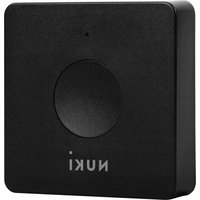
| Product type | Connection bridge for smart lock |
| Brand | Nuki |
| Model | Bridge |
| Category | Alarm system |
| Dimensions | 65 x 65 x 23 mm |
| Weight | 40 g |
| Power supply | USB-C (5 V) |
| Connectivity | Wi-Fi 2.4 GHz, Ethernet (PoE) |
| Compatibility | Nuki Smart Lock 1.0/2.0/3.0/Pro |
| Main functions | Remote control via Nuki app, push notifications, alarm integration, automatic updates |
| Mobile app | Nuki (iOS and Android) |
| Wi-Fi range | Standard depending on environment |
| Security | AES 256-bit encryption, secure communication, regular updates |
| Maintenance and cleaning | Clean with a soft, dry cloth. Avoid moisture. |
| Spare parts | No detachable parts |
| Repairability | Repair by manufacturer under warranty |
| Warranty | 2 years legal |
| Operating temperature | 0 °C to 40 °C |
| Allowable humidity | 10 to 90% without condensation |
| Box contents | Bridge, USB cable, power adapter, quick start guide |
Frequently Asked Questions - Bridge Nuki
How to set up the Nuki Bridge?
Download the Nuki app, create an account, follow the instructions to connect the Bridge to your Wi-Fi network via the app. Make sure the Bridge is powered on.
What to do if the Bridge does not connect to Wi-Fi?
Check that the router is on and the Wi-Fi password is correct. Try restarting the Bridge by unplugging it and plugging it back in. If the problem persists, reset the Bridge with a paperclip (reset button).
Is the Nuki Bridge compatible with all Nuki lock models?
Yes, the Bridge is compatible with Nuki Smart Lock 1.0, 2.0, 3.0 and Pro. It allows remote control and integration with the alarm.
How to integrate the Bridge with an alarm system?
In the Nuki app, go to alarm settings and follow the steps to pair sensors (doors, windows). The Bridge serves as a hub to receive alarm notifications.
Can I use the Bridge without a subscription?
Yes, the Bridge works without a subscription. However, some advanced features (such as third-party integrations) may require a Nuki Smart or Premium subscription.
How to reset the Nuki Bridge?
Press and hold the reset button (small hole) with a paperclip for about 10 seconds until the LED flashes. Release, the Bridge restarts and is reset.
Does the Nuki Bridge require a permanent Internet connection?
Yes, for remote control, the Bridge must be connected to the Internet via Wi-Fi or Ethernet. Without Internet, the Bridge works locally via Bluetooth within a limited range.
What to do if the Bridge loses connection with the lock?
Check that the lock is within Bluetooth range of the Bridge. Restart the lock by removing and reinserting the batteries. Re-pair the lock via the app if necessary.
How to update the firmware of the Bridge?
Updates are done automatically via the Nuki app. Make sure the Bridge is connected to the Internet. You can check the version in the settings.
Can the Bridge be used with other lock brands?
No, the Nuki Bridge is designed exclusively for Nuki locks. It does not work with locks from other brands.
User questions about Bridge Nuki
0 question about this device. Answer the ones you know or ask your own.
Ask a new question about this device
No questions yet. Be the first to ask one.
Download the instructions for your Alarm system in PDF format for free! Find your manual Bridge - Nuki and take your electronic device back in hand. On this page are published all the documents necessary for the use of your device. Bridge by Nuki.
USER MANUAL Bridge Nuki
Manual assistant
Powered by Anthropic
Waiting for your message
Product information
Brand : Nuki
Model : Bridge
Category : Alarm system