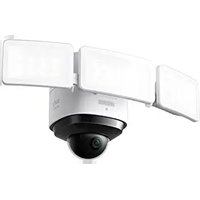
Solo IndoorCam P22 - Surveillance Camera eufy - Free user manual and instructions
Find the device manual for free Solo IndoorCam P22 eufy in PDF.


Pick your language and provide your email: we'll send you a specifically translated version.
| Product Type | Indoor Surveillance Camera |
| Brand | Eufy |
| Model | Solo IndoorCam P22 |
| Video Resolution | 1080p Full HD (1920 x 1080) |
| Night Vision | Up to 10 meters with infrared LED |
| Viewing Angle | 110° diagonal |
| Audio | Built-in microphone and speaker (two-way audio) |
| Motion Detection | Yes, with push notifications and customizable detection zones |
| Sound Detection | Yes, with sound alerts |
| Local Storage | microSD card up to 128 GB (not included) |
| Cloud Storage | Compatible with Eufy Cloud (subscription required) |
| Connectivity | Wi-Fi 2.4 GHz (802.11 b/g/n) |
| Power Supply | Power adapter 5V / 1A (microUSB cable included) |
| Power Consumption | 2.5 W (max) |
| Dimensions (L x W x H) | 5.7 x 5.7 x 10.0 cm |
| Weight | 200 g |
| Operating Temperature | 0 °C to 40 °C |
| Operating Humidity | 20 % to 80 % (non-condensing) |
| Privacy Mode | Yes, physical shutter to cover the lens |
| Security | AES 128-bit encryption, two-factor authentication |
| Maintenance and Cleaning | Clean the lens with a soft, lint-free cloth. Do not use abrasive products. |
| Spare Parts and Repairability | Not user-repairable. Contact customer service. |
| Included Accessories | Camera, power adapter, microUSB cable, mounting bracket, mounting kit, quick start guide |
Frequently Asked Questions - Solo IndoorCam P22 eufy
How to set up my Eufy Solo IndoorCam P22?
Download the Eufy Security app, create an account, then follow the on-screen instructions to add the device via Wi-Fi (2.4 GHz).
Does the camera work on 5 GHz Wi-Fi?
No, the Solo IndoorCam P22 only supports 2.4 GHz Wi-Fi. Make sure your router broadcasts this band.
How to activate night vision?
Night vision activates automatically in darkness. You can also toggle it manually in the app under Settings > Night Vision.
Can videos be recorded locally without a subscription?
Yes, insert a microSD card (up to 128 GB) into the slot provided. Recordings will be saved locally at no extra cost.
How to use privacy mode?
In the app, enable Privacy Mode to disable the camera and microphone. The physical shutter closes automatically. You can also do it manually on the device.
Do detection notifications arrive in real time?
Yes, when motion or sound detection is enabled, the app sends an instant push notification. You can adjust sensitivity in settings.
How to reset my camera?
Press and hold the Reset button on the back of the camera for about 5 seconds until you hear a beep. The camera will restart with factory settings.
Can I use the camera outdoors?
No, the Solo IndoorCam P22 is designed for indoor use only. It is not weather-resistant.
How to clean the lens?
Use a soft, dry cloth (lint-free) to gently wipe the lens. Avoid any chemical or abrasive products.
What to do if my camera does not connect to Wi-Fi?
Check that your network is 2.4 GHz, that the password is correct, and that the camera is near the router. Restart the camera and router, then try again.
User questions about Solo IndoorCam P22 eufy
0 question about this device. Answer the ones you know or ask your own.
Ask a new question about this device
No questions yet. Be the first to ask one.
Download the instructions for your Surveillance Camera in PDF format for free! Find your manual Solo IndoorCam P22 - eufy and take your electronic device back in hand. On this page are published all the documents necessary for the use of your device. Solo IndoorCam P22 by eufy.
USER MANUAL Solo IndoorCam P22 eufy

Manual assistant
Powered by Anthropic
Waiting for your message
Product information
Brand : eufy
Model : Solo IndoorCam P22
Category : Surveillance Camera