ProXS - Rangefinder Callaway - Free user manual and instructions
Find the device manual for free ProXS Callaway in PDF.


Pick your language and provide your email: we'll send you a specifically translated version.
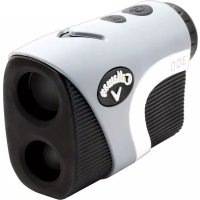
| Product Type | Golf laser rangefinder |
| Brand | Callaway |
| Model | ProXS |
| Dimensions (L x W x H) | Approx. 110 x 75 x 40 mm |
| Weight | Approx. 200 g |
| Power supply | CR2 battery (3V) |
| Maximum range | Up to 400 m (accuracy +/- 0.5 m) |
| Main functions | Distance measurement, slope mode, scan mode, image stabilizer |
| Accuracy | +/- 0.5 m |
| Magnification | 6x |
| Objective lens diameter | 24 mm |
| Housing material | Robust plastic with rubber coating |
| Water resistance | Splash resistant (IPX4) |
| Care and cleaning | Clean with a soft, dry cloth. Avoid solvents. |
| Safety | Do not look directly at the laser beam. Class 1 |
| Spare parts and repairability | CR2 battery, protective case, strap. Repair by authorized center. |
| General information | High-performance golf rangefinder designed for field use. |
Frequently Asked Questions - ProXS Callaway
How to turn on the Callaway ProXS rangefinder?
Press the power button located on top of the device. A short press is enough to turn it on. To turn it off, hold the button for 2 seconds.
How to change the battery of the ProXS?
Open the battery compartment located on the side of the device by sliding the cover. Replace the used battery with a new CR2 battery respecting polarity. Close the compartment.
What is the maximum range of this rangefinder?
The maximum range is approximately 400 meters on reflective targets. On non-cooperative targets (like a golf flag), the range is about 250 meters.
Can slope mode be disabled to comply with golf rules?
Yes, slope mode can be disabled. Consult the manual for the specific procedure. In competition, ensure slope mode is disabled.
How to use scan mode?
Hold the measure button in scan mode. The rangefinder will continuously update the distance to the targeted object, useful for identifying multiple obstacles or landmarks.
What to do if the display is blurry?
Use the focus ring located on the eyepiece to adjust image sharpness. Turn it until you get a clear view of the reticle and target.
How to clean the rangefinder lenses?
Use a dry or slightly damp microfiber cloth to gently wipe the lenses. Never use harsh chemicals. Store the rangefinder in its case after use.
Is the rangefinder waterproof?
It is splash resistant (IPX4 rating). It must not be submerged in water. In rain, it can be used but dry it quickly.
How to know if the battery is low?
A low battery indicator appears on the screen. If the display becomes dimmer or the device does not turn on, replace the battery.
Where to find spare parts like the case or strap?
Contact Callaway customer service or an authorized dealer. Some parts like the protective case can be purchased online.
User questions about ProXS Callaway
0 question about this device. Answer the ones you know or ask your own.
Ask a new question about this device
No questions yet. Be the first to ask one.
Download the instructions for your Rangefinder in PDF format for free! Find your manual ProXS - Callaway and take your electronic device back in hand. On this page are published all the documents necessary for the use of your device. ProXS by Callaway.
USER MANUAL ProXS Callaway




Manual assistant
Powered by Anthropic
Waiting for your message
Product information
Brand : Callaway
Model : ProXS
Category : Rangefinder