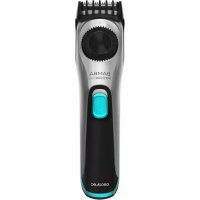
PrecisionCare OneShave Screen - Shaver CECOTEC - Free user manual and instructions
Find the device manual for free PrecisionCare OneShave Screen CECOTEC in PDF.


Pick your language and provide your email: we'll send you a specifically translated version.
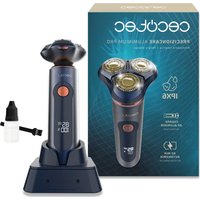
| Product type | Electric foil shaver |
| Brand | Cecotec |
| Model | PrecisionCare OneShave Screen |
| Dimensions (L x W x H) | 160 x 50 x 30 mm |
| Weight | 200 g |
| Power supply | Rechargeable lithium-ion battery, USB charging |
| Battery life | 60 minutes |
| Charging time | 1 hour |
| Main functions | Dry and wet shaving, pivoting head, LCD screen with battery and lock indicator |
| Cutting system | Self-sharpening stainless steel blade, ultra-fine foil |
| Included accessories | Cleaning brush, USB cable, protective cap |
| Maintenance and cleaning | Rinse under running water, regular brushing |
| Safety | IPX7 waterproof, travel lock, automatic shut-off |
| Spare parts and repairability | Replacement blades and foils available, easy maintenance |
| Warranty | 2 years |
Frequently Asked Questions - PrecisionCare OneShave Screen CECOTEC
How to clean the Cecotec PrecisionCare OneShave Screen shaver?
Remove the shaver head, rinse it under running water, then gently brush the blades and foil with the provided brush. Dry thoroughly before reassembling.
Can I use this shaver in the shower?
Yes, the PrecisionCare OneShave Screen is waterproof (IPX7) and can be used in the shower for a wet shave.
How to replace the blades and foil?
The blades and foil should be replaced every 12 to 18 months. Open the head, remove the old block, insert the new one, and close. Consult the manual for part numbers.
How long does the battery last?
The battery life is approximately 60 minutes after a full 1-hour charge.
Can I use the shaver while it is charging?
No, it is not recommended to use the shaver while charging for safety reasons.
How to lock the shaver for travel?
Press and hold the power button for 3 seconds; the lock icon appears on the screen. To unlock, repeat the operation.
What to do if the shaver does not turn on?
Check the battery charge, clean the contacts, and make sure the lock is not activated. If the problem persists, contact Cecotec customer service.
Is the shaver suitable for long hairs?
This shaver is designed for close cutting on short hairs. For long hairs, use a trimmer first.
How to interpret the LCD screen?
The screen shows the remaining battery level, lock indicator, and shaving time. Consult the manual for details.
Where can I buy spare parts?
Replacement blades, foils, and brushes are available on the official Cecotec website or from authorized dealers.
User questions about PrecisionCare OneShave Screen CECOTEC
0 question about this device. Answer the ones you know or ask your own.
Ask a new question about this device
No questions yet. Be the first to ask one.
Download the instructions for your Shaver in PDF format for free! Find your manual PrecisionCare OneShave Screen - CECOTEC and take your electronic device back in hand. On this page are published all the documents necessary for the use of your device. PrecisionCare OneShave Screen by CECOTEC.
USER MANUAL PrecisionCare OneShave Screen CECOTEC
Manual assistant
Powered by Anthropic
Waiting for your message
Product information
Brand : CECOTEC
Model : PrecisionCare OneShave Screen
Category : Shaver