
ExpertWiFi EBP15 - Network card / adapter ASUS - Free user manual and instructions
Find the device manual for free ExpertWiFi EBP15 ASUS in PDF.
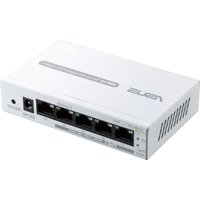


| Product Type | Wireless Network Adapter |
| Interface | USB 3.0 |
| Wireless Standard | Wi-Fi 6 (802.11ax) |
| Frequency Band | Dual-band 2.4 GHz / 5 GHz |
| Maximum Speed | Up to 1200 Mbps (2.4 GHz: 300 Mbps, 5 GHz: 867 Mbps) |
| Security | WPA3, WPA2, WPA |
| Antenna | Internal dual antennas |
| Dimensions (L x W x H) | 68 x 21 x 10 mm |
| Weight | 18 g |
| Power Supply | USB bus-powered |
| Operating Temperature | 0°C to 40°C |
| Storage Temperature | -20°C to 60°C |
| Operating Humidity | 10% to 90% (non-condensing) |
| Supported OS | Windows 10/11, macOS, Linux |
| LED Indicator | Power and activity |
| Main Functions | Wi-Fi connectivity, MU-MIMO, beamforming |
| Maintenance and Cleaning | Wipe with dry cloth; avoid liquids. |
| Safety Precautions | Use only in dry environments; do not expose to extreme heat. |
| Spare Parts and Repairability | No user-serviceable parts; contact support for issues. |
| General Information | Brand: ASUS, Model: ExpertWiFi EBP15 |
Frequently Asked Questions - ExpertWiFi EBP15 ASUS
User questions about ExpertWiFi EBP15 ASUS
0 question about this device. Answer the ones you know or ask your own.
Ask a new question about this device
Download the instructions for your Network card / adapter in PDF format for free! Find your manual ExpertWiFi EBP15 - ASUS and take your electronic device back in hand. On this page are published all the documents necessary for the use of your device. ExpertWiFi EBP15 by ASUS.
USER MANUAL ExpertWiFi EBP15 ASUS
5-Port GbE Managed PoE+ Switch
Model: EBP15

E23347
First Edition
March 2024
Copyright © 2024 ASUSTeK Computer Inc. All Rights Reserved.
No part of this manual, including the products and software described in it, may be reproduced, transmitted, transcribed, stored in a retrieval system, or translated into any language in any form or by any means, except documentation kept by the purchaser for backup purposes, without the express written permission of ASUSTeK Computer Inc. ("ASUS").
Product warranty or service will not be extended if: (1) the product is repaired, modified or altered, unless such repair, modification of alteration is authorized in writing by ASUS; or (2) the serial number of the product is defaced or missing.
ASUS PROVIDES THIS MANUAL "AS IS" WITHOUT WARRANTY OF ANY KIND, EITHER EXPRESS OR IMPLIED, INCLUDING BUT NOT LIMITED TO THE IMPLIED WARRANTIES OR CONDITIONS OF MERCHANTABILITY OR FITNESS FOR A PARTICULAR PURPOSE. IN NO EVENT SHALL ASUS, ITS DIRECTORS, OFFICERS, EMPLOYEES OR AGENTS BE LIABLE FOR ANY INDIRECT, SPECIAL, INCIDENTAL, OR CONSEQUENTIAL DAMAGES (INCLUDING DAMAGES FOR LOSS OF PROFITS, LOSS OF BUSINESS, LOSS OF USE OR DATA, INTERRUPTION OF BUSINESS AND THE LIKE), EVEN IF ASUS HAS BEEN ADVISED OF THE POSSIBILITY OF SUCH DAMAGES ARISING FROM ANY DEFECT OR ERROR IN THIS MANUAL OR PRODUCT.
SPECIFICATIONS AND INFORMATION CONTAINED IN THIS MANUAL ARE FURNISHED FOR INFORMATIONAL USE ONLY, AND ARE SUBJECT TO CHANGE AT ANY TIME WITHOUT NOTICE, AND SHOULD NOT BE CONSTRUED AS A COMMITMENT BY ASUS. ASUS ASSUMES NO RESPONSIBILITY OR LIABILITY FOR ANY ERRORS OR INACCURACIES THAT MAY APPEAR IN THIS MANUAL, INCLUDING THE PRODUCTS AND SOFTWARE DESCRIBED IN IT.
Products and corporate names appearing in this manual may or may not be registered trademarks or copyrights of their respective companies, and are used only for identification or explanation and to the owners' benefit, without intent to infringe.
Table of contents
1 Getting to know your EBP15
1.1 Overview 5 1.2 Package contents 5 1.3 Features....6 1.4 Product components....7
2 Placement
3 Getting started
3.1 Switch setup.... 10 3.1.1 Powering on your device....10 3.1.2 Connecting to the network....11 3.1.3 Power over Ethernet (PoE) considerations......12
3.2 Logging into the Web GUI for the first time.... 13
4 Web-based switch configuration
4.1 System Manage.... 17 4.1.1 System Information....17 4.1.2 IP Settings....18 4.1.3 Account Settings....19 4.1.4 Port configuration....20
4.2 System Config.... 21
4.2.1 IGMP Snooping....21
4.2.2 Loop Prevention 22
4.2.3 Port Mirror 23
4.2.4 Speed Limit 24
4.2.5 PoE Config....25
4.3 VLAN 26
4.4 QoS....29
4.4.1 QoS Basic....29
Table of contents
4.4.2 QoS Advanced....31
4.5 Security 32
4.6 Tools 33
4.6.1 System Upgrade 33
4.6.2 Backup and Restore....33
4.6.3 System Reset....34
4.6.4 System Reboot 34
4.7 Logout 35
Appendices
Safety Notices 45
Service and Support......47
Safety and Regulatory
This guide is for network professionals to manage the standalone EBP15 switch series.
It is recommended that only professionals with experience in networking devices and those who are familiar with Ethernet and local area networking terminology service the equipment.
1 Getting to know your EBP151 Getting to
Thank you for purchasing the EBP15 Gigabit Ethernet PoE+ web-managed switch.
This document provides hardware installation instructions as well as an overview of the interface and management functions of the Web Smart web-based software.
1.1 Overview
The EBP15 is a PoE+ web-managed switch with a total of 5 Gigabit Ethernet ports, and Ports 1-4 support PoE function. The Gigabit Ethernet switch provides seamless network connectivity with integrated 1000Mbps Gigabit Ethernet, 100Mbps Fast Ethernet, and 10Mbps Ethernet networking capabilities.
1.2 Package Contents
Before using the product, check that the following items are included and in good condition.
☑ ExpertWiFi EBP15 Network Cable (RJ-45) ☑ Power Adapter ☑ Power Cord ☑ Quick Start Guide
NOTES:
- If any of the items are damaged or missing, contact your dealer immediately.
- Keep the original packaging material in case you need future warranty services such as repair or replacement.
1.3 Features
- IEEE 802.3af/at PoE compliant
- Five Gigabit Ethernet ports
- Up to 30W per port (total power budget: 60W) to power PoE-enabled devices
- Auto-detection of powered devices (PD) and power consumption levels
- Switch capacity: 10Gbps; Forwarding rate: 7.4Mpps
- IEEE 802.1Q-based VLAN for network segmentation to improve performance and security
- IEEE 802.1p QoS with 8 priority queues • IGMP Snooping V1 / V2 / V3 support
- 8K MAC address table and jumbo frame support up to 15KB
- Small desktop form factor for small offices and home offices
1.4 Product components
1.4.1 Ports

| 1 | Ethernet (LAN1-4) PoE+ ports (Port 4 is a console port)IEEE 802.3af compliant PoE ports with a dedicated internal power supply of 60W. |
| 2 | Ethernet (LAN1-5) portsDesigned to connect to network devices with a bandwidth of 10Mbps, 100Mbps or 1000Mbps. Each has a corresponding 10/100/1000Mbps LED. |
| 3 | Power (DCIN) portSupports DC 100 – 240V, 50-60Hz. |
| 4 | Reset buttonPress for 6 seconds to restore factory defaults. |
1.4.2 LED Indicators

1 PoE/Alert LED
Green LED:
Off: The system is powered off or fails.
On: The system is powered on.
PoE power output is over 60W PoE power budget.
2 Power/System LED
Green LED:
Off: The system is powered off or fails.
On: The system is powered on.
Flashing: The system is booting up.
3 Port LEDs (Left) (Port 1-5)
LINK/ACT LED:
Off: The port is disconnected or the link fails.
Green On: Has physical connection to 1000M network.
Amber On: Has physical connection to 10M/100M network.
Blinking: Transmitting or receiving data.
4 PoE LEDs (Right) (Port 1-4)
PoE/ACT LEDs:
Off: The port is disconnected or the PoE port fails.
Green On: The PoE port supplies power normally.
2 Placement
Follow the guidelines to install the switch securely:
- Place the switch on a level and stable surface, such as a desktop, to prevent it from falling.
- To prevent the switch from overheating, do not operate it in an area where the ambient temperature exceeds 104°F (40°C).
- Ensure that there is sufficient air flow around the switch.
- Ensure that the location of the switch can support the weight of the switch and its accessories.
- Ensure that the switch operates in the correct AC input range and matches the labeled voltage.
3 Getting started
3.1 Switch setup
This section provides an introduction to the web-based configuration utility, including:
• Powering on your device - Connecting to the network • Power over Ethernet (PoE) considerations
3.1.1 Powering on your device
The switch is powered by the internal high performance DC 100-240 V 50/60Hz power supply. It is recommended that the switch be connected to a single-phase, three-wire power source with a neutral outlet, or to a multi-functional computer's professional source.
Connect the DCIN port on the front panel of the switch to an external power source using the supplied power cord and check that the power LED is on.
WARNING!
- Power off and disconnect the power cord before servicing or wiring a switch.
- DO NOT disconnect modules or wiring unless the power is switched off.
- The device supports only the voltage indicated on the label. DO NOT use power components other than those specifically designed for the switch.
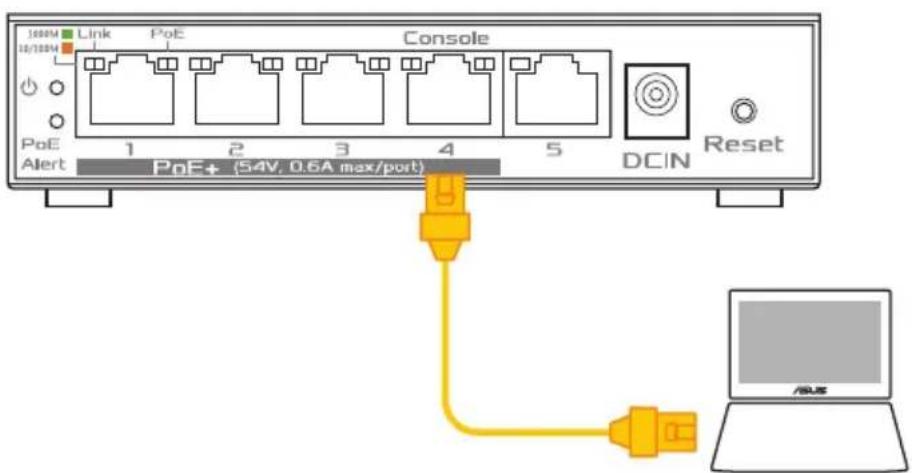
3.1.2 Connecting to the network
To connect the switch to the network:
- Connect an Ethernet cable to the Ethernet port of a computer.
- Connect the other end of the Ethernet cable to one of the numbered Ethernet ports of the switch. The LED of the port will light up to indicate an active connection.
NOTE: For safety purposes, connect your computer to the console port (Port 4) of the switch only.
- Repeat Step 1 and Step 2 for each device to connect to the switch.
IMPORTANT! We strongly recommend using CAT-5E or better cable to connect network devices. When connecting network devices, do not exceed the maximum cabling distance of 100 meters (328 feet). It can take up to one minute for the connected devices or the LAN to be operational after it is connected. This is normal behavior.
Connect the switch to end nodes using a standard Cat 5/5E Ethernet cable (UTP/STP) as shown in the illustration below.
Switch ports will automatically adapt to the characteristics (MDI/MDI-X, speed, duplex) of the device to which the switch is connected.
3.1.3 Power over Ethernet (PoE) considerations
For a PoE switch model, consider the following information:
As a Power Sourcing Equipment (PSE) device, the switch can support up to 30 Watts per PoE port on ports 1 to 4 and 30 Watts per port on other ports to a Powered Device (PD).
| Model | Power Dedicated to PoE | PoE ports | PoE Standard Supported |
| EBP15 60W | 1 to 4 IEEE802.3at/af |
When connecting switches capable of supplying PoE, consider the following information:
- Switch models with PoE function are PSEs. These models are capable of supplying DC power to attached PDs, such as VoIP phones, IP cameras, and wireless access points (APs). Additionally, PoE switches are capable of detecting and supplying power to pre-standard legacy PoE Power Devices. Due to the support of legacy PoE, there is a possibility that PoE switches acting as PSE may inadvertently detect and supply power to an attached PSE, including other PoE switches. This false detection can result in a PoE switch operating improperly and failing to supply power to attached PDs.
- To prevent false detections, you can either disable PoE on the ports that connect to PSEs, or power up a PSE device before connecting it to a PoE switch.
- If a device is mistakenly detected as a PD, disconnect the device from the PoE port and power recycle it using an AC power source before reconnecting it to the PoE port.
3.2 Logging into the Web GUI for the first time
This section describes how to log in and navigate the web-based switch configuration utility.
To log into the web GUI:
- On your web browser, key in the device's default IP address 192.168.1.50 in the address bar and press Enter.
NOTE: Network connection is available only on the console port (Port 4).

192.168.1.50
- Set up a username and password. It's recommended that you create a strong password.
| Login Username / Password Settings | Setup login username and password to prevent unauthorized access to your ASUS switch. |
| Username: 2-32 characters, The standard input characters include letters(A-Z, a-z), digits(0-9). The hyphen(-) and underscore(-) characters may also be used but not as the first character can be used by username | |
| Password: 6-32 characters, Alphabets, numbers, special characters, and the prefix and suffix of the password cannot contain double quotation marks. | |
| Username | |
| Password | |
| Retype Password |
3. Browse ASUS privacy notice, tick I Acknowledge That I Have Read And Understood The Policy and click Apply.
ASUS PRIVACY NOTICE (for firmware/security upgrades)
For Firmware/Security Upgrades, it is important to read this Notice before utilizing an ASUS switch. By clicking at "Agree" button, you agree to be bound by this Notice.

Wait for the system to complete the configuration.
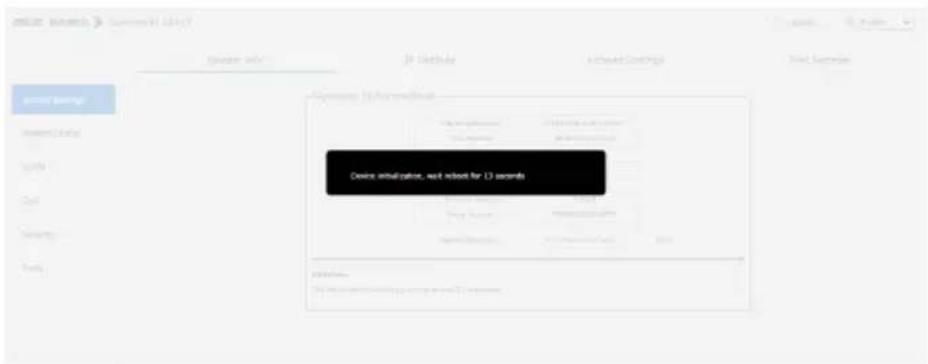
- On the login page, enter the username and password you set up earlier.

NOTE: If you enter an incorrect username or password, you'll see an error prompt and the login page will remain the same.
- You can now use the Web GUI to configure various settings on your EBP15.

PoE Smart-Lite comes with an intuitive web graphical user interface (GUI) that allows you to easily configure EBP15's various features through a web browser.
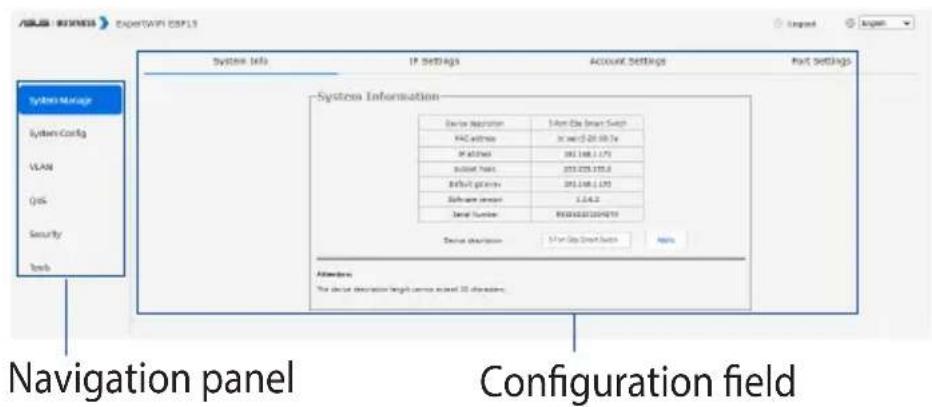
Function list
| Navigation panel Configuration field | |
| System Manage | System Info |
| IP Settings | |
| Account Settings | |
| Port Settings | |
| System Config | IGMP Snooping |
| Loop Prevention | |
| Port Mirror | |
| Speed Limit | |
| POE Config | |
| VLAN 802.1Q VLAN Settings | |
| QoS | QoS Basic |
| QoS Advanced | |
| Security Storm Suppression | |
| Tools | System Upgrade |
| Backup Restore | |
| System Reset | |
| System Reboot | |
4.1 System Manage
4.1.1 System Information
This page displays the system status, including device description, MAC address, IP address, loop status and so on.
System Information
| Device description | 5 Port Cibe Smart Switch |
| MAC address | bcl2a01c312016013a |
| IP address | 192.168.1.173 |
| Subnet mask | 255.255.255.0 |
| Default gateway | 192.168.1.155 |
| Software version | 3.0.6.2 |
| Serial Number | R90G6D300304STM |
Device description 5 Port Gbe Smart Switch Apply
Attention:
The device description length cannot exceed 32 characters.
Items Descriptions
| Device description | Displays the device description or the model name. The length of the device description should not exceed 32 characters. |
| Mac address | A unicast MAC address for which the switch has forwarding and/or filtering information. The format is a six-byte MAC address, with each byte separated by a colon. |
| IP address Displays the | switch's IPv4 address on the network. |
| Subnet mask A 32-bit number that masks an IP address. | |
| Default gateway The TCP / IP protocol under the gateway. | |
| Software version Displays current firmware version. | |
| Serial Number Displays the device's serial number. | |
4.1.2 IP Settings
IP settings
| DHCP settings | Enable | |
| IP address | 192.108.1.50 | |
| Subnet mask | 266.266.266.0 | |
| Default gateway | 192.198.1.1 | |
| DNS server | 0.0.0.0 | |
Apply
| Items Descriptions | |
| DHCP settings | The item is set to Disable by default.When enabled, the IP address is obtained from the external DHCP server. |
| IP address Displays the | switch's IPv4 address on the network. |
| Subnet mask A 32-bit number that masks an IP address. | |
| Default gateway The TCP / IP protocol under the gateway. | |
| DNS server | The item is set to Disable by default.When enabled, the IP address is obtained from the external DHCP server. |
4.1.3 Account Settings
- User settings
| Username | admin |
| Old password | |
| New password | |
| Confirm password |
Apply
Attention!
2.10.17.2016
2~32 characters. The standard input characters include letters (A-Z, a-z), digits (0-9). The hyphen (-) and underscore (_) characters may also be used but not as the first character. Can be used by username.
Plastic (rec)
5~32 characters. Alphabets, numbers, special characters and the prefix and suffix of the password cannot contain double quotation marks.
| Items Descriptions | |
| Username Allows you to set the username. | |
| Old password | You'll be asked to set a new password when you log into the system for the first time. You can modify the password here later. |
| New password Enter a new password. | |
| Confirm password Enter the new password again. | |
NOTES:
- Username is between 2 and 32 characters, consisting of letters (A-Z or a-z) and/or numbers (0-9). You can use hyphens (-) and underscores (_), but not as the first letter.
- The password must contain 5 to 32 characters. Double quotation marks are not allowed for letters, numbers, or special characters, nor for the prefix or suffix of the password.
4.1.4 Port configuration
- Port configuration
| Port | State | Rate | Duplex | Flow Control |
| Port 1 | ||||
| Port 2 | ||||
| Port 3 | ✓ | ✓ | ✓ | ✓ |
| Port 4 | ||||
| Port 5 |
Apply
| Port | State | Rate | Duplex | Flow Control | ||||
| Configuration | Actual | Configuration | Actual | Configuration | Actual | Configuration | Actual | |
| Port 1 | Enable | Disable | Automatic | 10M | Full Duplex | Half Duplex | On | On |
| Port 2 | Enable | Disable | Automatic | 10M | Full Duplex | Half Duplex | On | On |
| Port 3 | Enable | Enable | Automatic | 1000M | Full Duplex | Full Duplex | On | On |
| Port 4 | Enable | Enable | Automatic | 1000M | Full Duplex | Full Duplex | On | On |
| Port 5 | Enable | Disable | Automatic | 10M | Full Duplex | Half Duplex | On | On |
Attention:
When the speed/duplex of a port is set to auto/1000M, full duplex and its actual mode is 1000M full duplex/100M full duplex/10M full duplex; the flow control function can be enabled and take effect.
| Items Descriptions | |
| Port Select a port to configure. | |
| State | The item is set to Enable by default. When disabled, the port will be closed. |
| Rate | Control the direction and speed of data transfer. Configuration options: [Auto] [10M] [100M] |
| Duplex Configuration options: [Full Duplex] [Half Duplex] | |
| Flow Control Configuration options: [On] [Off] | |
4.2 System Config
4.2.1 IGMP Snooping

| Items Descriptions | |
| IGMP Snooping You can enable or disable IGMP Snooping. | |
| IGMP Fast-leave | When enabled, the switch will send out an IGMP Group-Specific Query message immediately after receiving the IGMP leave message from the host connecting to the port to speed up the leave process. |
| IGMP Report Suppression | You can enable or disable the report suppression function. |
NOTES:
- Multicast IP traffic is the traffic sent to a group of hosts, which are identified by Class D IP addresses ranging from 224.0.0.0 to 239.255.255.255.
- Internet Group Management Protocol (IGMP) Snooping is a feature that allows the switch to intelligently forward multicast traffic across the switch. This prevents the switch from broadcasting traffic to all ports, which could potentially affect network performance.
4.2.2 Loop Prevention

| Item Description | |
| Loop prevention settings | The item is set to Enable by default.The system regularly detects whether there is a loop on the local side. |
4.2.3 Port Mirror
-Mirror Port

-Mirrored Port
| Session | Mimmed Port | Insgncc | Sgncc | ||
| 1 | Port 1 Port 2 Port 3 Port 4 Port 5 | Disable ▼ | Disable ▼ | ||

| Mirrored Port | Ingress | Egress |
| Port1 | Disable | Disable |
| Port2 | Disable | Disable |
| Port3 | Disable | Disable |
| Port4 | Disable | Disable |
| Port5 | Disable | Disable |
| Items Descriptions | |
| Port Mirroring is enabled | This item is set toDisableby default.When enabled, the port can copy packets sent and received by other ports. |
| Mirror Port Select the port to copy. | |
| Mirrored Port Select the port to be copied. | |
| Ingress/Egress | You can enable or disable the mirroring of received or sent packets. |
| Apply ClickApplyto save the changes. | |
4.2.4 Speed Limit
Port Speed Limit
| Port | Ingress Speed | Egress Speed | |
| Port 1 | |||
| Port 2 | |||
| Port 3 | |||
| Port 4 | |||
| Port 5 | |||
Apply
| Port | Ingress Speed | Egress Speed |
| Port1 | Disable | Disable |
| Port2 | Disable | Disable |
| Port3 | Disable | Disable |
| Port4 | Disable | Disable |
| Port5 | Disable | Disable |
192.168.1.50 Display
Over the maximum number of rate limit, less than 80000
OK
| Items Descriptions | |
| Apply Click Apply to save the changes. | |
| Port Select a port to configure. | |
| Ingress Speed | Configure the maximum traffic limit for received data.· Disable: Unlimited· Maximum limit: 80000 |
| Egress Speed | Configure the maximum traffic limit for the data to be sent.· Disable: Unlimited· Maximum limit: 80000 |
4.2.5 PoE Config
-POE configuration
| Port | POE State | POE Priority | Max Watt | |
| Port 1 | - | |||
| Port 2 | Disable | Low | Watt (3.0 ~ 30.0) | |
| Port 3 | ||||
| Port 4 | ||||
Apply
Remain Watt: 60.0
| Port Index | Status | Priority | Power Limit | Actual Watt |
| Port 1 | Enable | High | 30 | 0.0 |
| Port 2 | Enable | High | 30 | 0.0 |
| Port 3 | Enable | High | 30 | 0.0 |
| Port 4 | Enable | High | 30 | 0.0 |
| Items Descriptions | |
| PoE Status | |
| Port Select an individual | port to configure PoE parameters. |
| PoE State | You can enable or disable the PoE port. The PoE state is set to Enable by default. |
| PoE Priority | Options:LowHigh (default)Critical (highest priority) |
| Max Watt 3-30W (default) | |
4.3 VLAN

| Items Descriptions | |
| VLAN | Default 1By default, ports 1-5 are all in VLAN 1.To add or modify a VLAN, key in the VLAN ID and click Add/Edit;To delete a VLAN, key in the VLAN ID and click Delete. |
| Access Configure an access port. | |
| Trunk Configure a trunk port. | |
| Non-member port The port is not a member of VLAN. | |
The following example shows how to set up a VLAN:
- From 802.1Q VLAN Settings, select Enable.

- Key in a VLAN number (e.g., 2), select Port 1 as an access port and Port 2 as a trunk port.
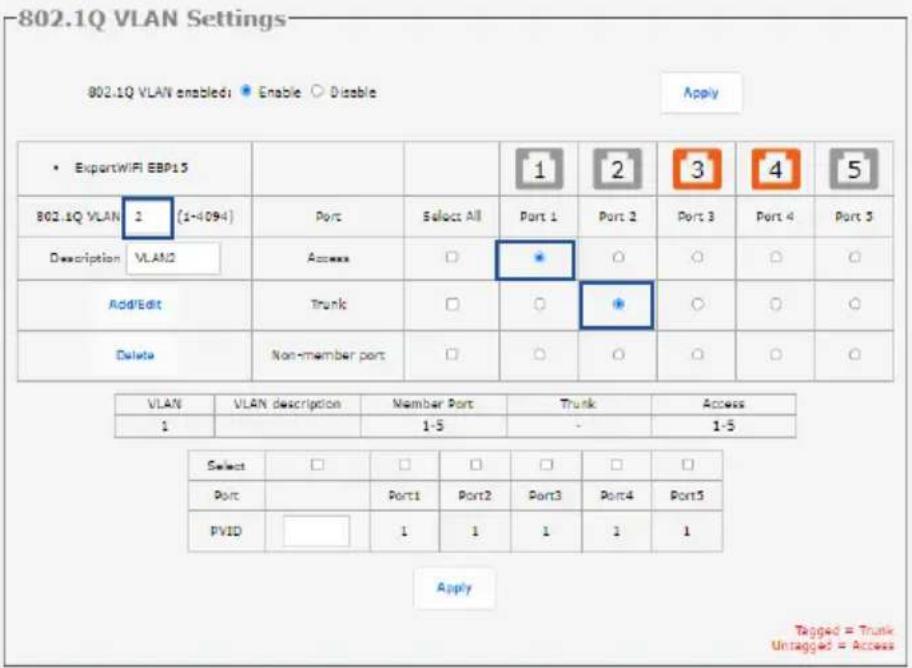
- Modify the port's PVID to 2 and click Apply.

-802.1Q VLAN Settings
802.1Q VLAN enabled: Enable ○ Disable
Apply
| • ExportWIFI EBP15 |  |  |  |  |  | ||
| 802.1Q VLAN(1-4084) | Port | Select All | Port 1 | Port 2 | Port 3 | Port 4 | Port 5 |
| Description | Access | ☐ | ☐ | ☐ | ☐ | ☐ | ☐ |
| Add/Edit | Trunk | ☐ | ☐ | ☐ | ☐ | ☐ | ☐ |
| Delete | Non-member port | ☐ | ☐ | ☐ | ☐ | ☐ | ☐ |
| VLAN | VLAN description | Member Fort | Trunk | Access |
| 1 | 1-5 | - | 1-5 | |
| 2 | VLAN2 | 1-2 | 2 | 1 |
| Select | □ | □ | □ | □ | □ | □ |
| Port | Port1 | Port2 | Port3 | Port4 | Port5 | |
| FV10 | 2 | 1 | 1 | 1 | 1 |
Apply
Tagged • Trunk
Untagged = Access
4.4 QoS
4.4.1 QoS Basic
QoS Port Select
| Select | Port |
| ☐ | Select All |
| ☐ | Port 1 |
| ☐ | Port 2 |
| ☐ | Port 3 |
| ☐ | Port 4 |
| ☐ | Port 5 |
Global Configuration
| QoS policy | SP | ○WRR | ○WFQ |
Apply
| Port | Policy | Queue to Weight(Q0,Q1,...,Q7) |
| ☐ | Select All | 5 |
| ☐ | Q0 | 5 |
| ☐ | Q1 | 10 |
| ☐ | Q2 | 15 |
| ☐ | Q3 | 20 |
| ☐ | Q4 | 25 |
| ☐ | Q5 | 30 |
| ☐ | Q6 | 35 |
| ☐ | Q7 | 40 |
| Port1 | SP | N/A |
| Port2 | SP | N/A |
| Port3 | SP | N/A |
| Port4 | SP | N/A |
| Port5 | SP | N/A |
Apply
| Items Descriptions | |
| Select You can select a port to configure QoS. | |
| QoS Policy | SP (strict priority): The strict priority queue is enabled by default.WRR (Weighted Round Robin): When selected, each queue gets a certain amount of service time.WFQ (Weighted Fair Queue): When selected, a certain amount of packets will be taken out from each queue and sent according to the bandwidth weighting. The priority of the packet will be included in the scheduling. |
| Queue to Weight | * Supports up to 8 queues (Q0, Q1, Q2, ... Q7)* Assigns bandwidth weighting for each queue |
4.4.2 QoS Advanced
Global Configuration
Apply
Based on Port Settings
| Choice | Port | Priority |
| Select All | 0 | |
| Port 1 | 0 | |
| Port 2 | 0 | |
| Port 3 | 0 | |
| Port 4 | 0 | |
| Port 5 | 0 |
Apply
QoS Basic
QoS Advanced
Priority Queue Mapping
| Choice | Priority | Queue |
| ☐ | Select All | Q0 |
| ☐ | 0 | Q1 |
| ☐ | 1 | Q9 |
| ☐ | 2 | Q2 |
| ☐ | 3 | Q3 |
| ☐ | 4 | Q4 |
| ☐ | 5 | Q5 |
| ☐ | 6 | Q6 |
| ☐ | 7 | Q7 |
Apply
4.5 Security
-Storm Suppression
| Port | Unknown Unicast Packets | Multicast Packets | Broadcast Packets | |||
| State | Speed Kbps | State | Speed Kbps | State | Speed Kbps | |
| Port 1 | ||||||
| Port 2 | ||||||
| Port 3 | Disable | Disable | Disable | |||
| Port 4 | ||||||
| Port 5 | ||||||
Apply
| Port | Unknown Unicast Packets | Multicast Packets | Broadcast Packets | |||
| State | Speed | State | Speed | State | Speed | |
| Port1 | Disable | 0pps | Disable | 0pps | Disable | 0pps |
| Port2 | Disable | 0pps | Disable | 0pps | Disable | 0pps |
| Port3 | Disable | 0pps | Disable | 0pps | Disable | 0pps |
| Port4 | Disable | 0pps | Disable | 0pps | Disable | 0pps |
| Port5 | Disable | 0pps | Disable | 0pps | Disable | 0pps |
| Items Descriptions | |
| Port | |
| Unknown unicast packet | State: The state is set to Disable by default (unlimit).Speed: [Kbps] The rate value range is 0-1000000.[PPS] The rate value range is 0-1000000. |
| Multicast packet | State: The state is set to Disable by default (unlimit).Speed: [Kbps] The rate value range is 0-1000000.[PPS] The rate value range is 0-1000000. |
| Broadcast packet | State: The state is set to Disable by default (unlimit).Speed: [Kbps] The rate value range is 0-1000000.[PPS] The rate value range is 0-1000000. |
4.6 Tools
4.6.1 System Upgrade
Download the latest firmware and upgrade manually.

4.6.2 Backup and Restore

WARNINGS!
- It takes a few minutes to backup or restore the configurations. DO NOT perform other operations during the process.
- DO NOT power off during backup or restoration to avoid possible damage to the device.
- The current configuration will be cleared after restoration. If configured incorrectly, the switch can become unmanageable and may fail to operate.
4.6.3 System Reset
Click Recovery or Reset (factory default) to reset the system.

When a prompt appears, click OK to clear all the configurations and reset the system to factory defaults.

4.6.4 System Reboot
System reboot option:
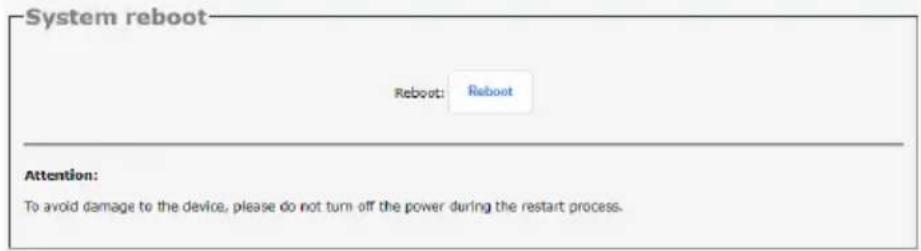
When a prompt appears, click OK to reboot the switch.

4.7 Logout
Click Logout to exit EBP15's management interface.

Click OK to log out.


Appendices
GNU General Public License
Licensing information
This product includes copyrighted third-party software licensed under the terms of the GNU General Public License. Please see The GNU General Public License for the exact terms and conditions of this license. All future firmware updates will also be accompanied with their respective source code. Please visit our web site for updated information. Note that we do not offer direct support for the distribution.
GNU GENERAL PUBLIC LICENSE
Version 2, June 1991
Copyright (C) 1989, 1991 Free Software Foundation, Inc.
59 Temple Place, Suite 330, Boston, MA 02111-1307 USA
Everyone is permitted to copy and distribute verbatim copies of this license document, but changing it is not allowed.
Preamble
The licenses for most software are designed to take away your freedom to share and change it. By contrast, the GNU General Public License is intended to guarantee your freedom to share and change free software--to make sure the software is free for all its users. This General Public License applies to most of the Free Software Foundation's software and to any other program whose authors commit to using it. (Some other Free Software Foundation software is covered by the GNU Library General Public License instead.) You can apply it to your programs, too.
When we speak of free software, we are referring to freedom, not price. Our General Public Licenses are designed to make sure that you have the freedom to distribute copies of free software (and charge for this service if you wish), that you receive source code or can get it if you want it, that you can change the software or use pieces of it in new free programs; and that you know you can do these things.
To protect your rights, we need to make restrictions that forbid anyone to deny you these rights or to ask you to surrender the rights. These restrictions translate to certain responsibilities for you if you distribute copies of the software, or if you modify it.
For example, if you distribute copies of such a program, whether gratis or for a fee, you must give the recipients all the rights that you have. You must make sure that they, too, receive or can get the source code. And you must show them these terms so they know their rights.
We protect your rights with two steps: (1) copyright the software, and (2) offer you this license which gives you legal permission to copy, distribute and/or modify the software.
Also, for each author's protection and ours, we want to make certain that everyone understands that there is no warranty for this free software. If the software is modified by someone else and passed on, we want its recipients to know that what they have is not the original, so that any problems introduced by others will not reflect on the original authors' reputations.
Finally, any free program is threatened constantly by software patents. We wish to avoid the danger that redistributors of a free program will individually obtain patent licenses, in effect making the program proprietary. To prevent this, we have made it clear that any patent must be licensed for everyone's free use or not licensed at all.
The precise terms and conditions for copying, distribution and modification follow.
Terms & conditions for copying, distribution, & modification
- This License applies to any program or other work which contains a notice placed by the copyright holder saying it may be distributed under the terms of this General Public License. The "Program", below, refers to any such program or work, and a "work based on the Program" means either the Program or any derivative work under copyright law: that is to say, a work containing the Program or a portion of it, either verbatim or with modifications and/or translated into another language. (Hereinafter, translation is included without limitation in the term "modification".) Each licensee is addressed as "you".
Activities other than copying, distribution and modification are not covered by this License; they are outside its scope. The act of running the Program is not restricted, and the output from the Program is covered only if its contents constitute a work based on the Program (independent of having been made by running the Program). Whether that is true depends on what the Program does.
- You may copy and distribute verbatim copies of the Program's source code as you receive it, in any medium, provided that you conspicuously and appropriately publish on each copy an appropriate copyright notice and disclaimer of warranty; keep intact all the notices that refer to this License and to the absence of any warranty; and give any other recipients of the Program a copy of this License along with the Program.
You may charge a fee for the physical act of transferring a copy, and you may at your option offer warranty protection in exchange for a fee.
- You may modify your copy or copies of the Program or any portion of it, thus forming a work based on the Program, and copy and distribute such modifications or work under the terms of Section 1 above, provided that you also meet all of these conditions:
a) You must cause the modified files to carry prominent notices stating that you changed the files and the date of any change.
b) You must cause any work that you distribute or publish, that in whole or in part contains or is derived from the Program or any part thereof, to be licensed as a whole at no charge to all third parties under the terms of this License.
c) If the modified program normally reads commands interactively when run, you must cause it, when started running for such interactive use in the most ordinary way, to print or display an announcement including an appropriate copyright notice and a notice that there is no warranty (or else, saying that you provide a warranty) and that users may redistribute the program under these conditions, and telling the user how to view a copy of this License. (Exception: if the Program itself is interactive but does not normally print such an announcement, your work based on the Program is not required to print an announcement.)
These requirements apply to the modified work as a whole. If identifiable sections of that work are not derived from the Program, and can be reasonably considered independent and separate works in themselves, then this License, and its terms, do not apply to those sections when you distribute them as separate works. But when you distribute the same sections as part of a whole which is a work based on the Program, the distribution of the whole must be on the terms of this License, whose permissions for other licensees extend to the entire whole, and thus to each and every part regardless of who wrote it.
Thus, it is not the intent of this section to claim rights or contest your rights to work written entirely by you; rather, the intent is to exercise the right to control the distribution of derivative or collective works based on the Program.
In addition, mere aggregation of another work not based on the Program with the Program (or with a work based on the Program) on a volume of a storage or distribution medium does not bring the other work under the scope of this License.
- You may copy and distribute the Program (or a work based on it, under Section 2) in object code or executable form under the terms of Sections 1 and 2 above provided that you also do one of the following:
a) Accompany it with the complete corresponding machine-readable source code, which must be distributed under the terms of Sections 1 and 2 above on a medium customarily used for software interchange; or,
b) Accompany it with a written offer, valid for at least three years, to give any third party, for a charge no more than your cost of physically performing source distribution, a complete machine-readable copy of the corresponding source code, to be distributed under the terms of Sections 1 and 2 above on a medium customarily used for software interchange; or,
c) Accompany it with the information you received as to the offer to distribute corresponding source code. (This alternative is allowed only for noncommercial distribution and only if you received the program in object code or executable form with such an offer, in accord with Subsection b above.)
The source code for a work means the preferred form of the work for making modifications to it. For an executable work, complete source code means all the source code for all modules it contains, plus any associated interface definition files, plus the scripts used to control compilation and installation of the executable. However, as a special exception, the source code distributed need not include anything that is normally distributed (in either source or binary form) with the major components (compiler, kernel, and so on) of the operating system on which the executable runs, unless that component itself accompanies the executable.
If distribution of executable or object code is made by offering access to copy from a designated place, then offering equivalent access to copy the source code from the same place counts as distribution of the source code, even though third parties are not compelled to copy the source along with the object code.
- You may not copy, modify, sublicense, or distribute the Program except as expressly provided under this License. Any attempt otherwise to copy, modify, sublicense or distribute the Program is void, and will automatically terminate your rights under this License. However, parties who have received copies, or rights, from you under this License will not have their licenses terminated so long as such parties remain in full compliance.
- You are not required to accept this License, since you have not signed it. However, nothing else grants you permission to modify or distribute the Program or its derivative works. These actions are prohibited by law if you do not accept this License.
Therefore, by modifying or distributing the Program (or any work based on the Program), you indicate your acceptance of this License to do so, and all its terms and conditions for copying, distributing or modifying the Program or works based on it.
- Each time you redistribute the Program (or any work based on the Program), the recipient automatically receives a license from the original licensor to copy, distribute or modify the Program subject to these terms and conditions. You may not impose any further restrictions on the recipients' exercise of the rights granted herein. You are not responsible for enforcing compliance by third parties to this License.
- If, as a consequence of a court judgment or allegation of patent infringement or for any other reason (not limited to patent issues), conditions are imposed on you (whether by court order, agreement or otherwise) that contradict the conditions of this License, they do not excuse you from the conditions of this License. If you cannot distribute so as to satisfy simultaneously your obligations under this License and any other pertinent obligations, then as a consequence you may not distribute the Program at all. For example, if a patent license would not permit royalty-free redistribution of the Program by all those who receive copies directly or indirectly through you, then the only way you could satisfy both it and this License would be to refrain entirely from distribution of the Program.
If any portion of this section is held invalid or unenforceable under any particular circumstance, the balance of the section is intended to apply and the section as a whole is intended to apply in other circumstances.
It is not the purpose of this section to induce you to infringe any patents or other property right claims or to contest validity of any such claims; this section has the sole purpose of protecting the integrity of the free software distribution system, which is implemented by public license practices. Many people have made generous contributions to the wide range of software distributed through that system in reliance on consistent application of that system; it is up to the author/
donor to decide if he or she is willing to distribute software through any other system and a licensee cannot impose that choice.
This section is intended to make thoroughly clear what is believed to be a consequence of the rest of this License.
- If the distribution and/or use of the Program is restricted in certain countries either by patents or by copyrighted interfaces, the original copyright holder who places the Program under this License may add an explicit geographical distribution limitation excluding those countries, so that distribution is permitted only in or among countries not thus excluded. In such case, this License incorporates the limitation as if written in the body of this License.
- The Free Software Foundation may publish revised and/or new versions of the General Public License from time to time. Such new versions will be similar in spirit to the present version, but may differ in detail to address new problems or concerns.
Each version is given a distinguishing version number. If the Program specifies a version number of this License which applies to it and "any later version", you have the option of following the terms and conditions either of that version or of any later version published by the Free Software Foundation. If the Program does not specify a version number of this License, you may choose any version ever published by the Free Software Foundation.
- If you wish to incorporate parts of the Program into other free programs whose distribution conditions are different, write to the author to ask for permission.
For software which is copyrighted by the Free Software Foundation, write to the Free Software Foundation; we sometimes make exceptions for this. Our decision will be guided by the two goals of preserving the free status of all derivatives of our free software and of promoting the sharing and reuse of software generally.
NO WARRANTY
11 BECAUSE THE PROGRAM IS LICENSED FREE OF CHARGE, THERE IS NO WARRANTY FOR THE PROGRAM, TO THE EXTENT PERMITTED BY APPLICABLE LAW. EXCEPT WHEN OTHERWISE STATED IN WRITING THE COPYRIGHT HOLDERS AND/OR OTHER PARTIES PROVIDE THE PROGRAM "AS IS" WITHOUT WARRANTY OF ANY KIND, EITHER EXPRESSED OR IMPLIED, INCLUDING, BUT NOT LIMITED TO, THE IMPLIED WARRANTIES OF MERCHANTABILITY AND FITNESS FOR A PARTICULAR PURPOSE. THE ENTIRE RISK AS TO THE QUALITY AND PERFORMANCE OF THE PROGRAM IS WITH YOU. SHOULD THE PROGRAM PROVE DEFECTIVE, YOU ASSUME THE COST OF ALL NECESSARY SERVICING, REPAIR OR CORRECTION.
12 IN NO EVENT UNLESS REQUIRED BY APPLICABLE LAW OR AGREED TO IN WRITING WILL ANY COPYRIGHT HOLDER, OR ANY OTHER PARTY WHO MAY MODIFY AND/OR REDISTRIBUTE THE PROGRAM AS PERMITTED ABOVE, BE LIABLE TO YOU FOR DAMAGES, INCLUDING ANY GENERAL, SPECIAL, INCIDENTAL OR CONSEQUENTIAL DAMAGES ARISING OUT OF THE USE OR INABILITY TO USE THE PROGRAM (INCLUDING BUT NOT LIMITED TO LOSS OF DATA OR DATA BEING RENDERED INACCURATE OR LOSSES SUSTAINED BY YOU OR THIRD PARTIES OR A FAILURE OF THE PROGRAM TO OPERATE WITH ANY OTHER PROGRAMS), EVEN IF SUCH HOLDER OR OTHER PARTY HAS BEEN ADVISED OF THE POSSIBILITY OF SUCH DAMAGES.
END OF TERMS AND CONDITIONS
Safety Notices
When using this product, always follow the fundamental safety precautions, including, but not limited to the following:

WARNING!
- The power supply cord(s) must be plugged into socket-outlet(s) that is /are provided with a suitable earth ground. Connect the equipment only to a nearby socket outlet that is easily accessible.
- If the Adapter is broken, do not try to fix it by yourself. Contact a qualified service technician or your retailer.
- DO NOT use damaged power cords, accessories, or other peripherals.
- DO NOT mount this equipment higher than 2 meters.
- Use this product in environments with ambient temperatures between 0°C (32°F) and 40°C (104°F).
- Read the operational guidelines and the temperature range provided before using the product.
- Pay particular attention to personal safety when using this device in airports, hospitals, gas stations, and professional garages. • Medical device interference: Maintain a minimum distance of at least 15 cm (6 inches) between implanted medical devices and ASUS products to reduce the risk of interference.
- Kindly use ASUS products in good reception conditions to minimize the radiation's level.
- Keep the device away from pregnant women and the lower abdomen of the teenager.
- DO NOT use this product if visible defects can be observed or it has been wet or damaged or modified. Seek servicing for assistance.

WARNING!
- DO NOT place on uneven or unstable work surfaces.
- DO NOT place or drop objects on the top of the product. Avoid exposing the product to mechanical shock such as crushing, bending, puncturing or shredding.
- DO NOT disassemble, open, microwave, incinerate, paint, or shove any foreign objects into this product.
- Refer to the rating label on the bottom of your product and ensure your power adapter complies with this rating.
- Keep the product away from fire and heat sources.
- DO NOT expose to or use near liquids, rain, or moisture. DO NOT use the product during electrical storms.
- Connect the PoE output circuits of this product exclusively to PoE networks, without routing to external facilities.
- To prevent electrical shock hazard, disconnect the power cable from the electrical outlet before relocating the system.
- Only use accessories that have been approved by the device manufacturer to work with this model. The use of other types of accessories may invalidate the warranty or violate local regulations and laws, and may pose safety risks. Contact your local retailer for the availability of authorized accessories.
- Use of this product in a way not recommended in the provided instructions may result in a risk of fire or personal injury.
Service and Support
Visit our multi-language website at https://www.asus.com/support.



- PORT GBE MANAGED POE+ SWITCH
- MODEL: EBP
- COPYRIGHT © 2024 ASUSTEK COMPUTER INC. ALL RIGHTS RESERVED
- TABLE OF CONTENTS
- GETTING TO KNOW YOUR EBP
- PLACEMENT
- GETTING STARTED
- WEB-BASED SWITCH CONFIGURATION
- APPENDICES
- SAFETY AND REGULATORY
- GETTING TO KNOW YOUR EBP151 GETTING TO
- OVERVIEW
- PACKAGE CONTENTS
- NOTES
- FEATURES
- PRODUCT COMPONENTS
- PORTS
- LED INDICATORS
- POE/ALERT LED
- POWER/SYSTEM LED
- PORT LEDS (LEFT) (PORT 1-5)
- POE LEDS (RIGHT) (PORT 1-4)
- SWITCH SETUP
- POWERING ON YOUR DEVICE
- WARNING
- CONNECTING TO THE NETWORK
- POWER OVER ETHERNET (POE) CONSIDERATIONS
- LOGGING INTO THE WEB GUI FOR THE FIRST TIME
- BROWSE ASUS PRIVACY NOTICE, TICK I ACKNOWLEDGE THAT I HAVE READ AND UNDERSTOOD THE POLICY AND CLICK APPLY
- ASUS PRIVACY NOTICE (FOR FIRMWARE/SECURITY UPGRADES)
- SYSTEM MANAGE
- SYSTEM INFORMATION
- ATTENTION
- IP SETTINGS
- ACCOUNT SETTINGS
- PORT CONFIGURATION
- SYSTEM CONFIG
- IGMP SNOOPING
- LOOP PREVENTION
- PORT MIRROR
- SPEED LIMIT
- POE CONFIG
- VLAN
- QOS
- QOS BASIC
- QOS ADVANCED
- SECURITY
- TOOLS
- SYSTEM UPGRADE
- BACKUP AND RESTORE
- WARNINGS
- SYSTEM RESET
- SYSTEM REBOOT
- LOGOUT
- GNU GENERAL PUBLIC LICENSE
- LICENSING INFORMATION
- PREAMBLE
- TERMS & CONDITIONS FOR COPYING, DISTRIBUTION, & MODIFICATION
- NO WARRANTY
- SAFETY NOTICES
- SERVICE AND SUPPORT
Brand : ASUS
Model : ExpertWiFi EBP15
Category : Network card / adapter