
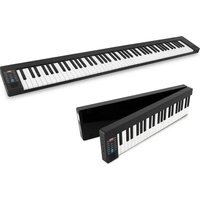
PKBRD6151PB - Keyboard Pyle - Free user manual and instructions
Find the device manual for free PKBRD6151PB Pyle in PDF.


Pick your language and provide your email: we'll send you a specifically translated version.
| Product Type | Portable Electronic Keyboard |
| Brand | Pyle |
| Model | PKBRD6151PB |
| Number of Keys | 61 Velocity-Sensitive Keys |
| Maximum Polyphony | 48 notes |
| Number of Sounds | 400 Timbres |
| Number of Rhythms | 100 Styles |
| Built-in Speakers | Yes, 2 x 10W |
| Dimensions (W x D x H) | 122 x 35 x 11 cm |
| Weight | 5.2 kg |
| Power Supply | 9V DC power adapter (included) or 6 D batteries |
| Connectivity | Headphone jack, line output, AUX input, USB-MIDI |
| Learning Functions | Lesson mode, metronome, transposition |
| Effects | Reverb, chorus, sustain |
| Recording | Built-in recorder, 1 track |
| Included Accessories | Music stand, power adapter, user manual |
| Care and Cleaning | Clean with a soft dry cloth, avoid solvents |
| Safety | Do not expose to moisture, use original adapter |
| Spare Parts Available | Power adapter, power supply unit, stand |
| Repairability | Repairable by an authorized technician |
Frequently Asked Questions - PKBRD6151PB Pyle
How to connect the keyboard to an amplifier?
Use the Line Out on the back of the keyboard with a 6.35mm jack cable to connect to your amplifier's input.
How to change the sound?
Press the 'Tone' or 'Sound' button, then use the numeric keys or +/- buttons to select the desired timbre from the 400 available.
How to use automatic rhythms?
Press the 'Style' or 'Rhythm' button, choose a rhythm with the numeric keys, then play chords in the accompaniment section to trigger the rhythm.
How to record my performance?
Press the 'Record' button, play your piece, then press 'Stop'. To listen, press 'Play'. Recording is done on one track.
How to connect the keyboard to a computer?
Use a USB Type-B cable to your computer. The keyboard is recognized as a MIDI device, compatible with music software.
How to transpose the keyboard?
Press the 'Transpose' or 'Function' button, then use the +/- keys to raise or lower the pitch in semitones. Transposition applies to the entire keyboard.
How to use the metronome?
Press the 'Metronome' button to activate it. Adjust the tempo with the +/- keys or dial. The metronome produces a rhythmic click.
What to do if the keyboard produces no sound?
Check the main volume, power supply (adapter or batteries), headphone jack (if plugged in, it mutes speakers). Ensure the 'Local' button is activated.
How to clean the keyboard?
Unplug the power. Use a slightly damp (not wet) soft cloth to wipe the keys and casing. Never use chemical products.
Is the keyboard under warranty?
Yes, the manufacturer's warranty is generally 2 years. Keep the receipt and contact the authorized dealer in case of issue. Worn parts (batteries) are not covered.
User questions about PKBRD6151PB Pyle
0 question about this device. Answer the ones you know or ask your own.
Ask a new question about this device
No questions yet. Be the first to ask one.
Download the instructions for your Keyboard in PDF format for free! Find your manual PKBRD6151PB - Pyle and take your electronic device back in hand. On this page are published all the documents necessary for the use of your device. PKBRD6151PB by Pyle.
USER MANUAL PKBRD6151PB Pyle



Manual assistant
Powered by Anthropic
Waiting for your message
Product information
Brand : Pyle
Model : PKBRD6151PB
Category : Keyboard