PKBRD6100 - Keyboard Pyle - Free user manual and instructions
Find the device manual for free PKBRD6100 Pyle in PDF.


| Product Type | Digital Keyboard |
| Model | PKBRD6100 |
| Brand | Pyle |
| Number of Keys | 61 Full-Size Keys |
| Keyboard Action | Touch Sensitive |
| Built-in Sounds | Over 300 Voices |
| Built-in Rhythms | Over 200 Accompaniment Styles |
| Display | LCD Screen with Note Display |
| Speakers | Built-in Stereo Speakers |
| Connectivity | USB-MIDI, Headphone Jack, Aux In |
| Power Supply | AC Adapter (Included) or 6 AA Batteries |
| Dimensions (W x D x H) | 37.4 x 12.2 x 4.3 inches (95 x 31 x 11 cm) |
| Weight | 9.5 lbs (4.3 kg) |
| Polyphony | 64 Notes |
| Split/Layer | Yes |
| Recording | Built-in Song Recorder |
| Learning Mode | Yes, with Step-by-Step Lessons |
| Pedal Support | Yes, Sustain Pedal Input |
| Accessories Included | Music Stand, Power Adapter, User Manual |
| Maintenance & Cleaning | Wipe with a dry, soft cloth. Avoid liquids and harsh chemicals. |
| Safety Warnings | Keep away from moisture and extreme temperatures. Use only supplied AC adapter. |
| Spare Parts & Repairability | Contact Pyle customer support for authorized service centers. |
Frequently Asked Questions - PKBRD6100 Pyle
User questions about PKBRD6100 Pyle
0 question about this device. Answer the ones you know or ask your own.
Ask a new question about this device
Download the instructions for your Keyboard in PDF format for free! Find your manual PKBRD6100 - Pyle and take your electronic device back in hand. On this page are published all the documents necessary for the use of your device. PKBRD6100 by Pyle.
USER MANUAL PKBRD6100 Pyle
natural_image
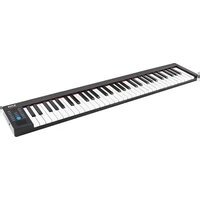
Black and white electronic piano keyboard with control panel (no text or symbols visible)PKBRD6100
Electric Musical Piano Keyboard
Portable and Foldable Electronic Piano Keyboard with 61 Standard Keys and 129 Tones
USER GUIDE

Before you use this keyboard, we recommend that you carefully read through this manual. Please keep the instruction manual for future reference.
PART NAMES AND FUNCTIONS

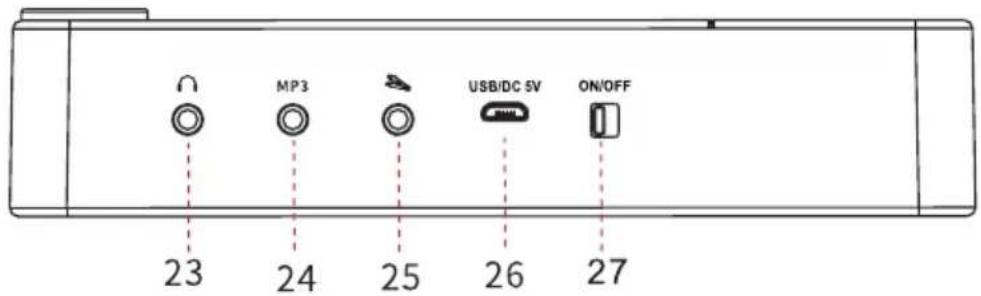
| 1 | 8.0.0 | LED display | 15 | Insert | Insert button |
| 2 | Dual Voice | Dual Voicebutton | 16 | ▶ | Play button |
| 3 | Sustain | Sustain button | 17 | ▶II | Start/Stop button |
| 4 | ○ | Power indicator | 18 | Tempo | Tempo button |
| 5 | Syncho | Syncho button | 19 | Dynamics | Dynamics button |
| 6 | A | Metronome button | 20 | RHY | Rhythm button |
| 7 | Demo | Demo button | 21 | + | Increase selection button |
| 8 | Trans | Trans button | 22 | Tone | Tone button |
| 9 | Vol | Volume button | 23 | Earphone/Speaker interface | |
| 10 | — | Decrease selection button | 24 | Mp3 input interface | |
| 11 | Dual Keyboard | Dual keyboard button | 25 | Sustain pedal interface | |
| 12 | Full Fingered | full fingered button | 26 | USB interface | |
| 13 | ○ | Charging indicator | 27 | POWER ON/OFF | |
| 14 | REC | Record button |
FUNCTION DESCRIPTION
-
ON/OFF: Used to turn the instrument ON/OFF.
-
Tone:
-
With 129 tones
- You can select a tone and adjust the way that it sounds.
The initial number is: 000, the digital screen displays "000".
Press "^" or "√" to select the tone. Press "^" or "√" and hold for one second to quickly select the tone.
- In other function selection modes, press the tone button to go back to the tone selection mode.
-
Volume:
-
Press the "volume" button, press "^" or "▼" again to increase or decrease the volume, the digital screen will display the corresponding level number.
• The initial volume level number is 12 and the highest is 15. -
Rhythm:
-
With 128 rhythms
-
Press "Start", "Stop" or "Rhythm", to play rhythm mode automatically, press again "Start" or "Stop" to stop. Press "^" or "▼" to select a rhythm.
-
Press "^" or "√" and hold for one second to quickly select the rhythm and plays the corresponding rhythm when released.
- Press "Syncho" button to start the rhythm playing.
- Press "Insert" button to insert new rhythm into the basis rhythm.
5. Demo:
- With 30 demos
- Press "Demo" button to play all the demos, press "Start" or "Stop" to start or stop playing demo.
- Press "^" or "▼" to select demo.
- Press "^" or "▼" and hold for one second to quickly select the demo and plays the corresponding demo when released.
6. Dynamics Control Function:
- Press "Dynamics" button to turn ON/OFF dynamics.
7. Chord Accompaniment:
- When playing any rhythm, press "Full Fingered" button to use single & finger mode. The LED will display "C03", then press "Syncho" button to play chord accompaniment.
- Chord function: Bass area, 61 keys (from C-f# area total of 19 keys), 88 keys (from A2-f# area total of 34 keys) play chords that match the rhythm, and the pitch of the chord changes with the pitch of the keys, different chord styles at different rhythms. Finger (major triads chord and minor triads chord), only single have major triads chord. In chord mode, press the “Full Fingered” to turn off the chord.
8. Record Function:
- Press "Record" button to record mode then digital screen displays REC.
You can record your performance, including accompaniment. You can play back a recorded performance to check your playing, or to play along with it.
- Into record mode, press the keyboard freely and the system will automatically record the keys played by the user. When memory is full, LED displays "full".
- Press "Play" to play the recorded notes.
It will return to original state automatically when finished.
- Select the tone while playing, the recorded notes will be refreshed automatically when re-record and reset.
- Close the metronome sound through START/STOP button according to your recording needs.
9. Trans Function:
• Total of 13 levels: -6, -5, -4, -3, -2, -1, 0, 1, 2, 3, 4, 5, 6
- In playing mode, press "Trans" button to use trans function through "^" or "√" trans.
10. Adjust the playing speed:
- In playing mode, press "Tempo" to adjust function, through "^" or "✓" button to control the playing speed.
-
USB-MIDI-IN-OUT Function: Connect the computer or cable through USB.
-
Metronome Function: Metronome assist function. Press "A" to select the 4 metronome cyclically: b01(2/4 beat), b02 (3/4 beat), b03 (4/4 beat), b04 (1/4 beat)
-
Drum Kit Function: Select the 128th tone for drum tone.
-
Sustain Function: Press "Sustain" button to turn ON/OFF sustain function.
-
Pedal Sustain Function: Step sustain pedal for sustain effect
-
Sleep mode: The Keyboard will enter into "Sleep mode" and LED turns off automatically if theres no activity, press any keys to wake up.
-
LED Indicator: Red LED indicator light for low battery or the built-in lithium battery is not fully charged. Plug in the USB 5V cable to charge.
-
Dual Voice Function: Press "+" or "-" to select your favorite tone (the first tone) when opening. Then press "Dual voice" button to open this function, the LED will display ON, and re-press "+" or "-" to select your second favorite tone. The mixed sound of two selected tones will play. Press this button again to turn off this function and the LED will display OFF. (Remark: It will not retain the previously selected tone when turned off)
-
Dual Keyboard Function: Press the "Dual Keyboard" button, the LED will display "ON" 28 keys on the left bass area fixed bass. Select your favorite tone on 29-88 keys area on the light, re-press "Dual Keyboard" button to turn off, the LED will display OFF.
20. Wireless BT Streaming APP function (Wireless BT 5.0):
- Search MIDI PIANO to connect by mobile APP
- iPhone connection method:
Pop Piano Connection:
- Scan the QR code to download the Pop piano;
- Turn ON the Wireless BT in your phone then open the Pop piano APP, select any song, start playing after entering;
- Click on the top left of the phone screen 🎨, select after opening:
Wireless BT connection- Next-confirm to connect with the BT; - Confirming Wireless BT connection, this icon is blue.
GarageBand Connection:
- Download and open the GarageBand in your phone.
- Turn ON Wireless BT in your phone;
- Open the GarageBand, click the setting icon on the top right of the phone screen;
- Song setting-advanced-BT device to connect the piano Wireless BT.
Perfect Piano Connection:
- Download the Perfect piano APP in your phone;
- Turn ON the Wireless BT in your phone;
- Connect the GarageBand then open perfect piano APP to use.
Android connection method:
Pop Piano Connection:
- Scan the QR code to download the Pop piano;
- Turn on the Wireless BT in your phone;
- Open the Pop piano, select any song and start playing;
- Click on the top left of the phone screen 📄, select BT connection- Next- confirm to connect with the Wireless BT;
-
Icon 📄 turns blue when Wireless BT connection successful.
-
Wireless BT function: After turning on, the Wireless BT function automatically turns ON with a prompt tone. Search "Music-Piano" in your phone to connect with a prompt tone after successful connection. Increase or decrease the volume or music selection on your phone. (Only for Wireless BT audio version)
TONE LIST
| Tone Number | Name | Tone Number | Name |
| T00 | Acoustic Grand Piano | T35 | Fretless Bass |
| T01 | Bright Acoustic Piano | T36 | Slap Bass 1 |
| T02 | Electric Grand Piano | T37 | Slap Bass 2 |
| T03 | Honky-tonk Piano | T38 | Synth Bass 1 |
| T04 | Rhodes Piano | T39 | Synth Bass 2 |
| T05 | Chorused Piano | T40 | Violin |
| T06 | Harpsichord | T41 | Viola |
| T07 | Clavichord | T42 | Cello |
| T08 | Celesta | T43 | Contrabass |
| T09 | Glockenspiel | T44 | Tremolo Strings |
| T10 | Music box | T45 | Pizzicato Strings |
| T11 | Vibraphone | T46 | Orchestral Harp |
| T12 | Marimba | T47 | Timpani |
| T13 | Xylophone | T48 | String Ensemble 1 |
| T14 | Tubular Bells | T49 | String Ensemble 2 |
| T15 | Dulcimer | T50 | Synth Strings 1 |
| T16 | Hammond Organ | T51 | Synth Strings 2 |
| T17 | Percussive Organ | T52 | Choir Aahs |
| T18 | Rock Organ | T53 | Voice Oohs |
| T19 | Church Organ | T54 | Synth Voice |
| T20 | Reed Organ | T55 | Orchestra Hit |
| T21 | Accordian | T56 | Trumpet |
| T22 | Harmonica | T57 | Trombone |
| T23 | Tango Accordian | T58 | Tuba |
| T24 | Acoustic Guitar (nylon) | T59 | Muted Trumpet |
| T25 | Acoustic Guitar (steel) | T60 | French Horn |
| T26 | Electric Guitar (jazz) | T61 | Brass Section |
| T27 | Electric Guitar (clean) | T62 | Synth Brass 1 |
| T28 | Electric Guitar (muted) | T63 | Synth Brass 2 |
| T29 | Overdriven Guitar | T64 | Soprano Sax |
| T30 | Distortion Guitar | T65 | Alto Sax |
| T31 | Guitar Harmonics | T66 | Tenor Sax |
| T32 | Acoustic Bass | T67 | Baritone Sax |
| T33 | Electric Bass(finger) | T68 | Oboe |
| T34 | Electric Bass (pick) | T69 | English Horn |
TONE LIST
| Tone Number | Name | Tone Number | Name |
| T70 | Bassoon | T99 | FX 4 (atmosphere) |
| T71 | Clarinet | T100 | FX 5 (brightness) |
| T72 | Piccolo | T101 | FX 6 (goblins) |
| T73 | Flute | T102 | FX 7 (echoes) |
| T74 | Recorder | T103 | FX 8 (sci-fi) |
| T75 | Pan Flute | T104 | Sitar |
| T76 | Bottle Blow | T105 | Banjo |
| T77 | Shakuhachi | T106 | Shamisen |
| T78 | Whistle | T107 | Koto |
| T79 | Ocarina | T108 | Kalimba |
| T80 | Lead 1 (square) | T109 | Bagpipe |
| T81 | Lead 2 (sawtooth) | T110 | Fiddle |
| T82 | Lead 3 (caliope lead) | T111 | Shanai |
| T83 | Lead 4 (chiff lead) | T112 | Tinkle Bell |
| T84 | Lead 5 (charang) | T113 | Agogo |
| T85 | Lead 6 (voice) | T114 | Steel Drums |
| T86 | Lead 7 (fifths) | T115 | Woodblock |
| T87 | Lead 8 (bass+lead) | T116 | Taiko Drum |
| T88 | Pad 1 (new age) | T117 | Melodic Tom |
| T89 | Pad 2 (warm) | T118 | Synth Drum |
| T90 | Pad 3 (polysynth) | T119 | Reverse Cymbal |
| T91 | Pad 4 (choir) | T120 | Guitar Fret Noise |
| T92 | Pad 5 (bowed) | T121 | Breath Noise |
| T93 | Pad 6 (metallic) | T122 | Seashore |
| T94 | Pad 7 (halo) | T123 | Bird Tweet |
| T95 | Pad 8 (sweep) | T124 | Telephone Ring |
| T96 | FX 1 (rain) | T125 | Helicopter |
| T97 | FX 2 (soundtrack) | T126 | Applause |
| T98 | FX 3 (crystal) | T127 | Gunshot |
| T128 | Drum kit | ||
RHYTHM LIST
| Rhythm Number | Name | Rhythm Number | Name |
| R000 | 80sPop | R035 | American march |
| R001 | 16Beat pop | R036 | March style |
| R002 | 8Ballad | R037 | Tarante |
| R003 | 8Beat soul | R038 | Funk soul |
| R004 | 70sRock | R039 | Rock waltz |
| R005 | Afro pop | R040 | Piano bar |
| R006 | Rap pop | R041 | Jazz waltz1 |
| R007 | 60sSoul | R042 | Jazz waltz2 |
| R008 | 70sSoul | R043 | 16Beat tune |
| R009 | Funky soul | R044 | Poka dance |
| R010 | 16Beat slide | R045 | Waltz |
| R011 | The twist | R046 | Cha-cha |
| R012 | British pop | R047 | Rumba |
| R013 | Hard rock | R048 | Rock rap |
| R014 | Fusion jazz | R049 | Bullfight dance |
| R015 | Funk slide | R050 | Samba1 |
| R016 | Fusion slide | R051 | Samba2 |
| R017 | Brisk rock1 | R052 | Tango1 |
| R018 | Brisk rock2 | R053 | Tango2 |
| R019 | Passionate rock | R054 | Fox step |
| R020 | Jazz rock | R055 | Jazz waltz |
| R021 | Fast gospel | R056 | Argentine Tango |
| R022 | Poka rock | R057 | Italian Tango |
| R023 | Rock billie | R058 | Bossanoval |
| R024 | Rock roll | R059 | Shuffle1 |
| R025 | Rock cha-cha | R060 | Shuffle2 |
| R026 | Rock classic | R061 | House |
| R027 | Rock slide | R062 | Merengue |
| R028 | Rock pop | R063 | Salsa |
| R029 | Early boca | R064 | Disco Latin |
| R030 | Poca pop | R065 | Thailand |
| R031 | Blues1 | R066 | Reggae1 |
| R032 | Blues2 | R067 | Salsa |
| R033 | Blues3 | R068 | Indian improvisation |
| R034 | Popular waltz | R069 | Merengue |
RHYTHM LIST
| Rhythm Number | Name | Rhythm Number | Name |
| R070 | Polka | R099 | Disco foxtrot |
| R071 | 16Reggae | R100 | Euro soul |
| R072 | Slow rock1 | R101 | Disco funk1 |
| R073 | Slow rock2 | R102 | Disco funk2 |
| R074 | Slow soul5 | R103 | Jazz samba |
| R075 | Jorpo | R104 | Disco Party |
| R076 | Lambada | R105 | Popular Samba |
| R077 | Love ballad | R106 | Club dance |
| R078 | Plena | R107 | Modern blues |
| R079 | China | R108 | Melancholy Foxtrot |
| R080 | Acid | R109 | Mambo |
| R081 | 8Beat modern | R110 | Disco soul |
| R082 | Country folk | R111 | Disco |
| R083 | Love songs | R112 | Cobmo |
| R084 | City pop | R113 | Swing beat |
| R085 | Electronic pop | R114 | Krump |
| R086 | Auditory folk | R115 | Band marche1 |
| R087 | Piano Ballads | R116 | Band marche2 |
| R088 | soul8.mid | R117 | Band marche3 |
| R089 | Rock folk | R118 | Big band1 |
| R090 | Slow and light | R119 | Big band2 |
| R091 | Similar ballad | R120 | Wild pop |
| R092 | Majestic pop | R121 | Southern jazz |
| R093 | Kinetic1 | R122 | Popular jazz |
| R094 | Kinetic2 | R123 | Jazz band |
| R095 | Funk disco | R124 | Jazz club |
| R096 | Saturday night | R125 | Habanera |
| R097 | Twist | R126 | Bachatal |
| R098 | Euro beat | R127 | Bachatal |
DEMO LIST
| Demo Number | Name | Demo Number | Name |
| D00 | Jasmine | D15 | Sweet honey |
| D01 | Why are the flowers so red | D16 | Susanna |
| D02 | Butterfly Lovers | D17 | Do-Re-Mi |
| D03 | Entering a new era | D18 | Moon River |
| D04 | Girl of Alishan | D19 | Mary has a little sheep |
| D05 | Qinghai Tibet Plateau | D20 | Hotels in the Pacific |
| D06 | InThePlace PeachBlossom | D21 | Crazy 1900 |
| D07 | Vox dance remix | D22 | Family Restaurant |
| D08 | Liuyang River | D23 | Johnny the surfer |
| D09 | Curvy Moon | D24 | Sinbad hands |
| D10 | Childhood | D25 | New paradise |
| D11 | Good days | D26 | Happy birthday |
| D12 | Go home often | D27 | Carmen |
| D13 | Night of grassland | D28 | Short song |
| D14 | Radiant | D29 | Jingle bells |
IMPORTANT SAFETY INSTRUCTIONS
• DO NOT use near water.
- Clean only with a soft, dry cloth.
• DO NOT block any ventilation openings.
- DO NOT place near any heat sources such as radiators, heat registers, stoves, or any other apparatus (including amplifiers) that produces heat.
• DO NOT split any part of the electronic piano
• Refer all servicing to qualified service personnel. Servicing is required when the apparatus has been damaged in any way, such as liquid has been spilled or objects have fallen into the apparatus, the apparatus has been exposed to rain or moisture, does not operate normally, or has been dropped.
TROUBLESHOOTING
- If the sound is abnormal or the key is invalid, please power ON/OFF the piano, restore to the original setting.
- If the battery voltage is low, the sound may be abnormal or the keys may be invalid. Please charge in time.

natural_image
Black and white electronic piano keyboard with control panel (no text or symbols visible)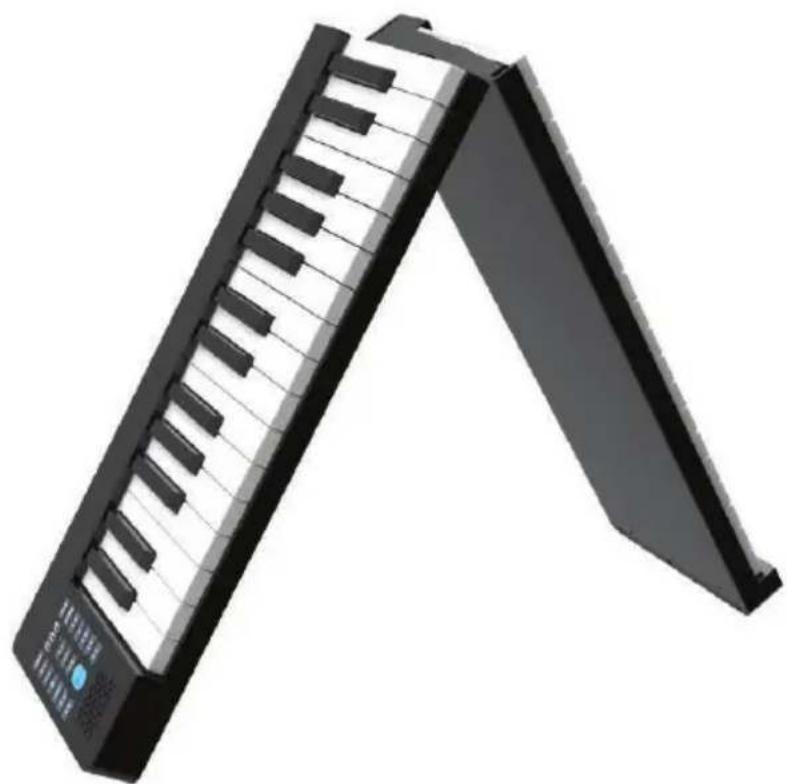
natural_image
Black and white piano keyboard with a blue control knob, shown in isometric view (no text or symbols visible)
natural_image
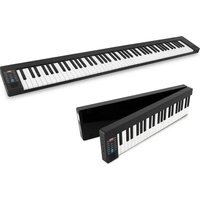
Front view of a black and white piano keyboard with no visible text or symbols on the keys or background.Features:
• 9 Functions: Record, Rhythm, Demo, Metronome, Drum Kit Dual Voice, Dynamic Switch, Wireless BT MIDI and BT Audio
- Compact & Portable Musical Piano
- Simple Electronic Plug-in Operation
• Built-in Full Range Stereo Speakers
- Connect & Stream Audio from External Devices
- Works with Smartphones, Tablets, Laptops, Computers
- Multiple Preset Selectable Keyboard Sound, Tone & Rhythm Styles
• Digital LED Display & LED Indicator Lights[A1]
- Adjustable Volume Control
- Record & Playback Mode
• Auto Power Off, Power Saving Function
- Perfect for Home Theater Living Room Performances
- Fun for Kids of All Ages: Children & Adults
What's in the Box:
- Portable & Foldable Piano Keyboard
- USB Charger Cable
- USB Adapter
- Manual
- Piano Bag
- Sustain Pedal
- Keyboard Note Stand
- Headphone
Technical Specs:
• (61) Keyboard Keys
• (129) Preset Selectable Tones
• (128) Preset Selectable Audio Rhythms
• Audio Interface: Aux (3.5mm) Input Jack
• Max Sound Level: Up to 15dB [A2]
- USB/Power Cable Length: 3.9' ft.
- Construction Material: Engineered ABS, PC, PVC
• Built-in Rechargeable Battery: 3.7V Li-ion, 1100mAh
• Power Supply: 100-240V, USB 5V/1A [A3]
- Piano Dimensions (L x W x H): 36.4" X 6.7" X 1.2" -inches [A4]
PYLE
PyleUSA.com
Questions? Comments?
We are here to help!
Phone: (1) 718-535-1800
Email: support@pyleusa.com


- PKBRD6100
- Electric Musical Piano Keyboard
- FUNCTION DESCRIPTION
- Demo:
- Dynamics Control Function:
- Chord Accompaniment:
- Record Function:
- Trans Function:
- Adjust the playing speed:
- Wireless BT Streaming APP function (Wireless BT 5.0):
- Pop Piano Connection:
- GarageBand Connection:
- Perfect Piano Connection:
- Android connection method:
- DEMO LIST
- IMPORTANT SAFETY INSTRUCTIONS
- TROUBLESHOOTING
- Features:
- What's in the Box:
- Technical Specs:
- PYLE
- PyleUSA.com
Brand : Pyle
Model : PKBRD6100
Category : Keyboard