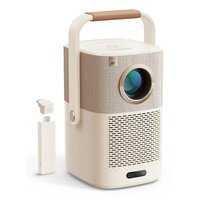
K3 Pro - Projector Yaber - Free user manual and instructions
Find the device manual for free K3 Pro Yaber in PDF.


Pick your language and provide your email: we'll send you a specifically translated version.
| Product type | Projector |
| Brand | Yaber |
| Model | K3 Pro |
| Projection technology | LCD |
| Native resolution | 1920 x 1080 pixels (Full HD) |
| Brightness | 6000 lux |
| Contrast ratio | 10000:1 |
| Lamp life (LED) | 50000 hours |
| Keystone correction | ±15° (vertical) |
| Focus | Manual |
| Connectivity | HDMI, USB, AV, VGA |
| Built-in speaker | 5 W |
| Power supply | AC 100-240 V, 50/60 Hz |
| Power consumption | 120 W |
| Dimensions (L x W x H) | 295 x 235 x 105 mm |
| Weight | 2.5 kg |
| Maintenance | Clean the air filter every 200 hours of use |
| Safety | Do not look directly at the light source while in operation |
| Included accessories | Remote control, power cable, HDMI cable |
| Warranty | 2 years |
Frequently Asked Questions - K3 Pro Yaber
How to connect an HDMI device to the Yaber K3 Pro projector?
Plug the HDMI cable into the source (Blu-ray player, console, PC) and into the HDMI input of the projector. Select the HDMI source in the Source menu on the remote control.
What is the recommended projection distance for a 100-inch screen?
For a 100-inch screen (diagonal), place the projector about 3 meters from the screen. Adjust the manual focus if necessary.
How to clean the projector air filter?
Turn off the projector and unplug it. Remove the filter cover (located on the side). Clean the filter with a vacuum cleaner or with warm soapy water, then dry it completely before reinstalling.
The projector does not turn on. What to do?
Check that the power cable is properly connected and the outlet works. Make sure the lens cap is removed. If the LED indicator flashes, consult the manual for error codes.
Can I use the projector with a USB flash drive?
Yes, the projector has a USB port that allows direct playback of multimedia files (video, photo, music) in compatible formats. Plug in the drive and select Media from the menu.
How to adjust the image size without moving the projector?
Use the zoom wheel (if available) or the keystone correction to distort the image and adjust the height. Manual focus provides sharpness.
What is the maximum resolution supported by the projector?
The native resolution is Full HD (1920x1080). It can accept signals up to 4K (3840x2160) but scales them down to Full HD.
How to replace a lost remote control?
The remote control is a spare part available from Yaber customer service or authorized dealers. You can also use a compatible universal remote.
The built-in sound is too low. Can I connect external speakers?
Yes, use the 3.5 mm audio output or optical output (depending on model) to connect powered speakers or an external audio system.
What is the battery life of the remote control?
The remote control uses two AAA batteries. Under normal use, the batteries last about 6 months. Replace them when the range decreases.
User questions about K3 Pro Yaber
0 question about this device. Answer the ones you know or ask your own.
Ask a new question about this device
No questions yet. Be the first to ask one.
Download the instructions for your Projector in PDF format for free! Find your manual K3 Pro - Yaber and take your electronic device back in hand. On this page are published all the documents necessary for the use of your device. K3 Pro by Yaber.
USER MANUAL K3 Pro Yaber

Manual assistant
Powered by Anthropic
Waiting for your message
Product information
Brand : Yaber
Model : K3 Pro
Category : Projector