L2S - Projector Yaber - Free user manual and instructions
Find the device manual for free L2S Yaber in PDF.


Pick your language and provide your email: we'll send you a specifically translated version.
| Product Type | Portable LED Projector |
| Native Resolution | 1920 x 1080 (Full HD) |
| Brightness | 7000 lux (claimed) |
| Contrast Ratio | 10000:1 |
| Lamp Life | 50000 hours |
| Keystone Correction | Manual ±15° |
| Focus | Manual |
| Power Supply | AC 100-240V, 50/60Hz |
| Power Consumption | 110 W |
| Dimensions (W x D x H) | 28 x 22 x 8 cm |
| Weight | 2.3 kg |
| Video Inputs | HDMI (x2), VGA, AV |
| USB Ports | USB 2.0 (x2) |
| Audio Output | 3.5 mm headphone jack |
| Built-in Speakers | 2 x 3 W |
| Special Features | Screen mirroring, digital zoom, media player |
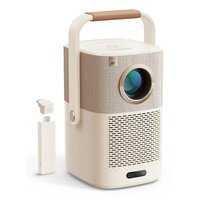
| Wireless Compatibility | External Wi-Fi adapter (not included) |
| Cleaning | Soft dry cloth, avoid solvents |
| Safety | Do not block vents, use on a stable surface |
| Warranty | 2 years |
Frequently Asked Questions - L2S Yaber
How to connect the projector to Wi-Fi?
The Yaber L2S does not have built-in Wi-Fi. Use an external Wi-Fi adapter (not included) on the USB port, or connect a streaming device via HDMI.
How to clean the projector lens?
Use a soft dry cloth specifically for optics. Avoid any liquid or solvent. Clean gently with circular motions.
What to do if the image does not display?
Check the HDMI or VGA connections, ensure the source is turned on. Press the Source button on the remote to select the correct input.
How to adjust the focus?
Turn the focus ring located around the lens until the image is sharp. If the projector is tilted, use keystone correction.
Can I use the projector outdoors?
Yes, but away from direct sunlight and moisture. Use a projection screen for better image quality.
Does the projector support 4K?
No, the native resolution is 1920 x 1080 (Full HD). It can accept a 4K signal and downscale it to 1080p.
How to change the projector lamp?
The LED lamp is integrated and not user-replaceable. Its lifespan is approximately 50000 hours. In case of failure, contact customer service.
Why is the fan noisy?
Fan noise is normal for a projector. Ensure the ventilation grills are not blocked and the device is in a cool location.
How to mirror my iPhone screen?
Use a Lightning to HDMI adapter or an AirPlay dongle (e.g., Apple TV) connected to the projector's HDMI port.
What is the recommended projection distance?
For a 100-inch image, place the projector between 2.5 and 3 meters from the screen. Use the zoom to adjust the size.
User questions about L2S Yaber
0 question about this device. Answer the ones you know or ask your own.
Ask a new question about this device
No questions yet. Be the first to ask one.
Download the instructions for your Projector in PDF format for free! Find your manual L2S - Yaber and take your electronic device back in hand. On this page are published all the documents necessary for the use of your device. L2S by Yaber.
USER MANUAL L2S Yaber

Manual assistant
Powered by Anthropic
Waiting for your message
Product information
Brand : Yaber
Model : L2S
Category : Projector