DCZ - Uncategorized Videotec - Free user manual and instructions
Find the device manual for free DCZ Videotec in PDF.


Pick your language and provide your email: we'll send you a specifically translated version.
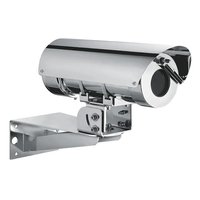
| Product type | Surveillance camera |
| Brand | Videotec |
| Model | DCZ |
| Dimensions (L x H x D) | 200 x 150 x 100 mm |
| Weight | 1.2 kg |
| Power supply | 12 V DC, 1 A |
| Power consumption | 12 W maximum |
| Maximum resolution | 1920 x 1080 pixels |
| Night vision | Yes, up to 20 meters |
| Viewing angle | 90 degrees |
| Connectivity | Ethernet RJ45, Wi-Fi (optional) |
| Storage | microSD card (up to 128 GB) |
| Main functions | Continuous recording, motion detection, email alerts |
| Maintenance and cleaning | Clean the lens with a soft, dry cloth |
| Safety | Do not expose to moisture or extreme temperatures |
| Spare parts and repairability | Available on request from the manufacturer |
| General information | User manual provided, downloadable from the website |
Frequently Asked Questions - DCZ Videotec
How to install the DCZ camera?
Attach the wall mount using the supplied plugs, connect the 12 V power supply, and plug in the Ethernet cable. Follow the installation guide in the manual.
How to access the video stream remotely?
Download the dedicated Videotec app, scan the QR code on the back of the camera, and follow the network setup steps.
What to do if the camera does not turn on?
Check the power supply, the power cable, and the outlet. Make sure the power adapter is securely plugged in.
How to reset the camera to factory settings?
Press and hold the RESET button on the back of the camera for 10 seconds until the LED blinks.
What is the range of night vision?
Infrared night vision works up to 20 meters in total darkness.
How to update the firmware?
Download the latest firmware from the Videotec website, copy it to a microSD card, and insert it into the camera. Follow the on-screen instructions.
Can I use the camera without Wi-Fi?
Yes, the camera works with wired Ethernet. Wi-Fi is optional and requires a USB adapter (not included).
How to record videos locally?
Insert a microSD card (up to 128 GB) into the slot. Recordings are made automatically according to the selected mode.
What to do if the image is blurry?
Gently clean the lens with a microfiber cloth. Check that the focus has not been altered.
How to contact Videotec customer service?
Check the official Videotec website for contact details. Have your serial number ready.
User questions about DCZ Videotec
0 question about this device. Answer the ones you know or ask your own.
Ask a new question about this device
No questions yet. Be the first to ask one.
Download the instructions for your Uncategorized in PDF format for free! Find your manual DCZ - Videotec and take your electronic device back in hand. On this page are published all the documents necessary for the use of your device. DCZ by Videotec.
USER MANUAL DCZ Videotec
Manual assistant
Powered by Anthropic
Waiting for your message
Product information
Brand : Videotec
Model : DCZ
Category : Uncategorized