GFM 1000-15 Professional - Measuring equipment BOSCH - Free user manual and instructions
Find the device manual for free GFM 1000-15 Professional BOSCH in PDF.


Pick your language and provide your email: we'll send you a specifically translated version.
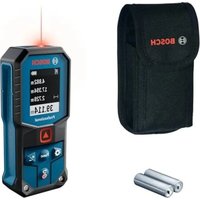
| Product type | Laser distance meter |
| Brand | Bosch |
| Model | GFM 1000-15 Professional |
| Category | Measuring equipment |
| Measuring range | 0.05 – 1000 m |
| Measurement accuracy | ± 1.5 mm |
| Laser | Class 2, 635 nm, < 1 mW |
| Power supply | 4 AAA 1.5 V batteries |
| Battery life | Approx. 30,000 measurements |
| Dimensions (L × W × H) | 120 × 60 × 30 mm |
| Weight | 200 g (with batteries) |
| Housing material | Reinforced plastic with shock protection |
| Protection rating | IP54 (dust and splash proof) |
| Main functions | Distance measurement, area, volume, continuous measurement, addition/subtraction, memory of last 10 values |
| Display | Backlit LCD screen with 4 lines |
| Connectivity | Bluetooth for data transfer (optional) |
| Operating temperature | -10 °C to +50 °C |
| Maintenance and cleaning | Clean with a soft, dry cloth; do not use solvents |
| Safety | Do not look directly into the laser beam; turn off when not in use |
| Spare parts and repairability | Standard batteries; repair by Bosch authorized center; parts available on request |
| Warranty | 2 years (subject to general conditions) |
| Box contents | Distance meter, protective case, wrist strap, 4 batteries, instruction manual |
Frequently Asked Questions - GFM 1000-15 Professional BOSCH
How to turn on and off the Bosch GFM 1000-15 Professional laser distance meter?
Press the On/Off button (usually the center button) to turn on the device. Hold the button pressed for about 2 seconds to turn off.
What is the maximum measuring range?
The GFM 1000-15 Professional can measure distances from 0.05 to 1000 meters, with an accuracy of ± 1.5 mm.
How to change the batteries?
Open the battery compartment located at the back of the device by sliding the cover. Insert 4 AAA batteries respecting polarity. Close the cover until it clicks.
What to do if the screen displays 'Error' or 'Over'?
This may indicate an out-of-range measurement, a too reflective surface, or low battery. Check the target, clean the lens, or replace the batteries.
Is the distance meter waterproof?
The device is certified IP54, meaning it is resistant to dust and water splashes. Do not immerse it in water.
How to use the continuous measurement function?
Press the Mode button until you see the continuous measurement icon (often a measuring tape symbol). Point towards the target and move to see the distance update in real time.
What accessories are available?
Bosch offers a protective case, a tripod adapter, a reflective target, and a data transfer cable. Consult the Bosch Professional catalog.
How to clean the laser lens?
Use a soft, clean cloth slightly dampened with water. Gently wipe the lens. Never use harsh cleaning agents.
Is the laser dangerous for eyes?
The device uses a class 2 laser (635 nm, < 1 mW). Never look directly into the beam and avoid pointing it into the eyes of other people or animals.
How to transfer measurements to a computer?
The GFM 1000-15 Professional has an optional Bluetooth interface. Enable Bluetooth on the device and your computer, then use the Bosch MeasureOn software to download the data.
User questions about GFM 1000-15 Professional BOSCH
0 question about this device. Answer the ones you know or ask your own.
Ask a new question about this device
No questions yet. Be the first to ask one.
Download the instructions for your Measuring equipment in PDF format for free! Find your manual GFM 1000-15 Professional - BOSCH and take your electronic device back in hand. On this page are published all the documents necessary for the use of your device. GFM 1000-15 Professional by BOSCH.
USER MANUAL GFM 1000-15 Professional BOSCH
Manual assistant
Powered by Anthropic
Waiting for your message
Product information
Brand : BOSCH
Model : GFM 1000-15 Professional
Category : Measuring equipment