
BTW200 - Cordless impact wrench MAKITA - Free user manual and instructions
Find the device manual for free BTW200 MAKITA in PDF.


| Product Type | Cordless Impact Wrench |
| Brand | MAKITA |
| Model | BTW200 |
| No-load Speed (High) | 0 - 2,000 rpm |
| No-load Speed (Low) | 0 - 1,600 rpm |
| Impacts per Minute (High) | 0 - 3,000 ipm |
| Impacts per Minute (Low) | 0 - 2,500 ipm |
| Max Fastening Torque (High Speed) | 200 N·m (144 ft-lbs) |
| Max Fastening Torque (Low Speed) | 150 N·m (108 ft-lbs) |
| Capacities (Standard Bolt) | M10 - M16 (3/8" - 5/8") |
| Capacities (High Tensile Bolt) | M10 - M12 (3/8" - 1/2") |
| Square Drive | 12.7 mm (1/2") |
| Overall Length | 226 mm (8-7/8") |
| Net Weight | 2.8 kg (6.1 lbs) |
| Battery Voltage | 24 V |
| Battery Type | Rechargeable Lithium-ion (models BH2420, BH2433) |
| Compatible Charger | DC24SA, DC24WA (AC input 50-60 Hz, DC output 7.2-24 V) |
| Charge Time (battery BH2420) | 30 min (DC24SA) / 60 min (DC24WA) |
| Charge Time (battery BH2433) | 55 min (DC24SA) / 90 min (DC24WA) |
| Electric Brake | Yes |
| Reversing Switch | Yes (forward/reverse/neutral) |
| Variable Speed | Yes (progressive trigger) |
| Speed Selector (2 speeds) | Yes (high and low) |
| Maintenance | Check and replace brushes regularly; clean vents; use only Makita parts |
| Warranty | 1-year limited (manufacturing defects and material flaws) |
Frequently Asked Questions - BTW200 MAKITA
User questions about BTW200 MAKITA
0 question about this device. Answer the ones you know or ask your own.
Ask a new question about this device
Download the instructions for your Cordless impact wrench in PDF format for free! Find your manual BTW200 - MAKITA and take your electronic device back in hand. On this page are published all the documents necessary for the use of your device. BTW200 by MAKITA.
USER MANUAL BTW200 MAKITA
MANUEL D'INSTRUCTION
For your personal safety, READ and UNDERSTAND before using.
SAVE THESE INSTRUCTIONS FOR FUTURE REFERENCE.
AVERTISSEMENT:
| Model | BTW200 | |||
| Capacities | Standard bolt | M10 - M16 (3/8" - 5/8") | ||
| High tensile bolt | M10 - M12 (3/8" - 1/2") | |||
| Square drive | 12.7 mm (1/2") | |||
| No load speed (RPM) | High | 0 - 2,000/min. | ||
| Low | 0 - 1,600/min. | |||
| Impacts per minute | High | 0 - 3,000 | ||
| Low | 0 - 2,500 | |||
| Max. fastening torque | High | 200 N.m (144 ft.lbs) | ||
| Low | 150 N.m (108 ft.lbs) | |||
| Overall length | 226 mm (8-7/8") | |||
| Net weight | 2.8 kg (6.1 lbs) | |||
| Battery Charger | DC24SA | DC24WA | ||
| Input | A.C. only 50 Hz - 60 Hz | |||
| Output | D.C. 7.2 V - 24 V | |||
| Battery Cartridge | BH2420 | BH2433 | BH2420 | BH2433 |
| Voltage | 24 V | |||
| Charging time | 30 min. | 60 min. | 55 min. | 90 min. |
- Due to our continuing programme of research and development, the specifications herein are subject to change without notice.
Note: Specifications may differ from country to country.
GENERAL SAFETY RULES
USA003-2
FOR ALL BATTERY OPERATED TOOLS
WARNING:
Read and understand all instructions.
Failure to follow all instructions listed below, may result in electric shock, fire and/or serious personal injury.
SAVE THESE INSTRUCTIONS
Work Area
- Keep your work area clean and well lit. Cluttered benches and dark areas invite accidents.
-
Do not operate power tools in explosive atmospheres, such as in the presence of flammable liquids, gases or dust. Power tools create sparks which may ignite the dust or fumes.
-
Keep bystanders, children, and visitors away while operating a power tool. Distractions can cause you to lose control.
Electrical Safety
- A battery operated tool with integral batteries or a separate battery pack must be recharged only with the specified charger for the battery. A charger that may be suitable for one type of battery may create a risk of fire when used with another battery.
- Use battery operated tool only with specifically designated battery pack. Use of any other batteries may create a risk of fire.
Personal Safety
-
Stay alert, watch what you are doing and use common sense when operating a power tool. Do not use tool while tired or under the influence of drugs, alcohol, or medication. A moment of inattention while operating power tools may result in serious personal injury.
-
Dress properly. Do not wear loose clothing or jewelry. Contain long hair. Keep your hair, clothing, and gloves away from moving parts. Loose clothes, jewelry, or long hair can be caught in moving parts.
- Avoid accidental starting. Be sure switch is in the locked or off position before inserting battery pack. Carrying tools with your finger on the switch or inserting the battery pack into a tool with the switch on invites accidents.
- Remove adjusting keys or wrenches before turning the tool on. A wrench or a key that is left attached to a rotating part of the tool may result in personal injury.
- Do not overreach. Keep proper footing and balance at all times. Proper footing and balance enables better control of the tool in unexpected situations.
- Use safety equipment. Always wear eye protection. Dust mask, non-skid safety shoes, hard hat, or hearing protection must be used for appropriate conditions.
Tool Use and Care
- Use clamps or other practical way to secure and support the workpiece to a stable platform. Holding the work by hand or against your body is unstable and may lead to loss of control.
- Do not force tool. Use the correct tool for your application. The correct tool will do the job better and safer at the rate for which it is designed.
- Do not use tool if switch does not turn it on or off. Any tool that cannot be controlled with the switch is dangerous and must be repaired.
- Disconnect battery pack from tool or place the switch in the locked or off position before making any adjustments, changing accessories, or storing the tool. Such preventive safety measures reduce the risk of starting the tool accidentally.
- Store idle tools out of reach of children and other untrained persons. Tools are dangerous in the hands of untrained users.
- When battery pack is not in use, keep it away from other metal objects like: paper clips, coins, keys, nails, screws, or other small metal objects that can make a connection from one terminal to another. Shorting the battery terminals together may cause sparks, burns, or a fire.
- Maintain tools with care. Keep cutting tools sharp and clean. Properly maintained tools with sharp cutting edges are less likely to bind and are easier to control.
-
Check for misalignment or binding of moving parts, breakage of parts, and any other condition that may affect the tool's operation. If damaged, have the tool serviced before using. Many accidents are caused by poorly maintained tools.
-
Use only accessories that are recommended by the manufacturer for your model. Accessories that may be suitable for one tool may create a risk of injury when used on another tool.
SERVICE
- Tool service must be performed only by qualified repair personnel. Service or maintenance performed by unqualified personnel could result in a risk of injury.
- When servicing a tool, use only identical replacement parts. Follow instructions in the Maintenance section of this manual. Use of unauthorized parts or failure to follow Maintenance instructions may create a risk of shock or injury.
SPECIFIC SAFETY RULES
USB025-2
DO NOT let comfort or familiarity with product (gained from repeated use) replace strict adherence to cordless impact wrench safety rules. If you use this tool unsafely or incorrectly, you can suffer serious personal injury.
- Hold tool by insulated gripping surfaces when performing an operation where the cutting tool may contact hidden wiring. Contact with a "live" wire will also make exposed metal parts of the tool "live" and shock the operator.
- Be aware that this tool is always in an operating condition, because it does not have to be plugged into an electrical outlet.
- Wear ear protectors.
- Check the socket carefully for wear, cracks or damage before installation.
- Hold the tool firmly.
- Always be sure you have a firm footing. Be sure no one is below when using the tool in high locations.
- The proper fastening torque may differ depending upon the kind or size of the bolt. Check the torque with a torque wrench.
SAVE THESE INSTRUCTIONS
WARNING:
MISUSE or failure to follow the safety rules stated in this instruction manual may cause serious personal injury.
SYMBOLS
USD302-1
The followings show the symbols used for tool.
V.....volts
direct current
No .no load speed
../min.......revolutions or reciprocation per minute
number of blow
IMPORTANT SAFETY INSTRUCTIONS FOR CHARGER & BATTERY CARTRIDGE
USC002-3
- SAVE THESE INSTRUCTIONS; This manual contains important safety and operating instructions for battery charger.
-
Before using battery charger, read all instructions and cautionary markings on (1) battery charger, (2) battery, and (3) product using battery.
-
CAUTION - To reduce risk of injury, charge only MAKITA rechargeable batteries marked on the charger label. Other types of batteries may burst causing personal injury and damage.
- Do not expose charger to rain or snow.
- Use of an attachment not recommended or sold by the battery charger manufacturer may result in a risk of fire, electric shock, or injury to persons.
- To reduce risk of damage to electric plug and cord, pull by plug rather than cord when disconnecting charger.
- Make sure cord is located so that it will not be stepped on, tripped over, or otherwise subjected to damage or stress.
- An extension cord should not be used unless absolutely necessary. Use of improper extension cord could result in a risk of fire and electric shock. If extension cord must be used, make sure:
a. That pins on plug of extension cord are the same number, size, and shape as those of plug on charger;
b. That extension cord is properly wired and in good electrical condition; and
c. That wire size is at least as large as the one specified in the table below.
Table 1: RECOMMENDED MINIMUM AWG SIZE FOR EXTENSION CORDS FOR BATTERY CHARGERS
| Length of Cord (Feet) | 25 | 50 | 100 | 150 |
| AWG Size of Cord | 18 | 18 | 18 | 16 |
- Do not operate charger with damaged cord or plug - replace them immediately.
- Do not operate charger if it has received a sharp blow, been dropped, or otherwise damaged in any way; take it to a qualified serviceman.
- Do not disassemble charger or battery cartridge; take it to a qualified serviceman when service or repair is required. Incorrect reassembly may result in a risk of electric shock or fire.
- To reduce risk of electric shock, unplug charger from outlet before attempting any maintenance or cleaning. Turning off controls will not reduce this risk.
- The battery charger is not intended for use by young children or infirm persons without supervision.
- Young children should be supervised to ensure that they do not play with the battery charger.
-
If operating time has become excessively shorter, stop operating immediately. It may result in a risk of overheating, possible burns and even an explosion.
-
If electrolyte gets into your eyes, rinse them out with clear water and seek medical attention right away. It may result in loss of your eyesight.
ADDITIONAL SAFETY RULES FOR CHARGER & BATTERY CARTRIDGE
- Do not charge the battery cartridge when temperature is BELOW 10^ (50^) or ABOVE 40^ (104^)
- Do not attempt to use a step-up transformer, an engine generator or DC power receptacle.
- Do not allow anything to cover or clog the charger vents.
- Do not short the battery cartridge:
(1) Do not touch the terminals with any conductive material.
(2) Avoid storing battery cartridge in a container with other metal objects such as nails, coins, etc.
(3) Do not expose battery cartridge to water or rain.
A battery short can cause a large current flow, overheating, possible burns and even a breakdown.
- Do not store the tool and battery cartridge in locations where the temperature may reach or exceed 50^ (122°F).
- Do not incinerate the Battery Cartridge even if it is severely damaged or is completely worn out. The battery cartridge can explode in a fire.
- Be careful not to drop or strike battery.
- Do not charge inside a box or container of any kind. The battery must be placed in a well ventilated area during charging.
SAVE THESE INSTRUCTIONS
SYMBOLS
The following show the symbols used for the equipment. Be sure that you understand their meaning before use.
- Ready to charge
Charging
10% ....Charging complete
≈ ...Delay charge (Cooling)
X .Defective battery
Conditioning
X .........Cooling abnormality
FUNCTIONAL DESCRIPTION
CAUTION:
Always be sure that the tool is switched off and the battery cartridge is removed before adjusting or checking function on the tool.
Installing or removing battery cartridge
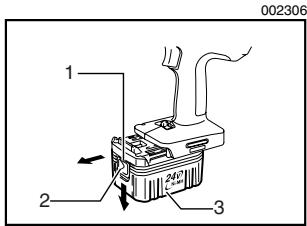
Always switch off the tool before insertion or removal of the battery cartridge.
- To remove the battery cartridge, withdraw it from the tool while sliding the button on the side of the cartridge.
- To insert the battery cartridge, align the tongue on the battery cartridge with the groove in the housing and slip it into place. Always insert it all the way until it locks in place with a little click. If you can see the red part on the upper side of the button, it is not locked completely. Insert it fully until the red part cannot be seen. If not, it may accidentally fall out of the tool, causing injury to you or someone around you.
- Do not use force when inserting the battery cartridge. If the cartridge does not slide in easily, it is not being inserted correctly.
Charging
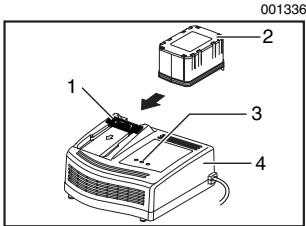
- Terminal cover
- Battery cartridge
- Charging light
-
Battery charger
-
Plug the battery charger into the proper AC voltage source. Two charging lights will flash in green color repeatedly.
- Insert the battery cartridge into charger until it stops adjusting to the guide of charger. Terminal cover of charger can be opened with inserting and closed with pulling out the battery cartridge.
- When the battery cartridge is inserted, the charging light color will change from green to red and charging will begin. The charging light will keep lighting up lit steadily during charging. One red charging light indicates charged condition in 0 - 80% and two red ones indicate 80 - 100%.
- With finish of charge, the charging lights will change from two red ones to two green ones.
- If you leave the battery cartridge in the charger after the charging cycle is complete, the charger will switch into its "trickle charge (maintenance charge)" mode which will last approximately 24 hours.
- After charging, unplug the charger from the power source.
NOTE:
- The battery charger is for charging Makita battery cartridge. Never use it for other purposes or for other manufacturer's batteries.
- When you charge a new battery cartridge or a battery cartridge which has not been used for a long period of time, it may not accept a full charge. This
is a normal condition and does not indicate a problem. You can recharge the battery cartridge fully after discharging it completely and recharging a couple of times.
If you charge a battery cartridge from a just operated tool or battery cartridge which has been left in a location exposed to direct sunlight for a long time, the charging light may flash in red color. If this occurs, wait for a while. Charging will begin after the battery cartridge is cooled by the cooling fan installed in the charger. (DC24SA only) When the temperature on battery is more than approx. 70^ , two charging lights may flash in red color, and when approx. 50^ - 70^ , one charging light in red color.
- If the charging light flashes alternately in green and red color, charging is not possible. The terminals on the charger or battery cartridge are clogged with dust or the battery cartridge is worn out or damaged.
Cooling system (DC24SA only)
- This charger is equipped with cooling fan for heated battery in order to enable the battery to prove its own performance. Sound of cooling air comes out during cooling, which means no trouble on the charger.
-
Yellow light will flash for warning in the following cases.
-
Trouble on cooling fan
- Incomplete cool down of battery, such as, being clogged with dust
The battery can be charged in spite of the yellow warning light. But the charging time will be longer than usual in this case. Check the sound of cooling fan, vent on the charger and battery, which can be sometime clogged with dust.
- The cooling system is in order although no sound of cooling fan comes out, if the yellow warning light will not flash.
Always keep clean the vent on charger and battery for cooling. - The products should be sent to repair or maintenance, if the yellow warning light will frequently flash.
Conditioning charge (DC24SA only)
Conditioning charge can extend the life of battery by automatically searching the optimum charging condition for the batteries in every situations.
The battery employed in the following conditions repeatedly, will be worn out shortly, and yellow warning light may flash.
- Recharge of battery with its high temperature
- Recharge of battery with its low temperature
- Recharge of full charged battery
- Over-discharge of battery (continue to discharge battery in spite of down of power.)
The charging time of such battery is longer than usual.
Trickle charge (Maintenance charge)
If you leave the battery cartridge in the charger to prevent spontaneous discharging after full charge, the charger will switch into its "trickle charge (maintenance charge)" mode and keep the battery cartridge fresh and fully charged.
Tips for maintaining maximum battery life
- Charge the battery cartridge before completely discharged.
Always stop tool operation and charge the battery cartridge when you notice less tool power. - Never recharge a fully charged battery cartridge.
Overcharging shortens the battery service life. - Charge the battery cartridge with room temperature at 10^ - 40^ (50^ - 104^)
Let a hot battery cartridge cool down before charging it. - Charge the Nickel Metal Hydride battery cartridge when you do not use it for more than six months.
Refresh charging
Refreshing adapter (optional accessory) can refresh an inactive battery cartridge.
Refresh charging should be done once a week.
- When you charge a new battery cartridge or a battery cartridge that has not been used for a long time, it may not accept a full charge. In this case, refresh charging must be done. The battery cartridge my decrease the tool performance, because the chemical substance of the battery cartridge is inactive.
Switch action
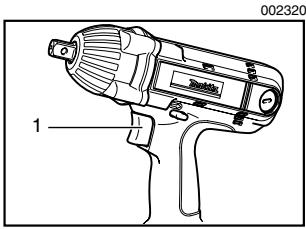
- Switch trigger
CAUTION:
- Before inserting the battery cartridge into the tool, always check to see that the switch trigger actuates properly and returns to the "OFF" position when released.
To start the tool, simply pull the switch trigger. Tool speed is increased by increasing pressure on the switch trigger. Release the switch trigger to stop.
Electric brake
This tool is equipped with an electric brake. If the tool consistently fails to quickly stop after switch trigger release, have tool serviced at a Makita service center.
Reversing switch action
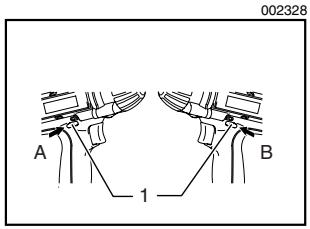
1. Reversing switch lever
This tool has a reversing switch to change the direction of rotation. Depress the reversing switch lever from the A side for clockwise rotation or from the B side for counterclockwise rotation.
When the reversing switch lever is in the neutral position, the switch trigger cannot be pulled.
CAUTION:
Always check the direction of rotation before operation.
- Use the reversing switch only after the tool comes to a complete stop. Changing the direction of rotation before the tool stops may damage the tool.
- When not operating the tool, always set the reversing switch lever to the neutral position.
Speed change
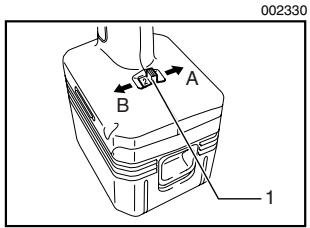
1. Speed change lever
To change the speed, first switch off the tool and then slide the speed change lever to the "A" side (2) for high speed or "B" side (1) for low speed. Be sure that the speed change lever is set to the correct position before operation. Use the right speed for your job.
CAUTION:
Always set the speed change lever fully to the correct position. If you operate the tool with the speed change lever positioned halfway between the "A" side (2) and "B" side (1), the tool may be damaged.
- Do not use the speed change lever while the tool is running. The tool may be damaged.
ASSEMBLY
CAUTION:
Always be sure that the tool is switched off and the battery cartridge is removed before carrying out any work on the tool.
Selecting correct socket
Always use the correct size socket for bolts and nuts. An incorrect size socket will result in inaccurate and inconsistent fastening torque and/or damage to the bolt or nut.
Installing or removing socket
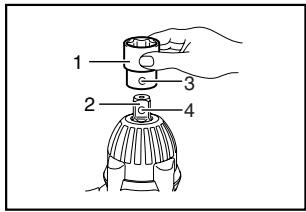
002343
- Socket
- Anvil
- Hole
- Detent pin
To install the socket, align the hole in the side of the socket with the detent pin on the anvil.
Push the socket onto the anvil until it snaps into place. Tap it lightly if required.
To remove the socket, depress the detent pin through the hole in the socket and pull the socket off the anvil.
OPERATION
CAUTION:
Always insert the battery cartridge all the way until it locks in place. If you can see the red part on the upper side of the button, it is not locked completely. Insert it fully until the red part cannot be seen. If not, it may accidentally fall out of the tool, causing injury to you or someone around you.
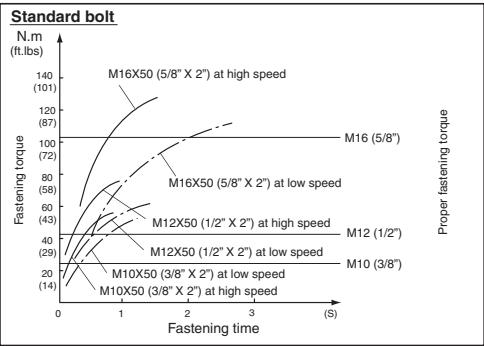
The proper fastening torque may differ depending upon the kind or size of the bolt, the material of the workpiece to be fastened, etc. The relation between fastening torque and fastening time is shown in the figures.
002369
002370
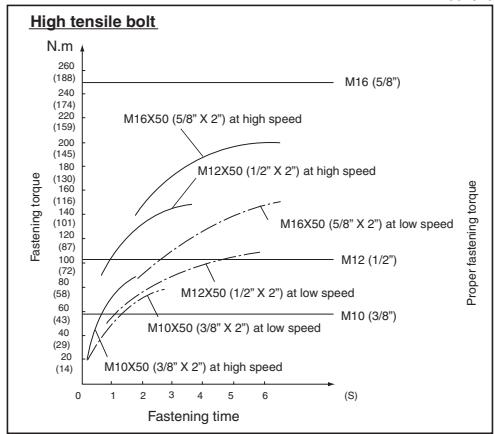
Hold the tool firmly and place the socket over the bolt or nut. Turn the tool on and fasten for the proper fastening time.
NOTE:
- Hold the tool pointed straight at the bolt or nut.
- Excessive fastening torque may damage the bolt/ nut or socket. Before starting your job, always perform a test operation to determine the proper fastening time for your bolt or nut.
If the tool is operated continuously until the battery cartridge has discharged, allow the tool to rest for 15 minutes before proceeding with a fresh battery.
The fastening torque is affected by a wide variety of factors including the following. After fastening, always check the torque with a torque wrench.
- When the battery cartridge is discharged almost completely, voltage will drop and the fastening torque will be reduced.
2. Socket
- Failure to use the correct size socket will cause a reduction in the fastening torque.
- A worn socket (wear on the hex end or square end) will cause a reduction in the fastening torque.
3. Bolt
-
Even though the torque coefficient and the class of bolt are the same, the proper fastening torque will differ according to the diameter of bolt.
Even though the diameters of bolts are the same, the proper fastening torque will differ according to the torque coefficient, the class of bolt and the bolt length. -
The use of the universal joint or the extension bar somewhat reduces the fastening force of the impact wrench. Compensate by fastening for a longer period of time.
- The manner of holding the tool or the material of driving position to be fastened will affect the torque.
- Operating the tool at low speed will cause a reduction in the fastening torque.
MAINTENANCE
CAUTION:
Always be sure that the tool is switched off and the battery cartridge is removed before attempting to perform inspection or maintenance.
Replacing carbon brushes
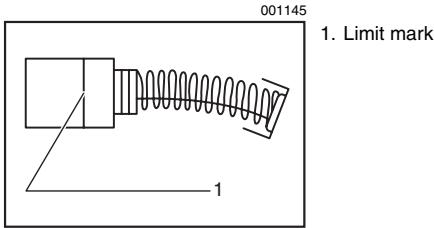
Remove and check the carbon brushes regularly. Replace when they wear down to the limit mark. Keep the carbon brushes clean and free to slip in the holders. Both carbon brushes should be replaced at the same time. Use only identical carbon brushes.
Use a screwdriver to remove the brush holder caps. Take out the worn carbon brushes, insert the new ones and secure the brush holder caps.
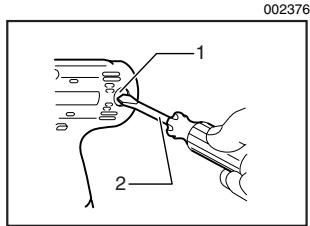
- Brush holder cap
- Screwdriver
After replacing brushes, insert the battery cartridge into the tool and break in brushes by running tool with no load for about 1 minute. Then check the tool while running and electric brake operation when releasing the switch trigger. If electric brake is not working well, ask your local Makita service center for repair.
To maintain product SAFETY and RELIABILITY, repairs, any other maintenance or adjustment should be performed by Makita Authorized or Factory Service Centers, always using Makita replacement parts.
ACCESSORIES
CAUTION:
- These accessories or attachments are recommended for use with your Makita tool specified in this manual. The use of any other accessories or attachments might present a risk of injury to persons. Only use accessory or attachment for its stated purpose.
If you need any assistance for more details regarding these accessories, ask your local Makita Service Center.
- Extension bar
Universal joint
Bit adapter
Screw bits
Automatic refreshing adapter
Shoulder strap
EN0006-1
MAKITA LIMITED ONE YEAR WARRANTY
Warranty Policy
Every Makita tool is thoroughly inspected and tested before leaving the factory. It is warranted to be free of defects from workmanship and materials for the period of ONE YEAR from the date of original purchase. Should any trouble develop during this one year period, return the COMPLETE tool, freight prepaid, to one of Makita's Factory or Authorized Service Centers. If inspection shows the trouble is caused by defective workmanship or material, Makita will repair (or at our option, replace) without charge.
This Warranty does not apply where:
- repairs have been made or attempted by others:
- repairs are required because of normal wear and tear:
the tool has been abused, misused or improperly maintained:
alterations have been made to the tool.
IN NO EVENT SHALL MAKITA BE LIABLE FOR ANY INDIRECT, INCIDENTAL OR CONSEQUENTIAL DAMAGES FROM THE SALE OR USE OF THE PRODUCT. THIS DISCLAIMER APPLIES BOTH DURING AND AFTER THE TERM OF THIS WARRANTY.
MAKITA DISCLAIMS LIABILITY FOR ANY IMPLIED WARRANTY, INCLUDING IMPLIED WARRANTY OF "MERCHANTABILITY" AND "FITNESS FOR A SPECIFIC PURPOSE," AFTER THE ONE YEAR TERM OF THIS WARRANTY.
This Warranty gives you specific legal rights, and you may also have other rights which vary from state to state. Some states do not allow the exclusion or limitation of incidental or consequential damages, so the above limitation or exclusion may not apply to you. Some states do not allow limitation on how long an implied warranty lasts, so the above limitation may not apply to you.
FRANÇAIS
SPÉCIFICATIONS
Some dust created by power sanding, sawing, grinding, drilling, and other construction activities contains chemicals known to the State of California to cause cancer, birth defects or other reproductive harm. Some examples of these chemicals are:
- lead from lead-based paints,
crystalline silica from bricks and cement and other masonry products, and - arsenic and chromium from chemically-treated lumber.
Your risk from these exposures varies, depending on how often you do this type of work. To reduce your exposure to these chemicals: work in a well ventilated area, and work with approved safety equipment, such as those dust masks that are specially designed to filter out microscopic particles.
< USA solamente >
ADVERTENCIA
3-11-8, Sumiyoshi-cho,
Anjo, Aichi 446-8502 Japan
- GENERAL SAFETY RULES
- FOR ALL BATTERY OPERATED TOOLS
- WARNING:
- SAVE THESE INSTRUCTIONS
- Work Area
- Electrical Safety
- Personal Safety
- Tool Use and Care
- SERVICE
- SPECIFIC SAFETY RULES
- SYMBOLS
- IMPORTANT SAFETY INSTRUCTIONS FOR CHARGER & BATTERY CARTRIDGE
- ADDITIONAL SAFETY RULES FOR CHARGER & BATTERY CARTRIDGE
- FUNCTIONAL DESCRIPTION
- CAUTION:
- Installing or removing battery cartridge
- Charging
- NOTE:
- Cooling system (DC24SA only)
- Conditioning charge (DC24SA only)
- Trickle charge (Maintenance charge)
- Tips for maintaining maximum battery life
- Refresh charging
- Switch action
- Electric brake
- ASSEMBLY
- Selecting correct socket
- Installing or removing socket
- OPERATION
- Socket
- Bolt
- MAINTENANCE
- Replacing carbon brushes
- ACCESSORIES
- MAKITA LIMITED ONE YEAR WARRANTY
- Warranty Policy
- ADVERTENCIA
Brand : MAKITA
Model : BTW200
Category : Cordless impact wrench