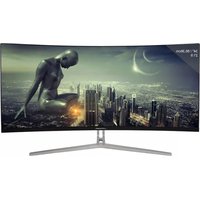
M34-UWQHD-100-C - Monitor LC-Power - Free user manual and instructions
Find the device manual for free M34-UWQHD-100-C LC-Power in PDF.


Pick your language and provide your email: we'll send you a specifically translated version.
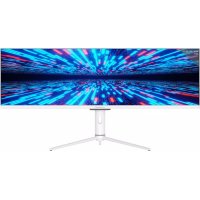
| Product Type | Ultrawide Curved Monitor |
| Brand | LC-Power |
| Model | M34-UWQHD-100-C |
| Screen Size | 34 inches |
| Resolution | 3440 x 1440 (UWQHD) |
| Refresh Rate | 100 Hz |
| Panel Type | VA |
| Response Time | 1 ms (MPRT) |
| Curvature | 1500R |
| Brightness | 300 cd/m² |
| Contrast Ratio | 3000:1 |
| Viewing Angles | 178° / 178° |
| Color Support | 16.7 million colors (8-bit) |
| Connectivity | 1x DisplayPort 1.4, 2x HDMI 2.0, 1x USB-C (DP Alt Mode), 1x 3.5mm Audio Out |
| USB Hub | 2x USB 3.0 |
| Speakers | 2x 3W integrated |
| VESA Mount | 100 x 100 mm |
| Adjustable Stand | Tilt (-5° to 15°) |
| Power Consumption | 45W typical, <0.5W standby |
| Weight (with stand) | 8.2 kg |
| Dimensions (with stand) | 815 x 460 x 245 mm |
| Special Features | AMD FreeSync, Low Blue Light, Flicker-Free, Game Mode |
| Cleaning | Wipe with a soft, dry cloth. Do not use solvents. |
| Safety | Do not open casing. Use only provided power adapter. |
Frequently Asked Questions - M34-UWQHD-100-C LC-Power
What is the resolution and refresh rate of the LC-Power M34-UWQHD-100-C?
The monitor features a 34-inch UWQHD (3440x1440) resolution with a 100Hz refresh rate, providing smooth visuals for gaming and productivity.
Does this monitor support FreeSync or G-Sync?
Yes, it supports AMD FreeSync, which reduces screen tearing and stuttering when used with compatible graphics cards.
What ports are available on the M34-UWQHD-100-C?
It includes 1x DisplayPort 1.4, 2x HDMI 2.0, 1x USB-C with DisplayPort Alt Mode, a 3.5mm audio jack, and 2x USB 3.0 ports.
Can I mount this monitor on a VESA arm?
Yes, it has a standard 100x100mm VESA mount pattern, compatible with most monitor arms and wall mounts.
How do I clean the screen safely?
Use a soft, lint-free microfiber cloth slightly dampened with water. Avoid using alcohol, ammonia, or abrasive cleaners. Wipe gently in circular motions.
What is the refresh rate and response time?
The monitor has a 100Hz refresh rate and a 1ms MPRT response time, ensuring fluid motion and minimal blur for fast-paced content.
Does the monitor have built-in speakers?
Yes, it has two integrated 3W speakers, suitable for basic audio but not for high-quality sound.
Is the stand height adjustable?
No, the stand only allows tilt adjustment (-5° to 15°). Height and swivel are not adjustable. A VESA mount is recommended for more flexibility.
What is the curvature of this monitor?
It has a 1500R curvature, which provides an immersive viewing experience by wrapping the screen around your field of view.
How do I enable Low Blue Light mode?
Press the OSD menu button, navigate to 'Game' or 'Picture' settings, and select 'Low Blue Light'. This reduces eye strain during extended use.
User questions about M34-UWQHD-100-C LC-Power
0 question about this device. Answer the ones you know or ask your own.
Ask a new question about this device
No questions yet. Be the first to ask one.
Download the instructions for your Monitor in PDF format for free! Find your manual M34-UWQHD-100-C - LC-Power and take your electronic device back in hand. On this page are published all the documents necessary for the use of your device. M34-UWQHD-100-C by LC-Power.
USER MANUAL M34-UWQHD-100-C LC-Power
Manual assistant
Powered by Anthropic
Waiting for your message
Product information
Brand : LC-Power
Model : M34-UWQHD-100-C
Category : Monitor