
AT1150A - Pneumatic nailer MAKITA - Free user manual and instructions
Find the device manual for free AT1150A MAKITA in PDF.


User questions about AT1150A MAKITA
0 question about this device. Answer the ones you know or ask your own.
Ask a new question about this device
Download the instructions for your Pneumatic nailer in PDF format for free! Find your manual AT1150A - MAKITA and take your electronic device back in hand. On this page are published all the documents necessary for the use of your device. AT1150A by MAKITA.
USER MANUAL AT1150A MAKITA
MANUEL D'INSTRUCTION
For your personal safety, READ and UNDERSTAND before using.
SAVE THESE INSTRUCTIONS FOR FUTURE REFERENCE.
AVERTISSEMENT:
| Model | AT1150A | AT2550A |
| Air pressure | 65 - 120 PSIG (4.4 - 8.3 bar) | |
| Applicable staples | 25 mm - 50 mm (1" - 2") | |
| Staple capacity | 140 pcs. | |
| Min. hose diameter | 6.5 mm (1/4") | |
| Dimensions (L x W x H) | 370 mm X 87 mm X 290 mm (14-1/2" X 3-7/16" X 11-3/8") | 370 mm X 76 mm X 260 mm (14-1/2" X 3" X 10-1/4") |
| Net weight | 2.2 kg (4.9 lbs) | 2.3 kg (5.1 lbs) |
- Due to our continuing programme of research and development, the specifications herein are subject to change without notice.
Note: Specifications may differ from country to country.
USB090-2
IMPORTANT SAFETY INSTRUCTIONS
WARNING: WHEN USING THIS TOOL, BASIC SAFETY PRECAUTIONS SHOULD ALWAYS BE FOLLOWED TO REDUCE THE RISK OF PERSONAL INJURY, INCLUDING THE FOLLOWING:
READ ALL INSTRUCTIONS.
- For personal safety and proper operation and maintenance of the tool, read this instruction manual carefully before using the tool.
- Always wear safety glasses to protect your eyes from dust or staple injury. The safety glasses should conform with the requirements of ANSI Z87.1.
WARNING:
It is an employer's responsibility to enforce the use of safety eye protection equipment by the tool operators and by other persons in the immediate working area.
- Wear hearing protection to protect your ears against exhaust noise and head protection. Also wear light but not loose clothing. Sleeves should be buttoned or rolled up. No necktie should be worn.
-
Rushing the job or forcing the tool is dangerous. Handle the tool carefully. Do not operate when under the influence of alcohol, drugs or the like.
-
General Tool Handling Guidelines:
(1) Always assume that the tool contains fasteners.
(2) Do not point the tool toward yourself or anyone whether it contains fasteners or not.
(3) Do not actuate the tool unless the tool is placed firmly against the workpiece.
(4) Respect the tool as a working implement.
(5) No horseplay.
(6) Do not hold or carry the tool with a finger on the trigger.
(7) Do not load the tool with fasteners when any one of the operating controls is activated.
(8) Do not operate the tool with any power source other than that specified in the tool operating/safety instructions.
- An improperly functioning tool must not be used.
- Sparks sometimes fly when the tool is used. Do not use the tool near volatile, flammable materials such as gasoline, thinner, paint, gas, adhesives, etc.; they will ignite and explode, causing serious injury.
- The area should be sufficiently illuminated to assure safe operations. The area should be clear and litter-free. Be especially careful to maintain good footing and balance.
- Only those involved in the work should be in the vicinity. Children especially must be kept away at all times.
- There may be local regulations concerning noise which must be complied with by keeping noise levels within prescribed limits. In certain cases, shutters should be used to contain noise.
-
Do not play with the contact element: it prevents accidental discharge, so it must be kept on and not removed. Securing the trigger in the ON position is also very dangerous. Never attempt to fasten the trigger. Do not operate a tool if any portion of the tool operating controls is inoperable, disconnected, altered, or not working properly.
-
Operate the tool within the specified air pressure on the tool label for safety and longer tool life. Do not exceed the recommended max. operating pressure. The tool should not be connected to a source whose pressure potentially exceeds 200 PSIG (13.6 bar).
- Never use the tool with other than compressed air. If bottled gas (carbon dioxide, oxygen, nitrogen, hydrogen, air, etc.) or combustible gas (hydrogen, propane, acetylene, etc.) is used as a power source for this tool, the tool will explode and cause serious injury.
- Always check the tool for its overall condition and loose screws before operation. Tighten as required.
- Make sure all safety systems are in working order before operation. The tool must not operate if only the trigger is pulled or if only the contact element is pressed against the wood. It must work only when both actions are performed. Test for possible faulty operation with staples unloaded and the contact element in fully pulled position.
- Check walls, ceilings, floors, roofing and the like carefully to avoid possible electrical shock, gas leakage, explosions, etc. caused by striking live wires, conduits or gas pipes.
- Use only staples specified in this manual. The use of any other staples may cause malfunction of the tool.
- Do not permit those uninstructed to use the tool.
- Make sure no one is nearby before stapling. Never attempt to staple from both the inside and outside at the same time. Staples may rip through and/or fly off, presenting a grave danger.
- Watch your footing and maintain your balance with the tool. Make sure there is no one below when working in high locations, and secure the air hose to prevent danger if there is sudden jerking or catching.
- On rooftops and other high locations, staple as you move forward. It is easy to lose your footing if you staple while inching backward. When stapling against perpendicular surface, staple from the top to the bottom. You can perform stapling operations with less fatigue by doing so.
- A staple will be bent or the tool can become jammed if you mistakenly staple on top of another staple or strike a knot in the wood. The staple may be thrown and hit someone, or the tool itself can react dangerously. Place the staples with care.
-
Do not leave the loaded tool or the air compressor under pressure for a long time out in the sun. Be sure that dust, sand, chips and foreign matter will not enter the tool in the place where you leave it setting.
-
Do not point the ejection port at anyone in the vicinity. Keep hands and feet away from the ejection port area.
- When the air hose is connected, do not carry the tool with your finger on the trigger or hand it to someone in this condition. Accidental firing can be extremely dangerous.
- Handle the tool carefully, as there is high pressure inside the tool that can be dangerous if a crack is caused by rough handling (dropping or striking). Do not attempt to carve or engrave on the tool.
- Stop stapling operations immediately if you notice something wrong or out of the ordinary with the tool.
-
Always disconnect the air hose and remove all of the staples:
-
When unattended.
Before performing any maintenance or repair.
Before cleaning a jam.
Before moving the tool to a new location. -
Perform cleaning and maintenance right after finishing the job. Keep the tool in tip-top condition. Lubricate moving parts to prevent rusting and minimize friction-related wear. Wipe off all dust from the parts.
- Do not modify tool without authorization from Makita.
- Do not attempt to keep the trigger or contact element depressed with tape or wire. Death or serious injury may occur.
- Always check contact element as instructed in this manual. staples may be driven accidentally if the safety mechanism is not working correctly.
- Ask Makita's Authorized service centers for periodical inspection of the tool.
- To maintain product SAFETY and RELIABILITY, maintenance and repairs should be performed by Makita Authorized or Factory Service Centers, always using Makita replacement parts.
SAVE THESE INSTRUCTIONS.
WARNING:
MISUSE or failure to follow the safety rules stated in this instruction manual may cause serious personal injury.
SYMBOLS
USD501-1
The followings show the symbols used for tool.

Read and understand tool labels and manual.

Operators and others in work area must wear safety glasses with side shields.

Keep fingers away from trigger when not driving fasteners to avoid accidental firing.
INSTALLATION
Selecting compressor
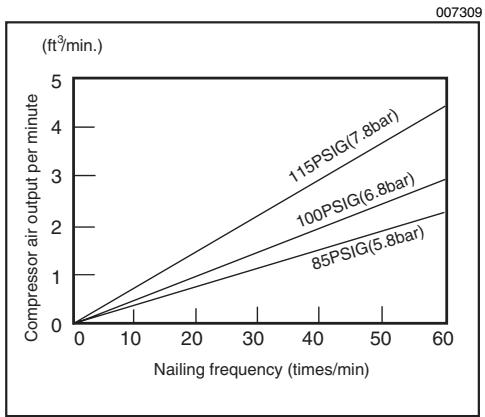
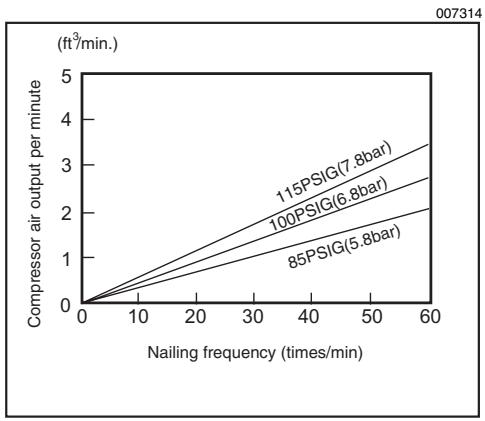
The air compressor must comply with the requirements of ANSI B19.3.
Select a compressor that has ample pressure and air output to assure cost-efficient operation. The graph shows the relation between stapling frequency, applicable pressure and compressor air output.
Thus, for example, if stapling takes place at a rate of approximately 60 times per minute at a compression of 100 PSIG (6.8 bar), a compressor with an air output over 3ft^3/minute is required.
Pressure regulators must be used to limit air pressure to the rated pressure of the tool where air supply pressure exceeds the tool's rated pressure. Failure to do so may result in serious injury to tool operator or persons in the vicinity.
Selecting air hose
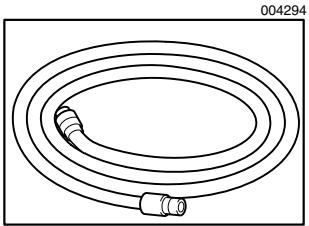
Use an air hose as large and as short as possible to assure continuous, efficient stapling operation. With an air pressure of 70 PSIG (4.9 bar), an air hose with an internal diameter of over 8.5mm (5/16^ ) and a length of less than 20m (6.6 ft.) is recommended when the interval between each stapling is 0.5 seconds. Air supply hoses shall have a minimum working pressure rating of 150 PSIG (10 bar) or 150 percent of the maximum pressure produced in the system whichever is higher.
CAUTION:
- Low air output of the compressor, or a long or smaller diameter air hose in relation to the stapling frequency may cause a decrease in the driving capability of the tool.
Lubrication
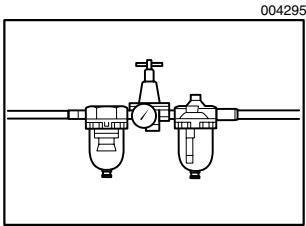
To insure maximum performance, install an air set (oiler, regulator, air filter) as close as possible to the tool. Adjust the oiler so that one drop of oil will be provided for every 50 staples.
When an air set is not used, oil the tool with pneumatic tool oil by placing 2 (two) or 3 (three) drops into the air fitting. This should be done before and after use. For proper lubrication, the tool must be fired a couple of times after pneumatic tool oil is introduced.
FUNCTIONAL DESCRIPTION

CAUTION:
Always disconnect the hose before adjusting or checking function on the tool.

Adjusting depth of stapling
- Depth adjusting plate
- Hex wrench
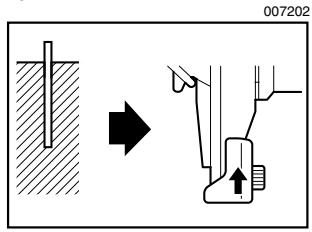
To adjust the depth of stapling, loosen the bolt by using the hex wrench provided with the tool and then slide the depth adjusting plate up or down.
If staples cannot be driven deep enough, slide the adjusting plate in the direction of arrow as shown in the figure.
If the staples are driven too deep, slide the adjustinhg plate in the direction of arrow as shown in the figure.
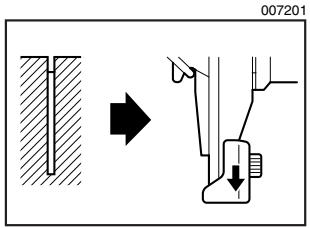
The depth can be adjusted 5mm to the maximum. Tighten the bolt securely at the right position after adjusting.
ASSEMBLY

CAUTION:
Always disconnect the hose before carrying out any work on the tool.
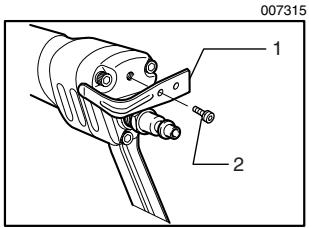
Hook
- Hook
- Screw

CAUTION:
Always disconnect the hose from the tool.
- Never hook the tool at high location or on potentially unstable surface.
The hook is convenient for hanging the tool temporarily. Secure the hook on the tool with the provided screw using either of two holes in the hook as shown in the figure.
Loading stapler

CAUTION:
Always disconnect the hose before loading the tool.
- Do not use deformed staples or staple strip. Failure to do so causes poor staple feeding.
Always use staples specified in this instruction manual. Failure to do so causes poor staple feeding.
Always return the pusher slowly and gently while holding it with a hand.
Select staples suitable for your work. Make sure that the hose is disconnected from the tool.
- Pull the pusher to the rear of magazine and hook the groove in the pusher on the lock pin.
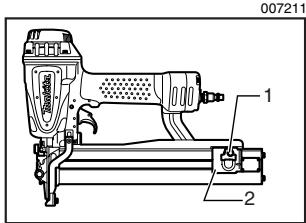
- Lock pin
-
Pusher
-
Insert strip of staples into the magazine. Two strips of staples can be loaded.
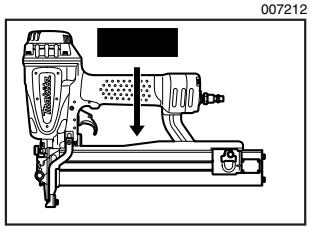
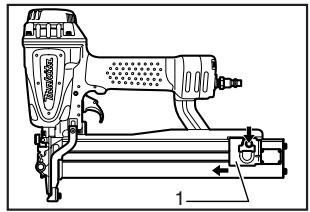
- Depress the lock pin lightly and pull the pusher to unhook it.
With the lock pin depressed, return the pusher slowly and gently to the original position.
Keep depressing the pusher until it passes through.
007213
1. Pusher
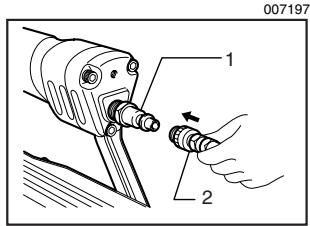
Connecting air hose
- Air fitting
- Air socket
Slip the air socket of the air hose onto the air fitting on the stapler. Be sure that the air socket locks firmly into position when installed onto the air fitting. A hose coupling must be installed on or near the tool in such a way that the pressure reservoir will discharge at the time the air supply coupling is disconnected.
OPERATION
CAUTION:
- Make sure all safety systems are in working order before operation.
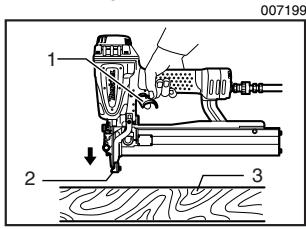
- Pull the trigger first and then place the contact element against the workpiece.
007199
- Trigger
- Contact element
- Workpiece
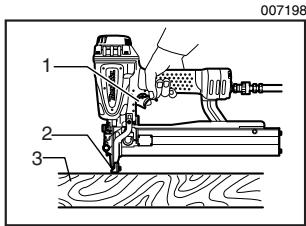
007198
- Trigger
- Contact element
-
Workpiece
-
To drive a staple, you may place the contact element against the workpiece and pull the trigger, or
No. 1 method is for continuous stapling.
No. 2 method is for intermittent stapling, when you wish to drive a staple carefully and very accurately.
CAUTION:
However when the tool is set to the "Intermittent Stapling" mode, WITH THE TRIGGER HELD IN A HALF-PULLED POSITION, an unexpected stapling could occur, if contact element is allowed to re-contact against the workpiece or the other surface under the influence of recoil.
In order to avoid this unexpected stapling, perform as follows;
A. Do not place the contact element against the workpiece with excessive force.
B. Pull the trigger fully and hold it on for 1-2 seconds after stapling.
For No. 2 method, the OPTIONAL SEQUENTIAL TRIP TRIGGER (SINGLE SHOT PART) is used. Replace the trigger part with this.
Direction of exhaust air
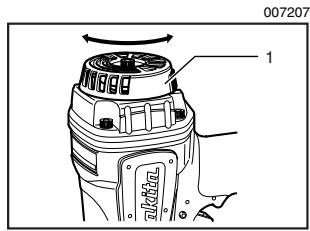
1. Exhaust cover
The direction of exhaust air can be changed 360 degrees of angle by turning the exhaust cover with a hand.
Removing jammed staples
WARNING:
Always disconnect the hose before removing staplers.
Remove the staples from the magazine.
Lift up the latch on the top of driver guide by hand.
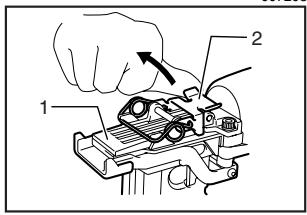
007203
- Driver guide
- Latch
If the latch cannot be lift up by hand, insert a slotted bit screwdriver in the gap between the latch and the door and force it up.
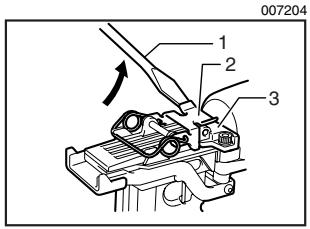
- Slotted bit screwdriver
- Latch
- Door
Open the door and take out staples.
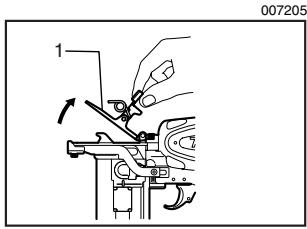
1. Door
Place the latch spring on two hooks of the driver guide and return it to its original position by pressing it.
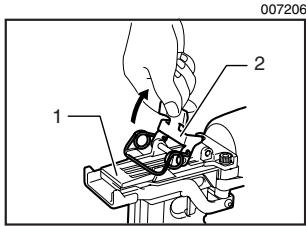
- Driver guide
- Latch
CAUTION:
- If the tip of staple driver has worn, staple jamming and shallow driving will tend to occur. When this occurs, have it repaired by Makita Authorized or Factory Service Centers.
MAINTENANCE
CAUTION:
Always disconnect the air hose from the tool before attempting to perform inspection or maintenance.
Maintenance of stapler
Always check the tool for its overall condition and loose screws before operation. Tighten as required.
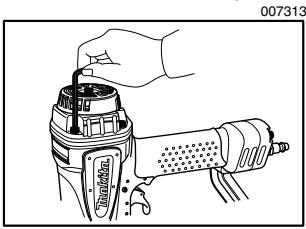
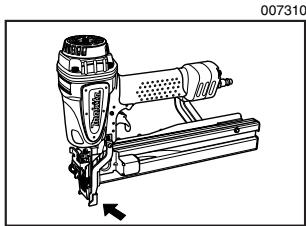
With tool disconnected, make daily inspection to assure free movement of the contact element and trigger. Do not use tool if the contact element or trigger sticks or binds.
When the tool is not to be used for an extended period of time, lubricate the tool using pneumatic tool oil and store the tool in a safe place. Avoid exposure to direct sunlight and/or humid or hot environment.
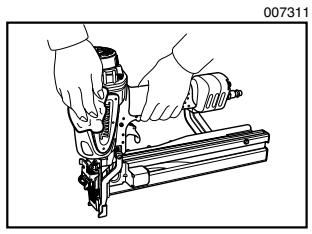
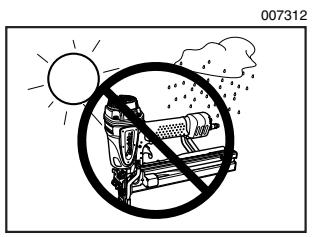
Maintenance of compressor, air set and air hose
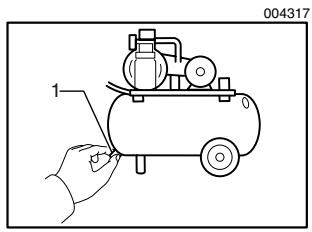
1. Drain cock
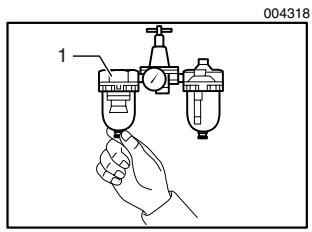
1. Air filter
After operation, always drain the compressor tank and the air filter. If moisture is allowed to enter the tool, It may result in poor performance and possible tool failure.
Check regularly to see if there is sufficient pneumatic oil in the oiler of the air set. Failure to maintain sufficient lubrication will cause O-rings to wear quickly.
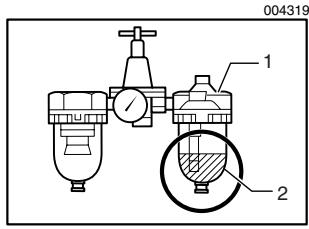
1. Oiler
2. Pneumatic oil
Keep the air hose away from heat (over 60^ , over 140^ ), away from chemicals (thinner, strong acids or alkalis). Also, route the hose away from obstacles which it may become dangerously caught on during operation. Hoses must also be directed away from sharp edges and areas which may lead to damage or abrasion to the hose.
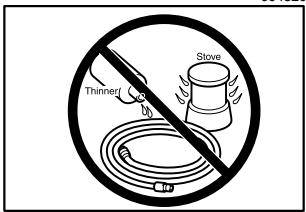
004320
To maintain product SAFETY and RELIABILITY, repairs, any other maintenance or adjustment should be performed by Makita Authorized or Factory Service Centers, always using Makita replacement parts.
ACCESSORIES
CAUTION:
- These accessories or attachments are recommended for use with your Makita tool specified in this manual. The use of any other accessories or attachments might present a risk of injury to persons. Only use accessory or attachment for its stated purpose.
If you need any assistance for more details regarding these accessories, ask your local Makita Service Center.
Staples
Air hoses
Safety goggles
MAKITA LIMITED ONE YEAR WARRANTY
Warranty Policy
Every Makita tool is thoroughly inspected and tested before leaving the factory. It is warranted to be free of defects from workmanship and materials for the period of ONE YEAR from the date of original purchase. Should any trouble develop during this one year period, return the COMPLETE tool, freight prepaid, to one of Makita's Factory or Authorized Service Centers. If inspection shows the trouble is caused by defective workmanship or material, Makita will repair (or at our option, replace) without charge.
This Warranty does not apply where:
- repairs have been made or attempted by others:
- repairs are required because of normal wear and tear:
the tool has been abused, misused or improperly maintained:
alterations have been made to the tool.
IN NO EVENT SHALL MAKITA BE LIABLE FOR ANY INDIRECT, INCIDENTAL OR CONSEQUENTIAL DAMAGES FROM THE SALE OR USE OF THE PRODUCT. THIS DISCLAIMER APPLIES BOTH DURING AND AFTER THE TERM OF THIS WARRANTY.
MAKITA DISCLAIMS LIABILITY FOR ANY IMPLIED WARRANTY, INCLUDING IMPLIED WARRANTYES OF "MERCHANTABILITY" AND "FITNESS FOR A SPECIFIC PURPOSE," AFTER THE ONE YEAR TERM OF THIS WARRANTY.
This Warranty gives you specific legal rights, and you may also have other rights which vary from state to state. Some states do not allow the exclusion or limitation of incidental or consequential damages, so the above limitation or exclusion may not apply to you. Some states do not allow limitation on how long an implied warranty lasts, so the above limitation may not apply to you.
FRANÇAIS
SPÉCIFICATIONS
| Modèle | AT1150A | AT2550A |
| Pression d'air | 65 - 120 PSIG (4.4 - 8.3 bar) | |
| Agrafes utilisables | 25 mm - 50 mm (1" - 2") | |
| Capacité d'agrafage | 140 agrafes. | |
| Diamètre min. du tuyau | 6.5 mm (1/4") | |
| Dimensions (L x P x H) | 370 mm X 87 mm X 290 mm(14-1/2" X 3-7/16" X 11-3/8") | 370 mm X 76 mm X 260 mm(14-1/2" X 3" X 10-1/4") |
| Poids net | 2.2 kg (4.9 lbs) | 2.3 kg (5.1 lbs) |
Some dust created by power sanding, sawing, grinding, drilling, and other construction activities contains chemicals known to the State of California to cause cancer, birth defects or other reproductive harm. Some examples of these chemicals are:
- lead from lead-based paints,
crystalline silica from bricks and cement and other masonry products, and - arsenic and chromium from chemically-treated lumber.
Your risk from these exposures varies, depending on how often you do this type of work. To reduce your exposure to these chemicals: work in a well ventilated area, and work with approved safety equipment, such as those dust masks that are specially designed to filter out microscopic particles.
< USA solamente >