G915 X LIGHTSPEED TKL - Keyboard LOGITECH - Free user manual and instructions

Find the device manual for free G915 X LIGHTSPEED TKL LOGITECH in PDF.

LOGITECH G915 X LIGHTSPEED TKL - Keyboard
📄 213 pages English EN Download 💬 AI Question 11 questions ⚙️ Specs
Notice LOGITECH G915 X LIGHTSPEED TKL - page 6
Pick your language and provide your email: we'll send you a specifically translated version.
Product Type Wireless Gaming Keyboard
Brand Logitech
Model G915 X LIGHTSPEED TKL
Dimensions (L x W x H) 368 x 150 x 22 mm
Weight 810 g
Power Supply Rechargeable lithium-ion battery, up to 30 hours battery life (backlight on) / 60 hours (backlight off)
Connection Type LIGHTSPEED wireless, Bluetooth, USB-C wired
Backlight Per-key RGB, customizable via G HUB
Switch Technology Low-profile mechanical, GL Switch (linear, tactile, clicky)
Number of Keys 87 (Tenkeyless)
Special Functions Volume wheel and media controls, programmable keys, game mode
Maintenance and Cleaning Use a soft, dry cloth. Avoid contact with liquids. Do not use abrasive products.
Safety Keep away from heat sources and moisture. Do not open the product.
Spare parts and repairability The USB-C cable is detachable. For any repair, contact Logitech support.
General Information High-end wireless gaming keyboard compatible with Windows, macOS, Chrome OS. Logitech G HUB software required for advanced customization.

Frequently Asked Questions - G915 X LIGHTSPEED TKL LOGITECH

How to connect the G915 X LIGHTSPEED TKL keyboard in wireless mode?
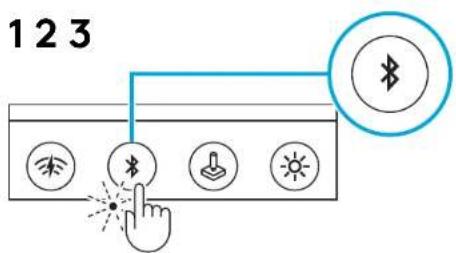
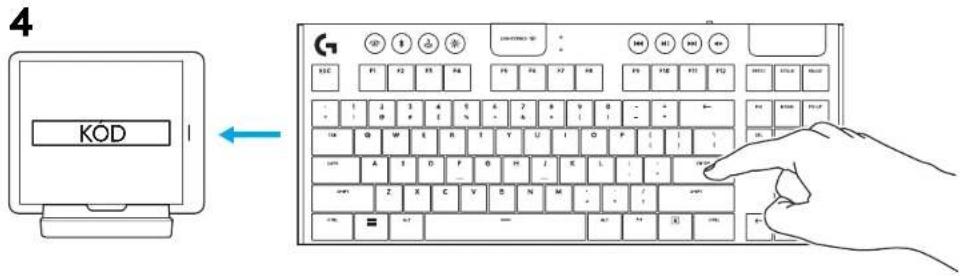
Use the included LIGHTSPEED receiver plugged into a USB port, or enable Bluetooth. For Bluetooth, hold down the connection button until the lights flash, then pair it from the device.
What is the battery life?
The battery life reaches 30 hours with RGB backlight on, and up to 60 hours in standby (backlight off).
How to charge the keyboard?
Use the provided USB-C cable, plug it into a wall outlet or a USB port on your computer. Full charging takes about 3 hours.
Are the keys replaceable?
The keycaps are not easily replaceable because they are specific to low-profile switches. Contact Logitech support for any repair.
How to customize the RGB backlight?
Download and install Logitech G HUB software. You can assign per-key colors and effects, and sync with other Logitech peripherals.
Can I use the keyboard in wired mode only?
Yes, simply plug the USB-C cable into the computer. The keyboard will work in wired mode and charge the battery simultaneously.
How to clean my keyboard?
Turn off the keyboard and unplug it. Use a slightly damp (not wet) soft cloth to wipe the surface. Avoid alcohol and chemicals. For spaces between keys, use a can of compressed air.
Is the keyboard compatible with consoles?
It is compatible with PlayStation 4, PlayStation 5, Xbox One, and Xbox Series X|S when connected via USB wired. Advanced features (RGB, macros) require a PC with G HUB.
What to do if the keyboard stops responding?
Try resetting the keyboard: turn it off, remove the battery if possible (not applicable here), wait 10 seconds and turn it back on. Otherwise, re-pair the receiver via the connection button or reconnect the USB cable.
Is there a sleep mode to save battery?
Yes, the keyboard automatically goes into standby after a period of inactivity. You can adjust this delay in the G HUB software.

User questions about G915 X LIGHTSPEED TKL LOGITECH

1 question about this device. Answer the ones you know or ask your own.

Ask a new question about this device

Your email remains private: it is only used to notify you if someone answers your question.

What are the different connection methods for the G915 X LIGHTSPEED TKL keyboard to a computer?
Frequently Asked Questions - 26 d
Response Notice-Facile

The Logitech G915 X LIGHTSPEED TKL mechanical keyboard offers three different connection modes to suit your needs:

LIGHTSPEED Connection (Wireless)

The simplest solution: just insert the included LIGHTSPEED receiver into a USB port on your computer. The connection is established automatically at 2.4 GHz without the need for pairing.

Bluetooth Connection

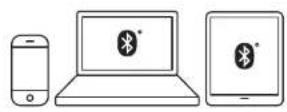
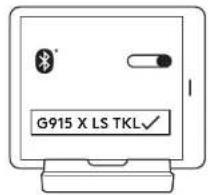
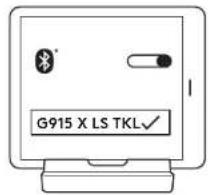
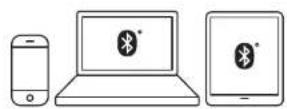
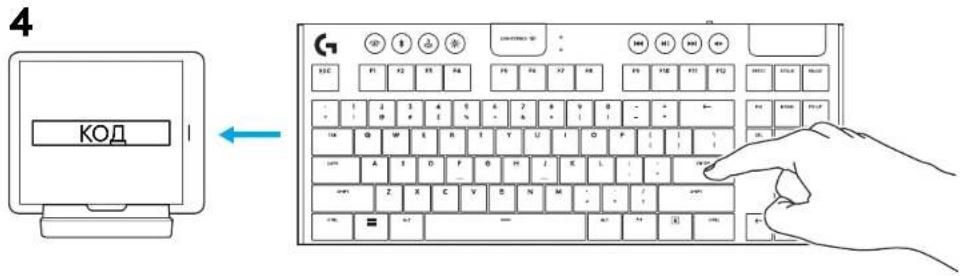
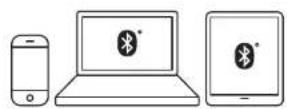
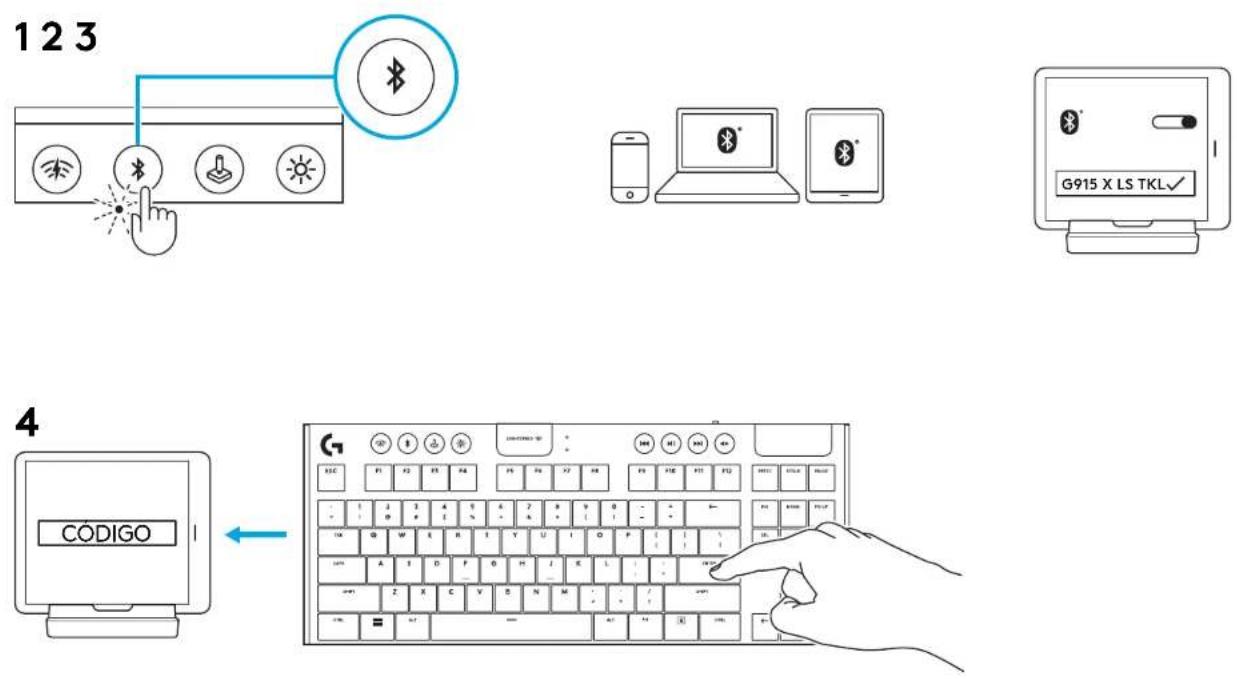
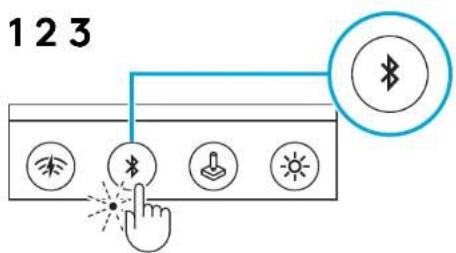
For maximum flexibility, press and hold the connection button until the indicator lights flash. Then start pairing from your device's Bluetooth settings (computer, tablet, or phone).

Wired USB-C Connection

Simply plug the included USB-C cable into your computer. The keyboard works immediately in wired mode and charges simultaneously.

Battery Life: With the LIGHTSPEED wireless mode, the lithium-ion battery provides up to 30 hours of use with RGB lighting on, or 60 hours with it turned off (configurable via Logitech G HUB). A full charge takes about 3 hours.

Respond (be the first)

Download the instructions for your Keyboard in PDF format for free! Find your manual G915 X LIGHTSPEED TKL - LOGITECH and take your electronic device back in hand. On this page are published all the documents necessary for the use of your device. G915 X LIGHTSPEED TKL by LOGITECH.

USER MANUAL G915 X LIGHTSPEED TKL LOGITECH

G915 X LIGHTSPEED TKL

Low-Profile Wireless Gaming Keyboard

SETUP GUIDE

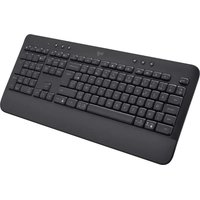
Close-up of a black computer keyboard with multiple function keys and control buttons (no visible text or symbols)

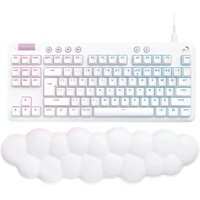
Front view of a white computer keyboard with multiple colored keys (no visible text or labels)

LOGITECH G915 X LIGHTSPEED TKL - G915 X LIGHTSPEED TKL - 3

logitech

ENGLISH....3 108.....فارسی

DEUTSCH....10 ČESKÁ VERZE....115

FRANÇAIS 17 SLOVENČINA 122

ITALIANO....24 УКРАЇНСЬКА....129

ESPAÑOL 31 EESTI 136

PORTUGUÊS .....38 LATVISKI.....143

NEDERLANDS ..... 45 LIETUVIŲ ..... 150

SVENSKA 52 БЪЛГАРСКИ. 157

DANSK 59 HRVATSKI 164

NORSK....66 SRPSKI....171

SUOMI 73 SLOVENŠČINA 178

GREEK....80 ROMANIAN....185

RUSSIAN ..... 87 TURKISH ..... 192

POLISH 94 199 ARABIC

HUNGARIAN.... 101 206....

LIGHTSPEED CONNECTIONLOGITECH G915 X LIGHTSPEED TKL - G915 X LIGHTSPEED TKL - 4

BLUETOOTH® CONNECTION

123 Wireless Bluetooth Hand Light Sun

LOGITECH G915 X LIGHTSPEED TKL - BLUETOOTH® CONNECTION - 2

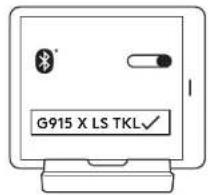
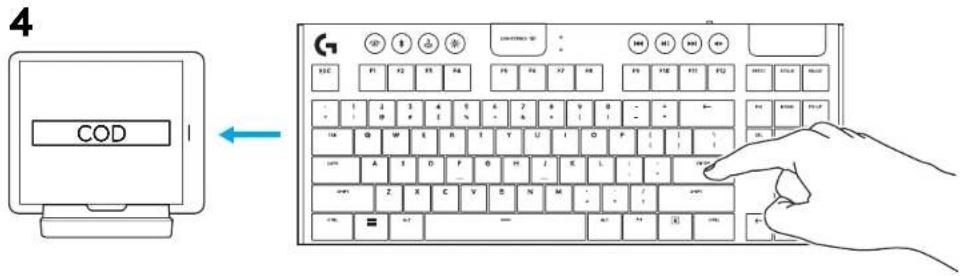
G915 X LS TKL

CODE ←

CHARGING

ESC F1 F2 F3 F4 F5 F6 F7 F8 F9 F10 F11 F12 POTC GRIE RACE - 1 2 3 4 5 6 7 8 9 0 - - + ← - - 9 # 3 % - 6 * ( ) - + TAT G W E R T Y U I O P ( ) \ DCL ENI FRTR CAP A S D F G H J K L / - + WTR MRT Z X C V B N M : / - / - SMT CTL - - → + - ↓ - →

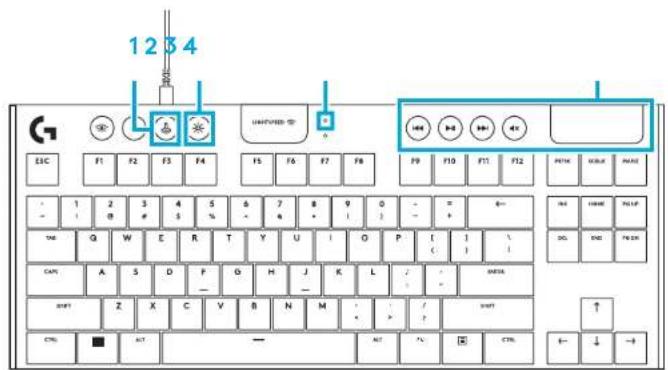
KEYBOARD FEATURES

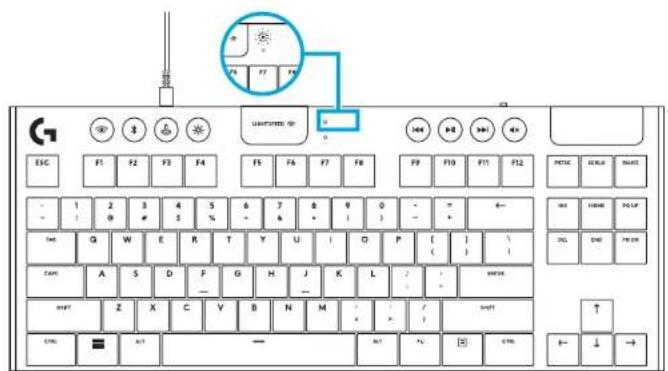
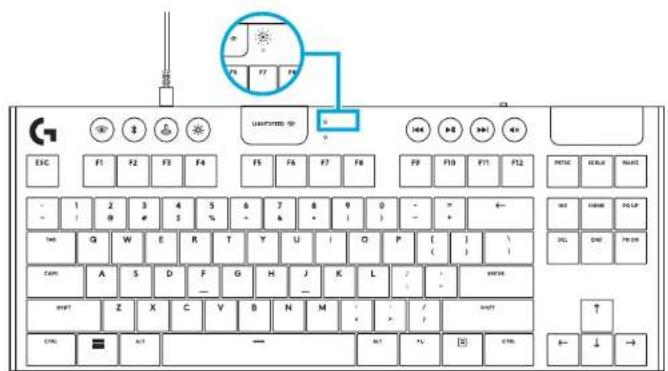
1 Game Mode 2 Brightness 3 Battery Indicator 4 Media Controls
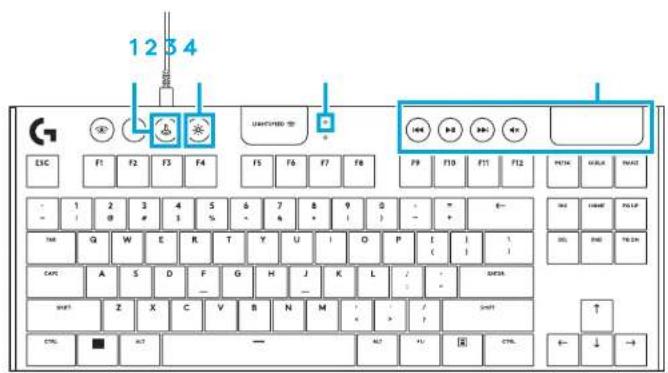
1234 UNITED SET ESC F1 F2 F3 F4 F5 F6 F7 F8 F9 F10 F11 F12 PETHA WELK SWAT - 1 2 3 4 5 6 7 8 9 0 - - * E- - - 1 2 3 4 5 6 7 8 9 0 - - * E- TMG Q W E R T Y U I O P I C I I CATS A S D F G H J K L J - * NETA SWAT Z X C V B N M - / ? SHIFT CTRL ■ A7 — A7 A7 国 CTRL ← ↓ →

KEYBOARD FEATURES - LIGHTING FUNCTIONS

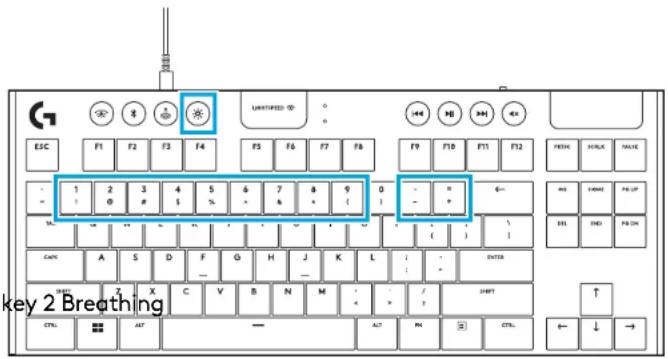
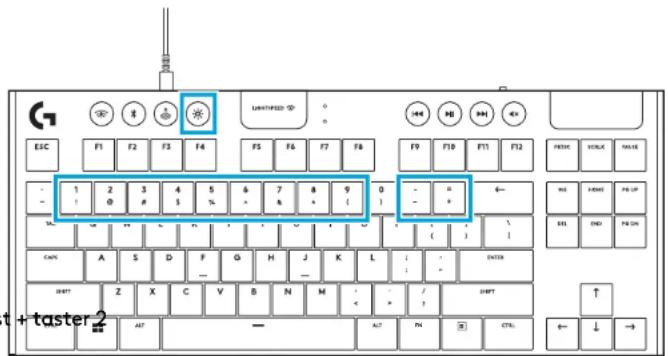
In addition to the lighting features available through G HUB software, G915 X LIGHTSPEED TKL has onboard lighting effects. To select these effects, press and hold the Brightness button while pressing the keyboard number keys to select an effect:

Shortcut First press Subsequent presses
Brightness + key 1 FixedCycle through colorsBrigh
Brightness + key 3 Ripple
Brightness + key 4 Color cycle
Brightness + key 5 Colorwave Cycle through directions
Brightness + key 6 Signature effect #1
Brightness + key 7 Signature effect #2
Brightness + key 8 Custom lighting effect #1
Brightness + key 9 Custom lighting effect #2
Brightness + key "-" Decreases effect speed
Brightness + key "+" Increased effect speed

LOGITECH G915 X LIGHTSPEED TKL - KEYBOARD FEATURES - LIGHTING FUNCTIONS - 1

User-stored effects are saved to the keyboard by G HUB software.

GAME MODE BUTTON

This button disables the standard Windows key and Menu key to prevent the Windows Start menu from activating during a game, which might disrupt play. The game mode LED is lit during game mode.

Adjust keyboard brightness by cycling the keyboard brightness button.

ENABLE FULL KEY CUSTOMIZATION

Toggle to switch between Default and Customized layout.

ONBOARD MEMORY

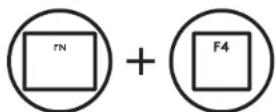
Three onboard profiles can be saved to G915 X LIGHTSPEED TKL. The profiles are downloaded into the G915 X LIGHTSPEED TKL through G HUB software, and are accessed by using FN+F2, F3, F4 when the keyboard is in Onboard mode (selected from G HUB software, or when G HUB software is off or not installed).

LOGITECH G915 X LIGHTSPEED TKL - ONBOARD MEMORY - 1

LOGITECH G915 X LIGHTSPEED TKL - ONBOARD MEMORY - 2

LOGITECH G915 X LIGHTSPEED TKL - ONBOARD MEMORY - 3

LOGITECH G915 X LIGHTSPEED TKL - ONBOARD MEMORY - 4

LOGITECH G915 X LIGHTSPEED TKL - ONBOARD MEMORY - 5

LOGITECH G915 X LIGHTSPEED TKL - ONBOARD MEMORY - 6

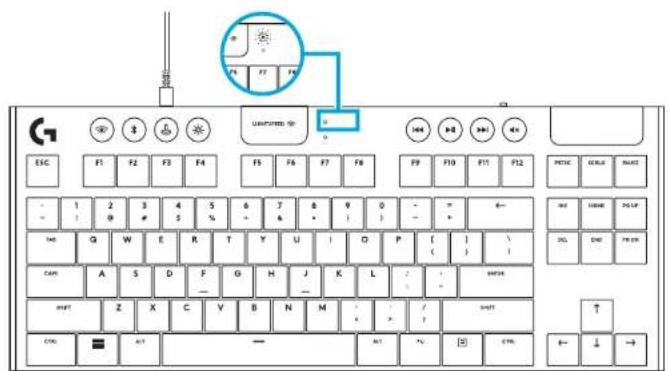
KEYBOARD FEATURES - BATTERY INDICATOR

  • Pulses green when charging. ● Shows green momentarily when started when battery is above 15%. ● Shows red when keyboard needs charging.

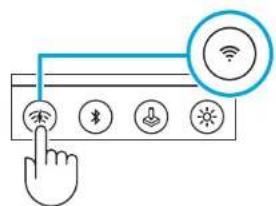
KEYBOARD FEATURES - WIRELESS CONTROLS

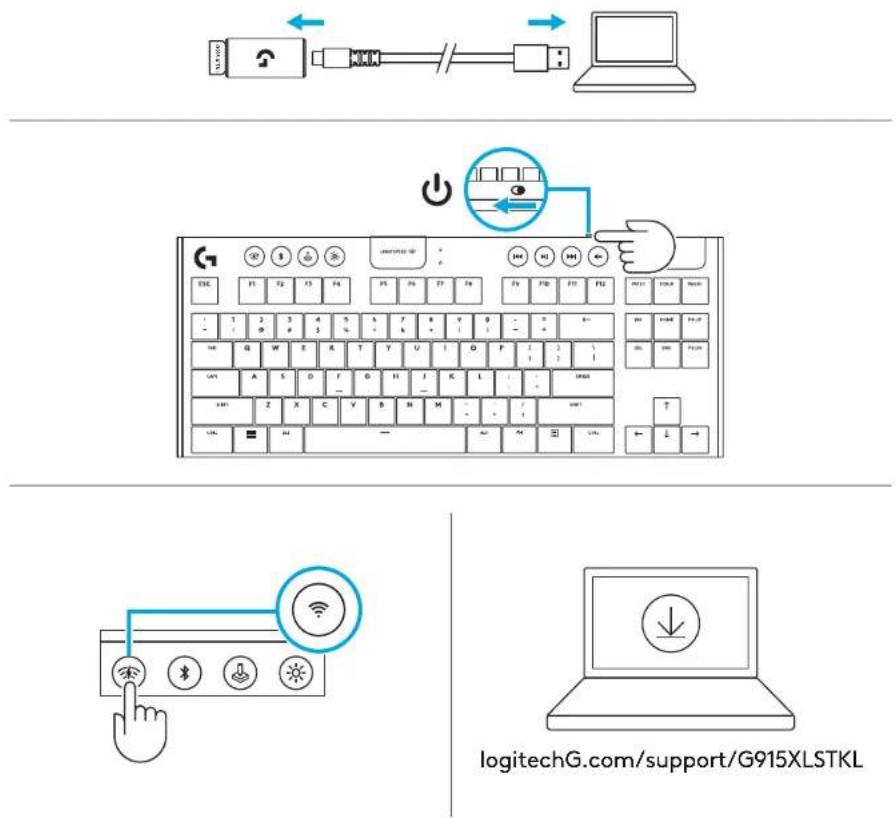
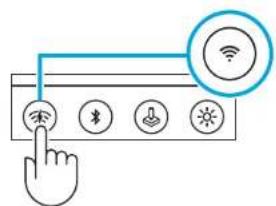
- LIGHTSPEED button selects LIGHTSPEED wireless connection, which connects to the PC or Mac using the included receiver dongle. It shows Cyan when connected, White when wired connection.

MOTOR MOTOR > 15% < 15% LEATHLET-3D ESC F1 F2 F3 F4 F5 F6 F7 F8 F9 F10 F11 F12 PEC ECEA PCDC 1 2 3 4 5 6 7 8 9 0 - - * + - - - - - - - - - - - - - - - - - - - - - - - - - - - - - - - - - - - - - - - - - - - - - - - - - - - - - - - - - - - TAR Q W E R T Y U I O P L ( ) / CAPN A S D F G H J K L - - OU…

graph LR A["Sensor"] --> B["USB Cable"] B --> C["Laptop"]

ESC F1 F2 F3 F4 F5 F6 F7 F8 F9 F10 F11 F12 F13 F14 F15 F16 F17 F18 F19 F20 F21 F22 F23 F24 F25 F26 F27 F28 F29 F30 F31 F32 F33 F34 F35 F36 F37 F38 F39 F40 F41 F42 F43 F44 F45 F46 F47 F48 F49 F50 F51 F52 F53 F54 F55 F56 F57 F58 F59 F60 F61 F62 F63 F64 F65 F66 F67 F68 F69 F70 F71 F72 F73 F74 F75 F76 F…

KEYBOARD FEATURES - BLUETOOTH®

- Bluetooth® button connects to devices via a Bluetooth® connection. It shows blue when connected.

CARE AND CLEANING

To clean the keyboard, use a soft, lint-free or microfiber cloth. A damp cloth can be used. Do not use harsh cleaning solutions.

Do not immerse the keyboard or expose it to liquids.

QUESTIONS?

logitechG.com/support/G915XLSTKL

Diagram showing four icons: Bluetooth, Wi-Fi, Bluetooth, and directional arrows, with a hand cursor pointing to the Bluetooth button.

LIGHTSPEED CONNECTIONLOGITECH G915 X LIGHTSPEED TKL - QUESTIONS? - 2

BLUETOOTH® CONNECTION

123 Wireless Bluetooth Hand Light Sun

LOGITECH G915 X LIGHTSPEED TKL - BLUETOOTH® CONNECTION - 2

G915 X LS TKL✓

CODE ←

CHARGING

ESC F1 F2 F3 F4 F5 F6 F7 F8 F9 F10 F11 F12 POTC ORLA NAAT - 1 2 3 4 5 6 7 8 9 0 - - + ← - - 9 # 3 % - 6 * ( ) - + TAS G W E R T Y U I O P ( ) \ DCL ENI FOR CAM A S D F G H J K L / - - NOT MINT Z X C V B N M : / - / - NOT CTRL = +1 — +1 +2 +3 +4 +5 +6 +7 +8 +9 +10 +11 +12 +← ↓ →

KEYBOARD FEATURES

KEYBOARD FEATURES - BLUETOOTH®

Diagram showing a hand interacting with a device interface with icons for wireless connectivity and signal control.

Line drawing of a laptop with a download icon on the screen (no text or symbols).

logitechG.com/support/G915XLSTKL

BLUETOOTH® CONNECTION

123 Wireless Bluetooth Hand Light Sunlight

LOGITECH G915 X LIGHTSPEED TKL - BLUETOOTH® CONNECTION - 2

G915 X LS TKL✓

CODE ←

CHARGING

ESC F1 F2 F3 F4 F5 F6 F7 F8 F9 F10 F11 F12 POTC SCAL PAST 1 2 3 4 5 6 7 8 9 0 - - - TBD Q W E R T Y U I O P ( ) \ CAM A S D F G H J K L Z - - - MINT Z X C V B N M : / - ? CTRL = ACT — ALT +2 [ ] CTRL ← ↓ →

KEYBOARD FEATURES

KEYBOARD FEATURES - BLUETOOTH®

MAINTENANCE AND CLEANING

Diagram showing a hand interacting with a device interface with icons for wireless connectivity and signal control.

Line drawing of a laptop with a download icon on the screen (no text or symbols).

logitechG.com/support/G915XLSTKL

BLUETOOTH® CONNECTION

graph TD A["Bluetooth"] --> B["Sensor Icon"] C["Hand Click"] --> D["Sensor Icon"] E["Light Bulb"] --> F["Sensor Icon"] G["Sun"] --> H["Sensor Icon"] I["Bluetooth"] --> J["Device Icon"]

LOGITECH G915 X LIGHTSPEED TKL - BLUETOOTH® CONNECTION - 2

G915 X LS TKL✓

4 CODE 1 2 3 4 5 6 7 8 9 10 11 12 13 14 15 16 17 18 19 20 21 22 23 24 25 26 27 28 29 30 31 32 33 34 35 36 37 38 39 40 41 42 43 44 45 46 47 48 49 50 51 52 53 54 55 56 57 58 59 60 61 62 63 64 65 66 67 68 69 70 71 72 73 74 75 76 77 78 79 80 81 82 83 84 85 86 87 88 89 90 91 92 93 94 95 96 97 98 99 100

CHARGING

ESC F1 F2 F3 F4 F5 F6 F7 F8 F9 F10 F11 F12 POTC ORLA NAAT - 1 2 3 4 5 6 7 8 9 0 - - + ← - - 9 # 3 % - 6 * ( ) - + TAS G W E R T Y U I O P ( ) \ DCL ENI FOR CAM A S D F G H J K L / - - NOT MINT Z X C V B N M : / - / - NOT CTRL = +1 — +1 +2 +3 +4 +5 +6 +7 +8 +9 +10 +11 +12 + - ↓ →

KEYBOARD FEATURES

CARE AND CLEANING

Diagram showing a hand interacting with a device interface with icons for wireless connectivity and signal control

Line drawing of a laptop with a download icon on the screen (no text or symbols)

logitechG.com/support/G915XLSTKL

BLUETOOTH® CONNECTION

LOGITECH G915 X LIGHTSPEED TKL - BLUETOOTH® CONNECTION - 1

CHARGING

ESC F1 F2 F3 F4 F5 F6 F7 F8 F9 F10 F11 F12 POTC SCAL PAST 1 2 3 4 5 6 7 8 9 0 - - - TBD Q W E R T Y U I O P ( ) \ CAM A S D F G H J K L Z - - - MINT Z X C V B N M : / - ? CTRL = ACT — ALT +2 [ ] CTRL ← ↓ →

ESC F1 F2 F3 F4 F5 F6 F7 F8 F9 F10 F11 F12 POTEL ROLLAR PAUL - 1 2 3 4 5 6 7 8 9 0 - - + - - + ← TAB G W E R T Y U I O P [ ] \ DLL END FROM GAIN A S D F G H J K L : / - SHIFT Z X C Y B N M : / ? CTRL ANT — AUT ? E CTRL ← ↓ →

KEYBOARD FEATURES: BLUETOOTH®

CARE AND CLEANING

Diagram showing a hand interacting with a touchscreen interface with icons for wireless connectivity and signal control

Line drawing of a laptop with a download icon on the screen (no text or symbols)

logitechG.com/support/G915XLSTKL

BLUETOOTH® CONNECTION

LOGITECH G915 X LIGHTSPEED TKL - BLUETOOTH® CONNECTION - 1

CHARGING

ESC F1 F2 F3 F4 F5 F6 F7 F8 F9 F10 F11 F12 POTC SCAL PAST 1 2 3 4 5 6 7 8 9 0 - - - TBD Q W E R T Y U I O P ( ) \ CAM A S D F G H J K L Z - - - MINT Z X C V B N M : / - ? CTRL = ACT — ALT +2 [ ] CTRL ← ↓ →

CARE AND CLEANING

Diagram showing a hand interacting with a touchscreen device displaying icons for Wi-Fi, Bluetooth, download, and signal.

Line drawing of a laptop with a download icon on the screen (no text or symbols).

logitechG.com/support/G915XLSTKL

BLUETOOTH® CONNECTION

123 Wireless Bluetooth Hand Light Sun

LOGITECH G915 X LIGHTSPEED TKL - BLUETOOTH® CONNECTION - 2

G915 X LS TKL✓

CODE ←

CHARGING

Keyboard layout diagram with labeled keys: ESC, F1-F12, and various keys including letters, numbers, and symbols.

KEYBOARD FEATURES

KEYBOARD FEATURES - BLUETOOTH®

CARE AND CLEANING

KOD ←

LADDER

Keyboard layout diagram with labeled keys: ESC, F1-F12, and various keys including letters, numbers, and symbols.

TANGENTBOARD FUNCTIONS

CARE AND CLEANING

Diagram showing a hand interacting with a touchscreen device displaying icons for Wi-Fi, Bluetooth, download, and signal.

Line drawing of a laptop with a download icon on the screen (no text or symbols).

logitechG.com/support/G915XLSTKL

BLUETOOTH® CONNECTION
graph TD A["Bluetooth"] --> B["USB"] B --> C["Download"] C --> D["Sun"] D --> E["Hand Clicking"] style A fill:#f9f,stroke:#333 style E fill:#bbf,stroke:#333

LOGITECH G915 X LIGHTSPEED TKL - BLUETOOTH® CONNECTION - 2

G915 X LS TKL ✓

KODE ← ESC F1 F2 F3 F4 F5 F6 F7 F8 F9 F10 F11 F12 POTC ORLA NAAT - 1 2 3 4 5 6 7 8 9 0 - - + ← - - 9 # 3 % - 6 * ( ) - + TAS G W E R T Y U I O P ( ) \ DCL ENI FOR CAM A S D F G H J K L / - - NOT MINT Z X C V B N M : / - / - NOT CTA - + - - + - + - + - + - + - ↓ →

CHARGING

1234 ESC F1 F2 F3 F4 UNUNITED F5 F6 F7 F8 F9 F10 F11 F12 PETH KORE MATH - 1 2 3 4 5 6 7 8 9 0 - - + 6- - - 1 2 3 4 5 6 7 8 9 0 - - + 6- TAC Q W E R T Y U I O P I I J CANS A S D P Q H J K L J - - MATH START Z X C V B N M - - ? - - - - - - - - - - - - - - - - - - - - - - - - - - - - - - - - - - - - -…

KEYBOARD FUNCTIONS

1 Game mode 2 Brightness 3 Battery indicator 4 Media keys

1234 ESC F1 F2 F3 F4 F5 F6 F7 F8 F9 F10 F11 F12 - 1 2 3 4 5 6 7 8 9 0 - - + 6- - - 1 2 3 4 5 6 7 8 9 0 - - + 6- TAB Q W E R T Y U I O P [ ] CAPS A S D F G H J K L ; ' ENTER SHIFT Z X C V B N M , . / SHIFT CTRL ALT SPACE ALT CTRL + ↓ →

KEYBOARD FUNCTIONS – LIGHTING

KEYBOARD FUNCTIONS – BLUETOOTH®

CARE AND CLEANING

Diagram showing a hand interacting with a touchscreen device displaying icons for Wi-Fi, Bluetooth, download, and smart speaker.

Line drawing of a laptop with a download icon on the screen, no text or symbols.

logitechG.com/support/G915XLSTKL

BLUETOOTH® CONNECTION

G915 X LS TKL✓

LOGITECH G915 X LIGHTSPEED TKL - BLUETOOTH® CONNECTION - 2

4 KODE ← 100+850 F1 F2 F3 F4 F5 F6 F7 F8 F9 F10 F11 F12 F13 F14 F15 F16 F17 F18 F19 F20 F21 F22 F23 F24 F25 F26 F27 F28 F29 F30 F31 F32 F33 F34 F35 F36 F39 F40 F41 F42 F43 F44 F45 F46 F49 F50 F51 F52 F53 F54 F55 F56 F59 F60 F61 F62 F63 F64 F65 F66 F69 F70 F71 F72 F73 F74 F75 F76 F79 F80 F81 F82 F83…

4 KODE ← 100+850 F1 F2 F3 F4 F5 F6 F7 F8 F9 F10 F11 F12 F13 F14 F15 F16 F17 F18 F19 F20 F21 F22 F23 F24 F25 F26 F27 F28 F29 F30 F31 F32 F33 F34 F35 F36 F39 F40 F41 F42 F43 F44 F45 F46 F49 F50 F51 F52 F53 F54 F55 F56 F59 F60 F61 F62 F63 F64 F65 F66 F69 F70 F71 F72 F73 F74 F75 F76 F79 F80 F81 F82 F83…

CHARGER

1234 ESC F1 F2 F3 F4 UNUNITED F5 F6 F7 F8 F9 F10 F11 F12 PETH KORE MATH - 1 2 3 4 5 6 7 8 9 0 - - + 6- - - 1 2 3 4 5 6 7 8 9 0 - - + 6- TAC Q W E R T Y U I O P I I J CANS A S D P Q H J K L J - - MATH START Z X C V B N M - - ? - - - - - - - - - - - - - - - - - - - - - - - - - - - - - - - - - - - - -…

KEYBOARD FUNCTIONS

1 Game mode 2 Brightness 3 Battery indicator 4 Media controls

1234 ESC F1 F2 F3 F4 UNUNITED F5 F6 F7 F8 F9 F10 F11 F12 PETH KORE MATH - 1 2 3 4 5 6 7 8 9 0 - - + 6- - - 1 2 3 4 5 6 7 8 9 0 - - + 6- TAC Q W E R T Y U I O P I I J CANS A S D P Q H J K L J - - MATH START Z X C V B N M - - ? - - - - - - - - - - - - - - - - - - - - - - - - - - - - - - - - - - - - -…

KEYBOARD FUNCTIONS – LIGHTING FEATURES

KEYBOARD FUNCTIONS - BLUETOOTH®

- The Bluetooth button connects to devices via a Bluetooth connection. It shows blue when connected.

Diagram showing four icons: Bluetooth, Wi-Fi, Bluetooth, download, and sun, with a hand cursor pointing to the Bluetooth button.

CARE AND CLEANING

Diagram showing a hand interacting with a touchscreen device displaying icons for Wi-Fi, Bluetooth, download, and signal.

Line drawing of a laptop with a download icon on the screen (no text or symbols).

logitechG.com/support/G915XLSTKL

BLUETOOTH® CONNECTION

123 Wireless Bluetooth Hand Light Sun

LOGITECH G915 X LIGHTSPEED TKL - BLUETOOTH® CONNECTION - 2

G915 X LS TKL✓

4 KOODI ←

CHARGING

ESC F1 F2 F3 F4 F5 F6 F7 F8 F9 F10 F11 F12 POTC ORLA NAAT - 1 2 3 4 5 6 7 8 9 0 - - + ← - - 9 # 3 % - 6 * ( ) - + TAS G W E R T Y U I O P ( ) \ DCL ENI FOR CAM A S D F G H J K L / - - NOT MINT Z X C V B N M : / - / - NOT CTA - + - - + - + - + - + - + - ↓ →

KEYBOARD FEATURES

KEYBOARD FEATURES – LIGHTING FUNCTIONS

CARE AND CLEANING

4 ΚΩΔΙΚΟΣ ← 100-100-100 P1 P2 P3 P4 P5 P6 P7 P8 P9 P10 P11 P12 P13 P14 P15 P16 P17 P18 P19 P20 P21 P22 P23 P24 P25 P26 P27 P28 P29 P30 P31 P32 P33 P34 P35 P36 P37 P38 P39 P40 P41 P42 P43 P44 P45 P46 P47 P48 P49 P50 P51 P52 P60 P61 P62 P63 P64 P65 P67 P68 P69 P71 P72 P73 P74 P76 P77 P78 P79 P80 P81 P…

CHARGING

ESC F1 F2 F3 F4 F5 F6 F7 F8 F9 F10 F11 F12 POTC ESCAL MAX - 1 2 3 4 5 6 7 8 9 0 - - + ← - - 9 # 3 % - 6 + ( ) - + TAT G W E R T Y U I O P ( ) \ CAL CND FEBR CAM A S D F G H J K L / - + MNTB MST Z X C V B N M : / - + / - + / - + / - CTL - + / - + / - + / - + / - + / - + / - + / - + / - + / - + / - +…

KEYBOARD FEATURES - BLUETOOTH®

4 CODE I ←

CHARGING

ESC F1 F2 F3 F4 F5 F6 F7 F8 F9 F10 F11 F12 POTC ORLA NAAT - 1 2 3 4 5 6 7 8 9 0 - - + ← - - 9 # 3 % - 6 * ( ) - + TAS G W E R T Y U I O P ( ) \ DCL ENI FOR CAM A S D F G H J K L / - - NOT MINT Z X C V B N M : / - / - NOT CTA - + - - + - + - + - + - + - ↓ →

LIGHTSPEED CONNECTION

graph LR A["Device"] --> B["Switch"] B --> C["Laptop"] style A fill:#f9f,stroke:#333 style B fill:#ccf,stroke:#333 style C fill:#cfc,stroke:#333

Diagram of a computer keyboard with labeled keys and an icon indicating a function or operation.

Diagram showing a hand interacting with a touchscreen device displaying icons for Wi-Fi, Bluetooth, download, and smart speaker.

Line drawing of a laptop with a download icon on the screen (no text or symbols)

logitechG.com/support/G915XLSTKL

BLUETOOTH® CONNECTION
LOGITECH G915 X LIGHTSPEED TKL - BLUETOOTH® CONNECTION - 1

4KOD ←

CHARGING

ESC F1 F2 F3 F4 F5 F6 F7 F8 F9 F10 F11 F12 POTC SCAL PAST 1 2 3 4 5 6 7 8 9 0 - - - TBD Q W E R T Y U I O P ( ) \ CAM A S D F G H J K L Z - - - MINT Z X C V B N M : / - ? CTRL = ACT — ALT +2 [ ] CTRL ← ↓ →

KEYBOARD FEATURES

CARE AND CLEANING

Diagram showing a hand interacting with a touchscreen device displaying icons for Wi-Fi, Bluetooth, download, and signal.

Line drawing of a laptop with a download icon on the screen (no text or symbols)

logitechG.com/support/G915XLSTKL

BLUETOOTH® CONNECTION

123 Wireless Bluetooth Hand Light Sun

LOGITECH G915 X LIGHTSPEED TKL - BLUETOOTH® CONNECTION - 2

G915 X LS TKL✓

CODE ←

CHARGING

ESC F1 F2 F3 F4 F5 F6 F7 F8 F9 F10 F11 F12 POTC GULK HAAT - 1 2 3 4 5 6 7 8 9 0 - - + ← - - 9 # 3 % - 6 * ( ) - + TAS Q W E R T Y U I O P ( ) \ DCL ENI FEBR CAM A S D F G H J K L / - - HTR MST Z X C V B N M : / - / - / - / - / - CTL - + - — + - ↓ → + -

KEYBOARD FEATURES

KEYBOARD FEATURES - BLUETOOTH®

CARE AND CLEANING

Diagram showing a hand interacting with a touchscreen device displaying icons for Wi-Fi, Bluetooth, download, and smart speaker.

Line drawing of a laptop with a download icon on the screen (no text or symbols)

logitechG.com/support/G915XLSTKL

BLUETOOTH® CONNECTION

1 2 3

LOGITECH G915 X LIGHTSPEED TKL - BLUETOOTH® CONNECTION - 2

G915 X LS TKL✓

4Diagram showing the left-hand rule of a computer keyboard with an open button, and the right-hand rule with a hand pointing to it.

Charging

ESC F1 F2 F3 F4 F5 F6 F7 F8 F9 F10 F11 F12 POTC ORLA NAAT - 1 2 3 4 5 6 7 8 9 0 - - + ← - - 9 # 3 % - 6 * ( ) - + TAS G W E R T Y U I O P ( ) \ DCL ENI FOR CAM A S D F G H J K L / - - NOT MINT Z X C V B N M : / - / - NOT CTRL = +1 — +1 +2 +3 +4 +5 +6 +7 +8 +9 +10 +11 +12 +← ↓ →

Keyboard features

1 game mode 2 lighting 3 4 5 6 7 8 9 0 - = 6- 6 F1 F2 F3 F4 F5 F6 F7 F8 F9 F10 F11 F12 F13 ICSLK IMAE - 1 2 3 4 5 6 7 8 9 0 - - + - - 1 2 3 4 5 6 - - + - TAL G W E R T Y U I O P ( ) - - CAP A S D P G H J K L / - - INTEL 2001 Z X C V B N M : / - / - CTM - AT - AT - % CTN ← ↓ →

Care and cleaning

Diagram showing a hand interacting with a touchscreen device displaying icons for Wi-Fi, Bluetooth, download, and smart speaker.

Line drawing of a laptop with a download icon on the screen (no text or symbols).

logitechG.com/support/G915XLSTKL

BLUETOOTH® CONNECTION

123 Wireless Bluetooth Hand Light Sun

LOGITECH G915 X LIGHTSPEED TKL - BLUETOOTH® CONNECTION - 2

G915 X LS TKL✓

KOD ←

CHARGING

ESC F1 F2 F3 F4 F5 F6 F7 F8 F9 F10 F11 F12 POTC GULK HAAT - 1 2 3 4 5 6 7 8 9 0 - - + ← - - 9 # 3 % - 6 * ( ) - + TAS Q W E R T Y U I O P ( ) \ DCL ENI FEBR CAM A S D F G H J K L / - + + + + + + + + + + + + + + + + + + + + + + + + + + + + + + + + + + + + + + + + + + + + + + + + + + + + + + + + + + +…

KEYBOARD FEATURES

CARE AND CLEANING

KÓD ←

CHARGING

ESC F1 F2 F3 F4 F5 F6 F7 F8 F9 F10 F11 F12 POTC SCAL PAST 1 2 3 4 5 6 7 8 9 0 - - - TBD Q W E R T Y U I O P ( ) \ CAM A S D F G H J K L Z - - - MINT Z X C V B N M : / - ? CTRL = ACT — ALT +2 [ ] CTRL ← ↓ →

KEYBOARD FEATURES

CARE AND CLEANING

4 КОД I ←

CHARGING

ESC F1 F2 F3 F4 F5 F6 F7 F8 F9 F10 F11 F12 POTC ORLA NAAT - 1 2 3 4 5 6 7 8 9 0 - - + ← - - 9 # 3 % - 6 * ( ) - + TAS G W E R T Y U I O P ( ) \ DCL ENI FOR CAM A S D F G H J K L / - - NOT MINT Z X C V B N M : / - / - NOT CTA - + - - + - + - + - + - + - ↓ →

KEYBOARD FEATURES

CARE AND CLEANING

Diagram showing a hand interacting with a device interface with icons for wireless connectivity and signal control.

Simple line drawing of a laptop with a download icon on the screen (no text or symbols).

logitechG.com/support/G915XLSTKL

BLUETOOTH® CONNECTION

123 Wireless Bluetooth Hand Light Sun

LOGITECH G915 X LIGHTSPEED TKL - BLUETOOTH® CONNECTION - 2

G915 X LS TKL ✓

4 KOOD ← 100+850 F1 F2 F3 F4 F5 F6 F7 F8 F9 F10 F11 F12 F13 F14 F15 F16 F17 F18 F19 F20 F21 F22 F23 F24 F25 F26 F27 F28 F29 F30 F31 F32 F34 F35 F36 F37 F39 F40 F41 F42 F44 F45 F46 F49 F50 F51 F52 F55 F56 F57 F58 F59 F60 F61 F62 F64 F65 F66 F69 F70 F71 F72 F75 F76 F77 F78 F79 F80 F81 F82 F84 F85 F86…

CHARGING

ESC F1 F2 F3 F4 F5 F6 F7 F8 F9 F10 F11 F12 POTC ORLA NAAT - 1 2 3 4 5 6 7 8 9 0 - - + ← - - 9 # 3 % - 6 * ( ) - + TAS G W E R T Y U I O P ( ) \ DCL ENI FOR CAM A S D F G H J K L / - - MNTN MST Z X C V B N M : / - / - / - / - / - CTL - + - — + - ↓ → + -

KEYBOARD FUNCTIONS

MAINTENANCE AND CLEANING

CLEANING AND CARE

Diagram showing a hand interacting with a device interface with icons for wireless connectivity and signal control.

Simple line drawing of a laptop with a download icon on the screen (no text or symbols).

logitechG.com/support/G915XLSTKL

CARE AND CLEANING

Diagram showing a hand interacting with a touchscreen device displaying icons for Wi-Fi, Bluetooth, download, and signal.

Line drawing of a laptop with a download icon on the screen (no text or symbols).

logitechG.com/support/G915XLSTKL

BLUETOOTH® CONNECTION

123 Wireless Bluetooth Hand Light Sun

LOGITECH G915 X LIGHTSPEED TKL - BLUETOOTH® CONNECTION - 2

G915 X LS TKL

4 KOΔ ← 100+85 60 F1 F2 F3 F4 F5 F6 F7 F8 F9 F10 F11 F12 F13 F14 F15 F16 F17 F18 F19 F20 F21 F22 F23 F24 F25 F26 F27 F28 F29 F30 F31 F32 F33 F34 F35 F36 F39 F40 F41 F42 F43 F44 F45 F46 F49 F50 F51 F52 F53 F54 F55 F56 F59 F60 F61 F62 F63 F64 F65 F66 F69 F70 F71 F72 F73 F74 F75 F76 F79 F80 F81 F82 F83…

CHARGING

ESC F1 F2 F3 F4 F5 F6 F7 F8 F9 F10 F11 F12 POTC ORLA NAAT - 1 2 3 4 5 6 7 8 9 0 - - + ← - - 9 # 3 % - 6 * ( ) - + TAS G W E R T Y U I O P ( ) \ DCL ENI FOR CAM A S D F G H J K L / - + + + + + + + + + + + + + + + + + + + + + + + + + + + + + + + + + + + + + + + + + + + + + + + + + + + + + + + + + + +…

CARE AND CLEANING

Diagram showing a hand interacting with a touchscreen device displaying icons for Wi-Fi, Bluetooth, download, and signal.

Simple line drawing of a laptop with a download icon on the screen (no text or symbols)

logitechG.com/support/G915XLSTKL

BLUETOOTH® CONNECTION

123 Wireless Bluetooth Hand Light Sun

LOGITECH G915 X LIGHTSPEED TKL - BLUETOOTH® CONNECTION - 2

G915 X LS TKL

KÖD ←

CHARGING

ESC F1 F2 F3 F4 F5 F6 F7 F8 F9 F10 F11 F12 POTC GULK HAAT - 1 2 3 4 5 6 7 8 9 0 - - + ← - - 9 # 3 % - 6 * ( ) - + TAS Q W E R T Y U I O P ( ) \ DCL ENI FEBR CAM A S D F G H J K L / - + + + + + + + + + + + + + + + + + + + + + + + + + + + + + + + + + + + + + + + + + + + + + + + + + + + + + + + + + + +…

KEYBOARD FEATURES

LIGHTSPEED CONNECTION

graph LR A["Device"] -->|USB| B["Switch"] B --> C["Laptop"]

Keyboard layout diagram with labeled keys, function buttons, and a hand pointing to the keyboard.

Diagram showing a hand interacting with a touchscreen device displaying icons for Wi-Fi, Bluetooth, download, and signal.

Simple line drawing of a laptop with a download icon on the screen (no text or symbols)

logitechG.com/support/G915XLSTKL

BLUETOOTH® CONNECTION

123 Wireless Bluetooth Hand Light Sun

LOGITECH G915 X LIGHTSPEED TKL - BLUETOOTH® CONNECTION - 2

G915 X LS TKL✓

CODE ←

CHARGING

ESC F1 F2 F3 F4 F5 F6 F7 F8 F9 F10 F11 F12 POTC ORLA NAAT - 1 2 3 4 5 6 7 8 9 0 - - + ← - - 9 # 3 % - 6 * ( ) - + TAS G W E R T Y U I O P ( ) \ DCL ENI FOR CAM A S D F G H J K L / - - NOT MINT Z X C V B N M : / - / - NOT CTRL = +1 — +1 +2 +3 +4 +5 +6 +7 +8 +9 +10 +11 +12 + - ↓ →

KEYBOARD FEATURES

1 Game mode 2 Brightness 3 Battery indicator 4 Media controls

1234 ESC F1 F2 F3 F4 UNUNITED F5 F6 F7 F8 F9 F10 F11 F12 PETH KORE MATH - 1 2 3 4 5 6 7 8 9 0 - - + 6- - - 1 2 3 4 5 6 7 8 9 0 - - + 6- TAC Q W E R T Y U I O P I I J CANS A S D P Q H J K L J - - MATH START Z X C V B N M - - ? - - - - - - - - - - - - - - - - - - - - - - - - - - - - - - - - - - - - -…

KEYBOARD FEATURES - LIGHTING FUNCTIONS

In addition to the lighting functions available through the G HUB software, the G915 X LIGHTSPEED TKL has built-in lighting effects. To select these effects, press and hold the brightness button while pressing the number keys on the keyboard to choose a specific effect:

Prečica Prvi pritisak Naknadna pritiskanja
Osvetljenost + taster 1 FiksnoPrebacivanje bojaOsvetlje
Sporo pulsiranje
Osvetljenost + taster 3 Talas
Osvetljenost + taster 4 Cikus boja
Osvetljenost + taster 5 Talas boja Prebacivanje smerova
Osvetljenost + taster 6 Efekat potpisa #1
Osvetljenost + taster 7 Efekat potpisa #2
Osvetljenost + taster 8Prilagođeni svetlosni efekat #1
Osvetljenost + taster 9Prilagođeni svetlosni efekat #2
Osvetljenost + taster „-“Smanjuje brzinu efekta
Osvetljenost + taster „+“Povećana brzina efekta

Diagram showing four icons: Bluetooth, Wi-Fi, Bluetooth, and a hand pointing to the Bluetooth button

CARE AND CLEANING

To clean the keyboard, use a soft, lint-free cloth or a microfiber cloth. A damp cloth may be used. Do not use harsh cleaning agents.

Diagram showing a hand interacting with a touchscreen device displaying icons for Wi-Fi, Bluetooth, download, and smart speaker.

Line drawing of a laptop with a download icon on the screen (no text or symbols)

logitechG.com/support/G915XLSTKL

BLUETOOTH® CONNECTION

123 Wireless Bluetooth Hand Light Sun

LOGITECH G915 X LIGHTSPEED TKL - BLUETOOTH® CONNECTION - 2

G915 X LS TKL✓

KODA ←

CHARGING

ESC F1 F2 F3 F4 F5 F6 F7 F8 F9 F10 F11 F12 POTC ORLA NAAT - 1 2 3 4 5 6 7 8 9 0 - - + ← - - 9 # 3 % - 6 * ( ) - + TAS G W E R T Y U I O P ( ) \ DCL ENI FOR CAM A S D F G H J K L / - - NOT MINT Z X C V B N M : / - / - NOT CTRL = +1 — +1 +2 +3 +4 +5 +6 +7 +8 +9 +10 +11 +12 +← ↓ →

KEYBOARD FUNCTIONS

1 Gaming mode 2 Brightness 3 Battery indicator 4 Media controls

1234 ESC F1 F2 F3 F4 UNUNITED F5 F6 F7 F8 F9 F10 F11 F12 PETH KORE MATH - 1 2 3 4 5 6 7 8 9 0 - - + 6- - - 1 2 3 4 5 6 7 8 9 0 - - + 6- TAC Q W E R T Y U I O P I I J CANS A S D P Q H J K L J - - MATH START Z X C V B N M - - ? - - - - - - - - - - - - - - - - - - - - - - - - - - - - - - - - - - - - -…

KEYBOARD FEATURES - LIGHTING FUNCTIONS

CARE AND CLEANING

Diagram showing a hand interacting with a touchscreen device displaying icons for Wi-Fi, Bluetooth, download, and signal.

Simple line drawing of a laptop with a download icon on the screen (no text or symbols)

logitechG.com/support/G915XLSTKL

BLUETOOTH® CONNECTION

123 Wireless Bluetooth Hand Light Sun

LOGITECH G915 X LIGHTSPEED TKL - BLUETOOTH® CONNECTION - 2

G915 X LS TKL✓

4 COD I INTENES 50 F1 F2 F3 F4 F5 F6 F7 F8 F9 F10 F11 F12 INTENES 50 F1 F2 F3 F4 F5 F6 F7 F8 F9 F10 F11 F12 INTENES 50 F1 F2 F3 F4 F5 F6 F7 F8 F9 F10 F11 F12 INTENES 50 F1 F2 F3 F4 F5 F6 F7 F8

CHARGING

ESC F1 F2 F3 F4 F5 F6 F7 F8 F9 F10 F11 F12 POTC ORLA NAAT - 1 2 3 4 5 6 7 8 9 0 - - + ← - - 9 # 3 % - 6 * ( ) - + TAS G W E R T Y U I O P ( ) \ DCL ENI FOR CAM A S D F G H J K L / - - MNTN MST Z X C V B N M : / - / - / - / - / - CTL - + - — + - ↓ → + -

KEYBOARD FEATURES:

1 Gaming mode 2 Brightness 3 Battery indicator 4 Media controls

1234 E5C F1 F2 F3 F4 F5 F6 F7 F8 P9 F10 F11 F12 PETM WELK WNT - 1 2 3 4 5 6 7 8 9 0 - - + 0- - - 0 # 5 % - - + 1 - TAC Q W E R T Y U I O P I J K L / - - + CAM A S D P O H J K L / - - + BRT Z X C V B N M - / - + - ? CTM AT - AT + - CTN ← ↓ →

KEYBOARD FEATURES - LIGHTING FUNCTIONS

KEYBOARD FEATURES - BLUETOOTH®

CARE AND CLEANING

Diagram showing a hand interacting with a device interface with icons for wireless connectivity and signal control

Line drawing of a laptop with a download icon on the screen (no text or symbols)

logitechG.com/support/G915XLSTKL

BLUETOOTH® CONNECTION

123 Wireless Bluetooth Hand Light Sun

LOGITECH G915 X LIGHTSPEED TKL - BLUETOOTH® CONNECTION - 2

G915 X LS TKL✓

KOD ←

CHARGING

ESC F1 F2 F3 F4 F5 F6 F7 F8 F9 F10 F11 F12 POTC ORLA NAAT - 1 2 3 4 5 6 7 8 9 0 - - + ← - - 9 # 3 % - 6 * ( ) - + TAS G W E R T Y U I O P ( ) \ DCL ENI FOR CAM A S D F G H J K L / - - NOT MINT Z X C V B N M : / - / - NOT CTRL = +1 — +1 +2 +3 +4 +5 +6 +7 +8 +9 +10 +11 +12 +← ↓ →

KEYBOARD FEATURES

CARE AND CLEANING

Diagram showing a hand interacting with a touchscreen device displaying icons for Wi-Fi, Bluetooth, download, and signal.

Line drawing of a laptop with a download icon on the screen (no text or symbols)

logitechG.com/support/G910XLSTKL

BLUETOOTH® CONNECTION
123 Wireless Bluetooth Hand Light Sun

LOGITECH G915 X LIGHTSPEED TKL - BLUETOOTH® CONNECTION - 2

G915 X LS TKL✓

4 کود ← 120-17365-10 F1 F2 F3 F4 F5 F6 F7 F8 F9 F10 F11 F12 F1 2 3 4 5 6 7 8 9 0 - - - - - - - - - - - - - - - - - - - - - - - - - - - - - - - - - - - - - - - - - - - - - - - - - - - - - - - - - - - - - - - - - - - - - - - - - - - - - - - - - - - - - - - - - - - - - - - -

CHARGING

ESC F1 F2 F3 F4 F5 F6 F7 F8 F9 F10 F11 F12 POTC ORLA NAAT - 1 2 3 4 5 6 7 8 9 0 - - + ← - - 9 # 3 % - 6 * ( ) - + TAS G W E R T Y U I O P ( ) \ DCL ENI FOR CAM A S D F G H J K L / - - NOT MINT Z X C V B N M : / - / - NOT CTRL = +1 — +1 +2 +3 +4 +5 +6 +7 +8 +9 +10 +11 +12 + - ↓ →

KEYBOARD FEATURES

1 وضعALLY عاب 2 السطوع 3 م Ôشر المطارية 4 عنا USSR 5 لصّر التّكيم في 6 صُرَة 7 فِي 8 نَمْتَ 9 بِرَّ 10 بِرَّ 11 بِرَّ 12 بِرَّ 13 بِرَّ 14 بِرَّ 15 بِرَّ 16 بِرَّ 17 بِرَّ 18 بِرَّ 19 بِرَّ 20 بِرَّ 21 بِرَّ 22 بِرَّ 23 بِرَّ 24 بِرَّ 25 بِرَّ 26 بِرَّ 27 بِرَّ 28 بِرَّ 29 بِرَّ 30 بِرَّ 31 بِرَّ 32…

Keyboard layout diagram with labeled keys, function buttons, and a hand pointing to the keyboard.

Diagram showing a hand interacting with a touchscreen device displaying icons for Wi-Fi, Bluetooth, download, and smart speaker.

Line drawing of a laptop with a download icon on the screen (no text or symbols).

logitechG.com/support/G915XLSTKL

BLUETOOTH®

123 Wireless Bluetooth Hand Light Sun

LOGITECH G915 X LIGHTSPEED TKL - BLUETOOTH® - 2

G915 X LS TKL✓

CODE ←

ESC F1 F2 F3 F4 F5 F6 F7 F8 F9 F10 F11 F12 POTC ORLA NAAT - 1 2 3 4 5 6 7 8 9 0 - - + ← - - 9 # 3 % - 6 * ( ) - + TAS G W E R T Y U I O P ( ) \ DCL ENI FOR CAM A S D F G H J K L / - - NOT MINT Z X C V B N M : / - / - NOT CTRL = +1 — +1 +2 +3 +4 +5 +6 +7 +8 +9 +10 +11 +12 + - ↓ →

1 Ⓟ Ⓟ Ⓟ 2 Ⓟ Ⓟ Ⓟ 3 Ⓟ Ⓟ Ⓟ Ⓟ 4 Ⓟ Ⓟ Ⓟ Ⓟ F1 F2 F3 F4 F5 F6 F7 F8 F9 F10 F11 F12 F13 F14 F15 F16 F17 F18 1 2 3 4 5 6 7 8 9 0 - = 6- - 1 2 3 4 5 % - 6 * ( ) - - + T4 Q W E R T Y U I O P ( ) - CAP A S D P G H J K L / - MERS Z X C V B N M : / ? - ? CTRL ■ ACT — AT + □ CTRL ← ↓ →

© 2024 Logitech, Logitech G, Legi and the Logitech Logo are trademarks or registered trademarks of Logitech Europe S.A. and/or its affiliates in the U.S. and other countries. The Bluetooth® word mark and logos are registered trademarks owned by the Bluetooth SIG, Inc. and any use of such marks is under license. All other trademarks are the property of their respective owners.

WEB-621-002465 002

Manual assistant
Powered by Anthropic
Waiting for your message
Product information

Brand : LOGITECH

Model : G915 X LIGHTSPEED TKL

Category : Keyboard