
Optimus ARGRILL02 - Grill plate ARDES - Free user manual and instructions
Find the device manual for free Optimus ARGRILL02 ARDES in PDF.


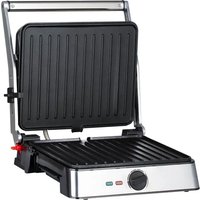
| Product Type | Grill Plate |
| Brand | Ardes |
| Model | Optimus ARGRILL02 |
| Dimensions (approx.) | 40 x 30 x 10 cm |
| Weight (approx.) | 2.5 kg |
| Power | 1500 - 2000 W |
| Voltage | 220-240 V ~ 50/60 Hz |
| Material | Cast iron with non-stick coating |
| Temperature Control | Adjustable thermostat |
| Indicator Light | Yes (power-on and ready) |
| Non-Stick Surface | Yes |
| Dishwasher Safe | No (hand wash recommended) |
| Detachable Power Cord | Yes |
| Overheat Protection | Yes |
| Cool-Touch Handles | Yes |
| Anti-Slip Feet | Yes |
| Main Function | Grilling, searing, and roasting |
| Cleaning Instructions | Wipe with damp cloth; do not immerse in water |
| Spare Parts Availability | Contact Ardes customer service |
| Reparability | Repairable by qualified technician only |
Frequently Asked Questions - Optimus ARGRILL02 ARDES
User questions about Optimus ARGRILL02 ARDES
0 question about this device. Answer the ones you know or ask your own.
Ask a new question about this device
Download the instructions for your Grill plate in PDF format for free! Find your manual Optimus ARGRILL02 - ARDES and take your electronic device back in hand. On this page are published all the documents necessary for the use of your device. Optimus ARGRILL02 by ARDES.
USER MANUAL Optimus ARGRILL02 ARDES


WARNINGS
TROUBLESHOOTING
Attention: read the precautions contained in the following booklet carefully as they provide important instructions regarding safety during installation, use and maintenance. Important instructions to keep for further reference.
- This unit can be used by children aged 8 and above and individuals with reduced physical, sensory or mental capacity, or lack of experience or knowledge, if they are provided with adequate supervision or have received instructions regarding the use of safety equipment and that they understand the risks related.
- Children must not play with the unit.
- Cleaning and user maintenance shall not be made by children unless they are older than 8 and supervised.
- Keep the equipment and its cable out of reach of children younger than 8 years of age.
- The appliance must never be operated by means of an external timer or with a separate remote control system.
- If the power cable gets damaged, it has to be replaced only in a service centre approved by the manufacturer, in order to avoid a hazard.

WARNING! The surfaces are subject to heating up during use
- Before using the appliance for the first time, clean it as indicated in the “CLEANING AND MAINTENANCE” paragraph.
- Do not position the appliance against a wall or against another appliance. Leave at least 20cm of free space behind, to the sides and over the appliance.
- Keep the vents free of obstruction.
- This appliance is designed for use at an altitude of no more than 2000m above sea level.
- The appliance can operate at 50Hz or 60Hz without adjustments.
After removing the packaging, check the appliance for any signs of damage. In case of visible damage, do not use it and contact a qualified technician.
Do not leave parts of the packaging within the reach of children.
This appliance is not a children's toy: it is an electrical device and must be treated with the necessary caution.
Before connecting the appliance, make sure that the power supply voltage matches the indication on the data plate.
Electrical safety of this appliance is assured only if it has been connected to an effective earthing system.
If the plug and socket are not compatible, the socket has to be replaced with a suitable type by skilled persons.
Do not use adapters or extension cables which do not meet current safety standards or that exceed the current carrying capacity limits.
Unplug the appliance from the mains when not in use.
Do not tug on the power cable or on the appliance itself to remove the plug from the socket.
The use of any electrical appliance requires that a number of basic rules are observed, namely:
- Never touch the appliance with wet or humid hands.
- Children must be supervised to make sure that they do not play with the appliance.
- Do not use the appliance when barefoot.
- Do not leave the appliance exposed to weathering (rain, sunlight).
- Do not subject it to rough handling.
In case of failure, disconnect it at once. Do not attempt to repair it, but take it to a service centre approved by the manufacturer.
If you decide you do not want to use this appliance any longer, disable it by cutting the power cable - of course, after disconnecting it from the socket.
If the power cable gets damaged, it has to be replaced only at a service centre approved by the manufacturer.
In case of a breakdown or malfunctioning of the appliance, disconnect it at once. Do not attempt to repair it, but take it to a service centre approved by the manufacturer.
The appliance has been designed and manufactured to operate as an electric cooker in the home. Any other use is considered inappropriate and dangerous.
Do not use the appliance out of doors.
For safety reasons, the appliance should never be opened.
During use, rest the appliance on a flat surface.
To prevent children from accidentally touching hot components, use the appliance on surfaces that are at least 85 cm high.
Keep the appliance out of reach of children and the disabled since the plates reach high temperatures.
Attention: the surfaces of the cavity and the container can get very hot during use.
Do not place the cord near sources of heat.
Do not position the appliance over or under other ovens, microwave ovens or near gas hobs.
Do not position the appliance against a wall or against another appliance. Leave at least 20cm of free space behind, to the sides and over the appliance.
Keep the vents free of obstruction.
Do not move the appliance when it is on, when it is hot, or when it contains food.
Attention: do not use the product near curtains or other combustible materials.
Pay attention to hot steam that may escape from the appliance when it is on or after opening the basket.
TECHNICAL INFORMATION
(see the image on page 2)
| 1 Container |
| 2 Basket |
| 3 Container grip |
| 4 Container opening button |
| 5 Control Panel |
| 6 Air intake |
| 7 Display |
| 8 Programs keys |
| 9 | Keys: |
| Key for setting the time and temperature | |
| Key to turn the light on | |
| Key to increase the time or temperature. | |
| Key to decrease the time or temperature. | |
| Multifunction key (turn on / turn off / pause / start) |
Technical data: see the label on the appliance.
Light source for compartment lighting
This product contains a light source of energy efficiency class G.
The light source has special features and is intended to be used only with this oven to illuminate the compartment; do not use it for other applications.
The light source can be replaced by the user with one of equivalent characteristics. Follow the instructions in the MAINTENANCE paragraph.
INSTRUCTIONS FOR USE
Contact with food
Only these parts are intended for contact with food, under the conditions indicated:
| Parts intended for contact with food | Types of food | Maximum temperature | Maximum time of contact |
| Container (1) | All 200°C 60min | ||
| Basket (2) |
- These parts can only be used with this appliance. Do not use the parts separately for other applications.
- Before using the appliance for the first time, wash the parts intended for contact with food as indicated in the Maintenance section.
INSTRUCTIONS FOR FIRST USE.
Before using the appliance for the first time, remove all packaging elements and operate the appliance empty for approximately 15 minutes at maximum temperature in a well-ventilated room to eliminate odours and fumes due to any processing residues on the internal parts of the appliance.
Remove the plug from the power outlet and let the device cool down.
Before using the appliance for the first time, clean it according to the indications in the "CLEANING AND MAINTENANCE" paragraph.
APPLIANCE USAGE
- Press the button (4), remove the container (1) from the fryer, insert the basket (2) into the container, and insert the ingredients into the container. Refer to the "PROGRAMS AND SETTINGS" paragraph for information regarding the preparation of ingredients.
Avoid food coming into contact with the heating element. Do not overfill the container and pay particular attention to foods that can rise. Never use the container without the basket.
Attention: never pour oil or other liquids into the container or basket. Use of oil is only permitted as indicated in the "PROGRAMS AND SETTINGS" paragraph.
- Insert the container (1) into the appliance.
- Insert the plug into the power socket. The button will light up to indicate that the appliance is connected to the mains.
- Press the key to activate the keys.
- Press the key to activate the keys.
- Select one of the pre-set programmes (8). The selected program will flash on the control panel.
6 Press the
6 Press the ⏻ key to select the cooking temperature or time. The symbol corresponding to the temperature or time lights up on the display (7). Use the keys to adjust the values.
- Press the key t
During cooking
Before and during cooking, the internal light can be turned on or off by pressing the key.
The display shows the remaining cooking time and the program set.
To change the cooking temperature or time, please refer to point 6 in "APPLIANCE USAGE".
To select another program, press the key and repeat points 5 to 7.
To temporarily stop cooking:
- Press the key to temporarily interrupt cooking (pause).
- Press the key again to
To end the cooking program:
- Press the key for approximately 2 seconds to end the program.
NOTE: some programs provide for shaking or overturning the food during cooking (see paragraph "PROGRAMS AND SETTINGS"). In this case, at the right time, the equipment emits acoustic signals and the display blinks. Press the button (4) and remove the container from the appliance, being sure only to touch the handle; the program stops momentarily when the container is removed; shake the container (or turn the food upside down) and put it back in the appliance; the fryer reactivates as soon as the container is reinserted and the cooking cycle resumes from the moment in which it was interrupted.
NOTE: use the handle and be careful not to touch the container and the inside of the appliance to avoid burns.
End of cooking
- Once the time has elapsed, the appliance emits 5 short beeps and the appliance switches off.
- Press the button (4), remove the container and check that cooking is completed; otherwise, reinsert the container and set a few more minutes by repeating operations 5 to 7.
- After cooking, remove the container (1) and pour the food into a suitable, heat-resistant container.
NOTE: use the handle and be careful not to touch the container and the inside of the appliance to avoid burns.
- Put the container (1) back into the fryer.
- Disconnect the appliance from the power outlet and let it cool down.
- Clean the container and the basket as indicated in the "CLEANING AND MAINTENANCE" paragraph.
PROGRAMS AND SETTINGS
List of programs
| Icon Function | Preset values | Adjusting field | SHAKE reminder | |||
| °C | min | °C | min | |||
 | Preheat 200 5 | NO | ||||
 | Fries 200 20 60-200 1-60 YES | |||||
 | Chicken 180 15 60-200 1-60 YES | |||||
 | Meat 200 20 60-200 1-60 NO | |||||
 | Vegetables 150 20 60-200 1-60 YES | |||||
 | Bake 160 30 60-200 1-60 NO | |||||
 | Reheat 80 30 60-200 1-60 NO | |||||
 | Rapid Cooling 30 1-60 NO | |||||
 | DIY (manual) | 60 10 60-200 1-60 YES | ||||
 | Extra 200 3 | 60-200 1-60 NO | ||||
(note 1) If starting to cook when the fryer is cold, add 3 minutes to the cooking time
Program customization
The programs' settings can be customized according to personal preferences*.
- Select the program to modify (its icon will flash).
- Adjust timer and temperature values.

- Press at the same time ∪ ∪ for 3 seconds until an acoustic signal is emitted.
* excluding Preheating and Rapid Cooling.
The following table outlines the indicative information to cook various food.
Use a program similar to the food to be cooked and adjust the time and temperature if necessary.
The values indicated can vary based on the dimensions of the ingredients, the quantity and the type.
Avoid cooking particularly fatty foods (e.g. sausages).
| Food | Time (min) | Temp. (°C) | note |
| CHIPS | |||
| frozen thin cut chips 12-25 200 shake | |||
| frozen chunky chips 12-25 200 shake | |||
| homemade chips * 18-25 180 shake | |||
| homemade wedges * 18-22 180 shake | |||
| homemade diced potatoes * | 12-25 180 | shake | |
| *1 - Peal and slice the potatoes2 - Carefully wash and dry3 - Pour a half tablespoon of oil in the bowl, add the potatoes and mix them to season them.4 - Remove the potatoes so the excess oil stays in the bowl. Put the potatoes in the basket.NOTE: for crispier potatoes, cut smaller pieces or use a little more oil | |||
| roast potatoes 15-22 180 shake | |||
| gratin potatoes 18-22 180 shake | |||
| MEAT AND POULTRY | |||
| steak 8-20 200 Flip over the food | |||
| pork chop 10-15 180 Flip over the food | |||
| hamburger 7-18 180 Flip over the food | |||
| sausage 13-15 160 Flip over the food | |||
| chicken breast 10-22 180 Flip over the food | |||
| spring roll | 8-12 200 | pre-heat | the appliance andshake during cooking |
| frozen chicken nuggets 6-15 200 pre-heat the appliance andshake during cooking | |||
| frozen fishfingers | 6-15 200 | pre-heat | the appliance |
| Frozen bread | 8-15 180 | pre-heat | the appliance |
| stuffed vegetables | 15-20 150 | ||
| SNACKS | |||
| cake 20-30 150 Use specific oven containers | |||
| savoury pie | 20-22 180 | Use specific oven containers | |
| muffin | 15-18 200 | Use specific oven containers | |
| desserts | 20 | 160 | Use specific oven containers |
(EN) CLEANING AND MAINTENANCE
Disconnect the plug from the socket and let the appliance cool down well before cleaning it.
In order to clean the appliance, use a soft or slightly damp cloth.
Never use abrasives or chemical solvents.
Do not use very wet substances, liquids or cloths to prevent water from entering into the appliance and irreparably damaging it.
Never use abrasive sponges to clean the inside of the appliance.
To clean the heating resistor, use a brush or a dry cloth to remove any food residue.
To clean the basket (2) and the container (1), use hot water, washing up liquid for washing dishes by hand and a nonabrasive sponge; DO NOT WASH IN THE DISHWASHER.
Do not clean the container, the basket and inside the appliance with metal tools or abrasive materials to avoid damaging the non-stick coating.
Do not use the appliance if the non-stick coating is damaged.
NEVER IMMERSE THE APPLIANCE INTO THE WATER.
Inner light:
Before replacing the light bulb, disconnect the appliance from the power supply and wait for it to cool completely.
ATTENTION: the bulb may be hot.
Remove the protection cover by unscrewing it counterclockwise and replace the bulb with one having the same technical characteristics shown on it:
- G9, 230VAC, MAX 25W, suitable for temperatures ≥ 300°C.
Replace the lid by screwing it clockwise.
(EN) TROUBLESHOOTING
| Problem | Cause | Solution |
| The appliance does not work Timer off Set timer | ||
| The chips are not cooked Too much food in the basket Reduce the quantity of food in the basket | ||
| Food is not evenly cooked During cooking, the food was not mixed | Increase the cooking temperature | |
| The fried food is not crispy Food was used which is suitable for a traditional oil fryer. | Cook for another few minutes, keeping the food mixed and see “PROGRAMS AND SETTINGS” | |
| White smoke is coming from the appliance | Fatty ingredients | Use food suitable for oven cooking or consult “PROGRAMS AND SETTINGS” |
| The container contains fatty residue from previous used | As indicated in “PROGRAMS AND SETTINGS”, avoid cooking excessively fatty food | |
| The display shows “E1” | Open circuit of the NTC temperature sensor | Clean the container and/or basket well after each use |
| The display shows “E2” | Short-circuit of the NTC temperature sensor | Turn off the appliance, and remove the plug from the socket. Contact assistance |
| The display shows “E3” | Excessive temperature (>240°C) | Turn off the appliance, and remove the plug from the socket.Let the equipment cool down with the basket removed and try to start the device again. If E3 appears again on the display, contact the support department |
(EN) DISPOSAL
PACKAGING
To respect the environment, the packaging material must be disposed of correctly, respecting separate collection.
Check the provisions of your municipality.

USER INFORMATION
Implementation of Directive 2012/19/EU on Waste Electrical and Electronic Equipment (WEEE), pertaining to reduced use of hazardous substances in electrical and electronic equipment, as well as to waste disposal.
The symbol of the crossed-out wheelie bin on the equipment or on its packaging indicates
that the product must be disposed of separately from other waste at the end of its service life.
The user must therefore take the dismissed equipment to suitable separate collection centres for electrical and electronic waste.
For more details, please contact the appropriate local authority.
Suitable segregated collection of the equipment for subsequent recycling, treatment or environmentally-friendly disposal helps prevent damage to the environment and to human health, and encourages the re-use and/or recycling of the materials that make up the equipment.
Abusive disposal of the product by the user shall result in the application of administrative fines in accordance with the laws in force.
WARRANTY
Conditions
The warranty is valid for 24 months from the date of purchase.
This warranty is valid only if it is correctly filled in and accompanied by the tax receipt proving the date of purchase.
The appliance must be delivered exclusively to our authorised Service Centre.
By warranty we mean the replacement or repair of appliance components that are faulty from the start due to manufacturing defects.
However, assistance (for a fee) is also guaranteed for products out of warranty.
The consumer is the owner of the rights applicable by the national legislation governing the sale of consumer goods; this warranty is without prejudice to those rights.
The manufacturer declines all responsibility for any damage to people, animals or things resulting from improper use of the appliance and failure to comply with the instructions indicated in the appropriate instruction booklet.
Limitations
All warranty rights and all our responsibilities expire if the device has been:
- Tampered with by unauthorised personnel.
- Used, stored or transported in an inappropriate way.
In any case, loss of performance related to the aesthetics of the product or similar that does not compromise the essence of the functions is excluded from the warranty.
If, despite the careful selection of materials and our commitment to making the product you have just purchased, you find any defects, or if you need information, we recommend that you call your local dealer.
- WARNINGS
- TECHNICAL INFORMATION
- LIGHT SOURCE FOR COMPARTMENT LIGHTING
- INSTRUCTIONS FOR USE
- CONTACT WITH FOOD
- INSTRUCTIONS FOR FIRST USE
- APPLIANCE USAGE
- DURING COOKING
- TO TEMPORARILY STOP COOKING
- TO END THE COOKING PROGRAM
- END OF COOKING
- PROGRAMS AND SETTINGS
- PROGRAM CUSTOMIZATION
- (EN) CLEANING AND MAINTENANCE
- INNER LIGHT
- (EN) DISPOSAL
- PACKAGING
- USER INFORMATION
- WARRANTY
- CONDITIONS
- LIMITATIONS
Brand : ARDES
Model : Optimus ARGRILL02
Category : Grill plate