
BIZHUB 250 PH2 5 COPY - Multifunction Printer KONICA MINOLTA - Free user manual and instructions
Find the device manual for free BIZHUB 250 PH2 5 COPY KONICA MINOLTA in PDF.


| Product type | Monochrome multifunction printer |
| Brand | KONICA MINOLTA |
| Model | BIZHUB 250 PH2 5 COPY |
| Main functions | Copy, print, scan, fax (optional), box (optional) |
| Copy speed | 25 pages per minute (A4) |
| Resolution | 600 x 600 dpi |
| Standard paper capacity | 500 sheets (1st tray) + 500 sheets (2nd tray) + manual bypass (150 sheets) |
| Maximum paper capacity | Up to 3650 sheets with options |
| Dimensions (W x D x H) | Approx. 600 x 700 x 900 mm (estimated) |
| Weight | Approx. 75 kg (estimated) |
| Power supply | 220-240 V AC, 50 Hz |
| Power consumption | Less than 1.5 kW during operation (estimated) |
| Finishing functions | Stapling, punching, center binding, sort, group |
| Advanced copy functions | Duplex copy, combine, book, multi-image, overlay, reverse B/W |
| Maintenance and cleaning | Cleaning exposure glass, document cover, control panel, emptying punch waste container |
| Safety | Class 1 laser, enhanced security, access lock, password rules |
| Spare parts and repairability | Toner bottle, staple cartridge, waste container, filters |
| General information | ENERGY STAR certified, CE conformity, detailed user guide (442 pages) |
Frequently Asked Questions - BIZHUB 250 PH2 5 COPY KONICA MINOLTA
User questions about BIZHUB 250 PH2 5 COPY KONICA MINOLTA
0 question about this device. Answer the ones you know or ask your own.
Ask a new question about this device
Download the instructions for your Multifunction Printer in PDF format for free! Find your manual BIZHUB 250 PH2 5 COPY - KONICA MINOLTA and take your electronic device back in hand. On this page are published all the documents necessary for the use of your device. BIZHUB 250 PH2 5 COPY by KONICA MINOLTA.
USER MANUAL BIZHUB 250 PH2 5 COPY KONICA MINOLTA
OpenSSL Statement 1-6
Pourperforerlescopies. 4-58
(mode Accessibility) 5-15
Copyright © 1998-2000 The OpensSsL Project. All rights reserved. Redistribution and use in source and binary forms, with or without modification, are permitted provided that the following conditions are met:
- Redistributions of source code must retain the above copyright notice, this list of conditions and the following disclaimer.
- Redistributions in binary form must reproduce the above copyright notice, this list of conditions and the following disclaimer in the documentation and/or other materials provided with the distribution.
- All advertising materials mentioning features or use of this software must display the following acknowledgment: "This product includes software developed by the OpenSSL Project for use in the OpenSSL Toolkit. (http://www.openss.org/"
- The names "OpenSSL Toolkit" and "OpenSSL Project" must not be used to endorse or promote products derived from this software without prior written permission. For written permission, please contact opensssl-core@openssll.org.
- Products derived from this software may not be called "OpenSSL" nor may "OpenSSL" appear in their names without prior written permission of the OpenSSL Project.
- Redistributions of any form whatsoever must retain the following acknowledgment:
"This product includes software developed by the OpenSSL Project for use in the OpenSSL Toolkit (http://www.openss.org/"
THIS SOFTWARE IS PROVIDED BY THE OpensSL PROJECT "AS IS" AND ANY EXPRESSED OR IMPLIED WARRANTYES, INCLUDING, BUT NOT LIMITED TO, THE IMPLIED WARRANTYES OF MERCHANTABILITY AND FITNESS FOR A PARTICULAR PURPOSE ARE DISCLAIMED. IN NO EVENT SHALL THE OpensSL PROJECT OR ITS CONTRIBUTORS BE LIABLE FOR ANY DIRECT, INDIRECT, INCIDENTAL, SPECIAL, EXEMPLARY, OR CONSEQENTIAL DAMAGES (INCLUDING, BUT NOT LIMITED TO, PROCEDURE OF SUBSTITUTE GOODS OR SERVICES; LOSS OF USE, DATA, OR PROFITS; OR BUSINESS INTERRUsION)HOWEVER CAUSED AND ON ANY THEORY OF LIABILITY, WHETHER IN CONTRACT, STRICT LIABILITY, OR TORT (INCLUDING NEGLIGENCE OR OTHERWISE)ARISING IN ANY WAY OUT OF THE USE OF THIS SOFTWARE, EVEN IF ADVISED OF THE POSSIBILITY OF SUCH DAMAGE.
This product includes cryptographic software written by Eric Young (eay@crypt-Soft.com). This product includes software written by Tim Hudson (tjh@cryptsoft.com).
Original SSLeay License
Copyright © 1995-1998 Eric Young (eay@cryptsoft.com) All rights reserved. This package is an SSL implementation written by Eric Young (eay@cryptsoft.com).
The implementation was written so as to conform with Netscapes SSL. This library is free for commercial and non-commercial use as long as the following conditions are ahead to. The following conditions apply to all code found in this distribution, be it the RC4, RSA, Ihash, DES, etc., code; not just the SSL code.
The SSL documentation included with this distribution is covered by the same copyright terms except that the holder is Tim Hudson (tjh@cryptsoft.com).
Copyright remains Eric Young's, and as such any Copyright notices in the code are not to be removed. If this package is used in a product, Eric Young should be given attribution as the author of the parts of the library used. This can be in the form of a textual message at program startup or in documentation (online or textual) provided with the package.
Redistribution and use in source and binary forms, with or without modification, are permitted provided that the following conditions are met:
- Redistributions of source code must retain the copyright notice, this list of conditions and the following disclaimer.
- Redistributions in binary form must reproduce the above copyright notice, this list of conditions and the following disclaimer in the documentation and/or other materials provided with the distribution.
- All advertising materials mentioning features or use of this software must display the following acknowledgement:
"This product includes cryptographic software written by Eric Young (eay@crypt-soft.com)"
The word 'cryptographic' can be left out if the routines from the library being used are not cryptographic related.
- If you include any Windows specific code (or a derivative thereof) from the apps directory (application code) you must include an acknowledgement:
"This product includes software written by Tin Hudson (tjh@cryptsoft.com)"
THIS SOFTWARE IS PROVIDED BY ERIC YOUNG "AS IS" AND ANY EXPRESS OR IMPLIED WARRANTYES, INCLUDING, BUT NOT LIMITED TO, THE IMPLIED WARRANTYES OF MERCHANTABILITY AND FITNESS FOR A PARTICULAR PURPOSE ARE DISCLAIMED. IN NO EVENT SHALL THE AUTHOR OR COLNTRIBUTORS BE LIABLE FOR ANY DIRECT, INDIRECT, INCIDENTAL, SPECIAL, EXEMPLARY, OR CONSEQUENTIAL DAMAGES (INCLUDING, BUT NOT LIMITED TO, PROCEDURE OF SUBSTITUTE GOODS OR SERVICES; LOSS OF USE, DATA, OR PROFITS; OR BUSINESS INTERRUPTION) HOWEVER CAUSED AND ON ANY THEORY OF LIABILITY, WHETHER IN CONTRACT, STRICT LIABILITY, OR TORT
(INCLUDING NEGLIGENCE OR OTHERWISE) ARISING IN ANY WAY OUT OF THE USE OF THIS SOFTWARE, EVEN IF ADVISED OF THE POSSIBILITY OF SUCH DAMAGE.
The licence and distribution terms for any publicly available version or derivative of this code cannot be changed. i.e. this code cannot simply be copied and put under another distribution licence [including the GNU Public Licence.]
All other product names mentioned are trademarks or registered trademarks of their respective companies
This machine is certified as a Class 1 Laser product under Radiation Performance Standard according to the Food, Drug and Cosmetic Act of 1990. Compliance is mandatory for Laser products marketed in the United States and is reported to the Center for Devices and Radiological Health (CDRH) of the U.S. Food and Drug Administration of the U.S. Department of Health and Human Services (DHHS). This means that the device does not produce hazardous laser radiation.
The label shown on page 2-19 indicates compliance with the CDRH regulations and must be attached to laser products marketed in the United States.

CAUTION
Incorrect handling may result in hazardous radiation exposure.
Use of controls, adjustments or performance of procedures other than those specified in this manual may result in hazardous radiation exposure.
This is a semiconductor laser. The maximum power of the laser diode is 5 mW and the wavelength is 770-795 nm.
Incorrect handling may result in hazardous radiation exposure.
KCLASS 1 LASER APPARAT

VAROITUS
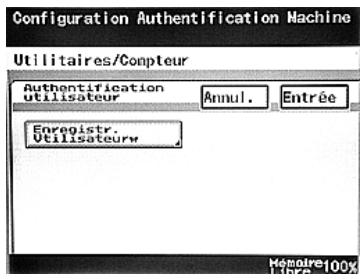
Configuration Authentication Machine

Détails
Authentication 3-34, 3-52
Authentication machine 3-34, 3-52, 12-44
Authentication serveur externe 3-37, 12-44
Formedauthentification 3-34,
3-52, 12-32, 12-44
G
Gestion Mémoire 12-79
1
Icônes 3-21
Incidents 6-28
Mode Basse consommation 3-31
Réglage Perforation 4-58