
Sound Mini HG08533A - Loudspeaker SILVERCREST - Free user manual and instructions
Find the device manual for free Sound Mini HG08533A SILVERCREST in PDF.


| Product Type | Portable Bluetooth Speaker |
| Brand | SilverCrest |
| Model | Sound Mini HG08533A |
| Connectivity | Bluetooth 5.0 |
| Battery Type | Lithium-ion, rechargeable |
| Battery Capacity | 1200 mAh |
| Playback Time | Up to 6 hours |
| Charging Time | Approximately 2 hours |
| Power Input | USB-C, 5V DC |
| Speaker Output | 3W RMS |
| Frequency Range | 100 Hz - 20 kHz |
| Impedance | 4 Ohm |
| Dimensions (W x H x D) | 100 x 70 x 40 mm |
| Weight | 150 g |
| Water Resistance | IPX5 (splash-proof) |
| Material | ABS plastic |
| Controls | Power, Volume, Play/Pause, Bluetooth pairing |
| Microphone | Yes (hands-free calls) |
| Included Accessories | Speaker, USB-C charging cable, User manual |
| Compatibility | Smartphones, tablets, computers with Bluetooth |
| Safety Features | Overcharge protection, short-circuit protection |
| Maintenance | Wipe with dry cloth, avoid liquids |
| Spare Parts | Not available separately, contact service |
| Repairability | Not user-serviceable, contact qualified technician |
| General Usage | Suitable for indoor and outdoor use |
Frequently Asked Questions - Sound Mini HG08533A SILVERCREST
User questions about Sound Mini HG08533A SILVERCREST
0 question about this device. Answer the ones you know or ask your own.
Ask a new question about this device
Download the instructions for your Loudspeaker in PDF format for free! Find your manual Sound Mini HG08533A - SILVERCREST and take your electronic device back in hand. On this page are published all the documents necessary for the use of your device. Sound Mini HG08533A by SILVERCREST.
USER MANUAL Sound Mini HG08533A SILVERCREST
BLUETOOTH® SPEAKER SOUND MINI
GB
BLUETOOTH® SPEAKER
Operation and Safety Notes
FI
BLUETOOTH® -KAIUTIN
Operation and Safety Notes Page 5
FI




Warnings and symbols used .... Page 6 Introduction Page 8 Intended use.... Page 8 Trademark notices Page 8 Scope of delivery.... Page 9 Parts description..... Page 9 Technical data Page 10 Safety.... Page 11 Safety instructions for built-in rechargeable batteries. Page 13 Before use.... Page 14 Charging Page 14 Using the product.... Page 15 Establishing a Bluetooth® connection..... Page 15 Functions of the buttons ...... Page 16 Connecting via the AUX-in jack.... Page 18 Switching between AUX-in and Bluetooth® connections Page 18 TWS pairing. Page 18 Cleaning Page 19 Storage during non-use Page 20 Troubleshooting Page 20 Disposal...... Page 21 Simplified EU declaration of conformity.... Page 22 Warranty and service.... Page 23 Warranty Page 23 Warranty claim procedure.... Page 24 Service Page 24
| Warnings and symbols usedThe following symbols and warnings are used in the operating instructions, on the packaging and on the product: | |
 | DANGER! This symbol with the signal word “DANGER” indicates a hazard with a high level of risk which, if not avoided, will result in serious injury or death. |
 | WARNING! This symbol with the signal word “WARNING” indicates a hazard with a medium level of risk which, if not avoided, could result in serious injury or death. |
 | CAUTION! This symbol with the signal word “CAUTION” indicates a hazard with a low level of risk which, if not avoided, could result in minor or moderate injury. |
 | ATTENTION! This symbol with the signal word “ATTENTION” indicates possible property damage. |
 | NOTE: This symbol with the signal word “NOTE” provides additional useful information. |
 | This mandatory sign indicates to wear suitable protective gloves! Follow the instructions of this warning to avoid hand injuries caused by objects or contact with hot or chemical materials. |
 | This symbol means that the operating instructions must be observed before using the product. |
 | This icon indicates the position of the hidden USB port, which is used for charging the internal battery. |
 | WARNING! EXPLOSION HAZARD!A warning with this symbol and word “WARNING! EXPLOSION HAZARD” indicates the potential threat of explosion. Failure to observe this warning may result in serious or fatal injuries and potential property damage. Follow the instructions in this warning to prevent serious injuries, a danger to life or property damage! |
 | The loudspeaker can withstand a maximum immersion depth of 1 m water for up to 30 minutes. |
 | CE mark indicates conformity with relevant EU directives applicable for this product. |
BLUETOOTH® SPEAKER
Introduction
We congratulate you on the purchase of your new product. You have chosen a high quality product. The instructions for use are part of the product. They contain important information concerning safety, use and disposal. Before using the product, please familiarise yourself with all of the safety information and instructions for use. Only use the product as described and for the specified applications. If you pass the product on to anyone else, please ensure that you also pass on all the documentation with it.
Intended use
This BLUETOOTH® SPEAKER (hereinafter referred to as "product") is a consumer electronic intended to render audio transmitted via Bluetooth® or a jack lead connection.
Any other use is considered improper. Any claims resulting from improper use or due to unauthorised modification of the speaker will be considered unwarranted. Any such use is at your own risk. The product is not intended for commercial use.
Trademark notices
- USB is a registered trademark of USB Implementers Forum, Inc.
- The Bluetooth® word mark and logos are registered trademarks owned by Bluetooth® SIG, Inc. and any use of such marks by OWIM GmbH & Co. KG is under license.
- The Silvercrest trademark and trade name is the property of their respective owners.
Any other names and products are trademarks or registered trademarks of their respective owners.
Scope of delivery
Remove all packaging material and check the contents of the packaging for completeness. Please contact the dealer if parts are missing or damaged.
1 Bluetooth® Speaker
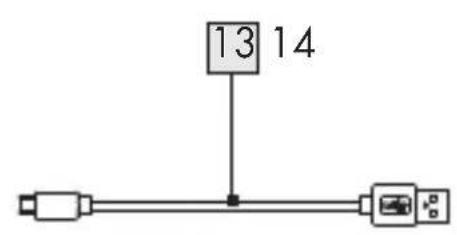
1 Charging cable (USB Type C / USB Type A)
1 AUX cable (3.5 mm jack plug)
1 Instructions for use
1 Quick start guide
Parts description
Please refer to the fold out page.
1 LED (Bluetooth / TWS / AUX-IN indicator) 2 Power ON / OFF button 3 Bluetooth / TWS button 4 ▶ button (Playback / Pause) 5 — button (Decrease volume / Skip backwards) 6 + button (Increase volume / Skip forwards) 7 LED (battery charging indicator) 8 Hand strap holder 9 Speaker 10 3.5 mm AUX-IN jack 11 USB Type C input socket 12 Plastic cover 13 USB cable (Type A to Type C) 14 3.5 mm AUX cable
15 Quick start guide 16 Instruction for use
- Technical data
USB-C socket
power supply: 5 V, 1000 mA
Battery power supply: 1 x 3.7 V rechargeable
lithium-ion battery with
1800 mAh (Battery is not
replaceable.)
Music output: max. 6 W RMS
Wireless standard: Bluetooth ® 5.3
Frequency band: 2400 MHz-2483.5 MHz
Max. transmitted
power: 1 mW
Charging socket: USB Type C
AUX-in jack: 3.5 mm jack plug
Dimensions: approx. 12.4 x 7.5 x 4.6 cm
(W x H x D)
Weight: approx. 330 g
Ingress protection: IPX7
Operating conditions: 10°C–35°C,
40%–85% rel. humidity
Storage temperature: -20°C to +60°C
Operation time: approx. 5 hours (at medium volume)
Charging time: approx. 3 hours
Bluetooth® protocols:
AVRCP (remotely controls key audio functions via mobile
phone), A2DP (wireless audio transmission)

Safety
This chapter provides important safety information for handling the product. Improper use can result in personal injury and property damage. Before using the product, please familiarise yourself with all of the safety instructions and instructions for use! When passing this product on to others, please also include all the documents!

DANGER!
DANGER TO LIFE AND RISK OF ACCIDENT FOR INFANTS AND CHILDREN!

DANGER!
RISK OF SUFFOCATION! Packaging material (e.g., film or polystyrene) should not be used for playing. Always keep children away from the packaging material. The packaging material is not a toy.
This product can be used by children aged 8 years and above and persons with reduced physical, sensory, or mental capabilities or lack of experience and knowledge if they have been given supervision or instruction concerning use of the product in a safe way and understand the hazards involved. Children shall not play with the product. Cleaning and user maintenance shall not be made by children without supervision.

ATTENTION! RISK OF DAMAGE
This product does not contain any parts which can be serviced by the user. The rechargeable battery cannot be replaced.
Check the product before every use! Discontinue use if any damage to the product or the charging cable is detected!
If you notice anything unusual during use (e.g., unusual noise, strange odor, or smoke), switch the product off immediately and disconnect all cables. Do not use the product anymore.
The product's rechargeable battery must only be charged in dry environments as it is not protected from splash water when the socket cover 12 for USB C charging socket 11 is left open. Please also note the instructions for use from the manufacturer of the charger.
Sudden temperature changes may cause condensation inside the product. In this case, allow the product to acclimatize for some time before using it again.
Do not place burning candles or open fire on or next to the product.
Do not use the product near heat sources such as radiators or other devices emitting heat!

WARNING! EXPLOSION HAZARD!
Do not throw the product into fire and do not expose to high temperatures.
Never open the housing of the product as there is a risk of explosion! The product has no internal parts requiring maintenance.

WARNING!
Wireless interference?
Switch the product off on airplanes, in hospitals, service rooms, or near medical electronic systems. The wireless signals transmitted could impact the functionality of sensitive electronics. Keep the product at least 20 cm from
pacemakers or implantable cardioverter defibrillators, as the electromagnetic radiation may impair the functionality of pacemakers. The radio waves transmitted could cause interference in hearing aids. Do not place the product near flammable gasses or potentially explosive areas (e.g. paint shops) with the wireless components on, as the radio waves emitted can cause explosions and fire.
NOTE: When using the product it is recommended that ALL cables (USB / AUX) are less than 3 meters in length to avoid any interference.
ATTENTION!
The range of the radio waves varies by environmental conditions. In the event of wireless data transmission, unauthorised third parties receiving the data cannot be excluded. The OWIM GmbH & Co KG is not responsible for interference with radios or televisions due to unauthorised modification of the device. The OWIM GmbH & Co KG further assumes no liability for using or replacing cables and devices not distributed by OWIM. The user of the device is fully responsible for correcting interference caused by such unauthorised modification of the device, as well as replacement of such devices.

WARNING! Safety instructions for built-in rechargeable batteries
The product may not be covered while charging. If liquids leak from the product, these may not come into contact with the skin, eyes or the mucous membranes, there exists the danger of chemical burns. Corresponding protective gloves have to be used.
If the skin, eyes or the mucous membranes have come into contact with the liquid, the concerned spots have to be washed with water and a doctor has to be sought immediately.

WEAR PROTECTIVE GLOVES! Leaked or damaged batteries / rechargeable batteries can cause burns on contact with the skin. Wear suitable protective gloves at all times if such an event occurs.
Before use
Before use, verify the package contents are complete and undamaged! Place the product on a level, even surface for operation. - Charging product may only take place in a dry environment.
Charging
The integrated rechargeable battery must be charged prior to first use.
NOTE: This product may not be charged via the USB port of notebooks etc.
When the integrated rechargeable battery is drained, there will be a notification sound signal 30 min before the end of the battery and the LED 7 flashes red. The integrated rechargeable battery should then be charged as soon as possible.
■ Depending on the volume and the age of the battery, the operating time of the product is approx. 5 hours of music playback when fully charged.
- Insert the USB-C plug of the charging cable into the USB-C charging socket 11 of the product. Insert the USB
plug of the charging cable 13 into the USB port on a USB adapter (not included in scope of delivery).
NOTE: The LED 7 will light up red whilst charging and then turn off once charging is complete. The charging time for a drained battery is approx. 3 hours. NOTE: The product may be used whilst charging.
However, doing so will at a minimum double the charging time.
Once charging is complete, remove the USB-C plug of the charging cable 13 from the product.
● Using the product
Press the button2 until the LED 1 flashes white and a signal tone sequence sounds. The product will now attempt to connect to the playback device (e.g. smartphone or computer).
- Establishing a Bluetooth connection:
Remove all plugs from the AUX-in jack before you attempt to establish a Bluetooth® connection. - Switch on the playback device and make sure its Bluetooth® mode is on. On the product press in button 3 for 2 seconds until the LED 1 flashes white and a signal tone sequence sounds. The product will now attempt to connect to the playback device (e.g. smartphone or computer). The product identification on the playback device will be "SOUND MINI". On the playback device "ACCEPT" the connection. Please note the requirements of the software on the playback device.
■ Once the connection is made the LED will light up white and a signal tone sequence sounds. The maximum range of the connection is approx. 10 m, but this may be reduced due to the geometry of the space (obstructing furniture, walls, etc.). The playback device must support Bluetooth® standard 5.3 otherwise you may not be able to use all the functions.
● Functions of the buttons
■ Start a playlist on your playback device.
The product has 5 buttons and these control the following functions:
| Button Function | |
 | - Press to switch the product ON or OFF. |
 | - Press briefly during playback to pause or continue playback. |
 + + | - Press briefly to pair two units before they connect to an external Bluetooth® playback device. A signal tone will be heard if pairing has been carried out successfully. The two speakers now work as stereo speakers.- Press briefly press again to break the current TWS connection, a signal tone will be heard.- Press briefly during playback to increase the volume, one beep will sound when the maximum volume has been reached.- Press and hold for 2 seconds during playback to skip forwards to the next song in the playlist. |
| - | - Press briefly during playback to decrease the volume, one beep will sound when the minimum volume has been reached.- Press and hold the button until playback of the current track jumps back to the beginning.- Then the button must be released briefly and held again.- Previous title in the list will start. i NOTE: Depends on the playback Application (App), skip to previous title operation may differ slightly. |
NOTE: When you change the volume on the product, the volume on the playback device will also change. This volume synchronization function depends on the operating system and the brand of your playback device.
Connecting via the AUX-in jack
NOTE: Music playback via the AUX-in jack 10 has a higher priority over a Bluetooth® connection.
Once the AUX cable is plugged into the AUX-in jack 10, the Bluetooth® wireless connection will be disconnected. Music playback is now switched to AUX-in only and the LED 1 lights up green. If the product is off, press the button 2 until the signal LED 1 lights up green and a signal tone sequence sounds. ■ Switch the playback device on and start playback. Set the highest possible volume on the playback device. Then adjust the volume with the +/- buttons 6 5 on the speaker.
- Switching between AUX-in and Bluetooth® connections
To resume music playback via Bluetooth connection, unplug the AUX cable 14 from the AUX-in jack 10. The product will then search for the previously paired playback device (if any) and re-establish the Bluetooth connection automatically.
TWS pairing
NOTE: The TWS (True Wireless Stereo) function is only available if two of these products have been purchased and both have the same model number.
Turn on both products and make sure they are both not connected to another device via Bluetooth®.
Press the button on one of the products which will then by default set it as the "primary" unit. A beep will sound. When pairing between both products has been carried out successfully, the LED 1 of the connected "secondary" unit stops flashing and a sequence of beeps will sound.
The “primary” unit LED will still be flashing waiting to pair with the playback device. Once the “primary unit” has successfully paired with the playback device, both the “primary” and “secondary” units can be played and controlled synchronously during Bluetooth® playback mode.
Press the button 3 again to break the TWS pairing connection, the LED 1 on the connected "secondary" unit flashes and a signal tone sequence sounds.
NOTE: The product which had its *button 3 pressed first will become the "primary" unit (in the left audio channel), and the other unit will then by default become the "secondary" unit (in the right audio channel).
Cleaning
Switch the product off and remove all cables before cleaning. Only clean the outside of the product using a clean, dry cloth. Never use corrosive liquids or abrasive cleaning agents. Use a slightly moistened cloth and a mild cleaning agent to remove stubborn dirt. When cleaning the speaker, the USB/AUX-IN cover should be closed.
Storage during non-use
Store the product in a dry environment when not in use. Protect it from dust and direct sunlight. The rechargeable battery needs to be charged regularly.
Troubleshooting
Fault
Possible cause
Action
No functions
Battery drained.
Recharge the battery as described in the "Charging" section of these instructions.
No Bluetooth® connection
Error operating the product.
If necessary, unplug the AUX cable from the AUX-in jack.
Switch the product off and on again and increase the volume.
Playback device error.
○ Check to see if the product was detected by the playback device.
○ Disconnect the playback device and pair the speakers with your playback device again.
No music playback via Bluetooth®
Error operating the product.
○ Check to see if the AUX cable 14 is still inserted into the AUX-in jack 10, if it is remove it.
Turn the speaker off and on again.
○ Press the button 3 to start a new connection to the playback device.
○ Increase the volume on the playback device.
No music playback via AUX-in connection
Error connecting the AUX cable 14
○ Reconnect the AUX cable 14 to the playback device.
The volume at the playback device or at the product is too low and has to be increased.
● Disposal
Packaging:
The packaging is made of environmentally friendly materials, which may be disposed of through your local recycling facilities.
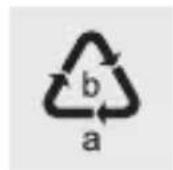
Observe the marking of the packaging materials for waste separation, which are marked with abbreviations (a) and numbers (b) with the following meaning: 1-7: plastics / 20-22: paper and fibreboard / 80-98: composite materials.
Product:

Contact your municipality for information on how to dispose of your worn-out product.

The adjacent symbol of a crossed-out dustbin on wheels indicates that this product is subject to Directive 2012/19/EU. This directive states that at the end of its life, this product must not be disposed of through regular household refuse but must be returned to special collection sites, recycling depots, or waste management companies.
This disposal is free of charge to you.
Protect the environment and dispose of properly.
The product is recyclable, subject to extended manufacturer responsibility, and collected separately. Further information can be obtained from your local authority.
The built-in rechargeable battery cannot be removed for disposal. Return the product completely to a collection site for used electronics.
● Simplified EU declaration of conformity
Hereby, OWIM GmbH & Co. KG, Stiftsbergstraße 1, 74167 Neckarsulm, GERMANY declares that the product BLUETOOTH® SPEAKER HG08533A / HG08533B / HG08533C is in compliance with Directive 2014/53/EU and 2011/65/EU.
The full text of the EU declaration of conformity is available at the following internet address: www.owim.com

● Warranty and service
Warranty
The product has been manufactured to strict quality guidelines and meticulously examined before delivery. In the event of product defects, you have legal rights against the retailer of this product. Your legal rights are not limited in any way by our warranty detailed below.
The warranty for this product is 3 years from the date of purchase. The warranty period begins on the date of purchase. Please keep the original sales receipt in a safe location. This document is required as your proof of purchase.
Should this product show any fault in materials or manufacture within 3 years from the date of purchase, we will repair or replace it – at our choice – free of charge to you. This warranty becomes void if the product has been damaged, or used or maintained improperly.
The warranty applies to defects in material or manufacture. This warranty does not cover product parts subject to normal wear, thus possibly considered consumables (e.g. batteries) or for damage to fragile parts, e.g. switches, rechargeable batteries or glass parts.
● Warranty claim procedure
To ensure quick processing of your case, please observe the following instructions:
Please have the till receipt and the item number (IAN 397016_2107) available as proof of purchase.
You will find the item number on the rating plate, an engraving, on the front page of the instructions for use (bottom left), or as a sticker on the rear or bottom of the product.
If functional or other defects occur, please contact the service department listed either by telephone or by e-mail.
You can return a defective product to us free of charge to the service address that will be provided to you. Ensure that you enclose the proof of purchase (till receipt) and information about what the defect is and when it occurred.
Service

Service Great Britain
Tel.: 08000569216
E-Mail: owim@lidl.co.uk
● = Fault
● = Possible cause
○ = Remedy
● = No functions
● = Battery empty.
⚠️ WARNING! EXPLOSION HAZARD!
Model No.: HG08533A / HG08533B / HG08533C
Version: 05/2022


- BLUETOOTH® SPEAKER SOUND MINI
- BLUETOOTH® SPEAKER
- INTRODUCTION
- INTENDED USE
- TRADEMARK NOTICES
- SCOPE OF DELIVERY
- PARTS DESCRIPTION
- TECHNICAL DATA
- SAFETY
- DANGER
- DANGER TO LIFE AND RISK OF ACCIDENT FOR INFANTS AND CHILDREN
- ATTENTION! RISK OF DAMAGE
- WARNING! EXPLOSION HAZARD
- WARNING
- WIRELESS INTERFERENCE
- ATTENTION
- WARNING! SAFETY INSTRUCTIONS FOR BUILT-IN RECHARGEABLE BATTERIES
- BEFORE USE
- CHARGING
- ● USING THE PRODUCT
- ESTABLISHING A BLUETOOTH CONNECTION
- ● FUNCTIONS OF THE BUTTONS
- CONNECTING VIA THE AUX-IN JACK
- SWITCHING BETWEEN AUX-IN AND BLUETOOTH® CONNECTIONS
- TWS PAIRING
- CLEANING
- STORAGE DURING NON-USE
- TROUBLESHOOTING
- ● DISPOSAL
- PACKAGING
- PRODUCT
- THIS DISPOSAL IS FREE OF CHARGE TO YOU
- ● SIMPLIFIED EU DECLARATION OF CONFORMITY
- ● WARRANTY AND SERVICE
- WARRANTY
- ● WARRANTY CLAIM PROCEDURE
- SERVICE
- SERVICE GREAT BRITAIN
- ⚠️ WARNING! EXPLOSION HAZARD
Brand : SILVERCREST
Model : Sound Mini HG08533A
Category : Loudspeaker