
VRR 50414 VW - Robot vacuum BEKO - Free user manual and instructions
Find the device manual for free VRR 50414 VW BEKO in PDF.


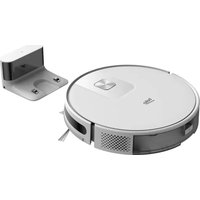
| Product type | Robotic vacuum cleaner |
| Brand | Beko |
| Model | VRR 50414 VW |
| Dimensions (diameter x height) | 33 cm x 9 cm |
| Weight | 3 kg |
| Power supply | Rechargeable lithium-ion battery 14.4 V / 2600 mAh |
| Battery life | 120 minutes |
| Charging time | 4 to 5 hours |
| Dustbin capacity | 0.6 L |
| Filtration | HEPA filter |
| Noise level | 65 dB |
| Main functions | Automatic cleaning, scheduled programming, anti-fall sensors, anti-collision sensors, powerful suction, side brushes, silent mode |
| Maintenance and cleaning | Empty the dustbin after each use; clean the filter every week; clean the side brushes every month |
| Safety | Anti-fall sensors, automatic shutdown in case of overheating, protection against electrical overloads |
| Spare parts and repairability | Filter, brushes, battery available; estimated repairability score 8/10 |
| Warranty | 2 years |
| General information | White and gray color; compatible with all types of floors (tile, parquet, carpet) |
Frequently Asked Questions - VRR 50414 VW BEKO
User questions about VRR 50414 VW BEKO
0 question about this device. Answer the ones you know or ask your own.
Ask a new question about this device
Download the instructions for your Robot vacuum in PDF format for free! Find your manual VRR 50414 VW - BEKO and take your electronic device back in hand. On this page are published all the documents necessary for the use of your device. VRR 50414 VW by BEKO.
USER MANUAL VRR 50414 VW BEKO
Robot Vacuum Cleaner
User Manual

VRR 50414 VW
DE - EN - BG - CS - HR - HU - IT - NL - PL - RO - SK - FR - SQ - SR

Cleaning brush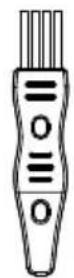
Remote control
3 Overview
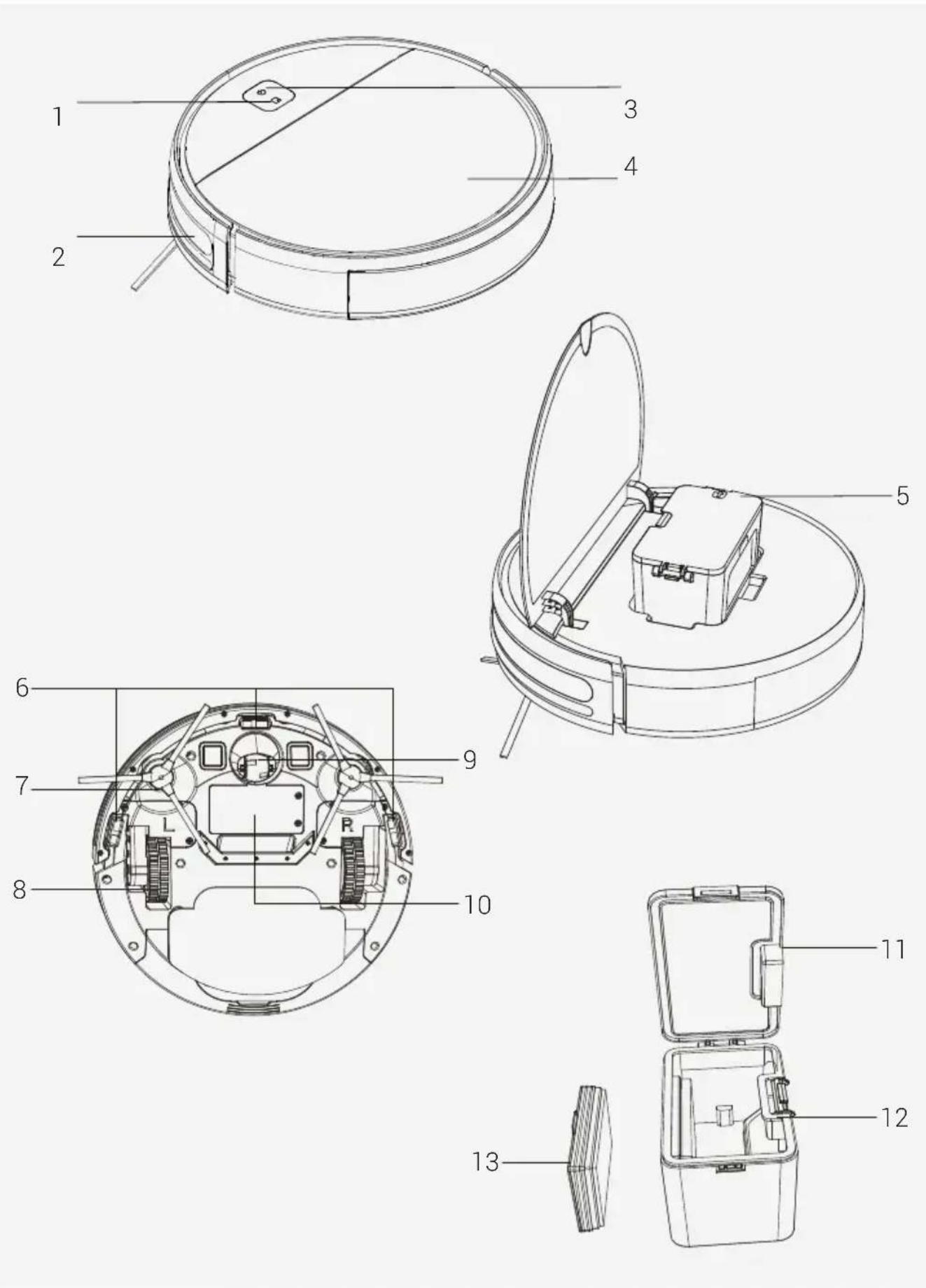
3 Overview

Stop cleaning
Please read this guide first!
Dear Customer,
Thank you for choosing a Beko product. We would like you to achieve the optimal efficiency from this high quality product which has been manufactured with the state of the art technology. Please make sure you read and understand this guide and supplementary documentation fully before use and keep it as a reference. Include this guide with the unit if you hand it over to someone else. Observe all warnings and information herein and follow the instructions.
Symbols and their meanings
Following symbols have been used throughout this guide:

Important information and beneficial advices regarding the usage of the device.

WARNING: Warnings about dangerous situations regarding safety of life and property.

Protection class against electric shock.
1 Important safety and environmental instructions
This section contains safety instructions to prevent hazards that can result in injury or property damage. Any warranty is void if these instructions are not followed.
1.1 General safety
• This appliance complies with international safety standards. • This appliance can be used by children 8 years old and over, people with physical, sensory or mental challenges, or people with lack of experience or knowledge, as long as control is ensured or information is provided regarding safe usage of the device and the hazards involved. Children must not play with the appliance. Cleaning and user maintenance should not be carried out by unattended children.
- Do not use the appliance if the power cord or the appliance is damaged. Contact authorized service.
- Keep the appliance and its cable out of the reach of children under 8 years of age.
- Do not power your device with a multi-socket.
- Your mains power supply should be in alignment with the specified information on the type tag of the appliance.
- Do not use the appliance with an extension cord. • To prevent damage to the power cord, prevent it from being pinched, crimped, or rubbed against sharp edges.
- Do not touch the plug of the appliance with damp or wet hands while the appliance is plugged in.
- Do not pull on the cord while unplugging the appliance.
1 Important safety and environmental instructions
- Do not vacuum flammable materials and ensure that the cigarette ashes are cooled down before vacuuming them.
- Do not vacuum water and other fluids.
- Protect the appliance against precipitation, humidity and heat sources.
- Do not use the appliance in or near explosive or flammable environments and substances.
- Unplug the appliance before cleaning and maintenance. This product is not designed for commercial use; it is intended for use at home and in applications as follows:
- In staff kitchens of stores, offices, and other working environments,
- In farm houses,
- By customers in hotels, motels, or other accommodation facilities;
- In hostels, or similar environments.
- Sleeping places and breakfast environments.
- Do not immerse the appliance or its power cord in water for cleaning.
- Do not disassemble the appliance.
- Use only original parts or parts recommended by the manufacturer.
To prevent blockage of the filter or damage to the motor, do not vacuum cement, plaster, or fragments of compressed paper.
Use the appliance only with the adapter delivered with the appliance.
- Do not use the appliance without filters; it may get damaged.
1 Important safety and environmental instructions
- If you keep the packaging materials, keep them out of the reach of children.
• This appliance is not intended to be used by persons, including children, with physical, sensory or mental disabilities, or those who have not adequate experience and knowledge regarding its use, unless they are under the supervision of a person responsible for their safety or they are informed about the operation of the appliance.
• Children shall be supervised to prevent them from playing with the appliance.
• To avoid any risk of hazard, a damaged adapter shall be replaced by the manufacturer, the authorized representative of the manufacturer, or a similarly qualified technician.
- Keep your fingers, hair, and loose clothes away from moving parts or clearances while vacuuming.
- Please discard used batteries in accordance with local laws and regulations.
- The batteries in this appliance may only be replaced by the authorized service.
- Do not use batteries of different types or old and new batteries together.
- Do not short circuit the supply terminals.
- Shall be used with INR18650 CM 2000mAh batteries only.
1 Important safety and environmental instructions
• This appliance shall not be operated by children and people with limited physical, sensory, or cognitive skills, or people with lack of experience and knowledge, unless they are under supervision or they are provided with the relevant instructions. • Children shall be supervised to prevent them from playing with the appliance. - Do not put weight on the appliance. Make sure that children and domestic animals do not get on the appliance. - Do not run the appliance on high grounds like tables or chairs. - The appliance is only to be used with the unit provided.
- The appliance is not to be used by persons (including children) with reduced physical, sensory, or mental capabilities, or lack of experience and knowledge, unless they have been given supervision or instruction. • This appliance can be used by children aged from 8 years and above and persons with reduced physical, sensory, or mental capabilities or lack of experience and knowledge if they have been given supervision or instruction concerning use of the appliance in a safe way and understand the hazards involved. • Children being supervised not to play with the appliance.
1 Important safety and environmental instructions
- Cleaning and user maintenance shall not be made by children without supervision. This appliance contains batteries that are only replaceable by skilled persons.
1.2 Compliance with the WEEE regulations and waste disposal

This product complies with EU WEEE Directive (2012/19/EU). This product bears a classification symbol for waste electrical and electronic equipment (WEEE).
This symbol indicates that this product shall not be disposed with other household wastes at the end of its service life. Used device must be returned to official collection point for recycling of electrical and electronic devices. To find these collection systems please contact to your local authorities or retailer where the product was purchased. Each household performs important role in recovering and recycling of old appliance. Appropriate disposal of used appliance helps prevent potential negative consequences for the environment and human health.
1.3 Packaging information

The product's packaging is made of recyclable materials, in accordance with the National Legislation.
Do not dispose of the packaging waste with the household waste or other wastes, dispose it to the packaging collection areas specified by local authorities.
1.4 Waste batteries

This symbol on rechargeable batteries/ batteries or on the packaging indicates that the rechargeable battery/battery may not be disposed of with regular house hold rubbish. For certain rechargeable batteries/batteries, this symbol may be supplemented by a chemical symbol. Symbols for mercury (Hg) or lead (Pb) are provided if the rechargeable batteries/batteries contain more than 0,0005% mercury or more than 0,004% lead.
Rechargeable batteries/batteries, including those which do not contain heavy metal, may not be disposed of with household waste. Always dispose of used batteries in accordance with local environmental regulations. Make enquiries about the applicable disposal regulations where you live.
1.5 CE Declaration of Conformity
As Arçelik A.Ş., we declare that this product and/or these products comply with the directive 2014/53/EU. The full text of the EU declaration of conformity is available at the following website: beko.com.tr
1.6 What to do for energy saving
- When using your appliance, adjust the speed settings according to the surface, in order to save energy.
- Normally, lower speeds are used when cleaning hard surfaces while high speeds are used for cleaning carpets.
2 Box content

Robot Vacuum Dustbin 2x Side Brush

Product documentation (2 pcs) Cleaning brush
1x Adapter User manual and Remote controller
Remote controller
3 Overview

3.1 Checks and components
- Spot cleaning button
- Omnidirectional lens
- Power button
- Surface cover
- Dust box
- Lower visual sensor
- Side brush
- Driving wheel
- Universal wheel
- Battery
- Dust box flip
- Dust box conductive spring
- HEPA filter
3.2 Technical data
| Adapter voltage | 100-240V~, 50/60 Hz |
| Adapter output 19 V 0.6 A | |
| Battery Li-ion: 14.4V / 2 Ah | |
| Charging period: 3-4 hours | |
| Operation time | Up to 100 minutes (in mute position) |
| Dust container capacity 0.3 L | |
| Operating time | Maximum: 80 minsQuiet: 100 mins |
Parameter of External Power Supply
Manufacturer:
E-TEK Electronics Manufactory Co., LTD
Model Identifier: ZD012A190060EU
Output Current: 0.6 A
Output Power: 11.4W
Average active
efficiency: 86.37%.
Efficiency at
low load (10%): 85.71%
No-load power
consumption: 0.074W
4 Installation
1 - Remove the protective sponges.

2- Install the side brush
Side brush installation: align the holes and press gently to fix the side brush on the device.

3- Connect to power;


Charge: Plug the cleaner into the adapter to charge (when charging, the indicator light breathes; when charging is complete, the light stays on. Charging time is about 3 hours).
5 Operation

Please charge the machine before first use.
5.1 Operation
Product Usage - Starting Cleaning
This product has two cleaning modes to choose from according to different cleaning needs. You can start these two cleaning modes through the cleaner.
Automatic Cleaning
Setting method: In the power-off state, press and hold the power button. After the indicator of the main unit is on, indicating that the main unit is powered on, press the power button again.

Spot Cleaning
Applicable scenario: The cleaning mode is applicable to the ground environment where rubbish is concentrated. The main unit cleans the ground in a spiral path in the specified area and returns to the original point after cleaning.
Setting method: Press the button ☐ on the cleaner to start spot cleaning.
Pause, Wake-up and Shutdown
Pause: When the main unit is working, press the power button on the main unit to suspend the main unit.
Wake-up: After the main unit is suspended for more than 10 minutes, the main unit activates the sleep mode (the indicator of the main unit is off). Press the power button on the main unit to wake up the main unit and press the power key on the remote control to restart the main unit.
5 Operation
Power-off: After the main unit is suspended, press and hold the power button on the main unit. If indicator of the main unit is off, the product is powered off.
* After the main unit completes operation, you are advised not to shut down the main unit. Keep the main unit in the charging status so that it can work better in the next operation.

WARNING: If the charging level is too low, the cleaning cannot be started. Please charge the appliance before starting the cleaning.

WARNING: Before the cleaning, tidy up all cables to prevent disconnections due to entanglement/pulling of the cables and to prevent damage to the furniture.
Vacuum power selection
You may select the desired cleaning power from the remote controller.
- Quiet
- Maximum
Start/Pause
Suction
6 Cleaning and maintenance
Turn off the appliance and unplug it before cleaning it.

WARNING: Never use gasoline, solvent, abrasive cleaners, metal objects or hard brushes to clean the appliance.
6.1 Cleaning the dust container and filters

You may call our call center to order a new filter when your filter reaches the end of its expected life, is deformed or needs to be replaced for a reason.

To achieve the maximum performance with EPA filter, clean it with a brush after each cleaning.
EPA filter is a replaceable accessory.
If you performed a cleaning operation in a space where there is construction dust and dust with very tiny particles, replace your filter with a new one in order not to experience a loss of performance.
Parts Maintenance – Dust Box
- Press the button on the dust box to remove the dust box.

- Open the side cover of the dust box.

6 Cleaning and maintenance
- Dump rubbish.

- Take out the HEPA filter.

- Tap the HEPA filter to remove dust.

- Clean the dust box with a cloth.

- Dry the dust box and filter component to guarantee their service life.

It is recommended to remove dust if the HEPA filter is used for 15~30 days. The maximum service life of the HEPA filter is three months.
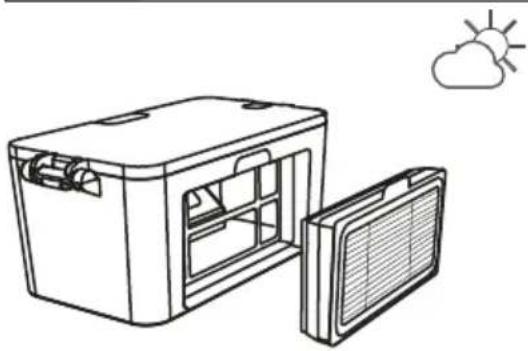
6 Cleaning and maintenance
- Put the HEPA filter back into the dust box.

Before installing the HEPA filter, ensure that the HEPA filter is dry. Do not expose the HEPA filter to sunlight.
- Close the cover of the dust box and install the dust box on the main unit.
6.4 Cleaning of the Sensors & Front wheel
Parts Maintenance: Lower Visual Sensor, Driving Wheel and Universal Wheel

The lower visual sensor and bumper contain sensitive electronic components. Use a dry cloth to clean the parts. Do not use a wet cloth in case water enters the parts and causes damage.
- Cleaning the lower visual sensor.

- Cleaning the driving wheel and universal wheel.

- If you do not use the product for a long time, fully charge the product and then power off the product before you store the product. Charge the product every three months in case of over-discharge of the battery.
- If the battery is over-discharged or is not used for a long time, the product may not be rechargeable. Contact after-sales service personnel of the company for maintenance. Do not disassemble the product.
7 Troubleshooting
Troubleshooting
Please check the table below to solve your problems.
| Prompt Tone Failure Cause Solution | ||
| One high beep Bumper stuck | Check whether the bumper can rebound normally | |
| Two high beep Robot suspended | Put the robot back to the ground and press the cleaning button again | |
| One low beep One high beep | Battery low Charge the robot | |
| One low beep Two high beep | Robot is trapped | Move the robot to a barrier-free location and press the cleaning button |
| Two low beep One high beep | Abnormal side brush | Check whether the side brush is wound by wire and clean up the entanglement |
| Two low beep Two high beep | Wheel jammed | Check whether the wheel is entangled with foreign objects and clean up the entangled |
Robot vacuum cleaner


with brush
2x side bins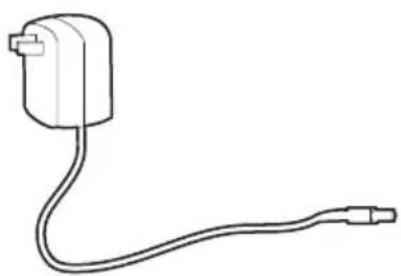
1x Adapter
Remote control
3 Overview

3.1 Checks and components
:E-TEK Electronics Manufactory Co., LTD

Stain cleaning


Remote control
3 Overview

3.1 Controls and components

Spot cleaning
6 Cleaning and maintenance
- Remove the HEPA filter.

6 Cleaning and maintenance
Model identifier:
ZD012A190060EU
Input power: 100-240
Input frequency: 50/60Hz

- Open the side cover on the dust box.

- Tap the HEPA filter to remove dust.

- Clean the dust box with a cloth.


Remote control
3 Overview

3 Overview
Electronics Manufactory Co., LTD
Type identification:
ZD012A190060EU

Spot cleaning

Remote control
3 Overview

3 Overview
Electronics Manufactory Co., LTD

Spot cleaning

Cleaning brush
Remote control
3 Overview

3 Overview
Electronics Manufactory Co., LTD
Model ID:
ZD012A190060EU

Stain removal
Pilot
3 Overview

3 Overview
Manufacturer: E-TEK Electronics Manufactory Co., LTD
Model ID: ZD012A1900G0EU

- Tap the HEPA filter to remove dust


Cleaning cycle
Remote control
Electronics Manufactory Co., LTD

Stain cleaning

□ Convector electric
Model / Serie:
SELLER
Invoice no.:......Date:......

and the product documentation (2 pcs) Cleaning brush
Remote control
3 Overview

3 Overview
3.1 Checks and components
Electronics Manufactory Co., LTD
3 - Connection to power supply;


Spot cleaning
6 Cleaning and maintenance
- Empty the dust bin.
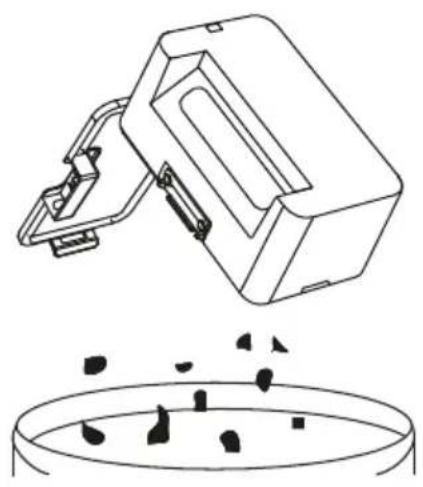
- Remove the HEPA filter.

- Clean the dust container with a cloth.

6 Cleaning and maintenance
- Insert the HEPA filter back into the dust container.

Before installing the HEPA filter, make sure it is dry.
Dear customer,

Cleaning brush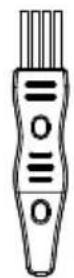
Remote control
3 General Overview


Cleaning brush
Remote control
E-TEK Electronics Manufactory Co., LTD
Model identifier: ZD012A190060EU

Spot Cleaning


1x Adapter User manual and
product documentation (2 pcs.)
Cleaning brush

Remote control
3 Overview

3 Overview
3.1 Checks and components
- Spot cleaning button
- Omnidirectional lenses
- Power button
- Surface cover
- Dust box
- Bottom visual sensor
- Side brush
- Drive wheel
- Universal wheel
- Battery
- Dust box cover
- Dust box conductive spring
- HEPA filter
3.2 Technical specifications
| Napon adaptera | 100-240V~, 50/60 Hz |
| Izlazna snaga adaptera 19 | V 0,6 A |
| Baterija | Litijum-jonska: 14,4V / 2 Ah |
| Period punjenja: 3-4 sati | |
| Vreme rada | Do 100 minuta (uprigušenoj poziciji) |
| Kapacitet pousda za prašinu | 0,3 L |
| Vreme rada | Maksimalno: 80 min.Tiho: 100 min. |
E-TEK Electronics Manufactory Co., LTD
Model identifier: ZD012A190060EU
2- Install the side brush
Side brush installation: align the holes and gently press to fix the side brush onto the device.
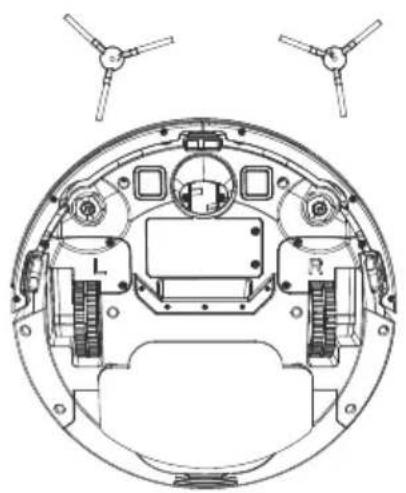

Cleaning the location
- Open the side cover of the dust box.

- Remove the HEPA filter.

- Tap the HEPA filter to remove dust.

- Clean the dust box with a cloth.
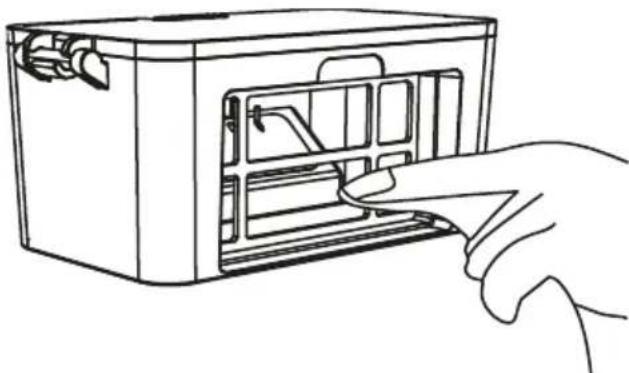
- Dry the dust box and filter component to ensure their service life.

It is recommended to remove dust if the HEPA is used for 15~30 days. The maximum lifespan of the HEPA filter is three months.


- If you do not use the product for an extended period, fully charge it, then turn it off before storing it. Charge the product every three months in case of excessive battery discharge.
- If the battery is too low or the product has not been used for an extended period, it may not be possible to charge it. For maintenance, contact the company's service personnel. Do not disassemble this product.
7 Troubleshooting
Problem detection and resolution

- ROBOT VACUUM CLEANER
- OVERVIEW
- STOP CLEANING
- PLEASE READ THIS GUIDE FIRST
- SYMBOLS AND THEIR MEANINGS
- IMPORTANT SAFETY AND ENVIRONMENTAL INSTRUCTIONS
- GENERAL SAFETY
- COMPLIANCE WITH THE WEEE REGULATIONS AND WASTE DISPOSAL
- PACKAGING INFORMATION
- WASTE BATTERIES
- CE DECLARATION OF CONFORMITY
- WHAT TO DO FOR ENERGY SAVING
- BOX CONTENT
- CHECKS AND COMPONENTS
- TECHNICAL DATA
- PARAMETER OF EXTERNAL POWER SUPPLY
- INSTALLATION
- REMOVE THE PROTECTIVE SPONGES
- INSTALL THE SIDE BRUSH
- CONNECT TO POWER
- OPERATION
- PRODUCT USAGE - STARTING CLEANING
- AUTOMATIC CLEANING
- SPOT CLEANING
- PAUSE, WAKE-UP AND SHUTDOWN
- VACUUM POWER SELECTION
- CLEANING AND MAINTENANCE
- CLEANING THE DUST CONTAINER AND FILTERS
- PARTS MAINTENANCE – DUST BOX
- CLEANING OF THE SENSORS & FRONT WHEEL
- PARTS MAINTENANCE: LOWER VISUAL SENSOR, DRIVING WHEEL AND UNIVERSAL WHEEL
- TROUBLESHOOTING
- STAIN CLEANING
- CONTROLS AND COMPONENTS
- STAIN REMOVAL
- SELLER
- CONNECTION TO POWER SUPPLY
- GENERAL OVERVIEW
- CLEANING THE LOCATION
- PROBLEM DETECTION AND RESOLUTION
Brand : BEKO
Model : VRR 50414 VW
Category : Robot vacuum