
ELPIF02 - Projector EPSON - Free user manual and instructions
Find the device manual for free ELPIF02 EPSON in PDF.
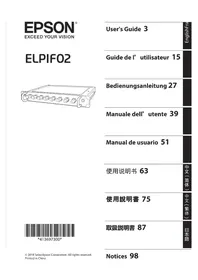


| Product type | 3LCD multimedia projector |
| Brand | Epson |
| Model | ELPIF02 |
| Dimensions (W x D x H) | 309 x 285 x 122 mm |
| Weight | 3.6 kg |
| Power supply | 100-240 V AC, 50/60 Hz, consumption 327 W (normal) |
| Native resolution | XGA (1024 x 768) |
| Brightness | 3200 ANSI lumens |
| Contrast | 15,000:1 |
| Lamp life | Up to 10,000 hours (ECO mode) |
| Keystone correction | Vertical: ±30°, horizontal: ±30° (manual) |
| Zoom | 1.6x manual optical |
| Built-in speaker | 16 W (mono) |
| Video inputs | 2x HDMI, 1x VGA, 1x composite, 1x S-Video |
| Outputs | 1x VGA, 1x 3.5mm audio |
| USB ports | 1x USB-A (for PC-free presentation), 1x USB-B (for mouse) |
| Maintenance and cleaning | Washable air filter, lens cleaning with soft cloth |
| Security | Kensington lock, security password |
| Spare parts and repairability | Replacement lamp (ELPLP96), filter (ELPAF60) |
| General information | Manufacturer warranty 2 years, supplied with remote control, power cable, VGA cable |
Frequently Asked Questions - ELPIF02 EPSON
User questions about ELPIF02 EPSON
0 question about this device. Answer the ones you know or ask your own.
Ask a new question about this device
Download the instructions for your Projector in PDF format for free! Find your manual ELPIF02 - EPSON and take your electronic device back in hand. On this page are published all the documents necessary for the use of your device. ELPIF02 by EPSON.
USER MANUAL ELPIF02 EPSON

User's Guide 3
SDI Interface Board ELPIF02
Included Items List
Check the following list to confirm that you have all of the supplied items. If by any chance there is anything missing or damaged, please contact your dealer.

SDI Interface Board User's Guide (this document) * To install/remove the interface boards, you need a commercially available No. 2 cross-head screwdriver.
Safety Instructions
Read this document and the User's Guide supplied with the projector carefully to use this unit safely and correctly. To allow you to solve any issues or problems quickly, keep this document close to hand. So that you can use the product safely and correctly, symbols are used in this guide and applied to the product to indicate possible harm to the user or to others and the risk of damage to property. The symbols and their meaning are as follows. Make sure you understand them properly before reading this guide.
| [5SZ2] Warning | This symbol indicates information that, if ignored, could possibly result in death or personal injury due to incorrect handling. |
 Caution Caution | This symbol indicates information that, if ignored, could possibly result in personal injury or physical damage due to incorrect handling. |

Warning
- This is a class A product. In a domestic environment this product may cause radio interference in which case the user may be required to take adequate measures.
- Special techniques are required to install or remove this product, so make sure you contact a specialist or your local dealer. Failure to do so may cause electric shock or malfunctions to occur.
- Disconnect the power cord from the projector before installing/removing this product to/from the projector. Installing/removing the product while the power cord is connected may cause electric shock to occur.
- Do not use sprays that contain flammable gas to remove dust or lint from the product. The high heat generated inside the projector may cause a fire.
- Do not use or install in locations where it may be subject to water or rain, or high humidity, such as outdoors, in a bathroom, or shower room, and so on. Otherwise, it could cause a fire or electric shock to occur.
- Do not place the product in a location subject to high levels of dust or humidity, or in a location subject to smoke or steam such as on a work surface or near a humidifier. Otherwise, it could cause a fire or electric shock to occur.
- Unless you are a qualified service technician, do not open the product's case unless instructed to do so in the User's Guide. Never disassemble or remodel the product. There are high-voltage components inside the product that could cause fire, electric shock, or an accident to occur.
- Do not place containers containing water or any chemical products and so on near this product. If anything spills or enters the product, it could cause a fire or electric shock to occur.

Caution
- Special techniques are required to install or remove this product, so make sure you contact a specialist or your local dealer. Otherwise, unexpected malfunctions could occur due to static electricity and so on.
- This product has been designed for exclusive use with Epson projectors. Before installing this product, check the projector's model number. If this product is installed on anything except for the specified projector, it may cause damage to this product or the projector.
- When installing/removing this product to/from the projector, be careful not to injure yourself on the edge of the product or the edge of the slot.
- Do not use or store in places where the product might be subjected to high and low extremes of temperature. Also, avoid any sudden changes in temperature.
- Do not store this product within reach of children. There is a risk of children swallowing screws or them getting stuck in the throat. If any screws are swallowed accidentally, contact a doctor immediately.
- Make sure that no dust or trash enters the slot when installing this product. If dust or trash enters the projector, it could cause a malfunction.
- Do not touch the connectors on this product with your hands. If this product is damaged by static electricity it will not operate correctly. Make sure you discharge any static build up before handling this product.
- When cleaning this product, do not use a wet cloth or solvents such as alcohol, benzene, or thinner. Doing so could cause an electric shock or malfunction to occur.
Part Names
Front

| Name Function | ||
| 1 | SDI1 In port | Inputs SDI signals. The SDI1 In port supports single-link 12G-SDI signals. |
| 2 | SDI2 In port | |
| 3 | SDI3 In port | |
| 4 | SDI4 In port | |
| 5 | SDI1 Out port | Outputs SDI signals being input from the SDI In port.The SDI1 Out port supports single-link 12G-SDI signals. |
| 6 | SDI2 Out port | |
| 7 | SDI3 Out port | |
| 8 | SDI4 Out port | |
Rear

| Name Function | ||
| 1 | Connector Connects to the projector's Slot ports. | |
Installing and Removing the Interface Board
Procedures and illustrations may differ depending on the projector you are using. For details, see the "User's Guide" supplied with the projector.
Installing
You can install boards in Slot1 or Slot2 on the projector. After installing, make [SDI Settings] from the projector's menu. For details, see the guides supplied with the projector.

1 Remove the slot cover.
Loosen the fixing screws (4 points) with a commercially available No. 2 cross-head screwdriver, and pull out the slot cover.
Store the removed slot cover in a safe place.
* The slot cover may not be attached depending on the projector you are using.
Before replacing this product with another interface board, make sure you remove the interface board from the projector first.
→ P. 8 - "Removing"

2 Make sure the interface board is not at an angle, and insert it straight into the slot.
Push the interface board firmly into the slot until it is fully inserted.
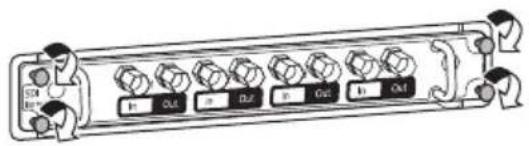
3 Tighten the fixing screws (4 points) with a commercially available No. 2 cross-head screwdriver.

Caution
- Tighten the fixing screws securely. If the interface board is not fixed securely in place, the projector may malfunction.
- Do not use an electric screwdriver when tightening the fixing screws. Doing so could damage the interface board.
Removing
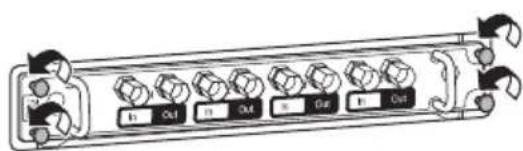
1 Loosen the fixing screws (4 points) with a commercially available No. 2 cross-head screwdriver.

2 Grip the knob, and pull the interface board straight out.

Caution
Make sure the slot cover or an interface board is always installed in the slot. If dust or trash enters the projector, it could cause a malfunction.
When Images are not Displayed
- Make sure that the screws on the interface board are tightened securely.
- Make sure that the projector's [Video Terminal Settings] are correct. For details, see the guides supplied with the projector.
- Check that the projector or the interface board is using the latest firmware version. For inquiries, use the contact details provided in the guides supplied with the projector.
- When installing an interface board in Slot1 and Slot2, use the projector's remote control or the control panel to switch between which slot is being recognized.
Specifications
For inquiries, use the contact details provided in the guides supplied with the projector. When disposing of this product, be sure to follow local rules and regulations. When using this product in a company, be sure to follow the company's disposal rules and regulations.
| Product name ELPIF02 | ||
| External dimensions W 180 × H 23.5 × D 133 mm (not including protruding parts) | ||
| Connection ports | SDI In port (×4) | BNC (female) |
| SDI Out port (×4) | ||
| Supported resolutions | SD-SDI | SDTV (480i): 720 × 480 |
| SDTV (576i): 720 × 576 | ||
| HD-SDI | HDTV (720p): 1280 × 720 | |
| HDTV (1080i/1080p): 1920 × 1080 | ||
| 3G-SDI HDTV (1080i/1080p): 1920 × 1080 | ||
| 3G-SDI (Quad) | 4K: 3840 × 2160 | |
| 4K (SMPTE): 4096 × 2160 | ||
| 12G-SDI* | 4K: 3840 × 2160 | |
| 4K (SMPTE): 4096 × 2160 | ||
| Power 17 Vdc, 1.6 A | ||
| Operating temperature range | 0 to +50°C (no condensation) | |
| Storage temperature range | -10 to +60°C (no condensation) | |
| Mass Approx. 614 g | ||
* Only the SDI1 port is supported.
Supported resolutions may vary depending on your projector. For details, see the guides supplied with the projector.
Warning
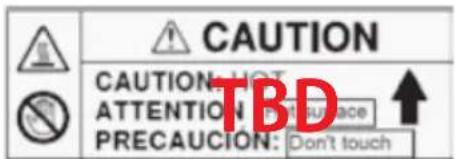
This product comes with a High Temp Warning label.

List of Safety Symbols Compliant with IEC60950-1 A2
The following table lists the meaning of the safety symbols labeled on the equipment.
| No. Symbol mark | Approved standards | Meaning | |
| 1 | IEC60417No. 5007 | "ON" (power)To indicate connection to the mains. | |
| 2 |  | IEC60417No. 5008 | "OFF" (power)To indicate disconnection from the mains. |
| 3 |  | IEC60417No. 5009 | Stand-byTo identify the switch or switch position by means of which part of the equipment is switched on in order to bring it into the stand-by condition. |
| 4 |  | ISO7000No. 0434BIEC3864-B3.1 | CautionTo identify general caution when using the product. |
| 5 |  | IEC60417No. 5041 | Caution, hot surfaceTo indicate that the marked item can be hot and should not be touched without taking care. |
| No. | Symbol mark | Approved standards | Meaning |
| 6 |  | IEC60417No. 6042ISO3864-B3.6 | Caution, risk of electric shockTo identify equipment that has risk of electric shock. |
| 7 |  | IEC60417No. 5957 | For indoor use onlyTo identify electrical equipment de-signed primarily for indoor use. |
| 8 |   | IEC60417No. 5926 | Polarity of d.c. power connectorTo identify the positive and negative connections (the polarity) on a piece of equipment to which a d.c. power supply may be connected. |
| 9 |  | IEC60417No. 5001B | Battery, generalOn battery powered equipment. To identify a device for instance a cover for the battery compartment, or the con- nector terminals. |
| 10 |   | IEC60417No. 5002 | Positioning of cellTo identify the battery holder itself and to identify the positioning of the cell(s) inside the battery holder. |
| 11 |  | IEC60417No. 5019 | Protective earthTo identify any terminal which is in- tended for connection to an external conductor for protection against electric shock in case of a fault, or the terminal of a protective earth electrode. |
| 12 |  | IEC60417No. 5017 | EarthTo identify an earth (ground) terminal in cases where symbol No. 11 is not explicitly required. |
| 13 |  | IEC60417No. 5032 | Alternating currentTo indicate on the rating plate that the equipment is suitable for alternating cur-rent only; to identify relevant terminals. |
| 14 |  | IEC60417No. 5031 | Direct currentTo indicate on the rating plate that the equipment is suitable for direct current only; to identify relevant terminals. |
| 15 |  | IEC60417No. 5172 | Class II equipmentTo identify equipment meeting the safety requirements specified for Class II equipment according to IEC 61140. |
| 16 |  | ISO 3864 | General prohibitionTo identify actions or operations that are prohibited. |
| 17 |  | ISO 3864 | Contact prohibitionTo indicate injury that could occur due to touching a specific part of the equipment. |
| 18 | 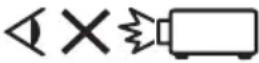 | --- | Never look into the projection lens while the projector is on. |
| 19 |  | --- | To indicate that the marked item don't place anything on projector. |
| 20 |  | ISO3864IEC60825-1 | Caution, laser radiationTo indicate the equipment has a laser radiation part. |
| 21 |  | ISO 3864 | Disassembly prohibitionTo indicate a risk of injury, such as electric shock, if the equipment is disassembled |
| 22 |  | EC60417No. 5266 | Standby, partial standbyTo indicate that part of the equipment is in the ready status. |
| 23 |  | ISO3864IEC60417No. 5057 | Caution, movable partsTo indicate that you must keep away from movable parts according to protection standards. |
| 24 |  | IEC60417-6056 | Caution (Moving Fan Blades)As a safety precaution, stay away from the moving fan blades. |
| 25 |  | IEC60417-6043 | Caution (Sharp Corners)To indicate sharp corners that should not be touched. |
| 26 |  | --- | To indicate that looking into the lens while projecting is prohibited. |
| 27 |  | ISO7010No.W027ISO3864 | Warning, light emission (UV, visible light, IR, etc.)When you are close to the light emissions, be careful not to injure your eyes or skin. |
| 28 |  | IEC60417No.5109 | Usage prohibition in residential areasTo indicate that this is an electrical device or a device that is not suitable for use in residential areas. |

Warning


Caution


Caution

1. Remove the slot cover.


1. Remove the slot cover.
Caution

1. Remove the slot cover.
Caution
2. Hold the knob firmly and pull the interface board straight out.
Caution
SDI interface board

1. Remove the slot cover.
Caution
Supplier's DECLARATION of CONFORMITY
According to 47CFR, Part 2 and 15
Class A digital devices, peripherals & switching power supplies
We: Epson America, Inc.
Located at: 3840 Kilroy Airport Way
Long Beach, CA 90806
Tel: 562-981-3840
Declare under sole responsibility that the product identified herein, complies with 47CFR Part 2 and 15 of the FCC rules as a Class A digital device. Each product marketed, is identical to the representative unit tested and found to be compliant with the standards. Records maintained continue to reflect the equipment being produced can be expected to be within the variation accepted, due to quantity production and testing on a statistical basis as required by 47CFR § 2.906. Operation is subject to the following two conditions: (1) this device may not cause harmful interference, and (2) this device must accept any interference received, including interference that may cause undesired operation.
Trade Name: EPSON
Type of Product: Interface board
Model: ELPIF02
FCC Compliance Statement For United States Users
This equipment has been tested and found to comply with the limits for a Class A digital device, pursuant to part 15 of the FCC Rules. These limits are designed to provide reasonable protection against harmful interference when the equipment is operated in a commercial environment. This equipment generates, uses, and can radiate radio frequency energy and, if not installed and used in accordance with the instruction manual, may cause harmful interference to radio communications. Operation of this equipment in a residential area is likely to cause harmful interference in which case the user will be required to correct the interference at his own expense.
This device complies with part 15 of the FCC rules. Operation is subject to the following two conditions: (1) this device may not cause harmful interference, and (2) this device must accept any interference received, including interference that may cause undesired operation.
WARNING
The connection of a non-shielded equipment interface cable to this equipment will invalidate the FCC Certification or Declaration of this device and may cause interference levels which exceed the limits established by the FCC for this equipment. It is the responsibility of the user to obtain and use a shielded equipment interface cable with this device. If this equipment has more than one interface connector, do not leave cables connected to unused interfaces. Changes or modifications not expressly approved by the manufacturer could void the user's authority to operate the equipment.
For Canadian Users
CAN ICES-3 (A) / NMB-3 (A)

English
The crossed out wheeled bin label that can be found on your product indicates that this product and incorporated batteries should not be disposed of via the normal household waste stream. To prevent possible harm to the environment or human health please separate this product and its batteries from other waste streams to ensure that it can be recycled in an environmentally sound manner. For more details on available collection facilities please contact your local government office or the retailer where you purchased this product. Use of the chemical symbols Pb, Cd or Hg indicates if these metals are used in the battery.
Deutsch
This information only applies to customers in the European Union, according to Directive 2002/96/EC OF THE EUROPEAN PARLIAMENT AND OF THE COUNCIL OF 27 January 2003 on waste electrical and electronic equipment (WEEE) and DIRECTIVE 2006/66/EC OF THE EUROPEAN PARLIAMENT AND OF THE COUNCIL OF 6 September 2006 on batteries and accumulators and waste batteries and accumulators and repealing Directive 91/157/EEC and legislation transposing and implementing it into the various national legal systems.
For other countries, please contact your local government to investigate the possibility of recycling your product.
For users outside the Province of Buenos Aires, Argentina:
This information only applies to customers in the Province of Buenos Aires, Argentina, according to Law No. 14321 in the Province of Buenos Aires (excluding the City of Buenos Aires) on waste electrical and electronic equipment (WEEE).
For other countries and other locations, please contact your local government to investigate the possibility of recycling your product.
Indication of the manufacturer and the importer in accordance with requirements of EU directive
Manufacturer : SEIKO EPSON CORPORATION
Address : 3-5, Owa 3-chome, Suwa-shi, Nagano-ken 392-8502 Japan
Telephone : 81-266-52-3131
http://www.epson.com/
Importer: EPSON EUROPE B.V.
Address: Atlas Arena, Asia Building, Hoogoorddreef 5, 1101 BA Amsterdam Zuidoost, The Netherlands
Telephone: 31-20-314-5000
http://www.epson.com/europe.html
Manufacturer: SEIKO EPSON CORPORATION
Address: 3-5, Owa 3-chome, Suwa-shi, Nagano-ken 392-8502, Japan
Tel: 81-266-52-3131
Web: https://www.epson.com/
- SDI INTERFACE BOARD ELPIF
- INCLUDED ITEMS LIST
- SAFETY INSTRUCTIONS
- WARNING
- CAUTION
- PART NAMES
- FRONT
- REAR
- INSTALLING AND REMOVING THE INTERFACE BOARD
- INSTALLING
- REMOVE THE SLOT COVER
- MAKE SURE THE INTERFACE BOARD IS NOT AT AN ANGLE, AND INSERT IT STRAIGHT INTO THE SLOT
- REMOVING
- WHEN IMAGES ARE NOT DISPLAYED
- SPECIFICATIONS
- LIST OF SAFETY SYMBOLS COMPLIANT WITH IEC60950-1 A
- SUPPLIER'S DECLARATION OF CONFORMITY
- FCC COMPLIANCE STATEMENT FOR UNITED STATES USERS
- ENGLISH
- DEUTSCH
- FOR USERS OUTSIDE THE PROVINCE OF BUENOS AIRES, ARGENTINA
- INDICATION OF THE MANUFACTURER AND THE IMPORTER IN ACCORDANCE WITH REQUIREMENTS OF EU DIRECTIVE
Brand : EPSON
Model : ELPIF02
Category : Projector