ManualGo.com
WS8009 - Weather Station LA CROSSE TECHNOLOGY - Free user manual and instructions
Find the device manual for free WS8009 LA CROSSE TECHNOLOGY in PDF.


Download the instructions for your Weather Station in PDF format for free! Find your manual WS8009 - LA CROSSE TECHNOLOGY and take your electronic device back in hand. On this page are published all the documents necessary for the use of your device. WS8009 by LA CROSSE TECHNOLOGY.
USER MANUAL WS8009 LA CROSSE TECHNOLOGY
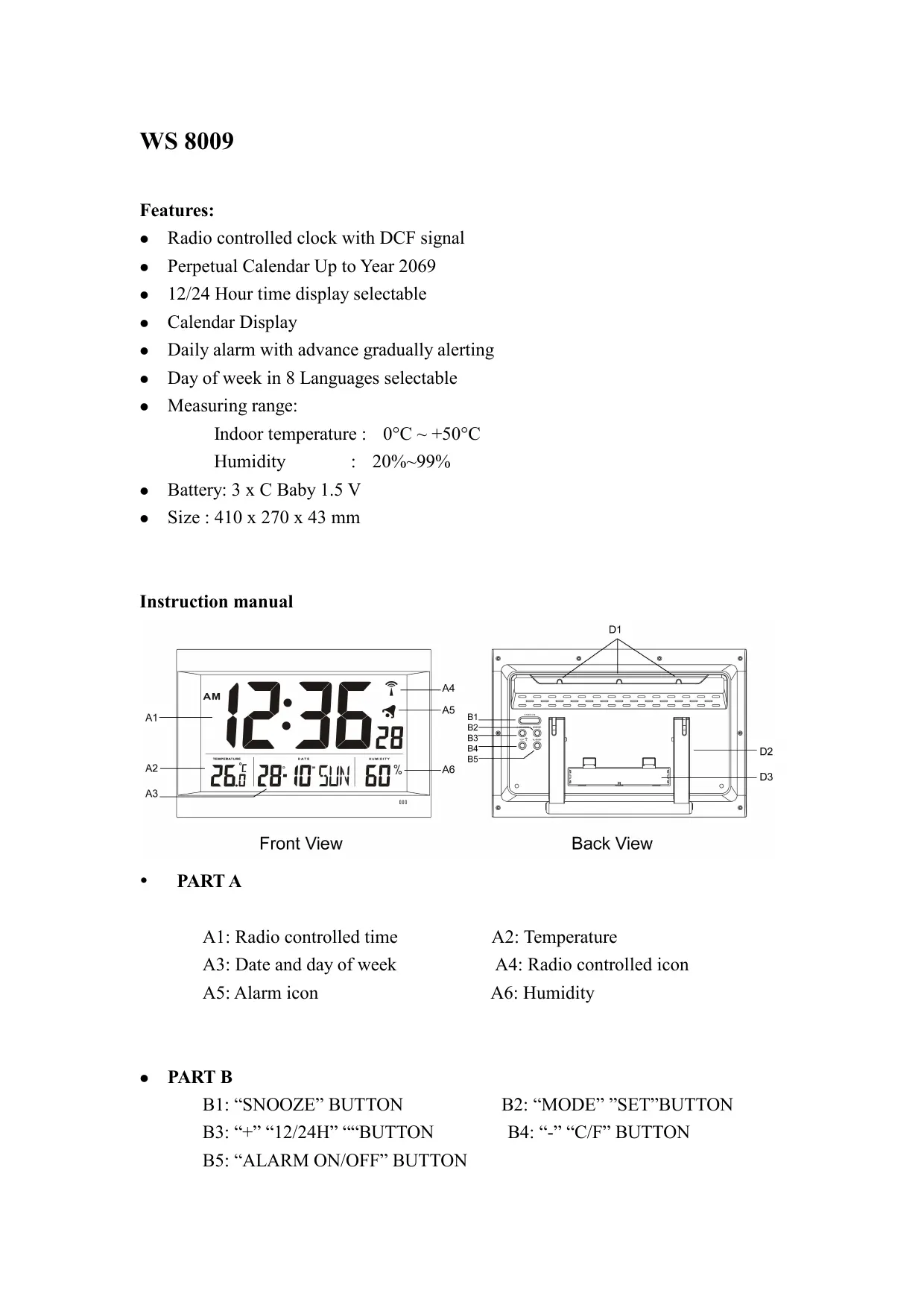
WS 8009 Features: e Radio controlled clock with DCF signal e _Perpetual Calendar Up to Year 2069 e 12/24 Hour time display selectable e Calendar Display e Daily alarm with advance gradually alerting e Day of week in 8 Languages selectable e Measuring range: Indoor temperature : 0°C - +50°C Humidity : 20%-99% e Battery: 3 x C Baby 1.5 V e Size :410 x 270 x 43 mm Instruction manual PET Er" 0103 : e-[ abi 2 Dan 60° A3 — Front View Back View + PARTA Al: Radio controlled time A2: Temperature A3: Date and day of week A4: Radio controlled icon A5: Alarm icon A6: Humidity e PARTB B1: “SNOOZE” BUTTON B2: “MODE” ”’SET”’BUTTON B3: “+? “12/24H° “BUTTON B4: -° “C/F° BUTTON
B5: “ALARM ON/OFF” BUTTON
PART D D1: Wall Mount Hole D3: Battery Compartment Set up and Radio Controlled Time: D2: Stand After inserting the batteries, the clock automatically starts scanning the DCF frequency signal after new batteries inserted ET flash on the LCD) The clock automatically scans the time signal at 3:00a.m. everyday to maintain accurate timing. For failed reception, scanning stops (on the LCD disappear) and repeats again at 4:00a.m., 5:00a.m., 6:00a.m. The clock manually scans the time signal by holding
(B4) buttons for 2 seconds. For failed reception in 10 minutes, scanning stops ET? on LCD disappear). And repeats again in the next hour. e.g. if scanning at 8:20a.m. fail, it will scan again at 9:00a.m. Hold T”(B4 buttons for 3 seconds to stop scanning. RCC icon : “Ps flash indicate DCF signal searching. «T° indicate signal received successfully. *_ “DST” icon will turn on when the DCF have DST signal in it. Manual Time Setting Hold “MODE” button (B2) until Hour digit flashes. Press “+” (B3) or “-” (B4) button to adjust Hour, Minutes, Second, Year, Month/Day sequence, Month, Date, Weekday Language, Time Zone. Press “MODE” button (B2) to confirm each setting. There are 8 languages, English, German, French, Spanish, Italian, Dutch, Denmark and Russian for day-of-week. The languages and their selected abbreviations for each day of the week are shown in the following table. Language Sunday [Monday Tuesday Wednesday Thursday Friday |Saturday German, GER [SON MON DIE MIT DON FRE SAM English, ENG SUN MON TUE WED THU FRI SAT Denmark, DAN SON MAN TIR ONS TOR FRE LOR Dutch, NET ZON MAA DIN WOE DON IVRI ZAT Italian, ITA DOM LUN MAR MER GIO VEN |SAB Spanish, ESP DOM LUN MAR MIE JUE VIE SAB French, FRA DIM LUN MAR MER JEU VEN [SAM Russian, RU BC NH BT CP HT INT CY
e The Time zone is used for the countries that can receive the DCF time signal but the time zone is different from the German time. e When the country time is faster than the German time for 1 hr, the zone should be set to +1. Then the clock will automatically set 1 hour faster from the signal time received. Note: Second adjusted to zero only. Press “+”12/24 (B3) button to set the 12/24 hour format at time display mode. Daily Alarm Setting : e Press “MODE”(B2) to select Alarm Time Display. e Hold “MODE” (B2) to Alarm Time setting mode, the hour digit will flash. e Press or hold “+“(B3) & “-“(B4) buttons to adjust the alarm time. e Press “MODE”(B2) to confirm each setting. Alarm and Snooze Function : e Press “ALARM ON/OFF” (BS) to switch alarm on/off. e _" 4 "appears if the daily alarm turns on. e During alerting, press “SNOOZE” (B1) button to turn on the Snooze function and icon “Zz” flash. The alarm snoozes for 5 minutes, then it alerts again. You can press “snooze” button to active the snooze function again when alerting. e Simply press other buttons to stop snooze alarm. Thermometer: e Press “°C / °F” (B4) button to select Temperature displayed in Celsius mode/ Fahrenheit mode. Notes/Remarks: e Remove batteries and then insert batteries again to reset the unit if it does not work properly. e _Avoid placing the clock near interference sources/metal frames such as computer monitor or TV sets. e _Buttons will not function while scanning for DCF time signal unless they are well received or stopped manually. e Never use the clock in bathroom or any other area with high humidity e The clock loses its time information when the battery is removed.