ManualGo.com
WTK3-100 - Weather Station LA CROSSE TECHNOLOGY - Free user manual and instructions
Find the device manual for free WTK3-100 LA CROSSE TECHNOLOGY in PDF.


Download the instructions for your Weather Station in PDF format for free! Find your manual WTK3-100 - LA CROSSE TECHNOLOGY and take your electronic device back in hand. On this page are published all the documents necessary for the use of your device. WTK3-100 by LA CROSSE TECHNOLOGY.
USER MANUAL WTK3-100 LA CROSSE TECHNOLOGY
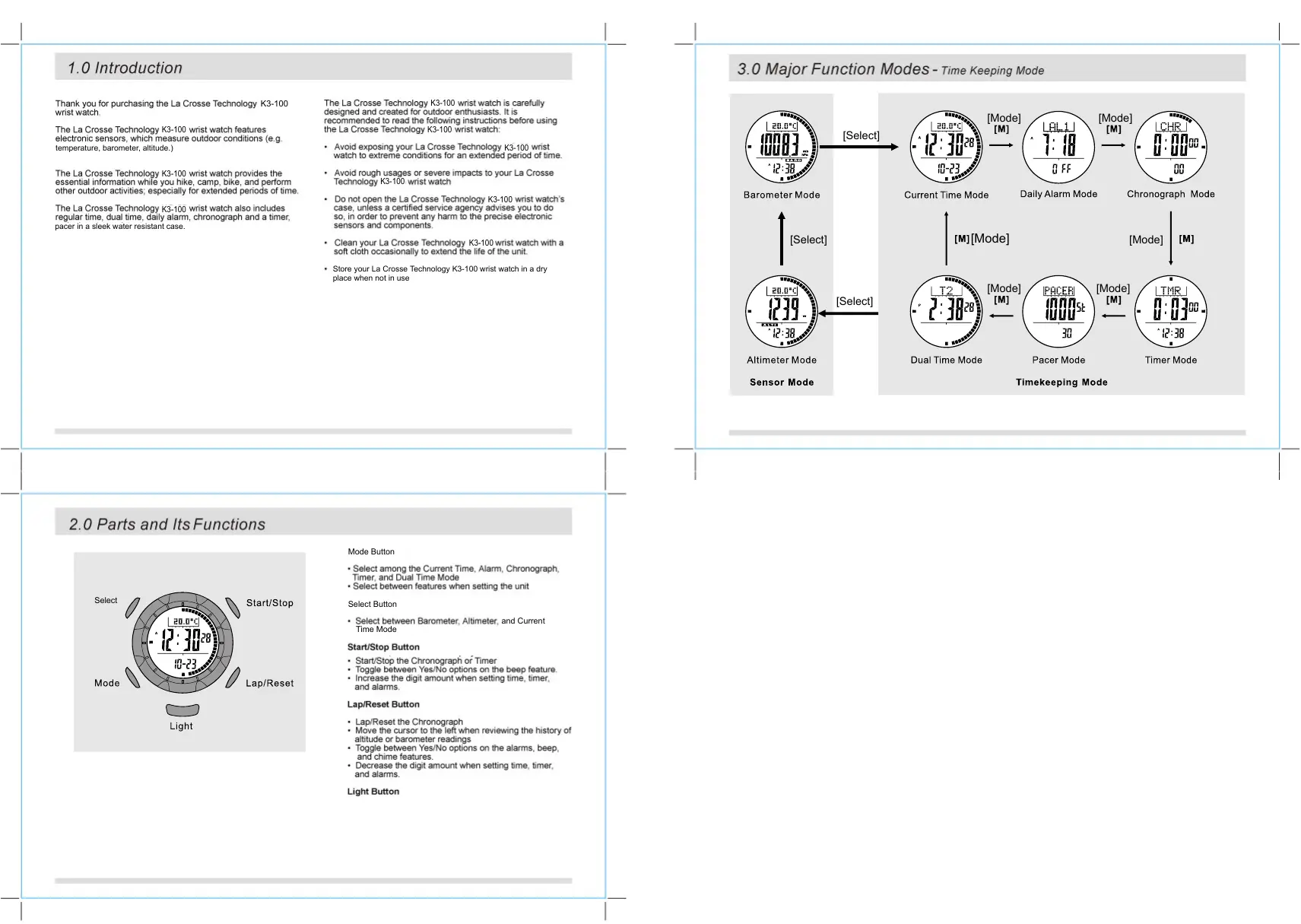
rank you for purchasing the La Crosse Technology K3-100 wrist watch. ‘The La Crosse Technology K3-100 wrist watch features electronic sensors, which measure outdoor conditions (eg temperalure, barometer, alttude.) 1e La Groue Technology 109 mr wat rondes De essential Information while you hike, camp. bi Gber ouldoo! sie! espocaIy fr Exdhded pero. 0 Um, ‘The La Crosse Technology K3-100 wist watch also includes reguiar time, dual üme, dall alarm, chronograph and a timer, paGer in a siook water resistant case ‘The La Crosse Technology K3-100 wrist watch is ‘designed and created for outdoor enthusiasts. is recommended 19 read the following instructions before using the La Grosse Technology K3-100 wrist watch: void exposing your La Crosse Technology K3-100 wrist watch 1) extreme conditions for an extended penod of tme. Avoid rough usages or severe impacts to your La Crosse Technology K3-100 wrist watch Do nl open the La Crosse Technalogy 100 wrist watch case, unless a certifed service agency advises you 50, in orier to prevent any harm lo the precise electronic Sensors and components. Clean your La Crosse Technology K3-100wrist watch with a so cloth occasionall to extend the life of tne unit Store your La Crosse Technology K3-100 wrist wat in a dry Place when nat in use
3.0 Major Function Modes - Time Keeping Mode
2.0 Parts and Its Functions
À sets D iront Mode Button + Select the Current Time, Alarm, Chronograph, Timer. and Duai Time Mode + Select between features when setting the unit Select Button + Select between Barometer Alimeter, and Current Fimo Mode StartiStop Button Star/Stop the Chronograph of Timer LapiReset Button : LapReset the Chr h
4.0 Current Time Mode - Day of week, temperature, altitude and pressure display
‘There are a total of 4 Kind of function among the upper display + Day ofthe weck + Temperature + Atitude tendency + Pressure tendency User can select by [ST./STP] button FIST ut had second 1 pins wi start to oggle remperature, nd Pressure 0adngs: changing pr second isT/STPJ/. JNC.\ (ST/STP. + !l | Î —+
Day of week Altitude tendency Pressure tendency 4 IST/STP] |
4.1 Current Time Mode - Settng the Current Time and the Calendar
TASTP LAPS] ‘To enter Setting Mode + To enterthe Seting Mode, press and hold the IMode], uso fr (3) seconds. The display val change from Current Time Mode to Current Time Sting Dsplay The SET. too vi appear. + The seconds will be selected (flashing). + Press [Mode] button to change the selections as in the Current Time Seting sequence (see graphic) Different Setting procedure Current Time Display Hoïg À Hoïd amet À [oder
- ile seconds are selected (asting) presse El or ILAP/RST] button to reset the seconds to [HE] TI [re Ut ‘will remain at “00” until the button is Del: Wie te oiersetinge (minutes, hour, year, month, Es DU ncemeinn pre TETE Duten
C mon ] 10 Increase Ine il amour, Foi in button 1 incroase (Current Time Setting Sequence ne cigits quickly Mode] lode] + Press the [LAP/RST.] button to dec [Mode] [Mode] M C Cat ] Ÿ Ÿ Hold AST./STP]/ [Lap/Rst.] ASTSTP.]/ (Lap/Rst.] Increase/Decrease the number Increase/decrease the number lnetts ot
4.2 Current Time Mode - setting the 12/24 Hour LCD Contrast and Key Beep
- Bress and hote TMODE]. but o fish sing and ctum lothe A1 Dai alarm
+ The Chronograph measures elapsed and lap times. + The display shows the ‘AI Zeros' display when the Bi chronograph is being selected tne ist ime or the running chronograph is reset To Start / Stop the Chronograph
en Used RUE goidesior einen Countdoun Timor less (on me ana need) * The La Crosso Technology K3-100wrist watch has a Countdown Timer mode. The Countdoun Timer starts counting from the preset value to 2810, and stops. ‘The Quick:Set-Values (ASS) + The Quick-Set-Value is a «at of defaut values in the La Grosse Technology K3-100 wrist watch for 8asier use of Ino Timer Display. final + There are 6 Quick-Set-Values: 1. 3,5. 10, 15 and 45 Minutes ‘These values cannot be changed by ihe user, ‘The User Preset Value (UPV) The User Preset Value is a value which can be changed by. the user: Current Time The setting range is up 0 99 hours 59 minutes 59 seconds. —— ur User | + Once the UPV has been set, such as 30 minutes, the value is preset stored in the La Crosse Technology K3-100 wrist watch, s0 the <UPV) Quick-Set-Value (ASV) pue ul Timor Setting Sequence
To Set the User Preset Value TAPIRST + From the Current Time Display, press the | Mode ] button three (3) imes to enter Timer mode. : Press and hold the [ Mode ] button for 2 seconds to change from Timer display to User Preset Value Settng display. The hour digits are selected (lashing). + Press he IST/STP] button io Ictease he gt amount. Press and hoid the button to Increase the digls quick.
‘The pacer will generate beeps at a pre-defned beeping rate. The beeping rate can be set from 30 to 180 beats per minute(BPM) in step of 5.
In current time mode, press [M] until PACER is displayed: Press the [S/S] button lo start the pacer. ‘The step counter “SE will run in the middle of the display (max 99999steps) Press the [S/S] button lo stop Ihe pacer. ‘To reset ihe step counter, press and hold the [L/R] button when the pacer was stopped.
HOW TO SET THE BEEPING RATE
Press and hold the [M] button for 2 seconds in Pacer Mode. When the beeping rate digits start to flash, press the [S/S] or [L/R] button to increasel decrease the number. (Hold down the button lo change the number at a higher speed). When the setting is completed, press and hold the [M] button to exit the setting display.
- RressIST/STPI or LAPIRST button to select VES or + Press and hold {Mode 1 | button to confirm setting. + When'YES” is confimmed, "DONE" wil| show, and the display wil automatically return to the Barometer mode,
10.2 Barometer Mode - Absolute Pressure Adjustment
ire] M. Absolute Pressure SettingDisplay Urea ATP ILArReT Before Calibrating the Barometer
- 19e La Crosse Technology 1100 ris walch was calrated in 1 act) Po Normal ue, You 0 nOU rato the Baromater Bt à air rca M Pr porn La Grosse Technology
- 1 der Lo input information into ie watch, dur the calibration procedure, you wi need the barometc pressure your Guen POSER + Consuit the nearest observatory station, or airport from your current position to get he current ambient barometric pressure. Important: Mputing ie icarect pressure value dun calbralon procedure mil resut in Mcarect pressure readngs in the Calibration Procedure + Press [ST/STP] in Absolute Pressure Display
Buton. Used EMoce | Press and hold the {Mode ]_ button in the Alimeter mode nn Mec Lo enter the adjustment display. There are four (4) DENsnonl adjustment methods: Zero Altitude : Make alitude 10 zero or relative aitude measurement Absolute Atitude 2 Set alitude to knoun value, which can be recalled for next seting Sea Level Pressure + Input specific sea level pressure. Please contact your local observatory for ne specific sea level pressure value in your area. Zero Alliude Display Absolute Alilude Display Factory Default (En + Restore t defaut facto seting wars assumed soa level pressure is 1013 2ml + Alitude is callbrated Independently on each mode. For example. absolute altlude s saected, affect of ne soa level pressure on the previous seting wil be ignored sure Display Adjustment Displays
11.3 Altimeter Mode - Absolute Altitude Adjustment
Butor Ut FTSred'iLarirsr Why the Altimeter needs to be Calibrated + AS the absolute alitude is calculated from the air pressure, the change of air pressure wouid affect the altitude reading = To reschieve a more accurate reading, the La Grosse Technology IST/STP.] K3-100 wrist watch needs to be calibrated from time to time as ——+ ressure may énange gradual, even vain Nour. Before Calibrating the Altimeter
- Calibrate the altimeter at a place were the altitude is Absolute Altitude Setting Display. determined, such as Sea Level (0m) or beside an altitude sign Pole (8 g. 8m). Input iis value into the La Crosse Technology K3-100 wrist watch during the calibration procedure, IMPORTANT: Input an incorect aitude during ne calibration procedure Wi resui i incorect alffude reading in the Rue. Calibration Procedures ? laine Auler made, ts a Ro Le Mode] Butor er 2 Seconds. When (ZERO) is shown in the top display, se Butor 1 Select ie Amel au sen! A spiay (ALT) + Press [ST/STP] in Absolute Altitude Display. + Wie the digits are selected (fashing), press the [ST/STP] buton Lo increase the digit amount. Press and hold the [ST/STP button to increase the digit quick. : Press the (LAP/RST] button to decre: and hold te (LAP/RST] button to de
Flashing + Since ie atlude is calculated from 1e changes in air pressure, te Sea Lovel pressure wil change depending on your location. + To achieve a more accurate reading, the Sea Level pr Shouié be updated en You mave om ane lation o another To adjustthe Sea Level Pressure
12.0 Low Battery Indication & Battery Replacement
Low Battery Indication Low Battery Detection + When the low battery indicator appears on the display, it Îs recommndad 10 replace the battery with a new GR2032 battery
- ne appearance of ne lo battery inchicator Îs caused by using the La Crosse fechnology K3-100 wrist watch under very cold conditions. The indicator vil! disappear once the watch returns Lo normal tomporatures NOTE: + ILis recommended to have the battery replaced by a certiied service agency. because the La Cr chnology K3-100 wrist watch contains precise Scronic Sensor and components
Measure Range 300 hPaimbar Lo 1100hPa/mbar {8.85 inHg to 32.48 inHg) History Recall ‘Thermometer Rosolution OTF (01°C) Moasurng Range TAÔ'F to 140O'F (-10.0°C to 60.0"C) Backlight Electro-Luminescent (EL) backight Water Resistant Ca {Up to 10m (30 feet) Battery Singe 3V lithium battor (CR2032) Battery Life Approximately 1.5 years under Ihe following conditions: 30 seconds alarm operation per day 2 8 seconds EL backight operation per day 25 minutes sensor mode operation per day Low Battery Detection Battory voltage is less {han 2,4V #- 0.2V 2 The memory il be clearad uen the battery Is repiaced