
SIM562D-1 - Kitchen appliance SMEG - Free user manual and instructions
Find the device manual for free SIM562D-1 SMEG in PDF.


| Product type | Induction hob |
| Brand | SMEG |
| Model | SIM562D-1 |
| Number of cooking zones | 4 induction zones |
| Power supply | 220-240 V ~ 50/60 Hz (single phase) or 380-415 V 3N/2N (three phase) |
| Maximum total power | 7.2 kW (adjustable from 2.5 to 7.2 kW) |
| Main functions | Booster (P), Timer (99 min), Multizone, Power Management, Control lock, Residual heat indicator, Pan detection |
| Control type | Touch controls with slider and buttons + / - |
| Surface material | Ceramic glass |
| Safety | Automatic shutdown, child lock, unsuitable pan detection, overheat protection |
| Cleaning | Soft cloth or specific induction cleaner; do not use steam cleaner or abrasive sponges |
| Built-in dimensions | See diagram page 2 of the manual |
| Weight | Not specified in the manual |
Frequently Asked Questions - SIM562D-1 SMEG
User questions about SIM562D-1 SMEG
0 question about this device. Answer the ones you know or ask your own.
Ask a new question about this device
Download the instructions for your Kitchen appliance in PDF format for free! Find your manual SIM562D-1 - SMEG and take your electronic device back in hand. On this page are published all the documents necessary for the use of your device. SIM562D-1 by SMEG.
USER MANUAL SIM562D-1 SMEG
Instructions for use
Mode d'emploi | Kayttoohje
IMPORTANT SAFETY INSTRUCTIONS
YOUR SAFETY AND THAT OF OTHERS IS VERY IMPORTANT
This manual and the appliance itself provide important safety messages, to be read and always observed.

This is the danger symbol, regarding safety, warning of potential risks to users and others.
All safety messages will be preceded by the danger symbol and the following words:

DANGER
Indicates a hazardous situation which, if not avoided, will result in serious injury.

WARNING
Indicates a hazardous situation which, if not avoided, could cause serious injury.
All messages relevant to safety specify the potential risk to which they refer and indicate how to reduce the risk of injury, damage and electric shocks due to incorrect use of the appliance. Make sure to comply with the following:
- Use protective gloves to perform all unpacking and installation operations.
The appliance must be disconnected from the power supply before carrying out any installation operation. - Installation and maintenance must be carried out by a specialised technician, in compliance with the manufacturer's instructions and the local safety regulations in force. Do not repair or replace any part of the appliance unless specifically stated in the user manual.
The appliance must be earthed. - The power cable must be long enough for connecting the appliance, fitted in the cabinet, to the power supply.
- For installation to comply with the current safety regulations, an omnipolar switch with minimum contact gap of 3mm is required.
- Do not use multi-sockets or extension cords.
- Do not pull the appliance's power cable.
- The electrical parts must not be accessible to the user after installation.
- The appliance is designed solely for domestic use for cooking food. No other use is permitted (e.g. heating rooms).
The Manufacturer declines any liability for inappropriate use or incorrect setting of the controls.
The appliance and its accessible parts become hot during use. Care should be taken to avoid touching heating elements. Very young (0-3 years) and young children (3-8 years) shall be kept away unless continuously supervised. - Children from 8 years and above and persons with reduced physical, sensory or mental capabilities or lack of experience and knowledge can use this appliance only if they are supervised or have been given instructions on safe appliance use and if they understand the hazards involved. Children shall not play with the appliance. Cleaning and user maintenance shall not be made by children without supervision.
- Do not touch the appliance heating elements during and after use. Do not allow the appliance to come into contact with cloths or other flammable materials until all the components have cooled down completely.
- Do not place flammable materials on or near the appliance.
Overheated oils and fats catch fire easily. Pay attention when cooking food products rich in fat and oil. - A separator panel (not supplied) must be installed in the compartment under the appliance.
- If the surface is cracked, switch off the appliance to avoid the possibility of electric shock (only for appliances with glass surface).
The appliance is not intended to be operated by means of an external timer or separate remote control system. - Unattended cooking on a hob with fat or oil can be dangerous and may result in fire. NEVER try to extinguish a fire with water, but switch off the appliance and then cover flame e.g. with a lid or a fire blanket. Danger of fire: do not store items on the cooking surfaces.
- Do not use steam cleaners.
Metallic objects such as knives, forks, spoons and lids should not be placed on the hob surface since they can get hot.
- After use, switch off the hob element by its control and do not rely on the pan detector (only for induction appliances).
SAFEGUARDING THE ENVIRONMENT

Disposal of packing
The packing material is 100% recyclable and marked with the recycling symbol (23). The various parts of the packing must not be dispersed in the environment, but disposed of in compliance with local regulations.
Disposal
This appliance is marked in conformity with European Directive 2002/96/EC on Waste Electrical and Electronic Equipment (WEEE).
By ensuring that this appliance is correctly disposed of, the user can help prevent potentially negative consequences for the environment and the health of people.
The symbol on the appliance or the accompanying documentation indicates that this product should not be treated as domestic waste but must be taken to an appropriate collection point for recycling WEEE.
Energy saving tips
For optimum results, it is advisable to:
Use pots and pans with bottom width equal to that of the cooking zone.
Only use flat-bottomed pots and pans.
- When possible, keep pot lids on during cooking.
Use a pressure cooker to to save even more energy and time.
- Place the pot in the middle of the cooking zone marked on the hob.
DECLARATION OF CONFORMITY (C)
This appliance has been designed, manufactured and marketed in conformity with the safety requirements of "Low Voltage" Directive 2006/95/EC (replacing 73/23/EEC as amended) and protection requirements of "EMC" Directive 2004/108/EC.
This appliance meets the eco design requirements of European Regulation N. 66/2014, in conformity to the European standard EN 60350-2.
BEFORE USE
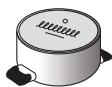
IMPORTANT: The cooking zones will not switch on if pots are not the right size. Only use pots bearing the symbol "INDUCTION SYSTEM" (Figure opposite). Place the pot on the required cooking zone before switching the hob on.
EXISTING POTS AND PANS

Use a magnet to check if the pot is suitable for the induction hob: pots and pans are unsuitable if not magnetically detectable.
- Make sure pots have a smooth bottom, otherwise they could scratch the hob. Check dishes.
- Never place hot pots or pans on the surface of the hob's control panel. This could result in damage.
RECOMMENDED POT BOTTOM WIDTHS


INSTALLATION
After unpacking the product, check for any damage during transport. In case of problems, contact the dealer or the After-Sales Service.
For built-in dimensions and installation instruction, see the pictures in page 2.
PREPARING THE CABINET FOR FITTING

WARNING
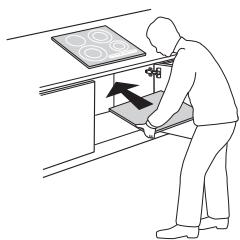
Install a separator panel under the hob.
- The lower part of the product must not be accessible after installation.
- Do not fit the separator panel if an undercut oven is installed.
nmin.5mn
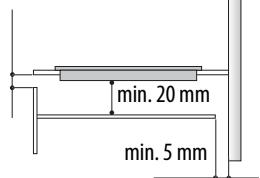
The distance between the underside of the appliance and the separator panel must respect the dimensions given in the figure.
In order to ensure the correct operation of the product, do not obstruct the minimum required clearance between the hob and the top of the unit (min. 5 mm).
If an undertop oven is installed, make sure the oven is equipped with a cooling system.
Do not install the hob above a dishwasher or washing-machine, so that the electronic circuits do not come into contact with steam or moisture which could damage them.
To remove the hob, use a screwdriver (not provided) to pry off the perimeter clips on the underside of the appliance.

WARNING
- Disconnect the appliance from the power supply.
- Installation must be carried out by qualified personnel who know the current safety and installation regulations.
The manufacturer declines all liability for injury to persons or animals and for damage to property resulting from failure to observe the regulations provided in this chapter.
The power cable must be long enough to allow the hob to be removed from the worktop.
Make sure the voltage specified on the dataplate located on the bottom of the appliance is the same as that of the home.
Connect to terminal Block
For the electrical connection a power cord ( 5 × 2,5 ~mm ) is present in the supply. To connect to the terminal block, follow the instruction below:
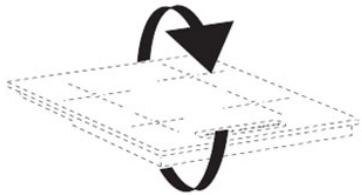
N1=N BLUE N2=N GREY with blue film
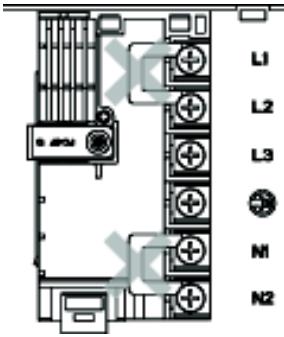
Remove shunts from terminal block
Before power cord connection remove the two shunts as per picture
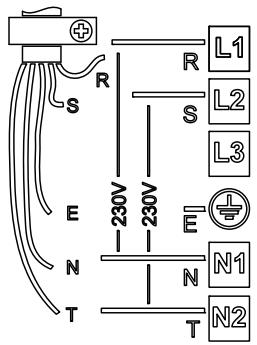
Connecting to the terminal block
- Secure the power cable with the cable clamp.
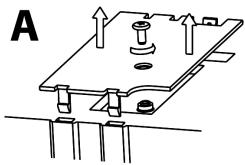
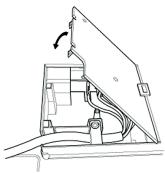
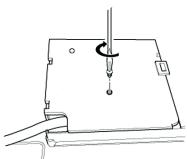
- Remove the terminal cover (A) by unscrewing the screw and insert the cover into the hinge (B) of the terminal.
- Close the cover (C) and screw on the terminal with the screw removed.
B
C
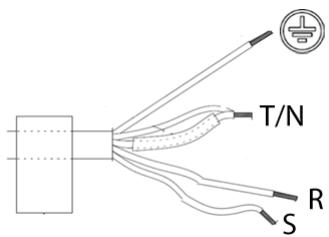
Connect to wall side
For 220-240V 1N use the cord paired as supplied.
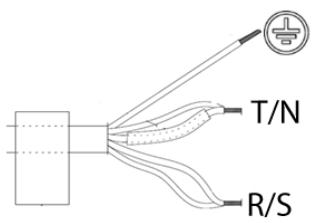
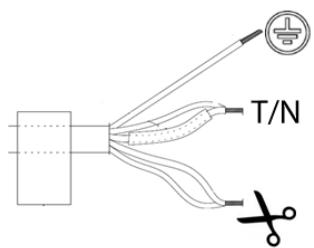
For 380-415V 3N or 380-415V 2N, separate with the scissors the wires as showed in the image below and connect them
Control Panel Description
Control panel
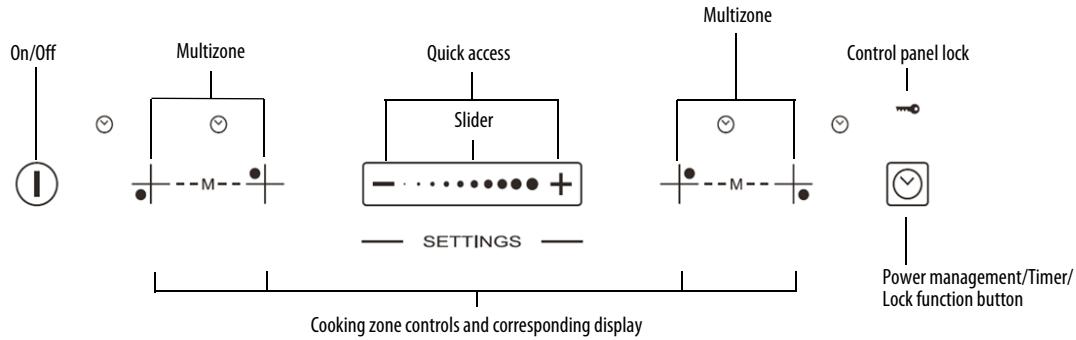
Switching the hob ON/OFF
To switch the hob on, press the ① button for approx. 2 seconds until the cooking zone displays light up. To switch off, press the same button until the displays switch off. All the cooking zones are deactivated
If the hob has been in use, the residual heat indicator "H" remains lit until the cooking zones have cooled down.
If within 10 seconds of switching on, no function is selected, the hob switches off automatically.
Switching on and adjusting cooking zones
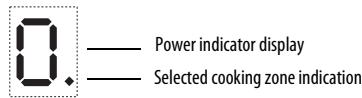

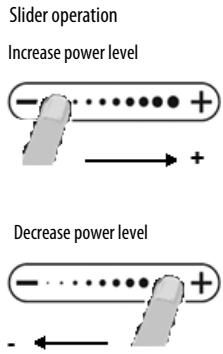
After switching the hob on, activate the required cooking zone by pressing the corresponding circular button and place the pot on the zone. With the Slider control it is possible to select the required power level, from min. 0 to max. 9, or booster "P" if available.
To increase the power level, slide your finger on the slider from left to right several times; to decrease it, slide in the opposite direction. Alternatively the "+" and -" quick access buttons can be used.
Deactivation of cooking zones
To switch off the cooking zone, press the corresponding button for more than 3 seconds.
The cooking zone switches off and, if still hot, the letter "H" appears on the zone display.
Control panel lock
This function locks the controls to prevent accidental activation of the hob. To activate the control panel lock, switch the hob on and press the Timer button for three seconds; an acoustic signal and a luminous indicator near the padlock symbol signal activation. The control panel is locked except for the switching off function. To deactivate the control lock, repeat the activation procedure. The luminous dot goes off and the hob is active again.
The presence of water, liquid spilled from pots or any objects resting on the button below the symbol can accidentally activate or deactivate the control panel lock.
Timer

The timer can be used to set the cooking time for a maximum of 99 minutes (1 hour and 39 minutes) for all the cooking zones.
Select the cooking zone to be used with the timer, press the timer and a beep signals the function (see figure). The display shows "00" and the LED indication comes on. The Timer value can be decreased and increased by keeping the slider function "+" and "-" buttons pressed. When the set time has elapsed, an acoustic signal sounds and the cooking zone switches off automatically. To deactivate the timer, keep the Timer button pressed for at least 3 seconds.

To set the timer for another zone, repeat the above steps. The timer display always shows the timer for the selected zone or the shortest timer.
To modify or deactivate the timer, press the cooking zone selection button for the timer in question.
Control panel warnings.
Residual heat indicator.

The hob is fitted with a residual heat indicator for each cooking zone. These indicators alert the user when cooking zones are still hot.
When the cooking zone cools down, the display goes off.
Incorrect or missing pot indicator.

If you are using a pot that is not suitable, not correctly positioned or not of the correct dimensions for your induction hob, the message "no pot" will appear in the display (see figure at side). If no pot is detected within 60 seconds, the hob switches off.
Fast boil function (Booster)
This function, only present on some cooking zones, makes it possible to exploit the hob's maximum power (for example to bring water to the boil very quickly). To activate the function, press the "+" button until "P" appears on the display. After 10 minutes' use of the booster function, the appliance automatically sets the zone to level 9.
"Power management" (Function where it is available)
Thanks to the "Power management" function, the user can set the maximum power the hob can reach, as required.
This setting is possible at any time and is maintained until the next change.
By setting the required maximum power, the hob automatically adjusts distribution in the various cooking zones, ensuring that this limit is never exceeded; with the advantage of also being able to manage all the zones simultaneously, but without overload problems.
4 maximum power levels are available and showed on display: 2.5 - 4.0 - 6.0 - 7.2kW (7.2 kW is considered as max power of cooktop).
At the time of purchase, the hob is set to maximum power
After plugging the appliance into the electrical socket, in the first 60 seconds it is possible to set the required power level by running the following points:
| Step | Control panel | Display | |
| 1 | ⊕ | Press for approximately 3 seconds | |
| 2 | Press the Power Management button to confirm the previous step | The display shows PL | |
| 3 | - /⊕ | Press to set the chosen level amongst the different options available | The light comes on together with the in-use lights for the individual cooking zones |
| 4 | Press the Power Management button to confirm the previous step | The display shows the set level which flashes for approximately 2 seconds; after which the hob emits an acoustic signal and then turns itself off; it is now ready for use | |
In case of an error when setting the power, the symbol appears in the middle and an acoustic signal sounds for about 5 seconds. In this case repeat the configuration procedure from the beginning. If the error occurs again, contact the After-Sales Service.
During normal use, if the user tries to increase the maximum available power level when reached, the level of the zone in use flashes twice and an acoustic signal sounds.
To obtain a higher power in that zone, it is necessary to manually decrease the power level of one or more already active cooking zones.
Multizone
Where present, this function allows the cooking zone to be used as two separate zones or as a single extra large zone.
It is perfect for oval, rectangular and elongated pans (with maximum base dimensions of 38 × 23 ~cm ) or more than one standard pan in the same time. In order to activate the Multizone, switch on the hob, press simultaneously the 2 selecting buttons of the zones as shown in the picture below: the two cooking zone displays show level "0"; both dots next to the level number are lit, indicating that the Multizone is activated.

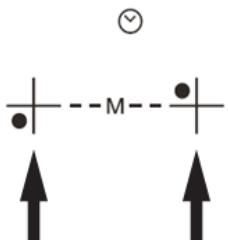
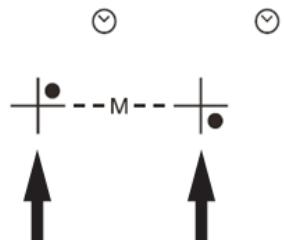
To change the power level (from 1 to max. 9 or P) press the - / + buttons or slide your finger horizontally on the slider. To deactivate the Multizone, press simultaneously the 2 selecting buttons of the zones. To switch off the zones instantly, hold one of the zone selection button for 3 seconds.

The message "no pot" will appear on the display of the zone that is not able to detect any pot (because of missing pot, or misplaced or not suitable for induction hob). This message remains active for 60 seconds: in this time you can add or slide pots within the Multizone area as you prefer.
After 60 seconds if no pan is placed on the zone, the system stops "searching" pots on that zone, the symbol remains visible on the display to remind that the zone is disabled.
To reactivate the Multizone, press one of the 2 buttons or
The Multizone is also able to detect when a pot is moved from one zone to the other one within the Multizone area keeping the same power level of the zone where the pan originally was placed (see the example in the figure below: if the pot is moved from the front heater to the rear heater, the power level will be shown on the display corresponding to the zone where the pot is placed).
It is also possible to operate the Multizone as two independent cooking zones, using the corresponding button of the single zone. Place the pot in the center of the single zone and adjust the power level with the slide touchscreen.

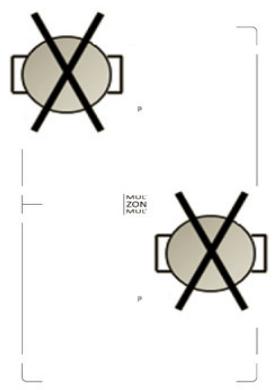
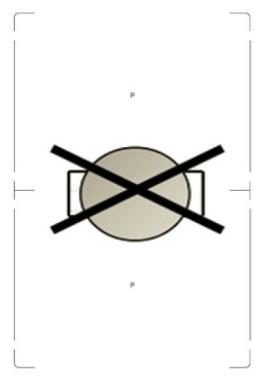
Important: make sure to place the pans centered on the cooking zone in the way to cover the logo P placed in the center of the single cooking zone.
In case of big pot, oval, rectangular and elongated pans make sure to place the pans centered on the cooking zone covering both P logos. Examples of good pot placement and bad pot placement :
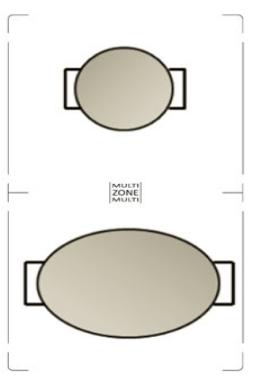
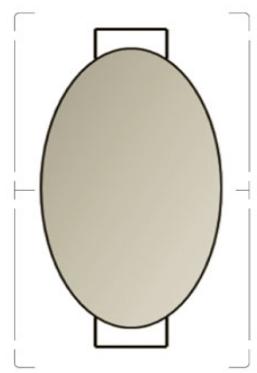
- Do not use steam cleaners.
Before cleaning, make sure the cooking zones are switched off and that the residual heat indicator ("H") is not displayed.
IMPORTANT: Do not use abrasive sponges or scouring pads. Their use could eventually ruin the glass.
After each use, clean the hob (when it is cool) to remove any deposits and stains due to food residuals.
Sugar or foods with a high sugar content damage the hob and must be immediately removed.
Salt, sugar and sand could scratch the glass surface.
Use a soft cloth, absorbent kitchen paper or a specific hob cleaner (follow the Manufacturer's instructions).
TROUBLESHOOTING GUIDE
- Read and follow the instructions given in the section "Instructions for use".
- Check that the electricity supply has not been shut off.
Dry the hob thoroughly after cleaning it.
If, when the hob is switched on, alphanumeric codes appear on the display, consult the following table for instructions.
If the hob cannot be switched off after using it, disconnect it from the power supply.
| ERROR CODE | DESCRIPTION | POSSIBLE CAUSES | ERROR ELIMINATION |
| C81, C82 | The control panel switches off because of excessively high temperatures | The internal temperature of electronic parts is too high | Wait for the hob to cool down before using it again. |
| F42 or F43 | The connection voltage is wrong | The sensor detects a discrepancy between the appliance voltage and that of the mains supply | Disconnect the hob from the mains and check the electrical connection |
| F12, F21, F25, F36, F37, F40, F47, F56, F58, F60 | Call the After-Sales Service and specify the error code | ||
NOISES MADE BY THE HOB
Induction hobs can make whistling or crackling sounds during normal operation, these actually come from the pots and pans as a result of the characteristics of the bottoms (for example, bottoms made of several layers of material, or uneven bottoms). These noises vary depending on the pots and pans used and the amount of food they contain, and are not indicative of a defect of any kind.
In addition, the induction hob is equipped with an internal cooling system to control the temperature of electronic parts; as a result, during operation and for several minutes after the hob has been switched off, the noise of the cooling fan will be audible. This is perfectly normal and indeed essential for proper functioning of the appliance.
POWER LEVEL TABLE
NOTE:
| Power level | Type of cooking | Level use (indicating cooking experience and habits) | |
| Max. power | Boost | Fast heating | Ideal for rapidly increasing the temperature of food to fast boiling in the case of water or rapidly heating cooking liquids |
| 8-9 | Frying - boiling | Ideal for browning, starting to cook, frying deep frozen products, fast boiling | |
| High power | 7-8 | Browning - sautéing - boiling - grilling | Ideal for sautéing, maintaining a lively boil, cooking and grilling (for a short period of time, 5-10 minutes) |
| 6-7 | Browning - cooking - stewing - sautéing - grilling | Ideal for sautéing, maintaining a light boil, cooking and grilling (for a medium period of time, 10-20 minutes), preheating accessories | |
| Medium power | 4-5 | Cooking - stewing - sautéing - grilling | Ideal for stewing, maintaining a gentle boil, cooking (for a long period of time). Creaming pasta |
| 3-4 | Cooking - simmering - thickening - creaming | Ideal for long-cooking recipes (rice, sauces, roasts, fish) with liquids (e.g. water, wines, broth, milk), creaming pasta | |
| 2-3 | Ideal for long-cooking recipes (less than a litre in volume: rice, sauces, roasts, fish) with liquids (e.g. water, wines, broth, milk) | ||
| Low power | 1-2 | Melting - defrosting - keeping food warm - creaming | Ideal for softening butter, gently melting chocolate, thawing small products and keeping just-cooked food warm (e.g. sauces, soups, minestrone) |
| 1 | Ideal for keeping just-cooked food warm, for creaming risottos and for keeping serving dishes warm (with induction-suitable accessory) | ||
| OFF | Zero power | Support surface | Hob in stand-by or off mode (possible end-of-cooking residual heat, indicated by an “H”) |
When making quick-cook foods that require perfect heat distribution (e.g. pancakes) on the 28~cm double cooking zone (where present), use pans no greater than 24~cm in diameter. For delicate cooking (for example, melting chocolate or butter) use the smaller diameter single zones.