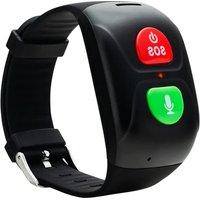
ST-01 - GPS device Canyon - Free user manual and instructions
Find the device manual for free ST-01 Canyon in PDF.


| Product type | GPS device |
| Brand | Canyon |
| Model | ST-01 |
| Dimensions | Approx. 6.0 × 11.0 × 3.0 cm |
| Weight | Approx. 150 g |
| Power supply | Rechargeable lithium-ion battery (2000 mAh) via USB cable |
| Display | 2.2-inch color TFT LCD |
| GPS receiver | High-sensitivity GPS + GLONASS |
| Waypoints | Up to 1000 |
| Routes | Up to 50 |
| Tracks | Up to 200 (log points) |
| Altimeter | Barometric altimeter |
| Compass | 3-axis electronic compass |
| Water resistance | IPX7 (submersible up to 1 m for 30 min) |
| Connectivity | USB 2.0 (micro-USB), Bluetooth |
| Memory | 8 GB internal (expandable via microSD) |
| Battery life | Up to 15 hours (normal use) |
| Maintenance | Clean with a soft, damp cloth; do not use solvents or abrasive cleaners |
| Safety | Use only the specified charger; avoid exposure to extreme temperatures or direct sunlight for prolonged periods |
| Spare parts | Battery, USB cable, screen protector, mounting bracket (available separately) |
Frequently Asked Questions - ST-01 Canyon
User questions about ST-01 Canyon
0 question about this device. Answer the ones you know or ask your own.
Ask a new question about this device
Download the instructions for your GPS device in PDF format for free! Find your manual ST-01 - Canyon and take your electronic device back in hand. On this page are published all the documents necessary for the use of your device. ST-01 by Canyon.
USER MANUAL ST-01 Canyon
GPS tracker for seniors
CNE-ST01BB
Quick Guide v 1.2
Please read this Guide carefully prior to use, so that you may start to use the device quickly and correctly.
1. Preparation before using
1.1 Check that all the accessories are included.
1.2 Choose the 2G Micro-SIM card which matches your GSM network, as recommended by your dealer (Turn the watch off before you insert the Micro-SIM card). Disable PIN code request of your SIM-card.
Please check that the Micro-Sim card is activated there is available credit and that the Internet is working (before inserting it into the watch).
1.3. Remove the SIM-card cover and insert SIM-card gently using tweezers. Then close the cover and turn on your device. Make sure that the screw is fastened tightly.
1.4 Install the app on the phone, you can ask the dealer if you don't know how to download it.
1.5 Open Canyon Life app -> “GSM Devices” -> register account or login, if you have account already -> prepare device -> enter or scan registration code (on the sticker on the watch «Reg code») -> press Add device and you will see Device successfully connected.
This product is not a medical device, its data accuracy may vary. Please do not use metrics it provides in any medical examinations.
2. Product functions:
- Location system: LBS, GPS, WIFI positioning
• Real-time positioning, tracing and monitoring - Phonebook
- Intercom
- Pedometer
- Alarm clock
- Safety area monitoring function
- SOS emergency alarm
- Low-power alarm
- Remote shutdown
- IP67 waterproof
3. Watch Introduction
Key 1:
ON key
SOS key
Hangup key
Indicator lamp

natural_image
Two black electronic devices with control buttons and a display screen, shown from different angles (no text or symbols visible)Sensor for heart rate
Key 2:
Chat key
Answer key
Magnetic charging interface
4. Key functions:
Key 1: Press and hold key 1 for 5 seconds to turn the watch on when the watch is turned off. Briefly press key 1 when watch is switched ON to hear current time. Since the App is designed to be used with an SOS phone number, press and hold key 1 for SOS dialing. Briefly press to hang up during an SOS phone call. Press briefly 3 times to enter the heart rate test function.
Briefly press the SOS key after card is inserted and turned on (green light will be on for 1 second if network is connected; red light will be on for 1 s if network is not connected).
Key 2: Briefly press key 2 to listen to a voice recording; press and hold key 2 for voice recording and to send the voice recording to the App after releasing the key. Briefly press key 2 to answer a phone call. Briefly press 3 times to automatically dial the SOS number.
5. Indicators:
- The red LED light will flash every 5 seconds in case of a low battery (lower than 20%); it will flash every 1 second when being charged
- The green LED light will flash 5 times if there is a voice message; when charging it will stay on after becoming fully charged.
The Red and green lights will flash alternately during
heart rate test. After the test, the green light will stay on for 3 seconds if the test proves to be successful and red light will be on for 3 seconds if the test fails. Led will be red when have GPS location. Led will be green when have WiFi location.
6. Main functions
6.1 SOS emergency alarm
Long press SOS key for 3 seconds. Watch will be on “alert state”.
Loop dialing 3 SOS numbers for two times. It will stop when the call is answered. If no answer, it will continue dialing for two times.
At the same time the watch can send a message to main phone number (default “off”), and at the same time send alert message to the App
6.2 Voice chat
Intercom between watch and App: Briefly press key 2 to listen to a voice recording; press and hold key 2 for voice recording and to send the voice recording to the App after releasing the key
6.3 Callback
You can request watch callback to any phone number from the app.
6.4 Voice monitoring
To use the voice monitoring function in the app,
you need to set a phone number to which you can request a quiet callback from the watch, this call will not be displayed on the watch and will not transmit sound to the watch from the incoming call, only outgoing sound will be transmitted as in one way call.
6.5 Shutdown
Press OFF key to power off if no sim-card installed, or remote turn off from the App.
6.6 Phone Book (white list)
10 phone numbers can be set in the App, and watch will accept incoming calls only from numbers from phonebook (whitelist).
6.7 Alarm clock: Three alarm clocks can be set; mode of alarm clock can be set according to customer's demand.
Troubleshooting
If the watch cannot connect with the server at the first time of use, and the device shows no network, please check the following:
- Check if you have inserted the Micro-Sim card correctly.
- Check if you are within the range of the GSM network
- Please check that the Micro-Sim card is activated and there is available credit and that the 2G Internet
is working (before inserting it into the watch).
Make sure you disabled PIN code request.
- Make sure that the registration code is entered or you can scan the QR code by selecting from the sticker on the watch «Reg code».
- Check that your device is charged fully There are two situations if you can not register on the APP.
a. The wrong code is entered, please re-enter carefully.
b. The watch is registered with another user, ask him/her to give you access through the watch menu in the application.
Scan this QR code to download and install the application Canyon Life:

If the actions from above-mentioned list do not help, please contact support service at Canyon web-site: http://canyon.eu/ask-your-question/
Download extended functional guide by the link: https://canyon.eu/wp-content/uploads/canyon-life-manual-en-1.pdf

Safety Instructions
Read and follow all instructions before usage of this device.
- Protect the device from excessive amount of water: this smartwatch can be
immersed into water for up to a maximum depth of 1m underwater for a very short time. It’s forbidden to use it for swimming.
- Protect the device from heat: do not install heating devices near it, and do not expose to direct sunlight during hot season for a long time.
- Protect the device from smashing: avoid dropping the device from over 0,5m to hard surfaces.
Warning! Do not use in hot water. This can cause damage to the device!
Don't put the watch in water before fastening the SIM card screw tightly. If the screw is not fastened tightly this can cause damage as water will get into the device.
Warranty liabilities
Warranty period starts from the date of the device's purchase from the Seller, authorized by Canyon. The date of purchase is indicated in your sales receipt or a waybill. During warranty period, a repair, replacement or refund of payment for goods are performed on discretion.
Manufacturer: Asbisc Enterprises PLC, 43, Diamond Court, Kolonakiou Str, 4303, Limassol, Cyprus, Agios Athanasios, http://canyon.eu/
natural_image
Two black electronic devices with control buttons and a dial indicator, shown from different angles (no text or symbols visible)Сензор за
сърдечна
честота
Tlačítko 2:
Tlačítko
konverzace
Tlačítko
přijetí
hovoru
2. Product functions:
Drošības norādījumi
natural_image
Close-up of a black electronic device with a circular lens and mounting holes (no visible text or symbols)Датчик
частоты
сердечных
сокращений
Магнитные
контакты
для зарядки
4. Функции кнопок:
natural_image
Black electronic device with circular button and four dots on sides (no visible text or symbols)Bezpečnostné pokyny
natural_image
Close-up of a black smartwatch with a central lens and control buttons (no visible text or symbols)Датчик
частоти
серцевих
скорочень
Магнітні
контакти для
зарядки
4. Функції кнопок:
Техніка безпеки
- GPS tracker for seniors
- Preparation before using
- Product functions:
- Watch Introduction
- Key 1:
- Key 2:
- Key functions:
- Indicators:
- Main functions
- SOS emergency alarm
- Voice chat
- Callback
- Voice monitoring
- Shutdown
- Phone Book (white list)
- Troubleshooting
- Make sure you disabled PIN code request.
- Safety Instructions
- Warranty liabilities
- Tlačítko 2:
- Drošības norādījumi
- Функции кнопок:
- Bezpečnostné pokyny
- Функції кнопок:
- Техніка безпеки
Brand : Canyon
Model : ST-01
Category : GPS device