SCHXL 897E D E - Oven SCHOLTES - Free user manual and instructions
Find the device manual for free SCHXL 897E D E SCHOLTES in PDF.



User questions about SCHXL 897E D E SCHOLTES
0 question about this device. Answer the ones you know or ask your own.
Ask a new question about this device
Download the instructions for your Oven in PDF format for free! Find your manual SCHXL 897E D E - SCHOLTES and take your electronic device back in hand. On this page are published all the documents necessary for the use of your device. SCHXL 897E D E by SCHOLTES.
USER MANUAL SCHXL 897E D E SCHOLTES
Operating Instructions
OVEN
Contents
Operating Instructions, 1
Warnings,2
Assistance,4
Description of the appliance,6
Description of the appliance,8
Installation,24
Oven structure,26
Start-up and use,27
Modes,28
Precautions and tips,34
Maintenance and care,34
Troubleshooting,36
WARNING: The appliance and its accessible parts become hot during use. Care should be taken to avoid touching heating elements. Children less than 8 years of age shall be kept away unless continuously supervised. This appliance can be used by children aged from 8 years and above and persons with reduced physical, sensory or mental capabilities or lack of experience and knowledge if they have been given supervision or instruction concerning use of the appliance in a safe way and understand the hazards involved. Children shall not play with the appliance. Cleaning and user maintenance shall not be made by children without supervision.
Do not use harsh abrasive cleaners or sharp metal scrapers to clean the oven door glass since they can scratch the surface, which may result in shattering of the glass.
Never use steam cleaners or pressure cleaners on the appliance.
WARNING: Ensure that the appliance is switched off before replacing the lamp to avoid the possibility of electric shock.
! When you place the rack inside, make sure that the stop is directed upwards and in the back of the cavity.
FR
Avertissements
The appliance is fitted with an automatic diagnostic system which detects any malfunctions. Malfunctions are signalled through messages of the following type: "F—" followed by numbers.
Call for technical assistance in the event of a malfunction.
Before calling for Assistance:
• check whether you can fix the problem yourself.
• restart the programme to check whether the malfunction has disappeared.
• if it has not, contact the Authorised Technical Assistance Service.
! Never use the services of an unauthorised technician.
Please have the following information to hand:
• the type of problem encountered.
• the message shown on the TEMPERATURE display.
• the appliance model (Mod.).
• the serial number (S/N).
The latter two pieces of information can be found on the data plate located on the appliance.
FR
Assistance
Attention :
Description of the appliance
Overall view
1 POSITION 1
2 POSITION 2
3 POSITION 3
4 POSITION 4
5 POSITION 5
6 DIVIDER "D" POSITION
7 POSITION 6
8 POSITION 7
9 GUIDES for the sliding racks
10 DRIPPING PAN
11 RACK shelf
12 DIVIDER shelf
13 Control panel
FR
text_image
Labeled diagram of an oven interior with numbered components for identificationPT
text_image
Labeled diagram of an oven interior with numbered components for identificationIT
Description of the appliance
Control panel
- SELECTOR knob
- CONTROL PANEL POWER BUTTON
- DISPLAY
- THERMOSTAT / TIMER knob
- START / STOP
- MINUTE MINDER icon
- TIMER icon
- CONTROL PANEL LOCKED icon
- DIAMOND CLEAN icon
- SELECT CAVITY icon
- LIGHT icon
Display
- SMALL CAVITY icon
- CAVITY TEMPERATURE display
- TIME display
- DURATION icon
- END OF COOKING icon
- CLOCK icon
- MINUTE MINDER icon
- CONTROL PANEL LOCK indicator
- CAVITY PREHEATING / RESIDUAL HEAT indicator
- MAIN CAVITY icon
- MODE icons

text_image
1 2 3 4 P - 0 + - 0 - START STOP 11 9 7 6 5 10 8
text_image
1 2 3 4 5 8:00:00" END ECO * * * * 11 10 9 8 7 6FR
natural_image
Line drawing of a cabinet or enclosure structure with two horizontal bars and a dashed floor, no text or symbols present.text_image
560 mm. 45 mm.
text_image
min. 20 mm FORNO VENTILATO min. 45 mmnatural_image
Line drawing of an open oven with internal grating and ventilation duct (no text or symbols)natural_image
Diagram showing a screwdriver inserted into a mechanical component, with an inset magnified view of the component (no text or symbols present)text_image
Diagram showing a refrigerator interior with labeled parts and a magnified view of the interior area.natural_image
Diagram of an oven with a black arrow indicating a process or operation, showing interior and exterior views (no text or symbols)
text_image
F
natural_image
Illustration of a person using a tablet device to interact with a screen (no text or symbols visible)! Please keep this instruction booklet in a safe place for future reference. If the appliance is sold, given away or moved, please make sure the booklet is also passed on to the new owners so that they may benefit from the advice contained within it.
! Please read this instruction manual carefully: it contains important information concerning the safe operation, installation and maintenance of the appliance.
Positioning
! Do not let children play with the packaging material; it should be disposed of in accordance with local separated waste collection standards (see Precautions and tips).
! The appliance must be installed by a qualified professional in accordance with the instructions provided. Incorrect installation may damage property or cause harm to people or animals.
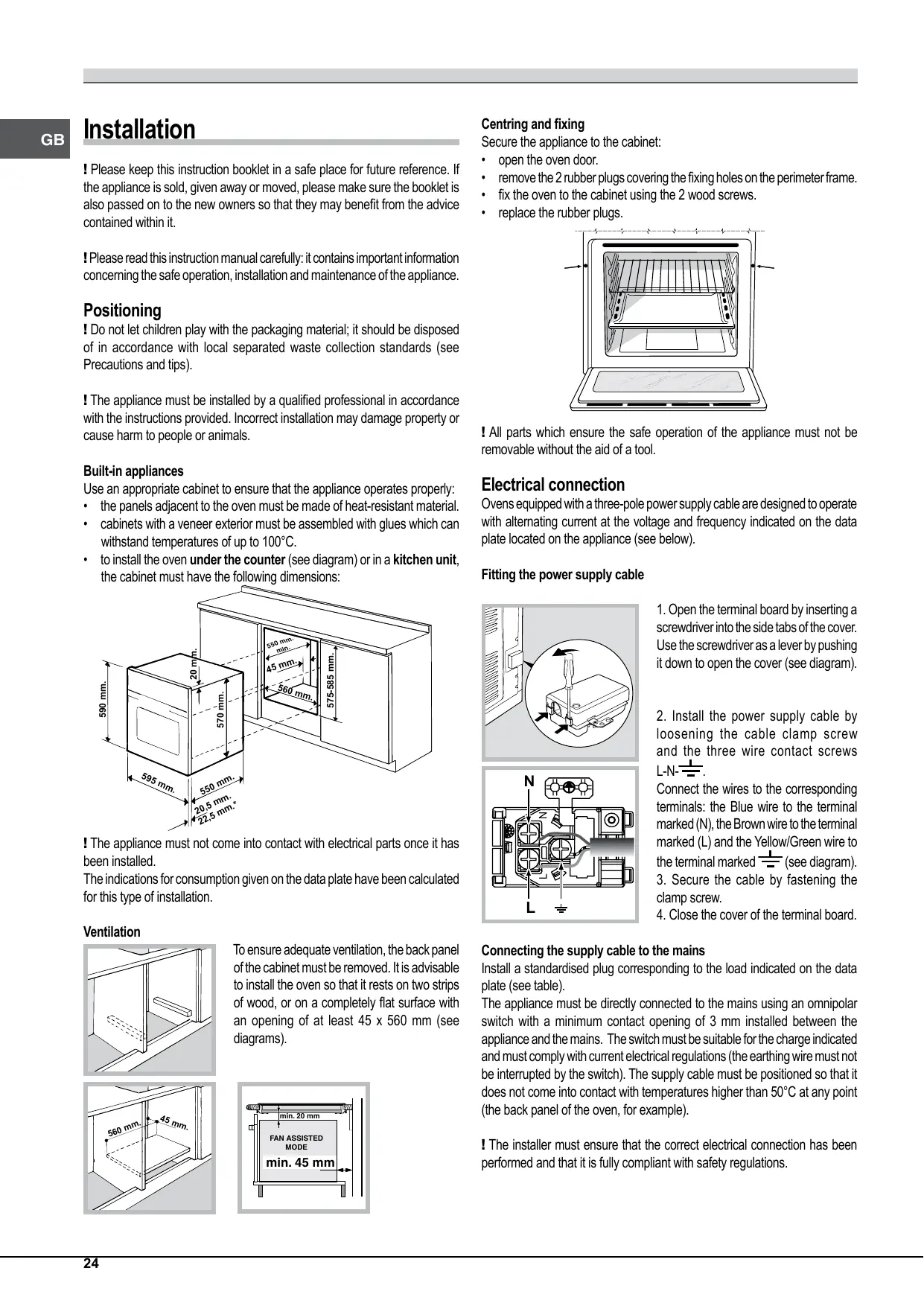
Built-in appliances
Use an appropriate cabinet to ensure that the appliance operates properly:
- the panels adjacent to the oven must be made of heat-resistant material.
- cabinets with a veneer exterior must be assembled with glues which can withstand temperatures of up to 100°C.
- to install the oven under the counter (see diagram) or in a kitchen unit, the cabinet must have the following dimensions:

text_image
590 mm. 20 mm. 570 mm. 550 mm. min. 45 mm. 560 mm. 575-585 mm. 595 mm. 550 mm. 20,5 mm. 22,5 mm.*! The appliance must not come into contact with electrical parts once it has been installed.
The indications for consumption given on the data plate have been calculated for this type of installation.
Ventilation

natural_image
Line drawing of a cabinet or enclosure structure with two horizontal bars and a dashed-line opening (no text or symbols)To ensure adequate ventilation, the back panel of the cabinet must be removed. It is advisable to install the oven so that it rests on two strips of wood, or on a completely flat surface with an opening of at least 45 x 560 mm (see diagrams).

text_image
560 mm. 45 mm.
text_image
min. 20 mm FAN ASSISTED MODE min. 45 mmCentring and fixing
Secure the appliance to the cabinet:
- open the oven door.
- remove the 2 rubber plugs covering the fixing holes on the perimeter frame.
- fix the oven to the cabinet using the 2 wood screws.
- replace the rubber plugs.

natural_image
Line drawing of an open oven with internal grating and ventilation duct (no text or symbols)! All parts which ensure the safe operation of the appliance must not be removable without the aid of a tool.
Electrical connection
Ovens equipped with a three-pole power supply cable are designed to operate with alternating current at the voltage and frequency indicated on the data plate located on the appliance (see below).
Fitting the power supply cable

natural_image
Diagram showing a screwdriver inserted into a mechanical component, with arrows indicating direction (no text or symbols present)- Open the terminal board by inserting a screwdriver into the side tabs of the cover. Use the screwdriver as a lever by pushing it down to open the cover (see diagram).

text_image
N Z L- Install the power supply cable by loosening the cable clamp screw and the three wire contact screws L-N-
Connect the wires to the corresponding terminals: the Blue wire to the terminal marked (N), the Brown wire to the terminal marked (L) and the Yellow/Green wire to the terminal marked 12 (see diagram).
-
Secure the cable by fastening the clamp screw.
-
Close the cover of the terminal board.
Connecting the supply cable to the mains
Install a standardised plug corresponding to the load indicated on the data plate (see table).
The appliance must be directly connected to the mains using an omnipolar switch with a minimum contact opening of 3 mm installed between the appliance and the mains. The switch must be suitable for the charge indicated and must comply with current electrical regulations (the earthing wire must not be interrupted by the switch). The supply cable must be positioned so that it does not come into contact with temperatures higher than 50°C at any point (the back panel of the oven, for example).
! The installer must ensure that the correct electrical connection has been performed and that it is fully compliant with safety regulations.
Before connecting the appliance to the power supply, make sure that
• the appliance is earthed and the plug is compliant with the law.
- the socket can withstand the maximum power of the appliance, which is indicated on the data plate.
• the voltage is in the range between the values indicated on the data plate.
- the socket is compatible with the plug of the appliance. If the socket is incompatible with the plug, ask an authorised technician to replace it. Do not use extension cords or multiple sockets.
! Once the appliance has been installed, the power supply cable and the electrical socket must be easily accessible.
! The cable must not be bent or compressed.
! The cable must be checked regularly and replaced by authorised technicians only (see Assistance).
! The manufacturer declines any liability should these safety measures not be observed.
| APPLIANCE SPECIFICATIONS | |
| Dimensions* | width 43.5 cmheight 41 cmdepth 41 cm |
| Volume* | 74 l |
| Dimensions** | width 45.6 cmheight 41 cmdepth 41 cm |
| Volume** | 77 l |
| Electrical connections | voltage: 220-240V~ 50/60Hz or 50Hz maximum power absorbed 2600W (see data plate) |
| ENERGY LABEL and ECODESIGN | EU Directive no 65/2014 supplementing Directive 2010/30/EU.EU Regulation no 66/2014 implementing Directive 2009/125/EC.Standard EN 60350-1Standard EN 50564Declared energy consumption for Forced convection Class – heating mode: ECO. |
| This appliance conforms to the following European Economic Community directives:- 2006/95/EC of 12/12/06 (Low Voltage) and subsequent amendments;- 2004/108/EC of 15/12/04 (Electromagnetic Compatibility) and subsequent amendments;- 93/68/EEC of 22/07/93 and subsequent amendments.- 2002/96/EU and subsequent amendments. | |
* Only for models with drawn rails.
** Only for models with wire rails.
Oven structure
The OPEN SPACE oven has a capacity of 70 litres and offers users the option of cooking on 4 shelves at the same time or cooking large quantities which would not necessarily be possible in a traditional oven.
The 56 universal (Creation) and automatic (Success) cooking modes guarantee perfect results every time, regardless of the dish you are cooking. OPEN SPACE also offers maximum comfort for all requirements, with 4 different operating options: the oven is one large compartment but can be divided into separate spaces of various sizes, each with its own independent temperature and duration controls.
This is made possible thanks to the heat-insulating DIVIDER, which divides the whole ExtraLarge Space into two different-sized spaces: the Main Space and the Small Space.
The two Main and Small Space compartments may be used at the same time to cook different dishes more quickly, or they may be used separately so that only the space necessary is used.
When the two compartments are used at the same time, the cooking temperature of each may be adjusted to a value between 30^ and 300^ .
There may be a difference in temperature of 100^ between the two zones, which means it is possible to cook very different dishes without any flavours or aromas intermingling.

text_image
ExtraLarge Space: cooking on 4 shelf levels EXTRALARGE SPACE RACK RACK RACK DRIPPING PAN
text_image
Main and Small Space: simultaneous operation SMALL SPACE RACK or DRIPPING PAN Divider "D" (fixed position) RACK (cooking on 3 shelves) RACK (cooking on 3 shelves) DRIPPING PAN (cooking on 3 shelves)
text_image
Cooking using the Small Space only SMALL SPACE MAIN SPACE RACK or DRIPPING PAN Divider "D" (fixed position)
text_image
Cooking using the Main Space only: cooking on 3 shelf levels SMALL SPACE MAIN SPACE Divider "D" (fixed position) RACK (cooking on 3 shelves) RACK (cooking on 3 shelves) DRIPPING PAN (cooking on 3 shelves)The table below lists the possible temperature values which may be set. The intelligent display will guide you through the correct procedure used to adjust the temperature of the two cavities.
| Temperature in the first cavity(Main or Small Space) | Temperature in the second cavity(Small or Main Space) |
| Between 40°C and 150°C | The temperature difference in relation to the first recess selected is no greater than 50°C |
| For example: if you set one recess to 90°C,you may set a value of between 40°C (90°C-50°C) and 140°C (90°C+50°C) for the other. | |
| Between 155°C and 200°C | The temperature difference in relation to the first recess selected is no greater than 70°C |
| For example: if you set one recess to 180°C,you may set a value of between 110°C (180°C-70°C) and 250°C (180°C+70°C) for the other. | |
| Between 205°C and 300°C | The temperature difference in relation to the first recess selected is no greater than 100°C |
| For example: if you set one recess to 210°C,you may set a value of between 110°C (210°C-100°C) and 300°C (maximum temperature setting) for the other. | |
Start-up and use

text_image
Diagram showing a refrigerator interior with labeled parts, including a numbered arrow pointing to the panel.WARNING! The oven is provided with a stop system to extract the racks and prevent them from coming out of the oven (1).
As shown in the drawing, to extract them completely, simply lift the racks, holding them on the front part, and pull (2).
! The first time you use your appliance, heat the empty oven with its door closed at its maximum temperature for at least half an hour. Make sure that the room is well ventilated before switching the oven off and opening the oven door. The appliance may emit a slightly unpleasant odour caused by protective substances used during the manufacturing process burning away.
! To make the setting process easier, keep the knob in “+” or “—” position: this will increase the scrolling speed of the numbers on the display.
! Each setting will automatically be stored in the appliance memory after 10 seconds.
! During operation, we recommend the removal of any crockery or delicate foodstuffs from the cavities not being used.
! Once cooking has begun, before the DIVIDER is removed, the oven must be switched off using the ⏻ icon.
! Every time the oven is switched on it is set to the CREATION cooking mode.
! The touch controls cannot be activated if the user is wearing gloves.
! In order to optimise the cooking performance, when starting the selected function, product settings will be applied that could cause a delayed start of the fan and heating elements.
! The oven will begin its preheating phase after 2 seconds from selecting the desired cycle.
Control panel lock
! The control panel can be locked while the oven is off, once cooking has started or finished and during programming.
To lock the oven controls, press and hold the ≡○ icon for at least 2 seconds. A buzzer will sound and the TEMPERATURE display shows the key symbol "O—n". The ≡○ icon will light up to indicate lock activation.
To deactivate the lock, press and hold the ⏱icon again for at least 2 seconds.
Setting the clock
! The clock can only be set when the oven is switched off. If the oven is in standby mode, pressing the ⏰ icon once will display the current time setting. Press it again to set the time.
After connection to the power supply network or after a blackout, the icon and the digits on the TIME display will flash for 10 seconds.
To set the clock:
-
Press ↙ icon.
-
Turn the TIMER knob towards “+” and “—” to adjust the hour value.
-
Once you have reached the correct hour value, press the 📋 icon.
-
Repeat the above process to set the minutes.
If a blackout occurs, it will be necessary to reset the clock. If the ⏰ icon flashes on the display, this indicates that the clock has not been set correctly.
Setting the minute minder
! The minute minder may be set regardless of whether the oven is switched on or off. It does not switch the oven on or off.
When the set time has elapsed, the minute minder emits a buzzer that will automatically stop after 30 seconds or when any active button on the control panel is pressed.
To adjust the minute minder, proceed as follows:
-
Press the 🔔 icon.
-
Adjust the time as desired by turning the TIMER knob towards “+” and “-”.
-
Once you have reached the desired value, press the 📋 icon again.
The lit 🔔 symbol will remind you that the minute minder is on. The DISPLAY will show the countdown.
To cancel the minute minder, press the 📋 icon and use the TIMER knob to set the time to 00:00. Press button again.
The 📋 icon will switch off to indicate that the minute minder has been disabled.
Cooling ventilation
In order to cool down the external temperature of the oven, a cooling fan blows a stream of air between the control panel and the oven door, as well as towards the bottom of the oven door.
! Once cooking has been completed, the cooling fan continues to operate until the oven has cooled down sufficiently.
Oven light
The light comes on when the oven door is opened or when a cooking mode starts.
The -icon can be used to switch on the light at any time.
Residual heat indicators
The appliance is fitted with a residual heat indicator. When the oven is off, the "residual heat" light on the display comes on to indicate high temperatures inside the oven cavity. The indicator light switches off when the inside of the oven has cooled down.
Restoring the factory settings
The oven factory settings can be restored to reset all selections made by the user (clock and customised durations). To carry out a reset, switch off the oven, then press and hold the button corresponding to the first manual cooking mode (top left) and the START STOP icon simultaneously for 6 seconds. Once the restore procedure is complete, a buzzer will sound. The first time the ⏻ icon is pressed, the oven will behave as if it is being switched on for the first time.
Standby
This product complies with the requirements of the latest European Directive on the limitation of power consumption in standby mode. If no buttons are pressed for 30 minutes and the control panel/door lock has not been activated, the appliance automatically reverts to standby mode. Standby mode is indicated by the high luminosity "Clock button" light. As soon as interaction with the machine resumes, system operation is restored.
Modes
! To guarantee perfectly soft or crispy food, the oven releases water contained within the food in the form of steam. This means it is possible to achieve optimal cooking results for all dishes.
! Every time the oven is switched on, it suggests the first CREATION cooking mode.
! Never put objects directly on the bottom of the oven; this will prevent the enamel coating from being damaged.
! Always place cookware on the rack(s) provided.
ExtraLarge Space
! Do not use position "D" for racks.
Starting the oven
-
Switch the control panel on by pressing the ⏻ icon. The appliance buzzer sounds three times (ascending) and all buttons light up in sequence.
-
Select the desired cooking mode by turning the SELECTOR knob. The TEMPERATURE display shows:
- the temperature associated with the mode, if programming manually;
- "Auto", if programming is automatic.
The TIME display shows:
- the current time, if programming manually;
- the duration, if programming is automatic.
-
Press the START STOP icon to begin cooking.
-
The oven will begin its preheating stage: the preheating light flashes.
-
When the preheating process has finished, a buzzer sounds and the preheating indicator light shows that this stage has been completed: the food can then be placed in the oven.
-
During cooking it is always possible to:
- modify the temperature by turning the THERMOSTAT knob (manual modes only);
- set the duration of a cooking mode (see Cooking Modes);
- press the START STOP icon to stop cooking. In this case the appliance stores the temperature modified previously in its memory (manual modes only);
- switch off the oven by pressing the ⏻ icon for 3 seconds.
- If a blackout occurs while the oven is already in operation, an automatic system within the appliance will reactivate the cooking mode from the point at which it was interrupted, provided that the temperature has not dropped below a certain level. Programmed cooking modes which have not yet started will not be restored and must be reprogrammed.
! There is no preheating stage for the BARBECUE mode.
CREATION cooking modes
!All cooking modes have a default cooking temperature which may be adjusted manually to a value between 30°C and 250°C as desired (300°C for GRILL mode). CREATION cooking modes include all manual programmes.
The oven controls all essential aspects of each of these cooking modes and makes it easier for you to create the perfect dish, from the simplest recipe to the most sophisticated culinary delights: the temperature, heat source, humidity and fan assisted operation are all controlled automatically.
This chapter was written with the help of our very own culinary expert. We invite you to follow his advice so you can benefit from his experience and perfect your cooking skills.
The recommended cooking modes, temperatures and oven shelf heights reflect our expert's own experience in the kitchen and will help you achieve the very best results.
The table below specifies whether it is best to pre-heat your oven or not for each CREATION cooking mode. Observing these suggestions will guarantee perfect results.
If you wish to place food in a preheated oven, wait for the preheating stage to be completed (this will be signalled by a series of beeps).
The temperature is set automatically, according to the cooking mode selected; however, you may adjust it to suit your recipe.
You can also set a cooking duration with an immediate or delayed start.

MULTILEVEL mode
All heating elements and the fan are activated. Since the heat remains constant throughout the oven, the air cooks and browns food in a uniform manner. A maximum of two racks may be used at the same time.

LOW TEMPERATURE modes
This type of cooking can be used for proving, defrosting, preparing yoghurt, heating dishes at the required speed and slow cooking at low temperatures. The temperature options are: 40, 65 and 90°C.

FAN GRILLING mode
The top heating element and the rotisserie spit (where present) are activated and the fan begins to operate. During part of the cycle the circular heating element is also activated. This combination of features increases the effectiveness of the unidirectional thermal radiation provided by the heating elements through the forced circulation of the air throughout the oven.
This helps prevent food from burning on the surface and allows the heat to penetrate right into the food. Always cook in this mode with the oven door closed.

GRILL mode
The top heating element and the rotisserie spit (where present) are activated. The high and direct temperature of the grill is recommended for food which requires a high surface temperature. Always cook in this mode with the oven door closed (see “Practical cooking advice”).

FAST COOKING mode
Preheating is not necessary for this cooking mode. This mode is particularly suitable for cooking pre-packed food quickly (frozen or pre-cooked). The best results are achieved using one cooking rack only.

PIZZA mode
The top and circular heating elements switch on and the fan begins to operate. This combination heats the oven rapidly. If you use more than one rack at a time, switch the position of the dishes halfway through the cooking process.
ECO mode
The back heating element is turned on and the fan starts working, ensuring a smooth and uniform heat level inside the oven.
This programme is indicated for slow cooking of any type of food with temperatures which can be set up to a maximum of 200^ C; the programme is also suitable for heating food and to complete the cooking process.
The programme is particularly suitable for the slow cooking of meat and fish, as it allows you to have softer meat and save energy at the same time. For a better energy effectiveness, when the product is turned on, the light stays on only
for 30 seconds; in order to turn the light back on, please press the 🎨 icon.
SUCCESS cooking modes
! The temperature and cooking duration are pre-set values, guaranteeing a perfect result every time - automatically. These values cannot be adjusted and use the C.O.P® (Programmed Optimal Cooking) system. The cooking cycle stops automatically and the oven indicates when the dish is cooked. You may start cooking whether the oven has been preheated or not. The cooking duration can be customised according to personal tastes, modifying it - before the start time - by ±5/20 minutes depending on the selected programme. Once cooking has begun, it is still possible to modify its duration. If the value is modified before cooking begins, it is stored in the appliance memory and suggested again when that cooking mode is next used. If the temperature inside the oven is higher than the suggested value for the selected mode, the text "Hot" appears on the TEMPERATURE display and it will not be possible to begin cooking; wait for the oven to cool.
! When the cooking stage has been reached, the oven buzzer sounds.
! Do not open the oven door as this will disrupt the cooking time and temperature.

BEEF mode
Use this function to cook beef and pork. Place the food inside the oven while it is still cold. The dish may also be placed in a preheated oven.

CAKES mode
This function is ideal for cooking desserts which are made using natural yeast, baking powder and desserts which contain no yeast. Place the dish in the oven while it is still cold. The dish may also be placed in a preheated oven.

BREAD mode
Use this function to bake bread. To obtain the best results, we recommend that you carefully observe the instructions below:
- Follow the recipe.
- Do not exceed the maximum weight of the dripping pan.
- Remember to pour 100 g (1dl) of cold water into the dripping pan, which should be placed in position 7.
- The dough must be left to rise at room temperature for 1 – 1 12 hours (depending on the room temperature) or until the dough has doubled in size.
Recipe for BREAD:
1 dripping pan holding 1000 g max, lower level
2 dripping pans each holding 1000 g max, middle and lower levels
Recipe for 1000 g of dough: 600 g flour, 360 g water, 11g salt, 25 g fresh yeast (or 2 sachets of powder yeast)
Method:
• Mix the flour and salt in a large bowl.
• Dilute the yeast in lukewarm water (approximately 35 degrees).
• Make a small well in the mound of flour.
• Pour in the water and yeast mixture.
- Knead the dough by stretching and folding it over itself with the palm of your hand for 10 minutes until it has a uniform consistency and is not too sticky.
- Form the dough into a ball shape, place it in a large bowl and cover it with transparent plastic wrap to prevent the surface of the dough from drying out. Select the manual LOW TEMPERATURE function on the oven and set the temperature to 40°C. Place the bowl inside and leave the dough to rise for approximately 1 hour (the dough should double in volume).
• Cut the dough into equal sized loaves.
- Place them in the dripping pan, on a sheet of baking paper.
- Dust the loaves with flour.
• Make incisions on the loaves. - Place the food inside the oven while it is still cold.
- Start the 🎨 BREAD cooking mode.
- Once baked, leave the loaves on one of the grill racks until they have cooled completely.
THE DIVIDER
Fit the DIVIDER to the DIVIDER shelf "D" using the pin, with the arrows turned towards the rear part of the oven. A buzzer will sound to confirm that the DIVIDER has been fitted correctly; it will then be possible to use the two MAIN and SMALL Space compartments separately or at the same time.
The icon will be enabled. The selected cavity alternates every time the button is pressed. The MAIN cavity is selected by default.
Small Space
Starting the oven
- With the DIVIDER inserted, use the 📄 icon to select the SMALL Space cavity. The 📄 icon will light up.
- Follow the above instructions for the EXTRALARGE cavity when carrying out the various adjustment and setting procedures.
Cooking modes
[Figure]
GRILL mode
The top heating element and the rotisserie spit (where present) are activated. The high and direct temperature of the grill is recommended for food which requires a high surface temperature. Always cook in this mode with the oven door closed (see “Practical cooking advice”).

FAST COOKING mode
Preheating is not necessary for this cooking mode. This mode is particularly suitable for cooking pre-packed food quickly (frozen or pre-cooked). The best results are achieved using one cooking rack only.
Main Space
Starting the oven
- With the DIVIDER inserted, use the 📋 icon to select the SMALL Space cavity. The 🖼️ icon will light up.
- Follow the above instructions for the EXTRALARGE cavity when carrying out the various adjustment and setting procedures.
CREATION cooking modes
!All cooking modes have a default cooking temperature which may be adjusted manually to a value between 30°C and 250°C as desired (300°C for GRILL mode). CREATION cooking modes include all manual programmes.
The oven controls all essential aspects of each of these cooking modes and makes it easier for you to create the perfect dish, from the simplest recipe to the most sophisticated culinary delights: the temperature, heat source, humidity and fan assisted operation are all controlled automatically.
This chapter was written with the help of our very own culinary expert. We invite you to follow his advice so you can benefit from his experience and perfect your cooking skills. The recommended cooking modes, temperatures and oven shelf heights reflect our expert's own experience in the kitchen and will help you achieve the very best results.
The table below specifies whether it is best to pre-heat your oven or not for each CREATION cooking mode.
Observing these suggestions will guarantee perfect results. If you wish to place food in a preheated oven, wait for the preheating stage to be completed (this will be signalled by a series of beeps). The temperature is set automatically, according to the cooking mode selected; however, you may adjust it to suit your recipe.
You can also set a cooking duration with an immediate or delayed start.

MULTILEVEL mode
All heating elements and the fan are activated. Since the heat remains constant throughout the oven, the air cooks and browns food in a uniform manner. A maximum of two racks may be used at the same time.

LOW TEMPERATURE modes
This type of cooking can be used for proving, defrosting, preparing yoghurt, heating dishes at the required speed and slow cooking at low temperatures. The temperature options are: 40, 65 and 90°C.

PIZZA mode
The top and circular heating elements switch on and the fan begins to operate. This combination heats the oven rapidly. If you use more than one rack at a time, switch the position of the dishes halfway through the cooking process.
ECO mode
The back heating element is turned on and the fan starts working, ensuring a smooth and uniform heat level inside the oven.
This programme is indicated for slow cooking of any type of food with temperatures which can be set up to a maximum of 200^ C; the programme is also suitable for heating food and to complete the cooking process.
The programme is particularly suitable for the slow cooking of meat and fish, as it allows you to have softer meat and save energy at the same time. For a better energy effectiveness, when the product is turned on, the light stays on only for 30 seconds; in order to turn the light back on, please press the 🎨️ icon.
SUCCESS cooking modes
! The temperature and cooking duration are pre-set values, guaranteeing a perfect result every time - automatically. These values cannot be adjusted and use the C.O.P.® (Programmed Optimal Cooking) system. The cooking cycle stops automatically and the oven indicates when the dish is cooked. You may start cooking whether the oven has been preheated or not. The cooking duration can be customised according to personal tastes, modifying it - before the start time - by ±5/20 minutes depending on the selected programme. Once cooking has begun, it is still possible to modify its duration. If the value is modified before cooking begins, it is stored in the appliance memory and suggested again when that cooking mode is next used. If the temperature inside the oven is higher than the suggested value for the selected mode, the text "Hot" appears on the TEMPERATURE display and it will not be possible to begin cooking; wait for the oven to cool.
! When the cooking stage has been reached, the oven buzzer sounds.
! Do not open the oven door as this will disrupt the cooking time and temperature.

BEEF mode
Use this function to cook beef and pork. Place the food inside the oven while it is still cold. The dish may also be placed in a preheated oven.

CAKES mode
This function is ideal for cooking desserts which are made using natural yeast, baking powder and desserts which contain no yeast. Place the dish in the oven while it is still cold. The dish may also be placed in a preheated oven.
Using the Small Space and Main Space at the same time
! Simultaneous operation is only possible when using CREATION cooking modes.
Starting the oven
For simultaneous use, simply start a cooking mode for both cavities in succession. The TEMPERATURE display shows the cooking parameters for both cavities.
! Thanks to the high energy efficiency of the appliance, it only takes around 15 minutes for the SMALL SPACE cavity to preheat.
Programming cooking
! A cooking mode must be selected before programming can take place.
Programming the cooking duration
- Press the ⏻ icon until the ⏻ icon and the numerical digits on the display begin to flash.
- Turn the TIMER knob towards “+” and “—” to adjust the time as desired; keep the knob in position to scroll through the numbers more quickly and make the setting process easier.
- Once you have reached the desired duration, press the ⏰ icon again. The DISPLAY will show the duration and set temperature alternately.
- Press the START STOP icon to begin cooking.
- When cooking has finished, "END" appears on the DISPLAY and a buzzer sounds.
- For example: it is 9:00 a.m. and a duration of 1 hour and 15 minutes is programmed. The programme will stop automatically at 10:15 a.m.
Setting the end time for a cooking mode
! A cooking duration must be set before the cooking end time can be scheduled.
! For the delayed programming to work properly, the clock should be set to the correct time.
- Follow steps 1 to 3 to set the duration as detailed above.
- Press the ⏻ icon twice: the ⏻ end icon and the numerical digits on the display will begin to flash.
- Turn the TIMER knob towards “+” and “—” to adjust the cooking end time value.
- Once you have reached the desired end time, press the ⏻ icon again. The DISPLAY will show the duration, the cooking end time and the set temperature alternately.
- Press the START STOP icon to activate the programmed mode.
Programming has been set when the Ⓗ and Ⓗ icons are illuminated. The DISPLAY shows the cooking end time and the cooking duration alternately.
- Once cooking has finished, "END" appears on the display and a buzzer sounds.
- For example: it is 9:00 a.m. and a time of 1 hour and 15 minutes is programmed, while the end time is set to 12:30. The programme will start automatically at 11:15 a.m.
To cancel programming press the START STOP icon.
Practical cooking advice
MULTILEVEL
• Use positions 1, 3, 5 and 6.
- Place the dripping pan at the bottom and the rack at the top.
- When cooking pizzas or focaccia breads, use a lightweight aluminium tray with a maximum diameter of 30 cm, placing it on top of the rack supplied. If the pizza has a lot of toppings, we recommend adding the mozzarella cheese to the top of the pizza halfway through the cooking process. During the cooking process, it is advisable to change the order of the shelves.
- Use positions 2 and 4, placing the food which requires more heat on 2.
- Place the dripping pan on the bottom and the rack on top.
GRILL
• Preheat the oven for 5 minutes.
• Fit the DIVIDER to the DIVIDER rack "D".
- Keep the oven door closed when cooking in this mode.
- Place the rack in position 7. Position the food in the centre of the rack. Position the dripping pan on shelf level 6.
- This function is recommended for: browning food, cooking gratins, colouring meringues, making toasted sandwiches and grilling small quantities of thin, lean meat.
- We recommend that the power level is set to maximum. The top heating element is regulated by a thermostat and may not always operate constantly.
- Place the grill rack in position 3 or 4 and place the food in the centre of the rack.
- We recommend that the temperature is set to its maximum level. The top heating element is regulated by a thermostat and may not always operate constantly.
FAST COOKING
• Use the dripping pan on shelf level 6.
- When cooking frozen foods, always follow the instructions on the packaging.
Cooking advice table for ovens with an ExtraLarge Space cavity
| Function | Food | Weight (Kg) | Cook on shelf no. | Shelf position | Preheating | Recommended temperature (°C) | Cooking duration (minutes) | |||
| Dripping pan | Rack 1 | Rack 2 | Rack 3 | |||||||
| Creation | ||||||||||
| Multilevel* | Tarts | 1 | 2 or 3 | Yes | 190 | 25-30 | ||||
| 2 | 1 or 2 | 3 or 5 | Yes | 180 | 35-45 | |||||
| 3 | 1 | 3 | 5 | Yes | 180 | 40-50 | ||||
| 4 | 1 | 3 | 5 | 6 | Yes | 180 | 45-55 | |||
| Cream puffs | 1 | 2 or 3 | Yes | 190 | 25-35 | |||||
| 2 | 1 to 2 | 3 to 5 | Yes | 190 | 25-35 | |||||
| 3 | 1 | 3 | 5 | Yes | 190 | 30-40 | ||||
| 4 | 1 | 3 | 5 | 6 | Yes | 190 | 30-40 | |||
| Biscuits | 1 | 2 or 3 | Yes | 180 | 15-25 | |||||
| 2 | 1 to 2 | 3 to 5 | Yes | 180 | 15-25 | |||||
| 3 | 1 | 3 | 5 | Yes | 180 | 20-30 | ||||
| 4 | 1 | 3 | 5 | 6 | Yes | 180 | 20-30 | |||
| Small pastries | 1 | 2 or 3 | Yes | 200 | 30-40 | |||||
| 2 | 2 | 5 | Yes | 200 | 35-45 | |||||
| 3 | 1 | 4 | 6 | Yes | 200 | 40-50 | ||||
| Crème Caramel (bain-marie) | 1 | 2 or 3 | Yes | 170 | 35-45 | |||||
| 2 | 2 | 5 | Yes | 170 | 35-45 | |||||
| 3 | 1 | 4 | 6 | Yes | 170 | 40-50 | ||||
| Panettone | 1 | 1 or 2 | Yes | 160 | 45-60 | |||||
| Cake | 1 | 2 or 3 | Yes | 160 | 60-75 | |||||
| 2 | 1 | 4 or 5 | Yes | 160 | 60-75 | |||||
| Sponge cake | 1 | 2 or 3 | Yes | 190 | 30-35 | |||||
| 2 | 2 | 5 | Yes | 190 | 35-40 | |||||
| 3 | 1 | 4 | 6 | Yes | 190 | 40-45 | ||||
| Roast | 1,5-2 | 1*** | 2 | Yes | 160 | 90-240 | ||||
| Fast cooking* | Kebabs | 1 | 1 | 5 | No | 210 | 20-25 | |||
| Fish fillets | 1 | 1 | 5 | No | 200 | 15-20 | ||||
| Frozen potatoes | 1 | 5 | No | 230 | 25-30 | |||||
| Pizza* | Pizza/Focaccia | 1 | 2 or 3 | Yes | 220 | 15-25 | ||||
| 2 | 1 or 2 | 3 or 5 | Yes | 220 | 20-30 | |||||
| 3 | 1 | 3 | 5 | Yes | 220 | 25-35 | ||||
| 4 | 1 | 3 | 5 | 6 | Yes | 220 | 30-40 | |||
| Fan grilling* | Roast meats | 1 | 2*** | 3 | No | 200 | 35-75 | |||
| Gratin | 1 | 3 or 4 | No | 190 | 40-60 | |||||
| Large roasting joint | 1 | 1*** | 2 | No | 200 | 90-120 | ||||
| Large game roasting joint | 1 | 1*** | 2 | No | 200 | 90-120 | ||||
| Grill* | Beef ribs | 1 | 3*** | 4 or 5 | Yes | 270-300 | 20-30 | |||
| Sausages | 1 | 3*** | 5 or 7 | Yes | 270-300 | 10-20 | ||||
| Pork ribs | 1 | 3*** | 5 or 7 | Yes | 270-300 | 15-25 | ||||
| Bacon | 1 | 3*** | 5 or 7 | Yes | 270-300 | 3-6 | ||||
| Low temperature* | Proving/Defrosting White meringues Meat/Fish | 1 | 2 | No | 40 | |||||
| 4 | 1 | 3 | 5 | 6 | No | 65 | 8-12 hours | |||
| 3 | 1 | 3 | 5 | No | 90 | 90-180 | ||||
| Success | ||||||||||
| Bread | Bread (see recipe) | 2 | 1 | 7** | 2 | No | ||||
| 2 | 2 | 7** | 1 | 4 | No | |||||
| 2 | 3 | 7** | 1 | 3 | 5 | No | ||||
| Beef | Roast | 1,2-1,5 | 1 | 1*** | 5 | No | ||||
| Cakes | Cakes | 1 | 2 | No | ||||||
| 2 | 2 | 5 | No | |||||||
* The cooking times listed above are intended as guidelines only and may be modified according to personal tastes. Oven preheating times are set as standard and may not be modified manually.
** As stated in the recipe, pour 100 g water into the dripping pan in position 7.
*** Use the dripping pan to collect any oil or fat produced as a result of the cooking process.
! ECO cooking mode: This programme can be used for slow cooking of any type of food with temperatures which can be set up to a maximum of 200^ C; the programme is also suitable for heating food and to complete the cooking process
Cooking advice table for the Small Space feature
| Function | Food | Weight (Kg) | Cook on shelf no. | Shelf position | Preheating | Recommended temperature (°C) | Cooking duration (minutes) | ||
| Dripping pan | Rack 1 | Divider | |||||||
| Fast cooking* | Fish fillets | 1 | 6 | D | Yes | 160-180 | 20-30 | ||
| Meat fillets | 1 | 6 | D | Yes | 180-200 | 30-40 | |||
| Frozen pizza | 1 | 6 | D | Yes | |||||
| Frozen prepared foods | 1 | 6 | D | Yes | |||||
| Grill* | Toast | 1 | 6 | D | Yes | 270-300 | 3-5 | ||
| Bacon | 1 | 6** | 7 | D | Yes | 270-300 | 3-6 | ||
| Pork steaks | 1 | 6** | 7 | D | Yes | 270-300 | 15-25 | ||
* The cooking times listed above are intended as guidelines only and may be modified according to personal tastes. Oven preheating times are set as standard and may not be modified manually.
** Use the dripping pan to collect any oil or fat produced as a result of the cooking process.
Cooking advice table for the Main Space feature
| Function | Food | Weight (Kg) | Cook on shelf no. | Shelf position | Preheating | Recommended temperature (°C) | Cooking duration (minutes) | ||
| Dripping pan | Rack 1 | Divider | |||||||
| Creation | |||||||||
| Multilevel* | Tarts | 1 | 2 | D | Yes | 200 | 30-40 | ||
| 2 | 1 | 3 | D | Yes | 200 | 35-45 | |||
| Cream puffs | 1 | 2 | D | Yes | 190 | 25-35 | |||
| 2 | 1 | 3 | D | Yes | 190 | 25-35 | |||
| Biscuits | 1 | 2 | D | Yes | 180 | 15-25 | |||
| 2 | 1 | 3 | D | Yes | 180 | 15-25 | |||
| Small pastries | 1 | 2 | D | Yes | 200 | 30-40 | |||
| 2 | 1 | 3 | D | Yes | 200 | 35-45 | |||
| Crème Caramel (bain-marie) | 1 | 2 | D | Yes | 170 | 35-45 | |||
| Cake | 1 | 2 | D | Yes | 160 | 60-75 | |||
| Sponge cake | 1 | 2 | D | Yes | 190 | 30-35 | |||
| 2 | 1 | 3 | D | Yes | 190 | 35-40 | |||
| Pizza* | Pizza/Focaccia | 1 | 2 or 3 | D | Yes | 220 | 15-25 | ||
| 2 | 1 or 2 | 3 or 5 | D | Yes | 220 | 20-30 | |||
| Low temperature* | Proving/Defrosting | 1 | 2 | D | No | 40 | |||
| White meringues | 2 | 1 | 3 | D | No | 65 | 8-12 hours | ||
| Meat/Fish | 2 | 1 | 3 | D | No | 90 | 90-180 | ||
| Success | |||||||||
| Beef | Roast | 1,2-1,5 | 1 | 1** | 2 | D | No | ||
| Cakes | Cakes | 1 | 2 | D | No | ||||
| 2 | 1 | 3 | D | No | |||||
* The cooking times listed above are intended as guidelines only and may be modified according to personal tastes. Oven preheating times are set as standard and may not be modified manually.
** Use the dripping pan to collect any oil or fat produced as a result of the cooking process.
! ECO cooking mode: This programme can be used for slow cooking of any type of food with temperatures which can be set up to a maximum of 200^ C; the programme is also suitable for heating food and to complete the cooking process.
Cooking advice table for using the Small Space and Main Space at the same time
Main Space
| Function | Food | Weight (kg) | Cook on shelf no. | Rack position | Preheating | Recommended temperature (°C) | Cooking duration (minutes) | ||
| Dripping pan | Rack 1 | Divider | |||||||
| Creation | |||||||||
| Multilevel* | Tarts | 1 | 2 | D | Yes | 200 | 30-40 | ||
| 2 | 1 | 3 | D | Yes | 200 | 35-45 | |||
| Biscuits | 1 | 2 | D | Yes | 180 | 15-25 | |||
| 2 | 1 | 3 | D | Yes | 180 | 15-25 | |||
| Small pastries | 1 | 2 | D | Yes | 200 | 30-40 | |||
| 2 | 1 | 3 | D | Yes | 200 | 35-45 | |||
| Crème Caramel (bain-marie) | 1 | 2 | D | Yes | 170 | 35-45 | |||
| Cake | 1 | 2 | D | Yes | 160 | 60-75 | |||
| Pizza* | Pizza | 1 | 2 or 3 | D | Yes | 220 | 15-25 | ||
| 2 | 1 or 2 | 3 or 5 | D | Yes | 220 | 20-30 | |||
Small Space
| Function | Food | Weight (kg) | Cook on shelf no. | Shelf position | Preheating | Recommended temperature (°C) | Cooking duration (minutes) | ||
| Dripping pan | Rack 1 | Divider | |||||||
| Fast cooking* | Fish fillets | 1 | 6 | D | Yes | 160-180 | 20-30 | ||
| Meat fillets | 1 | 6 | D | Yes | 180-200 | 30-40 | |||
| Frozen pizza | 1 | 6 | D | Yes | |||||
| Frozen prepared foods | 1 | 6 | D | Yes | |||||
| Grill* | Pork steaks | 1 | 6** | 7 | D | Yes | 270-300 | 15-25 | |
* The cooking times listed above are intended as guidelines only and may be modified according to personal tastes. Oven preheating times are set as standard and may not be modified manually.
** Use the dripping pan to collect any oil or fat produced as a result of the cooking process.
Precautions and tips
! This appliance has been designed and manufactured in compliance with international safety standards. The following warnings are provided for safety reasons and must be read carefully.
General safety
- The appliance was designed for domestic use inside the home and is not intended for commercial or industrial use.
- The appliance must not be installed outdoors, even in covered areas. It is extremely dangerous to leave the appliance exposed to rain and storms.
- When moving or positioning the appliance, always use the handles provided on the sides of the oven.
- Do not touch the appliance while barefoot or with wet or damp hands and feet.
- The appliance must be used by adults only for the preparation of food, in accordance with the instructions provided in this booklet. Any other use of the appliance (e.g. for heating the room) constitutes improper use and is dangerous. The manufacturer may not be held responsible for any damage caused as a result of improper, incorrect and unreasonable use of the appliance.
- Do not touch the heating elements or certain parts of the oven door when the appliance is in use; these parts become extremely hot. Keep children well away from the appliance.
- Make sure that the power supply cables of other electrical appliances do not come into contact with the hot parts of the oven.
- The ventilation and heat dispersal openings must never be obstructed.
• Always grip the oven door handle in the centre: the ends may be hot. - Always use oven gloves when placing cookware in the oven or when removing it.
- Do not use aluminium foil to line the bottom of the oven.
- Do not place flammable materials in the oven: if the appliance is switched on accidentally, the materials could catch fire.
- When unplugging the appliance, always pull the plug from the mains socket; do not pull on the cable.
- Do not perform any cleaning or maintenance work without having disconnected the appliance from the electricity mains.
- If the event of malfunctions, under no circumstances should you attempt to perform the repairs yourself. Contact an authorised Service Centre (see Assistance).
- Do not rest objects on the open oven door.
- Do not let children play with the appliance.
- The appliance should not be operated by people (including children) with reduced physical, sensory or mental capacities, by inexperienced individuals or by anyone who is not familiar with the product. These individuals should, at the very least, be supervised by someone who assumes responsibility for their safety or receive preliminary instructions relating to the operation of the appliance.
- The appliance is not intended to be operated by means of an external timer or separate remote-control system.
Disposal
- When disposing of packaging material: observe local legislation so that the packaging may be reused.
- The European Directive 2012/19/EU on Waste Electrical and Electronic Equipment (WEEE), requires that old household electrical appliances must not be disposed of in the normal unsorted municipal waste stream. Old appliances must be collected separately in order to optimise the recovery and recycling of the materials they contain and reduce the impact on human health and the environment. The crossed out “wheeled bin” symbol on the product reminds you
of your obligation, that when you dispose of the appliance it must be separately collected.
Consumers should contact their local authority or retailer for information concerning the correct disposal of their old appliance.
Respecting and conserving the environment
- Whenever possible, avoid pre-heating the oven and always try to fill it. Open the oven door as little as possible because heat is lost every time it is opened. To save a substantial amount of energy, simply switch off the oven 5 to 10 minutes before the end of your planned cooking time and use the heat the oven continues to generate.
• Automatic programmes are based on standard food product. - Keep gaskets clean and tidy to prevent any door energy losses.
- If you have a timed tariff electricity contract, the “delay cooking” option will make it easier to save money by moving operation to cheaper time periods.
! This product complies with the requirements of the latest European Directive on the limitation of power consumption of the standby mode.
Maintenance and care
Switching the appliance off
Disconnect your appliance from the electricity supply before carrying out any work on it.
Cleaning the appliance
- Slight differences in colour on the front of the oven are due to the different materials used, i.e. glass, plastic or metal.
- Any shady areas resembling grooves on the oven door glass are caused by reflections from the oven light.
- The enamel is branded at very high temperatures. This process may cause colour variations. This is normal and will not affect appliance operation in any way. The thin edges of the sheet metal cannot be entirely enamelled and may therefore appear to be unfinished. This will not affect the rust protection.
- The stainless steel or enamel-coated external parts and the rubber seals may be cleaned using a sponge that has been soaked in lukewarm water and neutral soap. Use specialised products for the removal of stubborn stains. After cleaning, rinse and dry thoroughly. Do not use abrasive powders or corrosive substances.
- The inside of the oven should ideally be cleaned after each use, while it is still lukewarm. Use hot water and detergent, then rinse well and dry with a soft cloth. Do not use abrasive products.
- All accessories - with the exception of the sliding racks - can be washed like everyday crockery, and are even dishwasher safe.
- We recommend that detergents are not sprayed directly onto the control panel, but that a sponge is used instead.
! Never use steam cleaners or pressure cleaners on the appliance.
Cleaning the oven door
Clean the glass part of the oven door using a sponge and a non-abrasive cleaning product, then dry thoroughly with a soft cloth. Do not use rough abrasive material or sharp metal scrapers as these could scratch the surface and cause the glass to crack.
For more thorough cleaning purposes, the oven door may be removed:
- Open the oven door fully (see diagram).
- Use a screwdriver to lift up and turn the small levers F located on the two hinges (see diagram).

natural_image
Line drawing of an oven with a tray and vent, showing a curved arrow indicating direction (no text or symbols)
text_image
F
natural_image
Illustration of a hand using a tool to cut or install a rectangular object, with no visible text or symbols.- Grip the door on the two outer sides and close it approximately half way. Pull the door towards you, lifting it out of its slot (see diagram). To replace the door, reverse this sequence.
Inspecting the seals
Check the door seals around the oven regularly. If the seals are damaged, please contact your nearest Service Centre (see Assistance). We recommend that the oven is not used until the seals have been replaced.
Replacing the light bulb

text_image
Lamp Holder compartment Lamp Glass coverTo replace the oven light bulb:
- Remove the glass cover of the lamp-holder.
- Remove the light bulb and replace it with a similar one: halogen lamp voltage 230 V, wattage 25 W, cap G 9.
- Replace the glass cover (see diagram).
! Do not touch the light bulb directly with your hands.
! Do not use the oven lamp as/for ambient lighting.
Automatic cleaning using the Diamond Clean cycle
The Diamond Clean mode is an automatic cleaning cycle which releases steam inside the cavity and uses the exclusive Diamond Clean enamel to make it easy to remove any dirt residues from the cavity and accessories.
Available in three different levels: Economy, Normal and Intensive - to be used based on the type of dirt.
The Diamond Clean cycle can be used to keep the oven always clean.
During the cleaning process steam is released inside the cavity which, together with the titanium-based Diamond Clean enamel (on the inside walls of the oven and dripping pans), makes it easy to clean the oven.
Three different cleaning levels may be selected: Economy, Normal and Intensive - based on the type of dirt. The following are the features of the three different cycles.
In order to start the Diamond Clean cycle:
- Wait for the oven to cool down.
- Place the dripping pan on level 1 and pour in the following quantities of water: 150g for the Economy cycle, 250g for the Normal cycle and 350g for the Intensive cycle. A smaller or larger quantity of water than recommended may affect the cycle results. Do not use detergents.
- Close the oven door.
-
Press the icon ⏻ to switch on the control panel.
-
Press the icon ⚙️ to display the text “dc”, “nor” and the default duration of 15 minutes (normal cycle) alternately.
-
Press the icon ⏻ and turn the TIMER knob to adjust the default cleaning level. There are 3 different levels to choose from, each with a pre-set duration which cannot be changed:
-
Economy (ECO): turn the knob towards “—”. Duration 10 minutes.
- Normal (NOR): initial level. Duration 15 minutes.
- Intensive (INT): turn the knob towards “+”. Duration 20 minutes.
- Press the icon ⬇ to confirm.
- Press the icon START STOP to start the cleaning process.
! To prevent any steam leaks do not open the door during the cycle.
! In the last minutes of the intensive cycle the control panel will partially and momentarily mist up. The mist will disappear every time the tangential cooling fan is started.
An end time for the Diamond Clean cycle may be programmed just like for a normal cooking cycle (see Programming the automatic cleaning end time.)
Safety devices
- Press the START STOP button to cancel the cleaning cycle at any time;
• If an anomaly occurs, the heating elements will be switched off.
Programming the automatic cleaning end time
- Press the icon ⏻ twice. The icon END and numerical digits begin to flash on the display panel;
- Turn the TIMER knob towards “+” and “—” to adjust the cleaning end time value.
- Once you have reached the desired end time, press again the icon ⬇. The display panel will show the duration, the cleaning end time and the set cleaning level alternately.
- Press the icon START STOP to start programming.
Programming has been completed when the icons 📋 and END light up.
- Once the cleaning process is over, "END" appears on the display panel and a buzzer sounds.
- E.g. It is 9:00 a.m. and the Economy Diamond Clean level has been selected, with the default duration of 10 minutes. 12:30 p.m. is scheduled as the end time. The programme will start automatically at 12:20 p.m.
To cancel a programme press the icon START STOP.
Once the automatic cleaning cycle is over
Wait for the oven to cool down and remove any water residues using a non-abrasive sponge. Waiting more than 10 minutes before carrying out this operation may affect the results.
To remove stubborn dirt we recommend repeating the Intensive cycle by adding a few detergent drops to the water.
Troubleshooting
| Problem | Possible cause | Solution |
| The “Clock button” and the digits on the display flash. | The appliance has just been connected to the electricity mains or there has been a blackout. | Set the clock. |
| A programmed cooking mode does not start. | There has been a blackout. | Reprogram the cooking mode. |
| Only the high luminosity “Clock button” is lit. | The appliance is in standby mode. | Press any button to exit standby mode. |
| An automatic mode has been selected. “Hot” appears on the display and cooking does not start. | The temperature inside the oven is higher than the suggested value for the selected mode. | Wait for the oven to cool down. |
| Fan-assisted cooking has been selected and the food looks burnt. | Positions 1 and 5: the direct heat could cause temperature-sensitive foods to burn. | We recommend switching dripping pan positions halfway through cooking. |
Installation
natural_image
Pure technical line drawing of a cabinet or enclosure structure without any text, numbers, or symbolstext_image
560 mm. 45 mm.
text_image
min. 20 mm FOUR VENTILÉ min. 45 mmnatural_image
Line drawing of an oven with internal shelves and top panel (no text or symbols)natural_image
Diagram showing a screwdriver inserted into a device, with arrows indicating direction (no text or symbols present)
text_image
N Z Ltext_image
Diagram showing a refrigerator interior with labeled parts and a magnified view of the interior's exterior wall.natural_image
Line drawing of an oven with a curved arrow indicating a process or operation (no text or symbols present)
text_image
F
natural_image
Illustration of a person using a tool to cut or adjust a component, no text or symbols visiblenatural_image
Pure technical line drawing of a cabinet or enclosure structure without any text, numbers, or symbolstext_image
560 mm. 45 mm.
text_image
min. 20 mm HORNO VENTILADO min. 45 mmCentrado y fijación
natural_image
Line drawing of an oven with internal grating and ventilation duct (no text or symbols)natural_image
Diagram showing a screwdriver inserted into a device component, with an inset magnified view of the component (no text or symbols present)text_image
Diagram showing a refrigerator interior with labeled parts and a magnified view of the interior structure.natural_image
Line drawing of an oven with a curved arrow indicating a process or operation (no text or symbols present)
text_image
F
natural_image
Illustration of a person using a tool to cut or adjust a component, no text or symbols visiblenatural_image
Pure technical line drawing of a cabinet or enclosure structure without any text, numbers, or symbolstext_image
560 mm. 45 mm.
text_image
min. 20 mm FORNO VENTILADO min. 45 mmColocar no centro e prender
natural_image
Line drawing of an open oven with internal shelves and ventilation grilles (no text or symbols)natural_image
Diagram showing a screwdriver inserted into a device with arrows indicating direction (no text or symbols present)text_image
Diagram showing a refrigerator interior with labeled parts and a magnified view of the interior area.natural_image
Line drawing of an oven with a tray and lid, showing a curved arrow indicating direction (no text or symbols)
text_image
F