
SWED 100 B1 - Radio SILVERCREST - Free user manual and instructions
Find the device manual for free SWED 100 B1 SILVERCREST in PDF.


| Product Type | DAB+/FM Radio |
| Brand | SilverCrest |
| Model | SWED 100 B1 |
| Dimensions (approx.) | 200 x 120 x 80 mm |
| Weight (approx.) | 500 g |
| Power Supply | AC 230V, 50Hz or 4 x AA batteries (not included) |
| Output Power | 2 x 3 W RMS |
| Radio Bands | DAB+ (Band III), FM (87.5–108 MHz) |
| Display | LCD with backlight |
| Preset Stations | 30 (DAB+ and FM) |
| Alarm & Timer | Dual alarm with snooze, sleep timer |
| Headphone Jack | 3.5 mm stereo |
| Antenna | Telescopic |
| Color | Black with silver accents |
| Cleaning | Wipe with a soft, dry cloth |
| Safety | Do not expose to moisture or extreme temperatures |
| Spare Parts & Repairability | Spare parts available through customer service; repair by qualified technician recommended |
| General Information | Includes user manual; intended for indoor use only |
Frequently Asked Questions - SWED 100 B1 SILVERCREST
User questions about SWED 100 B1 SILVERCREST
0 question about this device. Answer the ones you know or ask your own.
Ask a new question about this device
Download the instructions for your Radio in PDF format for free! Find your manual SWED 100 B1 - SILVERCREST and take your electronic device back in hand. On this page are published all the documents necessary for the use of your device. SWED 100 B1 by SILVERCREST.
USER MANUAL SWED 100 B1 SILVERCREST
User manual and service information
HU
Safety instructions ....7
Copyright 12
Overview of the controls and button functions ......13
Display indicators 15
Stand....16
Prior to use....16
Inserting the batteries....17
Connecting a mains adapter .... 18
First use 18
Switching the device on and off 18
Setting the time....19
Illuminated display....20
Setting the volume....20
Setting the reception sensitivity 21
Selecting a station....21
Automatic station scan with auto store function 21
Manual station scan: 22
Manual station tuning....22
Manually saving stations....23
Select saved stations....23
Stereo playback....23
SLEEP timer 24
Setting the alarm time....24
Activating the alarm function 25
Enabling/disabling the button lock 26
Connecting the earphones....27
Storage when not using the product 27
Troubleshooting 28
Environmental and disposal information....29
Conformity information 30
Warranty and servicing advice 30
Introduction
Thank you for purchasing a SilverCrest product.
The SilverCrest world receiver SWED 100 B1 allows you to receive stations from 9 different shortwave bands, the FM band and the AM band.
Intended use
This is a consumer electronics device which is used to receive and play radio stations. The device can also be used as an alarm clock. It is only designed for private use and not for industrial or commercial purposes. Furthermore, the device may not be used in any other way. The manufacturer does not accept any liability for any resulting damage or faults in the event of unauthorised modifications to the device. Only use accessories specified by the manufacturer. Please observe the regulations and laws in the country of use.
Please note that different countries may have different national regulations regarding free-to-air frequency ranges. Information received outside of the permitted frequency ranges must not be exploited nor its content or the fact of its reception forwarded to third parties.
Supplied items
Remove the device and all the accessories from the packaging. Remove the packaging material and check whether all the parts are complete and undamaged. If you find anything missing or damaged, please contact the manufacturer.


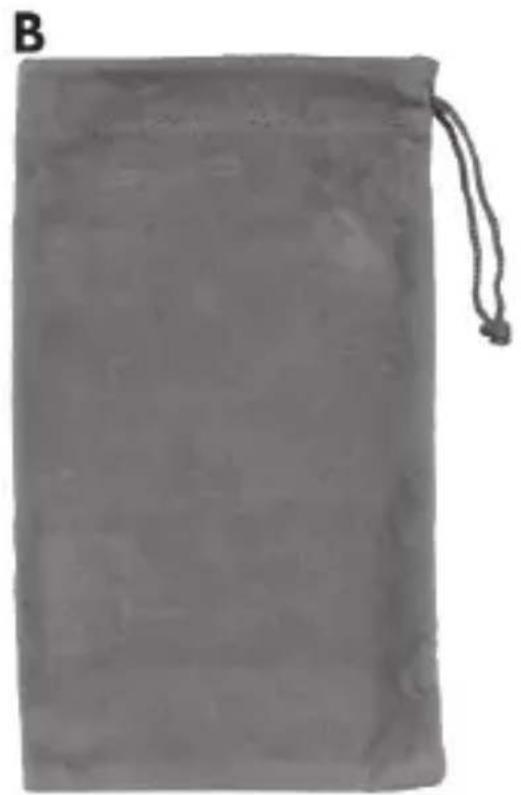
A World receiver SWED 100 B1 B Pouch C Earphones SWED 100 B1 D 2 batteries of type AA, 1.5V, (Mignon, LR6) E These instructions (symbolic representation)
Technical data

These specifications describe only the technical features of the device. Different legal regulations may apply in different countries to the free-to-air frequency range. Please note that reception outside of these regulations may then be illegal and subject to punishment.
| Power supply | • supplied batteries• optional mains adapter: 3V = |
| Polarity of mains adapter | ⊖⊖⊖ |
| Maximum power consumption | 100mA |
| Battery type 2x AA, 1.5V (Mignon, LR6) | |
| Power output 100mW | |
| Frequency bands | FM 87.5 - 108 MHzMW 522 - 1620 KHz |
| Please note that the specified upper and lower limits of the reception range may vary slightly due to production tolerances. | SW1 4.75 - 5.94 MHzSW2 5.95 - 7.09 MHzSW3 7.10 - 9.49 MHzSW4 9.50 - 11.64 MHzSW5 11.65 - 13.59 MHzSW6 13.60 - 15.09 MHzSW7 15.10 - 17.49 MHzSW8 17.50 - 21.44 MHzSW9 21.45 - 21.85 MHz |
| Station presets 60 (20 per frequency band) | |
| Dimensions approx. 130 x 30 x 79mm (W x D x H) | |
| Weight 120g (without batteries) | |
| Earphones SWED 100 B1 | |
| Impedance 32 Ohm | |
| Wideband characteristic voltage (WBCV) | approx. 70mV +/-15% |
| Maximum sound pressure with the supplied earphones | approx. 95 dB(A) |
| Maximum output voltage at the earphone jack | approx. 70mV |
| Operating temperature 5°C to 35°C | |
| Storage conditions -10°C to 50°C, Note: The device must not be stored in hot places, for example, in a car in summer. | |
| Operating air humidity max. 85% rel. air humidity | |
The technical data and design may be changed without notification.
Safety instructions
Before using this device for the first time, please read the following instructions carefully and take note of the safety warnings, even if you are familiar with the use of electronic devices. Store these instructions in a safe place for future reference. If you sell the device or pass it on, always include these instructions. They are an integral part of the product.
Explanation of symbols used

DANGER! This icon and the word "Danger" alert you to a potentially dangerous situation. Ignoring it can lead to severe injury or even death.

WARNING! This symbol and the word "Warning" denote important information required for the safe operation of the product and for the safety of its users.

This symbol indicates other important information on the topic.
Health risks due to excessively high volume levels

Take care when using earphones. Listening at high volume for prolonged periods of time can impair your hearing.
DANGER!

- Only use the earphones (C) supplied with your device, type SWED 100 B1. Other types of earphones can produce harmful sound pressure levels.
- Do not use the earphones (C) supplied, type SWED 100 B1, with other playback devices.
Do not use the earphones (C) at high volumes. This impairs your hearing and may disrupt your environment. Even if the device is designed to ensure that ambient noise can still be heard, adjust the volume so that you can continue to hear the ambient noise. In dangerous situations, for example, driving in traffic, working with machinery or other situations that require
your full attention, the sound can distract you or cause you to fail to perceive what is happening around you. Thus do not use the device in such situations.
Operating environment
The device is not designed for use in environments with high temperature or humidity (e.g., bathrooms) or in extremely dusty conditions. Operating temperature and air humidity: 5°C to 35°C, max. 85% relative humidity.

DANGER! Ensure that
■ air can always circulate freely (do not place the device on shelves, on a carpet or a bed, or anywhere where ventilation slots are covered, and always leave at least 10 cm clearance on all sides). - any contact with splashed and dripping water and corrosive liquids is avoided and the device is not operated in the vicinity of water. In particular, the device should never be submerged in liquid; do not place any vessels filled with liquid, e.g., vases or drinks, on or near the device. ■ no fire sources (e.g., burning candles) are placed on or near the device ■ no foreign objects penetrate the device. ■ the device is not subjected to any extreme temperature fluctuations, as this may result in moisture caused by condensation and thus a short circuit. If the device was subjected to extreme temperature fluctuations, however, wait (approx. 2 hours) until the device has reached ambient temperature before use.
- when using an optional wall plug power adapter, you read the corresponding operating instructions.

WARNING! Ensure that
■ no direct heat sources (e.g., heating) can affect the device. ■ no direct sunlight or bright artificial light reaches the device. ■ the device is not in the immediate vicinity of magnetic fields (e.g., speakers). ■ the device is never subjected to excessive shocks and vibrations.

DANGER! Batteries
Always ensure correct polarity of the batteries. Please note the markings in the battery compartment. Never try to recharge batteries and never throw them into an open fire. Never use different batteries (old and new, alkaline and carbon, etc.) at the same time. Remove the batteries if you will not be using the device for an extended period of time. In the event of improper use, there is a risk of explosion and leakage. Batteries are not toys! If a battery is swallowed, seek medical help immediately. Batteries may not be deformed or opened as leaking chemicals can cause injuries. In the event of skin or eye contact with chemicals, they must be immediately rinsed with generous amounts of water and a doctor must be consulted.

DANGER! Children and persons with disabilities
Electrical devices do not belong in the hands of children. Persons with limited physical, sensory or mental abilities should also only use electrical devices appropriately. Never allow children or persons with disabilities to use electrical devices unsupervised unless they have been instructed accordingly or are supervised by a person responsible for their safety. Children should always be supervised to ensure that they do not play with this device. Small parts can represent choking hazards.
Always keep plastic packaging out of reach also.

It poses a suffocation risk!

DANGER! Cleaning / maintenance
It is necessary to repair the device if it has been damaged in any way, for example, if the mains adapter or housing is damaged, if liquid or objects have penetrated the device, or if the product has been exposed to rain or moisture. Repair work is also required if the device is not working properly or has been dropped. If you notice any smoke, unusual noises, or strange odours, switch off the device immediately and remove the batteries or unplug the mains adapter from the mains socket. In such cases, the device should not be used until it has been inspected by authorised service personnel. Only have the device repaired by qualified personnel. Never
open the housing of the device. Only use a clean, dry cloth for cleaning and never use any corrosive liquids. Never try to open the housing of the device as this would void your warranty.
If the batteries have leaked, the device must be cleaned by authorised service personnel.
Copyright
All information contained in these instructions is subject to copyright and is provided for information purposes only.
It is only permitted to copy or duplicate data and information with the express and written consent of the author. This also includes commercial use of the content and data.
The text and illustrations are based on the state of the art at the time of printing.
Overview of the controls and button functions
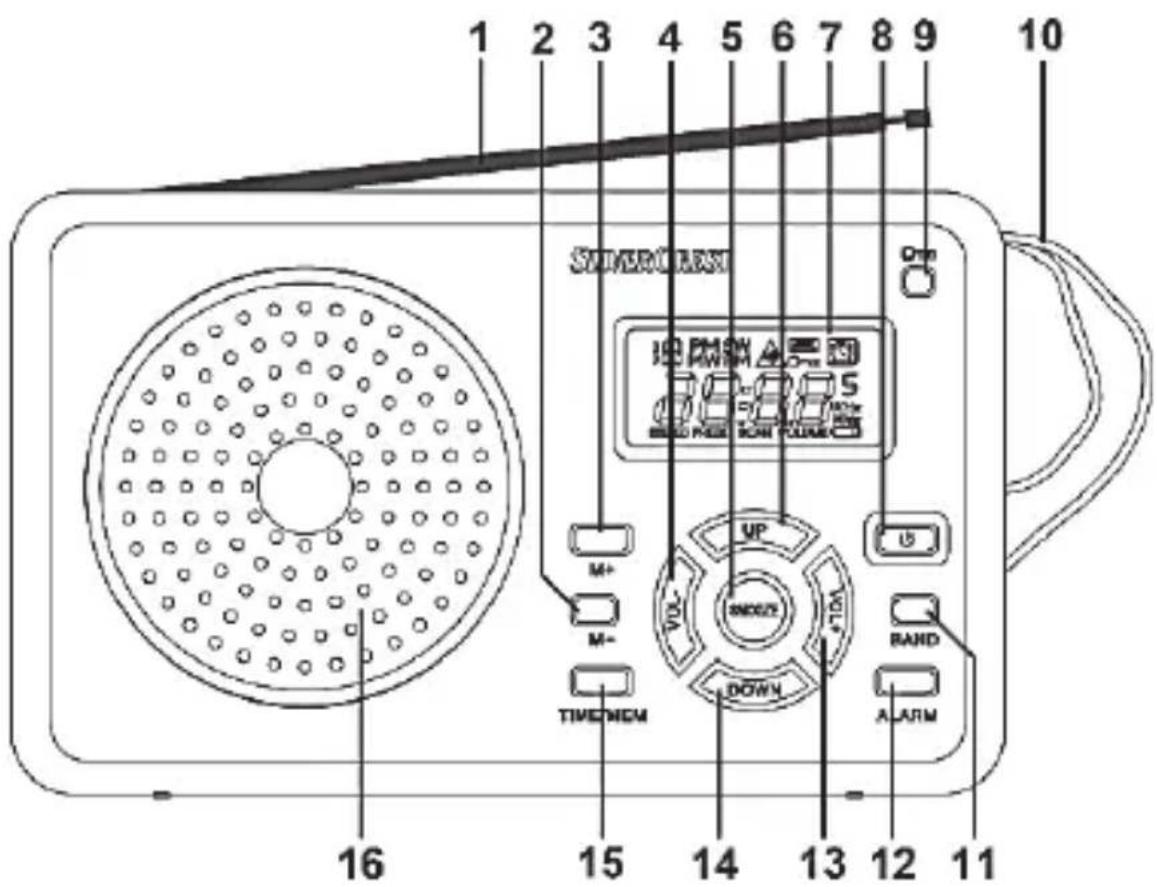

These operating instructions have a fold-out cover. Fold out the inside cover so that you always keep the controls in sight.
1 Telescopic aerial 2 M-button (select previous preset) 3 M+ button (select next preset) 4 VOLUME - button (reduce volume) 5 SNOOZE button (postpone alarm for approx. 5 minutes) 6 UP button (tune up, minute setting +) 7 Display 8 POWER button (turn on/off; set sleep timer) 9 LOCK button (button lock) 10 Strap 11 BAND button (select frequency band) 12 ALARM button (set or activate/deactivate alarm) 13 VOLUME + (increase volume) 14 DOWN button (tune down, minute setting -) 15 TIME/MEM button (setting time, presetting radio stations) 16 Loudspeaker 17 DX/LOCAL switch (set reception sensitivity) 18 (earphone jack) 19 -●(jack for optional mains adapter) 20 Battery compartment (at the back) 21 Stand (at the back)
Display indicators

22 PM display 23 Frequency band 24 Volume warning symbol 25 SLEEP 26 LOCK (button lock) 27 Alarm 28 Time/frequency display 29 Unit of frequency 30 Low battery power 31 VOLUME 32 SCAN 33 PRESET (station presets) 34 STEREO (only in earphone mode) 35 Preset location (1-20)
Stand

A stand (21), with which you can position the world receiver at an angle, is located at the back of the device. Open out the stand (21).
Prior to use
You can use the device either with the supplied batteries (D) of type AA (Mignon, LR6) or with an optional mains adapter (not supplied). The plug power adapter must meet the specifications outlined in the "Technical specifications" chapter.

WARNING! Do not use both operating options at the same time. Remove the batteries before you connect the device with the mains adapter.
Inserting the batteries
Unplug the power adapter cable if there is one connected to the product. Next slide the battery compartment cover (20) on the back panel of the device in the direction of the arrow and remove it. Insert the batteries with the correct polarity (+ and -), as shown in the following figure. The correct polarity is labelled on the batteries and inside the battery compartment. When installing the batteries, make sure the fabric strip is placed under the batteries. This will let you remove them easily the next time you want to exchange them. Re-insert the cover of the battery compartment (20) and slide it in the opposite direction of the arrow until it locks in place.

If the display (7) indicates a low battery level (30), the batteries are almost empty. When this happens, immediately replace the batteries with new batteries of the same type, as empty batteries are subject to leak. Leaked batteries can damage the device.

WARNING! Remove the batteries if you will not be using the device for an extended period of time.
Connecting a mains adapter
Remove the batteries from the battery compartment (20) at the back of the device if you have previously inserted them. Insert the plug of the mains adapter into the jack (19) of the world receiver (A). Then insert the main adapter into an easily accessible mains socket.
First use
Switching the device on and off
To switch on the device, press the "POWER" button (8) once briefly. When it is switched on, the display (7) shows the tuned frequency and the frequency band:
| FM | FM band |
| MW | medium wave band |
| SW | shortwave band |
To switch off the device, press the POWER button (8) again. When it is switched off, the display (7) shows the time that is currently set.
Setting the time
You can set the time only when the device is switched off. Switch off the device with the POWER button (8) if it is switched on. Please note that the multi-band tuner reverts to standby mode after 5 seconds of inactivity. Any settings made will be saved.
- First, press the "TIME/MEM" button (15). By pressing the "UP" (6) or "DOWN" button (14), you can now choose between the 12-hour and 24-hour display. Confirm your selection by pressing the "TIME/MEM" button (15) again.
- The display now flashes to indicate that you can set the relevant hour. Set the correct hour by pressing the "UP" (6) or "DOWN" buttons (14). You can keep the corresponding button pressed to accelerate the digits count. Confirm your selection by pressing the "TIME/MEM" button (15).
- The display now flashes to indicate that you can set the relevant minutes. Set the correct minutes by pressing the "UP" (6) or "DOWN" buttons (14). You can keep the corresponding button pressed to accelerate the digits count. Confirm your selection by pressing the "TIME/MEM" button (15). ■ The time has now been set. ■ If you have selected the 12-hour display, the symbol "PM" (22) appears on the display (7) once it is past noon.

You must adjust the time if you travel to a different time zone.
Illuminated display
Each time you press a button, the illuminated display lights up for approx. 5 seconds and then goes out again.
Setting the volume
By pressing the "VOL-" (4) and "VOL+" (13) buttons, you can adjust the volume to your requirements. You can set the volume from level "00" (minimum volume) to level "16" (maximum volume). When the device is switched on in speaker mode, it starts at the volume level at which it last operated.
To prevent damage to your hearing due to excessively high volume levels, the volume setting in earphone mode is regulated as follows:
- If the volume reaches level "08", the volume warning symbol (24) starts to flash on the display. Now you can continue to increase the volume only if you have confirmed the volume warning in advance by briefly pressing the "LOCK" button (9).
- If the speaker mode volume was set to higher than level "08" and the earphones are then plugged in during operation, the volume reverts back to level "08". When you press the "VOLUME +" button (13) again, the volume warning symbol (24) starts to flash. Now you can continue to increase the volume only if you have confirmed the volume warning in advance by briefly pressing the "LOCK" button (9).
- If the volume of the speaker or earphone mode was set to higher than level "08" and the device is switched off, it starts at level "08" when it is switched on again with attached earphones. When you press the "VOLUME +" button (13) again, the volume warning symbol (24) starts to flash. Now you can continue to increase the volume only if you have
confirmed the volume warning in advance by briefly pressing the "LOCK" button (9).
Setting the reception sensitivity
Slide the "DX/LOCAL" switch (17) to the "DX" position if you would like to use the device in normal operation.
Slide the "DX/LOCAL" switch (17) to the "LOCAL" position if only stations with a high field strength are to be received. This is recommended, for example, if a desired weak local station is superimposed by stronger national channels.
Selecting a station
To ensure the best possible reception, pull out the telescopic aerial (1) completely before tuning. The telescopic aerial (1) can be rotated. You can optimise the reception in this manner.
The shortwave band "SW" is divided into 9 sub-bands "SW1" to "SW9" (see chapter "Technical data"). To select the individual sub-bands, first press the "BAND" button (11) and select the "SW" band. Now press the "BAND" button (11) for approximately two seconds until the "SW" symbol flashes on the display. You can then use the "UP" (6) or "DOWN" (14) buttons to select the "SW" sub-bands. When the "SW" symbol on the display (7) stops flashing, you can continue with the station scanning.
Automatic station scan with auto store function
The most convenient way to search for stations and save them is the automatic station scan with automatic saving of stations (auto store function).
■ Turn the device on. ■ First, select the desired frequency band with the "BAND" button (11).
- Press the "TIME/MEM" button (15) for approximately 3 seconds to start the automatic station scan. The automatic station scan always starts at the lowest frequency. On the display, "PRESET" (33) lights up and "SCAN" (32) flashes. ■ The world receiver (A) now searches the entire frequency range for stations with strong signals. On the display (7), the frequency indicator stops momentarily as soon as a station with a strong signal is found and the preset location (35) where this station is stored is displayed briefly.
- The 20 first found stations are directly saved on the presets 1 to 20. The search stops after all 20 presets have been assigned. Then the station stored in preset 1 will be tuned in.

Please note that already occupied presets are overwritten.
Manual station scan:
■ Turn the device on. ■ First, select the desired frequency band with the "BAND" button (11). - Press the "UP" (6) or "DOWN" button (14) for approximately one second to start scanning in the desired direction. The scanning stops at the next available station and the frequency of the station is indicated on the display (7).
Manual station tuning
As an alternative to the station scan, you can also tune in stations manually. This enables you to find stations with weaker signals also. Proceed as follows:
Briefly press the "UP" (6) or "DOWN" button (14) to increase or decrease the frequency by one step. These steps differ depending on the selected
frequency band and are for "FM" >> 0.1MHz, for "MW" >> 9KHz and for "SW" >> 0.005MHz.
Manually saving stations
You have the option of saving 20 stations or frequencies per frequency band. Proceed as follows:
■ Search for a station which you want to save. ■ Briefly press the "TIME/MEM" button (15). - The last selected preset location (35) and "PRESET" (33) flash on the display (7). - Use the "M-" (2) or "M+" button (3) to select the preset location where you want to save the desired station. - Press the "TIME/MEM" button (15) to finish saving.

Please note that already occupied presets are overwritten.
Select saved stations
- To select a previously saved station, use the "M-" (2) or "M+" button (3) to choose the preset location where the desired station is saved.

The set time is lost, but saved radio stations are preserved when the batteries are changed.
Stereo playback
A station can be heard in stereo quality only in earphone mode. In this case, the "STEREO" symbol (34) appears on the display (7).
SLEEP timer
With the SLEEP timer, you can set a time between 10 and 90 minutes after which your world receiver (A) automatically switches off. The setting is made in intervals of 10 minutes. Proceed as follows:
■ Switch off the device with the "POWER" button (8). - Press the "POWER" button (8) for approximately one second until a beep sounds and the number 90 (for 90 minutes) is indicated on the display (7). - Then press the "POWER" button (8) repeatedly until you reach the desired number of minutes (for example, 40). Each time you press the "POWER" button (8), the number of minutes to switching off is reduced by 10 minutes. ■ Now the multi-band tuner (A) switches on and automatically off after the set countdown time (e.g. 40 minutes) has elapsed. ■ The display (7) indicates "SLEEP" (25) when the SLEEP timer is activated. - You can change the frequency band, start the station scan, access saved stations and adjust the volume even when the SLEEP timer is activated. - You can delete the activated SLEEP timer by switching off the device.
Setting the alarm time
You can set one alarm time. Make sure that the time is set correctly. You can set the alarm time only when the device is switched off. Switch off the device with the "POWER" button (8) if it is switched on. If no button is pressed for 3 seconds, the device returns to normal operating mode.
- Briefly press the "ALARM" button (12). The "ALARM" symbol (27) and the current alarm time are then indicated on the display (7).
- Now press the "TIME/MEM" button (15). The display flashes to indicate that you can set the relevant hour. Set the hour by pressing the "UP" (6) or "DOWN" (14) buttons. You can also keep the buttons pressed to speed up the progress of the numbers. Confirm your selection by pressing the "TIME/MEM" button (15).
- The display now flashes to indicate that you can set the relevant minutes. Set the minutes by pressing the "UP" (6) or "DOWN" (14) buttons. You can also keep the buttons pressed to speed up the progress of the numbers. Confirm your selection by pressing the "TIME/MEM" button (15).
- Finally, you can choose to be woken by the radio or buzzer by pressing the "UP" (6) or "DOWN" (14) buttons. Choose "RAD" for radio or "BUZ" for buzzer. Confirm your selection by pressing the "TIME/MEM" button (15).
The alarm time has now been set.
Activating the alarm function
When you have set the desired alarm time, you can activate the alarm function as follows:
- Briefly press the "ALARM" button (12) when the device is switched off. The set alarm time is indicated briefly, the "ALARM" symbol (27) appears on the display and the alarm is activated.
- The device automatically switches itself on at the set alarm time with the last established frequency and the last tuned frequency band. If you
have chosen the "BUZ" alarm time setting, however, you will be woken by the buzzer.

Please note that the alarm sound (radio or buzzer) is only output via the headphones if headphones are connected to the device.
- Briefly press the "POWER" button (8) to switch off the alarm tone or press the "SNOOZE" button (5) to postpone the alarm for about 5 minutes. The "ALARM" symbol (27) flashes. If you have previously chosen the buzzer as the alarm tone, you can switch on the radio during the snooze period. The alarm sounds again after the snooze period of 5 minutes. If you briefly press the "BAND" button (11) during these 5 minutes, the "SNOOZE" function is switched off, but the alarm function remains activated.
- To deactivate the alarm function, press the "ALARM" button (12) again. The "ALARM" symbol (27) is no longer indicated.

Even if the alarm function is activated, you can still use the device as usual. Please note:
- Alarm with radio: The alarm function always automatically uses the last frequency, frequency band and volume set.
- Alarm with buzzer: The alarm function always automatically uses a preset volume. This volume cannot be changed.
Enabling/disabling the button lock
Press the "LOCK" button (9) for approximately one second to enable the button lock of the world receiver. The "LOCK" symbol (26) now flashes on
the display. Further operation is only possible if you disable the button lock by pressing the "LOCK" button (9) again for approximately one second. The "LOCK" symbol (26) no longer flashes on the display (7).
Connecting the earphones

DANGER! To avoid hearing damage, you must set the volume to the lowest level before connecting the earphones. You can then adjust the volume to the desired level. Please pay particular attention to the section "Setting the volume".

DANGER! Do not use any other earphones than the supplied SWED 100 B1 earphones. Other earphones may create harmful sound pressure.

Take care when using earphones. Listening at full volume for prolonged periods of time can damage your hearing.
You can connect the supplied SWED 100 B1 earphones (C) to the earphone jack (18). If the earphones are connected, the loudspeaker (16) is automatically switched off and the volume is automatically reduced.
Storage when not using the product

If you will not be using the device for a long period of time, remove any inserted batteries.
Store the device in a dry, cool place. To protect against dust, we recommend storing the device in the pouch (B) supplied.
Troubleshooting
The device cannot be switched on
- The batteries may be empty, therefore, replace the batteries.
- Check whether the batteries have been inserted with the correct polarity. Please note the markings in the battery compartment and on the batteries. Please pay particular attention to the section "Inserting the batteries".
- Check whether the optional mains adapter is inserted in the mains socket.
No radio reception, poor radio reception
- Pull out the telescopic aerial (1) completely and make sure that it is oriented correctly.
- Tune in the station correctly. Start scanning again if necessary.
- Check whether the "DX/LOCAL" switch (17) is in the correct position. Please pay particular attention to the section "Setting the reception sensitivity".
No sound although device is switched on
- Check the volume setting.
- If earphones are connected, the built-in loudspeaker is switched off.
The device cannot be operated.
- Check whether the button lock is enabled.
Environmental and disposal information

When the crossed out wheelie bin symbol appears on a product, this indicates that the product is subject to the European Directive 2012/19/EU. All old electrical and electronic devices must be separated from normal household waste and disposed of at designated state facilities. Remove
the batteries before disposing of the device. The correct disposal of old/defective devices in this manner will prevent environmental pollution and human health hazards. For further information about proper disposal of old/defective devices, contact your local authorities, waste disposal office or the shop where you bought the device.
Disposal of the packaging
Dispose of the packaging in an environmentally compatible manner. Cardboard can be put out for municipal paper collections or brought to public collection points for recycling. Films and plastic used for packaging the device are collected by your local disposal services and disposed of in an environmentally compatible manner.
Disposal of batteries

Remember to protect the environment. Used batteries should not be disposed of in household waste. They must be taken to a collection point for old batteries. Please note that only discharged batteries may be deposited in battery recycling
bins. Cover the contacts with tape to prevent short circuits if batteries are not fully discharged.
Conformity information
CE This device meets the basic requirements and other relevant regulations of the EMC Directive 2014/30/EU as well as the RoHS II Directive 2011/65/EU.
In order to receive the complete EU declaration of conformity, please send an e-mail to the following e-mail address:
ce@targa.de
Warranty and servicing advice
Warranty of TARGA GmbH
This device is sold with three years warranty from the date of Please keep the original receipt in a safe place as proof of purchase. Before using your product for the first time, please read the enclosed documentation. Should any problems arise which cannot be solved in this way, please call our hotline. Please have the article number and, if available, the serial number to hand for all enquiries. If it is not possible to solve the problem on the phone, our hotline support staff will initiate further servicing procedures depending on the fault. Within the warranty period the product will be repaired or replaced free of charge as we deem appropriate. No new warranty period commences if the product is repaired or replaced. Consumables such as batteries, rechargeable batteries and lamps are not covered by the warranty.
Your statutory rights towards the seller are not affected or restricted by this warranty.

Service

Phone: 020 - 70 49 04 03
E-Mail: service.GB@targa-online.com

Phone: 01-4370121
E-Mail: service.IE@targa-online.com

Phone: 027 78 11 03
E-Mail: service.MT@targa-online.com

Phone: 02 - 20 09 025
E-Mail: service.CY@targa-online.com
IAN: 274010

Manufacturer
TARGA
GmbH
Coesterweg 45
59494 SOEST
GERMANY
Table of Contents
Introduction....34



DANGER! Batteries


WARNING! Battery


A Shortwave receiver (radio) SWED 100 B1
B Housing
C Headphones SWED 100 B1
D 2 AA batteries (mignon, LR6), 1.5 V
WARNING! Make sure that
DANGER! Batteries


DANGER! Batteries


- SAFETY INSTRUCTIONS
- COPYRIGHT
- OVERVIEW OF THE CONTROLS AND BUTTON FUNCTIONS
- PRIOR TO USE
- FIRST USE
- INTRODUCTION
- INTENDED USE
- SUPPLIED ITEMS
- TECHNICAL DATA
- EXPLANATION OF SYMBOLS USED
- HEALTH RISKS DUE TO EXCESSIVELY HIGH VOLUME LEVELS
- DANGER
- OPERATING ENVIRONMENT
- DANGER! ENSURE THAT
- WARNING! ENSURE THAT
- DANGER! BATTERIES
- DANGER! CHILDREN AND PERSONS WITH DISABILITIES
- DANGER! CLEANING / MAINTENANCE
- DISPLAY INDICATORS
- STAND
- INSERTING THE BATTERIES
- CONNECTING A MAINS ADAPTER
- SWITCHING THE DEVICE ON AND OFF
- SETTING THE TIME
- ILLUMINATED DISPLAY
- SETTING THE VOLUME
- SETTING THE RECEPTION SENSITIVITY
- SELECTING A STATION
- AUTOMATIC STATION SCAN WITH AUTO STORE FUNCTION
- MANUAL STATION SCAN
- MANUAL STATION TUNING
- MANUALLY SAVING STATIONS
- SELECT SAVED STATIONS
- STEREO PLAYBACK
- SLEEP TIMER
- SETTING THE ALARM TIME
- ACTIVATING THE ALARM FUNCTION
- ENABLING/DISABLING THE BUTTON LOCK
- CONNECTING THE EARPHONES
- STORAGE WHEN NOT USING THE PRODUCT
- TROUBLESHOOTING
- THE DEVICE CANNOT BE SWITCHED ON
- NO RADIO RECEPTION, POOR RADIO RECEPTION
- NO SOUND ALTHOUGH DEVICE IS SWITCHED ON
- THE DEVICE CANNOT BE OPERATED
- ENVIRONMENTAL AND DISPOSAL INFORMATION
- DISPOSAL OF THE PACKAGING
- DISPOSAL OF BATTERIES
- CONFORMITY INFORMATION
- WARRANTY AND SERVICING ADVICE
- WARRANTY OF TARGA GMBH
- SERVICE
- MANUFACTURER
- TABLE OF CONTENTS
- WARNING! BATTERY
- WARNING! MAKE SURE THAT
Brand : SILVERCREST
Model : SWED 100 B1
Category : Radio