
H12276 - Battery charger TRONIC - Free user manual and instructions
Find the device manual for free H12276 TRONIC in PDF.


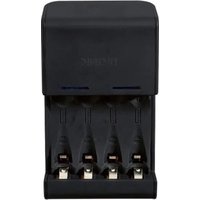
| Product Type | Battery Charger |
| Brand | Tronic |
| Model | H12276 |
| Dimensions (approx.) | 120 x 70 x 45 mm |
| Weight (approx.) | 0.2 kg |
| Input Voltage | 100-240 V AC, 50/60 Hz |
| Output Voltage | 1.2 V - 12 V DC |
| Charging Current | 500 mA - 2 A (depending on mode) |
| Supported Battery Types | Ni-MH, Ni-Cd, Li-ion (compatible with AA, AAA, 9V, etc.) |
| Number of Charging Slots | 4 |
| Charging Indicators | LED per slot: red charging, green ready |
| Protection Features | Overcharge protection, short circuit protection, reverse polarity protection |
| Operating Temperature | 0°C to 40°C |
| Housing Material | ABS plastic |
| Power Cord Length | 1.5 m |
| Included Accessories | AC power adapter, user manual |
| Certifications | CE, RoHS |
| Maintenance | Wipe with dry cloth; do not use liquids |
| Repairability | Not intended for repair; contact authorized service |
Frequently Asked Questions - H12276 TRONIC
User questions about H12276 TRONIC
0 question about this device. Answer the ones you know or ask your own.
Ask a new question about this device
Download the instructions for your Battery charger in PDF format for free! Find your manual H12276 - TRONIC and take your electronic device back in hand. On this page are published all the documents necessary for the use of your device. H12276 by TRONIC.
USER MANUAL H12276 TRONIC
Operation and Safety Notes
FI
Paristojentestauslaite
GB/IE Operation and Safety Notes Page 5
natural_image
Simple diagram of a battery with an upward arrow and two negative terminals (no text or symbols)Introduction
Proper use Page 6
Description of parts.... Page 6
Technical data...... Page 6
Safety Information
Safety Instructions for Batteries...... Page 7
Before use
Insert / change battery...... Page 8
Operating instructions
Measuring D, C, AA and AAA battery.... Page 8
Measuring 9 V battery...... Page 8
Troubleshooting Page 9
Cleaning and maintenance Page 9
Disposal Page 9
Information
Declaration of Conformity ...... Page 10
Battery tester
- Introduction
Familiarise yourself with the product before using it for the first time. In addition please refer carefully to the operating instructions below and the safety advice. Use the product only as described and for the indicated purpose. Keep these instructions in a safe place.
If you pass the product on to anyone else, please ensure that you also pass on all the documentation.
- Proper use
This device is intended for checking the residual voltage of disposable and rechargeable batteries with a voltage of 1.5 and 9 volts. The product is intended for indoor use only. Any modification to the product shall be considered as improper use and could lead to considerable risk of accident. The manufacturer will not accept liability for loss or damage arising from improper use. The product is not intended for commercial use.
● Description of parts
1 extendable contact arm (battery types: D, C, AA, AAA)
2 reset button
3 battery compartment cover
4 1.5 V scale
5 voltage display
6 | 9 V scale
7 test contacts (9 V battery)
- Technical data
Measurement range: 0.7 - 1.5 V (battery types: D, C, AA, AAA) 1.8 - 9 V (9 V battery)
Power supply: 1 x 1.5 V —— AAA battery

Safety Information

DANGER TO LIFE AND ACCIDENT HAZARD FOR TODDLERS AND SMALL
CHILDREN! Never allow children to play unsupervised with the packaging material.
There is a danger of suffocation from the packaging material. Children frequently
underestimate the dangers. Children should be kept away from the product at all times. This product is not a toy.

WARNING!
DANGER TO LIFE! Batteries can be swallowed, which may represent a danger
to life. If a battery has been swallowed, medical help is required immediately.
Children or persons who lack the knowledge or experience to use the device or whose physical, sensory or intellectual capacities are limited must never be allowed to use the device without supervision or instruction by a person responsible for their safety.
■ Children must never be allowed to play with the device.
- Do not use the device if it is damaged. Damaged devices represent a danger of death from electric shock!
■ Do not expose the device to
- extreme temperatures,
- strong vibrations,
- heavy mechanical loads,
- direct sunlight,
- moisture.
Otherwise there is a danger that the device will be damaged.
Please note that the guarantee does not cover damage caused by incorrect handling, non-compliance with the operating instructions or interference with the device by unauthorised individuals.
■ Under no circumstances should you take the device apart. Improper repairs may place the user in considerable danger. Repairs should only be carried out by specialist personnel.
- Please keep the product clean.
- Do not allow the product to be subjected to extreme heat or cold.
Do not allow the product to be subjected to extreme temperature fluctuations. Failure to observe this advice could lead to condensation forming. Wait until the product has reached temperature of the room before you use it.
Before inspection, please read the manufacturer's instructions for the respective battery.

Safety Instructions for Batteries
■ Remove the battery from the device when it has not been used for a longer period of time.
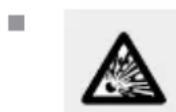
CAUTION! DANGER OF EXPLOSION! Non-rechargeable batteries must never
be recharged!
- When inserting the battery, ensure the correct polarity! This is shown in the battery compartments.
If necessary, clean the battery and device contacts before inserting the battery.
Safety Information / Before use / Operating instructions
■ Remove a spent battery immediately from the device. There is an increased danger of leaks!
■ Batteries must not be disposed of in the normal domestic waste!
■ Every consumer is legally obliged to dispose of batteries in the proper manner!
- Keep batteries away from children; do not throw them in the fire, short-circuit them or take them apart.
If the above instructions are not complied with, the battery may discharge themselves beyond their end voltage. There is then a danger of leaking. If the battery have leaked inside your device, you should remove them immediately in order to prevent damage to the device!
- Avoid contact with the skin, eyes and mucous membranes. Any parts of the body coming into contact with battery acid should be rinsed off with copious amounts of water and / or a doctor contacted if necessary!
Before use
- Insert / change battery
☐ Remove the cover of the battery compartment ☐ 3 by pulling it off in the direction of the arrow (see illustration).
☐ Insert a micro battery (AAA 1.5 V).
Note: Please observe the correct polarity. This is indicated in the battery compartment.
☐ Then close the battery compartment again.
● Operating instructions
● Measuring D, C, AA and AAA battery
☐ Place a battery of the type D, C, AA or AAA in the battery tester (see fig. A).
Note: In doing so, please observe the correct polarity. This is shown on the battery tester.
Note: Please ensure for proper contact between the battery and the battery tester.
☐ Secure the battery by means of the extendable contact arm 1 (see fig. A).
☐ Read the voltage of the connected battery using the voltage display 5 and the 1.5 V scale 4.
● Measuring 9 V battery
☐ Position the 9 V battery on the test contacts 7 (see fig. B).
Note: In doing so, please observe the correct polarity. This is shown on the test contacts 7.
Note: Please ensure for proper contact between the battery and the test contacts 7.
☐ Read the voltage of the connected battery using the voltage display 5 and the 9 V scale 6.
- Troubleshooting
● = Fault
C = Cause
O = Solution
● Battery tester does not react.
Electrostatic discharge can affect the function of the battery tester.
Press the reset button 2 on the back of the battery tester. For this purpose a paper clip or a similar object can be used.
The battery to be tested has been inserted incorrectly.
Insert the battery to be tested according to the correct polarity.
● The resulting measurement is unlikely.
The battery has not been inserted properly.
Remove the battery and wait for a few seconds, or press the reset button 2. Reinsert the battery.
● Cleaning and maintenance
☐ The device should only be cleaned on the outside with a soft dry cloth.
☐ Under no circumstances should you use liquids or detergents, as these will damage the device.
- Disposal

The packaging is made entirely of recyclable materials, which you may dispose of at local recycling facilities.
Contact your local refuse disposal authority for more details of how to dispose of your worn-out product.

To help protect the environment, please dispose of the product properly when it has reached the end of its useful life and not in the household waste. Information on collection points and their opening hours can be obtained from your local authority.
Defective or used batteries have to be recycled in line with Directive 2006 / 66 / EC. Return batteries and / or the device via the recycling facilities provided.
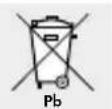
Environmental damage through incorrect disposal of the batteries!
Batteries may not be disposed of with the usual domestic waste. They may contain toxic heavy metals and are subject to hazardous waste treatment rules and regulations. The chemical symbols for heavy metals are as follows: Cd = cadmium, Hg = mercury, Pb = lead. That is why you should dispose of used batteries at a local collection point.
- Information
● Declaration of Conformity
We, the firm Milomex Ltd. c/o Milomex Services, Hilltop Cottage, Barton Road, Pulloxhill, Bedfordshire, MK45 5HP, UK, hereby declare that the product conforms to fundamental requirements and all other relevant regulations. The relevant documents have been archived and can be requested as necessary.
EMC CE
Product identification:
Battery tester
Model no.: H12276
Version: 01/2011
Johdanto
● = Fehler
● = Grund
O = Lösung
c/o Milomex Services
Hilltop Cottage
Barton Road
Pulloxhill
Bedfordshire
MK45 5HP
UK
© by ORFGEN Marketing
Last Information Update · Tietojen tila
Informationsstatus · Tilstand af information
natural_image
Simple L-shaped geometric shape with no text or symbols

- Paristojentestauslaite
- Introduction
- Safety Information
- Before use
- Operating instructions
- Cleaning and maintenance Page 9
- Information
- Battery tester
- - Introduction
- - Proper use
- ● Description of parts
- - Technical data
- DANGER TO LIFE AND ACCIDENT HAZARD FOR TODDLERS AND SMALL
- WARNING!
- Safety Instructions for Batteries
- Safety Information / Before use / Operating instructions
- - Insert / change battery
- ● Operating instructions
- ● Measuring D, C, AA and AAA battery
- ● Measuring 9 V battery
- - Troubleshooting
- ● Cleaning and maintenance
- - Disposal
- - Information
- ● Declaration of Conformity
- EMC CE
- Product identification:
- Johdanto
Brand : TRONIC
Model : H12276
Category : Battery charger