
Z30508 - Battery charger TRONIC - Free user manual and instructions
Find the device manual for free Z30508 TRONIC in PDF.


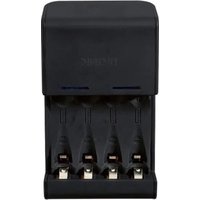
| Product Type | Battery Charger |
| Brand | Tronic |
| Model | Z30508 |
| Compatible Batteries | NiMH/NiCd AAA, AA |
| Number of Charging Slots | 4 |
| Charging Current | 200 mA per slot |
| Input Voltage | 100-240 V AC, 50/60 Hz |
| Output Voltage | 1.2 V per battery |
| Dimensions (approx.) | 100 x 70 x 40 mm |
| Weight (approx.) | 150 g |
| Charging Time (typical) | 4-6 hours for 2000 mAh AA |
| Protection Features | Overcharge protection, reverse polarity protection |
| LED Indicator | Charging status (red: charging, green: full) |
| Power Supply | Built-in, corded |
| Maintenance | Wipe with dry cloth; do not immerse in water |
| Safety Certifications | CE, RoHS |
| Spare Parts Availability | Not user-serviceable; contact manufacturer |
| Operating Temperature | 0°C to 40°C |
Frequently Asked Questions - Z30508 TRONIC
User questions about Z30508 TRONIC
0 question about this device. Answer the ones you know or ask your own.
Ask a new question about this device
Download the instructions for your Battery charger in PDF format for free! Find your manual Z30508 - TRONIC and take your electronic device back in hand. On this page are published all the documents necessary for the use of your device. Z30508 by TRONIC.
USER MANUAL Z30508 TRONIC
Operation and Safety Notes
DE AT CH
DIGITALER BATTERIETESTER
GB / MT Operation and Safety Notes Page 14
Digital Battery Tester
- Proper use
This device is intended for determining the residual voltage of single-use or rechargeable batteries with voltages of 1 to 9 volts. The product is intended for indoor use only. The product is not intended for commercial use.
● Description of parts
1 Pull-out contact arm (battery types: D, C, AA, AAA, N, button cell, 9 V)
2 RESET button
3 Battery compartment cover
4 On/Off switch
5 Voltage display
6 Test contacts (9 V battery)
- Technical data
Measuring range: 1 to 9 V (battery types: D, C, AA, AAA, N, 9 V, button cell)
Power supply: 3 V CR2032 battery (included)

Safety information

WARNING! DANGER TO LIFE AND ACCIDENT HAZARD
FOR TODDLERS AND SMALL CHILDREN! This product is not a toy.
WARNING! DANGER TO LIFE!
Batteries can be swallowed, which may represent a danger to life. If a battery has been swallowed, medical help is required immediately.
Do not use the device if it is damaged. Damaged devices represent a danger of death from electric shock!
Do not expose the device to:
- extreme temperatures,
- strong vibrations,
- high mechanical loads,
- direct solar radiation,
- moisture.
Failure to observe this advice may result in damage to the device.
Please note that the guarantee does not cover damage caused by incorrect handling, non-compliance with the operating instructions or interference with the device by unauthorised individuals.
■ Under no circumstances should you take the device apart. Improper repairs may place the user in considerable danger. Repairs should only be carried out by specialist personnel.
Please keep the product clean.
Do not allow the product to be subjected to extreme heat or cold.
Do not allow the product to be subjected to extreme temperature fluctuations. Failure to observe this advice could lead to condensation forming. Wait until the product has reached temperature of the room before you use it.
Before inspection, please read the manufacturer's instructions for the respective battery.

Safety instructions regarding batteries
Children should not be allowed to handle batteries. Do not leave batteries lying around. There is a danger that they may be swallowed by children or pets. If batteries are swallowed, seek medical advice immediately.
Do not use the product if you notice any signs of damage.
Do not short-circuit batteries. Overheating, fire or destruction of the batteries might result.
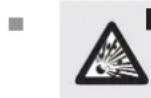
DA WARNING! GER OF EXPLOSION!
Never throw batteries into
fire or water. Never attempt to recharge single-use batteries! The batteries might explode.

Leaking or damaged batteries may cause burns to the skin when touched; in such
cases it is essential to wear appropriate protective gloves.
■ Remove used batteries from the device. Very old or used batteries may leak. The chemical fluid can damage the product.
- Check the batteries regularly for signs of expiry.
■ Remove batteries from the device if the product is not going to be used for a prolonged period.
- Single use, non-rechargeable batteries must never be recharged.
Before use
- Inserting/replacing batteries
Note: Remove the insulating strips before using the product for the first time.
☐ Inserting one battery type 3 V CR2032 (included).
Note: Make sure you fit the battery the right way round (polarity). The correct polarity is shown inside the battery compartment.
Operation
Note: Make sure you fit the battery the right way round (polarity). The correct polarity is shown on the battery tester.
☐ Ensure that you achieve good contact between the battery and the battery tester.
- Troubleshooting
●=Fault
●=Reason
O= Solution
● Battery tester does not react.
Electrostatic discharges can detrimentally affect the proper functioning of the battery tester.
Press the Reset button 2 on the back of the battery tester. An office paper-clip or similar implement can be used for this.
The battery being tested has been placed the wrong way around.
Place the battery to be tested the right way around (polarity).
● The displayed voltage is not credible.
The battery is not correctly positioned.
- Remove the battery and wait a few seconds or press the reset button. Reinsert the battery.
● Cleaning and maintenance
☐ The device should only be cleaned on the outside with a soft dry cloth.
- Disposal

The packaging is made entirely of recyclable materials, which you may dispose of at local recycling facilities.
Contact your local refuse disposal authority for more details of how to dispose of your worn-out product.
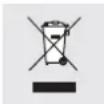
To help protect the environment, please dispose of the product properly when it has reached the end of its useful life and not in the household waste. Information on collection points and their opening hours can be obtained from your local authority.
Faulty or used batteries must be recycled in accordance with Directive 2006/66/EC. Please return the batteries and / or the device to the available collection points.

Environmental damage through incorrect disposal of the batteries!
Batteries may not be disposed of with the usual domestic waste. They may contain toxic heavy metals and are subject to hazardous waste treatment rules and regulations. The chemical symbols for heavy metals are as follows: Cd = cadmium, Hg = mercury, Pb = lead. That is why you should dispose of used batteries at a local collection point.
EMC CE
Product Designation:
Digital Battery Tester
Model No.: Z30508
Version: 10/2011
Digitaler Batterietester
WARNING! EXPLOSIONSGEFAHR!
= Fehler
● = Grund
O = Lösung
c/o Milomex Services
Hilltop Cottage
Barton Road
Pulloxhill
Bedfordshire
MK45 5HP
UK
© by ORFGEN Marketing
natural_image
Simple black outline of a seven-pointed star on white background (no text or symbols)

- DIGITALER BATTERIETESTER
- Digital Battery Tester
- - Proper use
- ● Description of parts
- - Technical data
- Safety information
- WARNING! DANGER TO LIFE AND ACCIDENT HAZARD
- WARNING! DANGER TO LIFE!
- Safety instructions regarding batteries
- DA WARNING! GER OF EXPLOSION!
- Before use
- - Inserting/replacing batteries
- Operation
- - Troubleshooting
- ● Cleaning and maintenance
- - Disposal
- Environmental damage through incorrect disposal of the batteries!
- EMC CE
- Product Designation:
- WARNING! EXPLOSIONSGEFAHR!
Brand : TRONIC
Model : Z30508
Category : Battery charger