
TD-9K - Electronic drum ROLAND - Free user manual and instructions
Find the device manual for free TD-9K ROLAND in PDF.


| Product Type | Electronic drum kit |
| Brand | Roland |
| Model | TD-9K |
| Power Supply | Roland PS8-1U AC adapter (included) |
| Sound Module | TD-9 with 50 preset drum kits |
| Included Pads | 1 PDX-8 snare (mesh head), 3 PD-8 toms (rubber), 1 KD-8 kick drum, 1 CY-5 hi-hat, 2 CY-8 cymbals |
| Included Pedals | FD-8 hi-hat pedal |
| Stand | MDS-9 stand with cymbal arms |
| Internal Songs | 50 accompaniment songs |
| Metronome | Built-in with tempo, sound and time signature settings |
| Recording | Quick Rec for instant recording and playback |
| Effects | Ambience (reverb) and 2-band equalizer |
| Connectivity | L/MONO and R audio outputs, MIX IN input, MIDI IN/OUT, USB port (USB flash drive) |
| Advanced Functions | Trigger settings, MIDI parameters, kit/instrument copy |
| Maintenance | Clean with a soft, dry cloth; do not use solvents |
| Safety | Follow instructions: do not open the module, use the supplied adapter, avoid moisture |
| Included Accessories | Special connection cable, tuning key, AC adapter, manuals (installation guide, quick start guide, owner's manual) |
Frequently Asked Questions - TD-9K ROLAND
User questions about TD-9K ROLAND
0 question about this device. Answer the ones you know or ask your own.
Ask a new question about this device
Download the instructions for your Electronic drum in PDF format for free! Find your manual TD-9K - ROLAND and take your electronic device back in hand. On this page are published all the documents necessary for the use of your device. TD-9K by ROLAND.
USER MANUAL TD-9K ROLAND
natural_image
Technical line drawing of a mechanical device with exploded view and assembly details (no text or symbols)natural_image
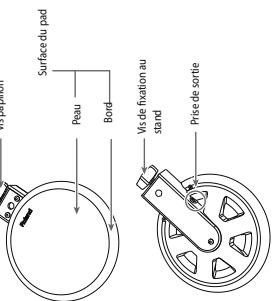
Technical line drawing of a mechanical device with exploded view and assembly details (no text or symbols)CY-8 (Cymbale crash/ride)
Description de la CY-8
m = 311

(2)
(2)
(2)
(2)
(2)

m = 311
The Ground Truth image displays a single, solid horizontal line. According to Rule 2 (UNDERSCORE & LINE RULES), this is a stylistic or background line, not a placeholder underscore. Therefore, the OCR result must ignore it and output nothing or only meaningful text. The provided OCR content is "____", which consists of four underscores. This is an incorrect interpretation of the line as a placeholder, violating the rule that stylistic lines must be ignored. The OCR has hallucinated underscores where none should exist based on the GT's visual context. Hence, the OCR result is inconsistent with the Ground Truth.
kez le module (TD-9)
The Ground Truth image displays a single, solid horizontal line. According to Rule 2 (UNDERSCORE & LINE RULES), if the GT contains lines used for stylistic emphasis or as background elements (like ruled paper), the OCR result must ignore them. The provided OCR content is "____", which consists of four underscores. This is incorrect because underscores are not equivalent to a solid line and are not permitted under the “Stylistic/Background Lines (Ignore)” rule. Outputting underscores for a stylistic line violates the rule and constitutes an error. Therefore, the OCR result is inconsistent with the Ground Truth.
4
m - 1 0 ;
[1]
-
-
-
-
-
-
-
-
-
-
-
-
-
-
-
-
-
-
-
-
-
-
-
-
-
-
-
-
-
-
-
-
-
-
-
-
-
-
-
-
-
-
-
-
-
-
-
-
-
-
-
-
-
-
-
-
-
-
-
-
-
-
-
-
-
-
-
-
-
-
-
-
-
-
-
-
-
-
-
-
-
-
-
-
-
-
-
-
- 90.
-
-
-
-
-
-
-
-
-
-
-
-
-
-
-
-
-
-
-
-
-
-
-
-
-
-
-
-
-
-
-
-
-
-
-
-
-
-
-
-
-
-
-
-
-
-
-
-
-
-
-
-
-
-
-
-
-
-
-
-
-
-
-
-
-
-
-
-
-
-
-
-
-
-
-
-
-
-
-
-
-
-
-
-
-
-
-
1
6
-
-
-
-
-
-
-
-
-
-
-
-
-
-
-
-
-
-
-
-
-
-
-
-
-
-
-
-
-
-
-
-
-
-
-
-
-
-
-
-
-
-
-
-
-
-
-
-
-
-
-
-
-
-
-
-
-
-
-
-
-
-
-
-
-
-
-
-
-
-
-
-
-
-
-
-
-
-
-
-
-
-
-
-
-
-
-
-
- 90.
-
-
-
-
-
-
-
-
-
-
-
-
-
-
-
-
-
-
-
-
-
-
-
-
-
-
-
-
-
-
-
-
-
-
-
-
-
-
-
-
-
-
-
-
-
-
-
-
-
-
-
-
-
-
-
-
-
-
-
-
-
-
-
-
-
-
-
-
-
-
-
-
-
-
-
-
-
-
-
-
-
-
-
-
-
-
-
1
*
The Ground Truth image displays a single, solid horizontal line, which is a stylistic or background element (like a rule line on paper). According to Rule 2, such lines must be ignored by the OCR result. The provided OCR content is "____", which consists of underscores. Underscores are not equivalent to a solid line and are not permitted under the “Stylistic/Background Lines (Ignore)” rule. Outputting underscores for a stylistic line is incorrect because it misinterprets the line as a placeholder fill-in-the-blank area. Hence, the OCR result is inconsistent with the Ground Truth.
[Non-Text]
The image contains no discernible text or characters.
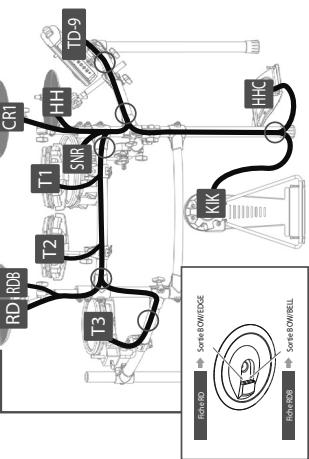
flowchart
graph TD
    A["RD RDB"] --> B["T2"]
    B --> C["T1"]
    C --> D["SNR"]
    D --> E["HH"]
    E --> F["TD-9"]
    G["Riche RD"] --> H["Sortie BOW/EDGE"]
    I["Riche-RDB"] --> J["Sortie BOW/BELL"]
    K["KIK"] --> L["HHC"]
natural_image
Technical line drawing of a mechanical assembly with no visible text or symbolsDescription du KD-8
natural_image
Technical line drawing of a multi-stage electronic instrument with control panel and drum components (no text or symbols)IMPORTANT: THE WIRES IN THIS MAINS LEAD ARE COLOURED IN ACCORDANCE WITH THE FOLLOWING CODE.
BLUE: NEUTRAL
BROWN: LIVE
As the colours of the wires in the mains lead of this apparatus may not correspond with the coloured markings identifying the terminals in your plug, proceed as follows:
The wire which is coloured BLUE must be connected to the terminal which is marked with the letter N or coloured BLACK. The wire which is coloured BROWN must be connected to the terminal which is marked with the letter L or coloured RED. Under no circumstances must either of the above wires be connected to the earth terminal of a three pin plug.

This equipment has been tested and found to comply with the limits for a Class B digital device, pursuant to Part 15 of the FCC Rules. These limits are designed to provide reasonable protection against harmful interference in a residential installation. This equipment generates, uses, and can radiate radio frequency energy and, if not installed and used in accordance with the instructions, may cause harmful interference to radio communications. However, there is no guarantee that interference will not occur in a particular installation. If this equipment does cause harmful interference to radio or television reception, which can be determined by turning the equipment off and on, the user is encouraged to try to correct the interference by one or more of the following measures:
— Reorient or relocate the receiving antenna.
— Increase the separation between the equipment and receiver.
— Connect the equipment into an outlet on a circuit different from that to which the receiver is connected.
— Consult the dealer or an experienced radio/TV technician for help.
This device complies with Part 15 of the FCC Rules. Operation is subject to the following two conditions:
(1) this device may not cause harmful interference, and
(2) this device must accept any interference received, including interference that may cause undesired operation.
Unauthorized changes or modification to this system can void the users authority to operate this equipment.
This equipment requires shielded interface cables in order to meet FCC class B Limit.
Pour le Canada
NOTICE
This Class B digital apparatus meets all requirements of the Canadian Interference-Causing Equipment Regulations.
AVIS
Pads (ex: PD-105/PD-85) 23
Cymbales (ex: CY-8, CY-12R/C) 23
natural_image
Technical line drawing of a multi-stage electronic instrument with control panel and drum components (no text or symbols)natural_image
Circular mechanical component with six directional arrows (no text or symbols)natural_image
Diagram showing two circular buttons labeled - and + connected by a double-headed arrow, next to a large circular object (no text or symbols)natural_image
Technical line drawing of a device housing with internal components and mounting holes (no text or symbols)NOTE
natural_image
Line drawing of hands using a tool to adjust or install electronic components (no text or symbols visible)natural_image
Diagram of a mechanical or electrical component with no visible text, numbers, or symbolsMEMO
natural_image
Technical line drawing of a multi-stage electronic instrument with control panel and drum components (no text or symbols)Page 'DRUM KIT'
Pads (ex: PD-105/PD-85)
Head Shot
natural_image
Diagram of a drum with a stirring rod and star-shaped head, labeled 'Peau' (no other text or symbols)Rim Shot
Cymbales (ex: CY-8, CY-12R/C)
Frappe sur le corps
natural_image
Simple line drawing of a circular object with a pointer and a small protrusion, no text or symbols present.Frappe sur le bord
Frappe sur le bord
TOM1-3
| Head Tuning | -240~+240 |
| Muffling | OFF, TAPE1–2, FELT1–2 |
![INST EDIT Cymbal Size 14" Fixed Hi-Hat NORMAL [HI-HAT] HEAD](/content/2020/05/130917/images/bfa33ddf851971f9cb0b05f75a3d0caa44bbdd0d54484567eadc8843c9173e8f.jpg)
HI-HAT
| Cymbal Size | 1"~40" |
| Fixed Hi-Hat | NORMAL, FIXED1-4 |
![INST EDIT [CRASH1] Cymbal Size 16" Sustain 100](/content/2020/05/130917/images/111d713652aa006b6129c2cb27561605fb6ca8c5b3cd4b8c14a627ffbb244b95.jpg)
CRASH1-2
| Cymbal Size | 1"~40" |
| Sustain | 1~100 |
![INST EDIT [ RIDE] HEAD Cymbal Size 20" Sustain 100](/content/2020/05/130917/images/29e240b5a577d1bf4c4e8a94d04e106cd18daabdd778ac9be37f23b2367d6765.jpg)
RIDE
| Cymbal Size | 1"~40" |
| Sustain | 1~100 |
![INST EDIT [ BELL ] Cymbal Size 20" Sustain 100](/content/2020/05/130917/images/3e8287143cc2b678fde41585c3e04d8741f7b6f3dfb7e3fa68ad458aaab48fb8.jpg)
BELL
| Cymbal Size | 1"~40" |
| Sustain | 1~100 |
![INST EDIT [ AUX ] Pitch 0 Decay 100 HEAD](/content/2020/05/130917/images/24cd1c35ac534bf263c79a28a2b35c44dbb4044d9304affd6a0035957106d993.jpg)
Autres sons
| Pitch | -240~+240 |
| Decay | 1~100 |
[F1] (AMB): Ambience