
Rigi 400 - Baby monitor Reer - Free user manual and instructions
Find the device manual for free Rigi 400 Reer in PDF.


Pick your language and provide your email: we'll send you a specifically translated version.
| Product Type | Baby Monitor with Screen |
| Brand | Reer |
| Model | Rigi 400 |
| Dimensions (parent unit) | Approx. 12 x 8 x 6 cm |
| Weight (parent unit) | Approx. 200 g (with battery) |
| Power Supply | 5V/1A mains adapter (included) or rechargeable Li-Ion battery |
| Battery Life | Up to 10 hours on standby |
| Range | Up to 300 meters in open field |
| Transmission Technology | FHSS (2.4 GHz) to avoid interference |
| Parent Unit Screen | 3.5-inch color LCD screen |
| Night Vision | Automatic infrared LEDs, range up to 5 meters |
| Audio | Built-in microphone and speaker, talk-back function |
| Additional Features | Night light, lullabies, temperature indicator, movement alarm |
| Care and Cleaning | Wipe with a soft dry cloth. Do not use abrasive products. |
| Safety | Compliant with European standards (CE). Keep out of reach of children. |
| Spare Parts and Repairability | Replacement adapter and battery. Repairability index not provided. |
| Box Contents | Baby unit, parent unit, mains adapters, USB cable, user manual |
| Warranty | 2 years |
Frequently Asked Questions - Rigi 400 Reer
How to pair the parent unit with the baby unit?
Press the PAIRING button under each unit for 3 seconds. The LEDs flash then turn off once the connection is established.
What to do if the parent unit screen is black?
Check that the parent unit is on (POWER button). If the battery is dead, connect the mains adapter. If the problem persists, reset by removing the battery for 10 seconds.
How to adjust the audio volume?
Use the +/- buttons on the side of the parent unit. The level is shown on the screen. You can also mute the sound with the MUTE button.
Is the range sufficient in a house?
The advertised range is 300 m in open field. In a house, it may be reduced by walls and obstacles. Place the baby unit high up and away from transmitting devices (Wi-Fi, microwaves).
How to activate the night light?
Press the bulb-shaped button on the baby unit. The night light turns on blue. Press again to turn it off.
Can I use multiple baby units?
Yes, the Reer Rigi 400 allows connecting up to 4 cameras (baby units) to one parent unit. Press the CAM button to switch between them.
How to clean the units?
Unplug the adapters. Wipe with a slightly damp cloth (no liquid directly). For the lenses, use a dry microfiber cloth.
What to do if the audio crackles?
Check for interference from other 2.4 GHz devices. Move the parent unit away from the Wi-Fi router. If the problem persists, change the transmission channel via the menu.
The parent unit battery drains quickly, what to do?
Make sure the screen backlight is not at maximum. Reduce the brightness in settings. If the battery is old, contact customer service for a replacement.
Is there an energy saving mode?
Yes, activate ECO mode in the menu. The screen turns off automatically when no sound is detected for 30 seconds, and turns back on at the slightest noise.
User questions about Rigi 400 Reer
0 question about this device. Answer the ones you know or ask your own.
Ask a new question about this device
No questions yet. Be the first to ask one.
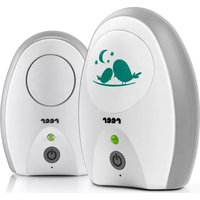
Download the instructions for your Baby monitor in PDF format for free! Find your manual Rigi 400 - Reer and take your electronic device back in hand. On this page are published all the documents necessary for the use of your device. Rigi 400 by Reer.
USER MANUAL Rigi 400 Reer

Manual assistant
Powered by Anthropic
Waiting for your message
Product information
Brand : Reer
Model : Rigi 400
Category : Baby monitor