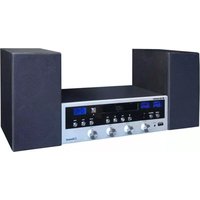
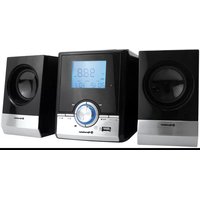
HIF-6970BT - Hi-Fi System ROADSTAR - Free user manual and instructions
Find the device manual for free HIF-6970BT ROADSTAR in PDF.


| Product Type | Hi-Fi System with Bluetooth |
| Brand | Roadstar |
| Model | HIF-6970BT |
| Dimensions (W x H x D) | 200 mm x 100 mm x 300 mm |
| Weight | 3.0 kg |
| Power Output | 2 x 25W RMS |
| Power Supply | AC 230V ~ 50Hz |
| Bluetooth Version | 5.0 |
| Supported Media | CD, CD-R/RW, USB, Bluetooth, FM Radio, AUX |
| Remote Control | Included |
| Speaker Configuration | 2-way bass reflex |
| Frequency Range | FM: 87.5 – 108 MHz |
| USB Playback | MP3, WMA |
| Audio Input | 3.5 mm AUX |
| Care and Cleaning | Wipe with a dry, soft cloth. Do not use solvents. |
| Safety Note | Do not open the device. Keep away from moisture. |
| Spare Parts Availability | Remote control, power cord, antennas (available from dealer) |
| Repairability | Moderate – consult qualified technician for repairs |
| General Information | Supports Bluetooth streaming, USB recording, and preset radio stations |
Frequently Asked Questions - HIF-6970BT ROADSTAR
User questions about HIF-6970BT ROADSTAR
0 question about this device. Answer the ones you know or ask your own.
Ask a new question about this device
Download the instructions for your Hi-Fi System in PDF format for free! Find your manual HIF-6970BT - ROADSTAR and take your electronic device back in hand. On this page are published all the documents necessary for the use of your device. HIF-6970BT by ROADSTAR.
USER MANUAL HIF-6970BT ROADSTAR
- Your new unit was manufactured and assembled under strict ROADSTAR quality control. Thank you for purchasing our product for your music enjoyment. Before operating the unit, please read this instruction manual carefully. Keep it also handy for further future references.
The exclamation point within the triangle is a warning sign alerting the user of important instructions accompanying the product.
The lightening flash with arrowhead symbol within the triangle is a warning sign alerting the user of "dangerous voltage" inside the unit.
To reduce the risk of electric shock, do not remove the cover. No user serviceable parts inside the unit. Refer all servicing to qualified personnel.
230v\~
This unit operates on 230V \~ 50Hz. If the unit is not used for a long period of time, remove the plug from the AC mains.
Ensure all connections are properly made before operating the unit.
This unit must not be exposed to moisture or rain.


This unit should be positioned so that it is properly ventilated. Avoid placing it, for example, close to curtains, on the carpet or in a built-in installation such as a bookcase.
Do not expose this unit to direct sunlight or heat radiating sources.
English Er
BUTTONS AND CONTROLS
-
POWER BUTTON
-
USB SOCKET
-
EARPHONE SOCKET
-
FUNCTION BUTTON
-
BALANCE KNOB
-
IR
-
STOP BUTTON
-
VOLUME KNOB
-
PREVIOUS BUTTON
-
PLAY/PAUSE BUTTON
-
BASS KNOB
-
NEXT BUTTON
-
SCAN BUTTON
-
TREBLE KNOB
-
TUNING DOWN BUTTON
-
TUNING UP BUTTON
-
DISPLAY
-
EJECT/ENTER BUTTON
-
CD COMPARTMENT
-
VU-METER LEFT
-
VU-METER RIGHT
-
AC POWER CORD
-
FM ANTENNA
-
SPEAKER INPUT SOCKET (LEFT&RIGHT)
-
AUX IN SOCKET (L/R)
REMOTE CONTROL
-
MUTE
-
FUNCTION BUTTON: Select a source.
-
PROGRAM: Set a program playback.
-
REPEAT: set a repeat playback
-
TUN-: in the FM mode, adjust the frequency.
-
PLAY/PAUSE BUTTON: Pause and resume playback.
-
NEXT BUTTON: skip forward.
-
VOLUME+ BUTTON: Adjust the volume level.
-
BALANCE (RIGHT): Select the right speaker to adjust treble or bass
-
BALANCE (LEFT): Select the left speaker to adjust treble or bass
-
ON/STANDBY BUTTON: Set the unit ON or STANDBY.
-
EJECT/ENTER: In CD mode, eject and close the CD Tray.
- RANDOM: Select to a random playback.
- TUN+: in the FM mode, adjust the frequency.
- SCAN: Act as "scan" in the menu.
- FOLDER: In USB and MP3 disc mode, press to select folder.
- PREVIOUS BUTTON: skip backward.
- STOP BUTTON: Stop the playback
- VOLUME- BUTTON: Adjust the volume level.
- TREBLE+: Act as "up" treble.
- BASS+: Act as "up" bass.
- BASS-: Act as "down" bass.
- TREBLE-: Act as "down" treble.
PRELIMINARY OPERATIONS
Connect the speaker wire to the speaker terminal (24) located on the back of unit.
Before connecting power to your audio system, the protective packing should be removed from the CD compartment.
1. Press FUNCTION BUTTON (4) to select "FM" function.
2. Press EJECT/ENTER BUTTON (18) to open the cd door.
3. Remove the protecting packing from the CD compartment.
FM antenna: Unwrap the FM antenna and extend it fully. You may need to adjust the position of the antenna to get optimum reception.
- Press POWER BUTTON (1) to turn the unit ON.
- Press and hold POWER BUTTON (1) for 3 seconds to turn the unit OFF.
NOTE: When no sound is produced, the unit will switch OFF automatically after 15 minutes. Unplug the AC plug from the wall outlet if it will not be used for long periods of time.
ADJUSTING THE VOLUME
- Turn the VOLUME KNOB (8) to the desired volume level.
- Audio Balance: Turn BALANCE KNOB (5) to adjust the volume between the left speaker and the right speaker. The volume of the left speaker and right speaker is equal when the LED display shows "00".
- Treble and bass: Tum BASS KNOB (11) and TREBLE KNOB (14) to switch between treble and bass from “-3” to “3”
English Er
Press FUNCTION BUTTON (4) to select "FM" function. "OP" will be shown on the display. Select a station using one of the following methods:
- Long pressing TUNING DOWN/UP BUTTON (15)/(16) for 2 seconds or more, the frequency changes down or up automatically until a station is found.
- Repeatedly press TUNING DOWN/UP BUTTON (15)/(16) to change the frequency until you find the station you want.
Program radio stations
You can program a maximum of 20 preset radio stations (FM).
-
Press SCAN BUTTON (13) for 2 seconds or more to activate automatic program mode.
-
All available stations are programmed.
- The first programmed radio station is broadcast automatically.
- Press PREVIOUS/NEXT BUTTON (9)/(12) to navigate through the stored presets.
NOTE: If you press and hold SCAN BUTTON (13), it will delete all of the previous presets you have stored and automatically reprogram all presets.
CD MODE
- Press FUNCTION BUTTON (4) to select "FM" function. "OP" will be shown on the display.
- Press EJECT/ENTER BUTTON (18) to open the cd door.
- Place a cd with the printed side facing up inside the tray, then close the cd door.
- The first track will start playback.
- Press PREVIOUS/NEXT BUTTON (9)/(12) to select your favorite tunes.
- Press PLAY/PAUSE BUTTON (10). The disc will pause and pause indicator appears on the display.
- Press PLAY/PAUSE BUTTON (10) again to resume the playback.
Playing Repeatedly
During play, repeatedly press the REPEAT button on the remote control to select:
- Repeat1: The current track is played repeatedly.
- RepeatAll: All tracks are played repeatedly
• To return to normal play.
Program play
You can program up to 20 tracks to play in any desired order.
1. Insert a disc and press STOP BUTTON (7) when it starts playing.
2. Long pressing PROGRAM BUTTON (28) on the remote control for 2 seconds or mo-

re.
- Press PREVIOUS/NEXT BUTTON (9)/(12) to select your favorite tunes.
- Long pressing PROGRAM BUTTON (28) on the remote control for 2 seconds or more to confirm the track number to be stored.
- Repeat steps 2-3 to select and store all desired tracks.
- Press PLAY/PAUSE BUTTON (10) to start program play.
- Press STOP BUTTON (7) once to stop the program play. Press STOP BUTTON (7) twice to clear programme.
AUXILIARY INPUT
This unit provides an auxiliary audio input jack for connecting external audio device like MP3 players, CD players and allow playback of your external source through the system speakers.
- Use an audio cable (not included) with 3.5 mm stereo plugs on each end of the cable.
- Plug one end into the AUX-IN jack on the main unit and plug the other end of the cable into the LINE OUT or HEADPHONE Jack of your external audio device.
- Turn ON the unit and your external audio device.
- Press FUNCTION BUTTON (4) to select "AUX" function. "AUX" will be shown on the display.
- Start to play the external device (see the user manual of the external device).
NOTE: If you connect this unit to the LINE OUT Jack of your external device (if available), you can only adjust the volume on this unit. If you connect this unit to the HEADPHONE Jack of your external device, you may need to adjust both volume controls of your external device and this unit to obtain the desired volume.
USB MODE
- Press FUNCTION BUTTON (4) to select "USB" function. "USB" will be shown on the display.
- Insert the USB device's plug into the USB socket.
- The first track will start playback.
- Press PREVIOUS/NEXT BUTTON (9)/(12) to select your favorite tunes.
- Press PLAY/PAUSE BUTTON (10). The disc will pause and pause indicator appears on the display.
- Press PLAY/PAUSE BUTTON (10) again to resume the playback.
- If the USB memory stick has more than 1 folder, press FOLDER BUTTON (41) on the remote control to select the desired folder.
NOTE: Repeat play and program play are also available in USB mode, the operation
English En
is the same as the CD description
BLUETOOTH MODE
Press FUNCTION BUTTON (4) to select "BLUETOOTH" function. "BLUE" will be shown on the display.
- Activate the Bluetooth function in your Bluetooth device (see the device user manual).
- Select "HRA-1750D+BT" on your device for pairing. For elder devices, you need to input "0000" as pairing password.
- Start music play on your Bluetooth device, you can use this unit to control the function to your Bluetooth device.
USING THE REMOTE CONTROL
The Remote Control Unit can operate the unit from a distance. When operating the remote control unit, point it towards the front panel of the unit.
Even if the remote control unit is operated within the effective range, remote control operation may be impossible if there are any obstacles between the unit and the remote control. If the remote control unit is operated near other appliances which generate infrared rays, or if other remote control devices using infrared rays are used near the unit, it may operate incorrectly. Conversely, the other appliances may operate incorrectly.
SPECIFICATIONS
Frequency Range: 87.5 to 108 MHz
Power Requirements: AC 230V\~50Hz
Power Consumption: 60W
NOTE: As a result of continual improvements, the design and specifications of this product are subject to change without notice.

Correct Disposal of This Product (Waste Electrical & Electronic Equipment)
This marking shown on the product or its literature, indicates that it should not be disposed with other household wastes at the end of its working life. To prevent possible harm to the environment or human health from uncontrolled waste disposal, please separate this from other types of wastes and recycles it responsibly to promote the sustainable reuse of material resources. Household d users should contact their the rates for where they purchased this product, or their local government office, for details of where and how they can take this item for environmentally safe recycling. Business users should contact their supplier and check the terms and conditions of the purchase contract. This product should not be mixed with other commercial wastes for disposal.
Deutsch
7
SICHERHEITSHINWEISE

• Blackstone sum not shown in the
Albanis (by operations around
Karnish Embar going home a Prandate
• Touring SOLUTION DE VOLUME (Millions of dollars, per share)
- Group of items: Trayee TOLICHE BARS (14) at TOLICHE THBSF (14) samples in
- Amount bounded by 10,000 (M€) and 50,000 (€) from the period ending December 31, 2014.
Programmation de stations radio
c. You can be a business organization and programmes.
Power Consumption: 60W
(3) financial statements and financial reports
Incorporated material properties, the material is a suitable product for the 1st and 2nd volumes of the other materials. The products are not available in any way to be used.
The quick brown fox jumps over the lazy dog.
Español
25
ATTENTIÓN

Figure 2M: Estimates in our eM is a network environment. To evaluate our ownity structure
• Agilent's game: one action block (17) a motion inside (40), a break in the agilent whom do "T" is
yapin-3a2
ESCUCNANDOLA RADIO
10.2017年1月1日
Subs. POTÓN DE FUNCION (4) microvinician anal adjuvant TM. En is partible para
Poule BONION DE P coul in relation "FM"
(1) 2017年第一季度
28
Español
- Raise taxes from Boston Station/Adon N.A.R. ATR
lear al frecuero
公司于2017年1月1日
(1) 2017, the results of variance, the past and future values are reported.
Benedictiva de resechelles
FM: Power Requirements Power Consumption
87.5 to 108 MHz AC 230V\~50Hz 60W
nla 20 no identi adrieme (jolo 101 obte reklas-dambolism. Part ofa for past II as delta at radio and
dade: 1 social performance, para informatic action: 3 items: 2 items possible. Bocera jeve que was secreted a set
Average (20%) of the average number of cases for a disease syndrome is given, the average number of cases for a disease syndrome is given.
Nederlandse
WARNINGS

-
STOP TOETS
-
VOLUMEKNOIP
46 TREBLE + KNOS
-
PASS + KNOR
-
6A20 12A3P
-
9A55 12A60
-
BASO - KNOF
-
TREELE - KNOP
AAN DE SLAG
- Brain volume control (s) driver variables is given
• Audio basers: Drais BALANG BUTTON (2) het volume van de inver luodapreier en de
the exercise is in simple
- Densit-Worthbridge
• Repeach: Net manage number wordenbestand
• RepeatAll: Alle customers worden herbaaid
| FM: | 87.5 to 108 MHz |
| Power Requirements: | AC 230V~50Hz |
| Power Consumption: | 60W |

- 230v\~
- English Er
- BUTTONS AND CONTROLS
- REMOTE CONTROL
- PRELIMINARY OPERATIONS
- ADJUSTING THE VOLUME
- Program radio stations
- CD MODE
- Playing Repeatedly
- Program play
- AUXILIARY INPUT
- USB MODE
- English En
- BLUETOOTH MODE
- USING THE REMOTE CONTROL
- SPECIFICATIONS
- Correct Disposal of This Product (Waste Electrical & Electronic Equipment)
- SICHERHEITSHINWEISE
- Albanis (by operations around
- Programmation de stations radio
- ATTENTIÓN
- 28
- Español
- Nederlandse
- WARNINGS
- AAN DE SLAG
Brand : ROADSTAR
Model : HIF-6970BT
Category : Hi-Fi System