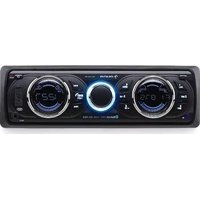
MD-160 BT - Car radio Auna - Free user manual and instructions
Find the device manual for free MD-160 BT Auna in PDF.


| Product Type | Car Stereo |
| Brand | Auna |
| Model | MD-160 BT |
| Dimensions (L x H x W) | Approx. 7.0 x 2.0 x 5.0 inches (standard DIN) |
| Weight | 1.5 lbs (0.68 kg) |
| Power Supply | 12V DC (negative ground) |
| Maximum Output Power | 4 x 45W |
| Bluetooth Version | 5.0 |
| USB Port | Yes, for playback and charging |
| AUX Input | Yes, 3.5mm front panel |
| Radio Tuner | FM/AM with 30 presets |
| Audio Formats Supported | MP3, WMA, WAV, FLAC |
| Equalizer Presets | Rock, Pop, Classic, Flat |
| Display | LCD with white backlight |
| Steering Wheel Control Compatibility | Yes (with optional adapter) |
| Remote Control Included | Yes |
| Mounting Type | DIN slot |
| Maintenance | Clean with soft dry cloth; avoid liquids |
| Safety Precautions | Disconnect battery before installation; use fuses as specified |
| Spare Parts Availability | Parts available via Auna service or authorized dealers |
| Repairability | Designed for professional service; DIY not recommended |
| Warranty | 2 years limited warranty |
| Language Supported | English, German, French, Spanish, Italian |
| Cable Length (Power) | Approx. 1.5 meters |
Frequently Asked Questions - MD-160 BT Auna
User questions about MD-160 BT Auna
0 question about this device. Answer the ones you know or ask your own.
Ask a new question about this device
Download the instructions for your Car radio in PDF format for free! Find your manual MD-160 BT - Auna and take your electronic device back in hand. On this page are published all the documents necessary for the use of your device. MD-160 BT by Auna.
USER MANUAL MD-160 BT Auna
natural_image
Abstract white geometric logo on black background (no text or symbols)auna
multimedia
Autoradio

10007166
Fernbedienung
natural_image
Symbol of a trash bin crossed with a diagonal line, no text or numbers presentCongratulations on purchasing this equipment. Please read this manual carefully and take care of the following hints on installation and use to avoid technical damages. Any failure caused by ignoring the mentioned items and cautions mentioned in the operation and installation instructions are not covered by our warranty and any liability.
Contents
Technical Data 10
Safety Instructions 10
Product Description and Controls 12
Basic Operations 13
Installation and Dismantling 14
Connections and Wiring 15
Bluetooth Operations 16
RDS Operations 16
Troubleshooting 17
Environment Concerns 17
Declaration of Conformity 17
Technical Data
| Item number 10007166 | |
| FM Radio | |
| Frequency scope 87.5~108 MHz | |
| Intermediate Frequency 10.7 MHz | |
| Signal-to-noise ratio 40 dB | |
| Noise-limited sensitivity (S/N = 30 dB) ≤ 37 dB | |
| Music Player | |
| Signal-to-noise ratio 40 dB | |
| Chanel separation at 1 KHz 30 dB | |
| Harmonic distortion at 1 KHz ≤ 5% | |
| Frequenzbereich 100 Hz - 10 KHz ± 6 dB | |
| Amplifier | |
| Output Speaker output | |
| Speaker resistance 4~8 Ohm | |
| Maximum output power ≥ 16 W x 4 | |
| Power supply DC 12 V | |
| Dimensions (Length x Height x Depth) 182 mm (L) x 52 mm (H) x 145 mm (D) | |
Safety Instructions
Installation Cautions
- The said product is powered via 12V and before installation, please check to ensure the voltage of the automobile is correct;
-
In the wiring process, tear down the battery's negative connecting wires so as to avoid electric shock or personnel injury due to short-circuit;
-
Try not to connect wires over or near any hot surface, especially those wires connected to the engine accessories;
- It is forbidden to dismantle the power cable of the said product and meanwhile, use such cable to power other products of different model. Over-current is likely to lead to fi re disaster;
- Replace old fuse with a new one with the same specifications;
• Install the said product with supplied screws; - Bundle wires and cables together or via tapes when installation is completed;
- Do not use the said product in a rainy, damp or dusty environment;
- Do not install the said product in a location that vibrates or is hard to secure;
- Try not to block any ventilation or radiation openings.
General Instructions
- Do not modify or dismantle the said product on your own so as not to trigger any accidental events, fi re hazard and electric shock;
- For the sake of driving safety, try to keep the volume down;
- While washing the automobile, necessary caution must be exercise as electric short-circuit or other hazards could be set off if any water is splashed over the said product (including the speakers);
- Wiring and installation are required to be performed by professionals. As skills and experience are essential while installing the said product and connecting relevant wires and cables, it is strongly suggested to contact relevant dealers for installation.
- If detected any abnormality, please stop using the said product immediately. Otherwise, such product could be damaged more seriously. For details, contact the corresponding professional technicians.
- As the said product consists of numerous precision components, any attempt to dismantle or adjust any component is strictly restricted. When maintenance is needed, please send such product to the locations as appointed by the company for maintenance.
Precaution
- The said product is powered by means of a 12V AC accumulator which is grounded via the negative electrode;
- Please connect as per the wiring diagram so as to avoid any device damage;
- Before connection, strip off the insulation layer long as 5mm on both ends of the wires;
- Do not power on until connection is fi nished;
• Insulate any exposed live part in order to prevent short-circuit with the automobile chassis. - Bundle all the wires and cables so as to prevent any terminals making contact with any metal object;

ATTENTION:
As for any automobile equipped with computer or satellite navigation system, the information stored could be totally erased when the battery terminal is pulled off.
Attention when connecting speakers
- Do not use any grounded speakers;
- The power of the speaker in use must exceed 40W as it is required to accept maximum output power of the amplifier;
- The speaker has resistance ranging between 4\~8ohm. Any resistance not covered by such range could affect output power and even damage the speaker or the said product;
- The speaker wires should be approximately 30mm away from the antenna and antenna extension cable;
- Please follow the diagrams to connect correctly so as to safeguard either the speaker or the said product.
Product Description and Controls
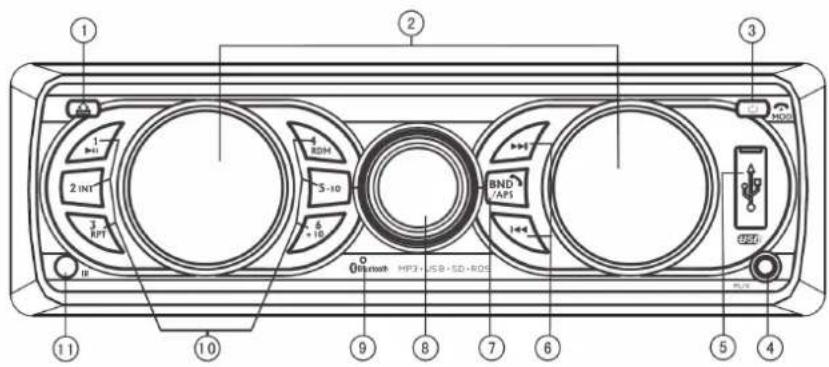
Front Panel Buttons
1 Front panel detaching button
2 Display
3 Power/Function mode/hang-up button
4 AUX-in port
5 USB slot
6 Track/station selector
7 Brand switch/Automatic station locking/Answer the phone
8 Volume knob/Tone selector/RDS function control/8 color illumination
9 Bluetooth mic
10 Numerical (1-6) function buttons
11 Remote-control sensor
12 SD/MMC slot
13 Reset

Remote-control Operations
1 Power button
2 Hang-up button
3 Function mode button
4 Digit 2/scan playback button
5 Digit 1/playback suspend button
6 Digit 4/radom playback button
7 Digit 5 button
8 Digit 8 button
9 Digit 9 button
10 Tone selector
11 Pick-up button
12 Volume + button
13 Track selection/station search button
14 Digit 3/repeat playback button
15 Volume - button
16 Digit 7 button
17 Digit 6 button
18 Sound effect selector
19 Digit 0/waveband button

Basic Operations
Front Panel Buttons:
Front panel detaching button (1)
Press to remove the front panel for savekeeping
Display (2)
Display radio frequency or current operation status.
Power button/Function mode/Hang up (3)
In turn off station, short press to turn on. In turn on station, press and hold to turn off. In turn on station, short press „MODE“ button to enter the function select. When bluetooth/USB/SD/MMC are available, press this button to order as follow:radio-USB-SD/MMC-bluetooth-AUX. It will skip the function which is unavailable. When link the bluetooth, short press to hang up the incoming call.
AUX-in port (4)
Receive external audio signals.
USB slot (5)
Automatically play back music in the corresponding formats once a memory stick is inserted.
Track/station selector (6)
While playing back MP3, press ◀◀ to jump to the previous tracks, press and hold such button to rewind; In the radio mode, press ◀◀ to automatically search stations backwards, press and hold such button to manually search stations backwards; While playing back MP3, press ▶▶ to jump to the nex tracks, press and hold such button to fast forward; In the radio mode, press ▶▶ to automatically search stations forwards, press and hold such button to manually search stations forwards.
Brand switch/Automatic station locking/answer the phone (7)
In radio mode, short press to band switch: F1-F2-F3. In radio state, press and hold this button to scan radio channels automatically and save to the three FM bands. After scanning, the player will browse and play once automatically. You can select respective band and channel to listen to.
Volume knob/Tone selector/RDS function control/8 color illumination (8)
In radio/MP3 mode, turn this knob to adjust volume. Pres this knob repeatedly to shift among BAS/TRE/BAL/FAD/BL AUTO/AF ON/REG OFF/TA OFF/EON ON/ADJ CLK/VOL. You can also use such knob to change tone. Press the VOL knob to show "ADJ CLK" on the screen, and then press and hold the VOL knob to flash the clock digits. Use the knob to adjust the time. Rotate clockwise to adjust the minute, and rotate counterclockwise to adjust the hour.
Bluetooth Mic (9)
The voice enters into the microphone through it during the Bluetooth call.
Remote-control signal receiving window (11)
Receive commands generated by the remove-control.
SD/MMC card holder (12)
Tracks in relevant formats will be automatically played back once a SD/MMC card is inserted.
Reset button (13)
To reset the system in case of system failure, press such button first and then reboot the system.
Numerical function buttons:
1/▶II
When completed searching radio stations automatically, press this button to listen to available stations, press and hold the same button to save such stations manually; In the MP3 mode, press this button to pause playback, and press the same button again to resume.
2/INT
When completed searching radio stations automatically, press this button to listen to available stations, press and hold the same button to save such stations manually; In the MP3 mode, press this button to browse tracks, and press the same button again to quit.
3/RPT
When completed searching radio stations automatically, press this button to listen to available stations, press and hold the same button to save such stations manually; In the MP3 mode, press this button to enable the function of Single Repeat, and press the same button again to disable such function.
4/RDM
When completed searching radio stations automatically, press this button to listen to available stations, press and hold the same button to save such stations manually; In the MP3 mode, press this button to enable the function of Shuffle, and meanwhile, you can use buttons like ◀◀ and ▶▶ to select tracks randomly. Press the same button again to disable such function.
5/-10
When completed searching radio stations automatically, press this button to listen to available stations, press and hold the same button to save such stations manually; In the MP3 mode, press this button to play back the first 10 tracks.
6/10+
When completed searching radio stations automatically, press this button to listen to available stations, press and hold the same button to save such stations manually; In the MP3 mode, press this button to play back tracks more than 10.
Installation and Dismantling
Installation Diagram
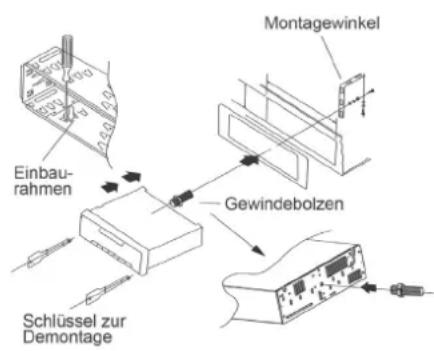
Before installing the main part, place it according to the installation locations and then connect with the corresponding speakers and power-supply; Do not fix the main part unless it performs well.
Install the main part.
Place the holder on the dashboard and then bend certain snapping components by force; Connect with the power-supply cable and speaker wires and then attach the fixing tag to the automobile; Slide the main part into the holder and then tighten the nuts on the fixing tag.
Dismantle the main part
Following loosening those nuts on the fixing tag, insert each dismantling key into the space on either left or right to pull the main part out. Later on, detach the power-supply cable and speaker wires and then the antenna connector.
Connections and Wiring
Wiring Diagram

flowchart
graph TD
    A["Antenna Slot"] --> B["Main Part"]
    B --> C["To ignition switch"]
    B --> D["To battery's anode"]
    B --> E["To battery's cathode"]
    B --> F["Front left speaker"]
    B --> G["Back left speaker"]
    B --> H["White wire"]
    B --> I["Yellow wire"]
    B --> J["Black wire"]
    B --> K["+ White wire"]
    B --> L["- White & black wire"]
    B --> M["+ Green wire"]
    B --> N["- Green & black wire"]
    B --> O["Blue wire"]
    B --> P["Grey wire"]
    B --> Q["Grey & black wire"]
    B --> R["Purple wire"]
    B --> S["Red"]
    B --> T["White"]
    B --> U["Red"]
    B --> V["Left RCA output"]
    B --> W["Right RCA output"]
    B --> X["To automatic antenna control wire"]
    B --> Y["Front right speaker"]
    B --> Z["Back right speaker"]
Cautions
- The said product is powered by means of a 12VAC accumulator which is grounded via the negative electrode;
- Please connect as per the wiring diagram so as to avoid any device damage;
- Before connection, strip off the insulation layer long as 5mm on both ends of the wires;
- Do not power on until connection is finished;
- Insulate any exposed live part in order to prevent short-circuit with the automobile chassis. Bundle all the wires and cables so as to prevent any terminals making contact with any metal object;
- Important: As for any automobile equipped with computer or satellite navigation system,
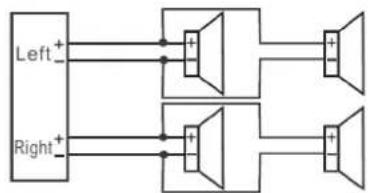
Attention when connecting speakers:
- Do not use any grounded speakers;
- The power of the speaker in use must exceed 40W as it is required to accept maximum output power of the amplifier;
- The speaker has resistance ranging between 4\~8ohm. Any resistance not covered by such range could affect output power and even damage the speaker or the said product;
- The speaker wires should be approximately 30mm away from the antenna and antenna extension cable; Please follow the diagrams below to connect correctly so as to safeguard either the speaker
• or the said product:
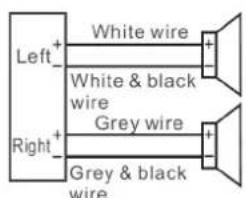
Correct

Wrong

Wrong
flowchart
graph TD
    A["Left+"] --> B["Speaker 1"]
    C["Right+"] --> D["Speaker 2"]
    B --> E["Output 1"]
    D --> F["Output 2"]
    style A fill:#f9f,stroke:#333
    style C fill:#f9f,stroke:#333
    style B fill:#ccf,stroke:#333
    style D fill:#ccf,stroke:#333
    style E fill:#dfd,stroke:#333
    style F fill:#dfd,stroke:#333
Wrong
Bluetooth Operations
Pair with cell phone
First of all, move a cell phone close enough to the said product and then turn on the Bluetooth device in such cell phone. Search the said product (code: 0000) for match-up.
Dial via Bluetooth
Once connected, press the Mode button to switch to "BTREADY" mode. press ↗ to call the last number or directly dial via the numerical keypad on the remote-control (0\~9) and then press ↗ to call.
Receive calls via Bluetooth
Once connected, when there is an incoming call, press on the front panel or on the remote-control to receive such call. To change the call-receiving device, press and hold "2INT" on the front panel to switch among the cell phone and the said product. When conversation is over, press on the front panel or on the remote-control.
Play back music via Bluetooth
Once connected, press the Mode button to switch to the Phone mode. Launch a kind of music playback software installed on the cell phone to play music. Under such circumstances, press ◀◀ and ▶▶▶ to select a previous or next track
RDS Operations
AF (Alternative Frequency) function
When the player is turned on for the first time, the system enters RDS (AF) state automatically. To listen to other channels, please turn off RDS (AF) first, and then scan the channels, or else other channels will be unavailable.
In any state, press the SEL button to enter REG OFF state, and then use the VOL knob to select REG ON or REG OFF.
TA (Traffic Announcement) function
In any state, press the SEL button to enter TA OFF state, and then use the VOL knob to select TA ON and play the traffic broadcast automatically.
TA (Traffic Announcement) Volume selection
In any state, press the SEL button to enter TA VOL state, and then use the VOL knob to adjust the TA volume.
EON (Enhanced Other Networks) function
In any state, press the SEL button to enter EON state, and then use the VOL knob to select whether display the information of other channels.
PTY (Programme Type) function
In any state, press and hold the SEL button to enter part PTY state, and press the SEL button again when the PTY type shows to enter the other PTY state. Then, use the number buttons (1\~6) to select the PTY type (note: each number buttons contains three types).
Troubleshooting
| Trouble Cause Solutions | ||
| Unable to turn on The process | fuse is broken. Replace the fuse with a new one having the same specifications. | |
| Malfunction The process | ssor experiences faulty situations due to other reasons. | Shut down and wait for 1 minute before reboot. |
| Press the Reset button for 1~3s. | ||
| No memory The ignition | on wire and positive power cable are connected incorrectly. | Switch those two wires and then reconnect. |
| Poor reception The automobile | tomobile antenna is not pulled out. | Check if the radio automatic control wire, antenna and grounding wire are connected well. |
| Such antenna is poorly grounded. | ||
| No or weak sound Inc | correct connection. Check connection and then rectify. | |
| The volume balancer is set out of tolerance. | Place the volume balancer in the middle. | |
| The speaker is grounded by one end. | Connect the speaker to the negative. | |
The company reserves rights to modify operation instructions and product outer appearance without notification in advance due to continuous product improvement. Illustrations in this manual could differ from the actual product as the printing conditions are restricted.
Any modification not authorized by the company could hinder users from using the said product appropriately.
Environment Concerns

natural_image
Symbol of a trash bin crossed out by a diagonal line, with no text or labels present.According to the European waste regulation 2002/96/EG this symbol on the product or on its packaging indicates that this product may not be treated as household waste. Instead it should be taken to the appropriate collection point for the recycling of electrical and electronic equipment. by ensuring this product is disposed of correctly, you will help prevent potential negative consequences for the environment and human health, which could otherwise be caused by inappropriate waste handling of this product. For more detailed information about recycling of this product, please contact your local council or your household waste disposal service.
Your product contains batteries covered by the European Directive. 2006/66/EC, which cannot be disposed of with normal household waste. Please check local rules on separate collection of batteries. The correct disposal of batteries helps prevent potentially negative consequences on the environment and human health.
Declaration of Conformity
This produkt is conform to the following European Directives:
2014/35/EU (Low voltage)
2014/30/EU (EMC)
2011/65/EG (RoHS)


- auna
- Autoradio
- Fernbedienung
- Contents
- Safety Instructions
- Installation Cautions
- General Instructions
- Precaution
- ATTENTION:
- Attention when connecting speakers
- Product Description and Controls
- Front Panel Buttons
- Remote-control Operations
- Basic Operations
- Numerical function buttons:
- 1/▶II
- 2/INT
- 3/RPT
- 4/RDM
- 5/-10
- 6/10+
- Installation and Dismantling
- Installation Diagram
- Install the main part.
- Dismantle the main part
- Connections and Wiring
- Wiring Diagram
- Cautions
- Attention when connecting speakers:
- Bluetooth Operations
- Pair with cell phone
- Dial via Bluetooth
- Receive calls via Bluetooth
- Play back music via Bluetooth
- RDS Operations
- AF (Alternative Frequency) function
- TA (Traffic Announcement) function
- TA (Traffic Announcement) Volume selection
- EON (Enhanced Other Networks) function
- PTY (Programme Type) function
- Troubleshooting
- Environment Concerns
- Declaration of Conformity
Brand : Auna
Model : MD-160 BT
Category : Car radio