
Series 3000 QT4013 - Beard trimmer PHILIPS - Free user manual and instructions
Find the device manual for free Series 3000 QT4013 PHILIPS in PDF.


| Product Type | Beard Trimmer |
| Brand | Philips |
| Model | Series 3000 QT4013 |
| Power Source | Rechargeable battery (Lithium-ion) |
| Charging Time | Approximately 10 hours for full charge |
| Usage Time | Up to 60 minutes cordless use |
| Blade Material | Stainless steel blades |
| Cutting Length Settings | 5 adjustable settings with comb (1-10mm) |
| Precision Trimmer | Yes, for detail work |
| Wet/Dry Use | Dry use only (not waterproof) |
| Cleaning | Washable blades, rinse under running water |
| Oil | Lubricating oil recommended for blades |
| Handle Design | Ergonomic rubber grip |
| Display | LED battery indicator |
| Travel Lock | Yes (press and hold power button) |
| Accessories | 1 comb attachment, cleaning brush, oil |
| Weight | Approximately 200 g (0.44 lbs) |
| Dimensions | 4.3 x 1.8 x 2.0 inches (11 x 4.6 x 5 cm) |
| Warranty | 2 years limited |
Frequently Asked Questions - Series 3000 QT4013 PHILIPS
User questions about Series 3000 QT4013 PHILIPS
0 question about this device. Answer the ones you know or ask your own.
Ask a new question about this device
Download the instructions for your Beard trimmer in PDF format for free! Find your manual Series 3000 QT4013 - PHILIPS and take your electronic device back in hand. On this page are published all the documents necessary for the use of your device. Series 3000 QT4013 by PHILIPS.
USER MANUAL Series 3000 QT4013 PHILIPS
Always here to help you
Register your product and get support at
www.philips.com/welcome


natural_image
Black Philips brand hairbrush with adjustable brush and control buttons (no text or symbols on body)QT4015,
QT4015,
QT4014,
QT4013,
QT4011
User manual
PHILIPS
ENGLISH 4
БЪЛГАРСКИ 11
ČEŠTINA 18
EESTI 25
HRVATSKI 32
MAGYAR 39
КАЗАКША 46
LIETUVIŠKAI 53
LATVIEŠU 60
POLSKI 67
ROMÂNĂ 74
РУССКИЙ 81
SLOVENSKY 88
SLOVENŠČINA 95
SRPSKI 102
УКРАЇНСЬКА 109
Introduction
Congratulations on your purchase and welcome to Philips! To fully benefit from the support that Philips offers, register your product at www.philips.com/welcome.
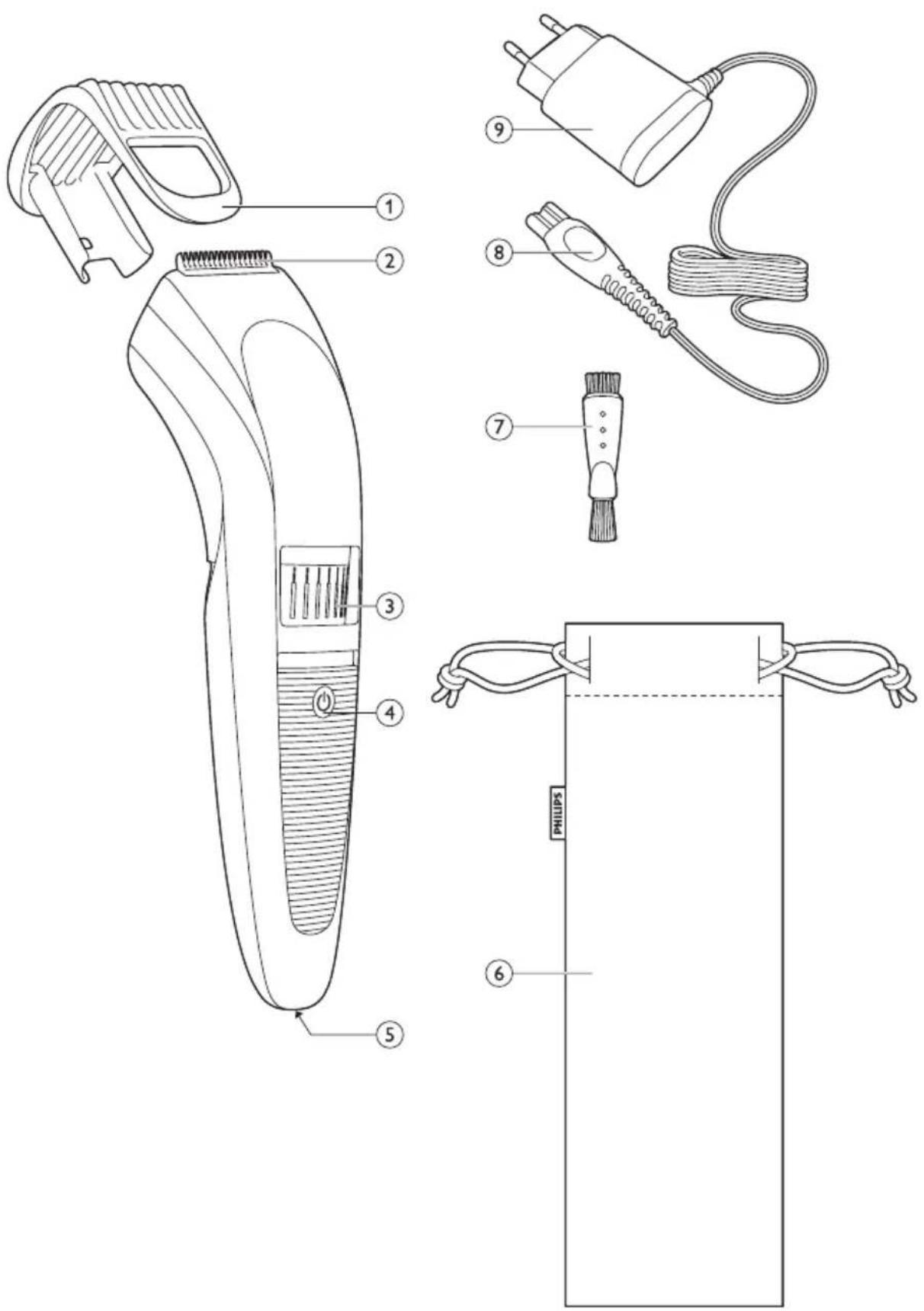
General description (Fig. 1)
1 Trimming comb
2 Cutting unit
3 Precision Zoom Lock™ adjustment ring
4 On/off slide with battery indicator
5 Socket for appliance plug
6 Pouch
7 Brush
8 Appliance plug
9 Adapter
Important
Read this user manual carefully before you use the appliance and save it for future reference.
Danger
- Make sure the adapter does not get wet.
Warning
- The adapter contains a transformer. Do not cut off the adapter to replace it with another plug, as this causes a hazardous situation.
- This appliance is not intended for use by persons (including children) with reduced physical, sensory or mental capabilities, or lack of experience and knowledge, unless they have been given supervision or instruction concerning use of the appliance by a person responsible for their safety.
- Children should be supervised to ensure that they do not play with the appliance.
Caution
- Never immerse the appliance in water or rinse it under the tap. Only the cutting unit can be rinsed under the tap.
- Use, charge and store the appliance at a temperature between 5^ C and 35^ C.
- Only use the adapter supplied.
- If the adapter is damaged, always have it replaced with one of the original type in order to avoid a hazard.
- This appliance is only intended for trimming the human beard. Do not use it for any other purpose.
- Do not use the appliance if the cutting unit or the trimming comb is damaged or broken, as this may cause injury.
Electromagnetic fields
This Philips appliance complies with all standards regarding electromagnetic fields (EMF). If handled properly and according to the instructions in this user manual, the appliance is safe to use based on scientific evidence available today.
General
- The appliance is equipped with an automatic voltage selector and is suitable for mains voltages from 100 to 240 volts.
- The adapter transforms 100-240 volts to a safe low voltage of less than 24 volts.
Charging

natural_image
Line drawing of a hand holding a handheld device with a black arrow pointing to the handle (no text or symbols)Charge the appliance fully before you use it for the first time.
It takes approximately 1 hour to fully charge the appliance.
When it is fully charged, the appliance has a cordless operating time of up to 60 minutes.
Note: You can use the appliance cordless as well as connected to the mains.
1 Make sure the appliance is switched off.

natural_image
Illustration of a plug inserted into a socket with an arrow pointing to the socket (no text or symbols present)2 Insert the appliance plug into the appliance.
3 Put the adapter in the wall socket.
The charging light starts to flash green to indicate that the appliance is charging.
When the battery is fully charged, the charging light lights up green continuously. After 30 minutes, the charging light goes out.
4 After charging, remove the adapter from the wall socket and pull the appliance plug out of the appliance.
Battery low
When the battery is almost empty (when there are only 5 or fewer trimming minutes left), the charging light flashes orange.
Optimising the lifetime of the rechargeable battery
When you have charged the appliance for the first time, we advise you to use it until the battery is completely empty. Continue to use the appliance until the motor almost stops running during a session. Then recharge the battery. Follow this procedure at least twice a year.
Using the appliance
Always comb the beard and/or moustache with a fine comb before you start trimming.
When you trim for the first time, be careful. Do not move the trimmer too fast. Make smooth and gentle movements.
Trimming with comb
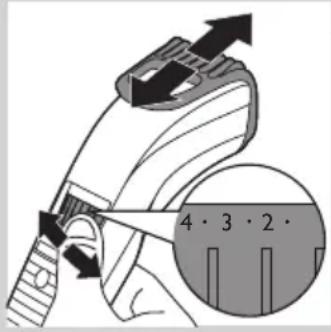
1 Turn the Precision Zoom Lock™ adjustment ring to the desired setting. The selected setting is the setting in the centre of the adjustment ring.
See the table below for an overview of the settings and the resulting hair lengths.
Setting Resulting hair length Setting Resulting hair length
| . 0.5mm . 5.5mm |
| 1 1mm 6 6mm |
| . 1.5mm . 6.5mm |
| 2 2mm 7 7mm |
| . 2.5mm . 7.5mm |
| 3 3mm 8 8mm |
| . 3.5mm . 8.5mm |
| 4 4mm 9 9mm |
| . 4.5mm . 9.5mm |
| 5 5mm 10 10mm |

natural_image
Illustration of a person using a hairbrush to trim a beaded neck (no text or symbols present)Note: When you trim for the first time, start at the highest setting (10) to familiarise yourself with the appliance.
2 Switch on the appliance.
3 To trim most effectively, move the trimmer against the hair growth direction. Make sure the surface of the comb always stays in contact with the skin.
4 If a lot of hair has accumulated in the beard trimming comb, remove the comb and blow and/or shake the hair out of it. The selected setting does not change when you do this.

natural_image
Illustration of a hand holding a small mechanical device with arrows indicating motion or force (no text or symbols)Trimming at the unique ‘stubble look’ setting

natural_image
Illustration of a person's face with a circular button labeled '1' pointing to the ear area (no text or symbols beyond the number)1 To create a 'stubble look', trim with the beard trimming comb set to setting 1.
Trimming without comb

natural_image
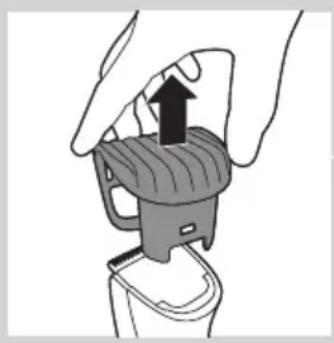
Illustration of a hand holding a car seatbelt with an upward arrow indicating force or movement (no text or symbols present)Use the trimmer without beard trimming comb to trim full beards and single hairs.
Be careful when you trim without comb because the cutting element removes every hair it touches.
1 Pull the beard trimming comb off the appliance as shown in figure 8.
2 Switch on the appliance.
3 Make well-controlled movements. Touch the hair lightly with the trimmer.

natural_image
Illustration of a person brushing a beaded subject with a brush (no text or symbols)Corded trimming
If the battery is low, you can also use the appliance from the mains:
1 Switch off the appliance, insert the adapter in the wall socket and wait a few seconds before you switch on the appliance.
Cleaning
Never use scouring pads, abrasive cleaning agents or aggressive liquids such as alcohol, petrol or acetone to clean the appliance.
1 Make sure the appliance is switched off and disconnected from the mains.
2 Wipe the housing of the appliance with a dry cloth.
Never immerse the appliance in water or rinse it under the tap.
3 Remove the trimming comb and clean it with the brush.
ENGLISH8
natural_image
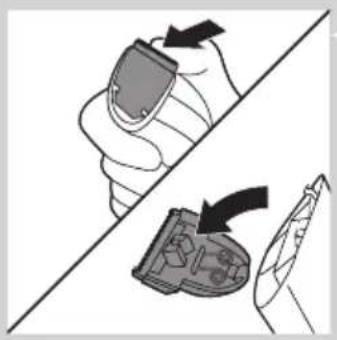
Diagram showing a hand holding a device with an arrow indicating rotation, and a close-up of a device with a handle (no text or symbols present)4 Remove the cutting unit by pushing against the teeth of the cutting unit and clean it with the brush or rinse it under the tap.
natural_image
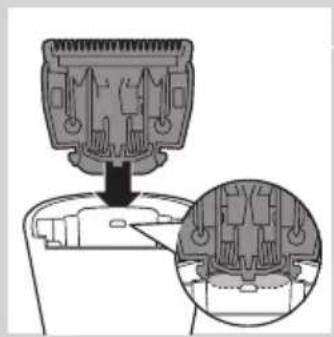
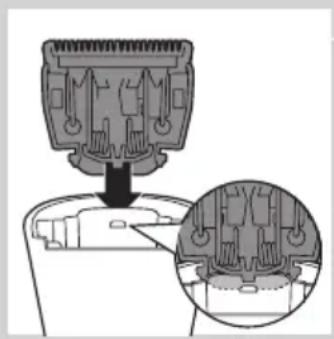
Diagram of a mechanical component with a downward arrow and magnified inset showing internal structure (no text or symbols)5 Shake off excess water and place the cutting unit back by inserting the lug of the cutting unit into the guiding slot.
6 Push the cutting unit back onto the appliance ('click').
Replacement

natural_image
Illustration of a hand holding a device with an arrow indicating rotation, alongside a close-up of the device's interior (no text or symbols)Only replace a worn or damaged cutting unit with an original Philips cutting unit, available from authorised Philips service centres.
1 Open the cutting unit.
2 Remove the old cutting unit by pushing against the teeth of the cutting unit.

natural_image
Diagram of a mechanical component with a downward arrow and magnified inset showing internal structure (no text or symbols)3 Insert the lug of the new cutting unit into the guiding slot.

natural_image
Illustration of a hand pressing down on a mechanical component with sparkles (no text or symbols)4 Push the cutting unit back onto the appliance ('click').
Ordering accessories
To purchase accessories for this appliance, please visit our online shop at www.shop.philips.com/service. If the online shop is not available in your country, go to your Philips dealer or a Philips service centre. If you have any difficulties obtaining accessories for your appliance, please contact the Philips Consumer Care Centre in your country. You find its contact details in the worldwide guarantee leaflet.
Environment
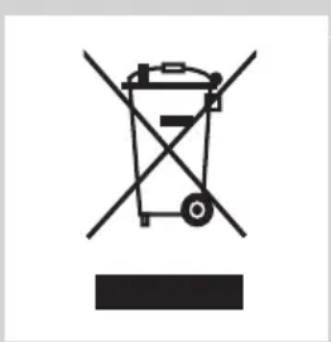
natural_image
Symbol of a waste bin with no text or numbers present- Do not throw away the appliance with the normal household waste at the end of its life, but hand it in at an official collection point for recycling. By doing this, you help to preserve the environment.

natural_image
Symbol of a trash bin crossed with two crossed lines, representing no waste or discharge (no text or labels)- The built-in rechargeable battery contains substances that may pollute the environment. Always remove the battery before you discard and hand in the appliance at an official collection point. Dispose of the battery at an official collection point for batteries. If you have trouble removing the battery, you can also take the appliance to a Philips service centre. The staff of this centre will remove the battery for you and will dispose of it in an environmentally safe way.
Removing the rechargeable batteries
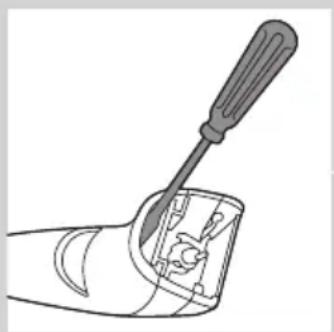
natural_image
Line drawing of a screwdriver inserted into a mechanical component (no text or symbols)Only remove the rechargeable batteries if they are completely empty.
1 Disconnect the appliance from the mains and let the appliance run until the motor stops.
2 Insert a screwdriver in the hair chamber to separate the housing part.

natural_image
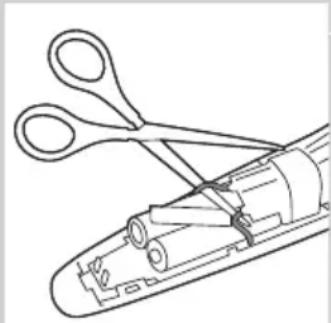
Line drawing of a mechanical device with scissors and internal components (no text or symbols)3 Cut the wires close to the batteries with a pair of household scissors.
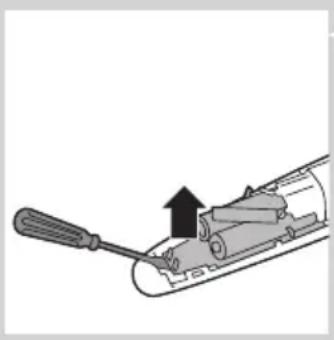
natural_image
Diagram of a screwdriver inserted into a cylindrical device with an upward arrow indicating motion (no text or symbols present)4 Remove the printed circuit board with the rechargeable batteries.

natural_image
Line drawing of scissors cutting a cylindrical object (no text or symbols)5 Cut the battery tabs with a pair of scissors and separate the batteries from the printed circuit board.
Do not connect the appliance to the mains again after you have opened it.
Guarantee and service
If you need service or information or if you have a problem, please visit the Philips website at www.philips.com/support or contact the Philips Consumer Care Centre in your country. You find its phone number in the worldwide guarantee leaflet. If there is no Consumer Care Centre in your country, go to your local Philips dealer.
Въведение
natural_image
Illustration of a hand holding a handheld device with a black arrow indicating the right-hand rule (no text or symbols present)natural_image
Illustration of a person using a hair curler to trim a beaded neck (no text or symbols present)natural_image
Diagram of a hand holding a device with arrows indicating movement or force (no text or symbols)natural_image
Illustration of a person's face with a circular button labeled '1' pointing to the ear area (no text or symbols beyond the number)natural_image
Illustration of a hand holding a car seatbelt with an upward arrow indicating force or movement (no text or symbols present)natural_image
Illustration of a person applying a hair to their beache with a brush (no text or symbols)natural_image
Diagram showing a hand holding a device with an arrow indicating rotation, and a close-up of a device with a handle (no text or symbols present)natural_image
Diagram of a mechanical component with a downward arrow and magnified inset showing internal structure (no text or symbols)natural_image
Illustration of a hand holding a device with an arrow indicating rotation, alongside a close-up of the device's internal components (no text or symbols)natural_image
Diagram of a mechanical component with a downward arrow and magnified inset showing internal structure (no text or symbols)
natural_image
Illustration of a hand holding a textured object with radiating lines, emitting sparkles (no text or symbols)natural_image
Symbol of a waste bin with no text or labels, crossed by two crossed lines and a solid rectangle below (no text or symbols present)natural_image
Line drawing of a tool interacting with a mechanical component (no text or symbols)natural_image
Line drawing of scissors cutting through a cylindrical device (no text or symbols)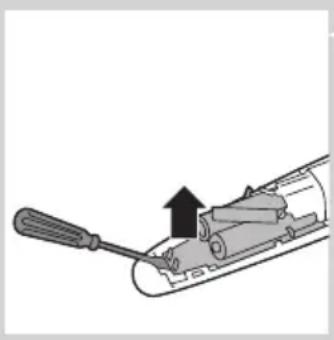
natural_image
Diagram of a screwdriver inserted into a cylindrical device with an upward arrow indicating motion (no text or symbols present)natural_image
Line drawing of scissors cutting a cylindrical object (no text or symbols)natural_image
Illustration of a hand holding a handheld device with a black arrow pointing to the handle (no text or symbols present)natural_image
Illustration of a person using a hairbrush to trim a beaded neck (no text or symbols present)natural_image
Illustration of a hand holding a small mechanical device with arrows indicating motion or force (no text or symbols)natural_image
Illustration of a person's face with a circular button labeled '1' pointing to the ear area (no text or symbols beyond the number)natural_image
Illustration of a hand holding a car seatbelt with an upward arrow indicating force or movement (no text or symbols)natural_image
Illustration of a person brushing a beaded subject with a brush (no text or symbols)natural_image
Diagram showing a hand holding a device with an arrow indicating rotation, and a close-up of a device with a handle (no text or symbols present)natural_image
Diagram of a mechanical component with a downward arrow and magnified inset showing internal structure (no text or symbols)natural_image
Illustration showing a hand holding a device with an arrow indicating rotation, alongside a close-up of the device's internal components (no text or symbols)natural_image
Diagram of a mechanical component with a downward arrow and magnified inset showing internal structure (no text or symbols)natural_image
Illustration of a hand pressing down on a mechanical component with sparkles (no text or symbols)natural_image
Symbol of a waste bin with no text or labels, crossed by two crossed lines and a solid black rectangle below (no text or symbols present)natural_image
Symbol of a trash bin crossed out by two crossed lines (no text or numbers present)natural_image
Line drawing of a screwdriver inserted into a mechanical component (no text or symbols)natural_image
Line drawing of a mechanical device with scissors and internal components (no text or symbols)natural_image
Diagram of a screwdriver inserted into a cylindrical device with an upward arrow indicating motion (no text or symbols present)natural_image
Line drawing of scissors cutting a cylindrical object (no text or symbols)natural_image
Line drawing of a hand holding a handheld device with a black arrow pointing to the button (no text or symbols)natural_image
Illustration of a plug inserted into a socket with an arrow indicating direction, and an inset showing a socket connected to its socket (no text or symbols present)2 Sisestage seadmepistik seadme pistikupessa.
3 Sisestage adapter seinakontakti.
natural_image
Illustration of a person using a hairpin to trim a beaded neck (no text or symbols present)
natural_image
Illustration of a hand holding a device with arrows indicating movement or force (no text or symbols)natural_image
Illustration of a person's face with a circular button labeled '1' pointing to the nose area (no text or symbols beyond the number)natural_image
Illustration of a hand holding a car seatbelt with an upward arrow indicating force or movement (no text or symbols present)natural_image
Diagram showing a hand holding a device with an arrow indicating rotation, and a close-up of the device's interior (no text or symbols present)natural_image
Diagram showing a mechanical component being inserted into a housing, with an inset close-up highlighting the internal structure (no text or symbols present)Osade vahetamine

natural_image
Diagram showing a hand holding a device with an arrow indicating rotation, and a close-up of the device's internal components (no text or symbols present)natural_image
Diagram showing a mechanical component being inserted into a device, with an inset close-up highlighting internal components (no text or symbols present)natural_image
Illustration of a hand holding a textured object with radiating lines, no text or symbols presentnatural_image
Symbol of a waste bin with no text or labels, crossed by two crossed lines and a solid black rectangle below (no text or symbols present)natural_image
Line drawing of a screwdriver inserted into a mechanical component (no text or symbols)natural_image
Technical line drawing of a mechanical assembly with scissors and internal components (no text or symbols)natural_image
Diagram of a mechanical device with a screwdriver and lever, showing a force or movement (no text or symbols present)natural_image
Line drawing of scissors cutting a rolled paper or cable (no text or symbols)Garantii ja hooldus
natural_image
Line drawing of a hand holding a handheld device with a black arrow indicating the right-hand rule (no text or symbols present)natural_image
Illustration of a plug inserted into a socket with an arrow indicating direction, and an inset showing a close-up of the socket (no text or symbols)natural_image
Illustration of a person using a hair curler to trim a beard (no text or symbols present)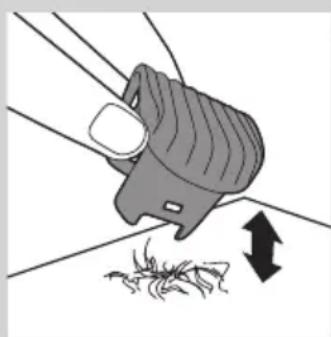
natural_image
Diagram of a hand holding a device with arrows indicating movement or force (no text or symbols)Napomena: Prilikom prvog podrezivanja započnite s najvišom postavkom (10) kako biste se navikli na rad s aparatom.
natural_image
Illustration of a person's face with a circular button labeled '1' pointing to the ear area (no text or symbols beyond the number)1 Kako biste postigli izgled “kratke i oštre brade”, podrezujte s češljem za podrezivanje brade postavljenim na postavku 1.
Podrezivanje bez češlja

natural_image
Illustration of a hand holding a car seatbelt with an upward arrow indicating force or movement (no text or symbols present)natural_image
Illustration of a person using a hairbrush to trim a beard (no text or symbols present)natural_image
Diagram showing a hand holding a device with an arrow indicating rotation, alongside a close-up of the device's internal components (no text or symbols present)Za čišćenje aparata nemojte nikada koristiti spužvice za ribanje, abrazivna sredstva za čišćenje ili agresivne tekućine poput alkohola, benzina ili acetona.
1 Provjerite je li aparat isključen i iskopčan iz napajanja.
2 Kućište aparata obrišite suhom krpom.
Nemojte nikada uranjati aparat u vodu ili ga ispirati pod mlazom vode.
3 Odvojite češalj za podrezivanje i očistite ga četkicom.
4 Odvojite jedinicu rezača guranjem uz zupce rezača i očistite je četkicom ili isperite pod mlazom vode.
5 Stresite suvišnu vodu i vratite jedinicu rezača tako da jezičac na njoj umetnete u vodilicu.
6 Vratite jedinicu rezača na aparat ("klik").

natural_image
Diagram of a mechanical component with a downward arrow and magnified inset showing internal structure (no text or symbols)Zamjena dijelova

natural_image
Diagram showing a hand holding a device with an arrow indicating rotation, and a close-up of the device's internal structure (no text or symbols)Istrošenu ili oštećenu jedinicu rezača zamijenite samo originalnom Philips jedinicom rezača koju možete nabaviti u ovlaštenim Philips servisnim centrima.
1 Otvorite jedinicu rezača.
2 Odvojite staru jedinicu rezača guranjem uz zupce rezača.
natural_image
Diagram showing a mechanical component being inserted into a device, with an inset close-up highlighting internal components (no text or symbols present)3 Jezičac nove jedinice rezača umetnite u vodilicu.

natural_image
Illustration of a hand pressing down on a mechanical component with motion lines indicating force or motion (no text or symbols)4 Vratite jedinicu rezača na aparat ("klik").
Naručivanje dodatnog pribora
natural_image
Symbol of a waste bin with no text or labels, crossed by two crossed lines and a solid black rectangle below (no text or symbols present)- Aparat koji se više ne može upotrebljavati nemojte odlagati suobičajenim otpadom iz kućanstva, nego ga odnesite u predviđeno odlagalište na recikliranje. Time ćete pridonijeti očuvanju okoliša.

natural_image
Line drawing of a screwdriver inserted into a mechanical component (no text or symbols)Punjive baterije vadite samo ako su potpuno prazne.
1 Isključite aparat iz napajanja i pustite ga da radi dok se motor ne zaustavi.
natural_image
Technical line drawing of a mechanical assembly with scissors and internal components (no text or symbols)4 S punjivim baterijama izvadite i pločicu sa sklopom.

natural_image
Diagram of a mechanical device with a screwdriver and lever, showing a force or movement indicator (no text or symbols present)5 Škarama prerežite jezičce baterije i odvojite baterije od pločice sa sklopom.

natural_image
Line drawing of scissors cutting a rolled paper into a cylindrical container (no text or symbols)Nakon otvaranja aparata nemojte ga priključivati na mrežno napajanje.
Jamstvo i servis
Ako vam je potreban servis ili informacija, odnosno ako imate neki problem, posjetite web-stranicu tvrtke Philips, www.philips.com/support, ili se obratite centru za korisničku podršku tvrtke Philips u svojoj državi. Broj telefona nalazi se u međunarodnom jamstvu. Ako u vašoj državi ne postoji centar za korisničku podršku, obratite se lokalnom prodavaču proizvoda tvrtke Philips.
Bevezetés
natural_image
Line drawing of a hand holding a handheld device with a black arrow indicating the right-hand rule (no text or symbols present)natural_image
Illustration of a plug inserted into a socket with an arrow indicating direction, and an inset showing a close-up of the socket (no text or symbols)natural_image
Illustration of a person using a hairpin to cut their face, showing the brush and head (no text or symbols)natural_image
Illustration of a hand holding a small object with arrows indicating movement or force (no text or symbols)natural_image
Illustration of a person's face with a circular button labeled '1' pointing to the ear area (no text or symbols beyond the number)natural_image
Illustration of a hand holding a car seatbelt with an upward arrow indicating force or movement (no text or symbols present)natural_image
Diagram showing a hand holding a device with an arrow indicating rotation, and a close-up of a device with a handle (no text or symbols present)natural_image
Diagram of a mechanical component with a downward arrow and magnified inset showing internal structure (no text or symbols)natural_image
Illustration of a hand holding a device with an arrow indicating rotation, alongside a close-up of the device's interior (no text or symbols)natural_image
Diagram of a mechanical component with a downward arrow and magnified inset showing internal structure (no text or symbols)natural_image
Illustration of a hand inserting a hair into a socket with sparkles (no text or symbols)natural_image
Symbol of a waste bin with crossed lines indicating no waste, and a solid rectangle below (no text or labels)natural_image
Line drawing of a screwdriver inserted into a mechanical component (no text or symbols)natural_image
Line drawing of a mechanical device with scissors and internal components (no text or symbols)
natural_image
Diagram of a screwdriver inserted into a cylindrical device with an upward arrow indicating motion (no text or symbols present)natural_image
Line drawing of scissors cutting a cylindrical object (no text or symbols)natural_image
Illustration of a hand holding a handheld device with a ruler and a downward arrow indicating compression (no text or symbols)Зарядтау
natural_image
Illustration of a person using a hair curler to trim a beaded neck (no text or symbols present)natural_image
Illustration of a hand holding a device with arrows indicating movement or force (no text or symbols)natural_image
Illustration of a person's face with a circular button labeled '1' pointing to the ear area (no text or symbols beyond the number)natural_image
Illustration of a hand holding a car seatbelt with an upward arrow indicating force or movement (no text or symbols present)natural_image
Illustration of a person brushing a beaded subject with a brush (no text or symbols)natural_image
Illustration of a hand holding a device with an arrow indicating rotation, alongside a close-up of a device with a handle (no text or symbols)natural_image
Diagram showing a mechanical component being inserted into a housing, with an inset close-up highlighting the internal structure (no text or symbols present)natural_image
Illustration of a hand holding a device with an arrow indicating rotation, alongside a close-up of the device's internal components (no text or symbols)natural_image
Symbol of a waste bin with crossed lines indicating no waste, and a solid rectangle below (no text or labels)natural_image
Line drawing of a tool interacting with a mechanical component (no text or symbols)natural_image
Line drawing of scissors cutting through a cylindrical device (no text or symbols)natural_image
Diagram of a screwdriver inserted into a cylindrical device with an upward arrow indicating motion (no text or symbols present)natural_image
Line drawing of scissors cutting a cylindrical object (no text or symbols)natural_image
Line drawing of a hand holding a handheld device with a black arrow indicating the right-hand rule (no text or symbols present)natural_image
Illustration of a person using a hair curler to trim a beard (no text or symbols present)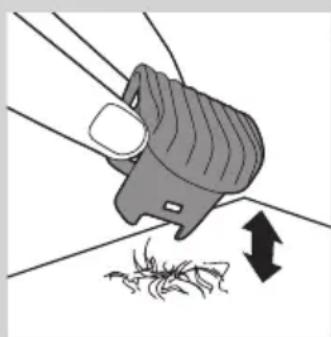
natural_image
Diagram of a hand holding a device with arrows indicating movement or force (no text or symbols)natural_image
Illustration of a person's face with a circular button labeled '1' pointing to the ear area (no text or symbols beyond the number)natural_image
Illustration of a hand holding a car seatbelt with an upward arrow indicating force or movement (no text or symbols present)natural_image
Illustration of a person applying a hair to their beache with a brush (no text or symbols)natural_image
Diagram showing a hand holding a device with an arrow indicating rotation, and a close-up of the device's internal components (no text or symbols present)natural_image
Diagram showing a mechanical component being inserted into a housing, with an inset close-up highlighting internal components (no text or symbols present)Pakeitimas

natural_image
Diagram showing a hand holding a device with an arrow indicating rotation, and a close-up of a mechanical component (no text or symbols present)natural_image
Diagram of a mechanical component with a downward arrow and magnified inset showing internal structure (no text or symbols)natural_image
Illustration of a hand pressing down on a mechanical component with a spring-like extension (no text or symbols)natural_image
Symbol of a waste bin with no text or labels, crossed by two crossed lines and a solid rectangle below (no text or symbols present)natural_image
Line drawing of a screwdriver inserted into a cylindrical device (no text or symbols)natural_image
Line drawing of a mechanical tool with scissors and internal components (no text or symbols)natural_image
Diagram of a mechanical device with a screwdriver and lever, showing a force or movement indicator (no text or symbols present)natural_image
Line drawing of scissors cutting a cylindrical object (no text or symbols)natural_image
Illustration of a hand holding a handheld device with a black arrow indicating the right-hand rule (no text or symbols present)natural_image
Illustration of a plug inserted into a socket with an arrow indicating direction, and an inset showing a close-up of a socket (no text or symbols)natural_image
Illustration of a person using a hair curler to trim a beard (no text or symbols present)natural_image
Illustration of a hand holding a device with arrows indicating movement or force (no text or symbols)natural_image
Illustration of a person's face with a circular button labeled '1' pointing to the nose area (no text or symbols beyond the number)natural_image
Diagram of a hand holding a device with an upward arrow indicating motion or force (no text or symbols present)natural_image
Illustration of a person applying a toothbrush to their beak (no text or symbols present)natural_image
Illustration of a hand holding a device with an arrow indicating rotation, alongside a close-up of the device's internal components (no text or symbols)natural_image
Diagram showing a mechanical component being inserted into a housing, with an inset close-up highlighting internal components (no text or symbols present)natural_image
Illustration of a hand holding a device with an arrow indicating rotation, alongside a close-up of the device's interior (no text or symbols)natural_image
Diagram of a mechanical component with a downward arrow and magnified inset showing internal structure (no text or symbols)natural_image
Illustration of a hand pressing down on a mechanical component with motion lines indicating force or motion (no text or symbols)natural_image
Symbol of a trash bin with crossed lines indicating no waste or discharge, and a solid black rectangle below (no text or labels)natural_image
Symbol of a trash bin crossed out by two crossed lines, representing no waste or discharge (no text or labels)natural_image
Line drawing of a hand holding a screwdriver inside a mechanical component (no text or symbols)natural_image
Technical line drawing of a mechanical device with scissors and internal components (no text or symbols)natural_image
Diagram of a mechanical device with a screwdriver and lever, showing a handle and internal components (no text or symbols)
natural_image
Line drawing of scissors cutting a cylindrical object (no text or symbols)natural_image
Illustration of a hand holding a handheld device with a black arrow indicating the right-hand rule (no text or symbols present)natural_image
Illustration of a person using a hair curler to trim a beaded neck (no text or symbols present)natural_image
Diagram of a hand holding a device with arrows indicating movement or force (no text or symbols)natural_image
Diagram of a hand holding a car seatbelt with an upward arrow indicating force or movement (no text or symbols present)natural_image
Illustration of a person applying a hair to their beard, showing the brush (no text or symbols present)natural_image
Illustration of a hand holding a device with an arrow indicating rotation, alongside a close-up of the device's internal structure (no text or symbols)natural_image
Diagram of a mechanical component with an arrow indicating downward motion, shown in two views (no text or symbols present)natural_image
Illustration of a hand holding a device with an arrow indicating rotation, alongside a close-up of the device's internal components (no text or symbols)natural_image
Diagram of a mechanical component with a downward arrow and magnified inset showing internal structure (no text or symbols)natural_image
Illustration of a hand pressing down on a mechanical component with sparkles (no text or symbols)natural_image
Symbol of a waste bin with crossed lines indicating no waste, and a solid black rectangle below (no text or labels)natural_image
Line drawing of a tool interacting with a mechanical component (no text or symbols)natural_image
Technical line drawing of a mechanical assembly with scissors and cylindrical components (no text or symbols)natural_image
Diagram of a screwdriver inserted into a cylindrical device with an upward arrow indicating motion (no text or symbols present)natural_image
Line drawing of scissors cutting a cylindrical object (no text or symbols)natural_image
Illustration of a hand holding a handheld device with a black arrow pointing to the handle (no text or symbols present)natural_image
Illustration of a person using a hair curler to trim a beaded neck (no text or symbols present)natural_image
Diagram of a hand holding a device with arrows indicating movement or force (no text or symbols)natural_image
Illustration of a person's face with a circular button labeled '1' pointing to the ear area (no text or symbols beyond the number)natural_image
Illustration of a hand holding a car seatbelt with an upward arrow indicating force or movement (no text or symbols present)natural_image
Illustration of a person brushing a beaded subject with a brush (no text or symbols)Utilizarea cu cablu
natural_image
Diagram showing a hand holding a device with an arrow indicating rotation, and a close-up of a device with a handle (no text or symbols present)natural_image
Diagram of a mechanical component with a downward arrow and magnified inset showing internal structure (no text or symbols)natural_image
Illustration of a hand holding a device with an arrow indicating rotation, alongside a close-up of the device's interior (no text or symbols)natural_image
Diagram of a mechanical component with a downward arrow and magnified inset showing internal structure (no text or symbols)natural_image
Illustration of a hand inserting a hair into a socket with sparkles (no text or symbols)natural_image
Symbol of a waste bin with no text or labels, crossed by diagonal lines and a solid rectangle below (no readable text or symbols)natural_image
Line drawing of a tool interacting with a mechanical component (no text or symbols)natural_image
Line drawing of a mechanical device with scissors and internal components (no text or symbols)
natural_image
Diagram of a screwdriver inserted into a cylindrical device with an upward arrow indicating motion (no text or symbols present)natural_image
Line drawing of scissors cutting a cylindrical object (no text or symbols)natural_image
Line drawing of a hand holding a handheld device with a black arrow pointing to the button (no text or symbols)natural_image
Illustration of a plug inserted into a socket with an inset showing a close-up of the socket (no text or symbols present)natural_image
Illustration of a person using a hair curler to trim a beaded neck (no text or symbols present)natural_image
Diagram of a hand holding a device with arrows indicating movement or force (no text or symbols)natural_image
Illustration of a hand holding a car seatbelt with an upward arrow indicating force or movement (no text or symbols present)natural_image
Illustration of a person applying a toothbrush to their beaded jaw (no text or symbols)natural_image
Diagram showing a hand holding a device with an arrow indicating rotation, and a close-up of a device with a handle (no text or symbols present)natural_image
Diagram of a mechanical component with a downward arrow and magnified inset showing internal structure (no text or symbols)Замена

natural_image
Illustration of a hand holding a device with an arrow indicating rotation, alongside a close-up of the device's internal components (no text or symbols)natural_image
Diagram of a mechanical component with a downward arrow and magnified inset showing internal structure (no text or symbols)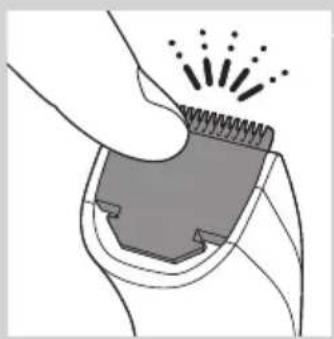
natural_image
Illustration of a hand using a tool to cut a mechanical component with sparks (no text or symbols)Заказ аксессуаров
natural_image
Symbol of a waste bin with crossed lines indicating no waste, and a solid rectangle below (no text or labels)natural_image
Line drawing of a tool with a screwdriver inserted into a mechanical component (no text or symbols)natural_image
Line drawing of scissors cutting through a cylindrical device (no text or symbols)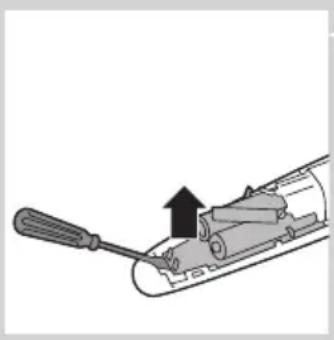
natural_image
Diagram of a screwdriver inserted into a cylindrical device with an upward arrow indicating motion (no text or symbols present)natural_image
Line drawing of scissors cutting a cylindrical object (no text or symbols)natural_image
Line drawing of a hand holding a handheld device with a black arrow indicating the right-hand rule (no text or symbols present)natural_image
Illustration of a plug inserted into a socket with an arrow indicating direction, and an inset showing a socket with a smiley face (no text or symbols)2 Koncovku napájania zasuňte do zariadenia.
3 Adaptér pripojte do siet'ovej zásuvky.
natural_image
Illustration of a person using a hairpin to cut their face (no text or symbols present)natural_image
Illustration of a hand holding a small mechanical device with arrows indicating motion or force (no text or symbols)natural_image
Illustration of a person's face with a circular button labeled '1' pointing to the ear area (no text or symbols beyond the number)natural_image
Illustration of a hand holding a car seatbelt with an upward arrow indicating force or movement (no text or symbols)natural_image
Illustration of a person brushing a beaded subject with a brush (no text or symbols)natural_image
Diagram showing a hand holding a device with an arrow indicating rotation, and a close-up of a device with a handle (no text or symbols present)4 Odpojte strihaciu jednotku zatlačením smerom proti ozubenej strane strihacej jednotky a očistite ju pomocou kefky alebo ju opláchnite pod tečúcou vodou.

natural_image
Diagram of a mechanical component with a downward arrow and magnified inset showing internal structure (no text or symbols)natural_image
Illustration showing a hand holding a device with an arrow indicating rotation, alongside a close-up of the device's internal components (no text or symbols)natural_image
Symbol of a waste bin with crossed lines indicating no waste, and a solid black rectangle below (no text or labels)natural_image
Line drawing of a screwdriver inserted into a mechanical component (no text or symbols)natural_image
Line drawing of a mechanical device with scissors and internal components (no text or symbols)natural_image
Diagram of a screwdriver inserted into a cylindrical device with an upward arrow indicating motion (no text or symbols present)natural_image
Line drawing of scissors cutting a cylindrical object (no text or symbols)natural_image
Line drawing of a hand holding a handheld device with a black arrow indicating the right-hand rule (no text or symbols present)natural_image
Illustration of a plug inserted into a socket with an arrow indicating direction, and an inset showing a close-up of the socket (no text or symbols)2 Vstavite vtikač aparata v aparat.
3 Vstavite adapter v stensko vtičnico.
natural_image
Illustration of a person using a hair curler to trim a beaded face (no text or symbols present)
natural_image
Illustration of a hand holding a device with arrows indicating movement or force (no text or symbols)1 Če želite ustvariti neobrit videz, glavnik za prirezovanje brade nastavite na nastavitev 1.
natural_image
Illustration of a hand holding a car seatbelt with an upward arrow indicating force or movement (no text or symbols present)Za celotno striženje brade in posameznih dlačic uporabite prirezovalnik brez glavnika za prirezovanje brade.
natural_image
Illustration of a person applying a hair to their beache with a brush (no text or symbols)natural_image
Diagram showing a hand holding a device with an arrow indicating rotation, and a close-up of a device with a handle (no text or symbols present)natural_image
Diagram showing a mechanical component with a downward arrow and a magnified inset of its internal structure (no text or symbols)Zamenjava

natural_image
Illustration of a hand holding a device with an arrow indicating rotation, alongside a close-up of the device's internal components (no text or symbols)natural_image
Diagram showing a mechanical component being inserted into a device, with an inset close-up highlighting internal components (no text or symbols present)natural_image
Illustration of a hand holding a spring-loaded object with radiating lines, no text or symbols present4 Strižno enoto potisnite nazaj na aparat ("klik").
natural_image
Symbol of a waste bin with no text or labels, crossed by two crossed lines and a solid black rectangle below (no text or symbols present)natural_image
Line drawing of a tool with a screwdriver inserted into a mechanical component (no text or symbols)natural_image
Technical line drawing of a mechanical assembly with scissors and clamps (no text or symbols)4 Odstranite ploščo s tiskanim vezjem z akumulatorskimi baterijami.

natural_image
Diagram of a mechanical device with a screwdriver and lever, showing a handle and internal components (no text or symbols)natural_image
Line drawing of scissors cutting a cylindrical object (no text or symbols)natural_image
Line drawing of a hand holding a handheld device with a black arrow indicating the right-hand rule (no text or symbols present)Napunite aparat pre prve upotrebe.
natural_image
Illustration of a plug inserted into a socket with an arrow indicating direction, and an inset showing a socket with a smiley face (no text or symbols)natural_image
Illustration of a person using a hair curler to trim a beaded neck (no text or symbols present)Napomena: Prilikom prvog podrezivanja, počnite od najviše postavke (10) da biste se navikli na aparat.
natural_image
Diagram of a hand holding a device with arrows indicating movement or force (no text or symbols)natural_image
Illustration of a person's face with a circular button labeled '1' pointing to the ear area (no text or symbols beyond the number)1 Da kreirate kratku čekinjastu bradu, podrezujte bradu češljem za podrezivanje brade postavljenim na postavku 1.
Podrezivanje bez češlja
natural_image
Illustration of a hand holding a car seatbelt with an upward arrow indicating force or movement (no text or symbols present)Trimer koristite bez češlja za podrezivanje punih brada i pojedinih dlačica.
natural_image
Illustration of a person brushing a beaded mouth with a brush (no text or symbols)natural_image
Diagram showing a hand holding a device with an arrow indicating rotation, and a close-up of a device with a handle (no text or symbols present)4 Uklonite rezač tako što ćete ga gurnuti uz zupce rezača, a zatim ga očistite četkom ili ga isperite pod mlazom vode.

natural_image
Diagram of a mechanical component with a downward arrow and magnified inset showing internal structure (no text or symbols)natural_image
Illustration showing a hand holding a device with an arrow indicating rotation, alongside a close-up of the device's internal components (no text or symbols)Istrošenu ili oštećenu jedinicu rezača treba zameniti originalnom Philips jedinicom rezača, koju možete nabaviti u ovlašćenim servisnim centrima kompanije Philips.
1 Otvorite jedinicu rezača.
2 Uklonite staru jedinicu rezača guranjem uz zupce rezača.

natural_image
Diagram of a mechanical component with a downward arrow and magnified inset showing internal structure (no text or symbols)natural_image
Illustration of a hand holding a textured object with radiating lines and sparkles, no text or symbols present4 Vratite jedinicu rezača na aparat („klik“).
natural_image
Symbol of a waste bin with crossed lines indicating no waste, and a solid black rectangle below (no text or labels)natural_image
Line drawing of a tool interacting with a mechanical component (no text or symbols)Punjive baterije izvadite samo ako su potpuno prazne.
1 Isključite aparat iz električne mreže i ostavite ga da radi dok se motor ne zaustavi.
2 Umetnite odvijač u komoru za sakupljanje dlaka da biste odvojili kućište.
natural_image
Line drawing of a mechanical device with scissors and internal components (no text or symbols)3 Presecite žice blizu baterija običnim makazama.

natural_image
Diagram of a screwdriver inserted into a cylindrical device with an upward arrow indicating motion (no text or symbols present)4 Izvadite štampanu ploču zajedno sa punjivim baterijama.

natural_image
Line drawing of scissors cutting a cylindrical object (no text or symbols)5 Presecite jezičke baterija makazama i odvojite baterije od štampane ploče.
Nakon otvaranja aparata nemojte da ga priključujete na mrežno napajanje.
Garancija i servis
Ukoliko vam je potreban servis, informacije ili imate neki problem, posetite Web lokaciju kompanije Philips na adresi www.philips.com/support ili se obratite centru za korisničku podršku kompanije Philips u svojoj zemlji (broj telefona ćete pronaći na međunarodnom garantnom listu). Ako u vašoj zemlji ne postoji centar za korisničku podršku, obratite se lokalnim distributeru Philips proizvoda.
Вступ
natural_image
Illustration of a hand holding a handheld device with a black arrow indicating the right-hand rule (no text or symbols present)natural_image
Illustration of a plug inserted into a socket with an arrow indicating direction, and an inset showing a close-up of a socket (no text or symbols)natural_image
Illustration of a person using a hair curler to trim a beaded neck (no text or symbols present)natural_image
Diagram of a hand holding a device with arrows indicating movement or force (no text or symbols)natural_image
Illustration of a person's face with a circular button labeled '1' pointing to the ear area (no text or symbols beyond the number)natural_image
Illustration of a hand holding a car seatbelt with an upward arrow indicating force or movement (no text or symbols present)natural_image
Illustration of a person brushing their face with a brush (no text or symbols)natural_image
Diagram showing a hand holding a device with an arrow indicating rotation, and a close-up of the device's internal components (no text or symbols present)natural_image
Diagram showing a mechanical component being inserted into a housing, with an inset close-up of the internal structure (no text or symbols present)natural_image
Illustration of a hand holding a device with an arrow indicating rotation, alongside a close-up of the device's internal components (no text or symbols)natural_image
Diagram of a mechanical component with a downward arrow and magnified inset showing internal structure (no text or symbols)
natural_image
Illustration of a hand pressing down on a mechanical component with motion lines indicating force or motion (no text or symbols)natural_image
Symbol of a waste bin with no text or labels, crossed by diagonal lines and a solid rectangle below (no text or symbols present)natural_image
Line drawing of a tool interacting with a mechanical component (no text or symbols)natural_image
Line drawing of a mechanical device with scissors and internal components (no text or symbols)
natural_image
Diagram of a screwdriver inserted into a cylindrical device with an upward arrow indicating motion (no text or symbols present)natural_image
Line drawing of scissors cutting a cylindrical object (no text or symbols)- Always here to help you
- User manual
- PHILIPS
- Introduction
- General description (Fig. 1)
- Important
- Danger
- Warning
- Caution
- Electromagnetic fields
- General
- Charging
- Battery low
- Optimising the lifetime of the rechargeable battery
- Using the appliance
- Trimming with comb
- Trimming at the unique ‘stubble look’ setting
- Trimming without comb
- Corded trimming
- Cleaning
- ENGLISH8
- Replacement
- Ordering accessories
- Environment
- Removing the rechargeable batteries
- Guarantee and service
- Въведение
- Osade vahetamine
- Garantii ja hooldus
- Podrezivanje bez češlja
- Zamjena dijelova
- Naručivanje dodatnog pribora
- Jamstvo i servis
- Bevezetés
- Зарядтау
- Pakeitimas
- Utilizarea cu cablu
- Замена
- Заказ аксессуаров
- Zamenjava
- Garancija i servis
- Вступ
Brand : PHILIPS
Model : Series 3000 QT4013
Category : Beard trimmer