ARCHOS Helium Plus 4G 55 - Smartphone

Helium Plus 4G 55 - Smartphone ARCHOS - Free user manual and instructions

Find the device manual for free Helium Plus 4G 55 ARCHOS in PDF.

📄 181 pages English EN Download 💬 AI Question 10 questions ⚙️ Specs
Notice ARCHOS Helium Plus 4G 55 - page 8
Pick your language and provide your email: we'll send you a specifically translated version.
Product Type Smartphone
Brand Archos
Model Helium Plus 4G 55
Dimensions (H x W x D) 154 x 77 x 8.9 mm
Weight 160 g
Screen Size 5.5 inches
Screen Resolution 1280 x 720 pixels
Screen Type LCD IPS
Operating System Android 5.1 Lollipop
Processor Quad-core 1.3 GHz
RAM 1 GB
Internal Storage 8 GB
Expandable Storage Yes, up to 32 GB via microSD
Rear Camera 8 megapixels with LED flash
Front Camera 2 megapixels
Battery Capacity 2500 mAh
Battery Type Rechargeable lithium-ion, non-removable
Network Connectivity 4G LTE, 3G, 2G
Wireless Connectivity Wi-Fi 802.11 b/g/n, Bluetooth 4.0, GPS
Ports Micro-USB, 3.5 mm headphone jack
Sensors Accelerometer, proximity sensor
Care and Cleaning Turn off the device before cleaning. Use a soft, dry cloth. Avoid chemical products.
Safety Do not expose to moisture or extreme temperatures. Use only a compatible charger.
Spare Parts and Repairability Replacement parts available on the manufacturer's website. Repair by an authorized center recommended.

Frequently Asked Questions - Helium Plus 4G 55 ARCHOS

How to insert the SIM card and microSD card?
Remove the back cover (clipped). Insert the SIM card into the provided tray. The microSD card slides into its slot next to it. Put the cover back on.
Why won't my phone turn on?
Check that the battery is charged. Plug in the charger for at least 30 minutes. If nothing happens, try a forced restart by holding the power button and volume down for 10 seconds.
How to take a screenshot?
Press the power button and the volume down button simultaneously until you hear a click or see an animation.
Internal memory is full, what to do?
You can free up space by deleting unused apps, moving files to a microSD card, or using a cleaning app.
How to reset the phone to factory settings?
Go to Settings > Backup and reset > Factory data reset. Be careful, this action erases all your data.
The touch screen is unresponsive, what to do?
Clean the screen with a soft cloth. Remove the screen protector if present. If the problem persists, perform a forced restart.
How to update Android?
Go to Settings > About phone > System updates. The phone will search for available updates. Make sure you are connected to Wi-Fi and have enough battery.
Battery drains quickly, what to do?
Reduce screen brightness, disable Bluetooth and GPS when not in use, close background apps. Check power-hungry apps in battery settings.
How to connect the phone to a computer?
Use the provided Micro-USB cable. On the phone, pull down the notification bar and select File Transfer (MTP). The computer will then detect the phone as a storage device.
Sound is low during calls, what to do?
Increase volume with the dedicated key. Check that the speaker grille is not blocked. If the problem persists, try a restart or reset network settings.

User questions about Helium Plus 4G 55 ARCHOS

0 question about this device. Answer the ones you know or ask your own.

Ask a new question about this device

Your email remains private: it is only used to notify you if someone answers your question.

No questions yet. Be the first to ask one.

Download the instructions for your Smartphone in PDF format for free! Find your manual Helium Plus 4G 55 - ARCHOS and take your electronic device back in hand. On this page are published all the documents necessary for the use of your device. Helium Plus 4G 55 by ARCHOS.

USER MANUAL Helium Plus 4G 55 ARCHOS

ARCHOS Helium Plus 4G 55 - 1

Table of contents

Package contents....2

Description of the phone....3

Getting started....6

Mobile data & WiFi connection....10

Google account & Contacts....12

Hints & tips with Android™....14

Troubleshooting....16

ARCHOS Helium Plus 4G 55 - Table of contents - 1

For more information, please consult the FAQs on www.archos.com.

Make sure to read them before considering any product return. As we are often updating and improving our products, your device's software may have a slightly different appearance or modified functionality than presented in this Quick Start Guide.

Consult the declaration of conformity on http://www.archos.com/gb-en/support/support_tech/downloads.html

1

ARCHOS Helium Plus 4G 55 - Table of contents - 2

ARCHOS 55 Helium Plus book.indd 1 01/07/2015 11:49:42

ARCHOS Helium Plus 4G 55 - Table of contents - 3

Two horizontal color swatches: black and white with a row of solid color blocks (no text or symbols)

ARCHOS Helium Plus 4G 55 - Table of contents - 5

Package Contents

Check your product box for the following items:

-ARCHOS 55 Helium Plus
-Battery
-Headset
-USB cable
-Charger
-Quick start guide
-Warranty Legal & Safety notices

ARCHOS Helium Plus 4G 55 - Package Contents - 1

ARCHOS Helium Plus 4G 55 - Package Contents - 2

The items supplied with your device and available accessories may vary depending on your region or service provider.

The supplied items are designed only for your device and may not be compatible with other devices.

Unapproved accessories may cause your device to malfunction.

2

ARCHOS Helium Plus 4G 55 - Package Contents - 3

ARCHOS 55 Helium Plus book.indd 2 01/07/2015 11:49:43

Two horizontal color swatches: one grayscale from black to white, the other solid-colored from yellow to pink (no text or symbols)

ARCHOS Helium Plus 4G 55 - Package Contents - 5

Description of the phone

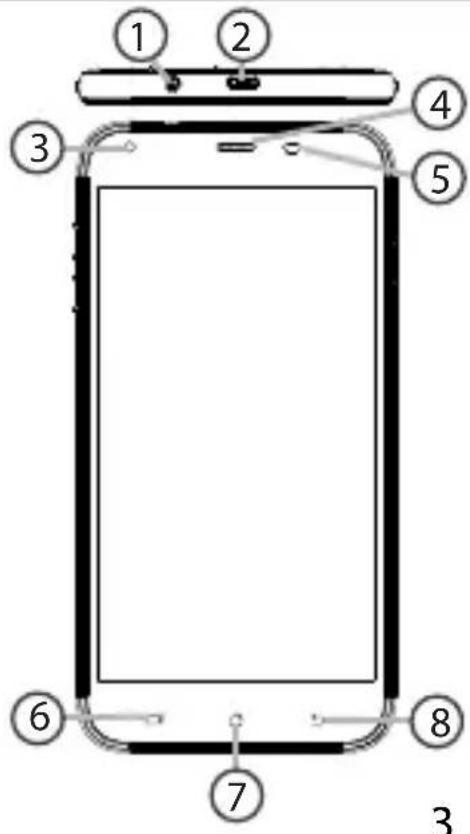
① Headset jack
② Micro-USB port
③ Front camera
④ Phone speaker
⑤ Light sensor
⑥ Recent apps
⑦ Home/Google NOW
⑧ Back
1 2 3 4 5 6 7 8 3

English

ARCHOS Helium Plus 4G 55 - Description of the phone - 2

3

ARCHOS Helium Plus 4G 55 - Description of the phone - 3

Two horizontal color swatches: black and magenta squares with white borders, no text or symbols present.

ARCHOS Helium Plus 4G 55 - Description of the phone - 5

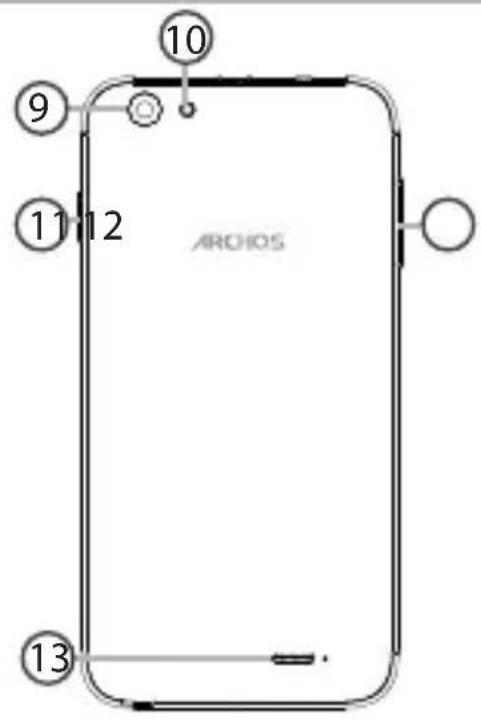
Description of the phone

⑨ Camera
10 Flash light
11 ON/OFF button
⑫ Volume buttons
13 Loudspeaker
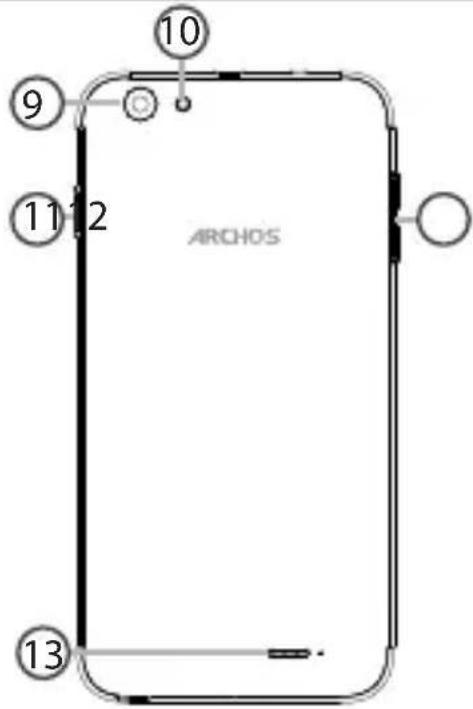
10 9 11 2 ARCHOS 13

ARCHOS Helium Plus 4G 55 - Description of the phone - 2

4

ARCHOS 55 Helium Plus book.indd 4 01/07/2015 11:49:44

ARCHOS Helium Plus 4G 55 - Description of the phone - 3

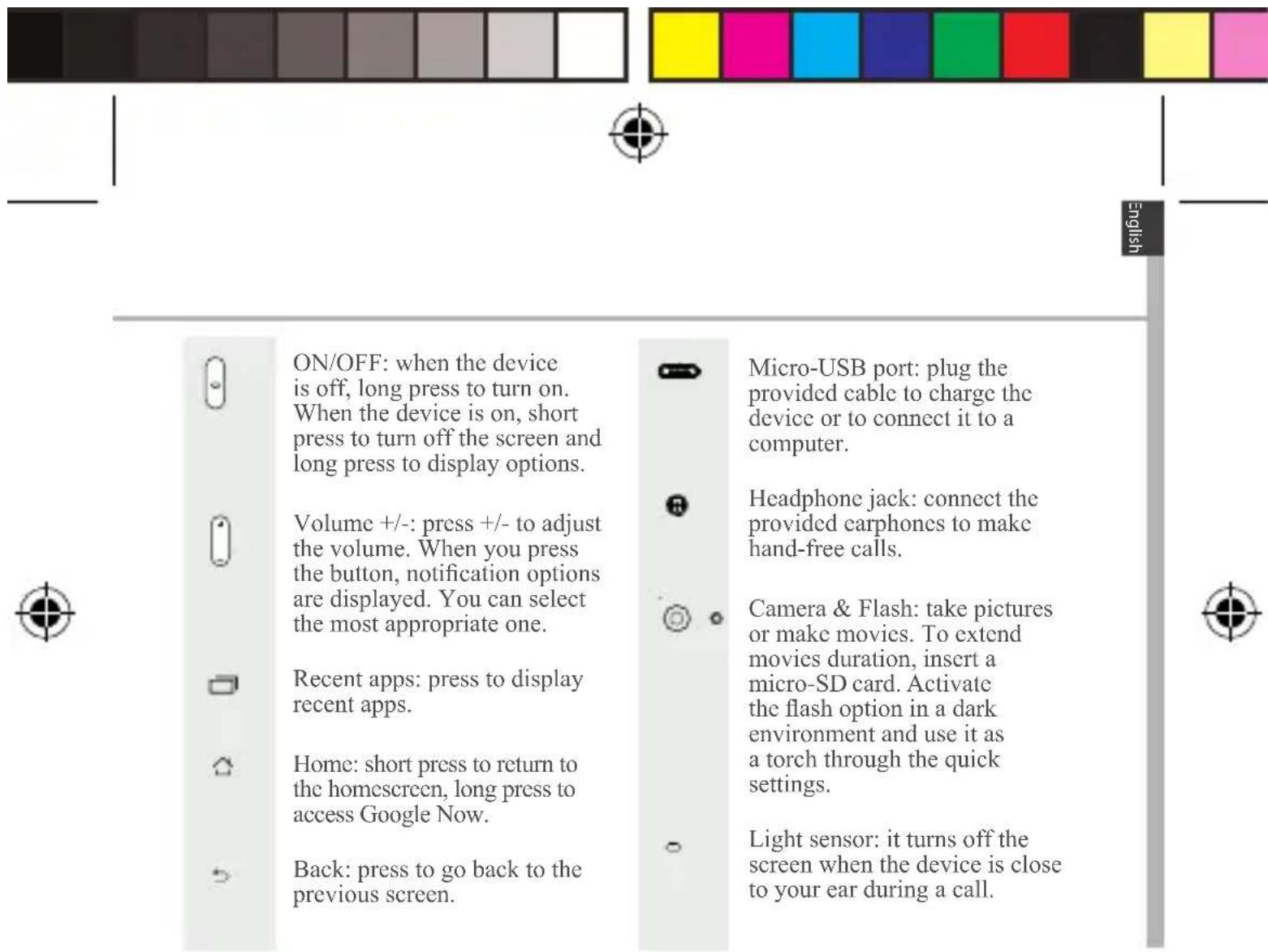
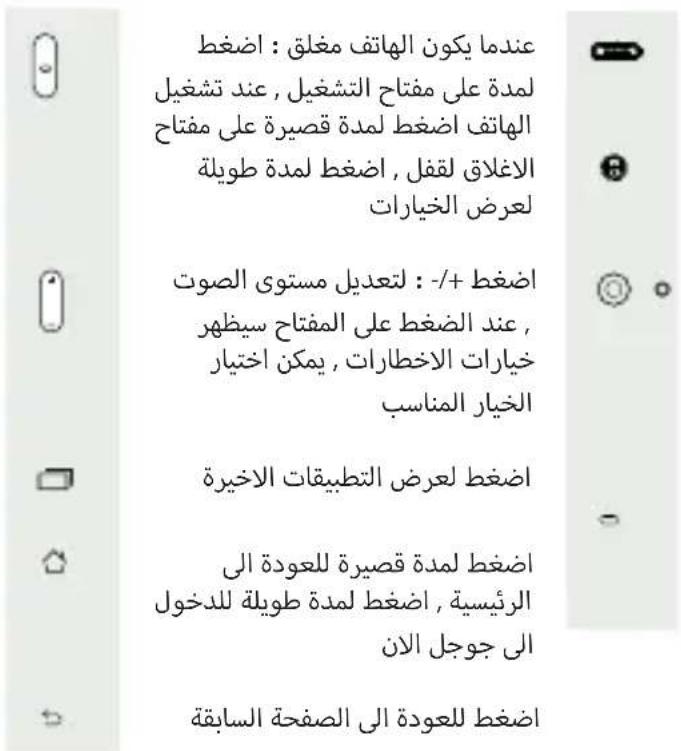
ON/OFF: when the device is off, long press to turn on. When the device is on, short press to turn off the screen and long press to display options. Volume +/-: press +/- to adjust the volume. When you press the button, notification options are displayed. You can select the most appropriate one. Rece…

ARCHOS Helium Plus 4G 55 - Description of the phone - 5

ON/OFF: when the device is off, long press to turn on. When the device is on, short press to turn off the screen and long press to display options.

ARCHOS Helium Plus 4G 55 - Description of the phone - 6

Volume +/-: press +/- to adjust the volume. When you press the button, notification options are displayed. You can select the most appropriate one.

ARCHOS Helium Plus 4G 55 - Description of the phone - 7

Recent apps: press to display recent apps.

ARCHOS Helium Plus 4G 55 - Description of the phone - 8

Home: short press to return to the homescreen, long press to access Google Now.

ARCHOS Helium Plus 4G 55 - Description of the phone - 9

Back: press to go back to the previous screen.

ARCHOS Helium Plus 4G 55 - Description of the phone - 10

Micro-USB port: plug the provided cable to charge the device or to connect it to a computer.

ARCHOS Helium Plus 4G 55 - Description of the phone - 11

Headphone jack: connect the provided carphones to make hand-free calls.

ARCHOS Helium Plus 4G 55 - Description of the phone - 12

Camera & Flash: take pictures or make movies. To extend movies duration, insert a micro-SD card. Activate the flash option in a dark environment and use it as a torch through the quick settings.

ARCHOS Helium Plus 4G 55 - Description of the phone - 13

Light sensor: it turns off the screen when the device is close to your ear during a call.

ARCHOS Helium Plus 4G 55 - Description of the phone - 14

Two horizontal color swatches: one grayscale from black to white, the other solid-colored from yellow to pink (no text or symbols)

ARCHOS Helium Plus 4G 55 - Description of the phone - 16

Getting started

Assembling

After you have unpacked your mobile phone box:

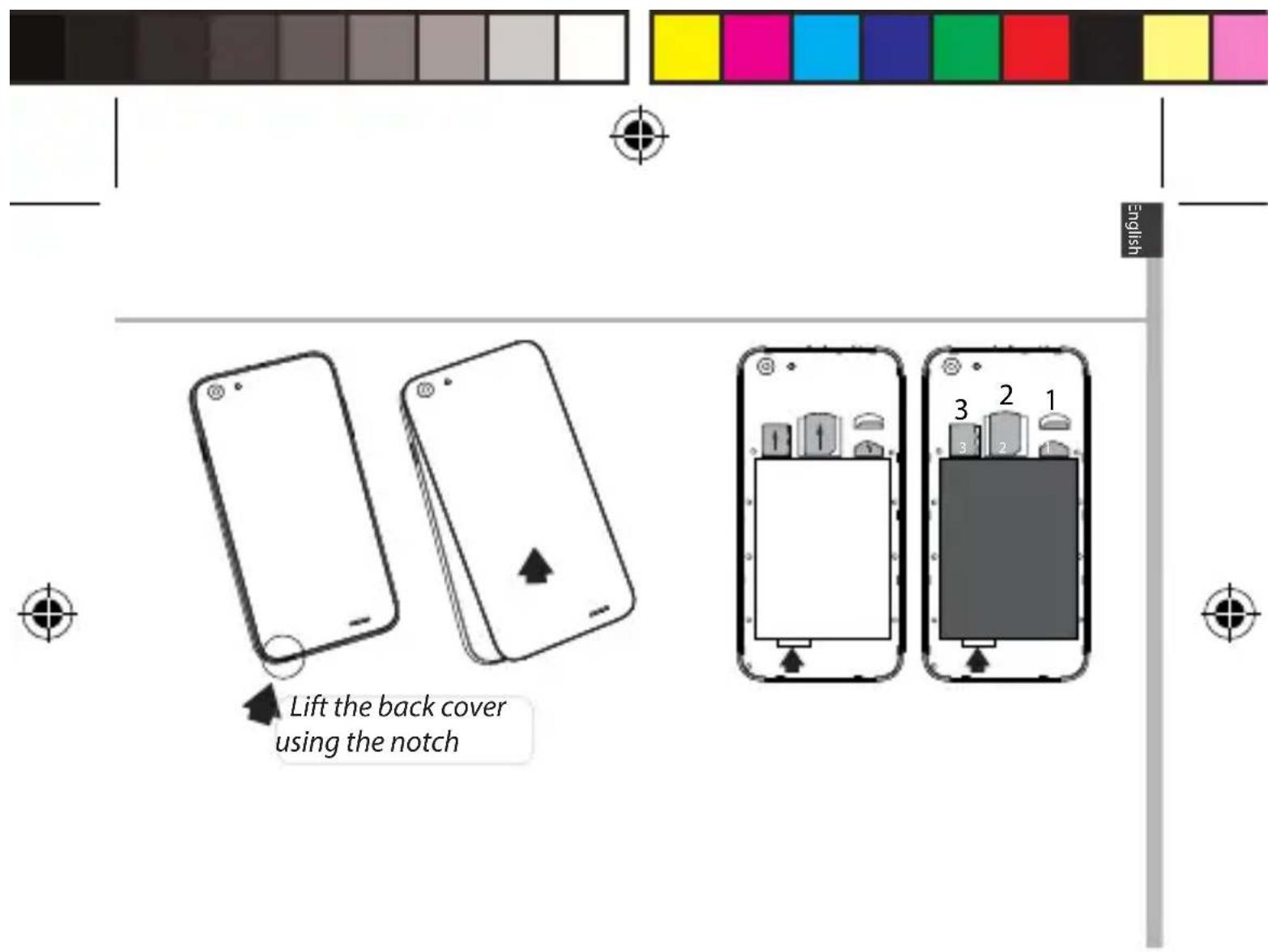
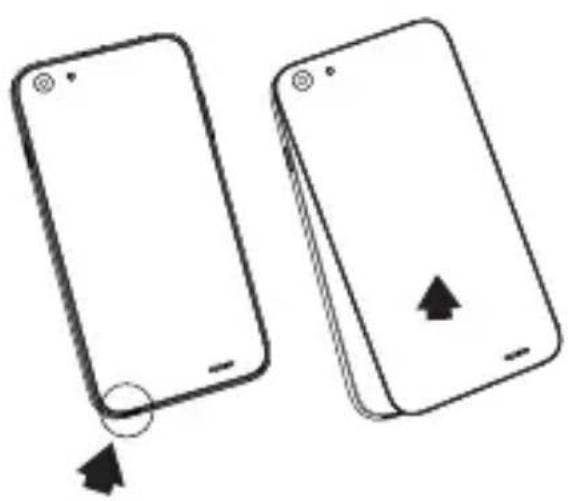
  1. Remove the device's back cover using the notch.
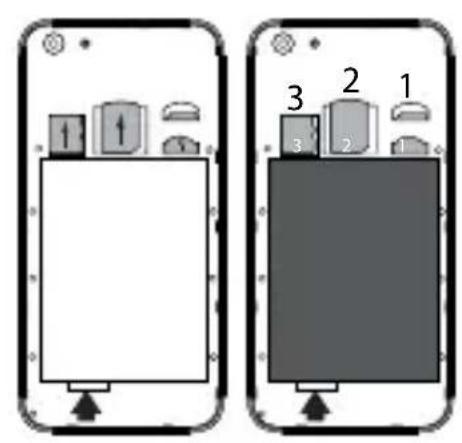
  2. Insert your SIM card or Memory card in the corresponding slot.
  3. Insert the device's battery.
  4. Replace the back cover.

ARCHOS Helium Plus 4G 55 - Assembling - 1

4G/3G/2G slot 1 When inserting your SIM card or micro-SD card, make sure to follow the illustration, otherwise you 2G slot 2 may damage the slot or the card.

Micro-SD card slot 3

ARCHOS Helium Plus 4G 55 - Assembling - 2

6

ARCHOS 55 Helium Plus book.indd 6 01/07/2015 11:49:45

ARCHOS Helium Plus 4G 55 - Assembling - 3

Lift the back cover using the notch

7

ARCHOS Helium Plus 4G 55 - Assembling - 5

ARCHOS 55 Helium Plus book.indd 7 01/07/2015 11:49:46

Two horizontal color swatches: black and white with gradient shading, each containing a distinct color block (no text or symbols)

ARCHOS Helium Plus 4G 55 - Assembling - 7

Getting started

Turning on

  1. Plug the charging cable in the Micro-USB port and connect it to its charger.

Before using your device for the first time, charge its battery completely.

  1. Press and hold the ON/OFF button to turn on the device.

The first time you start up your ARCHOS, the installation wizard will help you set up your device.

  1. Follow the instructions.

If you have inserted a SIM card, you may need to enter a PIN code. Beware of typing a wrong PIN code.

ARCHOS Helium Plus 4G 55 - Turning on - 1

ARCHOS Helium Plus 4G 55 - Turning on - 2

Tip:

Your device goes in standby mode when you do not use it for a specific period of time. To wake up your device, press the ON/OFF button. To set the duration, go to Settings > Display > Sleep.

8

ARCHOS Helium Plus 4G 55 - Tip: - 1

ARCHOS 55 Helium Plus book.indd 8 01/07/2015 11:49:46

Color swatch bar with grayscale gradient from black to white (no text or symbols)

ARCHOS Helium Plus 4G 55 - Tip: - 3

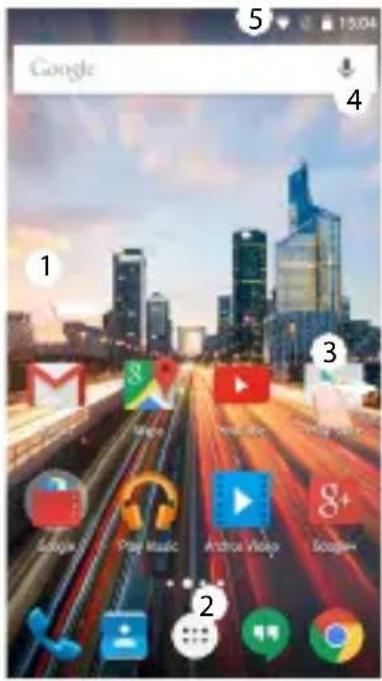
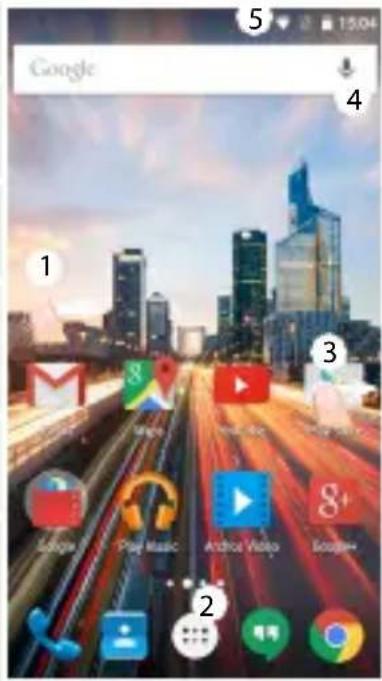
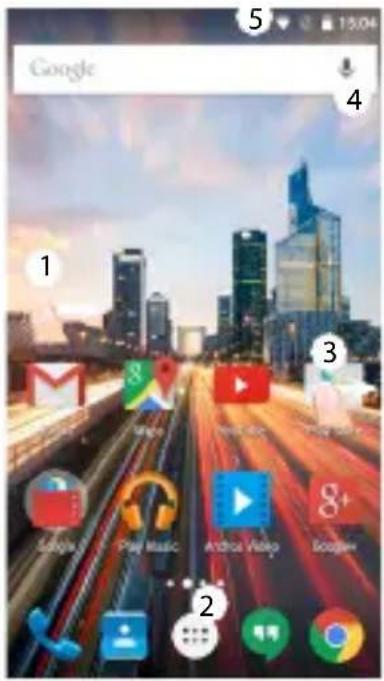
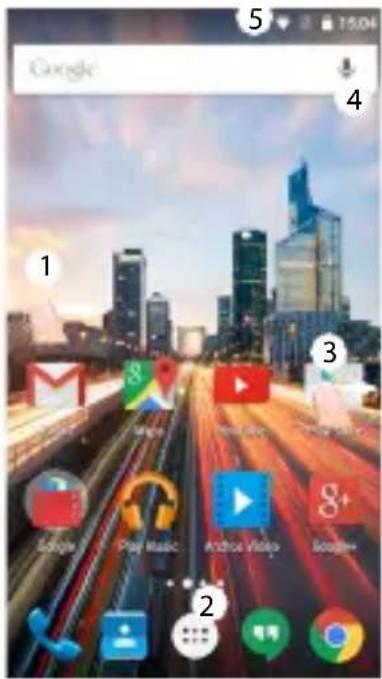
On your homescreen

  1. Swipe right to access Google Now
  2. Press [::] to access all your apps
  3. Hold your finger on an app to move it right and create a new homescreen.
  4. Say "Ok Google" to launch the search page.
  5. Touch and pull down the status bar to display it. Touch again the bar to reveal the quick settings.
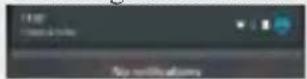
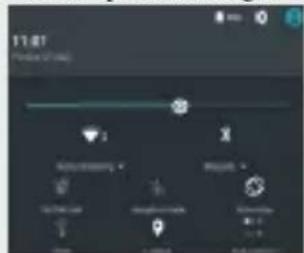
ARCHOS Helium Plus 4G 55 - On your homescreen - 1

11:07 Status Bar Auto Parking Speed None Auto Parking Speed None

Google 1 Mail 2 Play Music... Android Video... 3 Google+ 4 5 15:04

ARCHOS Helium Plus 4G 55 - On your homescreen - 4

Two horizontal color swatches: black and white with various shades of gray, transitioning to solid colors in yellow, magenta, cyan, blue, green, red, and yellow (no text or symbols)

ARCHOS Helium Plus 4G 55 - On your homescreen - 6

Mobile Data & WiFi connection

Mobile data connection

If your mobile phone subscription includes a mobile data option, you should be connected to the Internet without any further setup. The ARCHOS will only have signal if you are in an area covered by your provider's 4G or 3G network.

Activating/Deactivating the mobile data

  1. Touch and pull down the status bar to display it.
  2. Touch again the bar to reveal the quick settings.
  3. Select the Settings icon.
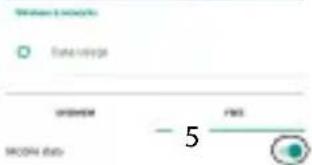
  4. In Wireless & networks, select Data usage, then the SIM card tab.
  5. Slide the Mobile data switch to turn on/off.

ARCHOS Helium Plus 4G 55 - Activating/Deactivating the mobile data - 1

ARCHOS Helium Plus 4G 55 - Activating/Deactivating the mobile data - 2

FMS FMS - 5

ARCHOS Helium Plus 4G 55 - Activating/Deactivating the mobile data - 4

10

ARCHOS 55 Helium Plus book.indd 10 01/07/2015 11:49:47

ARCHOS Helium Plus 4G 55 - Activating/Deactivating the mobile data - 5

Gradient color bar transitioning from black to white (no text or symbols)

Color swatch bar with eight distinct squares in yellow, magenta, cyan, blue, green, red, black, and light pink (no text or symbols)

ARCHOS Helium Plus 4G 55 - Activating/Deactivating the mobile data - 8

English

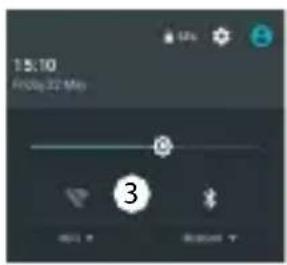
WiFi connection

WARNING: Make sure that you are in a WiFi zone. You can access the WiFi settings quickly from the status bar.

  1. Touch and pull down the status bar to display it.
  2. Touch again the bar to reveal the quick settings.
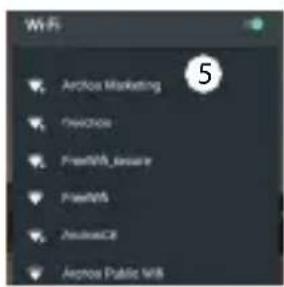
  3. Select the WiFi icon to activate the WiFi connection
  4. Select "WiFi" below the WiFi icon.
  5. Touch the name of network you want to connect to. Private networks are shown with a lock icon and will require you to enter your password.

ARCHOS Helium Plus 4G 55 - WiFi connection - 1

15:10 Friday 22 Mon 3

Wi-Fi Arclos Marketing FireWire FreeMOS_Jaware FreeMOS ApacheC3 Apache Public M8 5

ARCHOS Helium Plus 4G 55 - WiFi connection - 4

ARCHOS Helium Plus 4G 55 - WiFi connection - 5

ARCHOS 55 Helium Plus book.indd 11 01/07/2015 11:49:47

Gradient color bar transitioning from black to white (no text or symbols)

Color swatch bar with eight distinct squares in yellow, magenta, cyan, blue, green, red, black, and yellow (no text or symbols)

ARCHOS Helium Plus 4G 55 - WiFi connection - 8

Google & Contacts

Adding a Google account

A Google account lets you take full advantage of any Google apps and services that you may want to use.

  1. Go to "Settings" > "Accounts" > "Add account".
  2. Select the account type "Google" to add.
  3. Follow the onscreen instructions to enter information about the account. Once the account is created, you can access Play Store, Gmail, Hangouts, Maps and many other apps.

ARCHOS Helium Plus 4G 55 - Adding a Google account - 1

Synchronizing info

Information must be sync to be saved. Your data is backed up on Google servers.

  1. Go to "Settings" > "Accounts" > "Google".
  2. Select your account.
    The list of information that can be sync are displayed.
    Automatic sync should be activated. To launch the sync, press the Menu button then Sync now. You can get them back in case of loss of your device or SIM card. When your Google account is added to a new device, all your saved information is transferred.

12

ARCHOS Helium Plus 4G 55 - Synchronizing info - 1

ARCHOS 55 Helium Plus book.indd 12 01/07/2015 11:49:47

ARCHOS Helium Plus 4G 55 - Synchronizing info - 2

Two horizontal color swatches: black and white with gradient shading, each containing a solid square (no text or symbols)

ARCHOS Helium Plus 4G 55 - Synchronizing info - 4

Saving your contacts

When your contacts are saved, they are always available on the web and can be synced to any Android phone that's set up with your Google account.

  1. Install the SIM card with your contacts in your phone.
  2. From the Home screen or the All Apps screen, select the Contacts app
  3. Touch the Menu button: > "Import/Export".
  4. In Import/export contacts, select "Import from SIM card".
  5. Select your Google account.
  6. Check contacts to be imported and validate.
  7. Once the contacts are imported in the Google account, go to "Settings" > "Accounts" > "Google".
  8. Select you Google account.
  9. Select the Menu button then "Sync now".
    Your contacts are saved to your Google account.

ARCHOS Helium Plus 4G 55 - Saving your contacts - 1

ARCHOS Helium Plus 4G 55 - Saving your contacts - 2

ARCHOS Helium Plus 4G 55 - Saving your contacts - 3

Two horizontal color swatches: black and white with a row of solid color blocks (no text or symbols)

ARCHOS Helium Plus 4G 55 - Saving your contacts - 5

Hints & tips for Android™

Moving a home screen item:

Touch and hold your finger onto it, then slide it to the desired location, and release your finger.

Removing a home screen item:

Touch and hold it, slide your finger towards the top of the screen and drop it over the "Remove" icon.

Uninstalling an item:

ARCHOS Helium Plus 4G 55 - Uninstalling an item: - 1

From the "All apps" screens, touch and hold it, slide your finger towards the top of the screen and drop it over "Uninstall" bin.

Creating application folders:

Drop one app icon over another on a home screen and the two icons will be combined.

ARCHOS Helium Plus 4G 55 - Creating application folders: - 1

14

ARCHOS 55 Helium Plus book.indd 14 01/07/2015 11:49:48

ARCHOS Helium Plus 4G 55 - Creating application folders: - 2

Color swatch bar with grayscale gradient from black to white (no text or symbols)

ARCHOS Helium Plus 4G 55 - Creating application folders: - 4

English

Widgets:

Hold your finger on a homescreen at an empty location. Touch "Widgets".

Changing your wallpaper:

Hold your finger on a home screen at an empty location.

Touch "Wallpapers".

Locking the touchscreen:

Select the "Settings" app, then scroll down and touch "Security". Touch "Screen lock". Touch the type of lock you would like to use. After you set a lock, a lock screen is displayed whenever your screen wakes up, requesting the pattern, pin or other specified key.

ARCHOS Helium Plus 4G 55 - Locking the touchscreen: - 1

ARCHOS Helium Plus 4G 55 - Locking the touchscreen: - 2

ARCHOS Helium Plus 4G 55 - Locking the touchscreen: - 3

Gradient color bar transitioning from black to white (no text or symbols)

Color swatch bar with eight distinct squares in yellow, magenta, cyan, blue, green, red, black, and light pink (no text or symbols)

ARCHOS Helium Plus 4G 55 - Locking the touchscreen: - 6

Troubleshooting

My phone is frozen or cannot switch on

  1. Remove and replace the battery.
  2. Charge your device.

My phone cannot connect to a network or "No service" is displayed

Try connecting in another location. Verify the network coverage with your operator.

Unable to make outgoing calls

Make sure your phone is connected to a network, and the network is not overloaded or unavailable.

Unable to receive incoming calls

Make sure your phone is switched on and connected to a network (check for overloaded or unavailable network).

SIM card PIN locked

Contact your network operator to obtain the PUK code (Personal Unblocking Key).

To configure a new 4G network:

On your device, tap Settings.

  1. Select Wireless & networks > More... > Mobile networks.
  2. In Mobile network settings, select your operator in Network operators.
  3. In Mobile network settings, select Access point names, then select
    to add new parameters and enter the exact connection parameters provided by your 4G provider.

ARCHOS Helium Plus 4G 55 - To configure a new 4G network: - 1

ARCHOS Helium Plus 4G 55 - To configure a new 4G network: - 2

Two horizontal color swatches: black and white with gradient shading, each containing a distinct color block (no text or symbols)

ARCHOS Helium Plus 4G 55 - To configure a new 4G network: - 4

Table des matières

ARCHOS Helium Plus 4G 55 - Table des matières - 1

Contenu de la boîte

Gradient color bar transitioning from black to white (no text or symbols)

Color swatch bar with eight distinct squares in yellow, magenta, cyan, blue, green, red, black, and yellow (no text or symbols)

Two horizontal color swatches: black and white with gradient shading, each containing a distinct color block (no text or symbols)

ARCHOS Helium Plus 4G 55 - Contenu de la boîte - 4

Prise en main

Assemblage

Color swatch bar with eight distinct squares in yellow, magenta, cyan, blue, green, red, black, and light pink (no text or symbols)

ARCHOS Helium Plus 4G 55 - Assemblage - 2

Prise en main

Allumer l'appareil

Color swatch bar with eight distinct color blocks (yellow, magenta, cyan, blue, green, red, black, yellow, pink) arranged horizontally.

11:07 Shopping Button Add Existing > Remove > No OK or Help Cancel

Google 1 2 3 4 5 15:04

ARCHOS Helium Plus 4G 55 - Allumer l'appareil - 4

Gradient color bar transitioning from black to white (no text or symbols)

Color swatch bar with eight distinct squares in yellow, magenta, cyan, blue, green, red, black, and yellow (no text or symbols)

Gradient color bar transitioning from black to white (no text or symbols)

Color swatch bar with eight distinct squares in yellow, magenta, cyan, blue, green, red, black, and light pink (no text or symbols)

ARCHOS Helium Plus 4G 55 - Allumer l'appareil - 9

Connexion WiFi

Color swatch bar with eight distinct squares in yellow, magenta, cyan, blue, green, red, black, and light pink (no text or symbols)

ARCHOS Helium Plus 4G 55 - Connexion WiFi - 2

Compte Google & Contacts

ARCHOS Helium Plus 4G 55 - Compte Google & Contacts - 1

Sauvegarder vos contacts

Color swatch bar with eight distinct squares in yellow, magenta, cyan, blue, green, red, black, and yellow (no text or symbols)

Two horizontal color swatches: black and white with gradient shading, each containing a solid color bar (no text or symbols)

ARCHOS Helium Plus 4G 55 - Sauvegarder vos contacts - 3

Français

Widgets :

Color swatch bar with eight distinct squares in yellow, magenta, cyan, blue, green, red, black, and yellow (no text or symbols)

ARCHOS Helium Plus 4G 55 - Widgets : - 2

Dépannage

ARCHOS Helium Plus 4G 55 - Dépannage - 1

Inhaltsverzeichnis

Color swatch bar with eight distinct squares in yellow, magenta, cyan, blue, green, red, black, and yellow (no text or symbols)

ARCHOS Helium Plus 4G 55 - Inhaltsverzeichnis - 2

Verpackungsinhalt

Two horizontal color swatches: black and magenta squares with white borders, no text or symbols present.

Two horizontal color swatches: black and white with gradient shading, each containing a distinct color block (no text or symbols)

ARCHOS Helium Plus 4G 55 - Verpackungsinhalt - 3

Erste Schritte

Montage

ARCHOS Helium Plus 4G 55 - Montage - 1

Erste Schritte

Einschalten

Two horizontal color swatches: one grayscale from black to white, the other solid-colored from yellow to pink (no text or symbols)

17:07 @day 12:07 Settings @day 12:07 Date range OK Cancel OK/OK date 3 4 5

ARCHOS Helium Plus 4G 55 - Einschalten - 3

42

ARCHOS 55 Helium Plus book.indd 42 01/07/2015 11:49:54

ARCHOS Helium Plus 4G 55 - Einschalten - 4

Gradient color bar transitioning from black to white (no text or symbols)

Color swatch bar with eight solid color blocks (yellow, magenta, cyan, blue, green, red, black, yellow, pink) in a horizontal row (no text or symbols)

ARCHOS Helium Plus 4G 55 - Einschalten - 7

WLAN-Verbindung

Color swatch bar with eight distinct squares in yellow, magenta, cyan, blue, green, red, black, and light pink (no text or symbols)

Color swatch bar with grayscale gradient from black to white (no text or symbols)

Gradient color bar transitioning from black to white (no text or symbols)

Color swatch bar with eight distinct squares in yellow, magenta, cyan, blue, green, red, black, and yellow (no text or symbols)

Two horizontal color swatches: black and white with a row of solid-colored squares (no text or symbols)

ARCHOS Helium Plus 4G 55 - WLAN-Verbindung - 6

Widgets:

ARCHOS Helium Plus 4G 55 - Widgets: - 1

Fehlerbehebung

ARCHOS Helium Plus 4G 55 - Fehlerbehebung - 1

Índice

Color swatch bar with eight distinct squares in yellow, magenta, cyan, blue, green, red, black, and yellow (no text or symbols)

Gradient color bar transitioning from black to white (no text or symbols)

Color swatch bar with eight distinct color blocks (yellow, magenta, cyan, blue, green, red, black, yellow, pink) on white background

Two horizontal color swatches: black and yellow squares with no text or symbols, arranged horizontally.

Two horizontal color swatches: black and white with gradient shading, each containing a distinct color block (no text or symbols)

ARCHOS Helium Plus 4G 55 - Índice - 6

Primeros pasos

Montaje

Color swatch bar with eight distinct squares in yellow, magenta, cyan, blue, green, red, black, and light pink (no text or symbols)

ARCHOS Helium Plus 4G 55 - Montaje - 2

Primeros pasos

Encendido

17:07 Status: 2.5 MHz →

Google 1 2 3 4 5 6 7 8 9 10 11 12 13 14 15 16 17 18 19 20 21 22 23 24 25 26 27 28 29 30 31 32 33 34 35 36 37 38 39 40 41 42 43 44 45 46 47 48 49 50 51 52 53 54 55 56 57 58 59 60 61 62 63 64 65 66 67 68 69 70 71 72 73 74 75 76 77 78 79 80 81 82 83 84 85 86 87 88 89 90 91 92 93 94 95 96 97 98 99 100

ARCHOS Helium Plus 4G 55 - Encendido - 3

Two horizontal color swatches: black and white with various shades of gray, transitioning to solid colors in yellow, magenta, cyan, blue, green, red, and yellow (no text or symbols)

11:07 Friday 12:07 Settings Time to start Time to end 5 FMS 50000 bits

ARCHOS Helium Plus 4G 55 - Encendido - 6

ARCHOS Helium Plus 4G 55 - Encendido - 7

Gradient color bar transitioning from black to white (no text or symbols)

Color swatch bar with eight distinct squares in yellow, magenta, cyan, blue, green, red, black, and light pink (no text or symbols)

ARCHOS Helium Plus 4G 55 - Encendido - 10

Conexión WiFi

ARCHOS Helium Plus 4G 55 - Conexión WiFi - 1

Gradient color bar transitioning from black to white (no text or symbols)

Color swatch bar with eight distinct squares in yellow, magenta, cyan, blue, green, red, black, and yellow (no text or symbols)

Gradient color bar transitioning from black to white (no text or symbols)

Color swatch bar with eight distinct squares in yellow, magenta, cyan, blue, green, red, black, and light pink (no text or symbols)

Two horizontal color swatches: black and white with gray, transitioning to yellow, cyan, blue, green, red, and pink (no text or symbols)

Two horizontal color swatches: black and white with gradient shading, each containing a distinct color block (no text or symbols)

ARCHOS Helium Plus 4G 55 - Conexión WiFi - 8

Widgets:

Two horizontal color swatches: black and white with gradient shading, each containing a distinct color block (no text or symbols)

ARCHOS Helium Plus 4G 55 - Widgets: - 2

Sommario

Color swatch bar with grayscale gradient from black to white (no text or symbols)

Two horizontal color swatches: black and magenta squares with white borders, no text or symbols present.

Two horizontal color swatches: black and white with gradient shading, each containing a distinct color block (no text or symbols)

ARCHOS Helium Plus 4G 55 - Sommario - 4

Introduzione

Assemblaggio

Color swatch bar with eight distinct squares in yellow, magenta, cyan, blue, green, red, black, and light pink (no text or symbols)

ARCHOS Helium Plus 4G 55 - Assemblaggio - 2

Introduzione

Accensione

Color swatch bar with eight distinct color blocks (yellow, magenta, cyan, blue, green, red, black, yellow, pink) arranged horizontally.

ARCHOS Helium Plus 4G 55 - Accensione - 2

Schermata iniziale

Gradient color bar transitioning from black to white (no text or symbols)

Color swatch bar with eight distinct squares in yellow, magenta, cyan, blue, green, red, black, and yellow (no text or symbols)

ARCHOS Helium Plus 4G 55 - Accensione - 5

Connessione Wi-Fi

ARCHOS Helium Plus 4G 55 - Connessione Wi-Fi - 1

Gradient color bar transitioning from black to white (no text or symbols)

Color swatch bar with eight distinct squares in yellow, magenta, cyan, blue, green, red, black, and light pink (no text or symbols)

ARCHOS Helium Plus 4G 55 - Connessione Wi-Fi - 4

Account Google e contatti

Color swatch bar with eight distinct squares in yellow, magenta, cyan, blue, green, red, black, and yellow (no text or symbols)

Gradient color bar transitioning from black to white (no text or symbols)

Color swatch bar with eight distinct squares in yellow, magenta, cyan, blue, green, red, black, and yellow (no text or symbols)

ARCHOS Helium Plus 4G 55 - Account Google e contatti - 4

Conoscere Android™

ARCHOS Helium Plus 4G 55 - Conoscere Android™ - 1

Widget:

Color swatch bar with eight distinct squares in yellow, magenta, cyan, blue, green, red, black, and yellow (no text or symbols)

Two horizontal color swatches: black and white with gradient shading, each containing a distinct color block (no text or symbols)

ARCHOS Helium Plus 4G 55 - Widget: - 3

Inhoudsopgave

Color swatch bar with eight distinct squares in yellow, magenta, cyan, blue, green, red, black, and yellow (no text or symbols)

Gradient color bar transitioning from black to white (no text or symbols)

Color swatch bar with eight distinct color blocks (yellow, magenta, cyan, blue, green, red, black, yellow, pink) on white background

Two horizontal color swatches: black and magenta squares with white borders, no text or symbols present.

Two vertical color swatches: one grayscale from black to white, the other solid-colored from yellow to pink (no text or symbols)

ARCHOS Helium Plus 4G 55 - Inhoudsopgave - 6

Aan de slag

Montage

Color swatch bar with eight distinct squares in yellow, magenta, cyan, blue, green, red, black, and light pink (no text or symbols)

ARCHOS Helium Plus 4G 55 - Montage - 2

Aan de slag

Inschakelen

Color swatch bar with eight distinct squares in yellow, magenta, cyan, blue, green, red, black, and yellow (no text or symbols)

ARCHOS Helium Plus 4G 55 - Inschakelen - 2

Op het beginscherm

Google 1 2 3 4 5 15:04

Nederlands

ARCHOS Helium Plus 4G 55 - Inschakelen - 4

ARCHOS Helium Plus 4G 55 - Inschakelen - 5

Gradient color bar transitioning from black to white (no text or symbols)

Color swatch bar with eight distinct squares in yellow, magenta, cyan, blue, green, red, black, and yellow (no text or symbols)

ARCHOS Helium Plus 4G 55 - Inschakelen - 8

Mobiele data & WiFi-verbinding

Mobiele dataverbinding

ARCHOS Helium Plus 4G 55 - Mobiele dataverbinding - 1

ARCHOS Helium Plus 4G 55 - Mobiele dataverbinding - 2

Gradient color bar transitioning from black to white (no text or symbols)

Color swatch bar with eight distinct squares in yellow, magenta, cyan, blue, green, red, black, and yellow (no text or symbols)

ARCHOS Helium Plus 4G 55 - Mobiele dataverbinding - 5

WiFi-verbinding

Color swatch bar with eight distinct squares in yellow, magenta, cyan, blue, green, red, black, and light pink (no text or symbols)

ARCHOS Helium Plus 4G 55 - WiFi-verbinding - 2

Google account & Contacten

Color swatch bar with eight distinct squares in yellow, magenta, cyan, blue, green, red, black, and yellow (no text or symbols)

ARCHOS Helium Plus 4G 55 - Google account & Contacten - 2

Contacten opslaan

Two horizontal color swatches: black and white with gradient shading, each containing a distinct color block (no text or symbols)

ARCHOS Helium Plus 4G 55 - Contacten opslaan - 2

Widgets:

ARCHOS Helium Plus 4G 55 - Widgets: - 1

Probleemoplossing

ARCHOS Helium Plus 4G 55 - Probleemoplossing - 1

Índice

Two horizontal color swatches: one grayscale from black to white, the other solid-colored from yellow to pink (no text or symbols)

Two horizontal color swatches: black and yellow squares with no text or symbols, arranged horizontally.

Two horizontal color swatches: one grayscale from black to white, the other solid-colored from yellow to pink (no text or symbols)

ARCHOS Helium Plus 4G 55 - Índice - 4

Introdução

Montagem

Color swatch bar with eight distinct squares in yellow, magenta, cyan, blue, green, red, black, and light pink (no text or symbols)

ARCHOS Helium Plus 4G 55 - Montagem - 2

Introdução

Ligar

ARCHOS Helium Plus 4G 55 - Ligar - 1

No seu ecrã inicial

11:07 Date 12 July Settings Status: 0.0000 Status: 0.0000 Status: 0.0000 OK Cancel OK/OK Date 3 4 5

ARCHOS Helium Plus 4G 55 - No seu ecrã inicial - 2

106

ARCHOS Helium Plus 4G 55 - No seu ecrã inicial - 3

ARCHOS 55 Helium Plus book.indd 106 01/07/2015 11:50:10

Gradient color bar transitioning from black to white (no text or symbols)

Color swatch bar with eight distinct squares in yellow, magenta, cyan, blue, green, red, black, and light pink (no text or symbols)

ARCHOS Helium Plus 4G 55 - No seu ecrã inicial - 6

Ligação Wi-Fi

ARCHOS Helium Plus 4G 55 - Ligação Wi-Fi - 1

Gradient color bar transitioning from black to white (no text or symbols)

Color swatch bar with eight distinct color blocks (yellow, magenta, cyan, blue, green, red, black, yellow, pink) on white background

Gradient color bar transitioning from black to white (no text or symbols)

Color swatch bar with eight distinct squares in yellow, magenta, cyan, blue, green, red, black, and light pink (no text or symbols)

Two horizontal color swatches: black and white with a row of solid color blocks (no text or symbols)

Two horizontal color swatches: black and white with gradient shading, each containing a distinct color block (no text or symbols)

ARCHOS Helium Plus 4G 55 - Ligação Wi-Fi - 8

Widgets:

Two horizontal color swatches: black and white with gradient shading, each containing a solid square (no text or symbols)

ARCHOS Helium Plus 4G 55 - Widgets: - 2

Содержание

Color swatch bar with eight distinct squares in yellow, magenta, cyan, blue, green, red, black, and yellow (no text or symbols)

ARCHOS Helium Plus 4G 55 - Содержание - 2

Содержимое упаковки

ARCHOS Helium Plus 4G 55 - Содержимое упаковки - 1

Описание устройства

ARCHOS Helium Plus 4G 55 - Описание устройства - 1

Описание устройства

ARCHOS Helium Plus 4G 55 - Описание устройства - 1

Two horizontal color swatches: black and white with gradient shading, each containing a distinct color block (no text or symbols)

ARCHOS Helium Plus 4G 55 - Описание устройства - 3

Начало работы

Сборка

Color swatch bar with eight distinct squares in yellow, magenta, cyan, blue, green, red, black, and light pink (no text or symbols)

ARCHOS Helium Plus 4G 55 - Сборка - 2

Начало работы

Включение

ARCHOS Helium Plus 4G 55 - Включение - 1

На главном экране

Gradient color bar transitioning from black to white (no text or symbols)

Color swatch bar with eight solid color blocks (yellow, magenta, cyan, blue, green, red, black, yellow, pink) in a horizontal row (no text or symbols)

ARCHOS Helium Plus 4G 55 - Включение - 4

Подключение WiFi

Color swatch bar with eight distinct squares in yellow, magenta, cyan, blue, green, red, black, and yellow (no text or symbols)

Gradient color bar transitioning from black to white (no text or symbols)

Color swatch bar with eight distinct squares in yellow, magenta, cyan, blue, green, red, black, and light pink (no text or symbols)

Gradient color bar transitioning from black to white (no text or symbols)

Color swatch bar with eight distinct squares in yellow, magenta, cyan, blue, green, red, black, and yellow (no text or symbols)

Two horizontal color swatches: black and white with gradient shading, each containing a solid square (no text or symbols)

ARCHOS Helium Plus 4G 55 - Подключение WiFi - 7

Виджеты:

Two horizontal color swatches: black and white with gradient shading, each containing a solid square (no text or symbols)

ARCHOS Helium Plus 4G 55 - Виджеты: - 2

Spis treści

Two horizontal color swatches: one grayscale from black to white, the other solid-colored from yellow to pink (no text or symbols)

ARCHOS Helium Plus 4G 55 - Spis treści - 2

Opis telefonu

ARCHOS Helium Plus 4G 55 - Opis telefonu - 1

Opis telefonu

Two horizontal color swatches: black and white with gradient shading, each containing a distinct color block (no text or symbols)

Two horizontal color swatches: black and white with gradient shading, each containing a solid color block (no text or symbols)

ARCHOS Helium Plus 4G 55 - Opis telefonu - 3

Na ekranie głównym

Gradient color bar transitioning from black to white (no text or symbols)

Color swatch bar with eight distinct squares in yellow, magenta, cyan, blue, green, red, black, and yellow (no text or symbols)

ARCHOS Helium Plus 4G 55 - Na ekranie głównym - 3

Połączenie Wi-Fi

Polski.

ARCHOS Helium Plus 4G 55 - Połączenie Wi-Fi - 1

Two horizontal color swatches: black and white with various shades of gray, transitioning to solid colors in yellow, magenta, cyan, blue, green, red, and yellow (no text or symbols)

Gradient color bar transitioning from black to white (no text or symbols)

Color swatch bar with eight distinct squares in yellow, magenta, cyan, blue, green, red, black, and light pink (no text or symbols)

Gradient color bar transitioning from black to white (no text or symbols)

Color swatch bar with eight distinct squares in yellow, magenta, cyan, blue, green, red, black, and yellow (no text or symbols)

Two horizontal color swatches: black and white with gradient shading, each containing a distinct color block (no text or symbols)

ARCHOS Helium Plus 4G 55 - Połączenie Wi-Fi - 8

Widżety:

Two horizontal color swatches: black and white with gradient shading, each containing a distinct color block (no text or symbols)

ARCHOS Helium Plus 4G 55 - Widżety: - 2

Tartalomjegyzék

ARCHOS Helium Plus 4G 55 - Tartalomjegyzék - 1

A csomag tartalma

Color swatch bar with eight distinct color blocks (yellow, magenta, cyan, blue, green, red, black, yellow, pink) on white background

Two horizontal color swatches: black and magenta squares with white borders, no text or symbols present.

Two horizontal color swatches: one grayscale from black to white, the other solid-colored from yellow to pink (no text or symbols)

ARCHOS Helium Plus 4G 55 - A csomag tartalma - 4

Első lépések

Összeszerelés

ARCHOS Helium Plus 4G 55 - Összeszerelés - 1

Első lépések

Bekapcsolás

ARCHOS Helium Plus 4G 55 - Bekapcsolás - 1

A kezdőképernyőn

11:07 Time to play Settings Time to watch Time range OFFICE FOS 5

ARCHOS Helium Plus 4G 55 - A kezdőképernyőn - 2

154

ARCHOS Helium Plus 4G 55 - A kezdőképernyőn - 3

ARCHOS 55 Helium Plus book.indd 154 01/07/2015 11:50:24

Gradient color bar transitioning from black to white (no text or symbols)

Color swatch bar with eight distinct squares in yellow, magenta, cyan, blue, green, red, black, and light pink (no text or symbols)

ARCHOS Helium Plus 4G 55 - A kezdőképernyőn - 6

Wi-Fi kapcsolat

Magyar

155

ARCHOS Helium Plus 4G 55 - Wi-Fi kapcsolat - 1

ARCHOS 55 Helium Plus book.indd 155 01/07/2015 11:50:24

Gradient color bar transitioning from black to white (no text or symbols)

Color swatch bar with eight distinct squares in yellow, magenta, cyan, blue, green, red, black, and light pink (no text or symbols)

Two horizontal color swatches: black and white with gradient shading, each containing a solid square (no text or symbols)

ARCHOS Helium Plus 4G 55 - Wi-Fi kapcsolat - 5

Névjegyek mentése

Two horizontal color swatches: one grayscale from black to white, the other solid-colored from yellow to pink (no text or symbols)

ARCHOS Helium Plus 4G 55 - Névjegyek mentése - 2

Minialkalmazások:

ARCHOS Helium Plus 4G 55 - Minialkalmazások: - 1

Hibaelhárítás

Color test bar with eight solid color blocks (yellow, magenta, cyan, blue, green, red, black, yellow, pink) on white background

ARCHOS Helium Plus 4G 55 - Hibaelhárítás - 2

جدول المحتويات

Color swatch bar with eight distinct squares in yellow, magenta, cyan, blue, green, red, black, and yellow (no text or symbols)

ARCHOS Helium Plus 4G 55 - جدول المحتويات - 2

المحتوى

ARCHOS 55 Helium Plus

- الهاتف

- البطارية

-السماعة

- USB کابل

- الشاحن

- دليل المستخدم

- طاقة الضمان

ARCHOS Helium Plus 4G 55 - المحتوى - 1

Gradient color bar transitioning from black to white (no text or symbols)

Color swatch bar with eight distinct squares in yellow, magenta, cyan, blue, green, red, black, and light yellow (no text or symbols)

ARCHOS Helium Plus 4G 55 - المحتوى - 4

ARCHOS Helium Plus 4G 55 - المحتوى - 5

Diagram of a smartphone front panel with numbered labels pointing to key components

وصف الهاتف

من夫妇 سماعة الادن①

Micro-USB من Franz 2

الكامير الامية ③

سماعة الهاتف④

Liberia الحساني

⑥ التطبيقات الاخرة

ARCHOS Helium Plus 4G 55 - وصف الهاتف - 1

ARCHOS Helium Plus 4G 55 - وصف الهاتف - 2

10 9 11 12 ARCHOS 13

الكاميرا ⑨

ضوء الفلاش 10

ARCHOS Helium Plus 4G 55 - وصف الهاتف - 4

وصف الهاتف

Two horizontal color swatches: one grayscale from black to white, the other solid-colored from yellow to pink (no text or symbols)

ARCHOS Helium Plus 4G 55 - وصف الهاتف - 2

Two smartphone illustrations showing front and back views with directional arrows indicating movement (no text or symbols)

Diagram showing two smartphone panels with labeled buttons and icons, likely illustrating a device or system configuration.

ARCHOS Helium Plus 4G 55 - وصف الهاتف - 5

166

ARCHOS Helium Plus 4G 55 - وصف الهاتف - 6

ARCHOS 55 Helium Plus book.indd 166 01/07/2015 11:50:29

Gradient color bar transitioning from black to white (no text or symbols)

Color test bar with eight solid color blocks (yellow, magenta, cyan, blue, green, red, black, yellow, pink) on white background

ARCHOS Helium Plus 4G 55 - وصف الهاتف - 9

تهيئة الاستخدام

تهيئة الاستخدام

عند فتح علبة الجهاز

Color swatch bar with eight distinct squares in yellow, magenta, cyan, blue, green, red, black, and light pink (no text or symbols)

ARCHOS Helium Plus 4G 55 - تهيئة الاستخدام - 2

التشغيل

Color swatch bar with eight solid color blocks (yellow, magenta, cyan, blue, green, red, black, yellow, pink) in a horizontal row (no text or symbols)

ARCHOS Helium Plus 4G 55 - التشغيل - 2

بدء الاستخدام

الشاهة الرئيسية

Color swatch bar with eight distinct squares in yellow, magenta, cyan, blue, green, red, black, and yellow (no text or symbols)

ARCHOS Helium Plus 4G 55 - الشاهة الرئيسية - 2

اتصال البيانات

Color swatch bar with eight distinct squares in yellow, magenta, cyan, blue, green, red, black, and yellow (no text or symbols)

WiFi Anchor Marketing Preference FreeMS_ware FreeMS Ambience Anchor Public MS

ARCHOS Helium Plus 4G 55 - الشاهة الرئيسية - 5

171

ARCHOS Helium Plus 4G 55 - الشاهة الرئيسية - 6

ARCHOS 55 Helium Plus book.indd 171 01/07/2015 11:50:31

Gradient color bar transitioning from black to white (no text or symbols)

Color swatch bar with eight distinct squares in yellow, magenta, cyan, blue, green, red, black, and yellow (no text or symbols)

ARCHOS Helium Plus 4G 55 - الشاهة الرئيسية - 9

Google اضافة حساب

Color test bar with eight solid color blocks (yellow, magenta, cyan, blue, green, red, black, yellow, pink) on white background

ARCHOS Helium Plus 4G 55 - Google اضافة حساب - 2

الاسماء &Google حسب

unprotected الاسماء

Color swatch bar with eight distinct squares in yellow, magenta, cyan, blue, green, red, black, and yellow (no text or symbols)

Gradient color bar transitioning from black to white (no text or symbols)

Color swatch bar with eight distinct squares in yellow, magenta, cyan, blue, green, red, black, and light pink (no text or symbols)

ARCHOS Helium Plus 4G 55 - unprotected الاسماء - 4

تعليمات الاستخدام

Color swatch bar with eight distinct squares in yellow, magenta, cyan, blue, green, red, black, and yellow (no text or symbols)

Two horizontal color swatches: black and white with gradient shading, each containing a distinct color block (no text or symbols)

ARCHOS Helium Plus 4G 55 - تعليمات الاستخدام - 3

Open Source Software Offer

The software bundled with this product includes software files subject to certain open source license requirements. Such open source software files are subject solely to the terms of the relevant open source software license. Such open source software is provided on an "AS IS" basis to the maximum extent permitted by applicable law.

For the open source files contained herein, please access "Open source license" section located at: Settings\About phone\Legal information on the device for the relevant copyright and licensing terms. You may obtain a copy of Apache License, Version 2.0 at http://www.apache.org/licenses/LICENSE-2.0. You may also obtain a copy of GNU General Public License, Version 2 at the Free Software Foundation, INC, 51 Franklin Street, Fifth Floor, Boston, MA 02110-1301, USA.

Until the date that is three years after our last shipment of this product, you may obtain a copy of the source code corresponding to the binaries for any GPL-Licensed file by contacting ARCHOS customer service at http://www.archos.com and ARCHOS will send you a link to such source code or will provide instructions to get the source on a physical medium.

This offer is valid to anyone in receipt of this information.

ARCHOS Helium Plus 4G 55 - Open Source Software Offer - 1

ARCHOS Helium Plus 4G 55 - Open Source Software Offer - 2

ARCHOS Helium Plus 4G 55 - Open Source Software Offer - 3

Gradient color bar transitioning from black to white (no text or symbols)

Color swatch bar with eight distinct squares in yellow, magenta, cyan, blue, green, red, black, and light pink (no text or symbols)

ARCHOS Helium Plus 4G 55 - Open Source Software Offer - 6

National restrictions

This device is intended for home and office use in all EU countries (and other countries following the EU directive 1999/5/EC) without any limitation except for the countries mentioned below:

Country Restriction Reason/remark

Bulgaria None General authorization required for outdoor use and public service

ARCHOS Helium Plus 4G 55 - National restrictions - 1

France Outdoor use

limited to 10

mW e.i.r.p.

within the

band 2454-

2483.5 MHz

Military Radiolocation use. Refarming of the

2.4 GHz band has been ongoing in recent years to allow current relaxed regulation. Full implementation planned 2012

Italy None If used outside of own premises, general

authorization is required.

Luxembourg None General authorization required for network and service supply (not for spectrum)

180

ARCHOS Helium Plus 4G 55 - National restrictions - 2

ARCHOS 55 Helium Plus book.indd 180 01/07/2015 11:50:32

ARCHOS Helium Plus 4G 55 - National restrictions - 3

Gradient color bar transitioning from black to white (no text or symbols)

Color swatch bar with eight distinct squares in yellow, magenta, cyan, blue, green, red, black, and light pink (no text or symbols)

ARCHOS Helium Plus 4G 55 - National restrictions - 6

Norway Implemented This subsection does not apply for the geographical aera within a radius of 20 km from the centre of Ny-Alesund

Russian Federation None Only for indoor applications

Note: Frequency 2454-2483.5MHZ are restricted to indoor use in France.

Consult the declaration of conformity on http://www.archos.com/products/declaration_conformity.html

ARCHOS Helium Plus 4G 55 - National restrictions - 7

ARCHOS Helium Plus 4G 55 - National restrictions - 8

SAR After the laboratory measurement, this mobile phone SAR value is: Head 0.467 W/Kg; Body 1.360 W/Kg

Archos company declares that this device is in compliance with the essential requirements and other relevant provisions of Directive 1999/5/EC

C€0700

181

ARCHOS Helium Plus 4G 55 - National restrictions - 9

ARCHOS 55 Helium Plus book.indd 181 01/07/2015 11:50:33

Table of contents Click a title to access it
Manual assistant
Powered by Anthropic
Waiting for your message
Product information

Brand : ARCHOS

Model : Helium Plus 4G 55

Category : Smartphone