
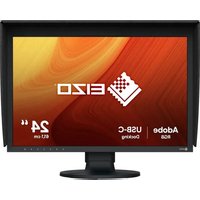
ColorEdge CG248-4K - Monitor EIZO - Free user manual and instructions
Find the device manual for free ColorEdge CG248-4K EIZO in PDF.


| Brand | Eizo |
| Model | ColorEdge CG248-4K |
| Product Type | Professional graphics monitor |
| Screen Size | 24 inches (61 cm) |
| Native Resolution | 3840 x 2160 (4K UHD) |
| Panel | IPS with LED backlight |
| Aspect Ratio | 16:9 |
| Brightness | 350 cd/m² |
| Contrast | 1000:1 |
| Color Gamut | 99% Adobe RGB, 98% DCI-P3 |
| Calibration | Built-in hardware calibration |
| Connectivity | HDMI, DisplayPort, USB-C (with 60W PD) |
| Dimensions (with stand) | 554 x 398 x 245 mm |
| Weight (with stand) | Approximately 7.5 kg |
| Power Supply | 100-240 V, 50/60 Hz |
| Power Consumption | Max. 75 W |
| Main Features | Brightness stabilization, DUE mode, color presets |
| Maintenance and Cleaning | Use a soft dry cloth. Do not use chemicals. |
| Security | Kensington lock slot, use on stable surface |
| Spare Parts and Repairability | Eizo after-sales service, parts available via authorized dealers |
Frequently Asked Questions - ColorEdge CG248-4K EIZO
User questions about ColorEdge CG248-4K EIZO
0 question about this device. Answer the ones you know or ask your own.
Ask a new question about this device
Download the instructions for your Monitor in PDF format for free! Find your manual ColorEdge CG248-4K - EIZO and take your electronic device back in hand. On this page are published all the documents necessary for the use of your device. ColorEdge CG248-4K by EIZO.
USER MANUAL ColorEdge CG248-4K EIZO
natural_image
Architectural line drawing of a modern office building (no text or symbols)
CAUTION
RISK OF ELECTRIC SHOCK, DO NOT OPEN
ATTENTIC
REQUES DE CHOC ELECTRIQUE, NE PAS OUVIR
ACHTUNG
The equipment must be supported to a rounded main outlet.
The equipment must be connected to a grounded
Chapter 1 Introduction....7
FCC Declaration of Conformity 70
China Measures for RoHS Compliance in ChinaRoHS 87
Chapter 1 Introduction
Attention
Calibration Mode (mode CAL) Standard Mode
natural_image
Diagram showing a computer monitor connected to a device with a ruler and indicator lights (no text or symbols present)2. Réglages
natural_image
Technical line drawing of a mechanical assembly with mounting bracket and connecting rods (no text or symbols)natural_image
Diagram of a rope knot with a hook and connecting rods, showing rope routing (no text or symbols)natural_image
Diagram showing a mechanical assembly with a clamp and a monitor, no text or symbols presentRemarque
natural_image
Two diagrams showing rope routing between a circular base and a ring, with no text or symbols present.natural_image
Diagram showing cable routing and cable attachment on a monitor, with no visible text or symbolsDCI (Digital Cinema Initiatives)
EBU (European Broadcasting Union)
HDCP (High-bandwidth Digital Content Protection)
HDMI (High-Definition Multimedia Interface)
FCC Declaration of Conformity
| For U.S.A., Canada, etc. (rated 100-120 Vac) Only | |
| FCC Declaration of Conformity | |
| We, the Responsible Party EIZO Inc. | 5710 Warland Drive, Cypress, CA 90630 |
| Phone: (562) 431-5011 | |
| declare that the product Trade name: EIZO | Model: ColorEdge CG248/CG318 |
| is in conformity with Part 15 of the FCC Rules. Operation of this product is subject to the following two conditions: (1) this device may not cause harmful interference, and (2) this device must accept any interference received, including interference that may cause undesired operation. | |
| This equipment has been tested and found to comply with the limits for a Class B digital device, pursuant to Part 15 of the FCC Rules. These limits are designed to provide reasonable protection against harmful interference in a residential installation. This equipment generates, uses, and can radiate radio frequency energy and, if not installed and used in accordance with the instructions, may cause harmful interference to radio communications. However, there is no guarantee that interference will not occur in a particular installation. If this equipment does cause harmful interference to radio or television reception, which can be determined by turning the equipment off and on, the user is encouraged to try to correct the interference by one or more of the following measures.* Reorient or relocate the receiving antenna.* Increase the separation between the equipment and receiver.* Connect the equipment into an outlet on a circuit different from that to which the receiver is connected.* Consult the dealer or an experienced radio/TV technician for help. | |
| Changes or modifications not expressly approved by the party responsible for compliance could void the user's authority to operate the equipment. | |
Annexe
Note
Use the attached specified cable below or EIZO signal cable with this monitor so as to keep interference within the limits of a Class B digital device.
- AC Cord
- Shielded Signal Cable (enclosed)
Canadian Notice
This Class B digital apparatus complies with Canadian ICES-003.
EIZO Corporation (hereinafter referred to as "EIZO") and distributors authorized by EIZO (hereinafter referred to as the "Distributors") warrant, subject to and in accordance with the terms of this limited warranty (hereinafter referred to as the "Warranty"), to the original purchaser (hereinafter referred to as the "Original Purchaser") who purchased the product specified in this document (hereinafter referred to as the "Product") from EIZO or Distributors, that EIZO and Distributors shall, at their sole discretion, either repair or replace the Product at no charge if the Original Purchaser becomes aware within the Warranty Period (defined below) that the Product malfunctions or is damaged in the course of normal use of the Product in accordance with the description in the instruction manual attached to the Product (hereinafter referred to as the "User's Manual").
The period of this Warranty is limited to (i) five (5) years from the date of purchase of the Product; or, limited to the expiration of (ii) 30,000 hours of its use of the Product (hereinafter referred to as the "Warranty Period"). However, the brightness of the Product shall be warranted only if the Product has been used within the recommended brightness described in the User's Manual. The Warranty Period for the brightness is also limited to five (5) years from the date of purchase of the Product subject to the usage time being less than or equal to 10,000 hours. EIZO and Distributors shall bear no liability or obligation with regard to the Product in relation to the Original Purchaser or any third parties other than as provided under this Warranty.
EIZO and Distributors will cease to hold or store any parts of the Product upon expiration of seven (7) years after the production of such parts is discontinued. In repairing the monitor, EIZO and Distributors will use renewal parts which comply with our QC standards.
The Warranty is valid only in the countries or territories where the Distributors are located. The Warranty does not restrict any legal rights of the Original Purchaser.
Notwithstanding any other provision of this Warranty, EIZO and Distributors shall have no obligation under this Warranty whatsoever in any of the cases as set forth below:
(a) Any defect of the Product caused by freight damage, modification, alteration, abuse, misuse, accident, incorrect installation, disaster, faulty maintenance and/or improper repair by third party other than EIZO and Distributors;
(b) Any incompatibility of the Product due to possible technical innovations and/or regulations;
(c) Any deterioration of the sensor;
(d) Any deterioration of display performance caused by the deterioration of expendable parts such as the LCD panel and/or backlight, etc. (e.g. changes in brightness uniformity, changes in color, changes in color uniformity, defects in pixels including burnt pixels, etc.);
(e) Any deterioration of the Product caused by the use at higher brightness than the recommended brightness described in the User's Manual;
(f) Any defect of the Product caused by external equipment;
(g) Any defect of the Product on which the original serial number has been altered or removed;
(h) Any normal deterioration of the product, particularly that of consumables, accessories, and/or attachments (e.g. buttons, rotating parts, cables, User's Manual, etc.); and
(i) Any deformation, discoloration, and/or warp of the exterior of the product including that of the surface of the LCD panel.
To obtain service under the Warranty, the Original Purchaser must deliver the Product, freight prepaid, in its original package or other adequate package affording an equal degree of protection, assuming the risk of damage and/or loss in transit, to the local Distributor. The Original Purchaser must present proof of purchase of the Product and the date of such purchase when requesting services under the Warranty.
The Warranty Period for any replaced and/or repaired product under this Warranty shall expire at the end of the original Warranty Period.
EIZO OR DISTRIBUTORS ARE NOT RESPONSIBLE FOR ANY DAMAGE TO, OR LOSS OF, DATA OR OTHER INFORMATION STORED IN ANY MEDIA OR ANY PART OF ANY PRODUCT RETURNED TO EIZO OR DISTRIBUTORS FOR REPAIR.
EIZO AND DISTRIBUTORS MAKE NO FURTHER WARRANTIES, EXPRESSED OR IMPLIED, WITH RESPECT TO THE PRODUCT AND ITS QUALITY, PERFORMANCE, MERCHANTABILITY OR FITNESS FOR ANY PARTICULAR USE. IN NO EVENT SHALL EIZO OR DISTRIBUTORS BE LIABLE FOR ANY INCIDENTAL, INDIRECT, SPECIAL, CONSEQUENTIAL OR OTHER DAMAGE WHATSOEVER (INCLUDING, WITHOUT LIMITATION, DAMAGES FOR LOSS OF PROFIT, BUSINESS INTERRUPTION, LOSS OF BUSINESS INFORMATION, OR ANY OTHER PECUNIARY LOSS) ARISING OUT OF THE USE OR INABILITY TO USE THE PRODUCT OR IN ANY CONNECTION WITH THE PRODUCT, WHETHER BASED ON CONTRACT, TORT, NEGLIGENCE, STRICT LIABILITY OR OTHERWISE, EVEN IF EIZO OR DISTRIBUTORS HAVE BEEN ADVISED OF THE POSSIBILITY OF SUCH DAMAGES. THIS EXCLUSION ALSO INCLUDES ANY LIABILITY WHICH MAY ARISE OUT OF THIRD PARTY CLAIMS AGAINST THE ORIGINAL PURCHASER. THE ESSENCE OF THIS PROVISION IS TO LIMIT THE POTENTIAL LIABILITY OF EIZO AND DISTRIBUTORS ARISING OUT OF THIS LIMITED WARRANTY AND/OR SALES.
BEGRENZTE GARANTIE
This product, when disposed of, is supposed to be collected and recycled according to your country's legislation to reduce environmental burden. When you dispose of this product, please contact a distributor or an affiliate in your country.
The contact addressees are listed on the EIZO website below.
http://www.eizoglobal.com
For recycling information for customers in Switzerland, please refer to the following website.
http://www.swico.ch
China Measures for RoHS Compliance in ChinaRoHS
关于电子信息产品污染控制标识

- Chapter 1 Introduction
- Attention
- Calibration Mode (mode CAL) Standard Mode
- Réglages
- Remarque
- DCI (Digital Cinema Initiatives)
- EBU (European Broadcasting Union)
- HDCP (High-bandwidth Digital Content Protection)
- HDMI (High-Definition Multimedia Interface)
- FCC Declaration of Conformity
- Canadian Notice
- BEGRENZTE GARANTIE
- China Measures for RoHS Compliance in ChinaRoHS
Brand : EIZO
Model : ColorEdge CG248-4K
Category : Monitor