
GW12786 - Motion detector Gewiss - Free user manual and instructions
Find the device manual for free GW12786 Gewiss in PDF.


| Product type | Infrared motion detector |
| Brand | Gewiss |
| Model | GW12786 |
| Dimensions (L x W x H) | 100 x 80 x 50 mm |
| Weight | 100 g |
| Power supply | 220-240 V ~ 50/60 Hz |
| Standby power consumption | < 1 W |
| Detection angle | 180° |
| Detection range | 12 m (at 25°C) |
| Sensitivity adjustment | Yes, via potentiometer |
| Adjustable time delay | From 10 seconds to 5 minutes |
| Adjustable brightness threshold | From 3 to 2000 lux |
| Protection rating | IP44 |
| Operating temperature | -20°C to +50°C |
| Max switching power | 2000 W (resistive) |
| Mounting type | Wall or ceiling |
| Recommended mounting height | 2 to 2.5 m |
| Max cable cross-section | 2.5 mm² |
| Main functions | Presence detection, automatic on/off, day/night mode |
| Care and cleaning | Clean with a soft, dry cloth. Do not use solvents. |
| Safety | Integrated circuit breaker, double insulation (Class II) |
| Spare parts and repairability | Sealed unit, no spare parts available. Recycle at end of life. |
Frequently Asked Questions - GW12786 Gewiss
User questions about GW12786 Gewiss
0 question about this device. Answer the ones you know or ask your own.
Ask a new question about this device
Download the instructions for your Motion detector in PDF format for free! Find your manual GW12786 - Gewiss and take your electronic device back in hand. On this page are published all the documents necessary for the use of your device. GW12786 by Gewiss.
USER MANUAL GW12786 Gewiss
natural_image
Exterior view of a modern KNX E13 digital camera with LUX TIME branding (no additional text or symbols visible)GW 10 786 GW 12 786 GW 14 786


Bus terminal - Borniers bus - Terminales bus - Busanschlüsse
INDICE
INSTALLAZIONE

natural_image
Diagram of a device interior showing internal components and a black arrow indicating direction (no text or symbols present)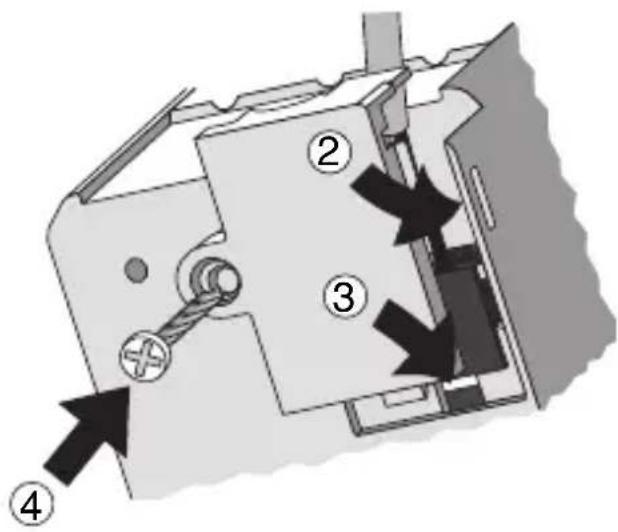
Completamento
PROGRAMMING WITH ETS SOFTWARE 12
TECHNICAL DATA 13
GENERAL DESCRIPTION
The movement detector with EIB twilight switch - flush-mounted allows you to send an activation command to actuator devices using the KNX/EIB bus, according to the movements and light intensity detected.
The passive Infra Red (IR) sensor has an adjustable lens with fixed opening.
The detector is powered by the bus line and is fitted with two local potentiometers on the front, to regulate the light sensitivity levels and the variation of the recovery time (+/-50% of the value set via ETS), and a green indicator LED that signals movement detection and the consequential messages sent to the bus.
Functions
The device is configured by the ETS software to achieve one of the functions listed below.
Commands:
- send commands (1 bit/1 byte) of start and/or end of movement events
Other functions:
- movement detection conditioned or unconditioned by light intensity
- regulation of light intensity threshold or via ETS parameter
- function enabling/disabling via bus
- activation of command sending to bus object
- up to 4 auxiliary switching blocks
- safety pause with parameter options
- pure twilight sensor function
Connection diagram
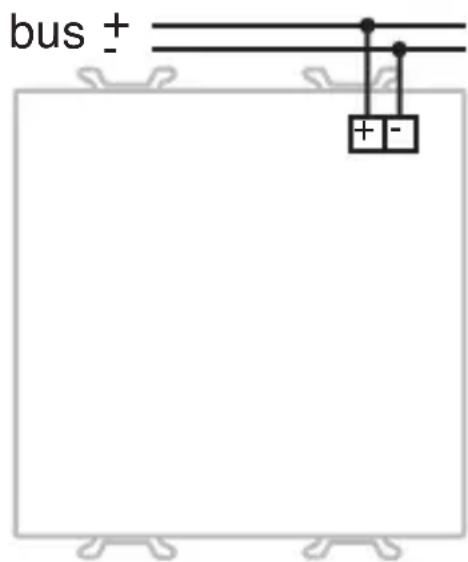
INSTALLATION

WARNING: only qualified personnel are permitted to install this device, according to the regulations in force and guide lines provided for KNX/EIB installation in the Technical Manual.
Electrical connections
Minimum bus distance - electrical power line

Slot in terminal fixing
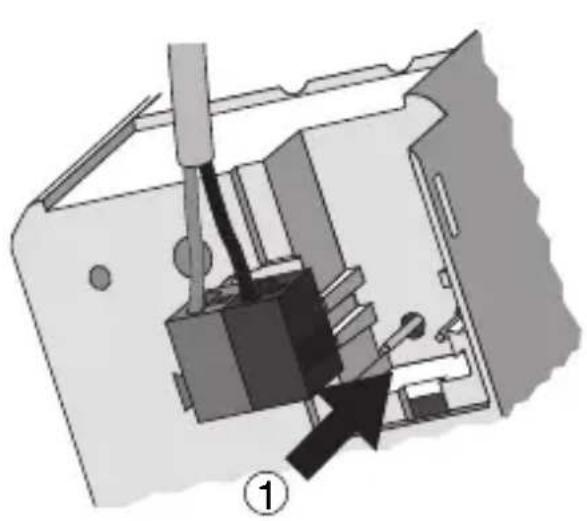
natural_image
Mechanical assembly diagram showing a tool interacting with a component, labeled with number 1 (no text or symbols on the diagram itself)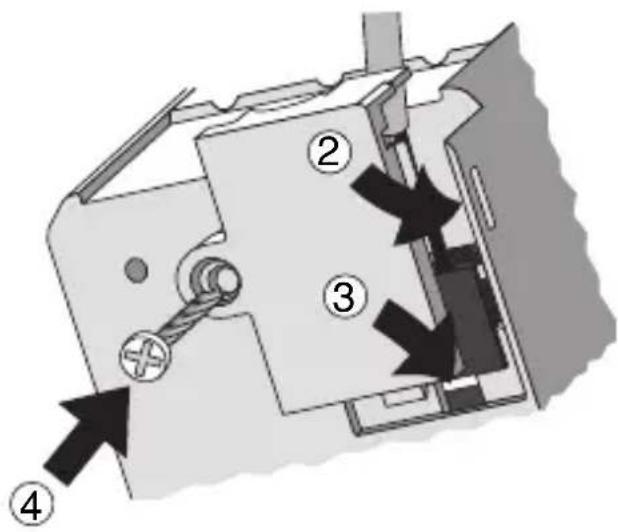
Completing installation
Insert the device into a Chorus support, making sure the front potentiometers are at the top.
Complete the installation with other Chorus devices or hole covers and fix it to the relative container (flush-mounted box, wall-mounted box etc).
Apply the finish plate.
PROGRAMMING WITH ETS SOFTWARE
This device must be configured using the ETS software.
Detailed information on the configuration parameters and their values can be found in the Technical Manual.
After completing device configuration it is possible to manually adjust the sensor and recovery time intervention thresholds.
Adjusting the intervention threshold on the twilight sensor

natural_image
Diagram showing three circular switches with directional arrows indicating rotation or adjustment (no text or symbols)10 lux 80 lux 500 lux/OFF
Manual regulation of the recovery time

TECHNICAL DATA
| Communication | KNX/EIB Bus |
| Power Supply | By KNX/EIB Bus, 29 V dc SELV |
| Bus cable | KNX/EIB TP1 |
| Bus current consumption | 5 mA max |
| Control elements | 1 mini physical address programming key |
| Display elements | 1 red physical address programming LED and 1 green indicator LED |
| Measuring elements | 1 PIR sensor ( = 5 ÷ 14 m )1 twilight sensor (10÷500 lux) |
| Configuration elements | 1 rotating potentiometer to regulate the twilight sensor, 1 rotating potentiometer to regulate the recovery period |
| IR sensor range | Max distance: 10mVertical range: 30° adjustableHorizontal range: 105° adjustable |
| Ambit of use | Indoors, dry places |
| Operating temperature | -5 ÷ +45 °C |
| Storage temperature | -25 ÷ +70 °C |
| Relative humidity | Max 93% (no condensation) |
| Bus connection | Slot in terminal, 2 pin ∅ 1 mm |
| Protection rating | IP20 |
| Dimensions | 2 Chorus modules |
| Reference standards | Low Voltage Standard 2006/95/CEElectromagnetic Compatibility Standard 89/336/CEEEN50428, EN50090-2-2 |
| Certifications | KNX/EIB |
TECHNICAL DATA
Horizontal range zone

radar
| Angle (°) | Value | | --------- | ----- | | 0 | 5 | | 5 | 4 | | 10 | 3 | | 15 | 2 | | 20 | 1 | | 25 | 0.5 | | 30 | 0.3 | | 35 | 0.2 | | 40 | 0.1 | | 45 | 0.05 | | 50 | 0.03 | | 55 | 0.02 | | 60 | 0.01 | | 65 | 0.005 | | 70 | 0.003 | | 75 | 0.002 | | 80 | 0.001 | | 85 | 0.0005| | 90 | 0.0003| | 95 | 0.0002| | 100 | 0.0001|Vertical range zone
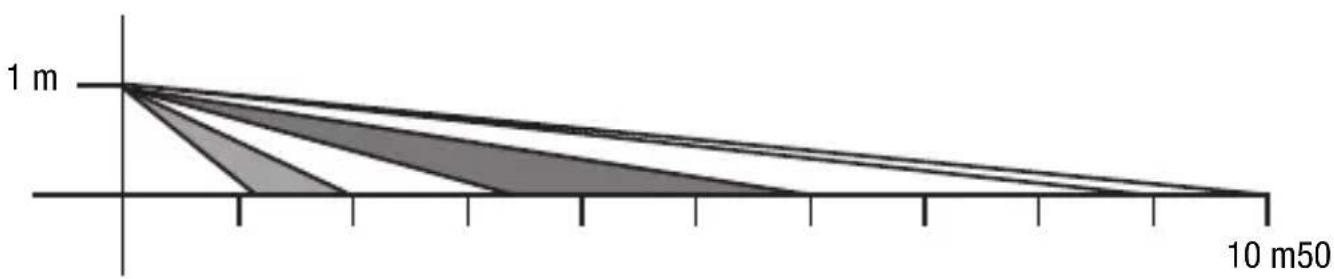
area
| x | y | |-------|-------| | 0 | 1 m | | 10 m50| 1 m |SOMMAIRE
page
DESCRIPTION GENERALE 16
INSTALLATION 17
PROGRAMMATION AVEC LOGICIEL ETS 18
natural_image
Diagram of a device interior showing internal components and a black arrow indicating direction (no text or symbols present)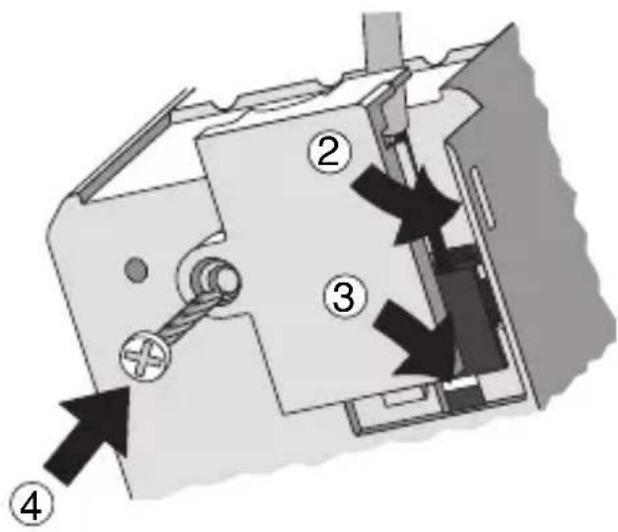
Achèvement
PROGRAMMATION AVEC LOGICIEL ETS
natural_image
Diagram of a mechanical device with a black arrow pointing to a component, no visible text or symbols
Finalización
INSTALLATION

natural_image
Diagram of a mechanical device with a black arrow pointing to a component, no visible text or symbols
Vervollständigung
According to article 9 paragraph 2 of the European Directive 2004/108/EC and to article R2 paragraph 6 of the Decision 768/2008/EC, the responsible for placing the apparatus on the Community market is:
GEWISS S.p.A Via A. Volta, 1 - 24069 Cenate Sotto (BG) Italy Tel: +39 035 946 111 Fax: +39 035 945 270 E-mail: qualitymarks@gewiss.com


+39 035 946 111
8.30 - 12.30 / 14.00 - 18.00 lunedì ÷ venerdì - monday ÷ friday

+39 035 946 260


- INDICE
- INSTALLAZIONE
- Completamento
- GENERAL DESCRIPTION
- Functions
- Commands:
- Other functions:
- Connection diagram
- INSTALLATION
- Electrical connections
- Completing installation
- PROGRAMMING WITH ETS SOFTWARE
- Adjusting the intervention threshold on the twilight sensor
- Manual regulation of the recovery time
- TECHNICAL DATA
- SOMMAIRE
- Achèvement
- PROGRAMMATION AVEC LOGICIEL ETS
- Finalización
- Vervollständigung
Brand : Gewiss
Model : GW12786
Category : Motion detector