
Babel RC - Fan TAURUS - Free user manual and instructions
Find the device manual for free Babel RC TAURUS in PDF.


| Product Type | Pedestal Fan |
| Model | Babel RC |
| Brand | Taurus |
| Power Supply | 220-240 V ~ 50 Hz |
| Power Consumption | 50 W |
| Speed Settings | 3 speeds (low, medium, high) |
| Oscillation | Yes, wide angle |
| Timer | Yes, up to 7 hours |
| Remote Control | Yes, included |
| Height | 130 cm |
| Base Diameter | 40 cm |
| Weight | 5 kg |
| Material | Plastic and metal |
| Adjustable Tilt | Yes |
| Protection | Overheat protection, stable base |
| Filter | Removable and washable front grille |
| Noise Level | 55 dB (approx.) |
| Cord Length | 1.5 m |
| Color | White / Black |
| Usage | Indoor only |
Frequently Asked Questions - Babel RC TAURUS
User questions about Babel RC TAURUS
0 question about this device. Answer the ones you know or ask your own.
Ask a new question about this device
Download the instructions for your Fan in PDF format for free! Find your manual Babel RC - TAURUS and take your electronic device back in hand. On this page are published all the documents necessary for the use of your device. Babel RC by TAURUS.
USER MANUAL Babel RC TAURUS
natural_image
Line drawing of two tall cylindrical electric fans with heat sinks and a digital display on top (no text or symbols)BABEL


BABEL RC


natural_image
Simple diagram showing a semicircular shape with concentric arcs and a labeled point G (no text or symbols beyond the label)
natural_image
Pure diagram of a semicircular structure with a labeled point H and circular features (no text or symbols beyond the label)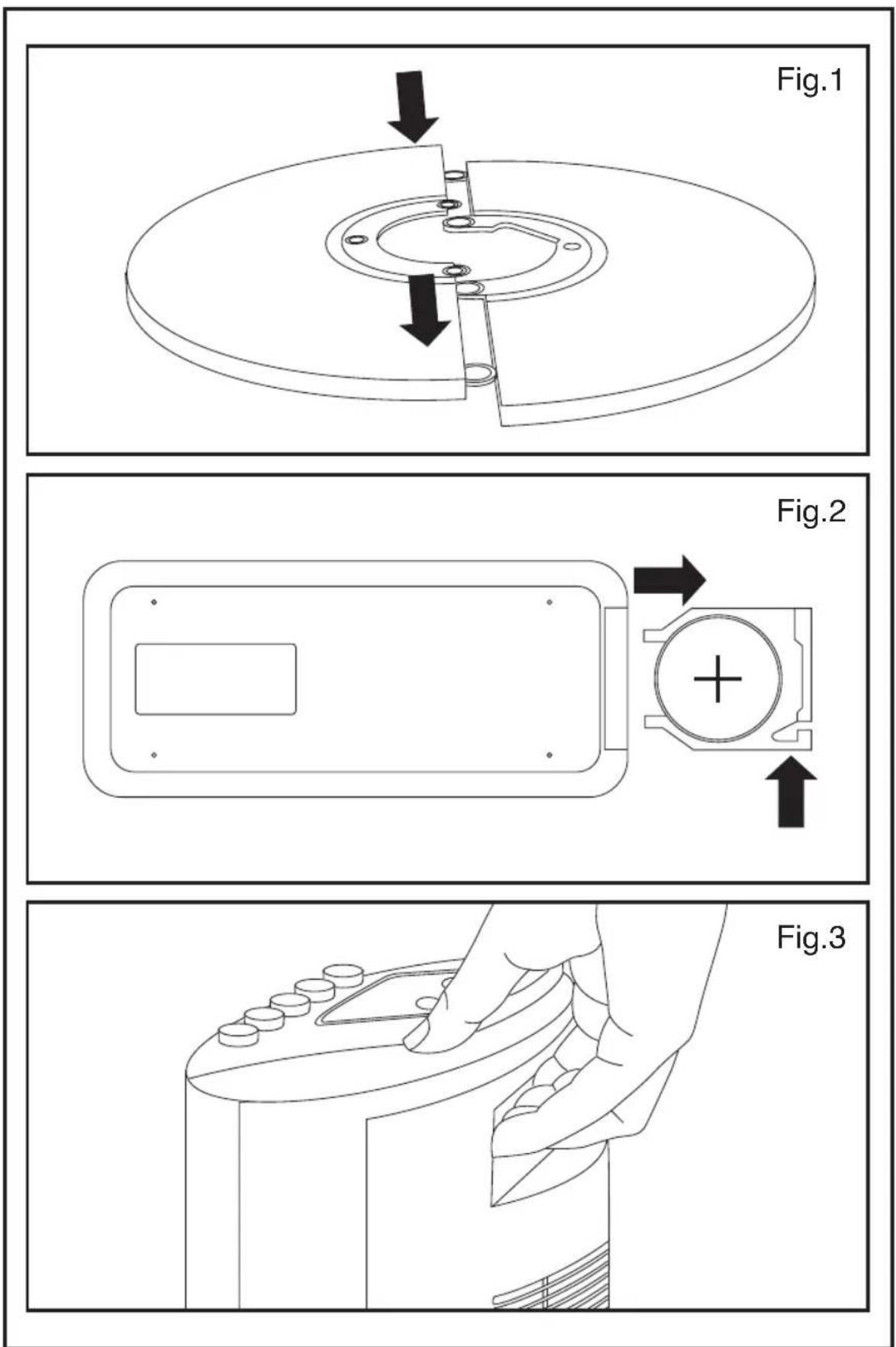
Español
Many thanks for choosing to purchase a TAURUS brand product.
Thanks to its technology, design and operation and the fact that it exceeds the strictest quality standards, a fully satisfactory use and long product life can be assured.
Description
A On/off button
B Oscillation control button
C Speed selection button
D Air flow selection button
E Timer control button
F Ventilation grille
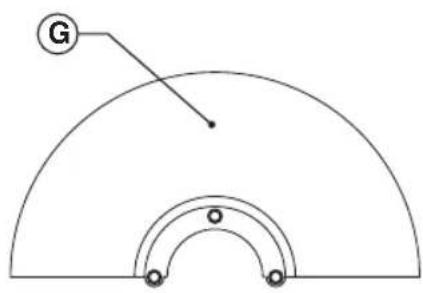
G Front base
H Back base
I Remote control
J LED display
!
Safety advice and warnings
- Read these instructions carefully before switching on the appliance and keep them for future reference. Failure to follow and observe these instructions could lead to an accident.
Working environment:
- Place the appliance on a horizontal, flat, stable surface.
Electrical safety:
- Do not use the appliance if the cable or plug is damaged.
- Ensure that the voltage indicated on the rating label matches the mains voltage before plugging in the appliance.
- The appliance's plug must fit into the mains socket properly. Do not alter the plug. Do not use plug adaptors.
- Do not leave the appliance out in the rain or exposed to moisture. If water
gets into the appliance, this will increase the risk of electric shock.
- Do not use the appliance if it has fallen on the floor, if there are visible signs of damage or if it has a leak.
- Do not use the appliance with damp hands or feet, or when barefooted.
- Do not force the power cord. Never use the power cord to lift up, carry or unplug the appliance.
the risk of electric shock.
- If using the appliance outdoors, use a suitable cord extension.
- Do not touch the plug with wet hands.
Personal safety:
- Do not touch any of the appliance's moving parts while it is operating.
- Do not use the appliance with wet feet.
Use and care:
- Do not use the appliance if the on/off switch does not work.
- Do not move the appliance while in use.
- Disconnect the appliance from the mains when not in use and before undertaking any cleaning task.
- This appliance is for household use only, not professional, industrial use.
- This appliance is only for domestic use, not for industrial or professional use. It is not intended to be used by guests in hospitality environments such as bed and breakfast, hotels, motels, and other types of residential environments, even in farm houses, areas of the kitchen staff in shops, offices and
other work environments.
- This appliance can be used by people unused to its handling, disabled people or children if they have been given supervision or instruction concerning use of the appliance in a safe way and understand the hazards involved.
- Cleaning and user maintenance shall not be made by children unless they are supervised
- This appliance is not a toy. Children should be supervised to ensure that they do not play with the appliance.
- This appliance should be stored out of reach of children and/or the disabled.
- Never leave the appliance connected and unattended if is not in use. This saves energy and prolongs the life of the appliance.
- Do not use the appliance with pets or animals.
- Do not use the appliance to dry textiles of any kind.
- Any misuse or failure to follow the instructions for use renders the guarantee and the manufacturer's liability null and void.
Installation
- The appliance should be used with its base fitted.
Assembling the base:
- To fix the base into the appliance, place the appliance face down.
- Fix the base using the screws provided (Fig 1).
- Stand the appliance up again so as to check that the base works properly.
Assembling the battery/s
- Remove the cover of the battery compartment.
- Check that the plastic covering that protects the battery has been removed (some batteries are
sold with a protective covering)
- Put the battery in its compartment, respecting the polarity (Fig.2).
- Replace the cover of the battery compartment.
#
Instructions for use
Use:
- Unroll the cable completely before plugging it in.
- Connect the appliance to the mains.
- Guide the appliance to direct the flow of air in the desired direction.
- Turn the appliance on, by using the on/off button
- Select the desired speed.
- To avoid a fierce start up of the fan, it is advisable to start off from the lowest speed position and, once the fan has been switched on, progressively increase the speed to the desired position.
Timer function (BABEL):
- The appliance's operating time can be controlled.
- To program the operating time simply select it using the (C) knob.
Timer function (BABEL RC):
- The appliance's operating time can be controlled.
- To program the operating time simply select it using the (E) control button.
- The fan is equipped with a timer that allows you to set its length of operation from 0,5h to 7,5h.
Oscillation function:
- The oscillation function makes it possible to direct the flow from the apparatus so that it automatically alternates over a range of 70^
- To activate this function, press the (B) button
- To deactivate this function, follow the procedure for switching it on in reverse.
Using the air flow options:
- Choose the desired air flow option by pressing the air flow selection button (D)
NM – Normal flow, continuous air flow
NT – Natural flow, soft air flow
SL – Sleeping, intermittent air flow
Once you have finished using the appliance:
- Stop the appliance, selecting position 0 on the selector control.
- Unplug the appliance from the mains.
Carry handle/s:
- This appliance has a handle on the upper part of the body, which facilitates comfortable transportation (Fig. 3).

Cleaning
- Disconnect the appliance from the mains and allow it to cool before undertaking any cleaning task.
- Clean the equipment with a damp cloth with a few drops of washing-up liquid and then dry.
- Do not use solvents, or products with an acid or base pH such as bleach, or abrasive products, for cleaning the appliance.
- Do not let water or any other liquid get into the air vents to avoid damage to the inner parts of the appliance.
- Never submerge the appliance in water or any other liquid or place it under running water.

Anomalies and repair
- Take the appliance to an authorised technical support service if product is damaged or other problems arise. Do not attempt to disassemble or repair the appliance yourself as this may be dangerous.
- In case of breakdown call the customer service telephone number indicated in the guarantee sheet. Do not attempt to disassemble or repair the appliance yourself as this may be dangerous.
- If the connection to the mains has been damaged, it must be replaced and you should proceed as you would in the case of damage.
Ecology and recyclability of the product
- The materials of which the packaging of this appliance consists are included in a collection, classification and recycling system. Should you wish to dispose of them, use the appropriate public recycling bins for each type of material.
- The product does not contain concentrations of substances that could be considered harmful to the environment.

This symbol means that in case you wish to dispose of the product once its working life has ended, take it to an authorised waste agent for the selective collection of Waste from Electric and
Electronic Equipment (WEEE).
The following information details the features related to ecodesign:
| BABEL / BABEL RC | |
| Maximum fan flow rate(F) 19.45 m3/min | |
| Fan power input (P) 33.2 W | |
| Serving Value (SV) (according to the IEC 60879) | 0.59 (m3/min)/W |
| Standby power consumption (PSB) | 0.20 W |
| Fan sound power level (LWA) 58.9 dB(A) | |
| Maximum air velocity (c) 2.68 m/sec | |
This appliance complies with Directive 2014/35/EC on Low Voltage, Directive 2014/30/EC on Electromagnetic Compatibility, Directive 2011/65/EU on the restrictions of the use of certain hazardous substances in electrical and electronic equipment and Directive 2009/125/EC on the ecodesign requirements for energy-related products.
Français
Fonction minuterie (BABEL RC):
The provided image is a graphic design and does not contain any chart or data points that can be extracted and converted into a markdown table.
Почистване


- Español
- Description
- !
- Safety advice and warnings
- Working environment:
- Electrical safety:
- Personal safety:
- Use and care:
- Installation
- Assembling the base:
- Assembling the battery/s
- #
- Instructions for use
- Use:
- Timer function (BABEL):
- Timer function (BABEL RC):
- Oscillation function:
- Using the air flow options:
- Once you have finished using the appliance:
- Carry handle/s:
- Cleaning
- Anomalies and repair
- Ecology and recyclability of the product
- Français
- Fonction minuterie (BABEL RC):
- The provided image is a graphic design and does not contain any chart or data points that can be extracted and converted into a markdown table.
- Почистване
Brand : TAURUS
Model : Babel RC
Category : Fan