
SFC 22-A - Drill HILTI - Free user manual and instructions
Find the device manual for free SFC 22-A HILTI in PDF.


| Product type | Cordless drill/driver |
| Brand | Hilti |
| Model | SFC 22-A |
| Battery voltage | 22 V (Li-Ion) |
| Battery capacity | 2.6 Ah |
| No-load speed (1st gear) | 0 - 400 rpm |
| No-load speed (2nd gear) | 0 - 1,500 rpm |
| Max torque | 50 Nm |
| Chuck | Self-tightening chuck 1.5 - 13 mm |
| Max drilling diameter (wood) | 30 mm |
| Max drilling diameter (metal) | 13 mm |
| Max drilling diameter (concrete) | 10 mm |
| Weight (without battery) | 1.2 kg |
| Dimensions (L x H x D) | 220 x 210 x 50 mm |
| Power supply | 22 V Li-Ion battery |
| Main functions | Drilling, screwing, hammer |
| Maintenance and cleaning | Clean with a dry cloth; do not use water |
| Safety | Wear safety goggles; disconnect battery before changing accessories |
| Spare parts | Battery, charger, chuck |
| Repairability | Parts available via Hilti service |
| General information | Professional drill/driver with LED light |
Frequently Asked Questions - SFC 22-A HILTI
User questions about SFC 22-A HILTI
0 question about this device. Answer the ones you know or ask your own.
Ask a new question about this device
Download the instructions for your Drill in PDF format for free! Find your manual SFC 22-A - HILTI and take your electronic device back in hand. On this page are published all the documents necessary for the use of your device. SFC 22-A by HILTI.
USER MANUAL SFC 22-A HILTI

Original operating instructions
1 Information about the documentation
1.1 About this documentation
- Read this documentation before initial operation or use. This is a prerequisite for safe, trouble-free handling and use of the product.
- Observe the safety instructions and warnings in this documentation and on the product.
- Always keep the operating instructions with the product and make sure that the operating instructions are with the product when it is given to other persons.
1.2 Explanation of symbols used
1.2.1 Warnings
Warnings alert persons to hazards that occur when handling or using the product. The following signal words are used:

DANGER
DANGER!
- Draws attention to imminent danger that will lead to serious personal injury or fatality.

WARNING
WARNING!
- Draws attention to a potential threat of danger that can lead to serious injury or fatality.

CAUTION
CAUTION!
- Draws attention to a potentially dangerous situation that could lead to slight personal injury or damage to the equipment or other property.
1.2.2 Symbols in the documentation
The following symbols are used in this document:

Read the operating instructions before use.

Instructions for use and other useful information

Dealing with recyclable materials

Do not dispose of electric equipment and batteries as household waste
1.2.3 Symbols in the illustrations
The following symbols are used in illustrations:
| 2 | These numbers refer to the corresponding illustrations found at the beginning of these operating instructions |
| 3 | The numbering reflects the sequence of operations shown in the illustrations and may deviate from the steps described in the text |
| 11 | Item reference numbers are used in theoverview illustrationsand refer to the numbers used in theproduct overview section |
| 💡! | This symbol is intended to draw special attention to certain points when handling the product. |
1.3 Product-dependent symbols
1.3.1 Symbols on the product
The following symbols are used on the product:
| [WBXK] | Drilling without hammer action |
 | Revolutions per minute |
 | Rated speed under no load |
 | Direct current (DC) |
 | Li-ion battery |
 | Hilti Li-ion battery type series used. Observe the information given in the section headed In-tended use. |
 | The product supports wireless data transmission compatible with iOS and Android platforms |

Never use the battery as a striking tool.

Do not drop the battery. Never use a battery that has suffered an impact or is damaged in any other way.
1.4 Product information

products are designed for professional users and only trained, authorized personnel are permitted to operate, service and maintain the products. This personnel must be specifically informed about the possible hazards. The product and its ancillary equipment can present hazards if used incorrectly by untrained personnel or if used not in accordance with the intended use.
The type designation and serial number are printed on the rating plate.
Write down the serial number in the table below. You will be required to state the product details when contacting Hilti Service or your local Hilti organization to inquire about the product. Product information → page 12
Product information
| Cordless drill / driver: SFC 22-A | SFC 14-A |
| Generation: 01 | |
| Serial no.: |
1.5 Declaration of conformity
We declare, on our sole responsibility, that the product described here complies with the applicable directives and standards. A copy of the declaration of conformity can be found at the end of this documentation.
The technical documentation is filed here:
Hilti Entwicklungsgesellschaft mbH | Tool Certification | Hiltistrasse 6 | 86916 Kaufering, Germany
2 Safety
2.1 General power tool safety warnings

WARNING
Read all safety warnings and all instructions. Failure to follow the warnings and instructions may result in electric shock, fire and/or serious injury.
Save all warnings and instructions for future reference.
Work area safety
- Keep work area clean and well lit. Cluttered or dark areas invite accidents.
- Do not operate power tools in explosive atmospheres, such as in the presence of flammable liquids, gases or dust. Power tools create sparks which may ignite the dust or fumes.
- Keep children and bystanders away while operating a power tool. Distractions can cause you to lose control.
Electrical safety
- Avoid body contact with earthed or grounded surfaces, such as pipes, radiators, ranges and refrigerators. There is an increased risk of electric shock if your body is earthed or grounded.
- Do not expose power tools to rain or wet conditions. Water entering a power tool will increase the risk of electric shock.
Personal safety
Stay alert, watch what you are doing and use common sense when operating a power tool. Do not use a power tool while you are tired or under the influence of drugs, alcohol or medication. A moment of inattention while operating power tools may result in serious personal injury.
▶ Use personal protective equipment. Always wear eye protection. Protective equipment such as dust mask, non-skid safety shoes, hard hat, or hearing protection used for appropriate conditions will reduce personal injuries.
▶ Prevent unintentional starting. Ensure the switch is in the off-position before connecting to battery pack, picking up or carrying the tool. Carrying power tools with your finger on the switch or energising power tools that have the switch on invites accidents.
Remove any adjusting key or wrench before turning the power tool on. A wrench or a key left attached to a rotating part of the power tool may result in personal injury.
Do not overreach. Keep proper footing and balance at all times. This enables better control of the power tool in unexpected situations.
- Dress properly. Do not wear loose clothing or jewellery. Keep your hair, clothing and gloves away from moving parts. Loose clothes, jewellery or long hair can be caught in moving parts.
If devices are provided for the connection of dust extraction and collection facilities, ensure these are connected and properly used. Use of dust collection can reduce dust-related hazards.
Power tool use and care
- Do not force the power tool. Use the correct power tool for your application. The correct power tool will do the job better and safer at the rate for which it was designed.
Do not use the power tool if the switch does not turn it on and off. Any power tool that cannot be controlled with the switch is dangerous and must be repaired. - Disconnect the battery pack from the power tool before making any adjustments, changing accessories, or storing power tools. Such preventive safety measures reduce the risk of starting the power tool accidentally.
- Store idle power tools out of the reach of children and do not allow persons unfamiliar with the power tool or these instructions to operate the power tool. Power tools are dangerous in the hands of untrained users.
- Maintain power tools. Check for misalignment or binding of moving parts, breakage of parts and any other condition that may affect the power tool's operation. If damaged, have the power tool repaired before use. Many accidents are caused by poorly maintained power tools.
- Keep cutting tools sharp and clean. Properly maintained cutting tools with sharp cutting edges are less likely to bind and are easier to control.
▶ Use the power tool, accessories and tool bits etc. in accordance with these instructions, taking into account the working conditions and the work to be performed. Use of the power tool for operations different from those intended could result in a hazardous situation.
Battery tool use and care
▶ Recharge only with the charger specified by the manufacturer. A charger that is suitable for one type of battery pack may create a risk of fire when used with another battery pack.
▶ Use power tools only with specifically designated battery packs. Use of any other battery packs may create a risk of injury and fire.
- When battery pack is not in use, keep it away from other metal objects, like paper clips, coins, keys, nails, screws or other small metal objects, that can make a connection from one terminal to another. Shorting the battery terminals together may cause burns or a fire.
▶ Under abusive conditions, liquid may be ejected from the battery; avoid contact. If contact accidentally occurs, flush with water. If liquid contacts eyes, additionally seek medical help. Liquid ejected from the battery may cause irritation or burns.
Service
▶ Have your power tool serviced by a qualified repair person using only identical replacement parts. This will ensure that the safety of the power tool is maintained.
2.2 Drill safety warnings
▶ Use auxiliary handle(s), if supplied with the tool. Loss of control can cause personal injury.
- Hold power tool by insulated gripping surfaces, when performing an operation where the cutting accessory may contact hidden wiring. Cutting accessory contacting a "live" wire may make exposed metal parts of the power tool "live" and could give the operator an electric shock.
2.3 Additional safety precautions for screwdrivers
Personal safety
▶ Use the product only when it is in perfect working order.
▶ Never tamper with or modify the tool in any way.
▶ Use the auxiliary grips supplied with the power tool. Loss of control can cause personal injury.
▶ Always hold the tool firmly with both hands on the grips provided. Keep the grips clean and dry.
- Do not touch rotating parts - risk of injury!
- Wear suitable protective glasses, a hard hat, ear protection, protective gloves and light respiratory protection while using the power tool.
HILTI
- Wear protective gloves also when changing the tool. Touching the accessory tool can result in cuts and burns.
▶ Wear eye protection. Flying fragments can injure the body and eyes.
Before starting work, check the hazard class of the dust that will be produced when working. Use an industrial vacuum cleaner with an officially approved protection class in compliance with the locally applicable dust protection regulations. Dust from materials such as lead-based paint, certain types of wood and concrete/masonry/stone containing quartz, minerals or metal can be harmful to health.
▶ Make sure that the workplace is well ventilated and, where necessary, wear a respirator appropriate for the type of dust generated. Contact with or inhalation of the dust may cause allergic reactions and/or respiratory or other diseases among operators or bystanders. Certain kinds of dust are classified as carcinogenic such as oak and beech dust, especially in conjunction with additives for wood conditioning (chromate, wood preservative). Only specialists are permitted to handle material containing asbestos.
Take breaks and do physical exercises to improve the blood circulation in your fingers. Exposure to vibration during long periods of work can lead to disorders of the blood vessels and nervous system in the fingers, hands and wrists.
Electrical safety
Before beginning work, check the working area for concealed electric cables or gas and water pipes. External metal parts of the power tool may give you an electric shock if you damage an electric cable accidentally.
Power tool use and care
- Immediately switch off the power tool if the accessory tool jams. The power tool might twist off-line.
- Wait until the power tool stops completely before you lay it down.
2.4 Battery use and care
- Observe the special regulations and instructions applicable to the transport, storage and use of Li-ion batteries.
- Do not expose batteries to high temperatures, direct sunlight or fire.
- Do not disassemble, crush or incinerate batteries and do not subject them to temperatures over 80 °C.
- Do not use or charge batteries that have suffered mechanical impact, have been dropped from a height or show signs of damage. In this case, always contact your Hilti Service.
If the battery is too hot to touch it may be defective. In this case, place the product in a non-flammable location, well away from flammable materials, where it can be kept under observation and allowed to cool down. In this case, always contact your Hilti Service.
3 Description
3.1 Overview 1


① Keyless chuck
② Torque and drilling mode selector ring
③ 2-speed gear selector switch
④ Forward / reverse selector switch with safety lock
⑤ Control switch (with electronic speed control)
⑥ Grip
⑦ Lamp
⑧ Belt hook (optional)
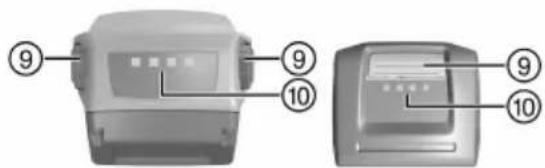
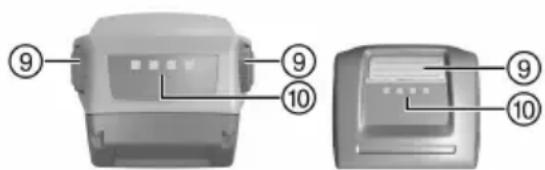
⑨ Release buttons with additional function (charge status display activation)
⑩ Charge state and fault display (Li-ion battery)
3.2 Intended use
The product described is a hand-held cordless drill/driver. It is designed for driving and removing screws and for drilling in steel, wood and plastic.
▶ Use only Hilti Li-ion batteries of the B 14 and B22 series with this product.
▶ Use only Hilti battery chargers of the C4/36 series for charging these batteries.
3.3 Charge status display
The charge status of the Li-ion battery is displayed after pressing the release button.
| Status Meaning | |
| 4 LEDs light up. Charge status: 75 % to 100 % | |
| 3 LEDs light up. Charge status: 50 % to 75 % | |
| 2 LEDs light up. Charge status: 25 % to 50 % | |
| 1 LED lights up. Charge status: 10 % to 25 % | |
| 1 LED blinks. Charge status: < 10 % |

Battery charge status cannot be displayed while the control switch is pressed.
3.4 Items supplied
Drill / driver, operating instructions.
- You can find other system products approved for use with your product at your local Hilti Center or online at: www.hilti.group.
4 Technical data
4.1 Technical data
| SFC 14-A SFC 22-A | ||
| Rated voltage | 14.4 V 21.6 V | |
| Weight in accordance with EPTA procedure 01 | 1.5 kg 2.4 kg | |
| Speed in 1st gear | 0 /min ... 500 /min | 0 /min ... 600 /min |
| Speed in 2nd gear | 0 /min ... 1,700 /min | 0 /min ... 1,800 /min |
| Torque (max.) | 24 Nm | 28 Nm |
| Torque range (15 settings) | 1.5 Nm ... 10 Nm | 1.5 Nm ... 10 Nm |
4.2 Battery
| Battery operating voltage | 14.4 V |
| Ambient temperature for operation | -17 °C ... 60 °C |
| Storage temperature | -20 °C ... 40 °C |
| Battery charging starting temperature | -10 °C ... 45 °C |
4.3 Battery
| Battery operating voltage | 21.6 V |
| Ambient temperature for operation | -17 °C ... 60 °C |
| Storage temperature | -20 °C ... 40 °C |
| Battery charging starting temperature | -10 °C ... 45 °C |
4.4 Noise information and vibration values in accordance with EN 60745
The sound pressure and vibration values given in these instructions were measured in accordance with a standardized test and can be used to compare one power tool with another. They can also be used for a preliminary assessment of exposure. The data given represents the main applications of the power tool. However, if the power tool is used for different applications, with different accessory tools, or is poorly maintained, the data can vary. This can significantly increase exposure over the total working period. An accurate estimation of exposure should also take into account the times when the tool is switched off, or when it is running but not actually being used for a job. This can significantly reduce exposure over the total working period. Identify additional safety measures to protect the operator from the effects of noise and/or vibration, for example: Maintaining the power tool and accessory tools, keeping the hands warm, organization of work patterns.
Noise emission values
| SFC 14-A SFC 22-A | ||
| Emission sound pressure level ( L_pA ) | 69 dB(A) 69 dB(A) | |
| Uncertainty for the sound pressure level ( K_pA ) | 3 dB(A) 3 dB(A) | |
| Sound (power) level | 80 dB(A) 80 dB(A) | |
| Uncertainty for the sound power level ( K_WA ) | 3 dB(A) 3 dB(A) |
Total vibration
| SFC 14-A SFC 22-A | ||
| Vibration emission value for screwdriving ( a_h ) | < 2 m/s ^2 < 2 m/s ^2 | |
| Uncertainty for screwdriving (K) | 1.5 m/s ^2 1.5 m/s ^2 | |
| Drilling in metal ( a_h,D ) | 2.67 m/s ^2 2.67 m/s ^2 | |
| Uncertainty for drilling in metal (K) | 1.5 m/s ^2 1.5 m/s ^2 |
5 Preparations at the workplace

CAUTION
Risk of injury by inadvertent starting!
Before inserting the battery, make sure that the product is switched off.
Remove the battery before making any adjustments to the power tool or before changing accessories.
Observe the safety instructions and warnings in this documentation and on the product.
5.1 Charging the battery
- Before charging the battery, read the operating instructions for the charger.
- Make sure that the contacts on the battery and the contacts on the charger are clean and dry.
- Use an approved charger to charge the battery.
5.2 Inserting the battery

CAUTION
Risk of injury by short circuit or falling battery!
Before inserting the battery, make sure that the contacts on the battery and the contacts on the product are free of foreign matter.
▶ Make sure that the battery always engages correctly.
- Charge the battery fully before using it for the first time.
- Push the battery into the battery holder until it engages with an audible click.
- Check that the battery is seated securely.
5.3 Removing the battery
- Press the battery release buttons.
- Remove the battery from the tool.
5.4 Fitting the belt hook (optional)2

WARNING
Risk of injury. A falling power tool may present a risk of injury to yourself and others.
▶ Check that the belt hook is fitted securely before beginning work.

The belt hook allows the power tool to be attached to a belt worn by the operator. The belt hook can be fitted to allow attachment on the left or right side of the body.
▶ Fit the belt hook.
5.5 Fitting the accessory tool
- Set the forward/reverse switch to the middle position or remove the battery from the power tool.
- Check that the connection end of the accessory tool is clean. Clean the connection end if necessary.
- Open the keyless chuck.
- Insert the accessory tool into the keyless chuck and then turn the chuck firmly by hand until tight and several clicks are heard.
- Check that the accessory tool is held securely.
6 Operation
Observe the safety instructions and warnings in this documentation and on the product.
6.1 Selecting the gear
▶ Select the gear.
6.2 Setting forward or reverse rotation 4

An interlock prevents switching while the motor is running.
The control switch is locked when the forward/reverse switch is in the middle position (safety lock).
- Set the forward/reverse switch to the desired direction of rotation.
6.3 Switching on
▶ Press the control switch.

Speed can be controlled steplessly right up to maximum by varying how far the control switch is pressed in.
6.4 Screwdriving
- Set the torque and operating mode selector ring to the required torque.
- Set the forward/reverse switch to the desired direction of rotation.
6.5 Drilling
- Set the torque and operating mode selector ring to the symbol.
- Set the forward/reverse switch to the "forward" position.
6.6 Switching off
▶ Release the control switch.
6.7 Removing the accessory tool
- Set the forward/reverse switch to the middle position or remove the battery from the power tool.
-
Open the keyless chuck.
-
Pull the accessory tool out of the keyless chuck.
7 Care and maintenance

WARNING
Risk of injury with battery inserted!
▶ Always remove the battery before carrying out care and maintenance tasks!
Care and maintenance of the tool
- Carefully remove stubborn dirt.
- Clean the air vents carefully with a dry brush.
- Use only a slightly damp cloth to clean the casing. Do not use cleaning agents containing silicone as these can attack the plastic parts.
Care of the Li-ion batteries
- Keep the battery free from oil and grease.
- Use only a slightly damp cloth to clean the casing. Do not use cleaning agents containing silicone as these may attack the plastic parts.
- Avoid ingress of moisture.
Maintenance
- Check all visible parts and controls for signs of damage at regular intervals and make sure that they all function correctly.
- Do not operate the product if signs of damage are found or if parts malfunction. Have it repaired immediately by Hilti Service.
• After cleaning and maintenance, fit all guards or protective devices and check that they function correctly.

To help ensure safe and reliable operation, use only genuine Hilti spare parts and consumables. Spare parts, consumables and accessories approved by Hilti for use with the product can be found at your local Hilti Store or online at: www.hilti.group.
8 Transport and storage of cordless tools
Transport

CAUTION
Accidental starting during transport!
▶ Always transport your products with the batteries removed!
▶ Remove the battery.
▶ Never transport batteries in bulk form (loose, unprotected).
▶ Check the tool and batteries for damage before use after long periods of transport.
Storage

CAUTION
Accidental damage caused by defective or leaking batteries!
▶ Always store your products with the batteries removed!
- Store the tool and batteries in a place that is as cool and dry as possible.
▶ Never store batteries in direct sunlight, on heating units or behind a window pane.
- Store the tool and batteries in a place where they cannot be accessed by children or unauthorized persons.
▶ Check the tool and batteries for damage before use after long periods of storage.
9 Troubleshooting
9.1 Troubleshooting
If the trouble you are experiencing is not listed in this table or you are unable to remedy the problem by yourself, please contact Hilti Service.
| Trouble or fault | Possible cause | Action to be taken |
| The power tool does not work. | The battery is not fully inserted. | ► Push the battery in until it engages with an audible double click. |
| Low battery. ► Change the battery and charge the empty battery. | ||
| Electrical fault. ► Remove the battery from the tool and contact Hilti Service. | ||
| The power tool does not work and one LED flashes. | low battery. ► Change the battery and charge the empty battery. | |
| The battery is too hot or too cold. ► Bring the battery to the recommended operating temperature. | ||
| The on/off button cannot be pressed, i.e. the button is locked. | The forward/reverse selector switch is in the middle position. | ► Push the forward/reverse switch to the left or right. |
| LED 1 flashes Low battery. | ► Change the battery and charge the empty battery. | |
| The tool is overloaded (application limits exceeded). | ► Pay attention to the power and performance rating of the product before using it, i.e check its suitability for the job on hand. See the “Technical data” section. | |
| The battery runs down more quickly than usual. | Very low ambient temperature. | ► Allow the battery to warm up slowly to room temperature. |
| The battery does not engage with an audible double click. | The retaining lugs on the battery are dirty. | ► Clean the retaining lugs and push the battery in until it engages. Contact Hilti Service if the problem persists. |
10 Disposal
Most of the materials from which Hilti tools and appliances are manufactured can be recycled. The materials must be correctly separated before they can be recycled. In many countries, your old tools, machines or appliances can be returned to Hilti for recycling. Ask Hilti Service or your Hilti representative for further information.
Battery disposal
Improper disposal of batteries can result in health hazards from leaking gases or fluids.
▶ DO NOT send batteries through the mail!
▶ Cover the terminals with a non-conductive material (such as electrical tape) to prevent short circuiting.
- Dispose of your battery out of the reach of children.
- Dispose of the battery at your Hilti Store, or consult your local governmental garbage disposal or public health and safety resources for disposal instructions.

- Do not dispose of power tools, electronic equipment or batteries as household waste!
11 China RoHS (guideline on restriction of the use of dangerous substances)
The following links take you to the table of dangerous substances: qr.hilti.com/r4793 (SFC 14-A) and qr.hilti.com/r4833 (SFC 22-A).
You will find a link to the RoHS table, in the form of a QR code, at the end of this document.
12 Manufacturer's warranty
▶ Please contact your local Hilti representative if you have questions about the warranty conditions.
▶ Kies de versnelling.
6.2 Rechts-/linksloop instellen

Perçage sans percussion
/min
Tours par minute

▶ Solte o interruptor on/off.


① Brzostezna glava
② Prsten za podešavanje zakretnog momenta i bušenja
③ Dvostupanjska sklopka
④ Preklopnik za okretanje na desno/lijevo s blokadom uključivanja
⑤ Upravljačka sklopka (s elektroničkom regulacijom broja okretaja)
⑥ Rukohvat
⑦ Svjetiljka
⑧ Pojasna kuka (opcionalno)
⑨ Tipke za deblokadu s dodatnom funkcijom aktiviranja indikatora stanja napunjenosti
⑩ Indikator stanja napunjenosti i pogrešaka (litij-ionska akumulatorska baterija)

Head of Quality and Process Management BA Electric Tools & Accessories
Executive Vice President BU Electric Tools & Accessories
ROHS
SFC 14-A

ROHS
SFC 22-A


Hilti Corporation
LI-9494 Schaan
Tel.:+423 234 21 11
Fax:+423 234 29 65
www.hilti.group


- Original operating instructions
- Information about the documentation
- About this documentation
- Explanation of symbols used
- Warnings
- DANGER
- DANGER!
- WARNING
- WARNING!
- CAUTION
- CAUTION!
- Symbols in the documentation
- Symbols in the illustrations
- Product-dependent symbols
- Symbols on the product
- Product information
- Declaration of conformity
- Safety
- General power tool safety warnings
- Work area safety
- Electrical safety
- Personal safety
- Power tool use and care
- Battery tool use and care
- Service
- Drill safety warnings
- Additional safety precautions for screwdrivers
- HILTI
- Battery use and care
- Description
- Overview 1
- Intended use
- Charge status display
- Items supplied
- Technical data
- Noise information and vibration values in accordance with EN 60745
- Preparations at the workplace
- Risk of injury by inadvertent starting!
- Charging the battery
- Inserting the battery
- Risk of injury by short circuit or falling battery!
- Removing the battery
- Fitting the belt hook (optional)2
- Fitting the accessory tool
- Operation
- Selecting the gear
- Setting forward or reverse rotation 4
- Switching on
- Screwdriving
- Drilling
- Switching off
- Removing the accessory tool
- Care and maintenance
- Risk of injury with battery inserted!
- Care and maintenance of the tool
- Care of the Li-ion batteries
- Maintenance
- Transport and storage of cordless tools
- Transport
- Accidental starting during transport!
- Storage
- Accidental damage caused by defective or leaking batteries!
- Troubleshooting
- Troubleshooting
- Disposal
- Battery disposal
- China RoHS (guideline on restriction of the use of dangerous substances)
- Manufacturer's warranty
- Rechts-/linksloop instellen
Brand : HILTI
Model : SFC 22-A
Category : Drill