
SPD5220CC - External hard drive PHILIPS - Free user manual and instructions
Find the device manual for free SPD5220CC PHILIPS in PDF.


| Product Type | External Hard Drive |
| Brand | Philips |
| Model | SPD5220CC |
| Storage Capacity | 500 GB (typical) |
| Interface | USB 3.0 (backward compatible) |
| Dimensions (L x W x H) | 121 x 78 x 14 mm |
| Weight | 158 g |
| Power Supply | USB bus powered |
| Operating Temperature | 5°C to 40°C |
| Storage Temperature | -20°C to 60°C |
| Relative Humidity | 20% to 80% (non-condensing) |
| Compatible Systems | Windows, macOS, Linux |
| Data Transfer Speed | Up to 5 Gbps |
| Form Factor | Portable (2.5-inch) |
| LED Indicator | Yes (power/activity) |
| Security | No built-in encryption |
| Warranty | 2 years limited |
| What's in the Box | External hard drive, USB cable, quick start guide |
| Maintenance | Keep away from water, dust, and extreme temperatures. Do not disassemble. |
| Repairability | Not user-serviceable; contact Philips support. |
Frequently Asked Questions - SPD5220CC PHILIPS
User questions about SPD5220CC PHILIPS
0 question about this device. Answer the ones you know or ask your own.
Ask a new question about this device
Download the instructions for your External hard drive in PDF format for free! Find your manual SPD5220CC - PHILIPS and take your electronic device back in hand. On this page are published all the documents necessary for the use of your device. SPD5220CC by PHILIPS.
USER MANUAL SPD5220CC PHILIPS
natural_image
Exterior view of a black hard drive with USB cable and power connector (no text or symbols visible)4 What's in the box?
5 How to connect this external hard disk to your computer?
5 How to safely disconnect?
6 How to use the One-Click Back-Up button?
6 How to install for Mac
7 Warranty, Environment and Safety
8 Specifications
Important note
To start using the One-Click Back-Up button, first activate the Carry it Easy software (once only) by clicking on the CarryitEasy.exe file located on your hard disk. For instructions and more information, see page 6.
When the computer does not recognize the hard disk (some computers provide insufficient bus power), we advise you to use the Y-cable supplied together with this product. For instructions and more information, see page 5.

natural_image
Line drawing of a Philips hardcover case (no text or symbols on the cover itself)A: External hard disk

natural_image
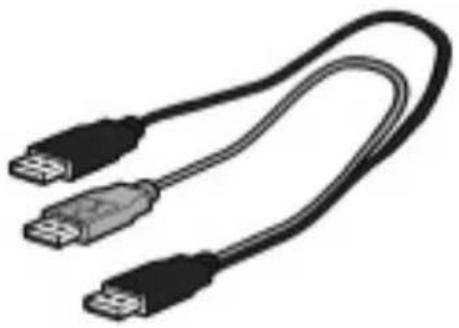
Illustration of a black USB cable with two connectors (no text or symbols)B:Y-cable
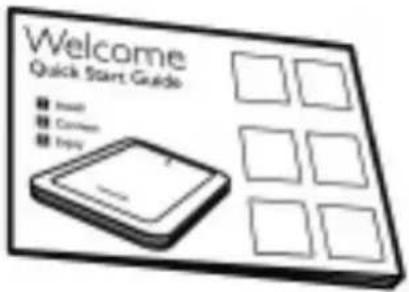
C: Quick Start Guide
How to connect this external hard disk on your system?
EN
natural_image
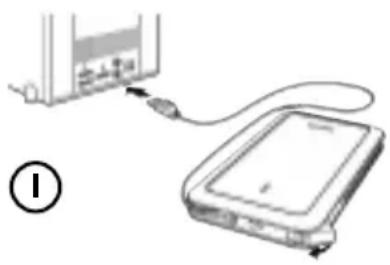
Diagram showing a device connected via cable to a storage unit (no text or symbols visible)Plug the wrap around USB cable into an empty USB port of your computer.
A drive icon, Philips External Hard Disk, appears in Windows Explorer. (The computer sometimes needs to be restarted, before you can use the new hardware).

natural_image
Diagram showing connections between a device and a server, with no visible text or symbolsWhen the computer does not recognize the hard disk (some computers provide insufficient bus power), we advise you to use the Y-cable supplied together with this product. Connect the Y-cable to the USB cable of the hard disk and plug in the 2 connectors in the free USB ports of your computer. The black connector is for data transfer and power, the gray connector is for additional power only.
How to safely disconnect?
I Double-click the Safely Remove Hardware icon in the system tray in the lower right part of the screen.
2 In the window that appears, select the name of the device that is to be removed, then click the Stop button.
3 When the Stop a hardware device screen appears, make sure the correct information is displayed, and then click the OK button.
4 When the message Safe to remove hardware appears, remove the drive from the computer's USB port.
For windows only, this functionality doesn't work with Mac computers
The One-Click Back-Up button allows you to instantly synchronize or back-up your files with the CoSoSys Carry it Easy software. To launch the software, double-click on the CarryitEasy.exe file on the hard disk in your Windows explorer.
Follow the instructions on your screen to get started.
See the Carry it Easy manual in the folder manuals on your hard disk for more instructions and more information.
How to install for Mac
The hard disk is preconfigured for Windows 2000, Windows XP and Windows Vista, with a NTFS format. For Mac, the hard disk needs to be formatted to FAT32.
How to find warranty information?
Browse to the Philips warranty folder on the hard disk or look on
www.philips.com/support
You need Adobe Reader software to open these files. If you don't have Adobe Reader, you can download it for free on www.adobe.com.
The Philips warranty may not apply if damage is caused by accidents, shock, misuse or neglect.

Be responsible Respect copyrights
'The making of unauthorized copies of copy-protected material including computer programs, files, broadcasts and sound recordings, may be an infringement of copyrights and constitute a criminal offence. This equipment should not be used for such purposes.'
WEEE mark: "Information to the Consumer".

Disposal of your old product
Your product is designed and manufactured with high quality materials and components, which can be recycled and reused. Please inform yourself about the local separate collection system for electrical and electronic products, including those marked by the crossed-out wheel bin symbol. Please act according to your local rules and do not dispose of your old products with your normal household waste.
WARNING
Plastic bags can be dangerous
To avoid danger of suffocation, keep this bag away from babies and small children.
Although this product has been designed with utmost care for long-lasting performance. Philips does advise you to handle electronics with good care:
Avoid contact with water, exposure to extreme forces.
Please make sure you place the device in a well-ventilated environment, to ensure longest possible lifetime and optimal performance.
Specifications
Technical Specifications:
Interface Hi-Speed USB 2.0
Transfer speed 480 Mb/s
Rotational speed 5400 rpm
Cache memory 8 MB
System requirements USB1.1 (USB 2.0 for max. transfer speed)
Windows 2000, Windows XP, Windows Vista
For interactive help and support:
www.philips.com/support
For software updates and frequently asked questions:
www.philips.com/storageupdates
natural_image
Line drawing of a Philips hardcover case (no text or symbols on the cover itself)A: Ekstern harddisk
natural_image
Coiled black USB cable with two connectors (no text or symbols visible)B:Y-kabel

natural_image
Diagram showing a device connected via cable to a storage unit (no text or symbols visible)natural_image
Diagram showing a device with two cables connected to a power bank, no text or symbols presentwww.philips.com/support
Specifications subject to change without notice.
All dimensions shown are approximate.
All rights reserved.
Reproduction, copying, usage, modifying, hiring, renting, public performance,
transmission and/or broadcasting in whole or part is prohibited without the written consent of Philips Electronics N.V.


Brand : PHILIPS
Model : SPD5220CC
Category : External hard drive