
TV EasyFlex Slim L - Flat screen mount Wentronic - Free user manual and instructions
Find the device manual for free TV EasyFlex Slim L Wentronic in PDF.


| Product type | Wall mount for flat screen |
| Brand | Wentronic |
| Model | TV EasyFlex Slim L |
| VESA compatibility | Up to 400x400 mm |
| Maximum screen size | Up to 75 inches |
| Maximum load | 35 kg |
| Material | High-strength steel |
| Color | Black |
| Distance from wall | 20 mm (ultra-slim profile) |
| Tilt | 0° to -15° (forward/backward tilt) |
| Rotation | No (fixed) |
| Leveling | Adjustable after installation (±2°) |
| Wall fixing | Screws and anchors included for concrete and brick |
| Tools required | Phillips screwdriver, adjustable wrench (not included) |
| Maintenance and cleaning | Wipe with a soft dry cloth. Do not use abrasive products. |
| Safety | Check wall solidity before installation. Use appropriate anchors. |
| Spare parts and repairability | Replacement screws available. Repair not planned by manufacturer. |
| Warranty | 2 years |
| Support weight | 1.5 kg |
Frequently Asked Questions - TV EasyFlex Slim L Wentronic
User questions about TV EasyFlex Slim L Wentronic
0 question about this device. Answer the ones you know or ask your own.
Ask a new question about this device
Download the instructions for your Flat screen mount in PDF format for free! Find your manual TV EasyFlex Slim L - Wentronic and take your electronic device back in hand. On this page are published all the documents necessary for the use of your device. TV EasyFlex Slim L by Wentronic.
USER MANUAL TV EasyFlex Slim L Wentronic
| DE | BETRIEBSANLEITUNG |
| EN | USER'S MANUAL |
| FR | MODE D'EMPLOI |
| IT | ISTRUZIONI PER L'USO |
TV-Wandhalter TV mount TV Support mural Supporto per TV
63494 Goobay TV EasyFlex Slim L

63495 Goobay TV EasyFlex Slim XL
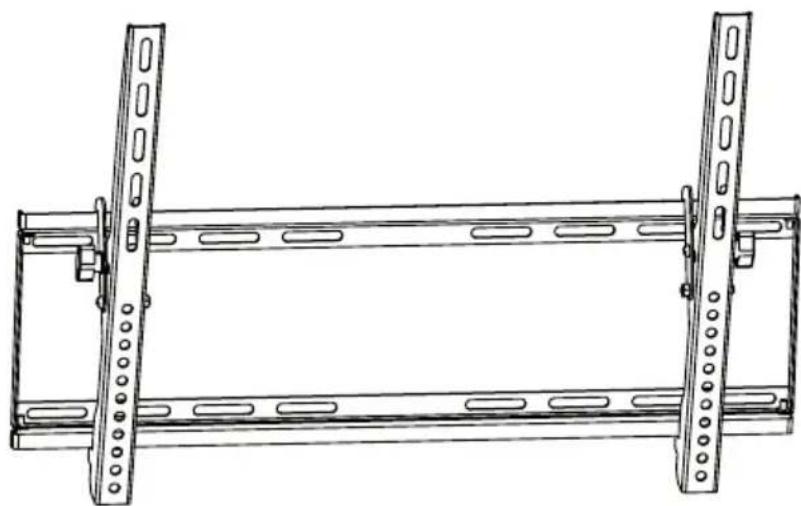

BETRIEBSANLEITUNG 2
USER'S MANUAL 16
MODE D'EMPLOI 30
ISTRUZIONI PER L'USO 44
BETRIEBSANLEITUNG
Inhalt


1 Safety Instructions 17
1.1 General Notes 17
1.2 User Groups 18
1.3 Warning Levels 18
2 Description and Function 19
2.1 Scope of Delivery 19
2.2 Required tools 20
3 Intended Use.... 21
3.1 Use restrictions.... 21
4 Installing 21
4.1 Preparing 21
4.2 Wall mounting 22
4.3 Mounting the flat screen 23
4.3.1 ....Flat screens with flat back.... 23
4.3.2 ......Flat screens with arched back ...... 23
4.4 Attaching and locking the flat screen 24
5 Adjusting the flat screen 25
6 Warranty and Liability 26
7 Maintenance, Care, Storage and Transport 26
8 Troubleshooting 27
9 Specifications.... 27
10 Information for VESA standard 27
11 Disposal Instructions 28
1 Safety Instructions
1.1 General Notes
- Read the including product documentation completely and carefully before use. It is part of the product.
- Attend to the safety instructions in product documentation, on product and accessories, such as on the package.
• Use product, product parts and accessories only in perfect condition. - Keep the product documentation for other potential users and for later requests.
- For questions, defects, mechanical damage, disturbances and other not remediable problems, consult your dealer.
Risk of life by suffocating
Children can suffocate by swallowed or inhaled parts and insulation materials.
Protect small parts and insulation material against unintentionally use.
Risk of injury by tripping and falling
Unfavorable placed or installed products and cable connections can injure persons.
Place, transport and install product, parts and accessories in a safe way.
When working with burdens, secure yourself and the working place, let a second person help you.
Let only a specialist do disassembly, maintenance and repair work.
Risk of injury by cutting
Children can cut themselves on packaging materials.
Protect packaging materials against unintentionally use.
Risk of material damage by improper product combination
Incompatible product combination does not fulfill required functions, can cause quality losses or material damage.
The specifications of all used products must match or be within the specified range.
Risk of injury by inappropriate ambient conditions
Extreme conditions can injure persons.
Attend to live cables or other lines lying behind plaster, and do not damage them!
Do not install the product to places with direct sunlight or bright light. This contributes to eye fatigue.
Risk of injury by moving product parts
Moving product parts can pinch or squeeze limbs.
Do not hold limbs between shear parts during use.
Mind the mobility of the product during use. This may move away from the wall or towards it and swivel sideways.


Risk of self-intervention and misuse
Self-interventions and misuse hide unpredictable risks and cause expiration of warranty.
Do not modify or alter either the product or the accessories!
Risk of material damage by inappropriate ambient conditions
Incorrect ambient conditions can damage things.
Avoid extreme conditions, such as extreme heat, coldness, humidity or direct exposure to the sun, as well as vibrations and mechanical pressure.
Keep enough space around product and to the whole system to ensure proper ventilation and mobility.
The included mounting material is only suitable for mounting on massive stone or concrete walls.
For other wall types use suitable mounting material.
Check the stability of the system periodically after installation.
1.2 User Groups
Caused to different risk levels and hazard potentials some working steps only may be done by trained specialists.
| Working step User Group | |
| Installing, Un-installing, Care, Storage, Transport, Disposal | Consumers and users with basical mechanical knowledge can do this work.>> Protect children and people with mental and motoral impairments from using the product! |
| Maintenance, Repairing | Trained specialists only>> special safety measures, knowledge and tools are necessary! |
Tab. 10: User Groups
1.3 Warning Levels

Warnings against hazards that will result directly in serious injuries or death in case of non-observance.
Warnings against hazards that may result in serious injuries or death in case of nonobservance.
Warnings against hazards that may result in injuries in case of non-observance.
NOTICE
Warnings against hazards that may result in material damage in case of non-observance.
2 Description and Function
Your wall mount is made for mounting your flat screen at stable, vertical walls. The compact and slim design supports individual, space-saving mounting. It is tiltable but not swivelable.
2.1 Scope of Delivery
| Part Figure Symbol Amount | |||
| Wall mounting | |||
| Wall mount 63494 or Wall mount 63495 |  | A | 1 |
| Wall screw 6.3x55 |  | W-A | 63494: each 4 |
| Concrete anchor |  | W-B | |
| Spacer D6 |  | W-C | 63495: each 6 |
Flat screen mounting
| Adapter bracket 63494 left |  | ||
| or | B | 1 | |
| Adapter bracket 63495 left | 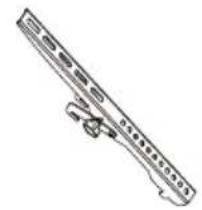 |

| Adapter bracket 63494 right |  | ||
| or | C | 1 | |
| Adapter bracket 63495 right |  | ||
| M5x14 |  | M-A 4 | |
| M6x14 |  | M-B 4 | |
| M8x20 |  | M-C 4 | |
| M6x30 |  | M-D 4 | |
| M8x30 |  | M-E 4 | |
| Washer |  | M-F 4 | |
| TV Spacer | [13CC] | M-G 8 | |
| TV Spacer |  | M-H 4 |
Tab. 11: Scope of Delivery
2.2 Required tools
| Tool Figure | |
| Line tester |  |
| Spirit level |  |
| Pencil |  |
| Phillips screwdriver |  |
| Drilling mashine |  |
| Concrete drill 8x60mm |  |
| Second person |  |
Tab. 12: Required tools
3 Intended Use
This product is made for mounting flat screens with specific screen sizes, weights and mounting points, which are summarized in chapter "Technical data", on a vertical wall. Another use than described in chapter "Description and Function" is not permitted. Neglegting and ignoring these regulations and safety instructions can cause serious accidents, personal injury and material damage. Also refer to chapter "Warranty and Liability".
3.1 Use restrictions

Only use in dry interior rooms.
4 Installing
4.1 Preparing
Checking the completeness and integrity
Check the packing content by comparing it to the scope of delivery regarding completeness and integrity.
Ensuring compatibility
| Warning level Safety instruction | Bid / Ban | |
| Risk of material damage by improper product combination |  | |
 | >> The specifications of all used products must match or be within the specified range. | |
Risk of material damage by improper product combination
Tab. 13: Ensuring compatibility

4.2 Wall mounting
Warning level Safety instruction Bid / Ban

Risk of injury due to inappropriate ambient conditions
Check the wall structure before installing or choose a safe installation place.
Attend to live cables or other lines lying behind plaster, and do not damage them!

Do not install the product to places with direct sunlight or bright light. This contributes to eye fatigue.


Risk of material damage by inappropriate ambient conditions
Keep enough space around product and to the whole system to ensure proper ventilation and mobility.

Tab. 14: Wall mounting

- Before drilling, attend to live cables or other lines lying behind plaster, and do not damage them.
- Use a spirit level to mark the drill holes on the wall.
- Drill the holes with a 10mm concrete drill 60mm deep.
- Plug a concrete anchor (W-B) in each drilling hole.
- Mount the wall mount (A) by using the wall screws (W-A) and washers (W-C).
4.3 Mounting the flat screen
Warning level Safety instruction Bid / Ban

CAUTION
Risk of injury by tripping and falling
Place, transport and install product, parts and aceories in a safe way.

NOTICE
Risk of material damage by improper procedure
Only use moderate force when tightening the screws in order to avoid damaging threads.

NEVER set the screen on the front during installation!
Do not damage the flat screen by too long screws.

Tab. 15: Mounting the flat screen
4.3.1 Flat screens with flat back


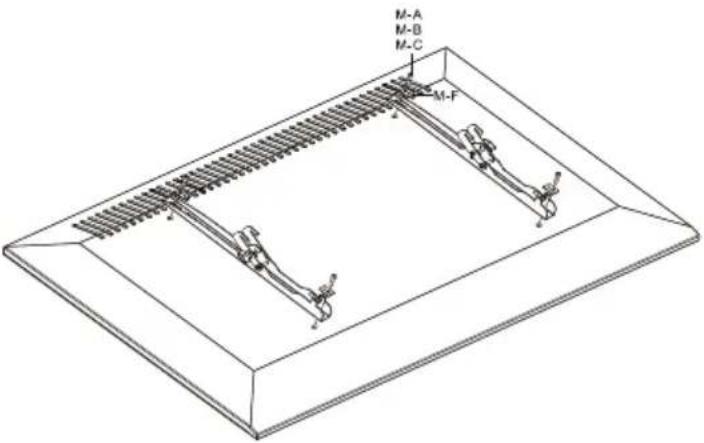
Fig. 9: Flat screens with flat back
- Lean the flat screen vertically on a soft, large surface or a wall and protect it of scratches and overturning.
- Install adapter brackets (B) and (C) with the washers (M-F) and the fitting screws, matching to your flat screen on the top and bottom side as shown.
Make sure that the slots are on the flat screens top side.
4.3.2 Flat screens with arched back


- Apart from the following working step - proceed like shown in chapter 4.3.1.
- Mount the fitting TV spacers (M-G) and/or (M-H) between adapter brackets (B) / (C) and flat screen like shown.
4.4 Attaching and locking the flat screen
Warning level Safety instruction Bid/Ban

CAUTION
Risk of injury by tripping and falling
Place, transport and install product, parts and aceories in a safe way.
When working with burdens, secure yourself and the working place, let a second person help you.
NOTICE
Risk of material damage by inappropriate ambient conditions
Keep enough space around product and to the whole system to ensure proper ventilation and mobility.


Tab. 16: Attaching and locking the flat screen


- Attach the prepared flat screen with adapter brackets (B) and (C) to the wall mount (A) together with a second person.
- Fix the system by the lower screws on both sides.
End of installing. To remove, proceed in reversed order.
5 Adjusting the flat screen
Warning level Safety instruction Bid/Ban
Risk of injury by moving product parts
Do not hold limbs between shear parts during use.
Mind the mobility of the product during use. This may move away from the wall or towards it and swivel sideways.

Tab. 17: Adjusting the flat screen
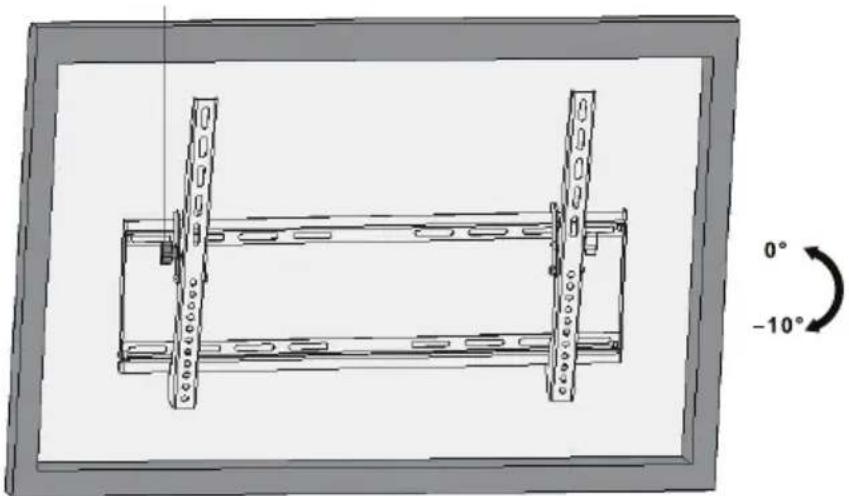
Fig. 12: Adjusting the flat screen
Adjust the flat screen by the side screws vertically as needed.
Power cords can be connected later due to the mobility of the TV wall mount.
6 Warranty and Liability
• The producer grants a 2 years warranty to a new device.
- As the manufacturer has no influence on installation, warranty only applies to the product itself.
- If any fault or damage is detected on your device, please contact your dealer and provide your sales slip or invoice as evidence of the purchase, if necessary. Your dealer will repair the fault either on site, or send the device to the manufacturer. You make the work of our technicians considerably easier, describing possible faults in detail – only then you can be assured that faults, occurring only rarely, will be found and repaired with certainty!
- The manufacturer is not liable for damages to persons or property caused by improper installation, operation or maintenance, not described in the manual.
- Do not alter or modify the product or its accessories.
- Any use other than described in this user's manual is not permitted and causes loss of warranty, loss of guarantee, and non-liability.
- We reserve our right for misprints and changes of the device, packing, or user's manual.
7 Maintenance, Care, Storage and Transport
• The product must be maintained only by professional workshops.
- Protect the angles from dirt and grease them regularly with light machine oil.
- Use a dry and soft cloth to clean your product. Be careful to avoid scratches. Use a slightly moist cloth for heavy stains. Look out for live cables! Do not use any cleaning supplies. This can cause burns to the materials. Avoid liquid entry to the device.
• Make sure no body parts will be pinched in the swivel device, when parts of the device are moved!
- Periodically check, if all attachments and screws are secured, and tighten them again when they are loosened. This may be caused e.g. by frequent movements. Do not overtighten screws.
- Avoid places with high temperatures, humidity, or places which can become wet, also during maintenance, care, storage, and transport.
- Keep the product away from children and store it at dry and dust-proof places!
- Drill holes are still visible after removing the product. After use for a longer time period, a spot may remain on the surface.
- Keep the original packing for transport and to avoid damages.
8 Troubleshooting
| Problem Help | |
| How to test wall quality? | Loads for home use are regulated in various European standards.>> Check wall thickness and material under plaster / wall paper.>> Ask a specialist. |
| Which drill holes must be drilled? | >> Read chapter 4.2. |
| The wall mount is hard to align. | >> Not longer adjustable after locking.>> Release the wall mount and reattach it in optimized position. |
| Other questions | >> Contact your dealer. |
Tab. 18: Troubleshooting
9 Specifications
| Phys. size Specification | Unit | |
| TV diameter | 63494: 23-5563495: 37-70 | “ / Inch |
| VESA | 63494: max. 400x20063495: max. 800x400 | mm |
| Load max. 75 kg | ||
| Tilting angle -10 ° | ||
| Swivel angle | +/-0 | ° |
| Wall distance | 45 | mm |
| Dimensions | 63494: 470 x 270 x 4563495: 864 x 440 x 45 | mm |
| Weight | 63494: 1.7063495: 2.70 | kg |
Tab. 19: Specifications
10 Information for VESA standard
To harmonize attachment options of monitors, TV devices and their stands and wall brackets in a user-friendly manner, VESA (Video Electronic Standard Organization) defined 3 standards for the applications mentioned above. Using the relevant VESA standard specified on your display unit, or in its user's manual, and the specifications in Chapter Specifications in this manual you are able to define the possible points of attachment. Some models allow for an infinitely variable individual attachment (e.g. 300 x 300 mm for Sony TVs).

| VESA Class Hole distance for attachment of monitors |
| MIS-D 75x75 / 100x100mm |
| MIS-E 200x100 / 200x200mm |
| MIS-F 400x200 / 400x400 / 600x200 / 600x400 / 800x400mm |
Tab. 20: Information for VESA standard
11 Disposal Instructions
This product should not be disposed together with domestic waste. Please return your product free of charge at the end of its service life at the producer, the sales outlet, or a public collection point, established for this purpose. Details for disposal are regulated in the relevant federal state law. Potential recyclable materials are fed into the recycling cycle to obtain new raw materials from them. Following materials are collected a local collection points:
- Waste glass, plastic, waste metal, metal sheet, and more.
This type of recycling of waste contributes significantly to the protection of our environment.


BETRIEBSANLEITUNG 2
USER'S MANUAL 16
MODE D'EMPLOI 30
ISTRUZIONI PER L'USO 44
MODE D'EMPLOI
Contenu

Fig. 17: Ajuster l'ecran plat

Fig. 22: Ajuster l'ecran plat
Goobay®
Pillmannstraße 12
38112 Braunschweig
Germany
Made in China.
Hotline: +49 (0180) 5005882


- BETRIEBSANLEITUNG 2
- USER'S MANUAL 16
- MODE D'EMPLOI 30
- ISTRUZIONI PER L'USO 44
- BETRIEBSANLEITUNG
- INHALT
- 1 SAFETY INSTRUCTIONS
- 1.1 GENERAL NOTES
- RISK OF LIFE BY SUFFOCATING
- RISK OF INJURY BY TRIPPING AND FALLING
- RISK OF INJURY BY CUTTING
- RISK OF MATERIAL DAMAGE BY IMPROPER PRODUCT COMBINATION
- RISK OF INJURY BY INAPPROPRIATE AMBIENT CONDITIONS
- RISK OF INJURY BY MOVING PRODUCT PARTS
- RISK OF SELF-INTERVENTION AND MISUSE
- RISK OF MATERIAL DAMAGE BY INAPPROPRIATE AMBIENT CONDITIONS
- 1.2 USER GROUPS
- 1.3 WARNING LEVELS
- NOTICE
- 2 DESCRIPTION AND FUNCTION
- 2.1 SCOPE OF DELIVERY
- FLAT SCREEN MOUNTING
- 2.2 REQUIRED TOOLS
- 3 INTENDED USE
- 3.1 USE RESTRICTIONS
- 4 INSTALLING
- 4.1 PREPARING
- 4.2 WALL MOUNTING
- WARNING LEVEL SAFETY INSTRUCTION BID / BAN
- RISK OF INJURY DUE TO INAPPROPRIATE AMBIENT CONDITIONS
- 4.3 MOUNTING THE FLAT SCREEN
- CAUTION
- RISK OF MATERIAL DAMAGE BY IMPROPER PROCEDURE
- 4.3.1 FLAT SCREENS WITH FLAT BACK
- 4.3.2 FLAT SCREENS WITH ARCHED BACK
- 4.4 ATTACHING AND LOCKING THE FLAT SCREEN
- WARNING LEVEL SAFETY INSTRUCTION BID/BAN
- 5 ADJUSTING THE FLAT SCREEN
- 6 WARRANTY AND LIABILITY
- 7 MAINTENANCE, CARE, STORAGE AND TRANSPORT
- 8 TROUBLESHOOTING
- 9 SPECIFICATIONS
- 10 INFORMATION FOR VESA STANDARD
- 11 DISPOSAL INSTRUCTIONS
- MODE D'EMPLOI
- CONTENU
Brand : Wentronic
Model : TV EasyFlex Slim L
Category : Flat screen mount