ODA 95174 - Motion detector Wentronic - Free user manual and instructions
Find the device manual for free ODA 95174 Wentronic in PDF.


| Product Type | Passive Infrared (PIR) Motion Detector |
| Brand | Wentronic |
| Model | ODA 95174 |
| Dimensions (approx.) | 100 x 60 x 40 mm |
| Weight | 100 g |
| Power Supply | 230 V AC, 50 Hz |
| Maximum Load | 1000 W (incandescent), 300 W (LED) |
| Detection Range | Up to 12 meters |
| Detection Angle | 180 degrees |
| Time Delay Adjustment | 10 seconds to 15 minutes |
| Twilight Sensor | Adjustable lux level (3-2000 lux) |
| Mounting Height | 1.8 - 2.5 meters |
| Operating Temperature | -20°C to +40°C |
| Protection Rating | IP44 (splashproof) |
| Main Functions | Automatic light control, adjustable time delay, adjustable light sensitivity, manual override |
| Maintenance & Cleaning | Wipe with a soft, dry cloth. Do not use solvents. |
| Safety Precautions | Disconnect power supply before installation or cleaning. Install by qualified electrician. |
| Spare Parts & Repairability | Spare parts not available. Device is not repairable; replace if faulty. |
| General Information | For indoor use only. Compiles with CE standards. |
Frequently Asked Questions - ODA 95174 Wentronic
User questions about ODA 95174 Wentronic
0 question about this device. Answer the ones you know or ask your own.
Ask a new question about this device
Download the instructions for your Motion detector in PDF format for free! Find your manual ODA 95174 - Wentronic and take your electronic device back in hand. On this page are published all the documents necessary for the use of your device. ODA 95174 by Wentronic.
USER MANUAL ODA 95174 Wentronic
natural_image
White 3D-rendered helmet with a curved glass and mounting holes (no text or symbols)natural_image
3D rendering of a white plastic enclosure or enclosure with internal components and mounting holes (no text or symbols visible)

natural_image
Diagram of a computer monitor with labeled ports and screen (no text or symbols present)95175:
Sensor
Leuchtdauer
text_image
Technical diagram of a mechanical device with labeled components and annotationsnatural_image
Two types of metal fasteners: a cylindrical screw and a standard screw, both with a 2x ratio label (no additional text or symbols)
natural_image
Illustration of stylized buildings with cars, a lamp, and a tree on diagonal railings (no text or symbols)ATTENTION! Read the user's manual completely and carefully. It is part of the product and includes important information for proper installation and use. Keep this user's manual for clarification and only pass it on together with the product.
Table of Content: Page:
1 Safety Instructions 14
2 Description and Function 16
3 Intended Use 17
4 Scope of Delivery 17
5 Installing and Operating 17
6 Maintenance, Care, Storage and Transport 20
7 Troubleshooting 20
8 Specifications 21
9 Warranty and Liability 22
10 Disposal Instructions 22
11 CE Declaration 23
1 Safety Instructions:

ATTENTION! Only skilled electricians may assemble and disassemble the housing of the product.
DANGER! Risk of life by electric shock!
Avoid contacting mains voltages!
Turn off the power of all circuits before working on the product!
ATTENTION! Risk of short-circuit!
Never bridge contacts!
Do not put things into ventilation slots or ports!


ATTENTION! Risk of injury by falling parts or impacts!
Mind respectable connections!
Install the product in a minimum height of 1.8 meters!

- This product is not a toy and is not meant for children, because it contains small parts which can be swallowed and can injure when used inappropriately!
- Do not use any damaged products or parts.
- Remove or store the packing materials well, because children may cut themselves on them while playing. Furthermore, there is a risk of swallowing and inhalating of incidentals and insulating material.
• Install and store the product and its accessories in a way that does not infringe any person or property damage, eg due to falling or stumbling. - Avoid extreme influences, e.g. like heat and coldness, humidity and direct sun insulaion, vibrations and mechanical pressure.
- Do not modify or change the product or its accessories! Also mind chapter “warranty and liability”.
- Mind the specifications for transporting and use applicable methods, e.g. by using the original packing.
- If defects, mechanical damages, disturbances or other problems occur, which are not solvable with this manual, take the device out of work immediately and consult your dealer for questions, repairing or change like it is described in chapter “warranty and liability”.
- A defective device may not be put into operation, but must be

protected against further use. Repairing, such as assembling and disassembling the housing is only allowed to skilled professionals. By repairing it yourself you will loose all warranties and there is a risk of electric shock and short circuit.
- Motion sensors are not suitable for use as components of an alarm system. They can trigger false alarms if the installation place has been chosen unfavourably.
2 Description and Function:
This product is an infrared motion sensor for indoors and outdoors and is specified as installation material. It reacts to heat radiation (infrared radiation) of moving objects that enter the detection area of the sensor, eg. people and animals, etc. The sensor must „see“ the area which is monitored. Thermal radiation propagates in a straight line, but is stopped by glass or other solid objects.
Entering the detection area of the sensor switches the connected electrical consumer on and after a (adjustable) time off again automatically. A built-in photocell prevents working of the motion sensor during sunlight. In addition, the ambient brightness can be adjusted by a regulator.
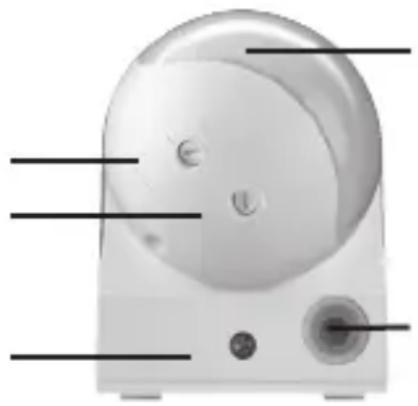
95174: sensor
lighting time photosensitivity
cable- mounting screw drain
natural_image
Illustration of a white electronic device with labeled ports and buttons (no text or symbols present)95175:
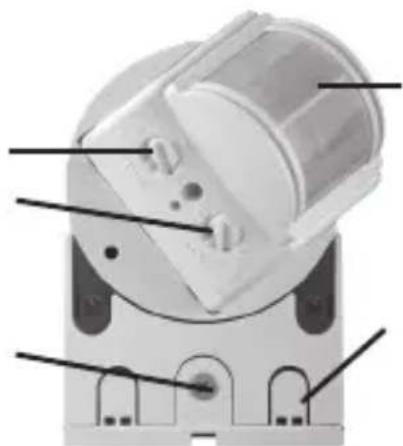
sensor ligthing time photosensitivity
cable- mounting screw drain
natural_image
Technical diagram of a mechanical device with labeled components (no readable text or symbols)
3 Intended Use:
This product is made for home use like described in chapter 2. We do not permit using this product in other ways. Use the product only in dry interior rooms. If not attending to these regulations and notes on safety, it might causes fatal accidents, injuries and damages to persons and property.
4 Scope of Delivery:
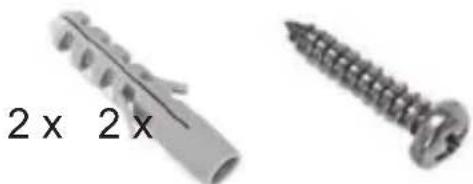
1 x Infrared motion sensor
1 x user's manual
1 x installation material
natural_image
Two metal screw components with no text or symbols visible5 Installing and Operating:
Installation:
DANGER! Risk of life by electric shock!
Avoid contacting mains voltages!
Turn off the power of all circuits before working on the product!


ATTENTION! Risk of short-circuit!
Never bridge contacts!
Do not put things into ventilation slots or ports!
- Switch off the mains fuse.
- Check with a voltage tester to be sure, all lines are really stress-free. If in doubt, a electrician must do the installation work.
- Check the packing content for being complete.
- Compare all products to be compatible to each other.
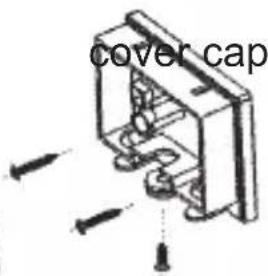
- Remove the cover cap at the back of the motion sensor by using a Phillips head screwdriver.
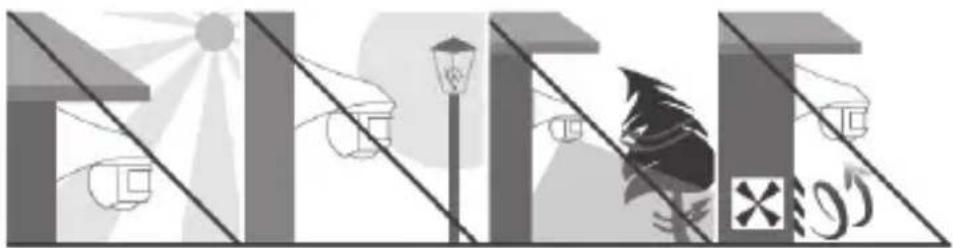
Choose the installation place away from street lighting, plants or air conditioning vents. Avoid direct sun insulation.
natural_image
Illustration of stylized buildings with a sun, street lamp, and a tree (no text or symbols)- Attach the cover cap to a wall or ceiling in a height of 1.8 to 2.5 ~m with the installation material. At this, attend to the cable location and its lateral alignment. The detection area is 180^ in a distance of max. 12 ~m .
The scope of delivery includes installation material for concrete walls or ceilings. Other materials need other installation material.
motion sensor
text_image
cover cap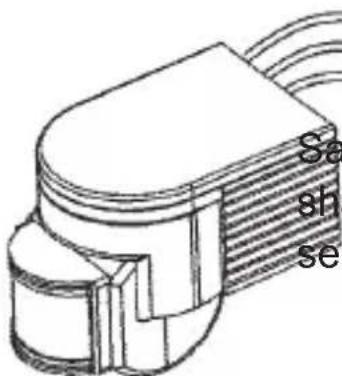
text_image
Sa sh seSample figure: The shape of the motion sensor can differ.
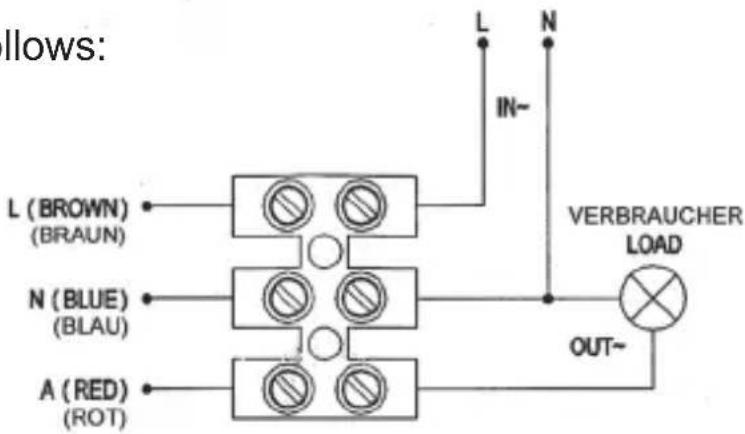
- Install all cables as follows:
phase (hot)
zero conductor (ground)
consumer (lamp)
text_image
llows: L (BROWN) (BRAUN) N (BLUE) (BLAU) A (RED) (ROT) IN~ L N VERBRAUCHER LOAD OUT~- Plug the luster terminal onto the provided lugs.
- Connect motion sensor and cover cap and lock the connection by the Phillips head screw.
- Adjust the direction of the motion sensor by turning and tilting the sensor unit.
- Switch on the mains fuse.
Operating:
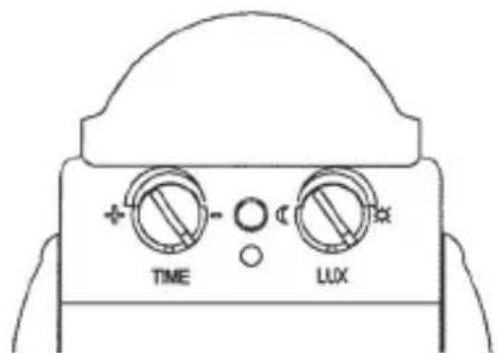
- Adjust the time settings (TIME). This means how long the lamp is on after activating.
- Adjust the photosensitivity (LUX). This means how fast the motion sensor react.
text_image
TIME LUX

6 Maintenance, Care, Storage and Transport:
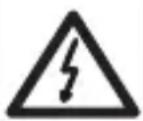
DANGER! Risk of life by electric shock!
Avoid contacting mains voltages!
Turn off the power of all circuits before working on the product!

ATTENTION! Risk of short-circuit!
Never bridge contacts!
Do not put things into ventilation slots or ports!
- The device is maintenance-free.
- Switch off the mains fuse and disconnect the product from mains!
- Use a dry and soft cloth to clean your product. Be careful to avoid scratches. Use a slightly moist cloth for heavy stains. Look out for live cables! Do not use any cleaning supplies. This can cause burns to the materials. Avoid liquid entry to the device.
- Avoid places with high temperatures, humidity, or places which can become wet, also during maintenance, care, storage, and transport.
- Keep the product away from children and store it at dry and dust-proof places!
- Keep the original packing for transport and to avoid damages.
7 Troubleshooting:
| Problem Help | |
| The product does not work. | Check all cables for being connected the right way.Check the function of the lamp and switch on the mains fuse after complete installation.Check the settings. |
| Sensitivity is not satisfying. | Remove objects out of the detection area.Temperatures >40°C can cause swit-ching errors.Attend to right installation height.Adjust the sensitivity (LUX). |
| Lighting time is not satisfying. | Adjust the lighting time (TIME). |
| other questions • Consult your dealer. | |

8 Specifications:
| Model 95174 95175 | |
| Input voltage 220-240 V AC / 50 Hz | |
| Ambient light 3-2000 Lux | |
| Lighting time | min. 10+/-3 s max. 7+/-2 min. |
| Protection category IP44 | |
| Max. rated load | 1200 W (incandescent lamp) 300 W (energy-saving lamp) |
| Minimum load 1 W | |
| Detection distance max. 12 m (<24°C) | |
| Detection angle 180° | |
| Working temperature -20 ~ +40°C | |
| Working humidity <93% RH | |
| Energy consumption | 0.45 W (arbeitend) 0.1 W (stand-by) |
| Reaction time 0.6~1.5 m/s | |
Dimensions 96 x 90 x 68 mm 130 x 88 x 76 mm
Weight 194 g 272 g
9 Warranty and Liability:
- The producer grants a 2 years warranty to a new device.
- As the manufacturer has no influence on installation, warranty only applies to the product itself.
- If any fault or damage is detected on your device, please contact your dealer and provide your sales slip or invoice as evidence of the purchase, if necessary. Your dealer will repair the fault either on site, or send the device to the manufacturer. You make the work of our technicians considerably easier, describing possible faults in detail – only then you can be assured that faults, occurring only rarely, will be found and repaired with certainty!
- The manufacturer is not liable for damages to persons or property caused by improper installation, operation or maintenance, not described in this manual.
- Do not alter or modify the product or its accessories.
- Any use other than described in this user's manual is not permitted and causes loss of warranty, loss of guarantee, and non-liability.
- We reserve our right for misprints and changes of the device, packing, or user's manual.
10 Disposal Notes:
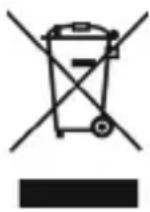
According to the European WEEE directive, electrical and electronic equipment must not be disposed with consumers waste. Its components must be recycled or disposed apart from each other. Otherwise contaminative and hazardous
substances can pollute our environment.
You as a consumer are committed by law to dispose electrical and electronic devices to the producer, the dealer, or public collecting points at the end of the devices lifetime for free. Particulars are regulated in national right. The symbol on the product, in the user's manual, or at the packaging alludes to these terms. With this kind of waste separation, application, and waste disposal of used devices you achieve an important share to environmental protection.
WEEE Directive: 2002/96/EC
WEEE No: 82898622
11 CE Declaration:
CE
This device corresponds to EU directive 2004/108/EC and 2006/95/EC: With the CE sign Goobay ^® , a registered trademark of the Wentronic GmbH ensures, that the product is
conformed to the basic standards and directives. These standards can be requested online on www.goobay.de. The mentioned directives replace all former national permissions in the European Union. All trademarks and registered brands are the property of their respective owners.
text_image
CERevision Date 2012-06-08
Version 1
Goobay®
Pillmannstraße 12
38112 Braunschweig
Germany
Made in China.
Hotline: +49 (0180) 5005882