60267 - Audio/video extender Wentronic - Free user manual and instructions
Find the device manual for free 60267 Wentronic in PDF.


| Product Type | Audio/Video Extender |
| Brand | Wentronic |
| Model | 60267 |
| Dimensions (approx.) | 80 x 60 x 25 mm |
| Weight (approx.) | 120 g |
| Power Supply | 5V DC via USB or included adapter |
| Power Consumption | 2.5 W |
| Supported Resolutions | Up to 1080p @ 60 Hz |
| Input Interface | HDMI (Type A) female |
| Output Interface | HDMI (Type A) female |
| Maximum Transmission Distance | Up to 50 meters via CAT5e/6 |
| Supported Audio Formats | PCM, Dolby Digital, DTS |
| HDCP Compliance | HDCP 1.4 |
| Operating Temperature | 0°C to 45°C |
| Storage Temperature | -10°C to 60°C |
| Housing Material | Aluminum alloy |
| Mounting | Wall mountable or desktop |
| Maintenance | Keep dry, clean with soft cloth |
| Safety | Use only included power supply; avoid moisture |
| Spare Parts / Repair | Power adapter available; unit not user-serviceable |
| Warranty | 2 years |
Frequently Asked Questions - 60267 Wentronic
User questions about 60267 Wentronic
0 question about this device. Answer the ones you know or ask your own.
Ask a new question about this device
Download the instructions for your Audio/video extender in PDF format for free! Find your manual 60267 - Wentronic and take your electronic device back in hand. On this page are published all the documents necessary for the use of your device. 60267 by Wentronic.
USER MANUAL 60267 Wentronic
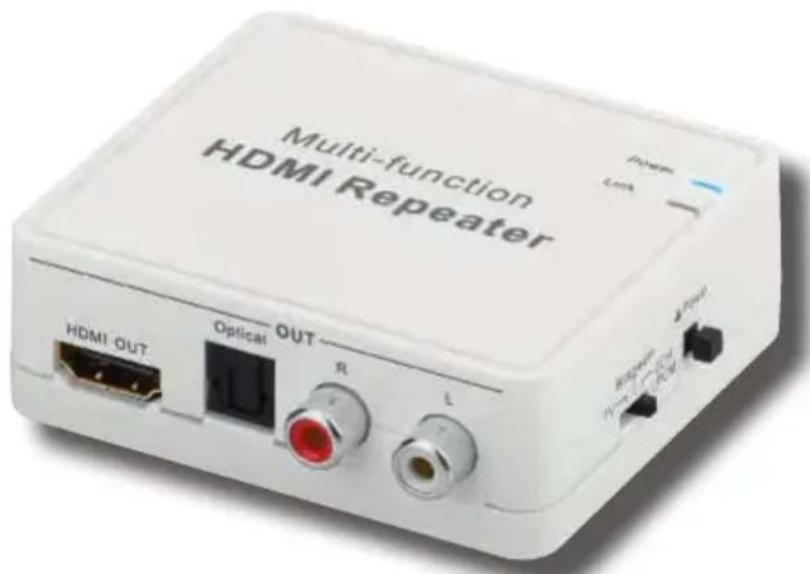
- extracts the audio signal out of the HDMI-signal
text_image
Multi-function HDMI Repeater HDMI OUT Optical OUT RF L Power Link Power Power Power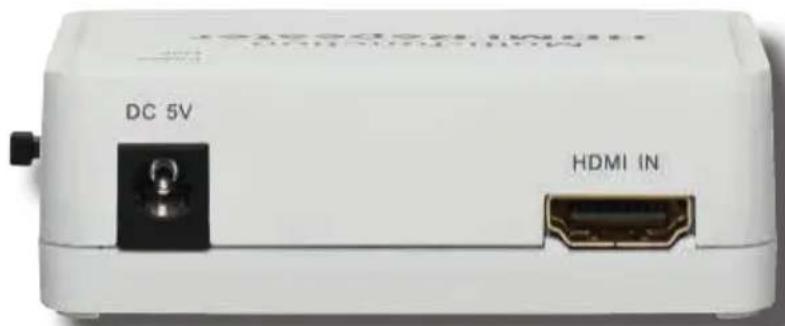
text_image
DC 5V HDMI IN
1.1 General Notes 13
1.2 User Groups 14
1.3 Warning Levels....14
2 Description and Function....14
2.1 Scope of Delivery 15
2.2 Operating Elements and Connections ..... 15
3 Intended Use....16
3.1 Use restrictions.... 16
4 Connecting....16
4.1 Preparing 16
4.2 Connecting the devices....17
5 Operating 18
6 Warranty and Liability 18
7 Maintenance, Care, Storage and Transport 19
8 Specifications....19
9 Disposal Instructions 20
10 EC Declaration....20
1 Safety instructions
1.1 General Notes
- Read the including product documentation completely and carefully before use. It is part of the product.
- Attend to the safety instructions in product documentation, on product and accessories, such as on the package.
• Use product, product parts and accessories only in perfect condition. - Keep the product documentation for other potential users and for later requests.
- For questions, defects, mechanical damage, disturbances and other not remediable problems, consult your dealer.
Risk of life by electric shock
Improper used products can overload, overheat and short-circuit.
Avoid contacting mains voltages!
NEVER let the product unattended when in use!
Only use in dry ambiance.
Do not short-circuit ports or circuits.
Let the device acclimatize after large temperature fluctuations and before use.
Only pull and plug mains and connection cables on the plug, never on the cord.
Unplug the mains plug when not in use or during thunder storms.
Risk of injury by tripping and falling
Unfavorable placed or installed products and cable connections can injure persons.
Place, transport and install product, parts and accessories in a safe way.
Let only a specialist do disassembly, maintenance and repair work.
Risk of injury by cutting
Children can cut themselves on packaging materials.
Protect packaging materials against unintentionally use.
Risk of self-intervention and misuse
Self-interventions and misuse hide unpredictable risks and cause expiration of warranty.
Do not modify or disassemble either the product or the accessories!
Risk of material damage by improper product combination
Incompatible product combination does not fulfill required functions, can cause quality losses or material damage.
The specifications of all used products must match or be within the specified range.
Risk of material damage by inappropriate ambient conditions
Incorrect ambient conditions can damage things.
Choose a safe, horizontal and non-slipping surface.

Avoid extreme conditions, such as extreme heat, coldness, humidity or direct exposure to the sun, as well as vibrations and mechanical pressure.
Keep ventilation slots or vents free.
1.2 User Groups
Caused to different risk levels and hazard potentials some working steps only may be done by trained specialists.
| Working step User Group | |
| Connecting, Operating, Care, Storage, Transport, Disposal | Consumers and users with basical mechanical knowledge can do this work.>> Protect children and people with mental and motoral impairments from using the product! |
| Maintenance, Repairing | Trained specialists only>> special safety measures, knowledge and tools are necessary! |
Tab.9: User Groups
1.3 Warning Levels

Warnings against hazards that will result directly in serious injuries or death in case of non-observance.

Warnings against hazards that may result in serious injuries or death in case of nonobservance.
Warnings against hazards that may result in injuries in case of non-observance.

Warnings against hazards that may result in material damage in case of non-observance.
2 Description and Function
The HDMI Extractor is a device that splits the audio tracks of your HDMI source devices such as PC or DVD player, and in addition to the HDMI output also supports the optical digital output and the analog RCA output separately for various output devices.
2.1 Scope of Delivery
| Part Figure Symbol Amount | |||
| HDMI Extractor |  | A | 1 |
| Power Supply unit | 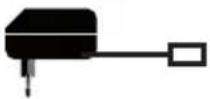 | B | 1 |
| User's manual |  | C | 1 |
Tab.10: Scope of Delivery
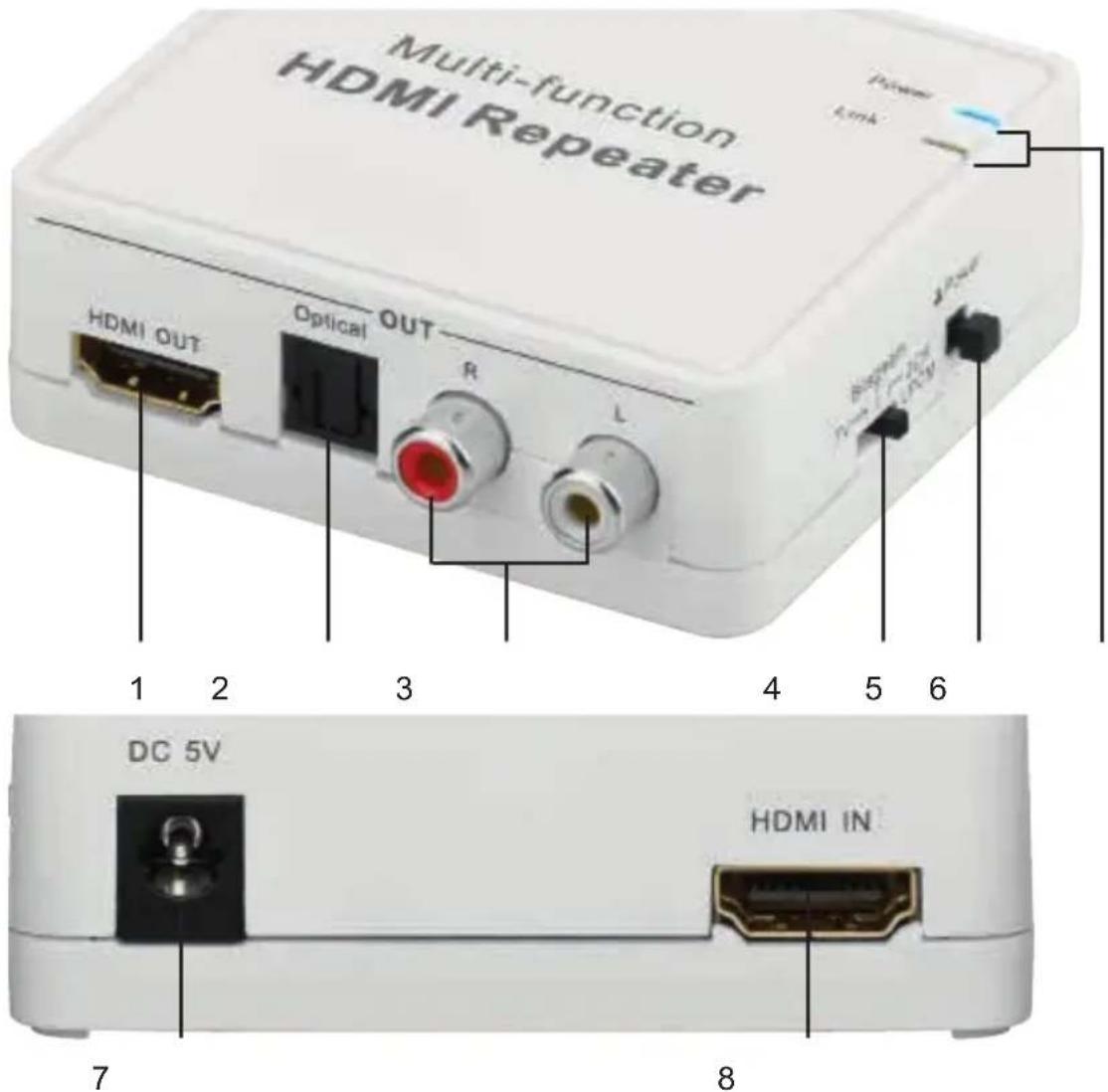
2.2 Operating Elements and Connections
text_image
Multi-function HDMI Repeater HDMI OUT Optical OUT R L 1 2 3 4 5 6 DC 5V HDMI IN 7 8

| Outputs | |
| 1 | HDMI Output |
| 2 | optical digital TOSLINK output |
| 3 | analog RCA output>> R = red = right channel,>> L = white = left channel) |
| Operating Elements | |
| 4 | Output switch>> TV = The audio tracks are emitted up to LPCM 7.1 only at the HDMI output.>> Bitstream = The audio tracks are emitted up to Dolby 5.1 at the HDMI and optical TOSLINK output.>> 2CH LPCM = The audio tracks are supported to HDMI, TOSLINK and RCA STEREO output. |
| 5 | ON/OFF switch |
| Displaying Elements | |
| 6 Operating LEDs>> POWER = the HDMI Extractor is ready to use. Voltage is supported.>> LINK = the connection between HDMI source and output device is active (Devices on and right channel selected). | |
| Inputs | |
| 7 | 5V DC Input for Power supply unit |
| 8 | HDMI-Eingang |
Tab.11: Operating Elements and Connections
3 Intended Use
This product is made for using as described in chapter “Description and Function”. Another use than described in chapter “Description and Function” is not permitted. Neglecting and ignoring these regulations and safety instructions can cause serious accidents, personal injury and material damage. Also refer to chapter “Warranty and Liability”.
3.1 Use restrictions

Only use in dry interior rooms.
4 Connecting
4.1 Preparing
Checking the completeness and integrity
Check the packing content by comparing it to the scope of delivery regarding completeness and integrity.
Ensuring compatibility
NOTICE
Risk of material damage by improper product combination
The specifications of all used products must match or be within the specified range.
Tab.12: Ensuring compatibility
4.2 Connecting the devices
Risk of life by electric shock
Avoid contacting mains voltages!
NEVER let the product unattended when in use!
Only use in dry ambiance.
Do not short-circuit ports or circuits.
Let the device acclimatize after large temperature fluctuations and before use.
Only pull and plug mains and connection cables on the plug, never on the cord.
Unplug the mains plug when not in use or during thunder storms.
WARNING
Risk of injury by tripping and falling
Place, transport and install product, parts and aceories in a safe way.
Tab.13: Connecting the devices
flowchart
graph TD
    A["PC"] --> B["Multi-function HDMI Repeater"]
    C["DVD"] --> B
    D["Speaker"] --> B
    E["Plasma TV"] --> B
    B --> F["Output ports: HDMI OUT, Optical, R, L"]
    F --> G["Computer"]
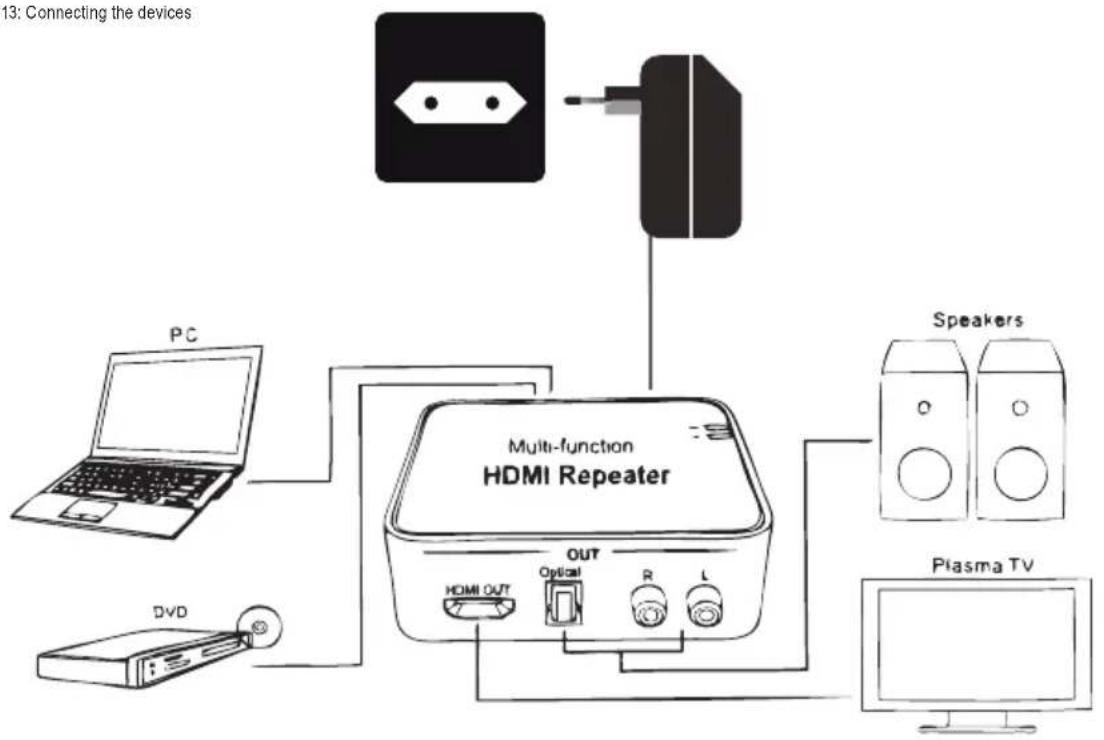
Fig.2: Connecting the devices

- Switch off the HDMI Extractor (A).
- Connect your HDMI source device to the HDMI input of the HDMI Extractor (A) by HDMI cable. (HDMI IN)
- Connect your output device(s) by fitting cable(s) to the HDMI Extractors outputs (OUT).
- Connect the HDMI Extractor (A) to its power supply unit (B) and this to a 100-240V\~ mains socket.
- Switch on all connected devices and the HDMI Extractor.
- Select the right ports and channels of your source and output devices.
The POWER LED shows readiness.
The LINK LED shows, that connection between source and output device is active.
5 Operating
- Set the output switch to the preferred function.
The so called EDID (Extended Display Identification Data) Function reports to the HDMI output device, what the best possible audio format is.
| Output switch position | TV | Bitstream | 2CH LPCM | |
| active outputs | HDMI x x x | |||
| TOSLINK x x | ||||
| RCA x | ||||
Tab. 14: Operating
- Check, if you have set the right audio adjustments on your devices, especially when there is no sound.
6 Warranty and Liability
• The producer grants a 2 years warranty to a new device.
- As the manufacturer has no influence on installation, warranty only applies to the product itself.
- If any fault or damage is detected on your device, please contact your dealer and provide your sales slip or invoice as evidence of the purchase, if necessary. Your dealer will repair the fault either on site, or send the device to the manufacturer. You make the work of our technicians considerably easier, describing possible faults in detail – only then you can be assured that faults, occurring only rarely, will be found and repaired with certainty!
- The manufacturer is not liable for damages to persons or property caused by improper installation, operation or maintenance, not described in the manual.
- Do not alter or modify the product or its accessories.
- Any use other than described in this user's manual is not permitted and causes loss of warranty, loss of guarantee, and non-liability.
• We reserve our right for misprints and changes of the device, packing, or user's manual.
7 Maintenance, Care, Storage and Transport

CAUTION
Risk of injury by tripping and falling
Place, transport and install product, parts and aceories in a safe way.
Let only a specialist do disassembly, maintenance and repair work.
NOTICE
Material Damage caused by improper procedure
Only use a dry or slightly moistened soft cloth for cleaning.
Do not use detergents or chemicals.
Tab.15: Maintenance, Care, Storage and Transport
• The device is maintenance-free.
- Avoid places with high temperatures, humidity, or places which can become wet, also during maintenance, care, storage, and transport.
- Keep the product away from children and store it at dry and dust-proof places!
- Keep the original packing for transport and to avoid damages.
8 Specifications
Phys. size Amount Unit
| HDMI Extractor | ||
| Input voltage 5 V DC | ||
| Power consumption 1.75 | W | |
| Dimensions | 74 x 80.4 x 26.4 | mm |
| Weight | 66 (without power supply unit) | g |
| Audio/Video standards | HDMI V1.3, HDCP 1.2, DVI 1.0 | |
| Data transfer rate | up to 192 | kHz |
| optical transfer rate | up to 48 | kHz |
| TMDS clock frequency | up to 225 | MHz |
| max. cable length for Full HD | 10 (IN/OUT) | m |


| supports built-in audio EDID switch (LPCM2), 5.1/7.1 or bitstream | ||
| 3D ready | ||
| Operating conditions -15~+40 / 5-90 °C / RH | ||
| Power Supply | ||
| input voltage 100-240 V~ | ||
| Frequency 50/60 Hz | ||
| Input current 0.25 A | ||
| Output voltage 5 V DC | ||
| max. output current 1 | A | |
| DC plug | 5.5x2.1 | mm |
Tab.16: Specifications
9 Disposal Instructions

According to the European WEEE directive, electrical and electronic equipment must not be disposed with consumers waste. Its components must be recycled or disposed apart from each other. Otherwise contaminative and hazardous substances can pollute our environment.
You as a consumer are committed by law to dispose electrical and electronic devices to the producer, the dealer, or public collecting points at the end of the devices lifetime for free. Particulars are regulated in national right. The symbol on the product, in the user's manual, or at the packaging alludes to these terms. With this kind of waste separation, application, and waste disposal of used devices you achieve an important share to environmental protection.
10 EC Declaration
CE With the CE sign, Goobay ^® , a registered trademark of the Wentronic GmbH ensures, that the product is conformed to the basic standards and directives.



- extracts the audio signal out of the HDMI-signal
Revision 2015-11-30
Version 2

text_image
QR code image containing encoded data, no visible human-readable textGoobay®
by Wentronic GmbH
Pillmannstraße 12
38112 Braunschweig
Germany
Made in China.
Hotline: +49 (0180) 5005882