
BC16 - Sphygmomanometer INVENTUM - Free user manual and instructions
Find the device manual for free BC16 INVENTUM in PDF.


| Product type | Automatic electronic blood pressure monitor |
| Brand | Inventum |
| Model | BC16 |
| Category | Blood pressure monitor |
| Dimensions | Approximately 110 x 80 x 60 mm |
| Weight | Approximately 250 g (without batteries) |
| Power supply | 4 AAA batteries (1.5 V) or mains adapter (not included) |
| Cuff type | Adjustable arm cuff (22-32 cm) |
| Measurement method | Oscillometric |
| Display | LCD digital screen |
| Main functions | Measurement of systolic and diastolic blood pressure, heart rate, arrhythmia detection, WHO classification |
| Memory | 60 measurements with date and time |
| Average calculation | Average of last measurements |
| Automatic shut-off | Yes, after 1 minute of inactivity |
| Maintenance and cleaning | Clean with a soft, dry cloth; do not use solvents |
| Safety | Compliant with European Directive 93/42/EEC on medical devices |
| Spare parts and repairability | Replacement cuff available; repair by authorized service center |
| General information | Domestic use; not suitable for children |
Frequently Asked Questions - BC16 INVENTUM
User questions about BC16 INVENTUM
0 question about this device. Answer the ones you know or ask your own.
Ask a new question about this device
Download the instructions for your Sphygmomanometer in PDF format for free! Find your manual BC16 - INVENTUM and take your electronic device back in hand. On this page are published all the documents necessary for the use of your device. BC16 by INVENTUM.
USER MANUAL BC16 INVENTUM
HANDGELENKS-BLUTDRUCKMESSGERÄT
TENSIOMÈTRE DE POIGNET ÉLECTRONIQUE
BLOOD PRESSURE MONITOR

0344
natural_image
Silhouette of a person with heart symbols on their arm, holding a wristwatch (no text or symbols present)natural_image
Illustration of a human wrist with a bandage and wristpin, showing rotational motion (no text or symbols)
natural_image
Illustration of a hand wearing a wristband with a finger, no text or symbols presentBlutdruck messen
natural_image
Silhouette of a person with heart symbol resting on arm and wrist, no text or symbols presentnatural_image
Illustration of a human wrist with a bandage and wristpin, showing rotational movement (no text or symbols)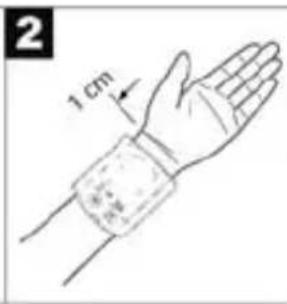

natural_image
Illustration of a hand wearing a wristband with a bandage, no text or symbols presentnatural_image
Silhouette of a person sitting at a desk with hands and a heart symbol on the chest (no text or symbols present)Name/function of each part
- LCD display
- Battery cover
- Date/ time set key
- Memory recall key
- ON/OFF/START key
- User-switching key
- Wrist cuff
Display explanations
- Memory zones
- Memory record
- Weak battery symbol
- Pulse symbol
- Date/time indicator
- Systolic pressure
- Diastolic pressure
- Pulse rate
- Error symbol
ENGLISH
Instruction Manual Inventum blood pressure monitor, BC16 Read the instruction manual carefully before use and keep the instructions in a safe place for future reference.
EXPLANATION SYMBOLS

Small household appliances don't belong in the garbage. Deliver them to your local authority service.
Device classification type BF
Please read the instructions for use!
INTRODUCTION
You can measure your blood pressure quickly and easily with the blood pressure wrist computer, save the readings and display the progress and average of the readings. The computer is used for non-invasive measurement and monitoring of your arterial blood pressure levels. The computer complies
with the requirements of the European Directive for Medical Products, the German Medical Product Act as well as the European standards EN1060-1 (Non-invasive blood pressure measuring devices Part 1: General requirements), EN1060-3 (Non-invasive blood pressure measuring devices Part 3: supplementary requirements for electromechanical blood pressure measuring systems).
SAFETY INSTRUCTIONS
- Read the instruction manual carefully and completely before using the appliance and keep them for later use.
- Always measure your blood pressure at the same time of day in order to ensure comparability of the readings.
- Relax for about 5 minutes before every measurement!
- Wait 5 minutes between successive measurements!
- The measurements you make yourself are only for your information – they are no substitute for a medical examination! Discuss your readings with your doctor and on no account make your own medical decisions (e.g. drugs and their dosages)!
- The wrist measurement will be less accurate if an arm suffers from restricted blood circulation resulting from chronic or acute vascular diseases (including vasoconstrictions). In this case, use a sphygmomanometer for measurements on the upper arm.
- Measuring errors can occur in diseases of the cardiovascular system, as well as with very low blood
pressure, irregular blood circulation and arrhythmia and also in the case of other symptoms. The blood pressure computer consists of precision-made electronic components. The measuring accuracy and life of the computer depend on the care with which it is treated:
- Protect the computer from shocks and be careful not to drop it,
- protect it against moisture, dirt, wide fluctuations in temperature and the direct rays of the sun,
- do not use it in areas where there are strong electromagnetic fields, i.e. keep it away from transmitters and mobile phones.
- Do not press buttons without the cuff fitted.
- Use the computer only on persons for whose wrist size the computer is intended.
- If the computer is not used for a lengthy period of time, it is advisable to remove the batteries.
- Keep the batteries out of reach of children. Batteries do not belong in domestic waste.
- Dispose of batteries at the appropriate collection points.
- Do not open the computer. Failure to comply invalidates the warranty. You must not adjust or repair the computer yourself or its correct function will no longer be guaranteed.
- This device is intended for wrist blood-pressure/pulse measurement on adult human beings.
- This instrument is not intended for commercial or clinical use.
- Never immerse the blood pressure monitor in water or any other liquid.
- If you have further questions about using our devices, please contact your dealer.
INSTRUCTIONS FOR USE
Inserting/ changing batteries
- Remove the battery compartment cover.
- Insert the two batteries into the battery compartment ensuring correct polarity.
- Use exclusively brand-name batteries of the type: 2x1.5 V Micro (Alkaline Type LR 03).
- Then close the battery compartment by fitting the cover and clicking it in position.
When the batteries are almost exhausted, an empty battery symbol appears at bottom left in the display and the batteries must then be exchanged. They are considered to be toxic waste and, as such, should be disposed of in special containers, toxic waste collection points or brought to electrical goods dealers. You are legally obliged to dispose of the batteries.
Note: Batteries containing pollutant substances are marked as follows: Pb- = Battery contains lead, Cd = Battery contains cadmium, Hg = Battery contains mercury.
Setting date/time
The date/time setting is necessary, so that you can save your readings correctly with the date and time and call them up again later.
Press the “ ” key and “ ” to adjust the month. Then press the “ ” and “ ” in turn to adjust the date, hour, minute and confirm entry with the “ ”. The time is being displayed in 12-hour format, which means a time from 13:00 onwards is being displayed as „1:00 pm“.
Applying the blood pressure monitor
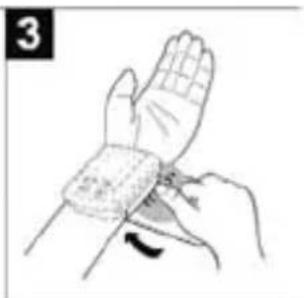
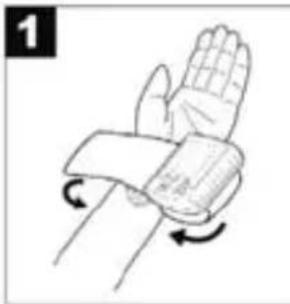
- Apply the blood pressure computer to the inside of the left wrist.
- Ensure that the wrist is unclothed.
- Close the cuff with the velcro fastener, so that the top margin of the computer is about 10 mm below the ball of the thumb (see illustration).
natural_image
Illustration of a human wrist with wristband and wrist movement arrows (no text or symbols)

natural_image
Illustration of a hand wearing a wristband with a curved arrow indicating motion (no text or symbols)The cuff must be placed tightly around the wrist but must not constrict.
Measuring blood pressure
- Sit in a relaxed position.
- Ensure that your arm is supported and bend it so that it is at the level of your heart (see illustration).
- Before measurement allow an adequate relaxation time of 5 minutes.
- Press the user-switching key " , " to select a memory zone, and press the " " key 2x to start measurement in the chosen memory zone. After
checking the display with all digits lighting up, the monitor will automatically inflate.
• The cuff will now inflate automatically to 180 mmHg.

natural_image
Silhouette of a person with heart symbols on the arm and wrist, no text or symbols present- When the 180 mmHg pressure is reached, the pressure is automatically released from the cuff.
- If the preset pressure of 180 mmHg is inadequate during inflation, the device automatically pumps up to a higher pressure.
- Your blood pressure readings and pulse rate will then appear in the display.
- To switch off and release the pressure, press the ON/OFF/START Key again.
- If you forget to switch off the computer, it will switch off automatically after 1 minute.
Display of the readings saved
The computer automatically saves the blood pressure readings of the last 50 measurements. When the 50 memory locations are exceeded, the current oldest value is deleted.
You can display the memory as follows:
- Press the user-switching key " , " to select a memory zone, and press the "M"-key to switch from memory to memory with sequence numbers.
- The saved measured values are continuously stored.
- To switch off, press the ON/OFF/START key again.
- If you forget to switch off the computer, it will switch off automatically after 1 minute.
Press the user-switching key „” to select a memory zone, then press and hold the „M“-key for approximately 5-seconds to clear the data in the pre-designated memory zone. The data in both memory zones - zone 1 and zone 2 may be erased if any of the batteries is removed.
Troubleshooting
Error messages can occur when
- the blood-pressure value is unusually high or low ("EE" appears in the display),
- you move or talk during the measurement („EE“ appears in the display),
- the cuff tube is not properly inserted („E1“ appears in the display),
- inflation takes longer than 20 seconds ("E1" appears in the display),
- the inflation pressure is higher than 300 mmHg („E2“ appears in the display),
- an error occurs when storing the measured values ("E3" appears in the display).
In the about cases, you must repeat the measurement. Make sure that the cuff tube is properly inserted and that you do not move or talk. Put the batteries back in if necessary, or else replace them.
About Blood Pressure
The World Health Organization (WHO) and National High Blood Pressure Education Program Coordinating Committee have developed a blood pressure standard, according to which areas of low- and high-risk blood pressure are identified. This standard, however, is a general guideline as individual's blood pressure varies among different people and different age groups...etc.
It is important that you consult with your physician regularly. Your physician will tell you your normal blood pressure range as well as the point at which you will be considered at risk.
Table for classification of blood pressure values (unit of measurement mmHg) for adults:
| Range Systolic Diastolic Action | |||
| Hypotonia (degraded blood pressure) | lower than 105 lower than 60 Check with doctor | ||
| Normal range between 105 and 120 | between 60 and 80 Self check | ||
| Pre-hypertensive blood pressure range(*) | between 120 and 140 | between 80 and 90 Check with doctor | |
| High blood pressure - degree I | between 140 and 160 | between 90 and 100 | Consult your doctor |
| High blood pressure - degree II | higher than 160 higher than 100 Consult your doctor | ||
* Blood pressure range that might transfer to high blood pressure. Adapted from JNC 2003
CARE & CLEANING
- Clean your blood pressure computer carefully only with a slightly moistened cloth.
- Do not use detergents or solvents.
- On no account must you immerse the computer in water, otherwise liquid can enter it and cause damage.
- Always store the blood pressure monitor in the storagecase.
Technical data
Type: BC16
Measuring method: non-invasive, oscillometric blood pressure measurement at the wrist, for wrist circumferences of 13.5 - 22 cm
Display range: 0 - 299 mmHg
Measuring range: systolic: 40 - 250 mmHg / diastolic: 40 - 180 mmHg / pulse: 40 - 199/min
Accuracy of the pressure reading: systolic ± 3 mmHg / diastolic: ± 3 mmHg / pulse: ± 5% of the displayed value
Measuring uncertainty: (max. permissible standard deviation according to clinical testing): systolic: 8 mmHg / diastolic: 8 mmHg
Power supply: 2 x 1,5 V Micro (Alkaline type LR 03)
Classification Application part type BF
Ambient conditions: +10 °C - +40 °C max. 85% atmospheric humidity
Storage/transport: -10 ^-+60 ^ max. 95% atmospheric humidity
Key to symbols: Application part type BF
Important! Read the operating instructions


GUARANTEE & SERVICE
- The guarantee generally runs for a period of 24 months from the date of purchase.
- The guarantee period comes into force only, if date of purchase can be confirmed by submission of the corresponding proof of purchase/receipt.
- Within the guarantee period we will eliminate any defects which are existing already from the time of buying in the appliance resulting from faults which be proved against us in material and/or workmanship either by repairing or exchanging defective parts or exchanging the whole appliance.
- The guarantee period for the appliance will not be extended by the submission of the claim under guarantee. Exchanged parts will become property of the manufacturer.
- Damages which are not under responsibility of the manufacturer are not covered by the guarantee. This is valid especially for claims from improper use (e.g. operation with the wrong type of current or voltage) or maintenance as well as from normal wear and tear. Moreover the guarantee does not cover claims resulting from calcification, glass breakages or faults which have only a negligible effect on the value or operation of the appliance.
- The guarantee becomes void if repairs are carried out by third parties which are not authorized by the manufacturer to do so and/or if spare parts are used other than the original ones.
We give a guarantee of 2 months on the repairs made by our technical department. Return the appliance, with receipt and a short description of the fault, to your supplier.
Modifications and printing errors reserved.


- Blutdruck messen
- ENGLISH
- EXPLANATION SYMBOLS
- INTRODUCTION
- SAFETY INSTRUCTIONS
- INSTRUCTIONS FOR USE
- Inserting/ changing batteries
- Setting date/time
- Applying the blood pressure monitor
- Measuring blood pressure
- Display of the readings saved
- Troubleshooting
- About Blood Pressure
- CARE & CLEANING
- Technical data
- GUARANTEE & SERVICE
Brand : INVENTUM
Model : BC16
Category : Sphygmomanometer