
BC03 - Sphygmomanometer INVENTUM - Free user manual and instructions
Find the device manual for free BC03 INVENTUM in PDF.


| Brand | Inventum |
| Model | BC03 |
| Product type | Electronic wrist blood pressure monitor |
| Measurement method | Non-invasive oscillometric |
| Blood pressure measurement range | 0-300 mmHg |
| Pulse measurement range | 40-180 beats/min |
| Blood pressure accuracy | ±3 mmHg (systolic and diastolic) |
| Pulse accuracy | ±5% of displayed value |
| Memory | 1 x 60 measurements with date and time |
| WHO classification | Yes, graphical display |
| Arrhythmia detection | Yes, with specific symbol |
| Cuff size | For wrist circumference 14 to 19.5 cm |
| Power supply | 2 AAA 1.5 V batteries (alkaline, type LR03) |
| Dimensions (L x W x H) | 84 x 62 x 30 mm |
| Weight | Approx. 140 g (without batteries) |
| Operating conditions | +5°C to +40°C, 40-80% relative humidity |
| Storage conditions | -20°C to +55°C, 10-95% relative humidity |
| Maintenance and cleaning | With a slightly damp cloth, without detergent or abrasive; do not immerse |
| Safety | Type BF applied part, compliant with EN1060-1 and EN1060-3; do not open |
| Warranty | 24 months from date of purchase, under conditions |
| Included accessories | Storage case, instruction manual, 2 AAA batteries |
| Available spare parts | AAA batteries (standard); other parts not specified |
| Repairability | Repairs only by authorized after-sales service |
| Intended use | Home use, external non-invasive measurement for adults |
Frequently Asked Questions - BC03 INVENTUM
User questions about BC03 INVENTUM
0 question about this device. Answer the ones you know or ask your own.
Ask a new question about this device
Download the instructions for your Sphygmomanometer in PDF format for free! Find your manual BC03 - INVENTUM and take your electronic device back in hand. On this page are published all the documents necessary for the use of your device. BC03 by INVENTUM.
USER MANUAL BC03 INVENTUM
NEDERLANDS
DEUTSCH

Small household appliances don't belong in the garbage. Deliver them to your local authority service.
Device classification type BF
Please read the instructions for use!
| TABLE DES MATIÈRES
- Introduction page 29
- Safety instructions page 29
- Unit description page 30
- Inserting/ changing batteries page 31
- Setting date & time page 31
- Applying the cuff page 31
- Measuring blood pressure page 32
- Evaluating results page 32
- Saving, retrieving and deleting results page 33
- Troubleshooting page 33
- Cleaning & care page 34
- Technical data page 34
- Guarantee & service page 35
NEDERLANDS
3 | BESCHRIJVING VAN APPARAAT
natural_image
Illustration of a hand wearing a wristband with a wristpin, showing rotational motion (no text or symbols)
natural_image
Illustration of a hand wearing a wristband with a bandage, no text or symbols presentnatural_image
Silhouette of a person with heart symbols on their chest, holding an object (no text or symbols present)9 | RESULTATEN OPSLAAN, WEERGEVEN EN WISSEN
natural_image
Silhouette of a person sitting at a desk with heart symbols on their chest, holding an object (no text or labels)natural_image
Illustration of a human wrist with a bandage and wristpin, showing rotational movement (no text or symbols)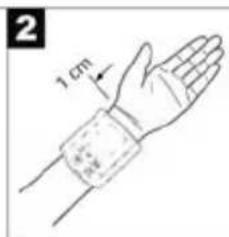

natural_image
Illustration of a hand wearing a wristband, showing the palm and wrist (no text or symbols)natural_image
Line drawing of a human figure with heart and wrist symbols, no text or labels presentInstruction Manual Inventum blood pressure monitor, BC03
Read the instruction manual carefully before use and keep the instructions in a safe place for future reference.
1 | INTRODUCTION
You can measure your blood pressure quickly and easily with the blood pressure wrist computer, save the readings and display the progress and average of the readings. The computer is used for non-invasive measurement and monitoring of your arterial blood pressure levels. The computer complies with the requirements of the European Directive for Medical Products, the German Medical Product Act as well as the European standards EN1060-1 (Non-invasive blood pressure measuring devices Part 1: General requirements), EN1060-3 (Non-invasive blood pressure measuring devices Part 3: supplementary requirements for electromechanical blood pressure measuring systems).
2 | SAFETY INSTRUCTIONS
- Read the instruction manual carefully and completely before using the appliance and keep them for later use.
- Always measure your blood pressure at the same time of day in order to ensure comparability of the readings.
- Relax for about 5 minutes before each measurement!
- Wait 5 minutes between successive measurements!
- The measurements you make yourself are only for your information - they are no substitute for a medical examination! Discuss your readings with your doctor and on no account make your own medical decisions (e.g. drugs and their dosages)!
- The wrist measurement will be less accurate if an arm suffers from restricted blood circulation resulting from chronic or acute vascular diseases (including vasoconstrictions). In this case, use a blood pressure monitor for measurements on the upper arm.
- Measuring errors can occur in diseases of the cardiovascular system, as well as with very low blood pressure, irregular blood circulation and arrhythmia and also in the case of other symptoms.
- The blood pressure computer consists of precision-made electronic components. The measuring accuracy and life of the computer depend on the care with which it is treated:
- Protect the computer from shocks and be careful not to drop it,
- protect it against moisture, dirt, wide fluctuations in temperature and the direct rays of the sun,
- do not use it in areas where there are strong electromagnetic fields, i.e. keep it away from transmitters and mobile phones.
- Do not press any buttons until the cuff is in position.
- Use the computer only on persons for whose wrist size the computer is intended.
- If the computer is not used for a lengthy period of time, it is advisable to remove the batteries.
- Keep the batteries out of reach of children. Batteries do not belong in domestic waste.
- Dispose of batteries at the appropriate collection points.
- Do not open the computer. Failure to comply invalidates the warranty. You must not adjust or repair the computer yourself or its correct function will no longer be guaranteed.
- This device is intended for wrist blood-pressure/pulse measurement on adult human beings.
- This instrument is not intended for commercial or clinical use.
- Never immerse the blood pressure monitor in water or any other liquid.
- If you have further questions about using our devices, please contact your dealer.
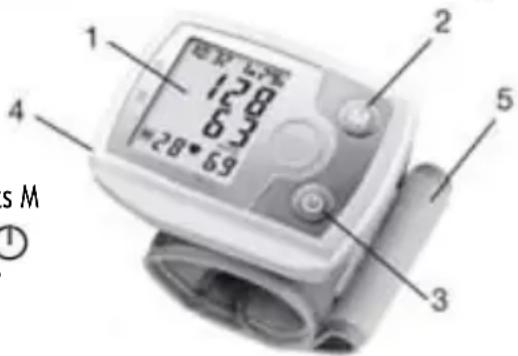
3 | UNIT DESCRIPTION
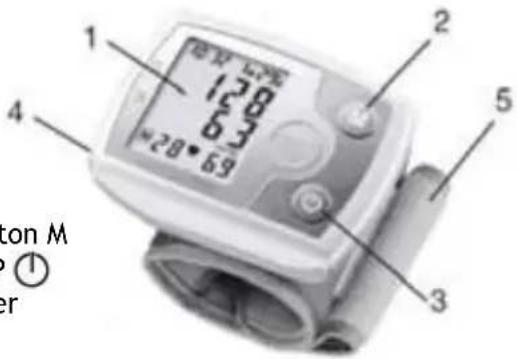
- LCD display
- Memory button M
- START/STOP ⏻
- Battery cover
-
Wrist cuff
-
Time and date
- Systolic pressure
- Diastolic pressure
- mmHg unit
- Measured pulse
- Pulse icon
- Number of memory space
- Inflate/deflate arrow
- Change battery icon
- Cardiac arrhythmia icon
- WHO classification

4 | INSERTING/ CHANGING BATTERIES
- Remove the battery compartment cover (left side of the unit).
- Insert two 1,5 V AAA batteries (Alkaline Type LR 03). Make absolutely sure that you insert the batteries with the correct polarity as marked. Do not use rechargeable batteries.
- Replace the battery cover carefully.
If the change battery icon is displayed, measurement is no longer possible and you must replace all the batteries.
Note: Batteries containing pollutant substances are marked as follows: Pb = Battery contains lead, Cd = Battery contains cadmium, Hg = Battery contains mercury.
5 | SETTING DATE & TIME
It is vital to set date and time. Only this way is it possible to save and subsequently retrieve your measured values with the right date and time. Time is shown in 24 hour format.
Note: if you hold down "M", you can set the values faster.
- Press “➊” and “M” simultaneously. The month starts flashing. Using the “M” button, set the month 1 to 12 and confirm with “➊”.
- Set the day, hour and minute and confirm in each case with “💡”.
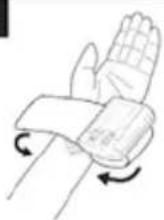
6 | APPLYING THE CUFF
1
2

3

natural_image
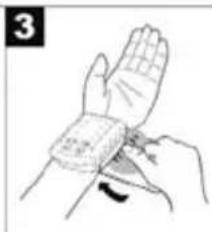
Illustration of a hand wearing a wristband with a finger pointing to the wrist area (no text or symbols present)- Bare your left wrist, making sure that the circulation in the arm is not restricted by any clothes etc. that are too tight. Position the cuff on the inside of your wrist.
- Fasten the cuff with the Velcro fastening so that the upper edge of the monitor is positioned approx. 1 cm below the ball of your thumb.
- The cuff has to be fitted tightly around the wrist but should not constrict it.
7 | MEASURING BLOOD PRESSURE
- Sit in a relaxed position.
- Ensure that your arm is supported and bend it so that it is at the level of your heart (see illustration).
- Before measurement allow an adequate relaxation time of 5 minutes.
- In order not to distort the result, it is important to keep still during the measurement and not talk.
- Switch on the blood pressure monitor with the “💡” button.
- Before the measurement, the last saved test result is briefly displayed. If there is no measurement in the memory, the instrument always displays the value '0'.

natural_image
Line drawing of a human figure with heart symbols on the chest and hands holding an object, no text or symbols present- The cuff is pumped up to 180 mmHg. Cuff air pressure is released slowly. If a tendency towards high blood pressure is already detectable, the cuff is pumped up again and cuff pressure increased further. As soon as a heart rate is detected, the heart rate symbol is displayed.
- Heart rate, systolic and diastolic blood pressure are displayed.
- You can interrupt measurement at any time by pressing the “💡” button.
- “EE” appears if it has not been possible to perform the measurement properly. Observe the section in these instructions on Troubleshooting and repeat the measurement.
- The test result is saved automatically.
8 | EVALUATING RESULTS
Cardiac arrhythmia
This instrument can identify possible cardiac arrhythmia disorders during measurement and if necessary indicates the measurement with the flashing icon (♥). This may be an indicator for arrhythmia. Arrhythmia is a condition where the heart rhythm is abnormal as a result of defects in the bioelectrical system controlling the heart beat. The symptoms (omitted or premature hearts beats, slow or
excessively fast heart rate) may be caused, among other things, by heart disease, age, physical predisposition, excessive use of stimulants, stress or lack of sleep. Arrhythmia can only be ascertained through examination by your doctor. Repeat the measurement if the flashing icon (♥) is displayed after the measurement. Please note that you should rest for 5 minutes between measurements and not talk or move during the measurement. If the icon (♥), appears often, please contact your doctor. Any self-diagnosis and treatment based on the test results may be dangerous. It is vital to follow your doctor's instructions.
WHO classification
According to the WHO Guidelines/Definitions and the latest findings, the test results can be classified and evaluated according to the following chart. Your physician will tell you your normal blood pressure range as well as the point at which you will be considered at risk.
Table for classification of blood pressure values (unit of measurement mmHg) for adults:
| Range Systolic Diastolic Action | |||
| Hypotonia - (degraded bl. pr.) | < 105 < 60 Check with | with | doctor |
| Optimal < 120 < 80 Self-control | |||
| Normal 120 - 129 80 - 84 Self-control | |||
| High-normal 130 - 139 | 85 - 89 Check with | doctor | |
| Mild hypertension - Grade I | 140 - 159 90 - 99 Check with | check with | doctor |
| Moderate hyper- tensive - Grade II | 160 - 179 100 - 109 Seek medical | advice | |
| Severe hyper- tension- Grade III | >= 180 >= 110 Seek medical | advice | |
Source: WHO, 1999
The bar graph in the display and the scale on the unit indicate the range of the blood pressure which has been recorded. If the values for systolic and diastolic pressure are in two different WHO ranges ranges (e.g. systolic in the high-normal range and diastolic pressure in the normal range) the graphic WHO classification on the unit indicates the higher range (high-normal in the example described).
9 | SAVING, RETRIEVING AND DELETING RESULTS
- The results of each successful measurement are stored together with date and time. With more than 60 items of measured data, the earliest items of data measured are lost.
- In order to retrieve measurement results again, press the memory button “M”. The instrument first displays the number of memory spaces occupied and then automatically switches to the last saved test result. If you continue pressing the memory button “M”, the last results in each case are measured and displayed with date and time.
- You can clear the memory by holding down the memory button "M" for 3 seconds.
10 | TROUBLESHOOTING
In case of faults, the "EE" message appears in the display. Error messages can occur when
- the inflation pressure is higher than 300 mmHg;
- the blood-pressure value is unusually high or low;
- you move or talk during the measurement, (in addition to "EE", the cardiac arrhythmia icon (♥), appears in the display);
- inflation takes longer than 30 seconds; In the above cases, you must repeat the measurement. Make sure that you do not move or talk. Re-insert the batteries if necessary, or else replace them.
11 | CLEANING & CARE
- Clean your blood pressure computer carefully only with a slightly moistened cloth.
- Do not use detergents or solvents.
- On no account must you immerse the computer in water, otherwise liquid can enter it and cause damage.
- Always store the blood pressure monitor in the storagecase.
12 | TECHNICAL DATA
Type BC03
Measuring method non-invasive, oscillometric blood pressure measurement at the wrist
Measuring range pressure 0 - 300 mmHg/heart rate 40 - 180 beats/min
Precision of pressure systolic ± 3 mmHg/
reading diastolic: ± 3 mmHg/ pulse: ± 5% of the displayed value
Measuring uncertainty Max. admissible standard deviation according to clinical testing: systolic: 8 mmHg/diastolic: 8 mmHg
Memory 1 x 60 storable data lines
Dimensions L 84 x W 62 x H 30 cm
Weight Approx. 140 g
Cuff size for a wrist circumference of approx. 14 to 19,5 cm
Admissible operating +5°C to +40°C
conditions 40-85% relative humidity
Admissible storage -20°C to +55°C
temperature 10-95% relative humidity
Power supply 2 x 1,5 V AAA (Alkaline type LR 03)
Accessories storage box, instructions for
use, 2 x AAA batteries
Classification Application part type BF Explanation of Application part type BF
symbols Caution! Read the operating instructions for use.


13 | GUARANTEE & SERVICE
- This product is guaranteed for a period of 2 years from the date of purchase against mechanical and electrical defect.
- Guarantee can only be given if proof of purchase (e.g. till receipt) can be shown. Therefore keep it in a safe place. The guarantee period starts at date of purchase.
- Guarantee is not valid in case of:
- normal wear;
- damage through misuse use or when the instructions were not followed correctly;
- lack of maintenance;
- not following the operation- and safety instructions;
- incompetent montage or repairs made by yourself or others;
- using accessories and spare parts which are not suitable for the appliance; for assessment by our technical department.
• The guarantee is not valid for: - normal wear;
- external cables;
- (interchangeable) signal- and controllamps for assessment by our technical department.
Return the appliance, including proof of purchase and description of the complaint, stamped to:
Inventum Holland BV or to: new E.T.P. bvba Generatorstraat 17 Passtraat 121 3903 LH VEENENDAAL 9100 Sint Niklaas The Netherlands BELGIUM
- Pack it carefully (preferably in the original carton). Ensure unit is clean.
- Enclose your name and address and quote model number on all correspondence.
When the guarantee is no longer valid or when the period of guarantee has passed, we will charge any costs that flow out of an assessment and/or repairing. On request we will supply a statement before repairing. Without requesting a statement, we assume that you, by sending the appliance, automatically order to repair the appliance.
A guarantee period of two months is valid for repairs done by our technical department and the used spare parts, counting from the repairdate. When a malfunction occurs within this period which directly flows out of the repairs and the used spare parts, the consumer has the right of repairs without any costs.
Modifications and printing errors are reserved.
Inventum Holland BV


- NEDERLANDS
- DEUTSCH
- | TABLE DES MATIÈRES
- | BESCHRIJVING VAN APPARAAT
- | RESULTATEN OPSLAAN, WEERGEVEN EN WISSEN
- | INTRODUCTION
- | SAFETY INSTRUCTIONS
- | UNIT DESCRIPTION
- | INSERTING/ CHANGING BATTERIES
- | SETTING DATE & TIME
- | APPLYING THE CUFF
- | MEASURING BLOOD PRESSURE
- | EVALUATING RESULTS
- Cardiac arrhythmia
- WHO classification
- | SAVING, RETRIEVING AND DELETING RESULTS
- | TROUBLESHOOTING
- | CLEANING & CARE
- | TECHNICAL DATA
- | GUARANTEE & SERVICE
Brand : INVENTUM
Model : BC03
Category : Sphygmomanometer