
AP-U990MV - Audio Equipment Sven - Free user manual and instructions
Find the device manual for free AP-U990MV Sven in PDF.


| Product Type | Wired Microphone |
| Model | AP-U990MV |
| Brand | Sven |
| Dimensions (L x D) | 180 mm x 50 mm |
| Weight | 350 g |
| Frequency Response | 50 Hz – 16 kHz |
| Sensitivity | -38 dB ± 3 dB |
| Impedance | 600 Ω |
| Polar Pattern | Cardioid |
| Connector Type | 3.5 mm TRS |
| Cable Length | 3 m |
| Power Supply | Plug-in power (via 3.5 mm jack) |
| Material | Metal grille, plastic body |
| Compatible Devices | PC, laptop, audio interface, mixer |
| Features | Adjustable stand, on/off switch, windscreen |
| Cleaning | Wipe with dry cloth, avoid liquids |
| Storage | Dry place, room temperature |
| Warranty | 1 year |
Frequently Asked Questions - AP-U990MV Sven
User questions about AP-U990MV Sven
0 question about this device. Answer the ones you know or ask your own.
Ask a new question about this device
Download the instructions for your Audio Equipment in PDF format for free! Find your manual AP-U990MV - Sven and take your electronic device back in hand. On this page are published all the documents necessary for the use of your device. AP-U990MV by Sven.
USER MANUAL AP-U990MV Sven
natural_image
Black and white photo of a black and white headboard with earplugs and microphone (no visible text or symbols)Рис. 1.
Рис. 7.
Мал. 1.
Congratulations on your purchase of the SVEN gaming stereo headphones!
COPYRIGHT
© 2017. SVEN PTE. LTD. Version 1.0 (V 1.0).
This Manual and information contained in it are copyrighted. All rights reserved.
CONTENTS
RUS 2
UKR 10
ENG 18
BUYER RECOMMENDATIONS
- Shipping and transportation equipment is permitted only in the original container.
- Does not require special conditions for realization.
- Dispose of in accordance with regulations for the disposal of household and computer equipment.
APPLICATION
SVEN AP-U990MV 7.1 gaming headphones with microphone allows you to experience 7.1 surround sound in games, music and movies. Closed style of the headphones with passive noise reduction and superior sound quality gives you the opportunity to hear the enemy before he will hear you.
PACKAGE CONTENTS
• Gamings tereo headphones – 1 pc
- 7.1 surround mode sound card – 1 pc .
- Adapter: mini-jack 2 * 3.5 mm (3-pin) to mini-jack 3.5 mm (4-pin) - 1 pc
- CD with software - 1 pc
- User's Manual – 1 pc
- Warranty card – 1 pc
SAFETY PRECAUTIONS
- Don't use the stereo headphones while driving.
- Don't use the stereo headphones at high volume for a long time (more than 15 minutes), as this may cause hearing impairment.
User's Manual
AP-U990MV
SPECIAL FEATURES
• External sound card
• 7.1 surround sound
- Optimized for professional gaming
• Headphones with passive noise reduction system
• The highest sound quality
• Non-tangling cable with fabric braid
- Comfortable seating
SOUND CARD
① Power switch button
② Headphone jack
③ Microphone jack
④ Volume control knob
⑤ Microphone mute button

Fig. 1.
- To use the 7.1 surround sound mode, connect the USB connector of the sound card to the USB connector of the source (computer, laptop, etc.), and headphones to the sound card, as shown in the diagram (Fig. 2a).

Fig. 2.a. Connection diagram
- To use without an external sound card, connect the headphone connector to the audio output connector of the source (sound card of the computer, laptop, player, etc.), as shown in the diagram (Fig. 2b).
• To use with the game console, use the adapter (included).

flowchart
graph LR
    A["Sound card"] --> B["Phone out"]
    B --> C["Adapter"]
    C --> D["Headphone connector"]
    D --> E["Microphone"]
    E --> F["On / Off microphone switch"]
    F --> G["Volume control"]
    G --> H["Microphone connector"]
    H --> I["Headphone connector"]
    I --> J["Microphone"]
    J --> K["Headphone"]
Fig. 2,b. Connection diagram
SOFTWARE DESCRIPTION
- Installing drivers for the headset is not required, Plug&Play device! Comes with additional software to extend the headset functionality, software installation is not necessary.
- When you connect the headset to a PC system will detect the device as a USB Audio Device. The sound system settings the device will be displayed in the devices for playback and recording.
- After installing the software, the included additional features become available. To enable it, right-click on the image the speaker or microphone. In the settings you can change the interface language, and the transparency of the interface window.
- When the headset is connected to the Windows taskbar will display the program logo. Right button clicking on it will displayed the context menu.
User's Manual
AP-U990MV
All available additional functions are displayed in the interface of the top in the form of abbreviations:
① EQ – Equalizer. Available 11 presets and the ability to save custom settings.
② EM – Environment Effect (environment effects). Spatial audio processing: reverb and echo. 27 available options emulation different environments, as well as three variants room size.
③ VSS – Virtual Speaker Shifter. This feature enables the emulation of the circular motion of the sound source (virtual speaker), as well as removal and approach the source to the listener. There is an opportunity to move separately seven virtual speakers.

④ KS – Key Shifting (pitch offset). The ability to increase and decrease the playback sound tone. Four semitone up or down (see. Fig. 4).
⑤ VF – Vocal Fading (attenuation vocals). The decoding of the reproduced signal to partially remove vocals from songs (see. Fig. 4).
⑥ SMX – Xear Surround Max. This involves emulation of multi-channel 7.1 surround, stereo distributing eight virtual channels. This effect will be noticeable when playing video with multichannel audio stream.

⑦ SF – Sing FX. This feature is included in the microphone settings. It includes the effect of a delay (echo) from the microphone signal and the «magical voice» – four variants of voice changes timbre (see. Fig. 5).

Fig. 5.
To listen to the signal from the microphone, select the microphone volume screen, there adjust the input level (slider «volume when recording»), and the monitor volume («Volume Control» slider) (see. Fig. 6).
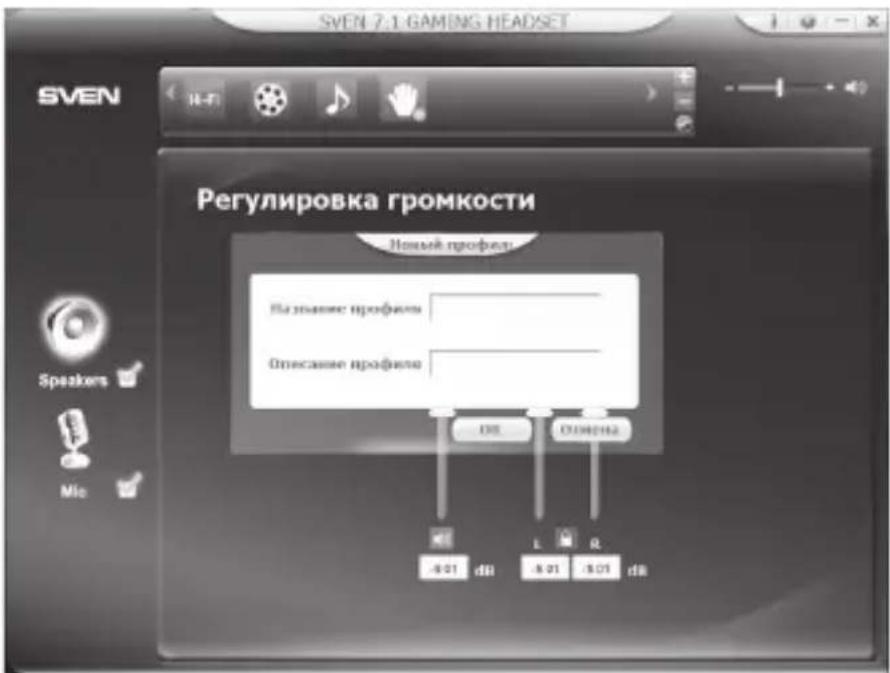
By clicking on the round icon with two arrows in the lower right corner of the display at the top of the interface, you will have access to the preset sound settings with the ability to save custom settings (profile) (see. Fig. 7).

Fig. 6.
| Parameter, measurement unit | Value |
| Sensitivity, dB | headphones: 105 ± 3; microphone: -38 ± 3 |
| Frequency range, Hz | headphones: 20 – 20000; microphone: 30 – 16000 |
| Impedance, Ohm | 32 |
| Membrane, mm | ∅ 50 |
| Connection type | mini-jack (stereo) ∅2 * 3.5 mm (3 pin) / adapter for mini-jack (stereo) ∅3.5 mm (4 pin) / external sound card (USB) |
| Cable length, m | 2.2 |
| Weight, g | 401 |
Notes:
- Technical specifications given in this table are supplemental information and cannot give occasion to claims.
- Technical specifications are subject to change without notice due to the improvement of SVEN production.
Technical support is on www.sven.fi
Модель: AP-U990MV
Manufacturer: SVEN PTE. LTD, 176 Joo Chiat Road, N° 02-02, Singapore, 427447. Produced under the control of Oy Sven Scandinavia Ltd. 15, Kotolahdentie, Kotka, Finland, 48310. Made in China.
® Registered Trademark of Oy SVEN
Scandinavia Ltd. Finland.


Brand : Sven
Model : AP-U990MV
Category : Audio Equipment