KF8178WDL - Wine cellar Atag - Free user manual and instructions
Find the device manual for free KF8178WDL Atag in PDF.


User questions about KF8178WDL Atag
0 question about this device. Answer the ones you know or ask your own.
Ask a new question about this device
Download the instructions for your Wine cellar in PDF format for free! Find your manual KF8178WDL - Atag and take your electronic device back in hand. On this page are published all the documents necessary for the use of your device. KF8178WDL by Atag.
USER MANUAL KF8178WDL Atag
text_image
1 2 ① | - | + | Light off | Alarm off | - | + 345678natural_image
Line drawing of an open refrigerator with shelves stocked with bottles (no text or symbols)Bovenste compartiment:
natural_image
Line drawing of a refrigerator with open door and side shelves (no text or symbols)natural_image
Line drawing of a refrigerator with shelves and a rolled-up scroll (no text or symbols)natural_image
Technical line drawing of a rectangular metal frame structure with slatted top and side cutouts (no text or symbols)natural_image
Line drawing of a mechanical device with a tray and side brackets (no text or symbols)natural_image
Technical line drawing of a mechanical component with internal flow arrows (no text or symbols)natural_image
Diagram showing a hand holding a tool inside a circular device with rotational arrows, no text or symbols present.natural_image
Technical line drawing of a mechanical component with a screwdriver and internal slots (no text or symbols)natural_image
Technical line drawing of a mechanical component with a hand pressing down and a downward arrow indicating motion (no text or symbols)natural_image
Technical line drawing of a mechanical component with an arrow indicating direction (no text or symbols)natural_image
Technical line drawing showing a door mechanism with an arrow indicating rotation (no text or symbols)natural_image
Diagram of a refrigerator with shelves and a hand holding a tool, showing airflow direction (no text or symbols)text_image
Diagram illustrating door lock mechanism with three circular insets showing clockwise rotation of a cabinet, mounted fixtures, and a wooden door.natural_image
Line drawing of a refrigerator interior with two magnified views showing hand positioning and mounting bracket (no text or symbols)natural_image
Technical line drawing of a structural beam with rotational arrows indicating motion (no text or symbols)natural_image
Technical line drawing of a structural frame with two parallel plates and directional arrows indicating assembly or movement (no text or symbols)natural_image
Technical line drawing of a structural beam with a rotation arrow indicating upward motion (no text or symbols)natural_image
Technical line drawing of a structural component with two parallel plates and an arrow indicating direction (no text or symbols)Safety instructions 16
Control panel 18
Daily use 19
Care and Cleaning 22
What to do if... 23
Installation
Technical data 29
Environmental concerns 29
Subject to change without notice.

SAFETY INSTRUCTIONS
In the interest of your safety and to ensure the correct use, before installing and first using the appliance, read this user manual carefully, including its hints and warnings. To avoid unnecessary mistakes and accidents, it is important to ensure that all people using the appliance are thoroughly familiar with its operation and safety features. Save these instructions and make sure that they remain with the appliance if it is moved or sold, so that everyone using it through its life will be properly informed on appliance use and safety.
For the safety of life and property keep the precautions of these user's instructions as the manufacturer is not responsible for damages caused by omission.
Children and vulnerable people safety
- This appliance is not intended for use by persons (including children) with reduced physical, sensory or mental capabilities, or lack of experience and knowledge, unless they have been given supervision or instruction concerning use of the appliance by a person responsible for their safety.
Children should be supervised to ensure that they do not play with the appliance.
- Keep all packaging well away from children. There is risk of suffocation.
- If you are discarding the appliance pull the plug out of the socket, cut the connection cable (as close to the appliance as you can) and remove the door to prevent playing children to suffer electric shock or to close themselves into it.
- If this appliance featuring magnetic door seals is to replace an older appliance having a spring lock (latch) on the door or lid, be sure to make that spring lock unusable before you discard the old appli-
ance. This will prevent it from becoming a death trap for a child.
General safety

Warning!
Keep ventilation openings, in the appliance enclosure or in the built-in structure, clear of obstruction.
- This appliance is intended to be used exclusively for the storage of wine.
- Do not use a mechanical device or any artificial means to speed up the thawing process.
- Do not use other electrical appliances (such as ice cream makers) inside of refrigerating appliances, unless they are approved for this purpose by the manufacturer.
- Do not damage the refrigerant circuit.
- The refrigerant isobutane (R600a) is contained within the refrigerant circuit of the appliance, a natural gas with a high level of environmental compatibility, which is nevertheless flammable.
During transportation and installation of the appliance, be certain that none of the components of the refrigerant circuit become damaged.
If the refrigerant circuit should become damaged:
- avoid open flames and sources of ignition
– thoroughly ventilate the room in which the appliance is situated
- It is dangerous to alter the specifications or modify this product in any way. Any damage to the cord may cause a short-circuit, fire and/or electric shock.

Warning! Any electrical component (power cord, plug, compressor) must be replaced by a certified service agent or qualified service personnel.
-
Power cord must not be lengthened.
-
Make sure that the power plug is not squashed or damaged by the back of the appliance. A squashed or damaged power plug may overheat and cause a fire.
-
Make sure that you can come to the mains plug of the appliance.
-
Do not pull the mains cable.
-
If the power plug socket is loose, do not insert the power plug. There is a risk of electric shock or fire.
-
You must not operate the appliance without the lamp cover (If the lamp cover is foreseen) of interior lighting.
-
This appliance is heavy. Care should be taken when moving it.
- Do not remove nor touch items from the freezer compartment if your hands are damp/wet, as this could cause skin abrasions or frost/freezer burns.
- Avoid prolonged exposure of the appliance to direct sunlight.
- Bulb lamps (If the lamp is foreseen) used in this appliance are special purpose lamps selected for household appliances use only. They are not suitable for household room illumination.
Daily use
- Do not put hot pot on the plastic parts in the appliance.
- Do not store flammable gas and liquid in the appliance, because they may explode.
- Appliance's manufacturers storage recommendations should be strictly adhered to. Refer to relevant instructions.
Care and cleaning
- Before maintenance, switch off the appliance and disconnect the mains plug from the mains socket.
- Do not clean the appliance with metal objects.
- Do not use sharp objects to remove frost from the appliance. Use a plastic scraper.
- Regularly examine the drain in the refrigerator for defrosted water. If necessary, clean the drain. If the drain is blocked, water will collect in the bottom of the appliance.
Installation
Important! For electrical connection carefully follow the instructions given in specific paragraphs.
- Unpack the appliance and check if there are damages on it. Do not connect the appliance if it is damaged. Report possible damages immediately to the place you bought it. In that case retain packing.
- It is advisable to wait at least four hours before connecting the appliance to allow the oil to flow back in the compressor.
- Adequate air circulation should be around the appliance, lacking this leads to overheating. To achieve sufficient ventilation follow the instructions relevant to installation.
- Wherever possible the back of the product should be against a wall to avoid touching or catching warm parts (compressor, condenser) to prevent possible burn.
- The appliance must not be located close to radiators or cookers.
- Make sure that the mains plug is accessible after the installation of the appliance.
- Connect to potable water supply only (If a water connection is foreseen).
Service
- Any electrical work required to do the servicing of the appliance should be carried out by a qualified electrician or competent person.
- This product must be serviced by an authorized Service Centre, and only genuine spare parts must be used.
Environment Protection

This appliance does not contain gasses which could damage the ozone layer, in either its refrigerant circuit or insulation materials. The appliance shall not be discarded together with the urban refuse and rubbish. The insulation foam contains flammable gases: the appli-
ance shall be disposed according to the applicable regulations to obtain from your local authorities. Avoid damaging the cooling unit, especially at the rear near the heat exchanger. The materials used on this appliance marked by the symbol 🌐 are recyclable.
CONTROL PANEL
text_image
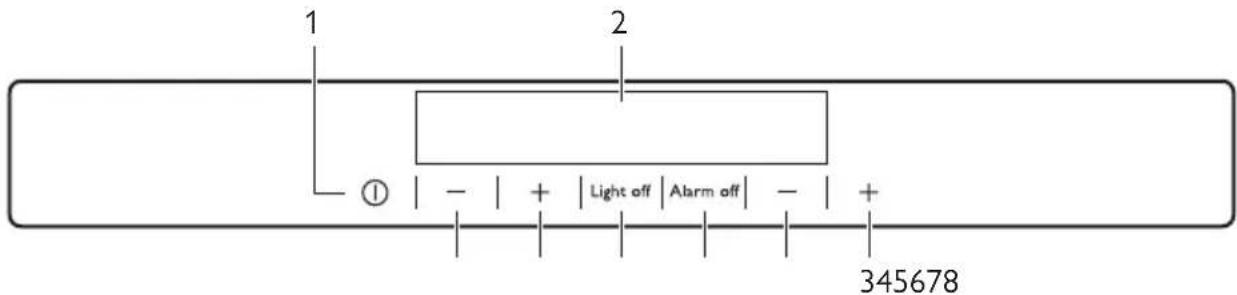
1 2 ① | - | + | Light off | Alarm off | - | + 3456781 Appliance ON/OFF button
2 Display
3 Bottom Compartment Temperature warmer button
4 Bottom Compartment Temperature colder button
5 Alarm off button
6 Light off button
Display
7 Top Compartment Temperature warmer button
8 Top Compartment Temperature colder button
It is possible to change predefined sound of buttons to a loudly one by pressing together Light off button and Temperature colder button for some seconds. Change is reversible.

text_image
1 2 88 min -88 3 5 41 Top Compartment indicator
2 Top Compartment temperature indicator and timer indicator
3 Bottom Compartment temperature indicator
4 Bottom Compartment indicator
5 Alarm indicator
Switching on
To switch on the appliance do these steps:
-
Connect the mains plug to the power socket.
-
Press the ON/OFF button if the display is off.
-
If "dEMo" appears on the display, the appliance is in demonstration mode. Refer to "What to do if...".
-
The temperature indicators show the set default temperature.
To select a different set temperature refer to "Temperature regulation".
Switching off
To switch off the appliance do these steps:
- Press the ON/OFF button for 5 seconds.
- The display switches off.
- To disconnect the appliance from the power disconnect the mains plug from the power socket.
Temperature regulation
The set temperature of the wine cellar may be adjusted by pressing the temperature regulators.
The temperature indicators show the set temperature.
The set temperature will be reached within 24 hours.
Refer to "Daily use - Wine Arrangement".
Important! After a power failure the set temperature remains stored.
DAILY USE
Cleaning the interior
Before using the appliance for the first time, wash the interior and all internal accessories with lukewarm water and some neutral soap so as to remove the typical smell of a brand-new product, then dry thoroughly.
Important! Do not use detergents or abrasive powders, as these will damage the finish.
Light off function
If you want to switch off the light before the automatic turn off time, open the door and press the light off button.
The light has no negative effect on the quality on the wine.
Door open alarm
An acoustic alarm will sound if the door is left open for a few minutes. The door open alarm conditions are indicated by:
- flashing Alarm indicator
- acoustic buzzer
When normal conditions are restored (door closed), the alarm will stop.
During the alarm, the buzzer can be switched off by pressing any button.
i
If “dEMo” appears on the Display, the appliance is in demonstration mode: refer to “WHAT TO DO IF...” paragraph.
Wine arrangement

natural_image
Line drawing of a double-free refrigerator with shelves stocked with bottles and one open door (no text or symbols)Top Compartment:
The temperature can be adjusted between +6 and +11°C. This compartment is ideal for wines, especially new reds and whites, to be consumed immediately. Operation compartments with differentiated temperatures.
Bottom Compartment:
The temperature can be adjusted between +11 and +18°C. This compartment is ideal for storing and refining red or white wines for long periods.
The temperatures of this compartment are suitable for storing aged and full-bodied wines.
Lay the bottles down in such a way that the corks do not dry.
Keep the wine in the dark. The door is in anti-UV darkened double glass to protect the wine from the light in case the refrigerator is located in a well-lit place.
Avoid switching the appliance light on too often or for too long. Wine keeps better in the dark.
Handle the bottles with care, to avoid agitating the wine.
Follow the recommendations and advice received at the time of purchase or given in the technical documentation regarding the quality, duration and optimum storage temperature of the wine.
Storage advice
The storage time for wine depends on ageing, the type of grapes, alcoholic content and level of fructose and tannin contained in it. At the time of purchase, check if the wine is already aged or if it will improve over time.
Recommended storage temperatures:
- For champagne and sparkling wines, between 6 and 8°C
- For white wines, between 10 and 12^
- For rose' and light red wines, between 12 and 16^
- Aged red wines, 14 -16°C
When placing various bottles on top of each other, make sure they do not touch the refrigerator cooling plate.
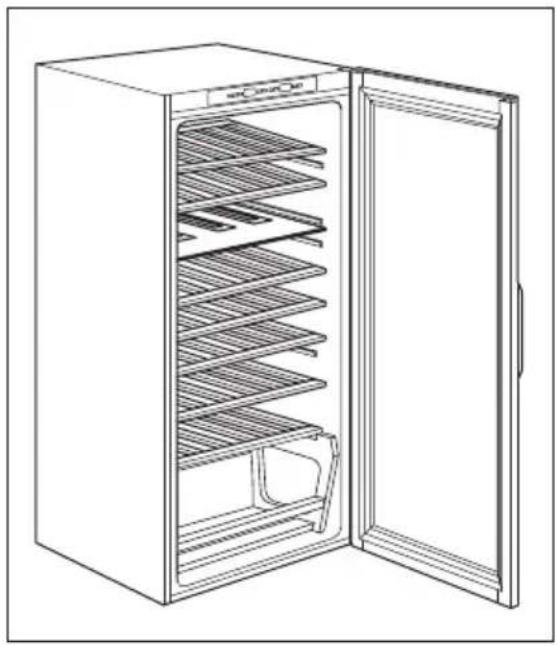
Wine Cellar shelves
natural_image
Line drawing of a refrigerator with open door and side shelves (no text or symbols)Remove the shelves for cleaning.
Wine Cellar Bottle Holder

natural_image
Line drawing of a refrigerator with shelves and a rolled-up scroll (no text or symbols)Remove the shelf and insert it between the two guides.
The maximum possible weight on the bottle shelves is 30 kg.
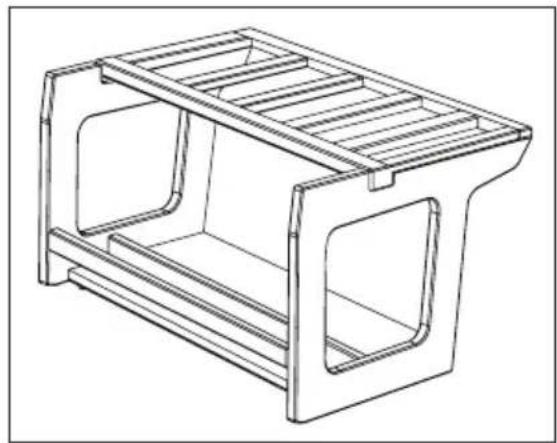
natural_image
Technical line drawing of a rectangular metal frame structure with slatted edges and cutouts (no text or symbols)The bottom compartment is fitted with a basket useful for placing upright and sloping bottles.
Humidifier

natural_image
Line drawing of a mechanical device with a tray and side brackets (no text or symbols)The right humidity is vitally important for the proper storage of wine.
Your Wine Cellar is fitted with a special humidifying device that increases the humidity inside the appliance.
Spread out the lava stones provided along the small tray as show in the picture. Then fill the tray with water up to the half of its capacity.
In normal operation, the lava stones are regularly humidified by the water, periodically check at water present inside the tray and refill it when needed.
Note that if the humidity in the area in which your appliance is installed is particularly high, the interior of your Wine Cellar will also be relatively more humid.
This may result in bottles misting up when the door is opened or labels peeling off. In this case reduce the quantity of water in the tray accordingly.
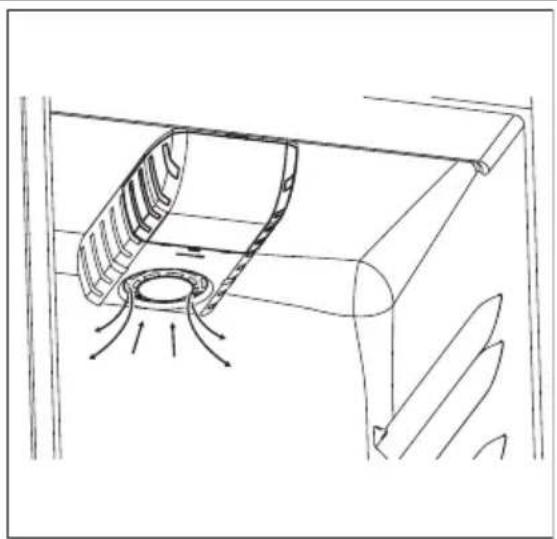
Air circulation
natural_image
Technical line drawing of a mechanical component with internal flow arrows (no text or symbols)The refrigerator compartment has a special AIRLIGHT fan which is automatically activated in function of the appliance thermostat setting and ambient conditions.
CARE AND CLEANING

Caution! Unplug the appliance before carrying out any maintenance operation.

This appliance contains hydrocarbons in its cooling unit; maintenance and re-charging must therefore only be carried out by authorized technicians.
Periodic cleaning
The equipment has to be cleaned regularly:
- clean the inside and accessories with lukewarm water and some neutral soap.
- regularly check the door seals and wipe clean to ensure they are clean and free from debris.
- rinse and dry thoroughly.
Important! Do not pull, move or damage any pipes and/or cables inside the cabinet. Never use detergents, abrasive powders, highly perfumed cleaning products or wax polishes to clean the interior as this will damage the surface and leave a strong odour.
Clean the condenser (black grill) and the compressor at the back of the appliance with a brush. This operation will improve the performance of the appliance and save electricity consumption.
Defrosting the refrigerator
natural_image
Illustration of a hand holding a tool inside a circular frame with rotational arrows, no text or symbols present.Periods of non-operation
When the appliance is not in use for long periods, take the following precautions:
- disconnect the appliance from electricity supply
- defrost (if foreseen) and clean the appliance and all accessories
WHAT TO DO IF...

Warning! Before troubleshooting, disconnect the mains plug from the mains socket. Only a qualified electrician or competent person must do the troubleshooting that is not in this manual.
Important! Take care of not to damage the cooling system.
Many proprietary kitchen surface cleaners contain chemicals that can attack/damage the plastics used in this appliance. For this reason it is recommended that the outer casing of this appliance is only cleaned with warm water with a little washing-up liquid added. After cleaning, reconnect the equipment to the mains supply.
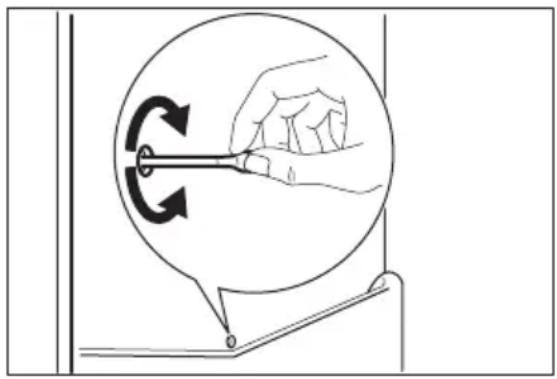
Frost is automatically eliminated from the evaporator of the refrigerator compartment every time the motor compressor stops, during normal use. The defrost water drains out through a drain hole into a special container at the back of the appliance, over the motor compressor, where it evaporates. It is important to periodically clean the defrost water drain hole in the middle of the refrigerator compartment channel to prevent the water overflowing and dripping on-to the food inside.
- leave the door/doors ajar to prevent unpleasant smells.
If the cabinet will be kept on, ask somebody to check it once in a while to prevent the food inside from spoiling in case of a power failure.
Important! There are some sounds during normal use (compressor, refrigerant circulation).
| Problem Possible cause Solution | ||
| The appliance is noisy | The appliance is not supported properly | Check if the appliance stands stable (all the four feet should be on the floor) |
| The buzzer sounds. The Display is red. | The door is not closed correctly. Refer to "Door open alarm". | |
| Problem Possible cause Solution | ||
| The appliance does not operate. The lamp does not operate. | The appliance is switched off. Switch on the appliance. | |
| The mains plug is not connected to the mains socket correctly. | Connect the mains plug to the mains socket correctly. | |
| The appliance has no power. | There is no voltage in the mains socket. | Connect a different electrical appliance to the mains socket. Contact a qualified electrician. |
| The lamp does not work. | The lamp is in stand-by. Close and the lamp is defective. | open the door. Refer to "Replacing the lamp". |
| The compressor operates continually. | The temperature is not set correctly. | Set a higher temperature. |
| The door is not closed correctly. | Refer to "Closing the door". | |
| The door has been opened too frequently. | Do not keep the door open longer than necessary. | |
| The room temperature is too high. | Decrease the room temperature. | |
| Water flows on the rear plate of the refrigerator. | During the automatic defrosting process, frost defrosts on the rear plate. | This is correct. |
| Water flows into the refrigerator. | The water outlet is clogged. Clean the water outlet. | |
| Products prevent that water flows into the water collector. | Make sure that products do not touch the rear plate. | |
| The temperature in the appliance is too low/high. | The temperature regulator is not set correctly. | Set a higher/lower temperature. |
| The door is not closed correctly. | Refer to "Closing the door". | |
| Many products are stored at the same time. | Store less products at the same time. | |
| The temperature in the appliance is too high. | There is no cold air circulation in the appliance. | Make sure that there is cold air circulation in the appliance. |
| Upper or lower square is shown in the temperature display. | An error has occurred in measuring the temperature. | Call your service representative (the cooling system will continue to keep food products cold, but temperature adjustment will not be possible). |
| DEMO appears on the Display. | The appliance is in demonstration mode (DEMO). | Keep pressed approximately 10 sec. the Light button since a long sound of buzzer is heard and the Display shut off for a short while: appliance start works regularly. |
Replacing the lamp Wine Cellar
Disconnect the mains plug from the mains socket.
natural_image
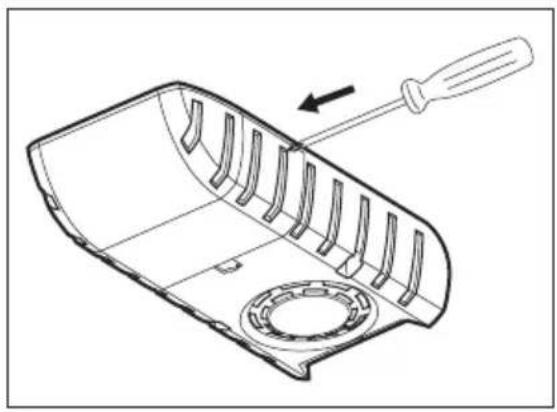
Technical line drawing of a mechanical component with a screwdriver and internal slots (no text or symbols)Remove the lamp cover by pressing it inwards with a tool (e.g. screwdriver) to free the rear side hookings.
natural_image
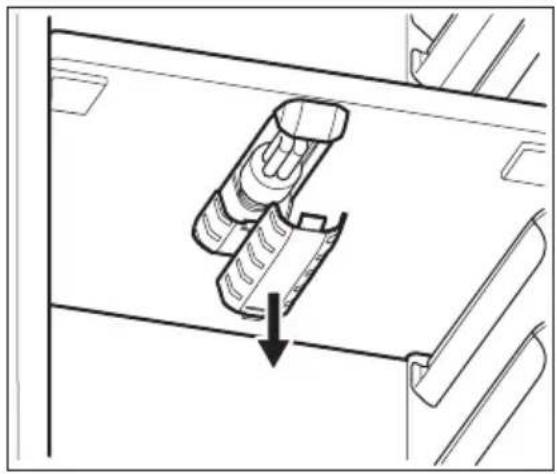
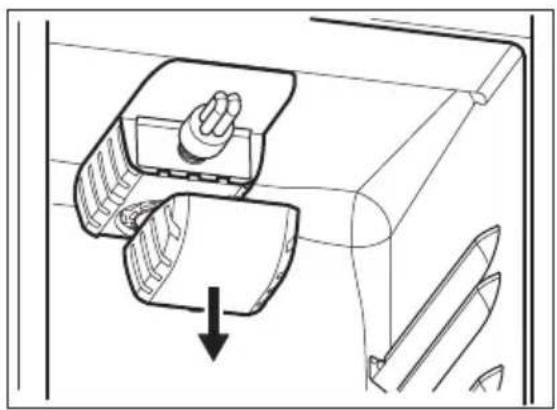
Diagram of a mechanical device with a hand pressing down and a downward arrow indicating motion (no text or symbols)At the same time, free the middle hook and slide off the cover in the direction of the arrows.
natural_image
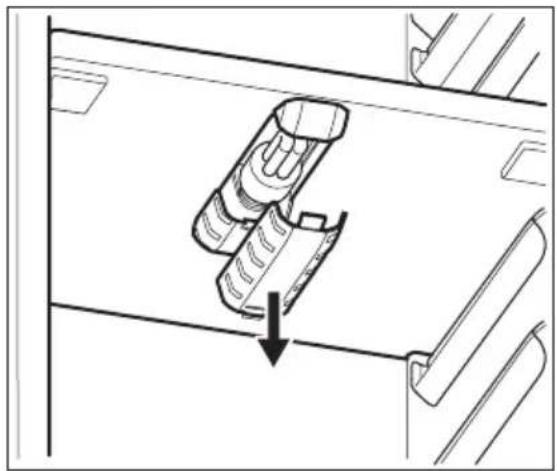
Technical line drawing of a mechanical component with an arrow indicating direction (no text or symbols)Replace the used lamp with a new lamp of the same type and specifically designed for household appliances and having the same characteristics.
Install the lamp cover.
Connect the mains plug to the mains socket.
Open the door. Make sure that the lamp comes on.
Closing the door
- Clean the door gaskets.
- If necessary, adjust the door. Refer to "Installation".
INSTALLATION
Positioning

Warning! If you are discarding an old appliance that has a lock or catch on the door, you must ensure that it is made unusable to prevent young children being trapped inside.
- If necessary, replace the defective door gaskets. Contact the Service Center.
Important! The appliance shall have the plug accessible after installation.
Install this appliance at a location where the ambient temperature corresponds to the climate class indicated on the rating plate of the appliance:
| Climate class | Ambient temperature |
| SN +10°C to + 32°C | |
| N +16°C to + 32°C | |
| ST +16°C to + 38°C | |
| T +16°C to + 43°C |
Electrical connection
Before plugging in, ensure that the voltage and frequency shown on the rating plate correspond to your domestic power supply.
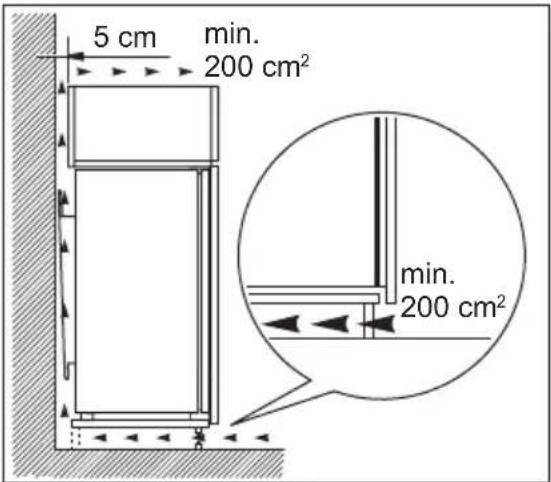
Ventilation requirements
text_image
5 cm min. 200 cm² min. 200 cm²Installing the appliance

Caution! Make sure that the mains cable can move freely.
natural_image
Technical line drawing showing a door mechanism with an arrow indicating rotation (no text or symbols)The appliance must be earthed. The power supply cable plug is provided with a contact for this purpose. If the domestic power supply socket is not earthed, connect the appliance to a separate earth in compliance with current regulations, consulting a qualified electrician.
The manufacturer declines all responsibility if the above safety precautions are not observed.
This appliance complies with the E.E.C. Directives.
The airflow behind the appliance must be sufficient.
Do the following steps:
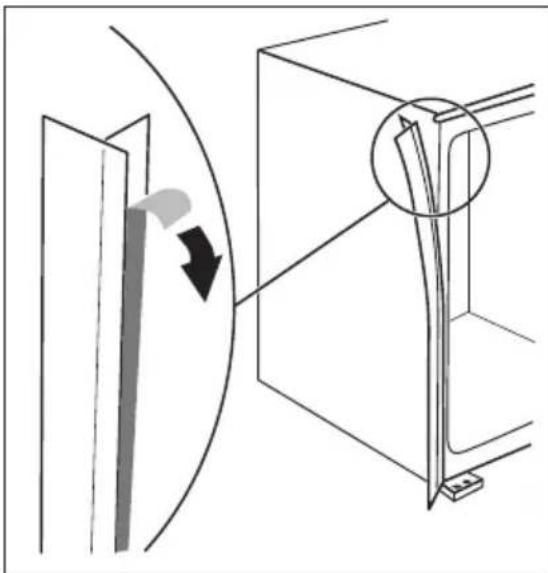
Apply the adhesive sealing strip to the appliance as shown in figure.

natural_image
Line drawing of a refrigerator with a hand pulling an arrow indicating rotation or movement (no text or symbols present)Install the appliance in the niche.

text_image
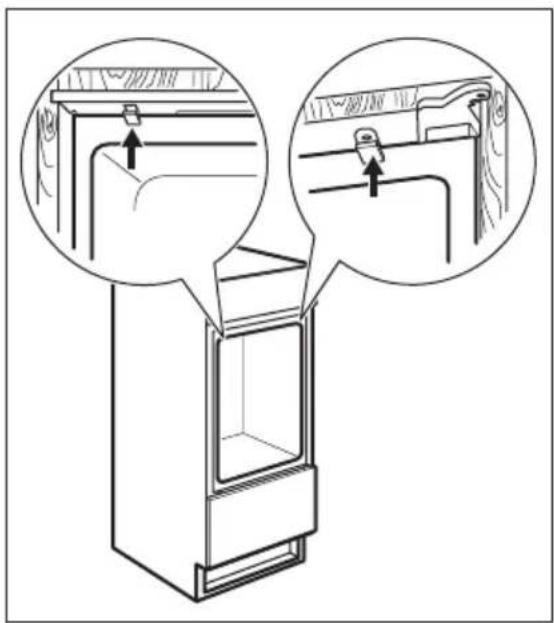
Diagram illustrating door lock mechanism with three circular insets showing clockwise rotation of a door panel and a wooden handle.Attach the appliance to the niche with 4 screws.
natural_image
Line drawing of a refrigerator interior with two magnified views showing hand positioning and mounting bracket (no text or symbols)Fix the covers on the screws.
Do a final check to make sure that:
- All screws are tightened.
- The sealing strip is attached tightly to the cabinet.
• The door opens and closes correctly.
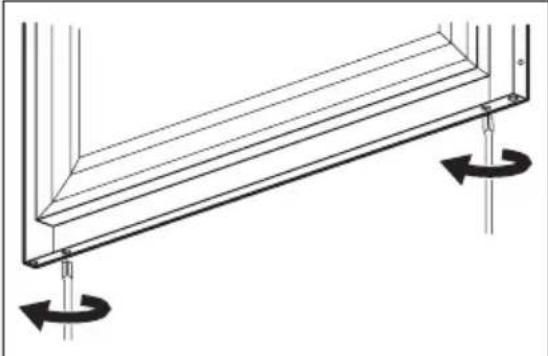
Assembly instructions for the compensator lower part of the door
natural_image
Technical line drawing of a structural beam with rotational arrows indicating motion (no text or symbols)With the door open, loosen the two screws situated in the lower part without unscrewing them completely.

natural_image
Technical line drawing of a structural frame with two parallel plates and directional arrows indicating assembly or movement (no text or symbols)Position the steel compensator as indicated in the figure and insert the upper part under the head of the screws.
natural_image
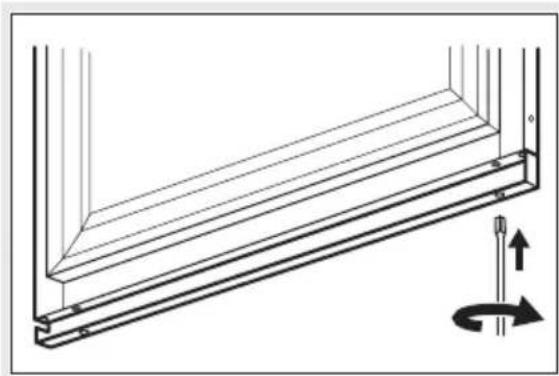
Technical line drawing of a structural beam with a rotation arrow indicating upward motion (no text or symbols)Align the compensator with the steel door panel and tighten the screws.

natural_image
Technical line drawing of a structural component with two parallel plates and an arrow indicating direction (no text or symbols)Insert the steel carter inside the compensator as indicated in the figure.
TECHNICAL DATA
| Dimension of the recess | ||
| Height 1780 mm | ||
| Width 560 mm | ||
| Depth 550 mm | ||
| Voltage 230-240 V | ||
| Frequency 50 Hz |
The technical information are situated in the rating plate on the internal left side of the appliance and in the energy label.
ENVIRONMENTAL CONCERNS
The symbol ☒ on the product or on its packaging indicates that this product may not be treated as household waste. Instead it should be taken to the appropriate collection point for the recycling of electrical and electronic equipment. By ensuring this product is disposed of correctly, you will help prevent potential negative
consequences for the environment and human health, which could otherwise be caused by inappropriate waste handling of this product. For more detailed information about recycling of this product, please contact your local council, your household waste disposal service or the shop where you purchased the product.
SOMMAIRE
text_image
1 2 ① | - | + | Light off | Alarm off | - | + 345678natural_image
Line drawing of a multi-level refrigerator with shelves filled with bottles and one open door (no text or symbols)natural_image
Line drawing of a refrigerator with open door and side shelves (no text or symbols)natural_image
Line drawing of a refrigerator with shelves and a rolled-up scroll (no text or symbols)natural_image
Technical line drawing of a rectangular metal frame structure with slatted top and side cutouts (no text or symbols)natural_image
Line drawing of a mechanical housing or enclosure with side brackets and internal compartments (no text or symbols)natural_image
Technical line drawing of a mechanical component with no visible text or symbolsnatural_image
Diagram showing a hand holding a tool inside a circular device with rotational arrows, no text or symbols present.natural_image
Technical line drawing of a mechanical component with a screwdriver inserted, showing internal slots and a circular base (no text or symbols)natural_image
Diagram of a mechanical device with a handle and two circular components, showing a downward arrow (no text or symbols)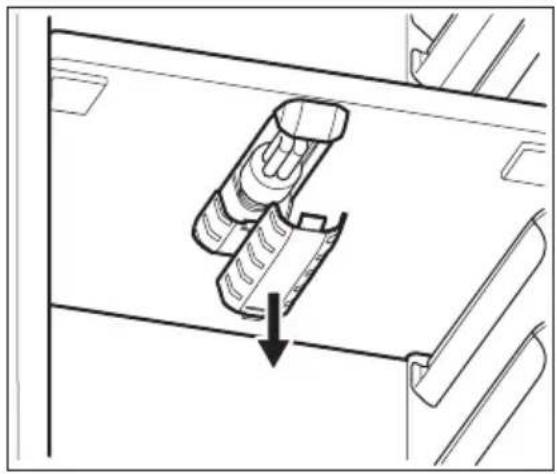
natural_image
Technical line drawing of a mechanical component with an arrow indicating direction (no text or symbols)natural_image
Diagram of a refrigerator with an arrow indicating rotation and force application (no text or symbols)text_image
Diagram illustrating the stepwise rotation of a refrigerator door mechanism, showing three stages from opening to closing.natural_image
Line drawing of a refrigerator with two circular insets showing close-ups of the door and shelf (no text or symbols)text_image
1 2 ① | - | + | Light off | Alarm off | - | + 345678natural_image
Line drawing of a multi-level refrigerator with shelves filled with bottles and one open door (no text or symbols)Oberes Fach:
natural_image
Line drawing of a refrigerator with open door and side shelves (no text or symbols)natural_image
Line drawing of a refrigerator with shelves and a rolled-up scroll (no text or symbols)natural_image
Technical line drawing of a rectangular metal frame structure with slatted top and side cutouts (no text or symbols)natural_image
Line drawing of a mechanical device with a tray and side brackets (no text or symbols)natural_image
Technical line drawing of a mechanical component with internal fan and mounting features (no text or symbols)natural_image
Diagram showing a hand holding a tool inside a circular frame with rotational arrows, no text or symbols present.Stillstandzeiten
natural_image
Technical line drawing of a mechanical component with a screwdriver and internal slots (no text or symbols)natural_image
Diagram of a mechanical device with a handle and two circular components, showing a downward arrow (no text or symbols)