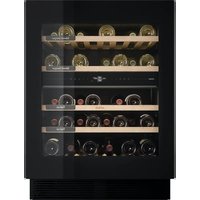
KU8571K2C - Wine cellar Atag - Free user manual and instructions
Find the device manual for free KU8571K2C Atag in PDF.


| Product type | Climate-controlled wine cellar |
| Brand | Atag |
| Model | KU8571K2C |
| Dimensions (W x D x H) | 595 x 545 x (820-870) mm |
| Capacity | Up to 38 bottles (Bordeaux 0.75 L format) |
| Power supply | 210-240 V ~ 50 Hz |
| Climate class | SN (10-32°C), N (16-32°C), ST (16-38°C), T (16-43°C) |
| Adjustable temperature range | 5°C to 20°C (per zone) |
| Temperature zones | 2 independent zones (A and B) with insulation barrier |
| Relative humidity | Monitoring and alarm if <40% or >80% |
| Lighting | LED, adjustable intensity (0-100%) and color temperature (2700K-5000K), ambient and functional modes |
| Charcoal filter | Replaceable every 12 months (on-screen notification) |
| Door opening | Push-to-open + hidden handle in case of power failure |
| Connectivity | Wi-Fi (2.4 GHz), ConnectLife app (iOS/Android) |
| Special functions | ECO mode, Sabbath mode (72h), Night mode, key lock, alarms (temperature, humidity, door, power failure) |
| Defrost | Automatic |
| Cleaning | Soft cloth, warm water, neutral detergent; do not use abrasives or dishwasher |
| Safety | Child lock (via key lock), automatic light shut-off after 10 min of opening, open door alarm |
| Optional accessories | Clay humidity box, replacement charcoal filter |
| Approximate weight | Approx. 70 kg (estimate) |
| Repairability | Approved after-sales service; spare parts available (filter, etc.) |
Frequently Asked Questions - KU8571K2C Atag
User questions about KU8571K2C Atag
0 question about this device. Answer the ones you know or ask your own.
Ask a new question about this device
Download the instructions for your Wine cellar in PDF format for free! Find your manual KU8571K2C - Atag and take your electronic device back in hand. On this page are published all the documents necessary for the use of your device. KU8571K2C by Atag.
USER MANUAL KU8571K2C Atag
natural_image
Line drawing of an open refrigerator with visible door, shelves, and ventilation slots (no text or symbols)GEBRUIKSAANWIJZING
WIJNKLIMAATKAST
NL
KU8574K2C
KU8571K2C
natural_image
Illustration of a door with a hand opening the window, showing airflow direction (no text or symbols)natural_image
Hand holding a small electronic component with a black X symbol crossed out (no text or symbols present)
INFORMATIE!
natural_image
Illustration of a hand holding a curved object with an arrow, next to a wooden frame (no text or symbols)natural_image
Illustration of six identical empty wine bottles arranged in a row (no text or symbols)Houtenplankophetisolatieplateau(6)
natural_image
Mechanical assembly diagram showing a conveyor belt system with a tool inserted (no text or symbols visible)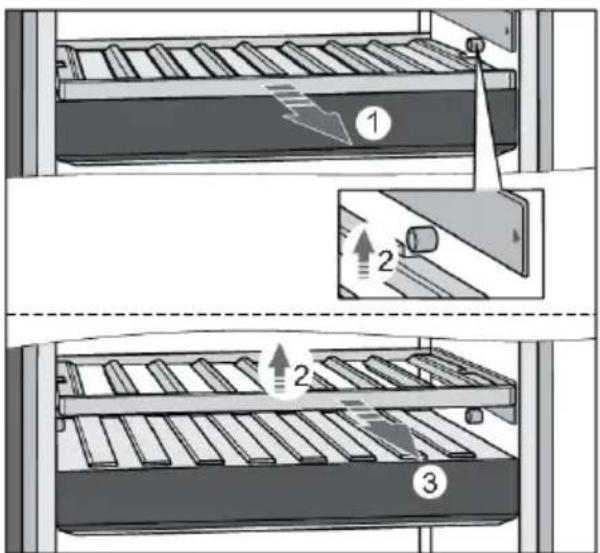
BedieningspaneelmetTFT-display(7)
natural_image
Diagram showing two views of a mechanical component with internal structure and directional arrows (no text or symbols)natural_image
Diagram of a mechanical device with five circular components arranged in a row (no text or symbols visible)natural_image
Illustration of a container pouring liquid into a rectangular block (no text or symbols)natural_image
Illustration of screwdriver and electric drill (T25) tools without any text or symbols on the devices themselves.natural_image
Diagram showing a refrigerator with open doors and a close-up view of the front panel (no text or symbols present)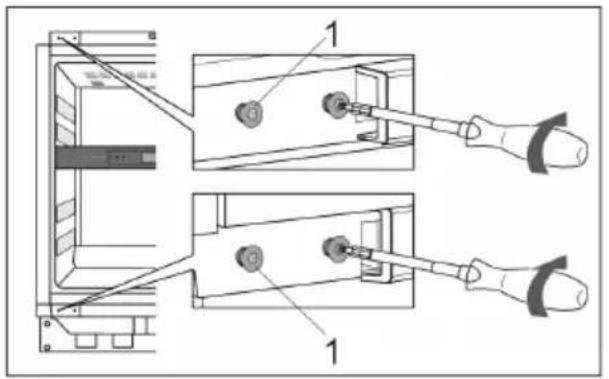
natural_image
Illustration of hands installing or adjusting a mechanical component with arrows indicating motion (no text or symbols)flowchart
graph TD
    A["Refrigerator"] -->|Remove refrigerator| B["Refrigerator with cooling unit"]
    B -->|Add refrigerator to refrigerator| C["Final refrigerator with cooling unit"]
natural_image
Illustration of a refrigerator cabinet with ventilation grilles and door panel (no text or symbols)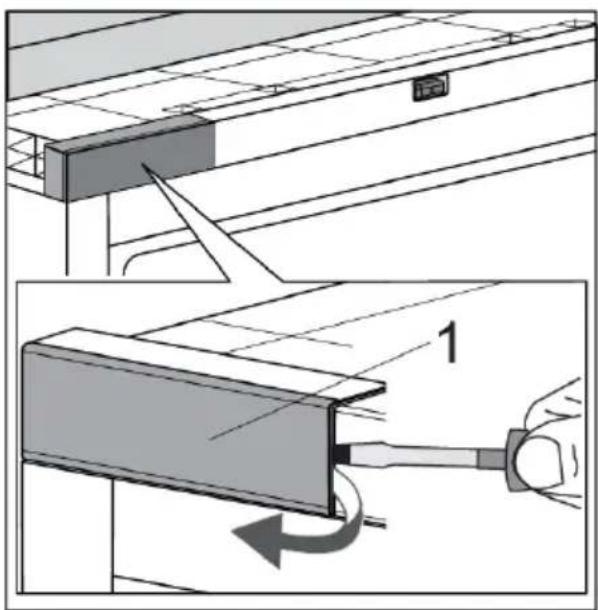
natural_image
Diagram of a cabinet with an open door and directional arrows indicating movement or force (no text or symbols)natural_image
Technical diagram showing two views of a mechanical assembly with labeled components (no text or symbols present)natural_image
Diagram of a structural joint or connection with two components, one showing force arrows and the other showing texture (no text or symbols)natural_image
Diagram showing a device interacting with a textured surface, with arrows indicating movement or force direction (no text or symbols present)natural_image
Line drawing of an open refrigerator with visible door, shelves, and ventilation slots (no text or symbols)NOTICED'UTILISATION
ARMOIRE À VIN
FR
KU8574K2C
KU8571K2C
Tables des matières
Installation et raccordement
Installation et raccordement
Installation et raccordement
natural_image
Illustration of a door with a hand opening the window, showing airflow direction (no text or symbols)natural_image
Hand holding a small electronic component with a black X symbol crossed out (no text or symbols present)
INFORMATION
natural_image
Illustration of a hand holding a curved object with an arrow, next to a wooden frame (no text or symbols)natural_image
Illustration of six identical empty wine bottles arranged in a row (no text or symbols)Clayetteenboissurlabarrièred'isolation(6)
natural_image
Mechanical assembly diagram showing a conveyor belt system with a tool inserted, alongside a close-up view of the component (no text or symbols present)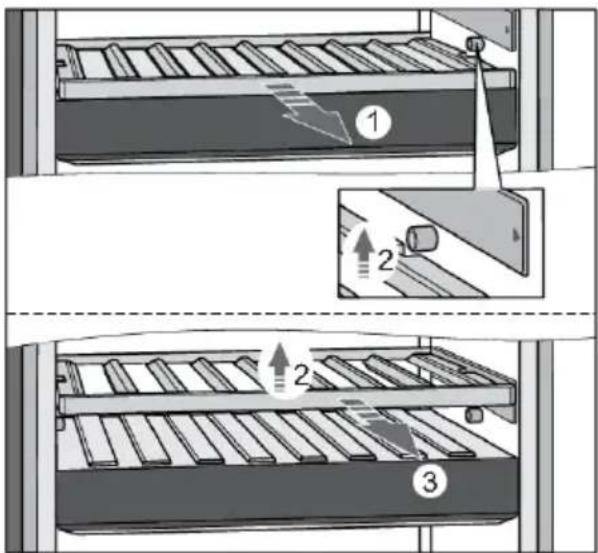
natural_image
Diagram showing two views of a mechanical component with internal structure and directional arrows (no text or symbols)natural_image
Diagram of a mechanical device with five circular components arranged in a row (no text or symbols visible)natural_image
Illustration of a container pouring liquid into a rectangular block (no text or symbols)bar
| Category | Value (%) | |---|---| | Top Bar | 64 | | Bottom Bar | 72 | | Right Arrow | 68 | The label '01' is positioned below the bar. The value '64%' is shown above the bar, and the value '68%' is marked with a red diamond. The label '01' is also labeled below the bar.natural_image
Illustration of screwdriver and electric drill (T25) tools without any text or symbols on the devices themselves.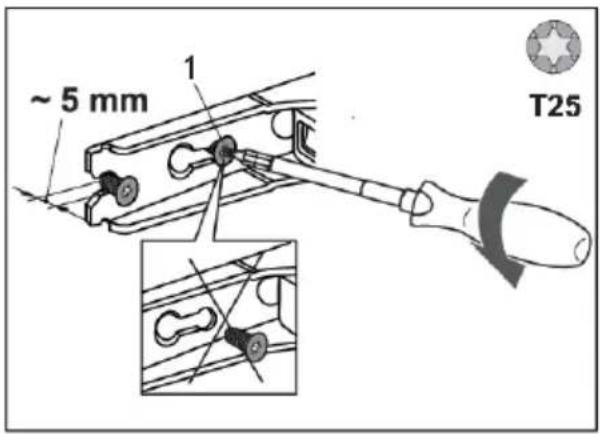
natural_image
Diagram showing a refrigerator with storage compartments and an open door, illustrating the exterior and interior views (no text or symbols present)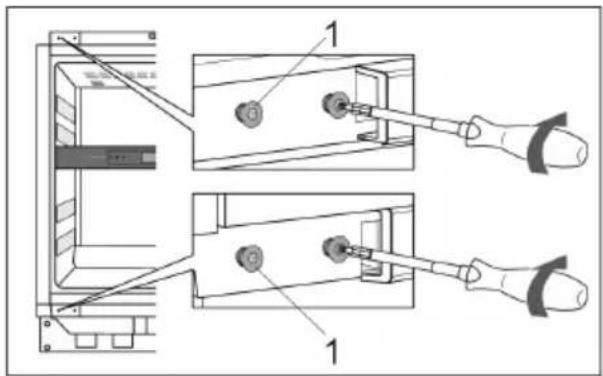
natural_image
Illustration of hands installing or adjusting a mechanical component with arrows indicating motion (no text or symbols)natural_image
Illustration of a refrigerator cabinet with ventilation grilles and door panel (no text or symbols)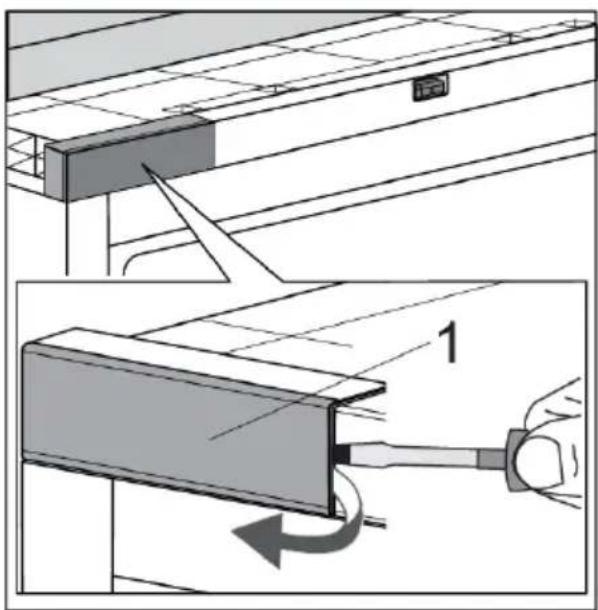
natural_image
Diagram of a cabinet with an open door and directional arrows indicating airflow or movement (no text or symbols)natural_image
Technical diagram showing two views of a mechanical assembly with labeled components (no text or symbols present)natural_image
Diagram of two mechanical components with arrows indicating motion or force direction (no text or symbols)natural_image
Diagram showing a mechanical assembly with arrows indicating force or movement, no text or symbols presentnatural_image
Line drawing of an open refrigerator with visible door, shelves, and ventilation slots (no text or symbols)BEDIENUNGSANLEITUNG
WEINKÜHLSCHRANK
DE
KU8574K2C
KU8571K2C
natural_image
Illustration of a door with a hand opening the window, showing airflow direction (no text or symbols)natural_image
Hand holding a small electronic component with a black X symbol crossed out (no text or symbols present)
INFORMATION!
natural_image
Illustration of a hand holding a curved object with an arrow, next to a wooden frame (no text or symbols)natural_image
Illustration of six identical empty wine bottles arranged in a row (no text or symbols)Holzablagerostaufderlsolierwand(6)
natural_image
Mechanical assembly diagram showing a conveyor belt system with a tool inserted, no text or symbols present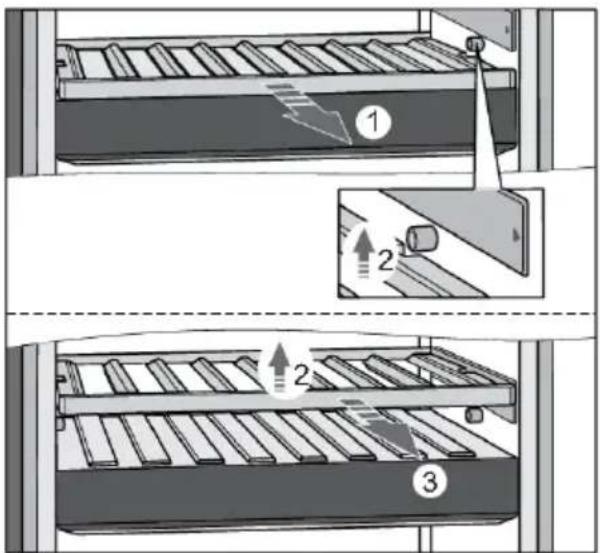
natural_image
Diagram of two mechanical components with internal mesh patterns, labeled 1 and 2 (no text or symbols beyond labels)natural_image
Diagram of a mechanical device with five circular components arranged in a row inside a rectangular frame (no text or symbols)natural_image
Illustration of a container pouring liquid into a rectangular block (no text or symbols)bar
| Category | Value (%) | |---|---| | Top Bar | 64 | | Bottom Bar | 72 | | Right Arrow | 68 | The label '01' is positioned below the bar at the bottom of the bar.natural_image
Illustration of screwdriver and electric drill (T25) tools without any text or symbols on the devices themselves.natural_image
Diagram showing a refrigerator with open doors and a close-up view of the front panel (no text or symbols present)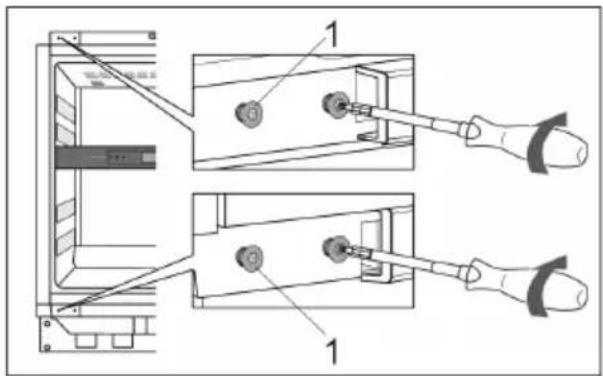
natural_image
Diagram showing three frames of a solar panel with an 180-degree rotation indicator (no text or symbols)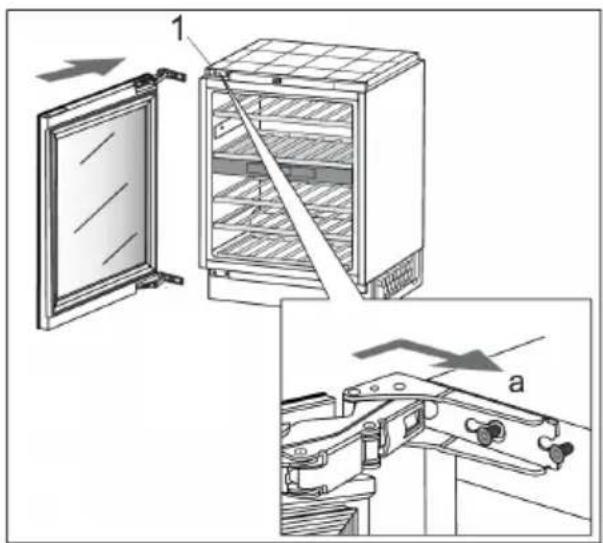
natural_image
Illustration of hands installing or adjusting a mechanical component with arrows indicating motion (no text or symbols)flowchart
graph TD
    A["Refrigerator"] -->|Remove refrigerator| B["Refrigerator with cooling unit"]
    B -->|Add refrigerator to sink| C["Final refrigerator with cooling unit"]
natural_image
Illustration of a multi-level refrigerator cabinet with ventilation grilles and control panel (no text or labels)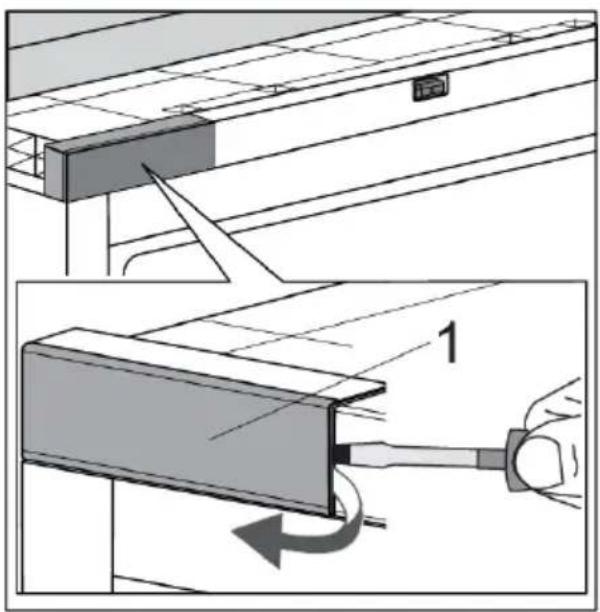
natural_image
Diagram of a cabinet with an open door and directional arrows indicating airflow or movement (no text or symbols)natural_image
Technical diagram showing two views of a mechanical assembly with labeled components (no text or symbols present)natural_image
Diagram of a mechanical joint or connection with two components, one showing a cut and the other forming a grid-like structure (no text or symbols present)natural_image
Diagram showing a mechanical assembly with arrows indicating force or movement, no text or symbols presentnatural_image
Line drawing of an open refrigerator with visible door, shelves, and ventilation slots (no text or symbols)INSTRUCTIONSFORUSE
WINE CLIMATE CABINET
EN
KU8574K2C
KU8571K2C
Contents
Welcome to our growing Atag family! ......
Safety of children and vulnerable people .....
Beforeusingtheapplianceforthefirst time....
Before you use the appliance for the first time ....
Humidity box (separate accessory, not included) ....
3Introduction......
3 26Main disp
4Safetyinstructions......
4 28Key lock.
5General safety 29Lock setti
6Installation 29Alarms ...
6Electrical connection 31SETTING:
7Use 34Software
8Care and cleaning 35Wi-Fi func
8Dis6obsaccoal.filter.countdown.and.notification ... 36
9Installationandconnection......
9Selecting the location 37Eco mode
9Appliance placement 38Maintena
11Connecting the appliance 38Defrosting
12
12
12Energy-saving advice ....
13Storingwine....
13Wine storage tips ....
14Storing bottles ......
15Descriptionoftheappliance......
Disposal of packaging and appliance ..... 60
22
23Operation....
23Control panel ....
24First use.
26Main disp
28Appliance
28Key lock.
29Lock setti
29Alarms ...
31SETTING:
34Software
35Wi-Fi func
36
37Sabbath r
37Eco mode
38Maintena
38Defrosting
38Cleaning
39Reversin
46Installatio
55Solvingp
55Tips & Tri
56Error notif
58Other dis|
59General p
60Environn
60
61Compliar
Welcome to our growing Atag family!
We are proud of our appliances. We hope that this appliance will be an appreciated and dependable aid for many years to come.
Please read the operating instructions before use. They include general tips, information about the settings and adjustments you can make, and the best way to take care of your appliance.
LinktotheEUEPRELdatabase
The QR code on the energy label supplied with the appliance provides a web link to the registration of this appliance in the EU EPREL database. Keep the energy label for reference together with the user manual and all other documents provided with this appliance.
It is possible to find information related to the performance of the product in the EU EPREL database using the link https://eprel.ec.europa.eu and the model name and product number that you can find on the rating plate of the appliance.
For more detailed information about the energy label, visit www.theenergylabel.eu.
The following symbols are used throughout the manual and they have the following meanings:

INFORMATION!
Information, advice, tip, or recommendation

WARNING!
Warning –general danger

ELECTRIC SHOCK!
Warning – danger of electric shock

DANGER OF FIRE!
Warning –danger of fire
Before the installation and use of the appliance, carefully read the supplied instructions. The manufacturer is not responsible if an incorrect installation and use causes injuries and damages. Always keep the instructions with the appliance for future reference.
WARNING!
If the appliance is installed at an altitude of over 1000 m above sea level, there is a danger of glass cracking due to air pressure. In such case, glass fragments could cause injury.
Safetyofchildrenandvulnerablepeople
- The appliance is not intended for use by persons (including children) with reduced physical, sensory or mental capabilities, or lack of experience and knowledge, unless they have been given supervision or instruction concerning use of the appliance by a person responsible for their safety.
- Children should be supervised to ensure that they do not play with the appliance.
- Cleaning and user maintenance shall not be made by children without supervision.
- Keep all packaging away from children.
For European marketsonly
- This appliance can be used by children aged from 8 years and above and persons with reduced physical, sensory or mental capabilities or lack of experience and knowledge if they have been given supervision or instruction concerning use of the appliance in a safe way and understand the hazards involved.
• Children shall not play with the appliance.
- Cleaning and user maintenance shall not be made by children without supervision.
- Children aged from 3 to 8 years are not allowed to load and unload the appliance.
Generalsafety
- Illumination in the appliance is only suitable for illumination of this appliance and not for household room illumination.
-
WARNING! This appliance is intended to be used in household and similar applications such as:
-
staff kitchen areas in shops, offices and other working environments;
- farm houses and by clients in hotels, motels and other residential type environments;
- catering and similar non-retail applications.
WARNING!
Keep ventilation openings, in the appliance enclosure or in the built-in structure, clear of obstruction.
Do not use mechanical devices or other means to accelerate the defrosting process, other than those recommended by the manufacturer.
Do not damage the refrigerant circuit.
Do not use water spray and steam to clean the appliance.
Clean the appliance with a moist soft cloth. Only use neutral detergents. Do not use abrasive products, abrasive cleaning pads, solvents or metal objects.
Do not store explosive substances such as aerosol cans with a flammable propellant in this appliance.
If the supply cord is damaged, it must be replaced by the manufacturer, its service agent or similarly qualified persons in order to avoid a hazard.
To avoid a hazard due to instability of the appliance, it must be fixed in accordance with the instructions.
Installation
- Remove all the packaging.
- Do not install or use a damaged appliance.
- Obey the installation instruction supplied with the appliance.
- Always be careful when you move the appliance because it is heavy. Always wear safety gloves.
- Make sure the air can circulate around the appliance.
- After you place the appliance, wait at least 4 hours before connecting the appliance to the power supply. This is to allow the oil to flow back in the compressor.
- Do not install the appliance close to radiators or cookers, oven or hobs.
- Do not install the appliance where there is direct sunlight.
- Do not install this appliance in areas that are too humid or too cold, such as the construction appendices, garages or cellars.

ELECTRIC SHOCK!
WARNING! When positioning the appliance, ensure the supply cord is not trapped or damaged.
Electricalconnection

ELECTRIC SHOCK!
WARNING! Risk of fire and electrical shock.
- The appliance must be earthed.
- All electrical connections should be made by a qualified electrician.
- Make sure that the electrical information on the rating plate agrees with the power supply. If not, contact an electrician.
• Always use a correctly installed shockproof socket. -
Do not use multi-plug adapters and extension cables.
-
Make sure not to cause damage to the electrical components (e.g. mains plug, mains cable, compressor). Contact the Service or an electrician to change the electrical components.
- The mains cable must stay below the level of the mains plug.
- Connect the mains plug to the mains socket only at the end of the installation. Make sure that there is access to the mains plug after the installation.
- Do not pull the mains cable to disconnect the appliance. Always pull the mains plug.

WARNING!
Do not locate multiple portable socket-outlets or portable power supplies at the rear of the appliance
Use

WARNING!
Risk of injury, burns, electrical shock or fire.
- Do not change the specification of this appliance.
- Do not put electrical appliances (e.g. ice cream makers) in the appliance unless they are stated applicable by the manufacturer.
- Be careful not to cause damage to the refrigerant circuit. It contains isobutene (R600a), a natural gas with a high level of environmental compatibility. This gas is flammable.
- If damage occurs to the refrigerant circuit, make sure that there are no flames and sources of ignition in the room. Ventilate the room.
- Do not let hot items to touch the plastic parts of the appliance.
- Do not store flammable gas and liquid in the appliance.
- Do not put flammable products or items that are wet with flammable products in, near or on the appliance.
- Do not touch the compressor or the condenser. They are hot.
Careandcleaning
WARNING!
Risk of injury or damage to the appliance.
- Before maintenance, deactivate the appliance and disconnect the mains plug from the mains socket.
- This appliance contains hydrocarbons in the cooling unit. Only a qualified person must do the maintenance and the recharging of the unit.
Disposal
WARNING!
Risk of injury or suffocation.
- Disconnect the appliance from the mains supply.
- Cut off the mains cable and discard it.
- Remove the door to prevent children and pets to be closed inside of the appliance.
- The refrigerant circuit and the insulation materials of this appliance are ozone friendly.
- The insulation foam contains flammable gas. Contact your municipal authority for information on how to discard the appliance correctly.
- Do not cause damage to the part of the cooling unit that is near the heat exchanger.
Installation and connection
Selecting the location
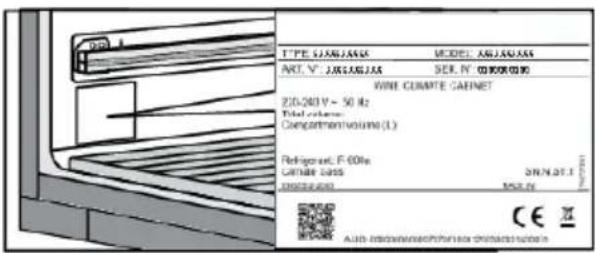
Place the appliance in a dry and well aired room. The permitted ambient temperature range for the appliance depends on the appliance's climate class, which is shown on the type plate.

WARNING!
Do not place the appliance in a room where the temperature can fall below 5^ C: the appliance may not work properly or become defective!
| RelativehumidityAmbienttem | |||
| +10 to +32SNExtended temperate | ≤75% | ||
| +16 to +32NTemperate | |||
| +16 to +38STSubtropical | |||
| +16 to +43TTropical |
- In environments with high humidity level, condensate droplets may appear on the appliance's exterior surfaces.

WARNING!
Install the appliance in a room with an adequate amount of air. There should be at least 1 m^3 of air per every 8 grams of refrigerant. The amount of refrigerant is indicated on the rating plate inside the appliance.

WARNING!
Do not place the appliance in a room where temperature can drop to below 5^ C. In such environment, the appliance may not operate correctly, or it may become defective.
Appliance placement
In order to safely install the appliance and for the appliance to operate correctly, it is important to place it onto a surface with adequate load-bearing capacity. If necessary, consult an architect/structural engineer. The surface should be smooth and level with the floor in the room.
When the appliance is placed on the intended surface, it should be completely level in order to decrease vibration.
Installation and connection
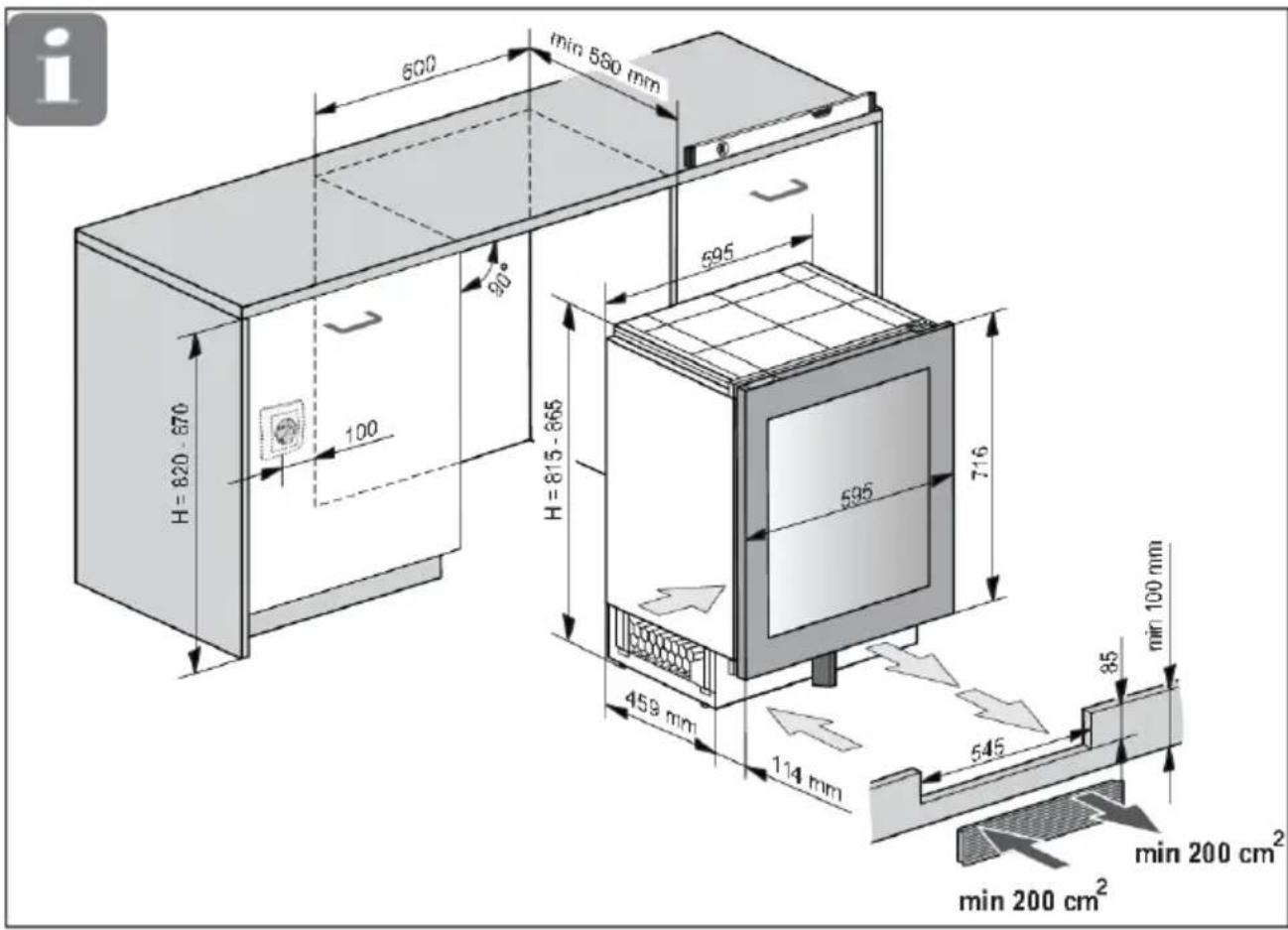
- Place the appliance at least 50 mm away from an electric or gas stove, and at least 300 mm away from a heat source (e.g. a radiator or a heater). If such clearance is not possible, then install an insulation panel.
• The appliance should not be exposed to direct sunlight. - At the base of the kitchen unit intended for building in the integrated appliance, there should be at least 400 cm² free space, for adequate air circulation. Ventilation openings must not be covered in any case!
Installation and connection
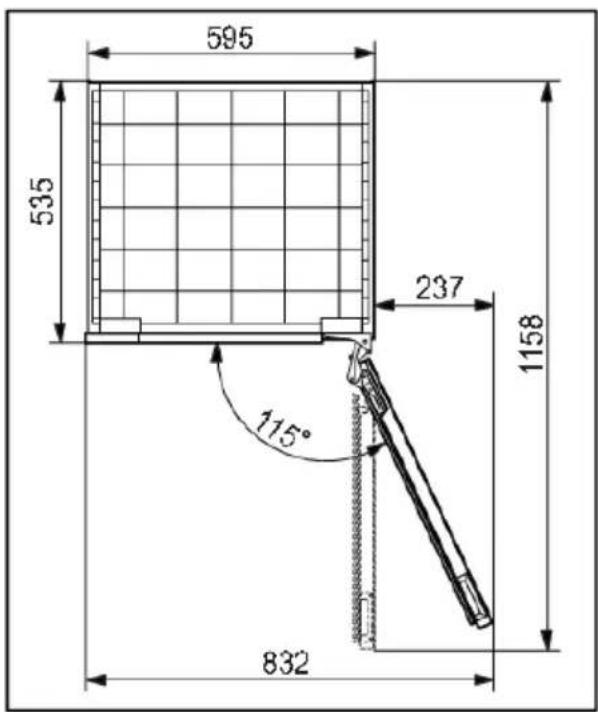
- When the appliance is installed, its plug should always be accessible!
Connecting the appliance
- Connect the appliance to the power supply with a plug. The socket must be earthed. The nominal voltage and frequency required for the appliance are shown on the appliance's type plate/label with basic information.
- The appliance must be connected to the mains and earthed in accordance with the prevailing standards and regulations. The appliance can withstand small variations in the mains voltage to a maximum of plus or minus 6%.

WARNING!
When you are not going to use the appliance for a longer period then switch it off (with function ON/OFF) and disconnect it from the mains. Empty and clean the appliance, than leave the door ajar.
Before using the appliance for the first time
Before you use the appliance for the first time
Do not connect the appliance to the mains until you have carefully read the instructions for the correct and safe use of the appliance. We recommend that you keep these instructions for future use. If you sell the appliance, enclose them with the appliance.
Inspect the appliance for damage and/or irregularities. If the appliance is damaged, contact the store that sold you the appliance.
Allow the appliance to stand upright for at least 4 hours before you connect the appliance to the mains. This reduces the risk of malfunctions resulting from transport effects on the refrigerant unit.
Before using the appliance for the first time, the interior and all internal accessories should be cleaned with lukewarm water and a neutral cleaning agent. Wipe the cleaned parts with a cloth with clean water and then dry them thoroughly.
Clean the wooden parts with a damp cloth. Make sure the wood is not too wet and leave the parts to fully dry before returning them to the appliance.
Energy-saving advice
• Install the appliance as stated in the instructions for use.
• Continuous use of ECO mode is recommended.
- Do not open the door more than necessary.
- Do not cover or block the ventilation slots.
- Replace a damaged door gasket or a gasket that no longer provides a perfect seal as soon as possible.
- When placing bottles on the shelves, make sure the air can freely circulate around them (observe the recommendations from the instruction manual and do not place more bottles on the shelves than recommended or indicated).
- In case of a power supply failure, leave the door closed as long as possible to maintain the temperature inside the appliance.
Wine storage tips
Natural wine cellars are the ideal place to store wine, because of the scarce light, the lack of vibrations and having a special climate. A wine's temperature determines its flavour, and influences enjoyment. Wine ageing depends on the environment conditions in which the wine is stored. By maintaining constant optimum temperature, correct air humidity, and an atmosphere free from any odours, the wine climate cabinet provides excellent conditions for storing your wine. It also provides an environment free from harmful vibrations that could also affect the ageing process. Since every type of wine has an optimum ageing time and climate, we suggest checking the recommended time to open the bottle as advised by the winemaker.
Most people who drink wine, know you serve white wine and champagne chilled, and red wine on room temperature. What people may not know that the "room temperature" that wine professionals are referring to, is the temperature of wine caves in the Bordeaux region of France. Those caves are about 13°C. A good wine climate cabinet, can keep your wines at a perfect serving temperature, reducing the guesswork and sometimes the headache.
It is very important to maintain a constant temperature within the wine climate cabinet. In case of a power failure, open the door as little as possible to maintain the temperature in the appliance interior. A gradual increase in temperature will not have a negative impact on the wine.
The humidity should be between 50% and 80%. Too low humidity will result in a dry cork. Too high humidity will cause mold. The Atag Wine Climate Cabinet provides excellent ventilation with clean air which helps preventing damage to labels and corks during storage.
The humidity levels in wine climate cabinet are particularly important for long term wine storage and ageing. Recommended temperature for wine ageing is between 11°C and 13°C. For that purpose, the wine climate cabinet will maintain optimal ageing conditions and notify the user, if the conditions deviate from them. Extremely high and low temperature settings are intended mainly for the wine serving purposes. Wine is exposed to this conditions for shorter time periods and therefore humidity should not have any negative effect on the wine. However, monitoring of relative humidity levels is available regardless of the compartment temperature setting.
Major temperature changes can cause humidity levels to deviate from the desired levels and it may take longer, e.g. about a week, for them to stabilize again. During this time, the notifications for humidity out of zone will not appear.
Extremely diverse settings in neighboring zones, e.g. A=20°C / B=5°C, A=5°C / B=20°C, may result in the humidity levels not reaching the desired levels in the warmer compartments.
Wine should be stored horizontally, especially corked wines. It will keep the cork moist and swollen and prevent wine from unwanted contact with air. Short term storage, within some weeks, storing in tilted position is preferred to keep the cork damp. If the position is too upward, the cork will dry out. Screw and crown caps have less demands regarding the positioning.
The wine cabinet is fitted with an activated carbon filter which prevents odors that can pollute your wines. The Activated Carbon filter is originally called HEGA filter (High Efficiency Gas Absorption). It removes the gas molecules through a process of adsorption (not absorption). During adsorption, the pollutants stick to the outside of the Activated Carbon filter.
By having your own wine climate cabinet in your house, this creates enjoyment of your wine on a premium level like the wine came straight out of a real wine cellar.
Storing wine
Storing bottles
- Moving the bottles or excessive vibration can have a negative effect on the aging process and thus on the wine's flavour.
- Keep the bottles intended for daily use on the front half of the shelves. Keep the wines you intend to store for a long time or age in the bottom part of the cabinet.
- Store the bottles horizontally, so that cork stoppers are also kept moist from within.

INFORMATION!
Mould can appear on bottle labels; this depends on the type of glue used for the label. Clean the bottles and remove any residual glue.

INFORMATION!
White sediment can form on cork stoppers as a result of oxidation due to contact with air. Wipe the sediment with a dry cloth. The sediment does not affect the quality of the wine.
This product contains a light source of energy efficiency class
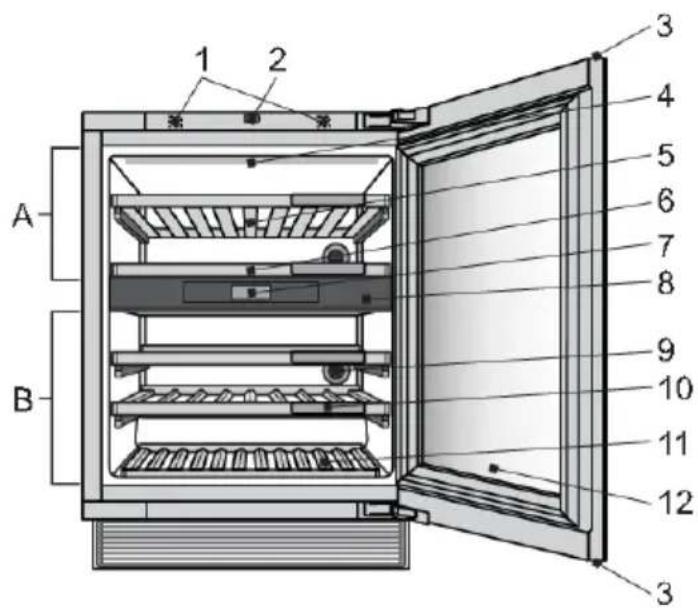
- Door sensor
- Push-to-open door mechanism
- Hidden handle
- LED illumination
- Wooden bottle shelf
- Wooden shelf on the insulation barrier
- Control unit with a TFT display unit
- Insulation barrier
- Charcoal filter
- Chalkboard name tag
- Wooden bottom bottle rack
- 2-layered glass door with UV filter
Doorsensor(1)
When you open or close the appliance door, light will change according to your preferences. They can be set in SETTINGS MENU.
Door sensor error is detected, when door open time reaches 10 minutes. In that case light is turned off.
Push-to-opendoormechanism(2)
The mechanism can be activated for the first time when the appliance is installed and connected to power.

INFORMATION!
Do not place any magnetic items in direct vicinity of the appliance door sensor (1), as this could cause the door to open inadvertently. As the mechanism is in the middle of the appliance, reversing the door opening direction does not affect its operation.
Description of the appliance

natural_image
Illustration of a door with a hand opening the window, showing airflow direction (no text or symbols)To open the door, push it slightly inwards on the upper left side, then release.
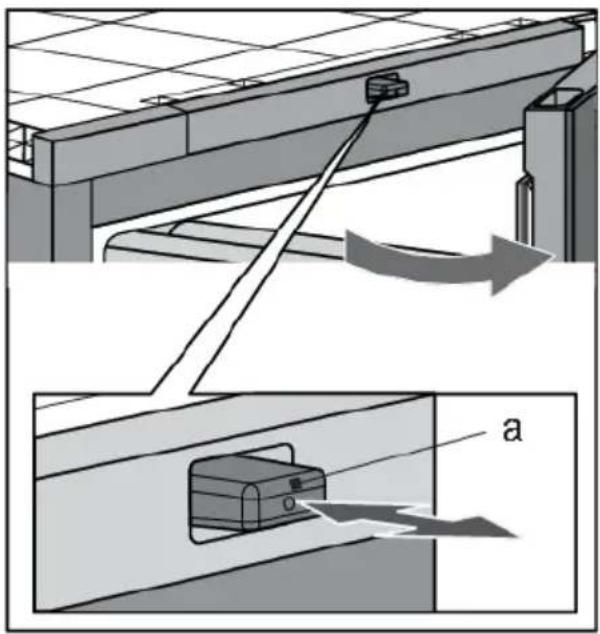
The mechanism's push pin (a) moves forward, and the door opens by approximately 6 cm. Then, you can fully open the door. If you do not open the door completely, it will automatically close. The soft-close mechanism gently closes the door.

INFORMATION!
If the door closes, at least 2 seconds have to pass before it can be opened again.
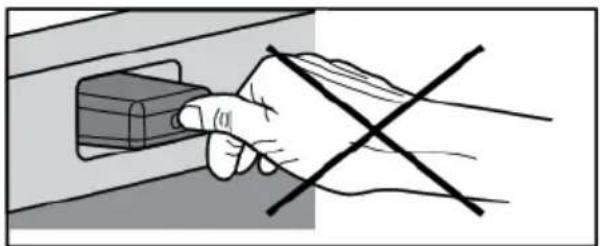
natural_image
Hand holding a small electronic component with a black X symbol crossed out (no text or symbols present)
INFORMATION!
When the door opens or closes, do not block it or press it onto the push pin in any way.
Description of the appliance
Hiddenhandle(3)
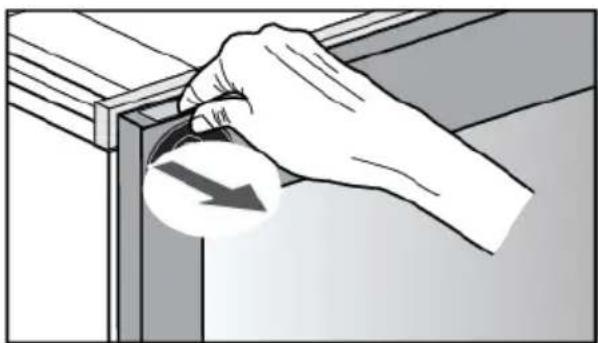
natural_image
Illustration of a hand holding a curved object with an arrow, next to a wooden frame (no text or symbols)In case of power failure, when push-to-open door mechanism is not operating, hidden handle enables you to open the door.
LEDillumination(4)
LED illumination is installed on the appliance ceiling. Owing to the use of LED illumination, the wine will not be exposed to UV rays and heat. The intensity, color and time interval of LED illumination can be changed in SETTINGS MENU.
Two light modes can be set and saved to use in different situations: Ambient mode and Functional mode.
Ambient mode: its purpose is to blend into the living space ambiance. It will be activated when the door is closed (default).
Functional mode: its purpose is to provide a clear view on the shelves. It will be activated when the door is opened (default).
Each light mode consists of a combination of intensity and warmth. These settings can be changed to your preferences. Light color can be changed in range of 2700K-5000K, light intensity can be set from 0% to 100%.
The activating and deactivating of the modes in different situations can be set in SETTINGS MENU.
Woodenbottleshelf(5)
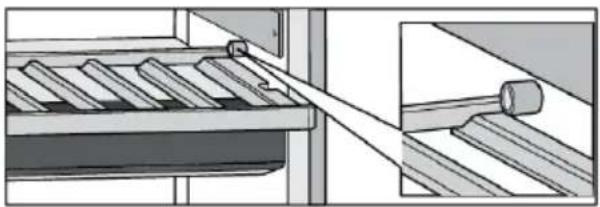
The shelves are placed on fully extendible telescopic rails. When closed, the shelves are retained in place. The retention force of the shelf closing mechanism prevents the shelf from being accidentally extended, while the full extension functionality allows easier handling of the bottles.

INFORMATION!
Be careful when pulling out the wooden shelves. Carefully pull out and push back the wooden shelves in order not to expose the wine bottles to vibration.
Before removing any shelf from the appliance, the shelf should be completely empty.
Make sure the door is fully open before removing the shelves. This will prevent any damage to the door gasket.
Description of the appliance
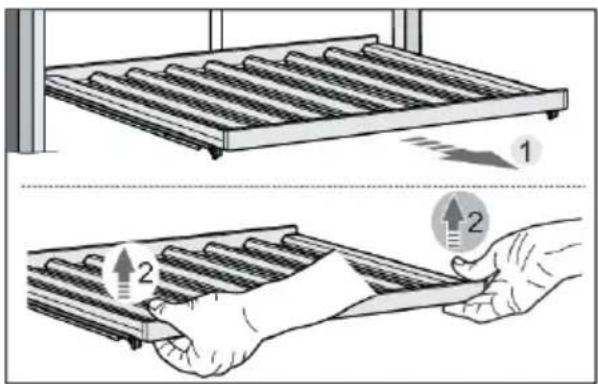
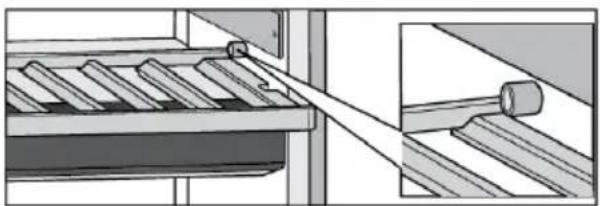
To remove a shelf from the appliance, fully extend the telescopic rails (1), and then vertically lift the shelf (2) to remove it from the rails. When removing the shelf, you can experience some resistance because of the fixation with the pin on the front side. Take care not to damage the door gasket.
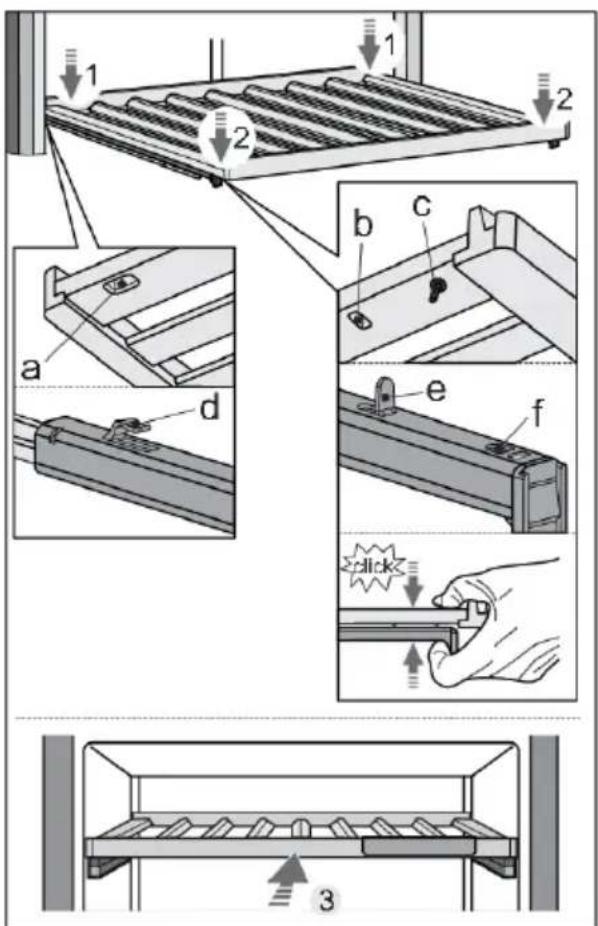
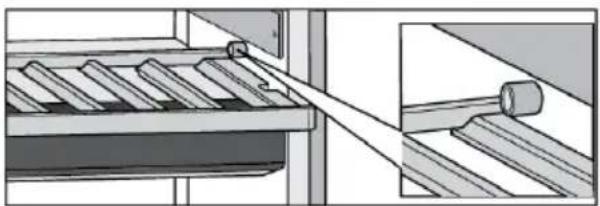
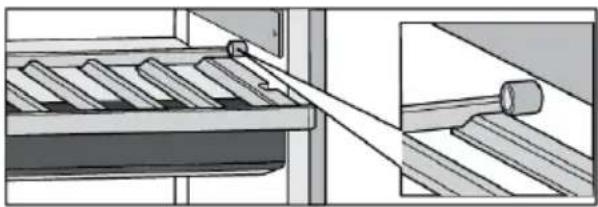
To replace a shelf onto the rails again, use the grooves (a, b) and pin (c) on the back and front side of the shelf.
First, fully extend the telescopic rails. Using the grooves (a) position the shelf onto the hooks (d) on the back side of the rails (1).
Then, use the grooves (b) to position the shelf onto the hooks (e) on the front side of the rails (2).
Pin (c) enables additional fixing of the shelf.
Press the shelf and rails together, so that the pin is fully seated in the hole (f).
This way you will not accidentally push the shelve off.
Description of the appliance
natural_image
Illustration of six identical empty wine bottles arranged in a row (no text or symbols)Woodenshelfontheinsulationbarrier(6)
natural_image
Mechanical assembly diagram showing a conveyor belt system with a shaft and roller, no text or symbols present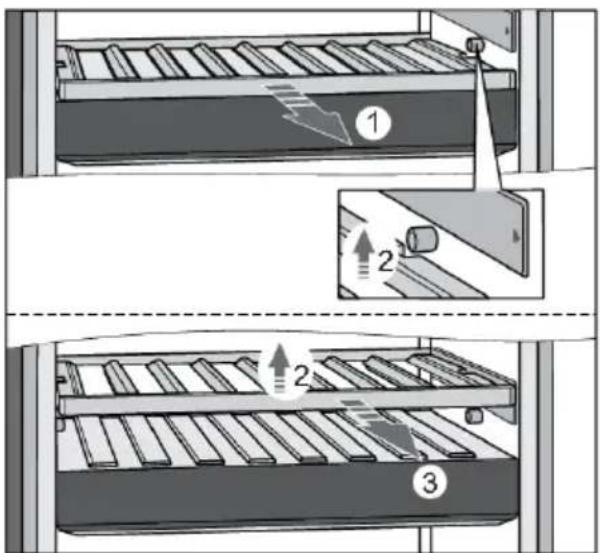
ControlunitwithaTFTdisplayunit(7)
By pressing the keys on display unit, you can control the operation of the wine climate cabinet and set certain functions according to your preferences.
INFORMATION!
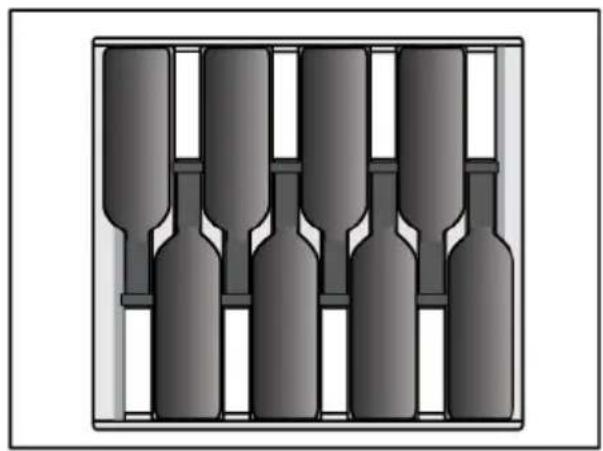
Before you start adding bottles to a shelf, check once more whether the shelf is correctly placed on the plastic holders. Up to 8 Bordeaux bottles (0.75 l) can be placed on each standard wooden bottle shelf.
INFORMATION!
Higher humidity level inside the appliance may cause the wooden parts to slightly bend; this, however, will not affect their functioning.
The shelf can be partly extended (pulled out from the appliance). The blocks on the cell protect the shelf from being fully extended and pulled out, which could result in the shelf falling from the appliance.
To remove a shelf from the appliance, partly pull it towards you (1) until the two grooves on the shelf and the two blocks (left, right) on the cell are aligned. Then, lift the shelf (2) and pull it out from the appliance (3). Take care not to damage the door gasket.
To replace the shelf, proceed with the same steps in the opposite direction.
Description of the appliance
Insulationbarrier(8)
Insulation barrier separates the inside of the wine climate cabinet into two temperature zones: A and B. That allows individual temperature settings for these two zones and storage of different type of wine.
Charcoalfilter(9)
Fresh air is drawn into the appliance interior through active charcoal air filter. This ensures freshness, as well as absence of dust and odours. The fan then distributes the air evenly across the appliance interior.
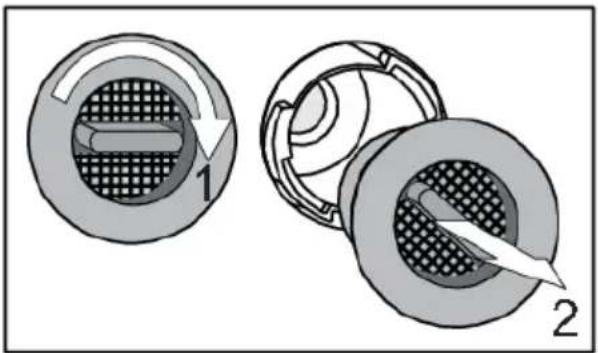
Replace the air filter approximately every 12 months. A notification will appear on the display to remind you it is time to replace the filter.
natural_image
Diagram showing two views of a mechanical component with internal structure and directional arrows (no text or symbols)To replace the air filter:
-
Rotate the filter in the clockwise direction (1) and pull it out from the appliance.
-
Insert a new filtering insert into the filter slot; then, rotate the filter anti-clockwise until it clicks into place.

INFORMATION!
Charcoal air filter can be ordered as accessory.
For more informations refer to the local Atag dealer or to the Atag website of your country.
Chalkboardnametag(10)
Chalkboard name tags are supplied with the appliance. They can be installed at the front side of each shelf. You can use chalk to indicate the wine stored on a particular shelf. The chalkboard name tags can be wiped with a damp cloth.

Description of the appliance
Woodenbottombottlerack(11)
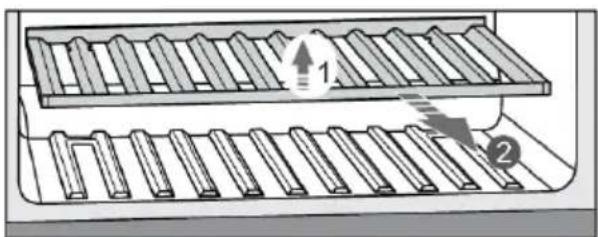
The wooden bottom bottle rack is intended for storing the bottles in the compressor area. This area is suitable for storing bottles you wish to keep for a longer period of time, especially for ageing without excessive vibration and unnecessary movement. To remove bottom rack from the appliance, lift it (1) and take it out (2). Take care not to damage the door gasket.
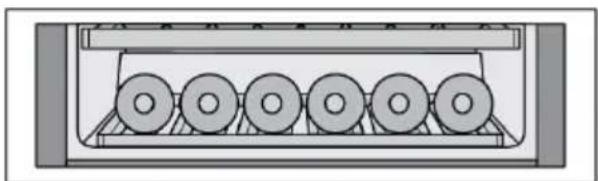
natural_image
Diagram of a mechanical device with six circular components arranged in a row (no text or symbols visible)Up to 6 Bordeaux bottles (0.75 l) can be stored on the wooden bottom bottle rack.
2-layeredglassdoorwithUVfilter(12)
The 2-layered glass door is filled with argon (a noble gas), which makes them more energy efficient. For maximum protection from sunlight that can harm the wine's aging process, an additional UV film is used that stops 99% of sunlight.
Appliancecapacity

The basic appliance configuration allows storing up to 38 Bordeaux bottles.
The number of bottles you can load onto each shelf is indicated on the drawing.
Description of the appliance
Humidity box (separate accessory, not included)
If the appliance is installed in a dry environmet, we recommend to buy Humidity box.
The purpose of the HumidityBox is to adjust the humidity in one of the zones of the wine climate cabinet, specifically to prevent humidity from dropping to below 50%, which could appear in certain conditions (e.g., when the wine climate cabinet is placed in an environment with low humidity).
Humidity level in respective zones can be monitored on the appliance display. If humidity in any zone drops to 40% or below, an alarm will be activated. You can then place the humidity box, filled with water, in this zone.
We recommend using the HumidityBox in compartments where the wines are stored for longer periods, since low humidity there could more severely impact the wine (with long-term drying of the corks). When you are storing your bottles for shorter periods or preparing them for serving, lower humidity should not have a significant impact on the wine quality.
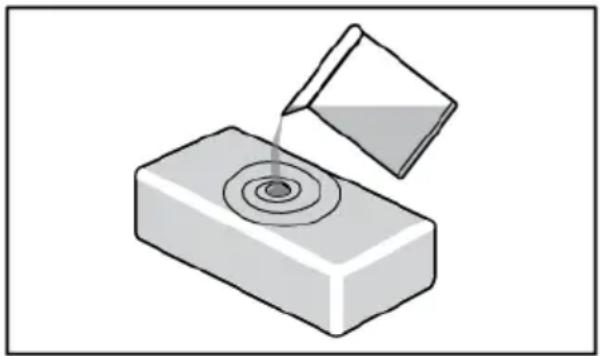
natural_image
Illustration of a container pouring liquid into a rectangular block (no text or symbols)Fill the box with 0.5 litre of tap water and place it in the relevant zone. There are no preferable positions, as long as it is placed in the correct zone.
HumidityBox is made of clay, a natural material with the right characteristics to first absorb water and then allow it to evaporate to increase humidity.
The walls and bottom of the clay box are glazed to prevent water leakage. Water is absorbed by all walls, but will only evaporate through the unglazed top surface.
The HumidityBox is made in an artisan workshop with fine craftsmanship. As a result, minor irregularities in material or shape may occur. They, however, do not have any effect on functionality.
The colour of the box changes when it is filled with water: as the walls absorb water, they become darker. Depending on the hardness of your tap water, some white limescale stains may appear on the material. To avoid this, you may use descaled or distilled water. The white stains can be washed off.
After placing the HumidityBox in the correct zone, it will take approximately 9 hours to increase the humidity back from 40% to 50%. After 9 hours, humidity will continue to slowly increase.
On average, the HumidityBox should be refilled every 30 days. The appliance will sound an alarm when humidity gets too low (below 40%).
You can also buy additional HumidityBoxes when needed.
Please do not put the HumidityBox in the dishwasher, as this type of material is not dishwasher safe. Because of the relatively thin walls, the box is fragile and should be handled carefully. Occasionally, shower the inside of the box with tap water.
In case you want to monitor humidity box refill notifications, you have to change SETTINGS MENU/SYSTEM/Humidity box notification/ from 'OFF' to 'ON'.

INFORMATION!
For more informations refer to the local Atag dealer or to the Atag website of your country.
Control panel

| On/Off key:01a long press (2 seconds) to switch the appliance on or offa short press to switch the appliance to or from Standby and Eco mode8 seconds press - appliance forced shutdown | |
| 02 | Settings key – to go to SETTINGS MENU |
| Key lock key:03to lock or unlock the user interface (3 seconds press)to deactivate Sabbath mode (3 seconds press) | |
| Menu left/right key:04to navigate menusto (de)activate a toggleto open/close information menu | |
| Up/down key:05to increase or decrease the set temperatureto increase or decrease valuesto navigate through vertical oriented menusto scroll text | |
| Confirmation key:06to confirm a setting from SETTINGS MENUto start a functionto answer 'Yes' to a pop-up | |
| X key:07to close or cancel a menu or functionto return to previous screento cancel alarmsto remove pop-up | |
| Wi-Fi key:08a long press (2 seconds) - shortcut to go inside CONNECTIVITY inside SETTINGS MENU | |
| Display09 |

INFORMATION!
For the best response, press the keys with the main part of your fingertip
Whenever you press the key, a short tone will sound. Volume of the key sound can be set in SETTINGS MENU.
Keylights intensity depends on the availability of the certain function:
| Keylightintensitywithdoorclosedor opened | |
| Function not available | 0% - no icon |
| Function available | 60% - |
| Function activatedortobeeactivated | 100% - |
Toggle:
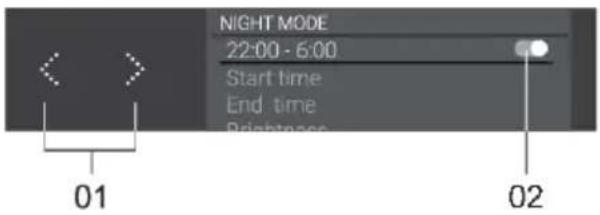
By pressing on 'Menu left/right' key (01), you can (de)activate toggle switch (02) to (de)activate a setting.
Theme colour background means 'On', a grey background means 'Off'.
In some cases when (de)activate toggle switch, also 'Confirmation' key is activated and needs to be pressed to (de)activate setting.
Informationtab:
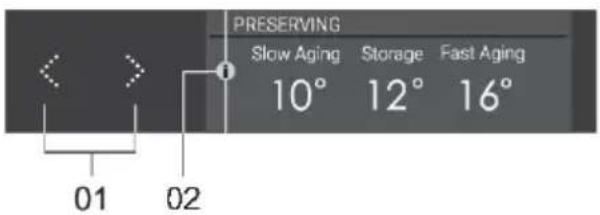
Contains additional explanation for the user.
By pressing on 'Menu left/right' key (01), you can open/close 'Information menu' (02).
If the 'Information tab' has more than one page, you can navigate through it also by using 'Menu left/right' key (01).
First use

INFORMATION!
When the appliance is plugged in for the first time or after the appliance was disconnected from the mains for a longer period of time it is mandatory to wait four hours until the appliance can be activated.
Appliance-Off is the default state of the appliance. After the appliance is plugged in to the power supply, it is still Off. To indicate that the power cord is attached to the electricity On/Off key is blinking
softly .Displayisstillinactive.
Appliance-On is normal control state of the appliance.
Appliance is switched on with a 2 seconds press on On/Off key cooling with the setpoint temperature.

INFORMATION!
When the appliance is plugged in for the first time or after the appliance was disconnected from the mains for a longer period of time, the display will firstly guide the user through the appliance.
Settingthelanguage
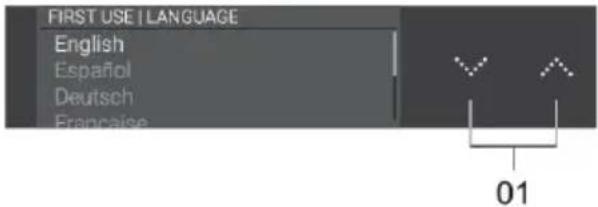
Set the desired language in which the appliance's display texts will appear. The default setting is 'English'.
- With 'Up/down' key (01) navigate vertically to view all languages.
- Choose the language and press on the 'Confirmation' key to save it and move to the next screen.
Settingthelocation
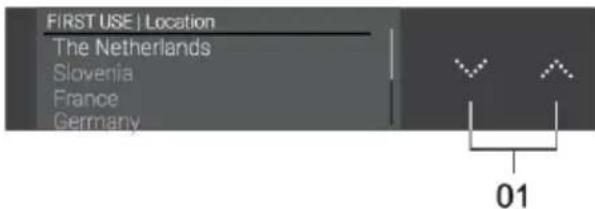
Set the appliance location.
- With 'Up/down' key (01) navigate vertically to set the appliance location.
- Choose the location and press on the 'Confirmation' key to save it and move to the next screen.
Temperatureunit
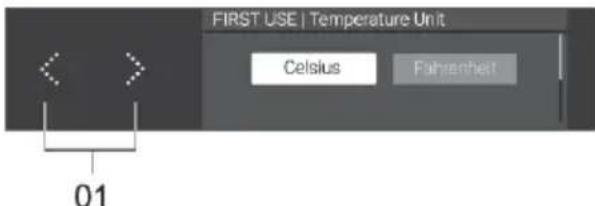
By pressing on 'Menu left/right' key (01), you can choose Temperature units (C/F) with which to control and monitor Wine Climate Cabinet.
Applicationdownload
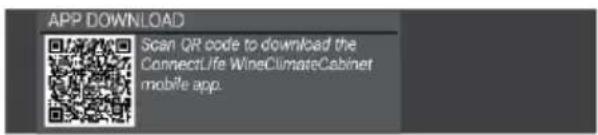
First, download the mobile application with your smart device and create a user account. It is available on Google Play, App Store and AppGallery.
After you download ConnectLife app, and register an account, you will be guided with the instructions.
Networkconnection
Connect your appliance to your home router to be able to pair your Wine Climate Cabinet with your mobile app to remote control it and to pair more appliances for monitoring.
TimeandDate
If a network connection has not been established you will need to set the current date and time manually.
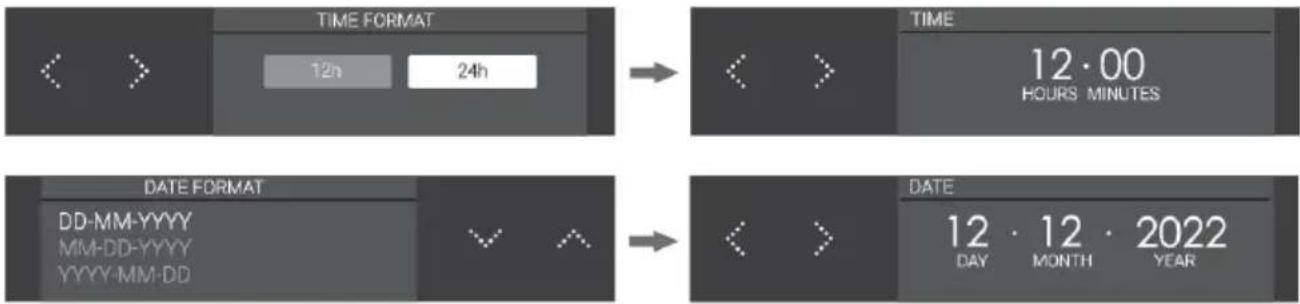
flowchart
graph LR
    A["TIME FORMAT"] --> B["12h / 24h"]
    B --> C["TIME 12·00 HOURS MINUTES"]
    D["DATE FORMAT"] --> E["DD-MM-YYYY MM-DD-YYYY YYYY-MM-DD"]
    E --> F["DATE 12·12·2022 DAY MONTH YEAR"]
After First use display goes to Status Screen.
Main displays
Statusscreen
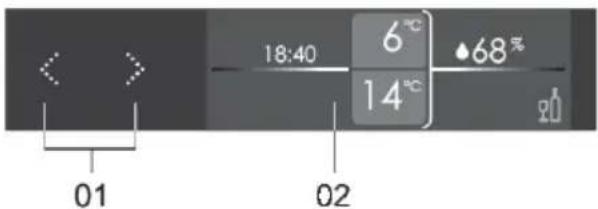
By pressing on 'Menu left/right' key (01), you can navigate through status screen (02).
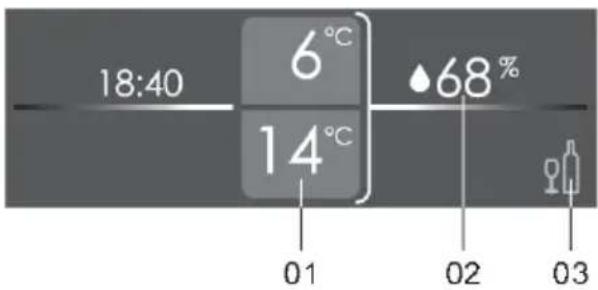
According to selection, different parts of screen are theme color highlighted.
01 Temperature value of each zone:
- Top value is for ZONE A, bottom for ZONE B.
Current average Humidity:02
- Press 'Confirmation' key to show the humidity percentage in each zone.
Temperature guide:03
- Press 'Confirmation' key to open temperature guide display.
Temperaturesetting
The factory default setting for each of two zones is 12^ C. This temperature can be changed instantly.
Temperature of each zone can be set between: 5°C and 20°C.
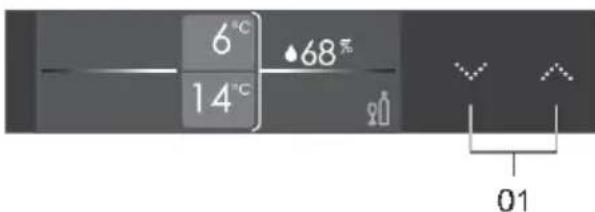
After selecting zone A or zone B, you can change setpoint temperature by pressing on 'Up/down'key (01).
With every press, setpoint temperature will change 1^ C up or down.
When highest setpoint temperature is reached, increasing arrow key is inactive and next press is ignored.
Vice versa reaction occurs when lowest set point temperature is reached.
Temperatureguidedisplay
Wine Climate Cabinet facilitates a temperature guide for serving and preserving wines. A little information comes with each screen.
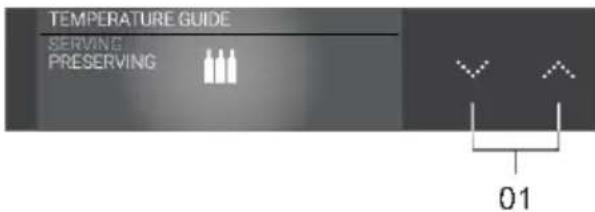
User can choose SERVING or PRESERVING by pressing 'Up/down' key (01) and 'Confirmation'key.
Serving guide: you can navigate by pressing 'Menu left/right' key.
Preserving guide: you can open 'Information menu'
Information tab gives extra information of the preserving settings.
Operation
Monitoringhumidity
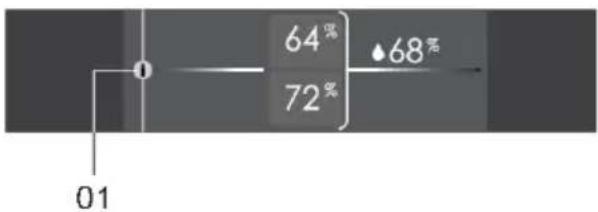
other
| Position | Percentage (%) | |---|---| | 0 | 64 | | 1 | 72 | | 2 | 68 |Humidity cannot be controlled, only monitored. Top value is for ZONE A and bottom value is for ZONE B. On the right side is the average humidity. The information tab (01) gives extra information about how humidity is related to wine.
Clockscreen
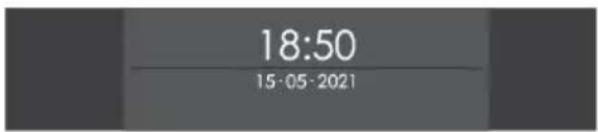
To view Clock screen press on 'X' key from Status screen.
To never view clock screen go to SETTINGS MENU>Display>Clock screen>Never.
Appliance Display Standby
Appliance Display Standby is a mode that display enters for optimal power consumption. Appliance cooling system is operating normal.
Appliance Display Standby activation:
• with a short press on On/Off key
• automatically, after a certain time of inactivity (standby time). It can be set in SETTINGS MENU.
It can not be activated in case of any errors detected and in case of opened door.
If Appliance Display Standby mode is active, it will end:
• by opening the door,
• by a short press on any key,
- when error indication is displayed on display,
When this mode ends, the appliance goes back to Status display, appliance works in On-mode.
Key lock
When Key lock mode is activated, it is not possible to switch off the appliance or to change any setting. Appliance cooling system is operating normal. Settings can be changed only from ConnectLife mobile application. Your preferences on door sensor, light and display actions will be executed.
Key lock mode activation:
• with a 3 seconds press on Key lock key
• manually from mobile application,
• automatically, after a certain time of inactivity. It can be set in SETTINGS MENU.
Key lock mode deactivation:
•
with a 3 seconds press on Key lock key

• manually from mobile application.
Lock settings
This is a ConnectLife app function that gives extended lock settings options to appliance key lock. Default status in ConnectLife app is "Not active". These lock settings can only be used when appliance key lock is activated, manually or automatically (from settings menu or from the same ConnectLife app). If appliance key lock is turned on, this will not turn on any lock settings. On the other hand, if Key lock is deactivated, all extended lock settings will be disabled.
Lock settings consists of two functions: door notification and door alarm. They can be enabled separately so one can be on and the other one off, or both on.
Doornotification
Door notification is a notification message you will get in your smart device when the door is open.
Dooralarm
Door alarm is an alarm sound that plays when the door opens, to hear when appliance is being used.
To stop this alarm, close the door or press key lock key for 3 seconds to turn key lock off. Remember that turning key lock off disables all lock settings, so, to enable again door alarm it can only be done in the ConnectLife app.
In case of a Power failure, lock settings remain active when power returns to the appliance.
Alarms
Please refer also to chapter "Tips & Tricks" to learn more about possible reasons for each particular alarm.
All alarms will be displayed using the alarm pop-up.
Temperaturealarm
The temperature alarm will go off when the temperature in the appliance compartment is out of range for more than 3 hours.
When this happens, an alarm will sound, compartment temperature will blink and a pop-up will show up on the screen.

INFORMATION!
Every time the appliance is switched on again, it takes a while until the correct temperature is reached. For this reason, the alarm is disabled for the first 6 hours after the appliance is switched on to prevent the unnecessary activation of the alarm. Each time the door is closed, temperature alarm is blocked for 3 hours.
If the difference between old setpoint and new setpoint is:
• less than 5^ C, it has no influence on temperature alarm,
- between 5 and 10^ , temperature alarm is blocked for 24h,
• higher than 10^ C, temperature alarm is blocked for 80h.
Stoppingthealarm:
Short press on 'X' key will stop the alarm from sounding and removes pop-up.
Setpoint temperature continues to blink while the temperature is still out of range. If the temperature is within range and temperature alarm is active, the pop-up will be dismissed automatically.
Humidity
Humidity can be monitored or can be chosen not to in SETTINGS MENU. If it is set to 'OFF', then humidity is no longer being monitored (not in the appliance and not in the mobile app). Display does not show any humidity values.
Humidity alarm sounds when 7 days average value of compartment humidity falls below 40% or rises above 80%, for 7 days constantly.
Hunidity value of compartment blinks, alarm pop-up is triggered.

INFORMATION!
Every time the appliance is switched on, it takes a while until the correct humidity is reached. For this reason, the alarm is disabled for the first 24 hours after the appliance is switched on to prevent the unnecessary activation of the alarm. Each time the door is closed, humidity alarm is blocked for 6 hours.
If the difference between old setpoint and new setpoint is less than 5^ C, it has no influence on humidity alarm.
If setpoint temperature for any compartment is set above or equal to 16^ C, humidity alarm is neglected.
Stoppingthealarm:
Short press on 'X' key will stop the alarm from sounding.
Humidity value continues to blink while the humidity is still out of range.
If humidity value reestablishes between 40% and 80% and humidity alarm is active, alarm pop-up will be canceled automatically.
Opendooralarm
Door alarm sounds and alarm pop-up is triggered when the door is open for more than 3 minutes and there is no user interaction.
Short press on 'X' key will stop alarm from sounding and alarm pop-up will be canceled. If you do not close the door, the alarm will switch on again after 5 minutes.
Closing the door will stop the alarm.
Poweroutagehightemperaturealarm
If the electricity power in which the appliance is plugged in fails or outages then appliance stops cooling and temperature inside the compartment can be affected.
The power failure alarm is designed to alert after power is restored and appliance turned on that the temperature inside the compartment is out of range. If the temperature is not out of range, power failure alarm will not be triggered. When the appliance is in a place not frequently visited or you are away for a long time this alarm will help you be aware after restoring the appliance that the temperature of the bottles might have changed.
Alarm sounds and "Power failure occurred" pop-up message is displayed.
Stoppingthealarm:
Short press on any key will stop pop-up message and Power outage high temperature alarm will be canceled.
Compartment setpoint temperature and humidity level will be shown on display.

INFORMATION!
When Power outage high temperature alarm is canceled, Temperature alarm can be still active. In that case, alarm behaves like Temperature alarm.
SETTINGS MENU
Because the appliance has extensive setting options, a menu system was defined to provide access to all settings. As a default all settings are already set, so it is not necessary to go through SETTINGS MENU. But to adapt the appliance settings to your preferences it is possible to do so.
EnterSETTINGSMENU
You can enter SETTINGS MENU with a short press on the settings key
This menu offers the following choices:
-GENERAL
•SOUNDS
•DISPLAY
•LIGHTS
•DOOR SENSOR
•NIGHT MODE
- CONNECTIVITY
•SYSTEM
GENERAL:
You can set the following from this menu:
• Language (language of the touch screen)
Operation
• Location (Select appliance location)
• Temperature unit (°C or °F)
• Time and date (Select time zone and enable automatic time and date)
•Time (enter manually)
• Time format (12 or 24-hour clock)
- Date (enter manually)
- Date format (DD-MM-YYYY or MM-DD-YYYY or YYYY-MM-DD)
SOUNDS:
You can set the following from this menu:
• General sounds (volume of sound signals and alarm)
• Alarm sound (volume of alarm sounds)
• Key sound (volume of key sounds)
DISPLAY:
You can set the following from this menu:
•Brightness (adjustable 0-100%)
• Color theme (two different colours)
- Clock screen (how long for the display to go to clock screen)
- Standby time (how long for the display to go to standby)
LIGHTmodes:
You can set the following from this menu:
- Functionalmode:
- Shelf lights (temperature and intensity sliding percentage from 0 to 100)
- On for (how long for the cabinet to be lit in this mode)
- Ambientmode:
- Shelf lights (temperature and intensity sliding percentage from 0 to 100)
- On for (how long for the cabinet to be lit in this mode)
DOORSENSOR:
You can set the following from this menu:
•During door opening:
- Display change to ('Off'-display on standby, clock screen or status screen)
- Light change to (no lights, ambient mode or functional mode)
•After door closing:
- Display change to ('Off'-display on standby, clock screen or status screen)
- Light change to (no lights, ambient mode or functional mode)
NIGHTMODE:
You can set the following from this menu:
• Night mode (switch 'On' or 'Off')
• Start time (start time for the lower display brightness)
• End time (end time for the lower display brightness)
• Light dimming (lights in cabinet intensity sliding percentage from 0 to 100)
CONNECTIVITY:
You can set the following from this menu:
• WLAN (switch 'On' or 'Off')
- Application download (QR code for application download)
- Connection setup ( after the Wi-Fi modul is activated the appliance is ready to connect to the mobile app. Follow instructions in the mobile app on how to connect.)
- Pairing (While in this menu pairing is enabled, QR code for pairing)
- Unpair all (activate to disconnect all paired user profiles from the appliance connected services)
- Remote control (switch 'On' or 'Off')
You can also enter SETTINGS-CONNECTIVITY menu by pressing Wi-Fi key

SYSTEM:
You can set the following from this menu:
• Key lock automatic (how long to automatically activate the key lock)
- Humidity (it is possible to stop monitoring humidity and to enable the humidity box refill notifications)
- Charcoal filters
- Countdown (after charcoal filters are replaced lifetime countdown must be reset)
- Notification (how long will the notification appear on the display before the expired date of the filters)
• Appliance info (MB sw version, UI sw version)
- Software update (can only be triggered from the mobile application)
- Modes
- Eco mode (switch 'On' or 'Off')
- Sabbath mode (switch 'On' or 'Off')
- Demo mode (first switch 'On' or 'Off' to dis- or enable the appliance performance and use for demonstration purposes)
• Factory reset (reset factory default settings)
ExitSETTINGSMENU
You can exit the SETTINGS MENU with a short press on the settings key

Settings menu ends automatically after 5 minutes without user interaction.

INFORMATION!
If SETTINGS MENU is active, the alarm indications (audio and visual), error notifications and Charcoal filter notifications are not active, they will be activated as soon as SETTINGS MENU is closed.
SETTINGS MENU is not activated again when, after failure, power is restored or when appliance goes back from Appliance-Off to Appliance-On.
In case of power failure, after power is restored, your settings will be set to values before power was disconnected.
Software update
Wine Climate Cabinet's appliance software can be updated (for example improved function updates or safety relevant updates). This requires Wine Climate Cabinet to be connected to the cloud.
With ConnectLife mobile application you can receive notifications when software updates for the appliance are available but only when a user account is paired to the appliance. If this is not yet established, please proceed with the chapter for Operation, Initial Use (this can be done anytime through SETTINGS menu, not only during initial use).
Update can only be triggered from the mobile app. When new software update is available, mobile app will send a notification. In the mobile app, a screen will appear with the notification that new software update is available with direct access to the update process. Please follow the instructions. Wine Climate Cabinet display shows "Software update" screen while the update is being downloaded and installed.
During the update process the appliance cannot be used. Make sure the power supply and Wi-Fi connection are not terminated. The update process may take a while. It is normal if there may be no response during the update. The update process can take up to 15 minutes. In some cases, if there is bad network connection, this time can be longer.

INFORMATION!
With the software update also user interface can change, so user manuals may not reflect the latest changes. For latest version of the user manuals please check your ConnectLife application.
In case the process failed, Wine Climate Cabinet remains on the previous software version and should operate normal. Try to trigger SW update process again. If the process continues to fail, contact the service department for further support.
If the appliance is not responding after the update process, please wait for some time. The appliance might be still in the update process. If there is still no response after multiple hours, contact the service department for further support.
Wi-Fi function
Wine climate cabinet reaches its full potential when connected to the cloud because everything can be operated and monitored through ConnectLifemobile application on your smart device. Choosing to remote control it from your device makes it easier to navigate through SETTINGS MENU for example, and be connected to features that are unavailable on the appliance interface, like the light switch control among others. Temperature and humidity values are mirrored at real time. Temperature in the compartment can be changed in the app too, so the door can remain closed.
1.Mobileapp
Connecting your appliance to the application ConnectLife

ConnectLife it is a smart home platform that connects people, devices, and services. The ConnectLife application includes advanced digital services and carefree solutions that allow users to monitor and control appliances, receive notifications from a smartphone, and update software (supported features vary depending on your appliance and your region/country).
To connect your smart device, you need a home Wi-Fi network (only 2.4 GHz networks are supported) and a smartphone with the application ConnectLife.

To download the ConnectLife application, scan the QR code or search for ConnectLife in your favorite app store.
- Install the ConnectLife application and create an account.
- In the ConnectLife application, go to the "Add device" menu and select the appropriate type of device. Then scan the QR code (it can be found on the rating plate of the appliance; you can also enter the AUID/SN code manually).
- The application then guides you through the entire process of connecting the appliance to your smartphone.
- After a successful connection, the appliance can be operated remotely via the mobile application.
Do you have more questions? Visit us at www.connectlife.io or contact us at hello@connectlife.io.
Although the application guides you through the process of connecting your device to your smartphone, we have listed some of the most important steps below.
2. Pairing your appliance
You can pair multiple user accounts, so you can have more than one smart device connected to the wine climate cabinet.
Only on the mobile application you can see if the pairing has been successful.
Pairing function ends automatically if pairing connection on the cloud is successful or if after 3 minutes the pairing connection has not been successfully established on the cloud.
3. Remotecontrol
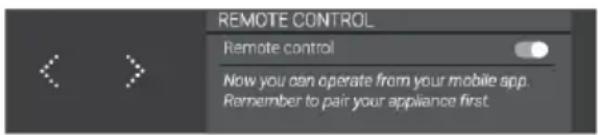
After you successfully pair a user to the wine climate cabinet, the appliance is ready to be operated from the mobile app.
| RemotecontrolCloudserviceWi | |||
| EnabledConnectedOn |
4.Unpairall
By triggering this option appliance removes all paired user accounts. Data and saved settings remain the same inside the appliance.
Unpairing function ends automatically if the unpairing process on the cloud is successful or if after 1 minute the unpairing has not been successful on the cloud.
5. DeactivateWi-Fimodul:
When you wish to stop operating and monitoring the appliance on remote control, you can turn the Wi-Fi module off the same way you activate it:
• directly, with a 2 seconds press on Wi-Fi key
• or go to WLAN STATUS inside CONNECTIVITY inside SETTINGS MENU.
When the Wi-Fi modul is off, you will not be able to use the mobile app. However, this does not mean you will need to repeat the pairing process next time you turn the Wi-Fi modul on again. Instead, the whole process will be automatic. If it occurs that connection between appliance and mobile cannot be established, please give it some time or unpair and pair again your smart device. If problem persists, contact customer support.
In case of power failure, state of Wi-Fi modul is saved. When power is restored, it will be the same as before disconnection.
Charcoal filter countdown and notification
When the appliance is 'On' for the first time, charcoal filter countdown timer is set to 365.
Every 24 hours, when appliance is connected to power supply, 1 day is deducted.
In case of power failure, Charcoal filter lifetime value is saved. When power is restored, it will be the same as before disconnection.
If you change time or date parameter, it will not affect charcoal filter countdown.
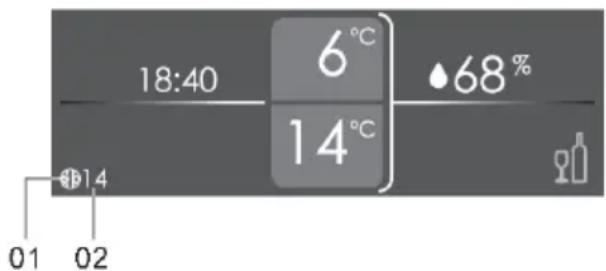
When Charcoal filter notification setting is reached, an Charcoal filter icon (01) and the number of days left for the charcoal filter to expire (02), will appear in Status Screen in theme color.
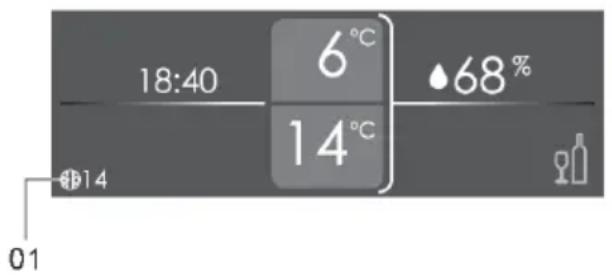
When Charcoal filter countdown timer is = 0 then Charcoal filter icon (01) is blinking normal in Status Screen.
After replacing filter, you have to reset Charcoal filter lifetime, Charcoal filter icon is then removed from Status Screen.
Sabbath mode
Sabbath mode will be activated for 72h directly after activation. All illuminated features and the display will be temporarily disabled. The cooling system is operating normal. Sabbath mode will be activated every week again on the same time of the same day.
Sabbath mode active phase ends:
• automatically 72 hours after activation,
• with a 3 seconds press on Key lock key
If any error occurs during Sabbath mode, it won't be showed until Sabbath mode is deactivated.
* Active Sabbath mode overrules ECO mode and Night mode for a maximum of 72 hours.
Eco mode
During ECO mode, the appliance works as normal but display is off, only On/Off key is active. To stop ECO mode press On/Off key and after 5 minutes of inactivity Eco mode will be activated again.
Defrosting the appliance
- The wine climate cabinet is defrosted automatically. Drops of water will flow through an opening in the rear wall into a tray fitted above the compressor, from where they will evaporate.
Cleaning the appliance

WARNING!
Switch off the appliance and remove the plug from the socket before you start cleaning it.

WARNING!
Do not use abrasive cleaning agents, as they can damage the surface.

WARNING!
Do not remove the rating plate located inside the appliance. The rating plate contains data that you need in case of a repair.
- Before cleaning, remove the bottles from the appliance and store them in a cold place.
- Regularly clean the appliance interior with lukewarm water. If necessary, add a neutral detergent or a special refrigerator detergent to the water. Use a soft cloth to clean all surfaces. Wipe the cleaned parts with a cloth dampened with clean water and dry them thoroughly.
- Do not wash parts of the appliance in a dishwasher as they can be damaged.
- Remove any stains from wooden parts immediately to prevent them from soaking into the wood. Clean the wooden parts with a damp cloth. Make sure the wood is not too wet and leave the parts to dry completely before returning them to the wine cabinet.
Note: Wood is a natural material. Therefore, some stains (especially from red wine) may be hard to remove.
Such stains can be removed by gently rubbing the wood with a very fine sandpaper and then treating the sanded part with wood oil. The substance used to treat the wood should be safe for food contact.
- Clean the glass door with a suitable glass cleaner.
- Clean the gasket with lukewarm water, then wipe it with a soft cloth and dry it thoroughly.
- Regularly clean (using a vacuum cleaner) the ventilation slots on the appliance sides and back. Accumulation of dust on the ventilation slots may result in increased power consumption.

WARNING!
If you do not intend to use the appliance for a long time, switch it off and disconnect it from the power mains. Empty and clean the appliance, than leave the door ajar. This will prevent the appearance of mould inside the appliance.
Reversing the door opening direction
The direction in which the appliance door opens can be reversed.
Changing of door opening direction should only be performed by a qualified professional.
In order to safely reverse the door opening direction, at least two people should carry out the procedure described below. The door weighs about 9,0 kg.

WARNING!
In order to avoid damaging the floor, use a floor mat or other suitable protection on the floor in front of the appliance. Also, plan for a suitable spot where you will temporarily place the door during the procedure.
Take care not to damage the door gasket. A damaged gasket will negatively affect appliance operation.

WARNING!
The self-closing hinge could close and damage your fingers. Therefore, please be particularly careful.

WARNING!
Disconnect the appliance from the power mains before reversing the door opening direction.
Toolsrequired:
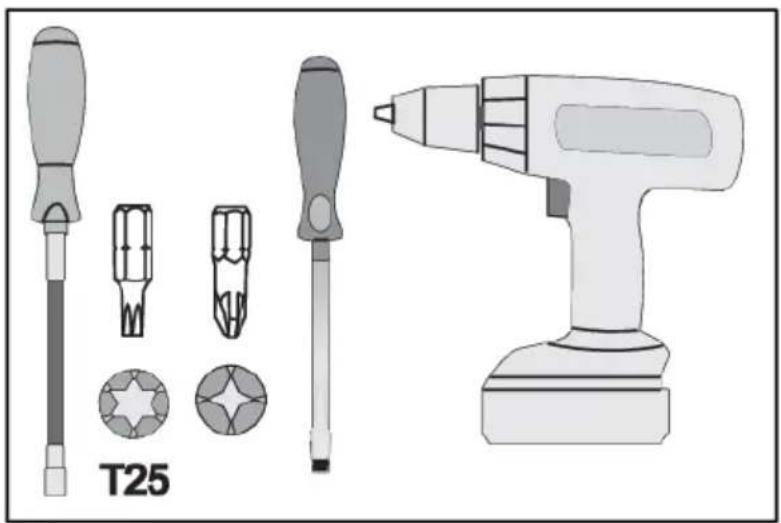
natural_image
Illustration of screwdriver and electric drill (T25) tools without any text or symbols on the devices themselves.Reversing the door opening direction
To reverse the door opening direction, proceed as follows:
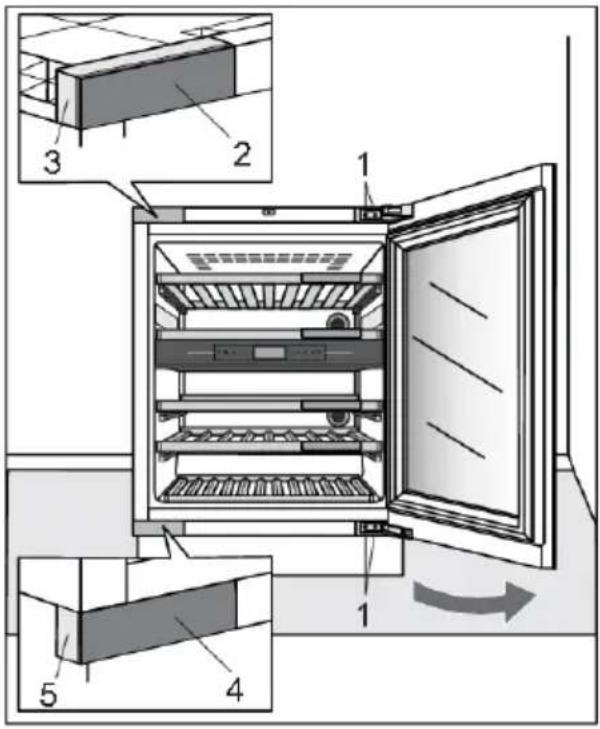
Open the appliance door.1.
- Hinge screws
- Upper hinge housing cover
- Upper hinge housing
- Bottom hinge housing cover
- Bottom hinge housing
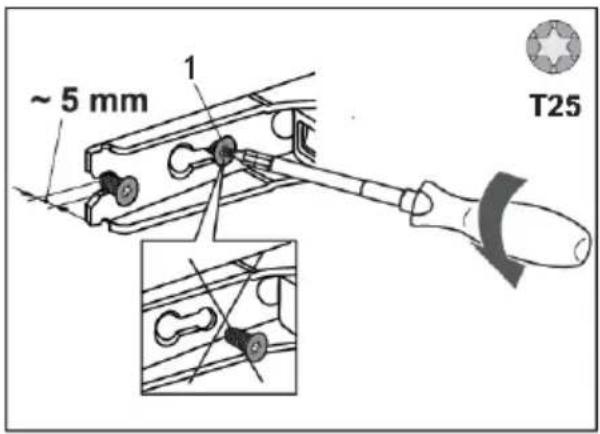
- Partly (by no more than 5 mm) undo the hinge screws (1) at the top and bottom. Do not completely undo the screws. This way, the door will remain in contact with the housing.
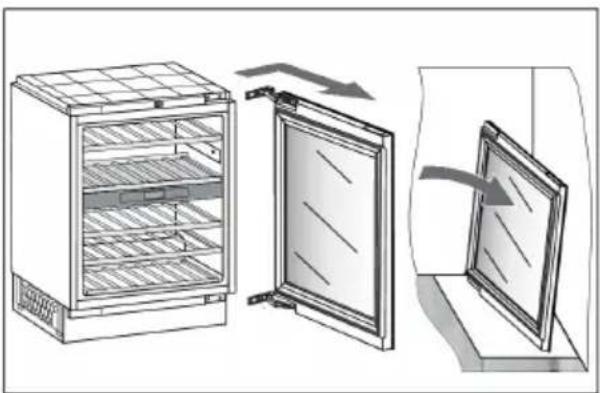
natural_image
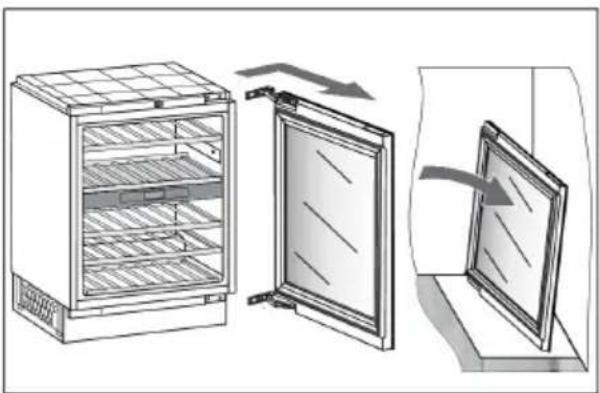
Diagram showing a refrigerator with open doors and a closed door, illustrating the exterior and interior views (no text or symbols present)- Remove the door, complete with the hinges, by moving it in the direction indicated by the arrow. Carefully place the door on the surface prepared for this purpose.
Reversing the door opening direction
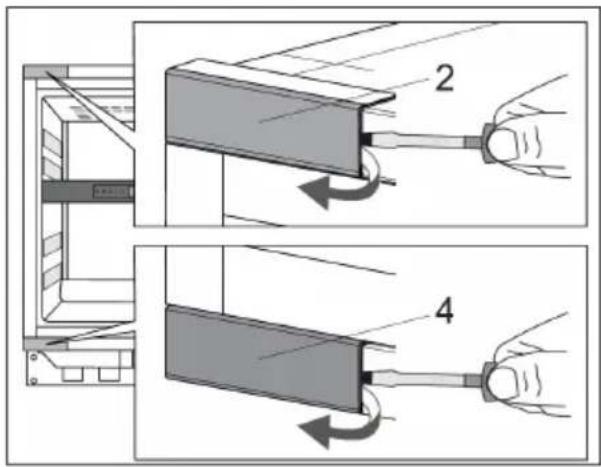
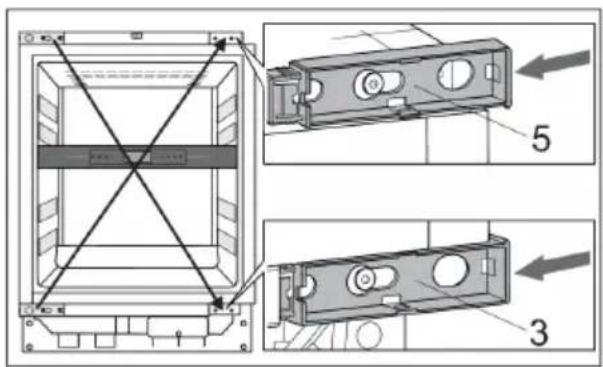
- Carefully remove the upper (2) and bottom (4) hinge housing covers with the help of a flat-head screwdriver. Set them aside, as you will need them later on.
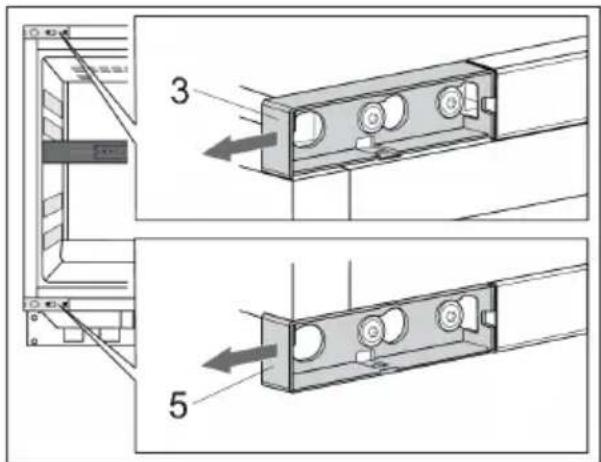
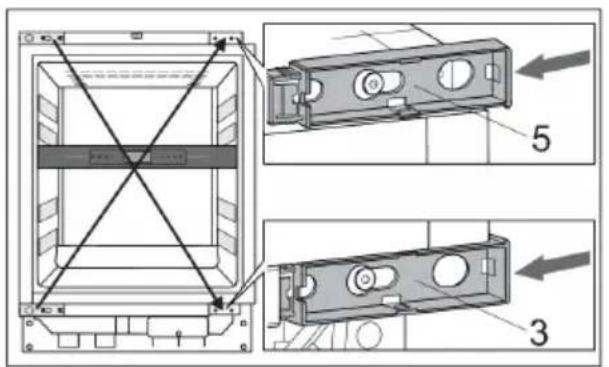
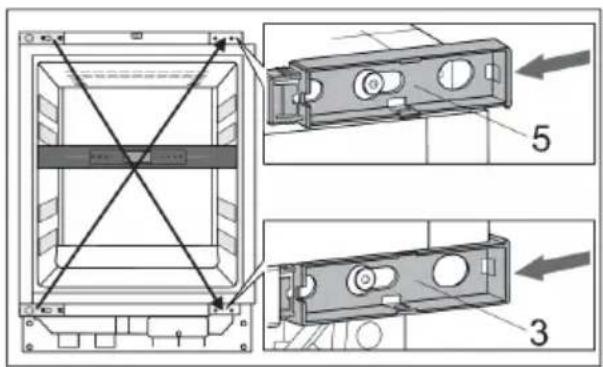
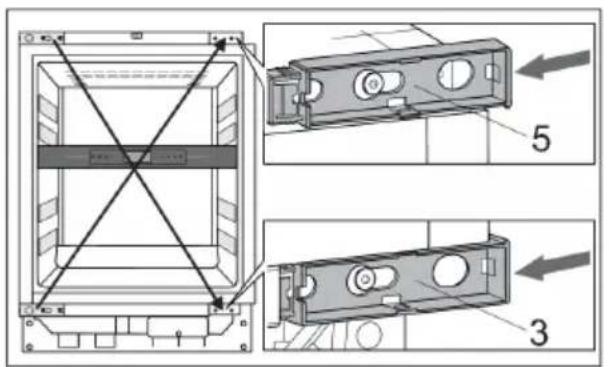
- Remove the upper (3) and bottom (5) hinge housings. Set them aside, as you will need them later on.
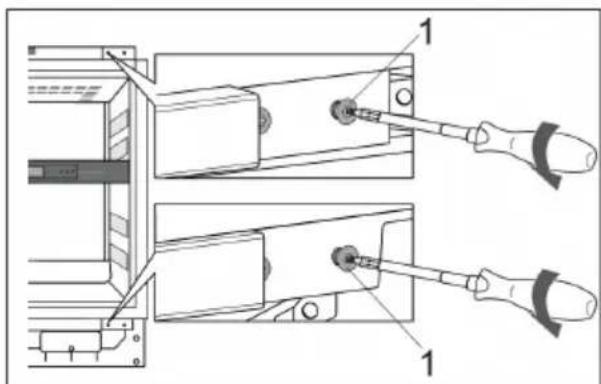
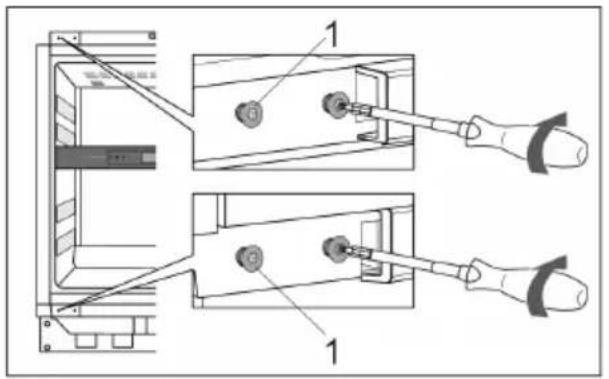
- Undo the hinge screws (1) at the top and bottom. Set them aside, as you will need them later on.
Reversing the door opening direction
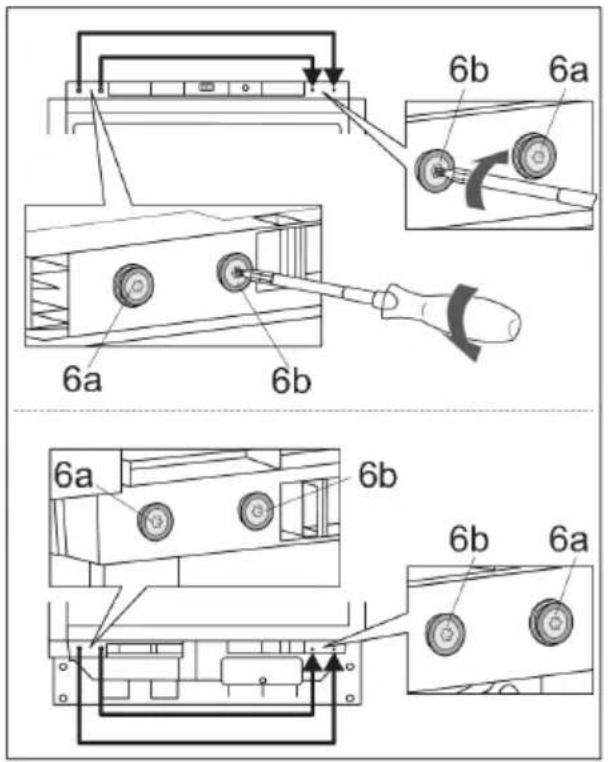
-
On the left side, at the top and bottom, undo:
-
the screws (6a) together with the caps and washers,
- the screws (6b) together with the caps.
Attach them on the opposite side of the housing.
The screws (6a) should always be attached on the far side, closer to the edge of the appliance housing.
-
Partly attach the screws (1) into the holes at the top and bottom on the left side of the housing.
-
Take the already removed hinge housings (3, 5) and slide them into place on the diagonal position.
Reversing the door opening direction
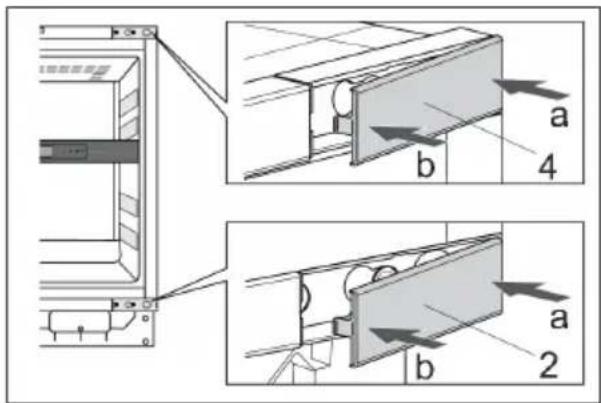
- Take the already removed upper (2) and bottom (4) hinge housing covers and place them on the diagonal position where they came from.
First push in the direction of arrow "a" then arrow "b".
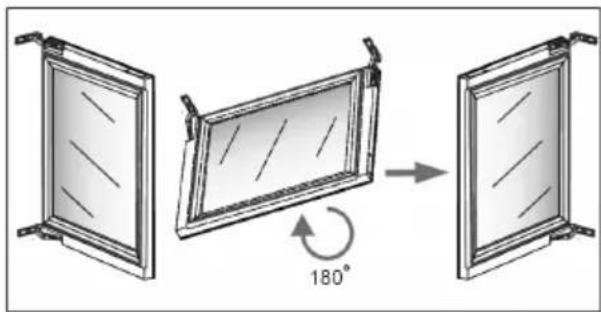
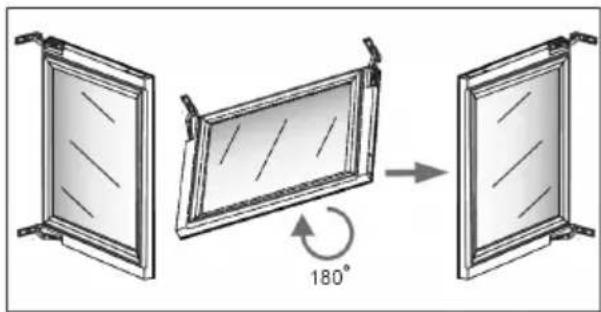
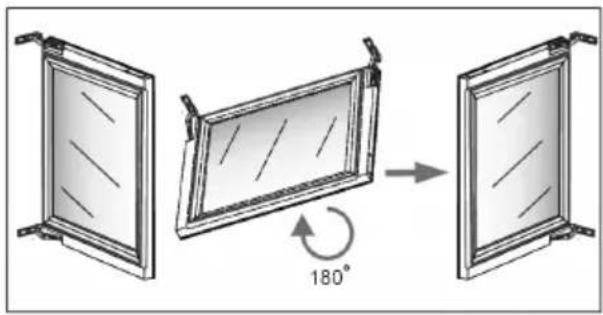
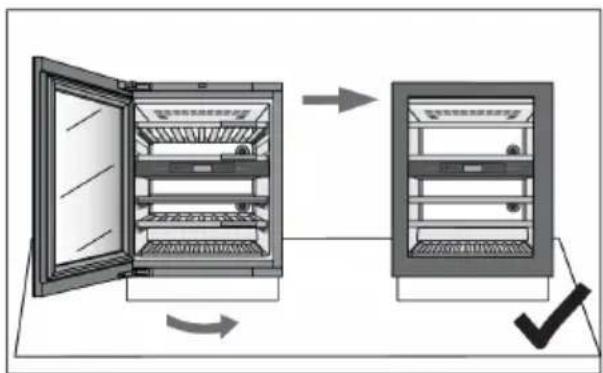
Carefully rotate the door by 180 degrees.11.
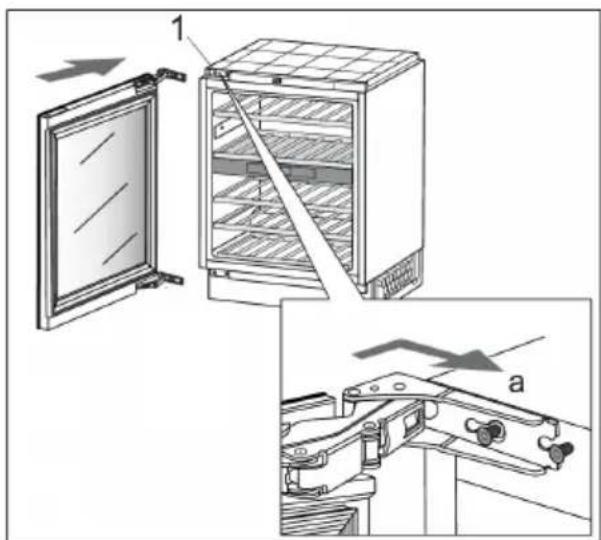
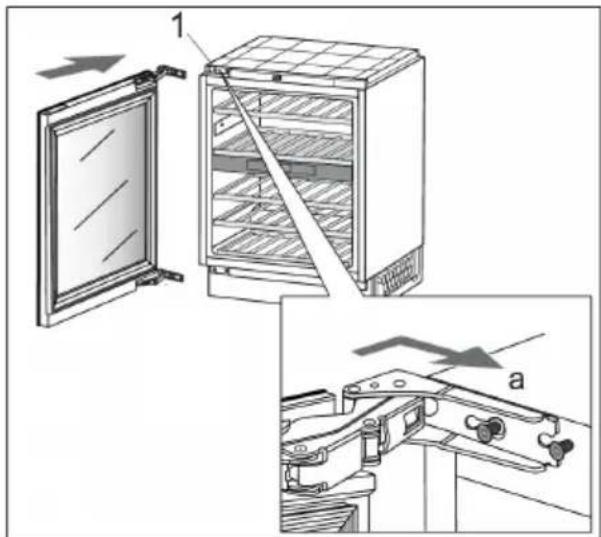
- Hang the door onto the screws (1) at the top and bottom and slide it in the direction indicated by the arrow (a).
Reversing the door opening direction
-
Tighten the screws. The screws should be tightened to a torque of 6.2 Nm.
-
Close the door and make sure it is aligned with the housing. The housing side and the edge of the door should be parallel.
-
If the door is not aligned with the housing (the angle is not 0^ ),
then proceed as follows:
- Open the door and detach the gasket from its groove in the corners at the top and bottom hinge.
Reversing the door opening direction
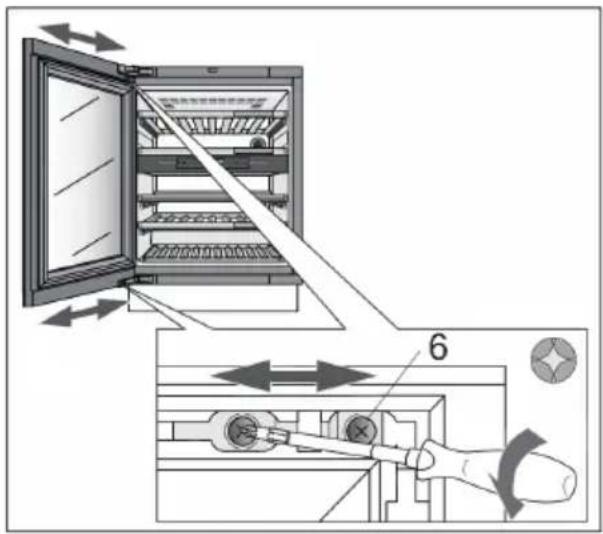
- Release the screws (6) at the top and bottom. Do not undo them completely! Align the door at the side and tight the screws back.
natural_image
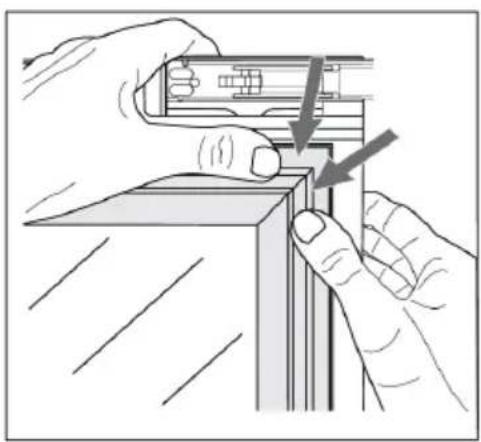
Illustration of hands installing or adjusting a mechanical component with arrows indicating motion (no text or symbols)- Carefully press the gasket back into the groove in the door.
flowchart
graph TD
    A["Refrigerator"] -->|No| B["Refrigerator with cooling unit"]
    B -->|Yes| C["Refrigerator with cooling unit"]
    C -->|No| D["Refrigerator with cooling unit"]
    D -->|Yes| E["Refrigerator with cooling unit"]
    E -->|No| F["Refrigerator with cooling unit"]
    F -->|Yes| G["Refrigerator with cooling unit"]
    G -->|No| H["Refrigerator with cooling unit"]
    H -->|Yes| I["Refrigerator with cooling unit"]
    I -->|No| J["Refrigerator with cooling unit"]
    J -->|Yes| K["Refrigerator with cooling unit"]
    K -->|No| L["Refrigerator with cooling unit"]
    L -->|Yes| M["Refrigerator with cooling unit"]
    M -->|No| N["Refrigerator with cooling unit"]
    N -->|Yes| O["Refrigerator with cooling unit"]
- The housing side and the edge of the door should be parallel.
Now you can continue with the installation of the appliance.
Installation of the appliance
If the appliance is not properly installed in a kitchen cabinet, it may tip over.
In order to safely install the appliance, at least two people should carry out the procedure described below.
Before installation, make sure that the installation niche has the specified installation dimensions. The installation niche must be horizontally and vertically aligned.
When pushing the appliance into the niche, be careful not to damage the power cord!
If the floor is sensitive, also be careful not to damage the floor covering. The floor has to be horizontal and flat.
The wall socket must be located outside the area of the back of the appliance and easily accessible in an emergency.
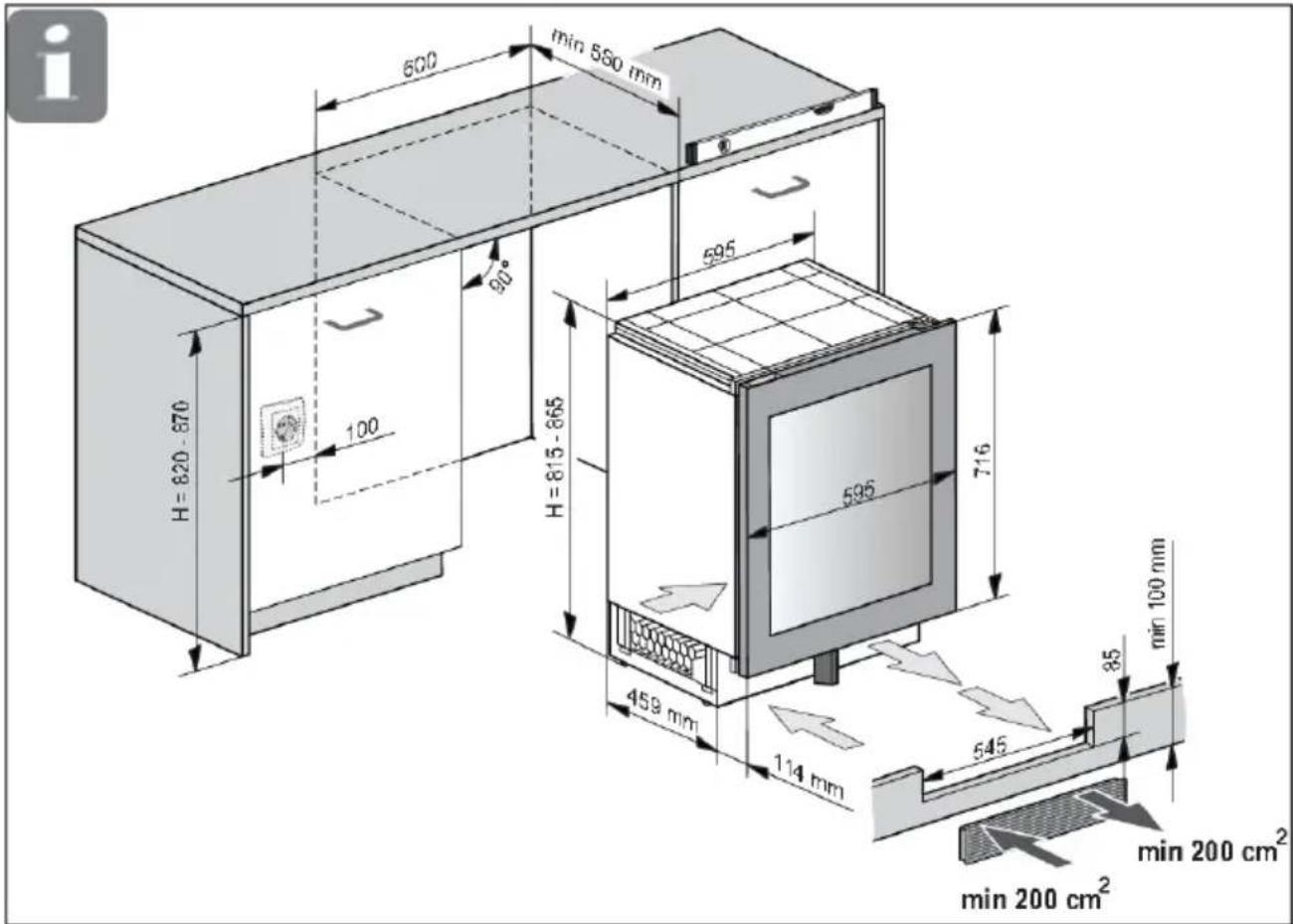
Ventilation of the appliance takes place through the slots in the base. These must not be covered. In addition, dust must be regularly cleaned from the slots.
Tools required:
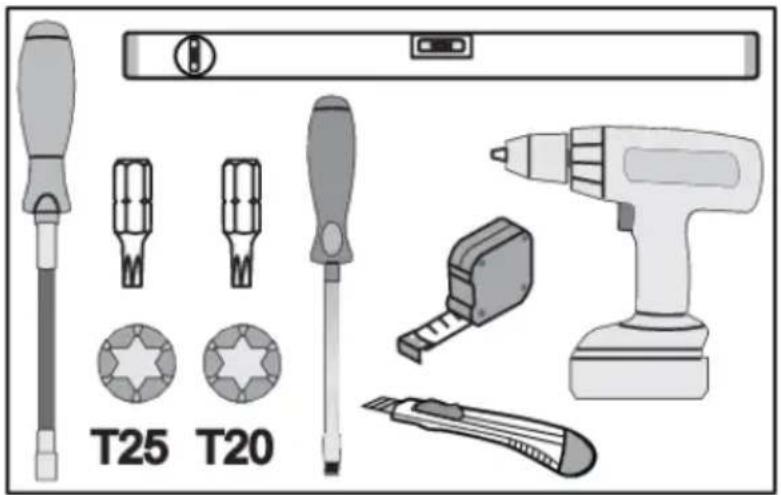
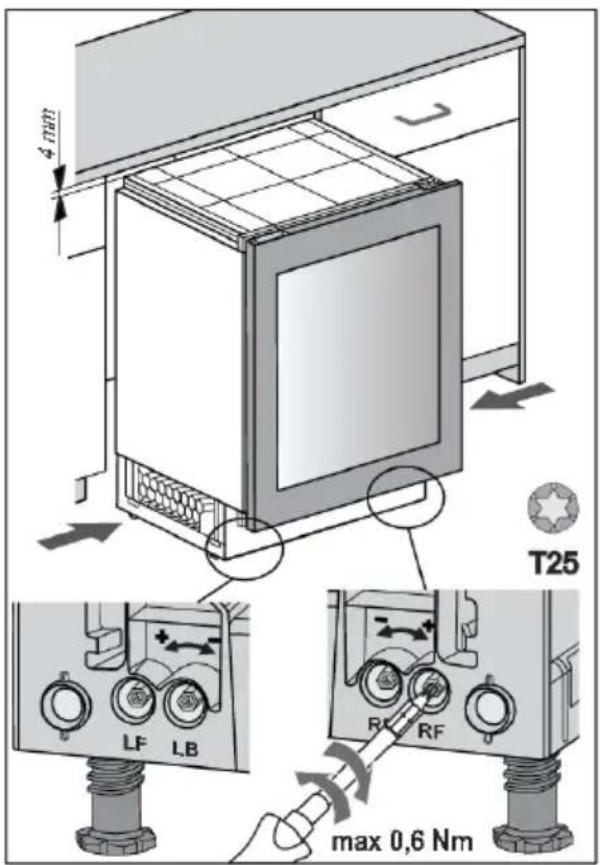
- Before pushing the appliance into the niche, set the height of the appliance to 4 mm less than the opening.
This can be done by turning the adjustable feet: LF - left front, LB - left back, RF - right front, RB - right back.

WARNING!
Be careful with the amount of force you use. The maximum recommended torque is 0.6 Nm.
Installation of the appliance
natural_image
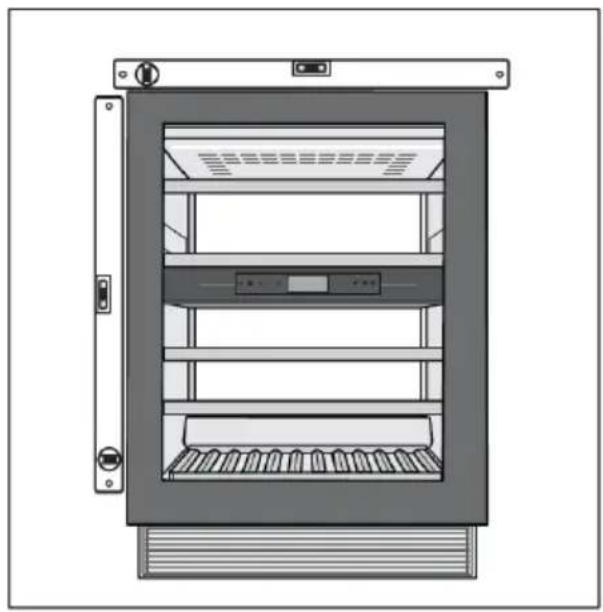
Illustration of a refrigerator cabinet with ventilation grilles and control panel (no text or symbols)- The appliance must be aligned horizontally and vertically, otherwise it may deform and it will not be possible to close the door properly.
-
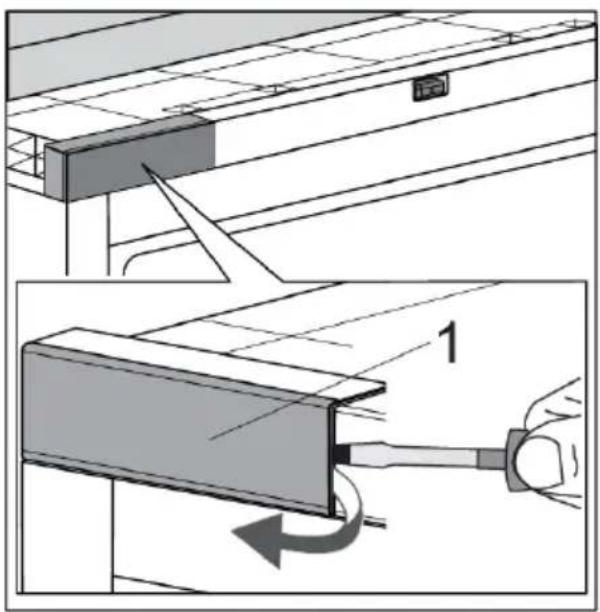
Open the appliance door. Carefully remove the upper hinge housing cover (1) with the help of a flat-head screwdriver. Set it aside, as you will need it later on. In case you have changed door opening direction, start in the top right-hand corner.
-
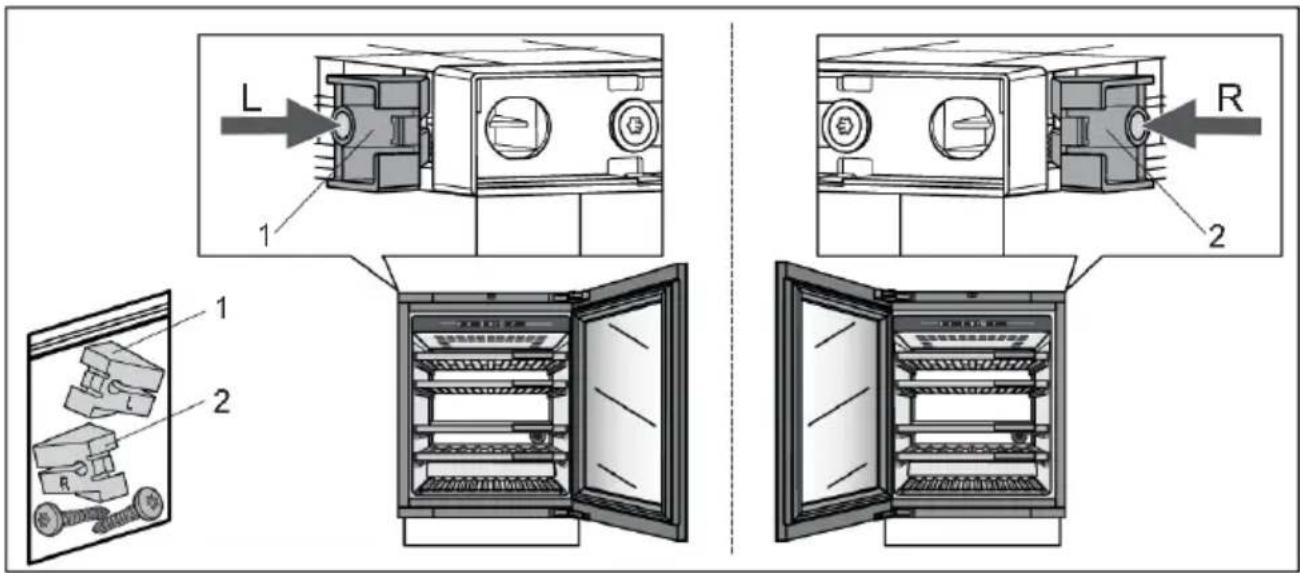
Install fixation spacer (1 or 2) according to door opening direction on your appliance.
natural_image
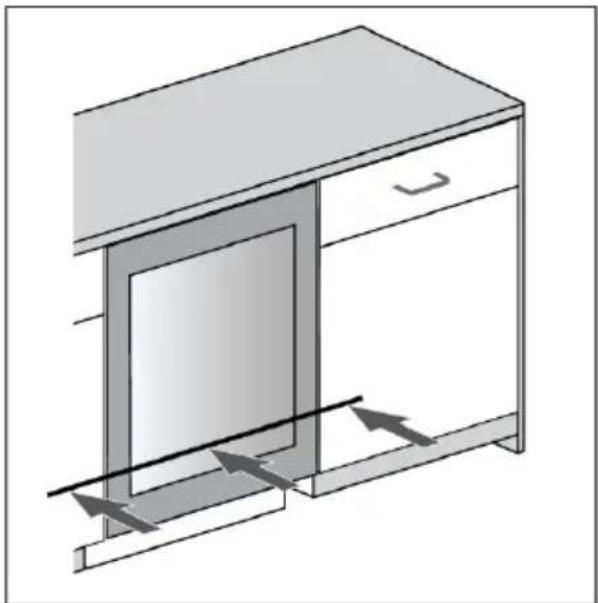
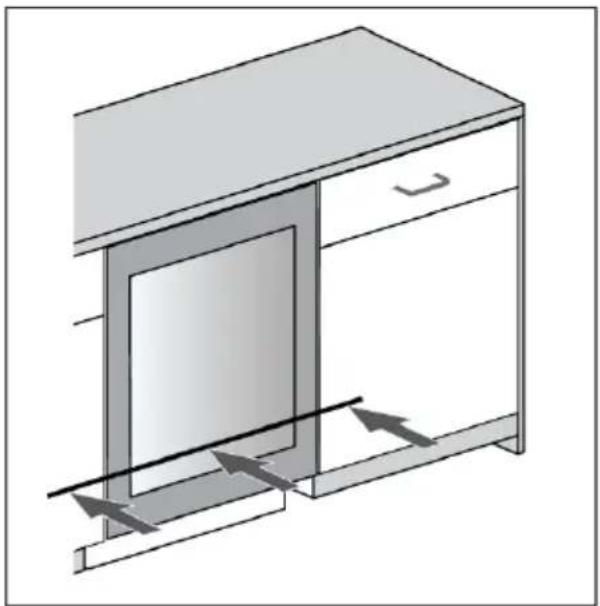
Diagram of a cabinet with an open door and directional arrows indicating airflow or movement (no text or symbols)- Push the appliance into the niche until the front surface of the door is aligned with kitchen cabinet door.
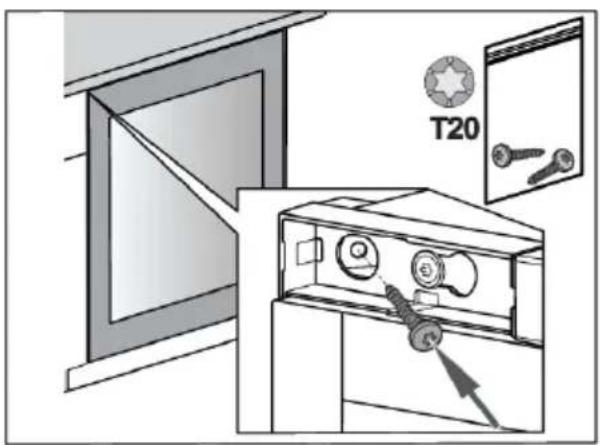
- Attach the appliance to the adjacent kitchen element –first in the top left-hand corner.
Installation of the appliance
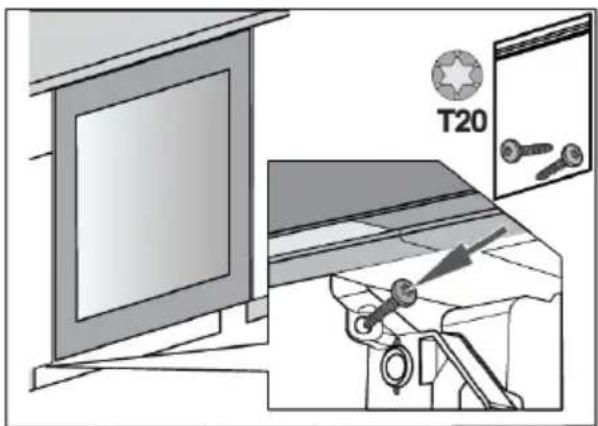
- Attach the appliance to the adjacent kitchen element at the bottom, on the opposite side of the hinge.
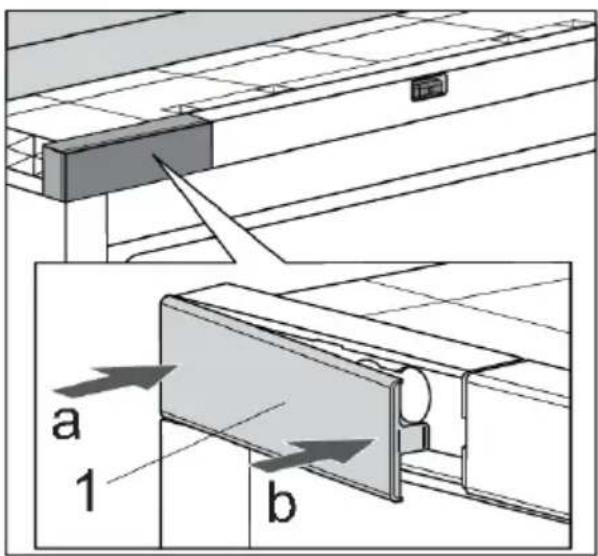
- Reinstall the upper hinge housing cover (1). First push in the direction of arrow "a" then arrow "b".

- Remove the bottom front cover (2).
Installation of the appliance
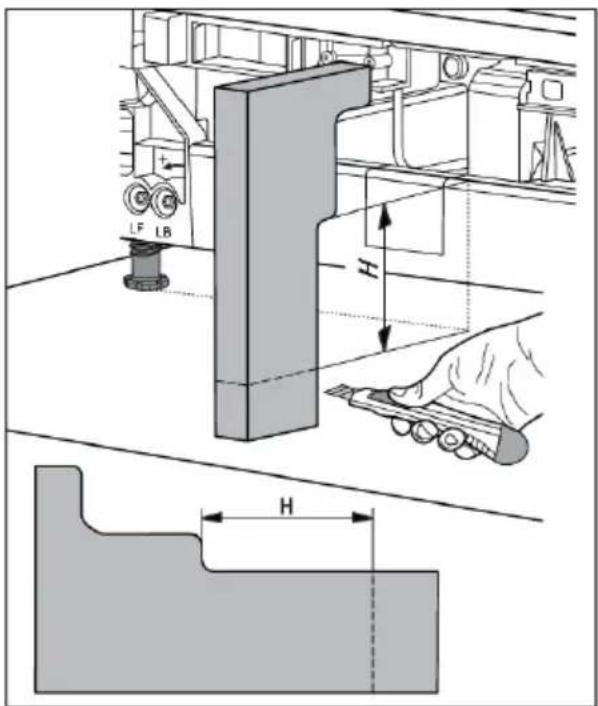
- Measure dimension "H" on the appliance and then cut the foam airflow divider according to the sketch.
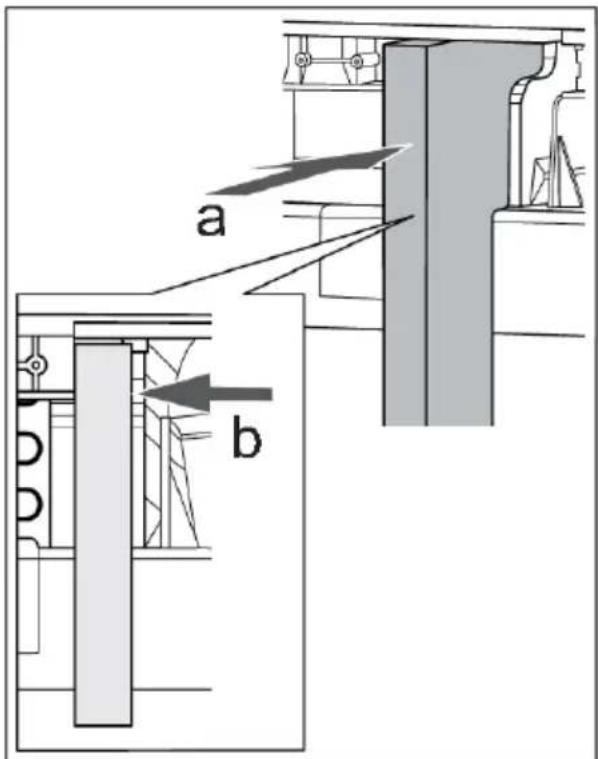
- Push the foam airflow divider in the direction of arrows "a" and "b".
Installation of the appliance
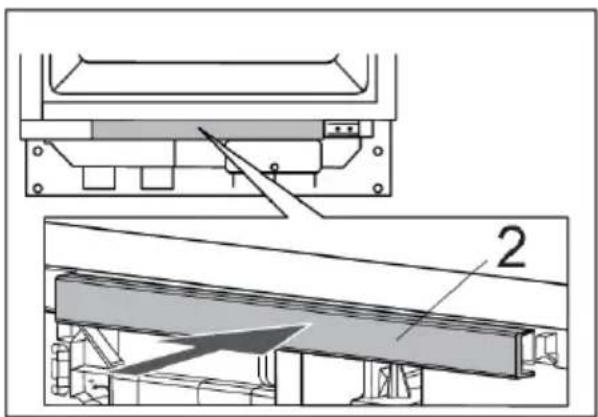
natural_image
Technical diagram showing two views of a mechanical assembly with labeled components (no text or symbols present)-
Snap the bottom front cover (2) back into its position.
-
Take the hinge covers (1 and 2) and install them according to the door opening direction on your appliance.
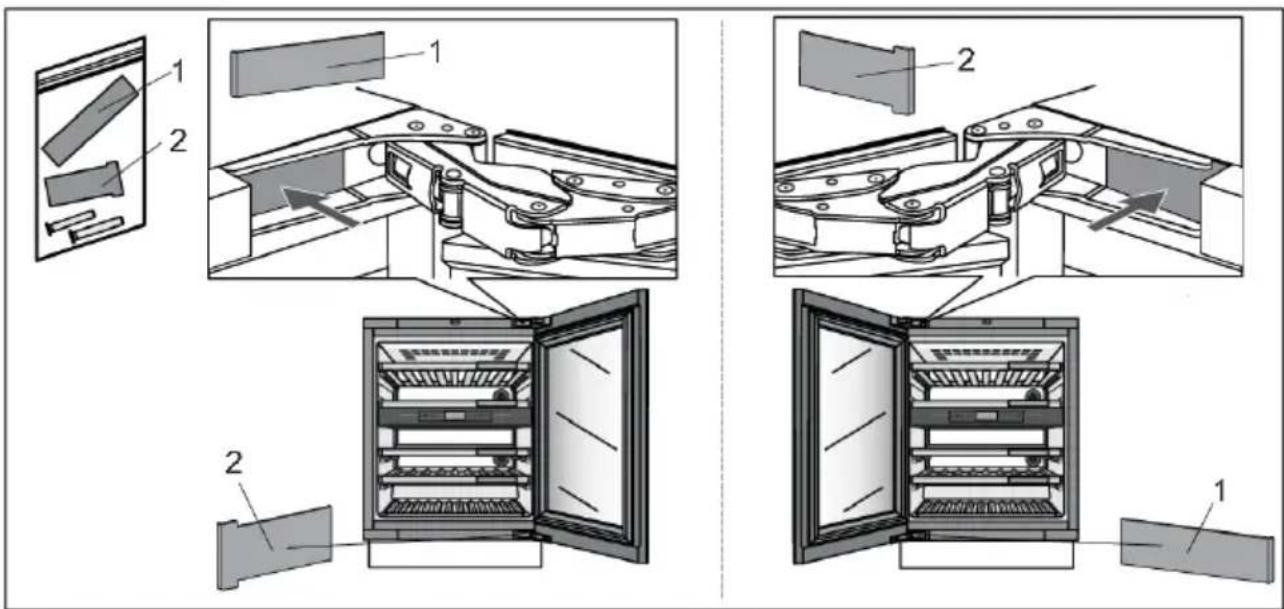
Installation of the appliance
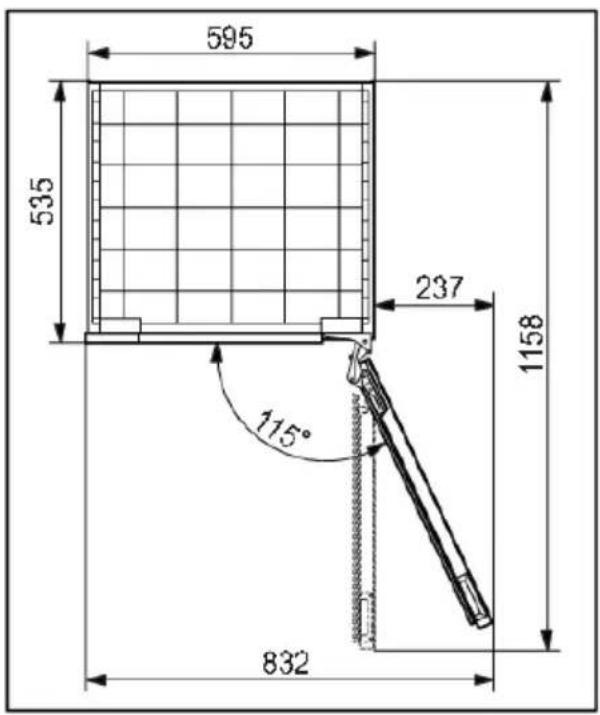
- If the appliance is placed in a way that does not allow the door to be opened to the 115^ angle, the opening angle can also be restricted to 90^ . In this case, use the door restrictors (1 and 2) and install them according to the door opening direction on your appliance. Carefully open the door to an angle less than 90^ and insert the restrictor into the provided opening in the upper hinge. Repeat the same process for the lower hinge. When inserting the restrictor into the hinge, you may also use a small hammer.

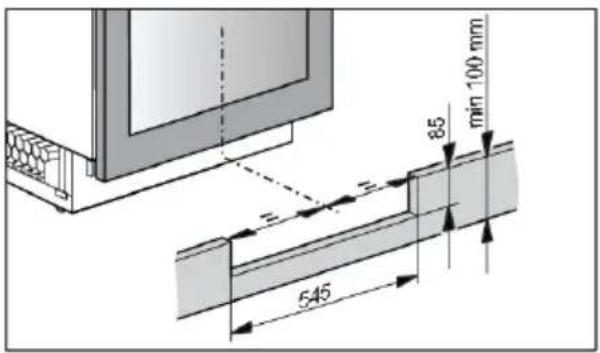
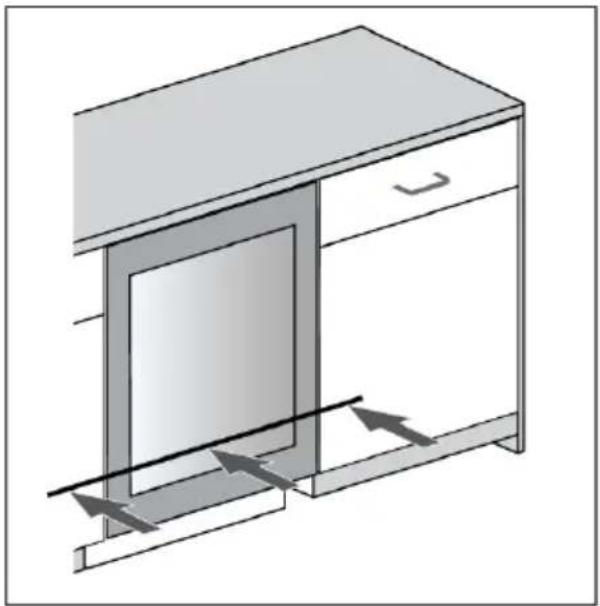
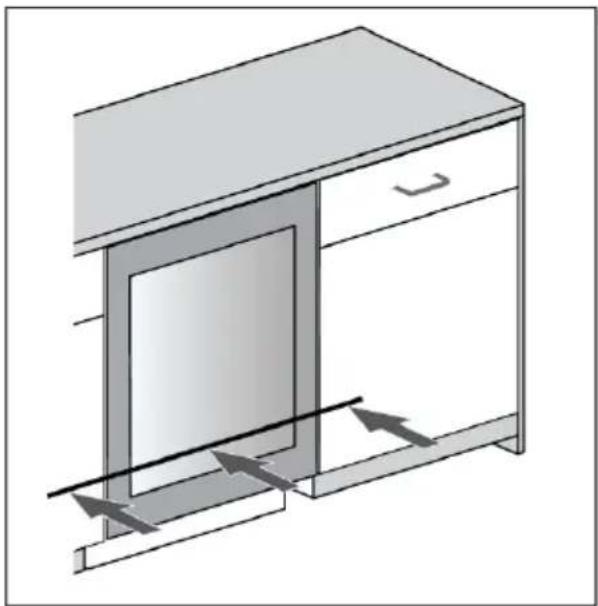
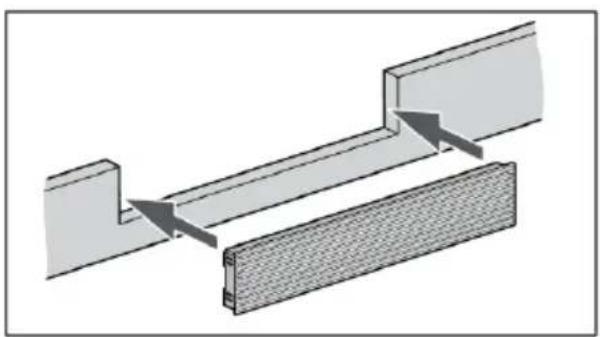
- Prepare the plinth board. The cut-out in the plinth board for the ventilation grille must be centred with the appliance. This is the only way to ensure correct operation of the appliance.
natural_image
Diagram of two mechanical components with arrows indicating motion or force, no text or symbols present- Install the ventilation grille into the wooden plinth board.
Installation of the appliance
natural_image
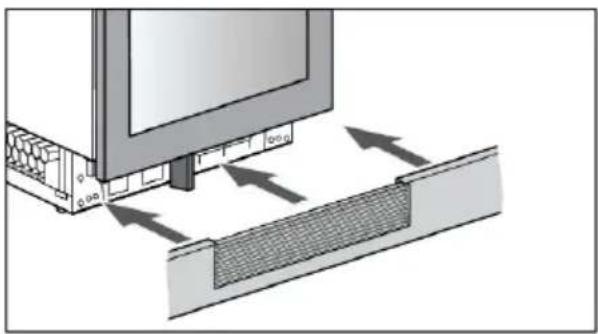
Diagram showing a mechanical assembly with arrows indicating force or movement, no text or symbols present- Assemble the plinth board with the ventilation grille. Installation of the appliance is finished.
If you have any doubts about whether your appliance is working properly, we recommend to first read suggestions below.
Tips & Tricks
When temperature or humidity in the appliance is out of range an alarm will be triggered. This is an alarm sound and notification pop-up.
To remove the sound and pop-up press X key or Confirm key. The temperature and/or humidity of the zone which causes the problem will be blinking on the display until it has been recovered.
If the alarm has not been removed and the temperature and/or humidity has been recovered, the alarm sound will stop but the pop-up needs to be removed (press X key or Confirm key).
Temperatureoutofrange
| CountermeasuresPossiblecause | |
| Frequent and/or long door openings. | Try to minimize opening the door of the wine climate cabinet appliance. Prepare loading plan of large quantities of bottles in advance to minimize the required time for loading.Try to use the ConnectLife mobile application as much as possible to change appliance settings. |
| Recent big changes in temperature settings. | Making larger changes of the temperature settings may take the appliance a few hours to reach new settings. |
| Introduction of new bottles. | Especially introduction of larger quantities of new bottles to the appliance may take longer for the appliance to reach the set temperature range.If possible, we recommend to introduce already cooled bottles to the appliance.We recommend to let the appliance cool down to the set temperature before introducing the first batch of your wine bottles. |
| Recent start-up of the appliance. | It may take a few hours for the appliance to cool to the requested setting after being turned on.We recommend to let the appliance cool down to the set temperature before introducing the first batch of your wine bottles. |
| Extreme ambient temperatures. | Make sure that the appliance is installed in a well ventilated room and is not exposed to extremely high or extremely low temperatures. For detailed appliance installation instructions please refer to the user manual [see chapter “Selecting the location”]. |
In case none of the above countermeasures helped and the "temperature out of range" warning persists, please contact a service center.
Humidityoutofrange
| CountermeasuresPossiblecause | |
| Frequent and/or long door openings. | Try to minimize opening the door of the wine climate cabinet appliance. Prepare loading plan of large quantities of bottles in advance to minimize the required time for loading.Try to use the ConnectLife mobile application as much as possible to change appliance settings. |
| Recent big changes in temperature settings. | Making larger changes of the temperature settings may take the appliance a few hours to reach new settings.Humidity levels in the appliance are strongly dependent on the temperature changes and take longer to stabilize. |
| Recent start-up of the appliance. | It may take a few hours for the appliance to cool to the requested setting after being turned on.Humidity levels in the appliance are strongly dependent on the temperature changes and take longer to stabilize. |
| Extreme ambient temperatures and/or humidity levels. | Make sure that the appliance is installed in a well ventilated room and is not exposed to extremely high or extremely low temperatures. Humidity levels in the appliance are strongly dependent on the temperature changes and take longer to stabilize.For detailed appliance installation instructions please refer to the user manual [see chapter “Selecting the location”].In case of use in ambient with extremely high or extremely low humidity levels you can purchase a humidity stabilizer accessory set. |
In case none of the above countermeasures helped and the "humidity out of range" warning persists, please contact a service center.
Powerfailure
| CountermeasuresPossiblecause | |
| Recent and/or frequent power failure. | If this power cut-outs appear to be frequent, contact professional electrician to check electrical fuses, outlets and appliance's power connecting cable. |
Powersupplyreset
In case of power failure or appliance is unplugged when it is functioning (Appliance-On), compressor operation is blocked for 300 seconds when power is restored.
After power is restored, appliance control mode will be the same as set before disconnection.
Error notifications
If a component inside the appliance is failing, a notification will pop-up.
The notification will display a code. Codes for these errors can be found in the table below.
| Error Code | Description |
| A1 | Automatic door opening time error. |
| A2 | Automatic door opening time error. |
| A3 | Automatic door opening overload error. |
| E0 | Communication error from power board to user interface electronics. |
| E1 | Wi-Fi module can not turn on. |
| E4 | Wi-Fi module can not connect to Cloud Service. |
| E5 | 'Hard Pairing' process not successful. |
| E6 | 'Unpair all' process not successful. |
| E8 | Communication error from user interface electronics to power board. |
| Door sensor error.E9 | |
| Zone A fan error.F1 | |
| Condenser fan error.F2 | |
| Zone B fan error.F3 | |
| H1 | Humidity sensor error for zone A. |
| H2 | Humidity sensor error for zone B. |
| Environment temperature/humidity sensor error.t1 | |
| t2 | Temperature sensor error for zone A. |
| t4 | Temperature sensor error for zone B. |
| Wi-fi modul error.81 |
The message/code is displayed on the screen until the user confirms it by pressing X Key or Confirm key.
If after 3 hours since the user closed the message, the error is still not resolved, the error message is displayed again.
If the problem persists, please contact a service center.
Other display warnings
| Cause/SolutionWarning | |
| Wi-Fi icon is displayed on the screen. | The device is connected to the cloud service. |
| Wi-Fi icon with additional check mark is displayed on the screen. | The device is connected to the cloud service and remote control is enabled.Make sure the device is connected to a local wireless network.Make sure your LAN has access to the Internet. |
| There is no visible Wi-Fi icon on the screen. | The device is not connected to the cloud service.Make sure the device is connected to a local wireless network.Make sure your LAN has access to the Internet. |
| The door is open. | The door has been open too long: close the door.If the warning keeps showing, call the service center to arrange repairs. The appliance operates in a safe mode until it is corrected.The appliance automatically maintains the most suitable temperature for each temperature zone. |
| The Charcoal filter of every zone has a lifetime of 12 months. This means that your filters will expire within X days. Please exchange all filters. | Replace the air filter. |
| The temperature or humidity of a zone is out of range. | The value of humidity in the room is outside the permitted limits.Ensure that the appliance is located in in a well-ventilated area and not exposed extremely low or extremely high temperatures. |
| The temperature or humidity of a zone is out of range."X"compartment temperature too high | The temperature in an individual room is outside the permitted limits.You can find more information regarding possible causes and potential solutions for this notification in section »Tips & Tricks«In the event that this occurs for a longer period of time since the last intervention in the device (change of setting, loading of bottles, opening of doors,...) it may mean that temperature sensor is out of order. Contact a service center to correct the error. The appliance will operate in safe mode until repaired by a service technician.The appliance will automatically maintain the most suitable temperature for each temperature zone. |
| The average humidity value blinks because the humidity of one or more zones is below 40%. | Pop-up will show. It can be removed by pressing X key or Confirm key.By pressing the average humidity value on the status screen, you can see which zone has the blinking humidity value. |
General problems
| Cause/SolutionProblem | |
| Appliance cools continuously for a long time. | The ambient temperature is too high.The door has been opened for too long or too frequently.The door does not seal properly (the seal is dirty, the door is misaligned or the seal is damaged, etc.).A larger quantity of bottles is newly inserted.Insufficient air circulation around the compressor and condenser.Check that there is sufficient ventilation around the appliance. |
| Appliance makes a noise. | The appliance is cooled by a cooling system with a noise-causing compressor. The noise level depends on the installation of the appliance, its correct use and age.When you connect the appliance to the power supply, the noise made by the compressor or liquid refrigerant may be slightly louder. This does not indicate a fault and has no effect on the service life of the appliance.The appliance will produce more noise for some time.The appliance may temporarily produce more noise after the door has been opened for too long or too frequently or, there is a large amount of newly inserted bottles.The appliance may produce more noise when operating in a high temperature environment. |
| Some or all LED lights are not working. | Check if LED lighting is turned on. For additional information see chapter »Settings/Light«.You may not try to repair LED lighting. Please contact a service center |

INFORMATION!
When calling a service center, you will have to state the type, model and serial number indicated on the type plate on the inside of the appliance [see chapter "Selecting the location"].
When waiting for a service technician, do not open the appliance door to avoid an unnecessary rise in temperature.
Environmental aspects
Disposal of packaging and appliance
This appliance is made from sustainable materials. This appliance must be disposed of in a responsible manner at the end of its service life. Contact the local authorities for information about the method.

INFORMATION!
See also the chapter ‘Disposal’ in the Safety instructions.
The packaging of the appliance is recyclable. The following materials may have been used:
- Cardboard.
•Polyethylene foil (PE).
• CFC-free polystyrene (hard PS foam).
These materials must be disposed of in a responsible manner and in accordance with government regulations.
The appliance is marked with a crossed out wheeled bin symbol to draw your attention to the requirement for the separate disposal of domestic electrical appliances. This means that the appliance may not be disposed of in unsorted household waste at the end of its service life. The appliance must be taken to a special municipal waste processing location for separated waste or to a dealer who provides this service.
Collecting and disposing of domestic appliances separately avoids detrimental consequences for humans and the environment. This ensures that the materials used to make the appliance can be recovered and that substantial savings in the use of energy and raw materials can be achieved.

Declarationofconformity
We hereby declare that our products conform to the applicable European Directives, Regulations and requirements, as well as all requirements in the standards to which reference is made.
| Wi-Fi moduleRadio equipment type: | |
| Operating frequency range: | 2,412 GHz - 2,472 GHz |
| Maximum output power: | 20 dBm EIRP |
| 2,7 dBiMaximum antenna gain: |
or
| HL3215STGRadio equipment type:HLW3215-TGHLW3215-TG01 | |
| Wi-Fi | |
| Operating frequency range: | 2,412 GHz - 2,472 GHz |
| Maximum output power: | ≤10 dBm/MHz (EIRP) (Antenna gain 10 dBi) |
| Maximum antenna gain: | Gain: 0 dBi |
| Bluetooth | |
| Frequency range: | 2,402 GHz - 2,480 GHz |
| Carrier Output: | 6 dBm (≤10 dBm) |
| F1DEmission type: | |
Declarationofconformity
The company declares that the device with the function Connectlife complies with the essential requirements and other relevant provisions of Directive 2014/53/EU. The detailed Declaration of Conformity can be found at the web address https://auid.connectlife.io on the page of your device among the additional documents.
ATAG
The instructions for use can also be found on our website: www.atag.nl, www.atag.be

- INFORMATIE!
- BedieningspaneelmetTFT-display(7)
- Tables des matières
- Installation et raccordement
- INFORMATION
- INFORMATION!
- Contents
- Beforeusingtheapplianceforthefirst time....
- 3Introduction......
- 4Safetyinstructions......
- 9Installationandconnection......
- 12
- 13Storingwine....
- 15Descriptionoftheappliance......
- 23Operation....
- 38Maintena
- 39Reversin
- 55Solvingp
- 60Environn
- Welcome to our growing Atag family!
- LinktotheEUEPRELdatabase
- WARNING!
- ELECTRIC SHOCK!
- DANGER OF FIRE!
- Safetyofchildrenandvulnerablepeople
- For European marketsonly
- Generalsafety
- Installation
- Electricalconnection
- Use
- Careandcleaning
- Disposal
- Installation and connection
- Selecting the location
- Appliance placement
- Connecting the appliance
- Before using the appliance for the first time
- Before you use the appliance for the first time
- Energy-saving advice
- Wine storage tips
- Storing wine
- Storing bottles
- Doorsensor(1)
- Push-to-opendoormechanism(2)
- Description of the appliance
- Hiddenhandle(3)
- LEDillumination(4)
- Woodenbottleshelf(5)
- ControlunitwithaTFTdisplayunit(7)
- Insulationbarrier(8)
- Charcoalfilter(9)
- Chalkboardnametag(10)
- 2-layeredglassdoorwithUVfilter(12)
- Humidity box (separate accessory, not included)
- First use
- Settingthelanguage
- Settingthelocation
- Temperatureunit
- Applicationdownload
- Networkconnection
- TimeandDate
- Main displays
- Statusscreen
- Temperaturesetting
- Temperatureguidedisplay
- Operation
- Appliance Display Standby
- Key lock
- Lock settings
- Doornotification
- Dooralarm
- Alarms
- Temperaturealarm
- Stoppingthealarm:
- Humidity
- Opendooralarm
- Poweroutagehightemperaturealarm
- SETTINGS MENU
- EnterSETTINGSMENU
- GENERAL:
- SOUNDS:
- DISPLAY:
- LIGHTmodes:
- - Functionalmode:
- - Ambientmode:
- DOORSENSOR:
- NIGHTMODE:
- CONNECTIVITY:
- SYSTEM:
- ExitSETTINGSMENU
- Software update
- Wi-Fi function
- 1.Mobileapp
- Pairing your appliance
- Remotecontrol
- 4.Unpairall
- DeactivateWi-Fimodul:
- Charcoal filter countdown and notification
- Sabbath mode
- Eco mode
- Defrosting the appliance
- Cleaning the appliance
- Reversing the door opening direction
- Installation of the appliance
- Tips & Tricks
- Powersupplyreset
- Error notifications
- Environmental aspects
- Disposal of packaging and appliance
- Declarationofconformity
- ATAG
Brand : Atag
Model : KU8571K2C
Category : Wine cellar