DEH-4250SD - Receiver PIONEER - Free user manual and instructions
Find the device manual for free DEH-4250SD PIONEER in PDF.


User questions about DEH-4250SD PIONEER
0 question about this device. Answer the ones you know or ask your own.
Ask a new question about this device
Download the instructions for your Receiver in PDF format for free! Find your manual DEH-4250SD - PIONEER and take your electronic device back in hand. On this page are published all the documents necessary for the use of your device. DEH-4250SD by PIONEER.
USER MANUAL DEH-4250SD PIONEER
ThankyouforpurchasingthisPIONEERproduct.
Toensureproperuse, pleasereadthroughthismanualbeforeusingthisproduct. It is especially important that you read and observe WARNINGS and CAUTIONS in thismanual.Pleasekeepthemanualinasafeandaccessibleplaceforfuturereference.
01 BeforeYouStart
Aboutthisunit3
Incaseoftrouble3
Demomode3
Aboutthismanual3
02 Operatingthisunit
Headunit4
Remotecontrol4
Displayindication5
BasicOperations5
Useandcareoftheremotecontrol6
Menuoperationsidenticalforfunction settings/audioadjustments/initialsettings/lists7
Tuner7
-BasicOperations7
-Storingandrecallingstations7
-Functionsettings8
CD/CD-R/CD-R\Wandexternalstorage devices(USB,SD)8
-BasicOperations8
-Displayingtextinformation9
-Selectingandplayingfiles/tracksfrom thenamelist9
-Advancedoperationsusingspecial buttons9
-Functionsettings10
iPod10
-BasicOperations10
-Displayingtextinformation10
-Browsingforasong10
-Advancedoperationsusingspecial buttons11
-Functionsettings11
AudioAdjustments12
InitialSettings14
OtherFunctions15
-UsingtheAUXsource15
-Turningtheclockdisplayonoroff15
-Switchingthedisplayindicationand buttonillumination15
AdditionalInformation
Troubleshooting16
Errormessages16
Handlingguideline18
Compressedaudiocompatibility(disc,USB, SD)19
iPodcompatibility20
Sequenceofaudiofiles21
Copyrightandtrademark21
Specifications22
Aboutthisunit

CAUTION
- Donotallowthisunittocomeintocontact withliquids. Electricalshockcouldresult. Also, damagetothisunit, smoke, andoverheatingcouldresultfromcontactwithliquids.
- "CLASS1LASERPRODUCT" Thisproductcontainsalaserdiodeofhigher classthan1.Toensurecontinuedsafety,do notremoveanycoversorattemptogainaccesstotheinsideoftheproduct.Referallservicingtoqualifiedpersonnel.
• Always keep the volumelowen ought to hear outsidesounds. - Avoidexposuretomoisture.
- If the battery is disconnected, discharged, any preset memory will be erased.
Incaseoftrouble
Should this unit fail to operate properly, please contact your dealer or nearest authorized PIONEERServiceStation.
Demomode

Important
Failuretoconnecttheredlead(ACC)ofthisunit toaterminalcoupledwithignitionswitchon/off operationsmayleadtobatterydrain.
ThedemoautomaticallystartswhentheignitionswitchissettoACCorONwhiletheunitisturnedoff.Turningofftheunitdoesnotcanceldemomode.Tocancelthedemomode, press ↩/DISP/SCRL. Press ↩/DISP/SCRL againtostart.Operatingthedemowhilethe ignitionswitchissettoACCmaydrainbattery power.
Aboutthismanual
Inthefollowinginstructions,USBmemories, USBportableaudioplayers,andSDmemory cardsarecollectivelyreferredtoas"external storagedevices(USB,SD)."IfonlyUSBmemoriesandUSBportableaudioplayersareindicated,theyarecollectivelyreferredtoas"USB storagedevices." Inthismanual,iPodandiPhonewillbereferredtoasiPod.
Headunit
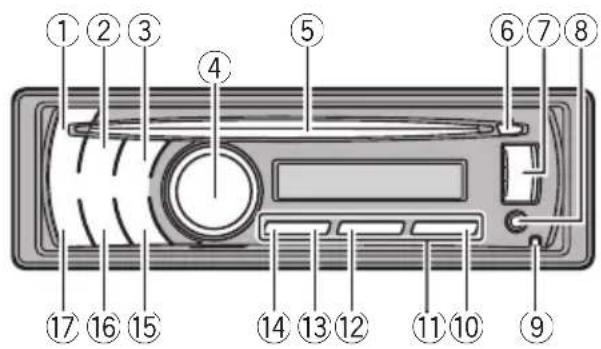
text_image
Diagram of a device rear panel with numbered labels pointing to key components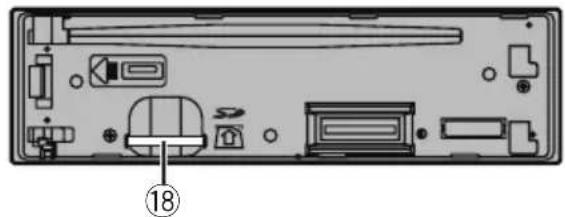
natural_image
Back view of a computer case with internal components and a numbered label (18), no readable text or symbols present.PartPart
| 1SRC/OFF106/PAUSE | ||
| 2S.Rtrv111to6 | ||
| 3 | Q(list)123/ | |
| 4 | MULTI-CONTROL(M.C.) | 132/ |
| 5 | Discloadingslot141/iPod | |
| 6▲(eject)15 | ⊃/DISP/SCRL. | |
| 7USBport16CLK/DISPOFF | ||
| 8 | AUXinputjack(3.5mmstereojack) | 17BAND/ESC |
| 9 | Detachbutton18 | SDmemorycard slotYoucanseetheSD memorycardslotif youremovethe frontpanel. |

CAUTION
UseanoptionalPioneerUSBcable(CD-U51E)to connecttheUSBaudioplayer/USBmemoryto theUSBport.SincetheUSBaudioplayer/USB memoryisprojectedforwardfromtheunit,itis dangeroustoconnectdirectly.
Donotusetheunauthorizedproduct.

Remotecontrol

text_image
VOLUME + MUTE BANOGUSC 17 26 20 21 25 22 1 23 DISP -ISP 19 24PartOperation
| 19VOLUME | Presstoincreaseordecreasevolume. |
| 20MUTE | Presstomute.Pressagaintoun-mute. |
| 21▲/▼/◄/► | Presstoperformmanualseektuning,fastforward,reverseandtracksearchcontrols.Alsousedforcontrollingfunctions. |
| 22AUDIO | Presstoselectanaudiofunction. |
| 23DISP/SCRL | Presstoselectdifferentdisplays.Pressandholdtoscrollthroughthetextinformation. |
| 24■Presstopauseorresume. | |
| 25FUNCTION | Presstoselectfunctions.Pressandholdtorecalltheinitialsettingmenuwhenthesourcesareoff. |
| 26LIST/ENTER | Pressto displaythe listdependingonthesource.Whileintheoperatingmenu,presstocontrolfunctions. |

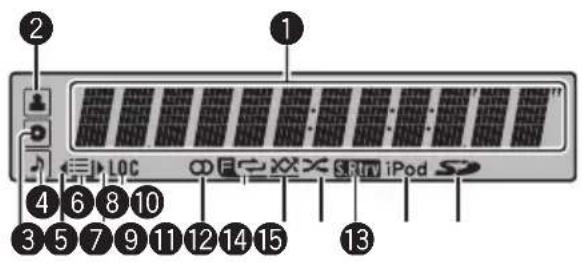
Displayindication
text_image
2 1 LOC 3 5 7 9 11 12 14 15 4 6 8 10 3 5 7 9 11 12 14 15 iPodIndicatorState
| 1 | Maindis-playsec-tion | Tuner:bandandfrequencyBuilt-inCD,externalstoragede-vice(USB,SD)andiPod:elapsed playbacktimeandtextinformation |
| 2 | (artist) | Thedisc(track)artistnameisdis-played.Artistsearchrefinementonthe iPodbrowsingfunctionisinuse. |
| 3 | (disc) | Thedisc(album:nameisdis-played.Albumsearchrefinementonthe iPodbrowsingfunctionisinuse. |
| 4 | (song) | Thetrack(song:nameisdis-played.Aplayableaudiofilehasbeense-lectedwhileoperatingthelist.Songsearchrefinementonthe iPodbrowsingfunctionisinuse. |
| 5 | Anuppertieroffolderormenu exists. | |
| 6 | (list) | Thelistfunctionisoperated. |
| 7 | Alowertieroffolderormenuex-ists.Itflasheswhenasong/albumre-latedtothesongcurrentlyplaying isselectedfromiPod. | |
| 8 | LOC | Thelocalseektuningison. |
| 9 | (stereo) | Theselectedfrequencyisbeing broadcastedinstereo. |
| 10 | (folderre-peat) | Folderrepeatison.Whenrepeatfunctionison,onlyisdisplayed. |
| 11 | (folderran-dom) | Folderrandomison.Whenrandomfunctionison,onlyisdisplayed. |
| 12 | × (shuffle) | ShuffleorshuffleallfunctionisonwhiletheiPodsourceisbeingselected. |
| 13 | SRtrv(soundretriever) | Thesoundretrieverfunctionison. |
| 14 | iPod | CTRL(controlmode)issetto iPod. |
| 15 | SD(SDmemorycard) | SD/SDHCmemorycardisinserted. |

BasicOperations

Important
- Handlegentlywhenremovingorattaching thefrontpanel.
- Avoid subjecting the front panel to excessive shock.
- Keepthefrontpaneloutofdirectsunlightand hightemperatures.
- Removeanycablesanddevicesattachedto thisunitbeforedetachingthefrontpanelto avoiddamagetothedeviceor vehicleinterior.
| Removingthefrontpaneltoprotectyourunitfromtheft1|Pressthedetachbuttontoreleasethefrontpanel.2|Grabthefrontpanelandremove.3|Alwayskeepthedetachedfrontpanelintheprotectiondevicesuchasprotectioncase. |
Re-attachingthefrontpanel1|Slidethefrontpaneltotheleftuntilclicks.Frontpanelandtheheadunitareconnectedontheleftside.Makesurethatthefrontpanelhasbeenproperlyconnectedtotheheadunit.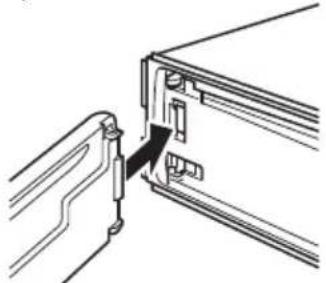 2|Presstherightsideofthefrontpaneluntilitisfirmlyseated.Ifyoucan'tattachthefrontpaneltotheheadunitsuccessfully,tryagain.However,forcingthefrontpanelintoplacemayresultindamage. 2|Presstherightsideofthefrontpaneluntilitisfirmlyseated.Ifyoucan'tattachthefrontpaneltotheheadunitsuccessfully,tryagain.However,forcingthefrontpanelintoplacemayresultindamage. |
| Turningtheuniton1|PressSRC/OFFtoturntheuniton. |
| Turningtheunitoff1|PressSRC/OFFand hold until the unit turns off. |
| Selectingasource1|PressSRC/OFFtocyclebetween:TUNER(tuner)—CD(built-in CD player)—USB(USB)/USB-iPod(iPod)—SD(SD memory card)—AUX(AUX) |
| Adjustingthevolume1|TurnM.C.toadjustvolume. |

Note
Whenthisunit'sblue/whiteleadisconnectedto thevehicle'sauto-antennarelaycontrolterminal, thevehicle'santennaextendswhenthisunit's sourceisturnedon.Toretracttheantenna,turn thesourceoff.
Useandcareoftheremote control
| Usingtheremotecontrol1Pointtheremotecontrolinthedirectionofthe frontpaneltooperate.Whenusingforthefirsttime,pulloutthefilm protrudingfromthetray. |
Replacingthebattery1.Slidethetrayoutonthebackoftheremotecon-trol.2Insertthebatterywiththeplus(+)andminus(-) polesalignedproperly. |

WARNING
- Keepthebatteryoutofthereachofchildren. Shouldthebatterybeswallowed,consulta doctorimmediately.
- Batteries(batterypackorbatteriesinstalled) must not be exposed to excessive heats such as sunshine, fireorthelike.

CAUTION
• UseoneCR2025(3V) lithium battery.
- Removethebatteryiftheremotecontrolisnot usedforamonthorlonger.
- Thereisadangerofexplosionifthebatteryis incorrectlyreplaced.Replaceonlywiththe sameorequivalenttype.
- Donothandlethebatterywithmetallictools.
- Donotstorethebatterywithmetallicobjects.
- Ifthebatteryleaks,wipetheremotecontrol completelycleanandinstallanewbattery.
- Whendisposingofusedbatteries,comply withgovernmentalregulationsorenvironmentalpublicinstitutions' rulesthatapplyinyour country/area.

Important
- Donotstoretheremotecontrolinhighttemperaturesordirectsunlight.
• Theremote control may not function properly indirect sunlight. - Donotlettheremotecontrolfallontothe floor,whereitmaybecomejammedunderthe brakeoracceleratorpedal.
Menuoperationsidentical forfunctionsettings/audio adjustments/initial settings/lists
| ReturningtothepreviousdisplayReturningtothepreviouslist/category(thefolder/Categoryonelevelhigher)|1|Press ⇌/DISP/SCRL. |
| ReturningtothemainmenuReturningtothetoptieroflist/category|1|Pressandhold ⇌/DISP/SCRL. |
| ReturningtotheordinarydisplayCancelingtheinitialsettingmenuReturningtotheordinarydisplayfromthelist/category|1|PressBAND/ESC. |

Tuner

Important
If you are using this unit in North, Central or South America, reset the AM tuning step (referto AM step (AM tuning step) on page 14).
BasicOperations
| Selectingaband1 Press BAND/ESC until the desired band (FM1, FM2,FM3forFMorAM)isdisplayed. |
| Manualtuning(stepbystep)1PushM.C.leftorright. |
| Seeking1PushandholdM.C.leftorright,andthenrelease.YoucancancelseektuningbypushingM.C.leftorright.WhilepushingandholdingM.C.leftorright,you canskipstations.SeektuningstartsassoonasyoureleaseM.C. |
Storingandrecallingstations
Youcaneasilystoreuptosixstationsforeach bandaspresets.
Usingpresettuningbuttons
1Whenyoufindastationthatyouwant tostoreinmemory,pressoneofthepreset tuningbuttons(1to6)andholduntilthe presetnumberstopsflashing.
2Pressoneofthepresettuningbuttons (1to6)toselectthedesiredstation.
Usingpresetscreen
1Presstoswitchtothepresetscreen.
2UseM.C.tostoretheselectedfrequencyinmemory.
Turntochangethepresetnumber.Pressand holdtostore.
3UseM.C.toselectthedesiredstation.
Turntochangethestation.Presstoselect.

Note
YoucanalsorecallstoredradiostationsbypushingM.C.upordownduringthefrequencydisplay.
Functionsettings
1PressM.C.todisplaythemainmenu.
2TurnM.C.tochangethemenuoption andpresstoselectFUNCTION.
3TurnM.C.toselectthefunction.
Afterselecting, perform the following procedure to set the function.
BSM(beststationsmemory)
BSM(beststationsmemory)automaticallystoresthe sixstrongeststationsintheorderoftheirsignal strength.
1PressM.C.toturnBSMon.
Tocancel, press M.C. again.
Local(localseektuning)
Localseektuningletsyoutuneinonlythoseradiostationswithsufficientlystrongsignalsforgoodreception.
1PressM.C.todisplaythesettingmode.
2TurnM.C.toselectthedesiredsetting.
FM: OFF—Level1—Level2—Level3—Level4
AM:OFF—Level1—Level2
Largersettingnumberishigherlevel.Thehighest levelsettingallowsreceptionofonlythestrongest stations,whilelowersettingsletyoureceiveprogressivelyweakerstations.
3PressM.C.toconfirmtheselection.

Note
Operationiscompleteevenifthemenuiscancelledbeforebeingconfirmed.
CD/CD-R/CD-RWandexternal storagedevices(USB,SD)
BasicOperations
PlayingaCD/CD-R/CD-RW
1 Insertthedisc, labelsideup, intothediscloading slot.
|1 |Ifadischasalreadybeeninserted,pressSRC/OFFtoselectthebuilt-inCDplayer.
EjectingaCD/CD-R/CD-RW
1Press(eject).
| PlayingsongsonaUSBstoragedevice 1 OpentheUSBconnectorcover. 2 PlugintheUSBstoragedeviceusingaUSB cable. |
| StopplayingaUSBstoragedevice 1 YoumaydisconnecttheUSBstoragedeviceat anytime. |
| PlayingsongsonanSDmemorycard 1 Removethefrontpanel. 2 InsertanSDmemorycardintotheSDcardslot.Insertitwiththecontactsurfacefacingdownand pressthecarduntilclicksandcompletelylocks. 3 Re-attachthefrontpanel. 4 Press SRC/OFF to select SD as the source.Playbackwillstart. |
| StopplayinganSDmemorycard 1 Removethefrontpanel. 2 PresstheSDmemorycarduntilclicks.TheSDmemorycardisejected. 3 PullouttheSDmemorycard. 4 Re-attachthefrontpanel. |
| Selectingafolder 1 PushM.C.upordown. |
| Selectingatrack 1 PushM.C.leftorright. |
| Fastforwardingorreversing 1 PushandholdM.C.leftorright. |
| Returningtorootfolder 1 PressandholdBAND/ESC. |
| SwitchingbetweenencompressedaudioandCD-DA 1 PressBAND/ESC. |

Notes
- When playing compressed audio, there is no sound during fast forward or reverse.
- USBportableaudioplayersthatcanbe chargedviaUSBwillberechargedwhen pluggedinandtheignitionswitchissetto ACCorON.
- DisconnectUSBstoragedevicefromunit whennotinuse.
Operatingthisunit
- IfplugandplayisonandaUSBstoragedeviceispresent,dependingonthetypeofdevice,thesourcemayswitchtoUSB automaticallywhenyouturnontheengine. Pleasechangeplugandplaysettingasnecessary.RefertoUSBPNP(plugandplay)onpage 14.
Displayingtextinformation
Selectingthedesiredtextinformation
1Press ⇌/DISP/SCRL.
CDTEXTdiscs:Tracknumberandplaytime—disc title—disc artist name—track title—track artistname
WMA/MP3/AAC:Playtime—foldername—file name—track title—artist name—album title—genre—comment—bitrate—folderandtrack numbers
WAV: Play time—folder name—file name—track title—artist name—album title—genre—comment—samplingfrequency—folderandtrack numbers
Scrollingthetextinformationtotheleft
1Pressandhold
→/DISP/SCRL.

Notes
- Incompatible text stored with the audio file may not be displayed or may be displayed incorrectly.
- DependingontheversionofiTunesusedto writeMP3/AACfilesontoadisc,commentinformationmaybeincorrectlydisplayed.
- WhenWindowsMediaPlayer11isusedtoencodetheWAVfiles,textinformationcanbe displayed.
- WhenplayingbackVBR(variablebitrate)-recordedWMAfiles,theaveragebitratevalueis displayed.
- WhenplayingbackVBR(variablebitrate)-recordedMP3files, VBR is displayed instead of bitrate value.
- WhenplayingbackVBR(variablebitrate)-recordedAACfiles,theaveragebitratevalueis displayed.However,dependingonthesoftwareusedtodecodeAACfiles,VBRmaybe displayed.
Selectingandplayingfiles/ tracksfromthenamelist
1Presstoswitchtothefile/track namelistmode.
2UseM.C.toselectthedesiredfilename (orfoldername).
| Changingfileorfoldername1TurnM.C. |
| Playing1Whenafileortrackisselected,pressM.C. |
| Seeingalistofffiles(orfolders)intheselectedfolder1Whenafolderisselected,pressM.C. |
| Playingasongintheselectedfolder1Whenafolderisselected,pressandholdM.C. |

Note
Tracktitlelistwilldisplaythelistoftracktitleson aCDTEXTdisc.
Advancedoperationsusing specialbuttons
| Selectingarepeatplayrange1Press3/ → tocyclebetweenthefollowing:CD/CD-R/CD-RWDisc–RepeatalltracksTrack–RepeatthecurrenttrackFolder–RepeatthecurrentfolderExternalstoragedevice(USB,SD)All–RepeatallfilesTrack–RepeatthecurrentfileFolder–Repeatthecurrentfolder |
| Playingtracksinrandomorder1Press2/ ×× toturnrandomplayonoroff.Tracksinaselectedrepeatrangeareplayedin randomorder. |
| Pausing playback1Press 6/PAUSEto pause or resume. |
| Enhancingcompressedaudioandrestoringrich sound(soundretriever)1PressS.Rtrvtocyclebetween:OFF(off)—1—21iseffectiveforlowcompressionrates,and2is effectiveforhighcompressionrates. |
Functionsettings
1PressM.C.todisplaythemainmenu.
2TurnM.C.tochangethemenuoption andpresstoselectFUNCTION.
3TurnM.C.toselectthefunction.
Afterselecting, perform the following procedure to set the function.
Repeat(repeatplay)
1PressM.C.todisplaythesettingmode.
2TurnM.C.toselectarepeatplayrange. Fordetails, refer to Selecting arepeat play range on the previous page.
3PressM.C.toconfirmtheselection.
Random(randomplay)
①PressM.C.toturnrandomplayonoroff.
Pause(pause)
1PressM.C.topauseorresume.
S.Rtrv(soundretriever)
Automaticallyenhancescompressedaudioandre-storesrichsound.
①PressM.C.todisplaythesettingmode.
2TurnM.C.toselectthedesiredsetting. Fordetails,refertoEnhancingcompressedaudio andrestoringrichsound(soundretriever)onthe previouspage.
3PressM.C.toconfirmtheselection.

Note
Operationiscompleteevenifthemenuiscancelledbeforebeingconfirmed.
iPod
BasicOperations
PlayingsongsoniPod
| 1 OpentheUSBconnectorcover.
2 PluginaniPodusinganiPodDockConnectorto USBCable.
Selectingatrack(chapter)
1 PushM.C.leftorright.
Fastforwardingorreversing
1 PushandholdM.C.leftorright.

Notes
- TheiPod's batterywillbechargediftheignitionswitchissettoACCorON,whileconnected.
- While the iPodis connected to this unit, the iPod cannot be turned on or off unless the control mode is set to iPod.
- DisconnectheadphonesfromtheiPodbefore connectingtothisunit.
•TheiPodwillturnoffabouttwominutesafter theignitionswitchissettoOFF.
Displayingtextinformation
Selectingthedesiredtextinformation
1 Press ↩/DISP/SCRL.
Playtime—songtitle—artistname—albumtitle—numberofsongs
Scrollingthetextinformationtotheleft
1 Pressandhold ⊃/DISP/SCRL.

Note
IncompatibletextsavedontheiPodwillnotbe displayedbytheunit.
Browsingforasong
1Presstoswitchtothetopmenuof thelistsearch.
2UseM.C.toselectacategory/song.
| Changingthenameofsongorcategory1TurnM.C.Playlists—artists—albums—songs—podcasts—genres—composers—audiobooks |
| Playing1Whenasongisselected,pressM.C. |
| Seeingalistof songsintheselectedcategory1Whenacategoryisselected,pressM.C. |
| Playingasongintheselectedcategory1Whenacategoryisselected,pressandholdM.C. |
| Searchingbyalphabetinthelist1Whenalistfortheselectedcategoryisdisplayed, press 🔒 toswitchtoalphabetsearchmode.2TurnM.C.toselectaletter.3PressM.C.todisplaythealphabeticallist. Ifalphabetsearchisaborted,NOTFOUNDisdis-played. |

Note
DependingonthenumberoffilesintheiPod, theremaybeadelaywhendisplayingalist.
Advancedoperationsusing specialbuttons
| Selectingarepeatplayrange1Press3/ ⇌ tocyclebetweenthefollowing:One-RepeatthecurrentsongAll-Repeatallsongsintheselectedlist |
| Playingallsongsinarandomorder(shuffleall)1Press2/ ×× toturnshuffleallon. |
| Pausing playbackRefertoPausingplaybackonpage9. |
| PlayingsongsrelatedtothecurrentlyplayingsongYoucanplaysongsfromthefollowinglists.—Albumlistofcurrentlyplayingartist—Songlistofcurrentlyplayingalbum—Albumlistofcurrentlyplayinggenre1PressandholdM.C.toswitchtothelinkplay mode.2TurnM.C.tochangethemode;presstoselect.Artist– Plays an album of currently playing artist.Album–Playsasongofcurrentlyplaying album.•Genre–Playsanalbumofcurrentlyplaying genre.Theselectedsong/albumwillbeplayedafterthe currentlyplayingsong.Theselectedsong/albummaybecancelledifyouoperatefunctionsotherthanlinksearch(e.g.fastforwardandreverse).Ifnorelatedalbums/songsarefound,NOTFOUND isdisplayed.Dependingonthesongselectedtoplay,theendof thecurrentlyplayingsongandthebeginningofthe selectedsong/albummaybecutoff. |
| Operatingthisunit’siPodfunctionfromyouriPod Thisfunctionisnotcompatiblewiththefollowing iPodmodels.—iPodnano1stgeneration—iPod5thgenerationThisunit’siPodfunctionallowsyoutoconductoperationsfromyouriPodandlistentoitusingyourcar’s speakers.1Press1/iPodtoswitchthecontrolmode.iPod– This unit’s iPod function can be operatedfromtheconnectediPod.Audio– This unit’s iPod function can be operatedfromthisunit. |
| Enhancingcompressedaudioandrestoringrich sound(soundretriever)RefertoEnhancingcompressedaudioandrestoring richsound(soundretriever)onpage9. |
Functionsettings
1PressM.C.todisplaythemainmenu.
2TurnM.C.tochangethemenuoption andpresstoselectFUNCTION.
3TurnM.C.toselectthefunction.
Afterselecting, perform the following procedure to set the function.
Repeat(repeatplay)
- RefertoRepeat(repeatplay)onpage10. HowevertherepeatrangeisdifferentfromCD/externalstoragedevice.RefertoSelectingarepeatplayrangeonthepreviouspage.
Shuffle(shuffle)
1 | PressM.C. to display the setting mode.
2|TurnM.C.toselectyourfavoritesetting.
- Songs – Play back songs in the selected list in randomorder.
- Albums—Playback songs from randomly selected albumin order.
- OFF-Cancelrandomplay.
3 PressM.C.toconfirmtheselection.
Shuffleall(shuffleall)
- PressM.C.toturnshuffleallon. Toturnoff,setShuffleintheFUNCTIONmenuto off.
Linkplay(linkplay)
1PressM.C.todisplaythesettingmode.
2TurnM.C.tochangethemode;presstoselect. Fordetailsaboutthesettings,refertoPlaying songsrelatedtothecurrentlyplayingsongonthe previouspage.
CTRL(controlmode)
1PressM.C.toselectyourfavoritesetting. Fordetailsaboutthesettings,refertoOperating thisunit'siPodfunctionfromyouriPodonthepreviouspage.
Pause(pause)
• RefertoPause(pause)onpage10.
Audiobooks(audiobookspeed)
Theplaybackspeedofaudiobookcanbechanged.
1 | PressM.C. to display the setting mode.
2|TurnM.C.toselectyourfavoritesetting.
- Faster-Playbackfasterthannormalspeed
• Normal-Playbackinnormalspeed - Slower-Playbackslowerthannormalspeed
3PressM.C.toconfirmtheselection.
S.Rtrv(soundretriever)
• Refer to S.Rtrv (sound retriever) on page 10.

Notes
- Operationiscompleteevenifthemenuiscancelledbeforebeingconfirmed.
- SwitchingthecontrolmodetoiPodpauses song playback. OperatetheiPodtoresume playback.
- The following functions are still accessible from the unitevenifthe control mode is setto
iPod.
—Volume
—Fastforward/reverse
—Trackup/down
—Pausing
—Switchingthetextinformation
- WhenthecontrolmodeissettoiPod, operationsarelimitedasfollows:
—OnlyCTRL(controlmode), Pause(pause) and S.Rtrv(soundretriever)functions are available.
—Browsefunctioncannotbeoperatedfrom thisunit.
AudioAdjustments
1PressM.C.todisplaythemainmenu.
2TurnM.C.tochangethemenuoption andpresstoselectAUDIO.
3TurnM.C.toselecttheaudiofunction.
Afterselecting, perform the following procedure to set the audio function.
FAD/BAL(fader/balanceadjustment)
1 PressM.C. to display the setting mode.
2PressM.C.tocyclebetweenfaderandbalance.
3 TurnM.C. to adjust the speaker balance.
Adjustment range(front/rear): F-F15 to F-R15
Adjustment range(left/right): B-L15 to B-R15
- F-0isthepropersettingwhenonlytwospeakersareused.
- When therearoutputsettingandpreoutsettingareSUBW, you cannot adjust front/rear speaker balance.
PresetEQ(equalizerrecall)
1 PressM.C.todisplaythesettingmode.
2|TurnM.C.toselectanequalizercurve.
Powerful—Natural—Vocal—Custom1—Custom2—Flat—Superbass
- When Flatisselectednoadjustmentsare madetothesound.
3PressM.C.toconfirmtheselection.
GraphicEQ(equalizeradjustment)
You can adjust the currently selected equalizer curve settings desired. Adjusted equalizer curves settings are memorized in Custom1 or Custom2.
- AseparateCustom1curvecan becreated for each source. If you make adjustments when a curve other than Custom2 is selected, the equalizer curves settings will be memorized in Custom1.
- ACustom2curvecanbecreatedcommontoall sources. If you make adjustments when the Custom2 curve is selected, the Custom2 curve will be updated.
1PressM.C.todisplaythesettingmode.
2PressM.C.tocyclebetweenequalizerbandand level.
3PressM.C.toswitchtoequalizerbandandthen turnM.C.toselect. 100Hz—315Hz—1.25kHz—3.15kHz—8kHz
4 Press M.C. to switch to level and then turn M.C. to adjust. Adjustmentrange:+6to-6
Loudness(loudness)
Loudnesscompensatesfordeficienciesinthelow-andhigh-frequencyrangesatlowvolume.
1PressM.C.todisplaythesettingmode.
2TurnM.C.toselectthedesiredsetting.
OFF (off)—Low (low)—Mid (mid)—High (high)
3PressM.C.toconfirmtheselection.
SWsetting1(subwooferon/offsetting)
Thisunitisequippedwithasubwooferoutputwhich canbeturnedonoroff.
1PressM.C.todisplaythesettingmode.
2TurnM.C.toselectthedesiredsetting.
Normal(normalphase)—Reverse(reverse phase)—OFF(subwooferoff)
3PressM.C.toconfirmtheselection.
SWsetting2(subwooferadjustment)
Whenthesubwooferoutputison,youcanadjustthe cut-offfrequencyandtheoutputlevelofthesubwoofer.
Only frequencies lower than those in these selected range are outputted from the subwoofer.
|1|PressM.C.todisplaythesettingmode.
[2]PressM.C.tocyclebetween-offfrequency and outputlevelofsubwoofer.
3 PressM.C.toswitchocut-offfrequencyandthen turnM.C.toselectcut-offfrequency.
50Hz—63Hz—80Hz—100Hz—125Hz
4 PressM.C.toswitchtooutputlevelandthenturn
M.C.toadjustoutputlevel.
Adjustmentrange:+6to-24
HPFsetting(highpassfilteradjustment)
When you donotwantlowsoundsfromthesubwooferoutputfrequencyrangetoplayfromthefrontorrearspeakers, turnontheHPF(highpassfilter). Only frequencieshigherthanthoseintheselectedrange are outputfromthefrontorrearspeakers.
1PressM.C.todisplaythesettingmode.
②TurnM.C.toselectcut-offfrequency.
OFF (off)—50Hz—63Hz—80Hz—100Hz—125Hz
3PressM.C.toconfirmtheselection.
Bassbooster(bassboost)
①PressM.C.todisplaythesettingmode.
2TurnM.C.toadjustthelevel.
Adjustmentrange:0to+6
3PressM.C.toconfirmtheselection.
SLA(sourceleveladjustment)
SLA(Sourceleveladjustment) lets you adjust the volume level of each source to prevent radical changes in volumewhenswitching between sources.
- WhenselectingFMasthesource,youcannot switchtoSLA.
- SettingsarebasedontheFMvolumelevel,which remainsunchanged. Beforeadjustingsourcelevels,comparetheFM volumelevelwiththelevelofthesourceyouwish toadjust.
• The AM volume level can also be adjusted with source level adjustments.
1PressM.C.todisplaythesettingmode.
2TurnM.C.toadjustthesourcevolume. Adjustmentrange:+4to-4
|3|PressM.C.toconfirmtheselection.

Note
Operationiscompleteevenifthemenuiscancelledbeforebeingconfirmed.
InitialSettings
1PressSRC/OFFandholduntiltheunit turnsoff.
2PressM.C.andholduntiltheinitialsettingmenuappearsinthedisplay.
3TurnM.C.toselecttheinitialsetting.
Afterselecting, perform the following procedure to set the initial setting.
Clockset(settingtheclock)
1 PressM.C.todisplaythesettingmode.
[2]PressM.C.toselectthesegmentoftheclockdisplayyouwishtoset.
Hour—Minute
Asyouselectsegmentsoftheclockdisplay,the selectedsegmentflashes.
3TurnM.C.toadjusttheclock.
Clock(clockon/offsetting)
1PressM.C.toturntheclockdisplayonoroff.
FMstep(FMtuningstep)
TheFMtuningstepemployedbyseektuningcanbe switchedbetween100kHz,thepresetstep,and50 kHz.
- Ifseektuningisperformedin50kHzsteps,stationsmaybetunedinimprecisely.Tuneinthestationswithmanualtuningoruseseektuning again.
- Thetuningstepremainsat50kHzduringmanual tuning.
1PressM.C.todisplaythesettingmode.
2TurnM.C.toselecttheFMtuningstep. 100kHz(100kHz)—50kHz(50kHz)
3PressM.C.toconfirmtheselection.
AMstep(AMtuningstep)
TheAMtuningstepcanbeswitchedbetween9kHz, thepresetstep,and10kHz.Whenusingthetunerin North,CentralorSouthAmerica,resetthetuning stepfrom9kHz(531kHzto1602kHzallowable)to10 kHz(530kHzto1640kHzallowable).
1PressM.C.todisplaythesettingmode.
2TurnM.C.toselecttheAMtuningstep. 9kHz(9kHz)—10kHz(10kHz)
3PressM.C.toconfirmtheselection.
AUX(auxiliaryinput)
Activate this setting when using auxiliary device connected to this unit.
1 PressM.C.toturnAUXonoroff.
USBPnP(plugandplay)
ThissettingallowsyoutoswitchyoursourcetoUSB/USB-iPodautomatically.
[1]PressM.C.toturntheplugandplayonoroff. ON-WhenUSBstoragedevice/iPodisconnected,thesourceisautomaticallyswitchedto USB/USB-iPod.IfyoudisconnectyourUSBstoragedevice/iPod,thisunit'ssourceisturnedoff.
OFF-WhenUSBstoragedevice/iPodisconnected,thesourceisnotswitchedtoUSB/USB-iPodautomatically.Pleasechangethesourceto USB/USB-iPodmanually.
Brightness(displaybrightnesssetting)
1 PressM.C.todisplaythesettingmode.
2 TurnM.C.toswitchthebrightnesssetting. High(high)—Low(low)
3 PressM.C.toconfirmtheselection.
SWcontrol(rearoutputandsubwoofersetting)
Therearspeakerleadsoutput(RearSP)andRCAoutput(Preout)ofthisunitcanbeusedforfull-range speaker (Rear SP :Full/Preout :Rear) or subwoofer (Rear SP :SUBW/Preout :SUBW) connection. If you switch to Rear SP :SUBW, you can connect a rear speakerleaddirectlytoasubwooferwithoutusingan auxiliaryamp. Initially,RearSPissetforrearfull-rangespeakerconnection (Full). When Rear SP :Full is selected, you can connecttheRCAoutputtoasubwoofer.Inthiscase, youcanselectwhetherousethesubwoofercontroller's (low pass filter, phase) built-in Preout :SUBW or theauxiliaryPreout:Rear.
1 PressM.C. to display the setting mode.
2 PressM.C.tocyclebetweenasfollowing: Rear SP/Preout—Full (SUBW)/SUBW(Rear)
3 TurnM.C.tochangethesetting. RearSP:Full—SUBW
Preout:SUBW—Rear
- Evenifyouchangethissetting, thereisno outputunlessyouturnthesubwooferoutput on(refertoSWsetting1(subwooferon/off setting)onthepreviouspage).
- If you chan get his setting, subwoofer output in the audiomenu will return to the factory settings.
DEMO(demodisplaysetting)
1 PressM.C.tpturnthedemodisplayonoroff.
Operatingthisunit
EverSCRL(scrollmodesetting)
When EverScrollissettoON, recorded textinformationscrollscontinuouslyinthedisplay.SettoOFFif you prefer the information to scroll just once. 1 Press M.C. to turn the evererscroll on or off.

OtherFunctions
UsingtheAUXsource
1Insertthestereominiplugintothe AUXinputjack.
2PressSRC/OFFtoselectAUXasthe source.

Note
AUX cannot be selected unless the auxiliary setting is turned on. Formed details, refer to AUX (auxiliary input) on the previous page.
Turningtheclockdisplayonoroff
- PressCLK/DISPOFFtoturntheclock displayonoroff.

Note
Theclockdisplaydisappearstemporarilywhen youperformotheroperations,buttheclockdisplayappearsagainafter25seconds.
Switchingthedisplay indicationandbutton illumination
- PressandholdCLK/DISPOFFtoswitch thedisplayindicationandbuttonilluminationonoroff.
■Evenifth display indicationisturnedoff, operationcanbeconducted. Ifoperationisconductedwhilethedisplayindicationisoff, display willlightupforafewsecondsandthenturnoff again.
AdditionalInformation
Troubleshooting
| SymptomCauseAction(See) | ||
| Thedisplay automatically returnstothe ordinarydis-play. | Youdidnotperformanyoperationwithinabout 30seconds. | Performoperation again. |
| Therepeatplay rangechanges unexpectedly. | Dependingon therepeatplay range,these-lectedrangemay changewhense-lectinganother folderortrack,or whenfastforwarding/reversing. | Selecttherepeat playrangeagain. |
| Asubfolderis notplayed back. | Subfolderscan-notbeplayed whenFolder (folderrepeat)is selected. | Selectanotherre-peatplayrange. |
| NOXXXXappearswhena displayischan-ged(e.g.,NOTITLE). | Notextinformationembedded | Switchthedisplay orplayanother track/file. |
| Thedisplayis illuminated whentheunit isturnedoff. | Demomodeison. | Press ⊃/DISP/SCRLtocancel demomode. |
| Theunitismal-functioning. Thereisinter-ference. | Youareusinga device,suchasa cellphone,that transmitselectro-magneticwaves neartheunit. | Moveelectricalde-vicesthatmaybe causingtheinter-ferenceawayfrom theunit. |

Errormessages
Whenyoucontactyourdealeroryournearest PioneerServiceCenter,besuretonotethe errormessage.
Built-inCDPlayer
| MessageCauseAction | ||
| ERROR-11,12, 17,30 | DirtydiscCleandisc. | |
| ScratcheddiscReplacedisc. | ||
| ERROR-10,11, 12,15,17,30, A0 | Electricalormechanical | Turntheignition switchOFFand backON,orswitch toadifferent source,thenback totheCDplayer. |
| ERROR-15Theinserteddisc isblank | Replacedisc. | |
| ERROR-22,23UnsupportedCD format | Replacedisc. | |
| FormatreadThereissome-timesadelaybetweenthestartof playback and whenyoustartto hearanysound | Waituntilthemes-sagedisappears andyouhear sound. | |
| NOAUDIO | Theinserteddisc doesnotcontain anyplayablefiles | Replacedisc. |
| SKIPPED | Theinserteddisc containsDRM protectedWMA files | Replacedisc. |
| PROTECT | Allthefileson theinserteddisc areembedded withDRM | Replacedisc. |
Externalstoragedevice(USB,SD)
| MessageCauseAction | ||
| NODEVICE | Whenplugand playisoff,no USBstoragedeviceisconnected. | •Turntheplug andplayon.•Connectacom- patileUSBsto- ragedevice. |
| Formatread | Thereissome- timesadelaybe- tweenthestartof playbackand whenyoustartto hearanysound | Waituntilthemes- sagedisappears andyouhear sound. |
Additional Information
| NOAUDIO | NosongsTransfertheaudio | |
| filestotheexternal storagedeviceand connect. | ||
| Theconnected USBstoragedevicehassecurity enabled | FollowtheUSB storagedevicein-structionstodis-ablethesecurity. | |
| SKIPPEDTheexternalsto-ragedevicein usecontains WMAfilesem-beddedwith WindowsMed-iaTMDRM9/10 | Playanaudiofile notembeddedwith WindowsMedia DRM9/10. | |
| PROTECTAllthefilesinthe externalstorage deviceareem-beddedwith WindowsMedia DRM9/10 | Transferaudiofiles notembeddedwith WindowsMedia DRM9/10tothe externalstorage deviceandcon-nect. | |
| N/AUSBTheUSBstorage deviceconnected toisnotsup-portedbythis unit. | ConnectaUSB MassStorage Classcompliant device. | |
| Notcompatible USBdevice | ||
| CHECKUSBTheUSBconnec-tororUSBcable hasshort-circuited. | Checkthatthe USBconnectoror USBcableisnot caughtinsome-thingordamaged. | |
| Theconnected USBstoragede-viceconsumes morethan500 mA(maximum allowablecur-rent). | ||
| N/ASDNotcompatible SDstoragede-vice | Removeyourde-viceandreplaceit withacompatible SDstoragedevice. | |
| ERROR-19 | Communication failure | Performoneofthe followingoperations.-Turntheignition switchOFFand backON.-Disconnector ejecttheexternal storagedevice.-Changetoadifferentsource.Then,returntothe USBorSDsource. |
| ERROR-23 | USBstoragedeviceisnotformattedwith FAT12,FAT16or FAT32 | USBstoragedev-viceshouldbefor-mattedwithFAT12,FAT16orFAT32. |
iPod
| MessageCauseAction | |
| NODEVICEWhenplugand playisoff,no USBstoragede-viceoriPodis connected. | •Turntheplug andplayon.•Connectacom-patibleiPod. |
| FormatreadThereissome-timesadelaybe-tweenthestartof playbackand whenyoustartto hearanysound | Waituntilthemes-sagedisappears andyouhear sound. |
| ERROR-19Communication failure | Disconnectthe cablefromiPod.OnceiPod'smain menuisdisplayed, reconnectcable. ResettheiPod. |
| iPodfailure | Disconnectthe cablefromiPod.OnceiPod'smain menuisdisplayed, reconnectcable. ResettheiPod. |
| ERROR-16OldiPodfirm-wareversions | UpdatetheiPod version. |
| iPodfailure | Disconnectthe cablefromiPod.OnceiPod'smain menuisdisplayed, reconnectcable. ResettheiPod. |
AdditionalInformation
| N/AUSB | Notcompatible iPod | Disconnectyour deviceandreplace itwithacompati-bleiPod. |
| CHECKUSBiPodoperates correctlybut doesnotcharge | Checkifthecon- nectioncablefor iPodshortedout (e.g.,notcaughtin metalobjects). Afterchecking, turntheignition switchOFFand backONordiscon- necttheiPodand reconnect. | |
| STOPNosongsonthe iPod | Transfersongsto iPod. | |
| Nosongsinthe currentlist Selectalistthat containssongs. | ||

Handlingguideline
Discsandplayer
Useonlydiscsfeaturingeitheroffollowingtwologos.


Use12-cmdisc.Donotuse8-cmdiscoranadapter for8-cmdisc.
Useonlyconventional,fullycirculardiscs.Donotuse shapeddiscs.
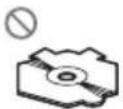

DonotinsertanythingotherthanaCDintotheCD loadingslot.
Donotusecracked, chipped, warped, or otherwise damaged discsasthey may damage the player.
UnfinalizedCD-R/CD-RWdiscplaybackisnotpossible.
| Donottouchtherecordedsurfaceofthediscs. |
| Storediscsintheircaseswhennotinuse. |
| Avoidleavingdiscsinexcessivelyhotenvironments includingunderdirectsunlight. |
| Donotattachlabels,writeonorapplychemicalsto thesurfaceofthediscs. |
| TocleanaCD,wipethediscwithasoftclothoutward fromthecenter. |
| Condensationmaytemporarilyimpairtheplayer's performance.Leaveittoadjusttotherwarmertem- peratureforaboutonehour.Also,wipeanydamp discswithasoftcloth. |
| Playbackofdiscsmaynotbepossiblebecauseof disccharacteristics,discformat,recordedapplica- tion,playbackenvironment,storageconditions,and soon. |
| Roadshocksmayinterruptdisc playback. |
| Readtheprecautionsfordiscsbeforeusingthem. |
Externalstoragedevice(USB,SD)
Addressanyquestionsyouhaveaboutyourexternal storagedevice(USB,SD)tothemanufacturerofthe device.
Donotleavetheexternalstoragedevice(USB,SD)in anyplacewithhightemperatures.
Depending on the external storage device (USB, SD), the following problem may occur.
- Operationsmayvary.
- Thisunitmaynotrecognizethestoragedevice.
• Thefilemaynotbeplayedbackproperly.
USBstoragedevice
ConnectionsviaaUSBhubarenotsupported.
DonotconnectanythingotherthanaUSBstorage device.
FirmlysecuretheUSBstoragedevicewhendriving. DonotlettheUSBstoragedevicefallontothefloor, whereitmaybecomejammedunderthebrakeoracceleratorpedal.
Depending on the USB storage device, the following problem may occur.
• The devicemay generatenoise in theradio.
AdditionalInformation
SDmemorycard
This unitsupportsonlythefollowingSDmemory cards.
•SD
• miniSD
- microSD
•SDHC
KeeptheSDmemorycardoutofthereachofchildren.ShouldtheSDmemorycardbeswallowed,consultadoctorimmediately.
DonottouchtheconnectorsoftheSDmemorycard directlywithyourfingersorwithanymetaldevice.
DonotinsertanythingotherthananSDmemorycard intotheSDcardslot.Ifametalobject(e.g.acoin)is insertedintotheslot,theinternalcircuitsmaybreak andcausemalfunctions.
When inserting aminiSDormicroSD, use an adapter. Donot use an adapter which has metal part sother than the connector sexposed.
DonotinsertadamagedSDmemorycard(e.g. warped, labelpeeledoff)asitmaynotbeejected fromtheslot.
DonottrytoforceanSDmemorycardintotheSD cardslotastheSDmemorycardorthisunitmaybe damaged.
WhenyouejectanSDmemorycard, pressitand holduntilclicks.ItisdangeroustopresstheSD memorycardandreleaseyourfingerimmediatelyas theSDcardmayshootoutoftheslotandhityouin theface,etc.IftheSDmemorycardshootsoutofthe slot,itmaygomissing.
iPod
DonotleavetheiPodindirectsunlightforextended amountsoftime.Extendedexposuretodirectsun-lightcanresultiniPodmalfunctionduetotheresult-inghightemperature.
Donotleavethei Podinanyplace with hightemperatures.
Toensureproperoperation,connectthedockconnectorcablefromtheiPoddirectlytothisunit.
FirmlysecuretheiPodwhendriving.Donotletthe iPodfallontothefloor,whereitmaybecomejammed underthebrakeoracceleratorpedal.
Fordetails, refertothei Pod's manuals.
AboutiPodsettings
- WhenaniPodisconnected, this unitchangesthe EQ(equalizer) setting of the Podtooffinorderto optimizetheacoustics. When you disconnect the iPod, the EQ return to the original setting.
- You cannot set Repeat to off the Pod when using this unit. Repeats automatically changed to all when connecting the Pod to this unit.
DualDiscs
DualDiscsaretwo-sideddiscsthathavearecordable CDforaudioononesideandarecordableDVDfor videoontheother.
SincetheCDsideofDualDiscsisnotphysicallycompatiblewiththegeneralCDstandard,itmaynotbe possibletoplaytheCDsidewiththisunit.
FrequentloadingandejectingofaDualDiscmayresultsscratchesonthedisc.Seriousscratchescan leadtoplaybackproblemsonthisunit.Insome cases,aDualDiscmaybecomestuckinthedisloadingslotandwillnoteject.Topreventthis,werecommendyourefrainfromusingDualDiscwiththisunit.PleaserefertotheinformationfromthediscmanufacturerformoredetailedinformationaboutDualDiscs.

Compressedaudio compatibility(disc,USB,SD)
WMA
Fileextension:.wma
Bitrate:48kbpsto320kbps(CBR),48kbpsto384kbps(VBR)
Samplingfrequency:32kHz,44.1kHz,48kHz
WindowsMediaAudioProfessional, Lossless, Voice/DRMStream/Streamwithvideo: No
MP3
Fileextension:.mp3
Bitrate:8kbpsto320kbps
Sampling frequency: 8kHz to 48kHz (32kHz, 44.1 kHz, 48kHz foreemphasis)
AdditionalInformation
CompatibleID3tagversion:1.0,1.1,2.2,2.3,2.4(ID3 tagVersion2.xisgivenpriorityoverVersion1.x.)
M3uplaylist:No
MP3i(MP3interactive),mp3PRO:No
WAV
Fileextension:.wav
Quantizationbits:8and16(LPCM),4(MSADPCM)
Sampling frequency: 16kHz to 48kHz (LPCM), 22.05 kHz and 44.1kHz (MSADPCM)
AAC
Compatibleformat: AACencodedbyiTunes
Fileextension:.m4a
Samplingfrequency:11.025kHzto48kHz
Transmissionrate:16kbpsto320kbps,VBR
AppleLossless:No
AACfileboughtontheiTunesStore(.m4pfileextension):No
Supplementalinformation
Onlythefirst32characterscanbedisplayedasafilename(includingthefileextension)orafoldername.
Thisunitmaynotoperatecorrectlydependingonthe applicationusedtoencodeWMAfiles.
Theremaybeaslightdelaywhenstartingplaybackof audiofilesembeddedwithimagedata.
Disc
Playablefolderhierarchy:uptoeighttiers(Apractical hierarchyislessthantwotiers.)
playable folders: upto99
playablefiles:upto999
Filesystem:ISO9660Level1and2,Romeo,Joliet
Multi-session playback: Yes
Packetwritedatatransfer: No
Regardless of the length of blank section between the song so the original recording, compressed audio discs play with short pause between songs.
Externalstoragedevice(USB,SD)
Playablefolderhierarchy:uptoeighttiers(Apractical hierarchyislessthantwotiers.)
playable folders: upto1500
playablefiles:upto15000
Playbackofcopyrightprotectedfiles:No
Partitionedexternalstoragedevice(USB,SD):Only thefirstplayablepartitioncanbeplayed.
Theremaybeaslightdelaywhenstarting playback of audiofilesonianexternalstoragedevice(USB,SD) with numerousfolderhierarchies.
SDmemorycard
There is no compatibility for MultiMediaCards (MMC).
CompatibilitywithaIISDmemorycardsisnotguaranteed.
ThisunitisnotcompatiblewithSD-Audio.

CAUTION
Pioneeracceptsnoresponsibilityfordataloston theUSBmemory/USBportableaudioplayer/SD memorycard/SDHCmemorycardevenifthat dataislostwhileusingthisunit.
iPodcompatibility
This unitsupportsonlythefollowingiPodmodels. SupportediPodsoftwareversionsareshownbelow. Olderversionsmaynotbesupported.
- iPodnano4thgeneration(softwareversion1.0.3)
- iPodnano3rdgeneration(softwareversion1.1.3)
- iPodnano2ndgeneration(softwareversion1.1.3)
- iPodnano1stgeneration(softwareversion1.3.1)
- iPodtouch2ndgeneration(softwareversion3.0)
- iPodtouch1stgeneration(softwareversion3.0)
- iPodclassic120GB(softwareversion2.0.1)
- iPodclassic(softwareversion1.1.2)
- iPod5thgeneration(softwareversion1.3)
- iPhone3GS(softwareversion3.0)
- iPhone3G(softwareversion3.0)
DependingonthegenerationorversionoftheiPod, somefunctionscannotbeoperated.
AdditionalInformation
OperationsmayvarydependingonthesoftwareversionofiPod.
When using an iPod, iPod Dock Connect to USB Cable is required.
PioneerCD-IU50interfacecableisalsoavailable.For details,consultyourdealer.
About the file/format compatibility, referto Pod manuals.
AudioBook, Podcast: Yes

CAUTION
Pioneeracceptsnoresponsibilityfordataloston theiPodevenifthatdataislostwhileusingthis unit.
Sequenceofaudiofiles
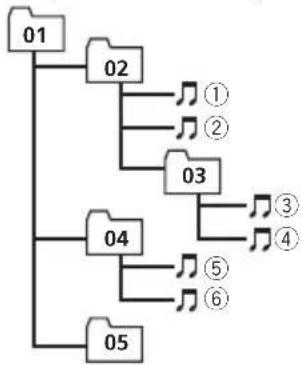
Theusercannotassignfoldernumbersand specify playbacksequenceswiththisunit.
Exampleofahierarchy
flowchart
graph TD
    01 --> 02
    02 --> 1
    02 --> 2
    03 --> 3
    03 --> 4
    04 --> 5
    04 --> 6
    05 --> 6
Level 1 Level 2 Level 3 Level 4
:Folder Compressed audiofile 01to05:Folder number ①to⑥:Playback sequence
Disc
Folderselectionsequenceorotheroperation may differ depending on the encoding or writing software.
Externalstoragedevice(USB,SD)
Playbacksequenceisthesameasrecorded sequenceintheexternalstoragedevice(USB, SD).
Tospecifythe playbacksequence, the following method is recommended.
①Createthefilenameincludingnumberthat specifythe playbacksequence(e.g., 001xxx.mp3and099yyy.mp3).
2 Putthosefilesintoafolder.
3 Savethefoldercontainingfilesontheexternal storagedevice(USB,SD).
However, depending on the system environment, you cannot specify the playback sequence.
ForUSBportableaudioplayers,thesequence isdifferentanddependsontheplayer.
Copyrightandtrademark
iTunes
AppleandiTunesaretrademarksofApple Inc., registeredintheU.S.andothercoun-tries.
MP3
Supplyofthisproductonlyconveysalicense forprivate,non-commercialuseanddoesnot conveyalicensenorimplyanyrighttouse thisproductinanycommercial(i.e.revenue-generating)realtimebroadcasting(terrestrial, satellite,cableand/oranyothermedia),broadcasting/streamingviainternet,intranetsand/orothernetworksorinotherelectroniccontentdistributionsystems,suchaspay-audioor audio-on-demandapplications.Anindependentlicenseforsuchuseisrequired.Fordetails,pleasevisit http://www.mp3licensing.com.
WMA

text_image
Plays Medium Medium™WindowsMediaandtheWindowslogoaretrademarksorregisteredtrademarksofMicrosoft CorporationintheUnitedStatesand/orother countries.
AdditionalInformation
Thisproductincludestechnologyownedby MicrosoftCorporationandcannotbeusedor distributedwithoutalicensefromMicrosoft Licensing,Inc.
SDmemorycard

SDLogoisattrademark.

miniSDLogoisattrademark.

microSDLogoisattrademark.

SDHCLogoisattrademark.
iPod

text_image
Made for iPodiPodisatrademarkofAppleInc., registered in the U.S. and other countries.
"MadeforiPod" meansthatanelectronicaccessoryhasbeendesignedtoconnectspecifi-callytoiPodandhasbeencertifiedbythe
developertomeetAppleperformancestandards.
Appleisnotresponsiblefortheoperationof thisdeviceoritscompliancewithsafetyand regulatorystandards.
iPhone

text_image
Works with iPhoneiPhoneisattrademarkofAppleInc.
"WorkswithiPhone" meansthatanelectronic accessoryhasbeendesignedtoconnectspecificallytoiPhoneandhasbeencertifiedby thedevelopertomeetAppleperformance standards.
Appleisnotresponsiblefortheoperationof thisdeviceoritscompliancewithsafetyand regulatorystandards.
Specifications
General
Ratedpowersource......14.4VDC (allowablevoltagerange: 12.0Vto14.4VDC)
Groundingsystem......Negativetype
Maximumcurrentconsumption 10.0A
AdditionalInformation
Continuouspoweroutput...22W×4(50Hzto15000
Hz,5%THD,4Ωload,both
channelsdriven)
Load impedance .... 4 Ω to 8 Ω × 4
4 to 8 × 2 + 2 × 1
Preoutmaximumoutputlevel
2.2V
Equalizer(5-BandGraphicEqualizer):
Frequency.....100/315/1.25k/3.15k/8kHz
Gain....±12dB
HPF:
Frequency.....50/63/80/100/125Hz
Slope....-12dB/oct
Subwoofer(mono):
Frequency.....50/63/80/100/125Hz
Slope....-18dB/oct
Gain....+6dBto-24dB
Phase......Normal/Reverse
Bassboost:
Gain....+12dBto0dB
CDplayer
System....Compactdiscaudiosystem
Usablediscs....Compactdisc
Signal-to-noiseratio....94dB(1kHz)(IEC-Anetwork)
Numberofchannels......2(stereo)
MP3decodingformat......MPEG-1&2AudioLayer3
WMAdecodingformat......Ver.7,7.1,8,9,10,11(2ch audio)
(WindowsMediaPlayer)
AACdecodingformat......MPEG-4AAC(iTunesen-
codedonly)(.m4a)
(Ver.8.2andearlier)
WAVsignalformat....LinearPCM&MSADPCM
(Non-compressed)
USB
USBstandardspecification
...USB2.0fullspeed
Maximumcurrentsupply....500mA
USBClass....MSC(MassStorageClass)
Filesystem.....FAT12,FAT16,FAT32
MP3decodingformat......MPEG-1&2AudioLayer3
WMAdecodingformat......Ver.7,7.1,8,9,10,11(2ch audio)
(WindowsMediaPlayer)
AACdecodingformat......MPEG-4AAC(iTunesen-codedonly)(.m4a)
(Ver.8.2andearlier)
WAVsignalformat....LinearPCM&MSADPCM
(Non-compressed)
SD
Compatiblephysicalformat
Version2.00
Maximummemorycapacity
.32GB(forSDandSDHC)
Filesystem.....FAT12,FAT16,FAT32
MP3decodingformat......MPEG-1&2AudioLayer3
WMAdecodingformat......Ver.7,7.1,8,9,10,11(2ch audio)
(WindowsMediaPlayer)
AACdecodingformat......MPEG-4AAC(iTunesen-
codedonly)(.m4a)
(Ver.8.2andearlier)
WAVsignalformat....LinearPCM&MSADPCM
(Non-compressed)
FMtuner
Frequencyrange.....87.5MHzto108.0MHz
Usable sensitivity .... 9 dBf (0.8 μV/75 Ω, mono, S/N:30dB)
Signal-to-noiseratio......72dB(IEC-Anetwork)
AMtuner
Frequencyrange.....531kHzto1602kHz(9kHz)
530kHzto1640kHz(10
kHz)
Usablesensitivity.....25μV(S/N:20dB)
Signal-to-noiseratio......62dB(IEC-Anetwork)
Infraredremotecontrol
Wavelength....940nm±50nm
Output.....typ;12mw/srperInfrared
LED

Note
Specificationsandthedesignaresubjecttomodificationswithoutnotice.
Índice
GraciasporhaberadquiridoesteproductoPIONEER.
text_image
Labeled diagram of a device rear panel with numbered components for identification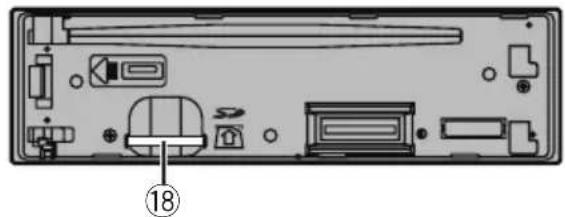
natural_image
Back view of a computer case with internal components and a numbered label (18), no readable text or symbols present.ParteParte
| 1SRC/OFF106/PAUSE | ||
| 2S.Rtrv111a6 | ||
| 3 | Q (lista)123/ | |
| 4 | MULTI-CONTROL(M.C.) | 132/ ×× |
| 5 | Ranuradecargadediscos | 141/iPod |
| 6▲(expulsar)15 | /DISP/SCRL. | |
| 7PuertoUSB16CLK/DISPOFF | ||
| 8 | Conectordeentra-daAUX(conector estéreode3,5mm) | 17BAND/ESC |
| 9Botóndesoltar18 | Ranuraparalatar-jetadememoriaSDAlextraerlacarátu-la,podráverlara-nuradelatarjeta dememoriaSD. | |

PRECAUCIÓN
natural_image
Pure mechanical assembly diagram showing a bracket and mounting bracket without any text or symbols②Pulseelladoderechodelacarátulahastaquese asientefirmemente.
natural_image
Diagram of a mechanical or laboratory setup with a pipette and a circular component, showing directional arrows (no text or symbols)
ADVERTENCIA
text_image
Plays Medium Medium™text_image
Works with iPhonetext_image
① ② ③ ④ ⑤ ⑥ ⑦ ⑧ ⑮ ⑯ ⑰ ⑱ ⑲ ⑳ ⑴ ⑵ ⑶ ⑷ ⑧
natural_image
Interior view of a computer case with labeled components (no text or symbols beyond numbered label)ParteParte
natural_image
Diagram of a laboratory procedure showing a pipette and a circular sample on a base (no text or symbols)
ADVERTÊNCIA
text_image
① ② ③ ④ ⑤ ⑥ ⑦ ⑧ ⑮ ⑯ ⑰ ⑰ ⑱ ⑲ ⑳ ⑴ ⑵ ⑶ ⑷ ⑧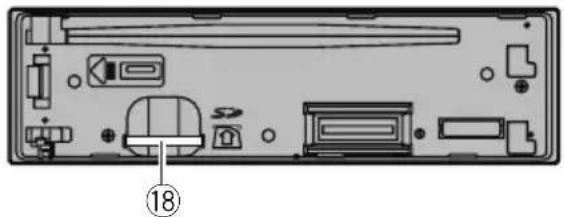
natural_image
Interior view of a computer case with labeled components (no text or symbols beyond numbered label)部位部位
| 1SRC/OFF106/PAUSE | |||
| 2S.Rtrv111至6 | |||
| 3 | ○(清單) | 12 | 3/↔ |
| 4 | MULTI-CONTROL(M.C.) | 132/ | ×× |
| 5 | 碟片槽 | 14 | 1/iPod |
| 6▲(退出)15 | ⊃/DISP/SCRL. | ||
| 7 | USB埠 | 16 | CLK/DISP OFF |
| 8 | AUX輸入插孔(3.5mm立體聲插孔) | 17 | BAND/ESC |
| 9拆卸按鈕18 | SD記憶卡插槽若取下前面板,就能看見SD記憶卡插槽。 | ||

注意
natural_image
Diagram of a laboratory procedure showing a pipette inserted into a test tube with an arrow indicating direction (no text or labels)
警告
機身....178mmx50mmx162mm
機身....178mmx50mmx162mm
(Windows Media Player)
(Windows Media Player)
(Windows Media Player)
iTunes (تشفیر) MPEG-4 AAC ...... AAC تنسیق ترمیز
(m4a.) ( youth)
لا تImplemented Lionel Pioneer SD/SDHC/Pioneer/Pioneer/Pioneer/Pioneer/Pioneer/Pioneer/Pioneer/Pioneer/Pioneer/Pioneer/Pioneer/Pioneer/Pioneer/Pioneer/Pioneer/Pioneer/Pioneer/Pioneer/Pioneer/Pioneer/Pioneer/Pioneer/Pioneer/Pioneer/Pioneer/Pioneer/Pioneer/Pioneer/Pioneer/Pioneer/Pioneer/Pioneer/Pioneer/Pioneer/Pioneer/Pioneer/Pioneer/Pioneer/Pioneer/Pioneer/Pioneer/Pioneer/Pioneer/Pioneer/Pioneer/Pioneer/Pioneer/Pioneer/Pioneer/Pioneer/Pierre SD/SDHC/Pioneer/Pioneer/Pioneer/Pioneer/Pioneer/Pioneer/Pioneer/Pioneer/Pioneer/Pioneer/Pioneer/Pioneer/Pioneer/Pioneer/Pioneer/Pioneer/Pioneer/Pioneer/Pioneer/Pioneer/Pioneer/Pioneer/Pioneer/Pioneer/Pioneer/Pioneer/Pioneer/Pioneer/Pioneer/Pioneer/Pioneer/Pioneer/Pioneer/Pioneer/Pioneer/Pioneer/Pioneer/Pioneer/Pioneer/Pioneer/Pioneer/Pioneer/Pioneer/Pioneer/Pioneer/Pioneer/Pioneer/Pioneer/Money Pione Pione Pione Pione Pione Pione Pione Pione Pione Pione Pione Pione Pione Pione Pione Pione Pione Pione Pione Pione Pione Pione Pione Pione Pione Pione Pione Pione Pione Pione Pione Pione Pione Pione Pione Pione Pione Pione Pione Pione Pione Pione Pione Pione Pione Pione Pione Pione Pione Pione Pone
قٌٌٌٌٌٌٌٌ
المstrongitude (ق Subject)
WMA
AUX ل baking OFF/SRC 1

Super bass—Flat—Custom2
text_image
Diagram of a device rear panel with numbered labels pointing to key components
natural_image
Diagram of a computer case with internal components (no text or labels)18
Visit us on the World Wide Web at
http://pioneer.jp/group/index-e.html
Pioneer Gulf.FZE
http://www.pioneer-uae.com
Pioneer Electronics Australia. Pty.Ltd
http://www.pioneeraus.com.au
Pioneer Electronics Asiacentre.Pte
http://www.pioneer.com.sg
Pioneer (HK) Ltd.
http://www.pioneerhongkong.com.hk
Pioneer High Fidelity Taiwan Co., Ltd.
http://www.pioneer-twn.com.tw
Pioneer International Latin America S.A.
http://www.pioneer-latin.com
PIONEERCORPORATION
4-1,MEGURO1-CHOME,MEGURO-KU
TOKYO153-8654,JAPAN
PIONEERELECTRONICS(USA)INC.
P.O.Box1540,LongBeach,California90801-1540,U.S.A.
TEL:(800)421-1404
PIONEEREUROPENV
Haven1087, Keetberglaan1, B-9120 Melsele, Belgium/Belgique
TEL:(0)3/570.05.11
PIONEERELECTRONICSASIACENTREPTE.LTD.
253AlexandraRoad,#04-01,Singapore159936
TEL:65-6472-7555
PIONEERELECTRONICSAUSTRALIAPTY.LTD.
178-184BoundaryRoad, Braeside, Victoria3195, Australia
TEL:(03)9586-6300
PIONEERELECTRONICSOFCANADA, INC.
300AllstateParkway, Markham, OntarioL3R0P2, Canada
TEL:1-877-283-5901
TEL:905-479-4411
PIONEERELECTRONICSDEMEXICO,S.A.deC.V.
Blvd.ManuelAvilaCamacho13810piso
Col.LomasdeChapultepec,Mexico,D.F.11000
TEL:55-9178-4270
先鋒股份有限公司
總公司:台北市中山北路二段44號13樓
電話:(02)2521-3588
先鋒電子(香港)有限公司
香港九龍尖沙嘴海港域世界商業中心
9樓901-6室
電話:(0852)2848-6488
PublishedbyPioneerCorporation.
Copyright©2009byPioneerCorporation.
Allrightsreserved.