EM4591 - Wi-Fi repeater Eminent - Free user manual and instructions
Find the device manual for free EM4591 Eminent in PDF.


User questions about EM4591 Eminent
0 question about this device. Answer the ones you know or ask your own.
Ask a new question about this device
Download the instructions for your Wi-Fi repeater in PDF format for free! Find your manual EM4591 - Eminent and take your electronic device back in hand. On this page are published all the documents necessary for the use of your device. EM4591 by Eminent.
USER MANUAL EM4591 Eminent
EM4591 Universal Wi-Fi repeater with WPS
Multilingual
User manual
Universal Wi-Fi repeater with WPS
nl
Handleiding
EM4591 – Universal Wi-Fi repeater with WPS
Inhoudsopgave
natural_image
White rectangular device with a green Wi-Fi symbol on its surface, labeled 'EMINENT' at the bottom (no other text or symbols visible)text_image
EMINENT EM4591 Reboot Em Nov 01, 2013 11:25:03 AM Available Wireless Networks Refresh SSID Security Signal Mode WPS Connect Eminent Test 1 WPA1/WPA2 11b/g/n YEStext_image
EMINENT EM4591 Reboot Password Wireless Password: ************ ✓ Mask ✓ Apply This Nov 07, 2013 10:53:07 AM Quic View Systb View Connected Setuptext_image
Quick Connect VIEW >
text_image
Setup View >
text_image
Wireless View >

text_image
Device Status View >
text_image
WPS Wi-Fi Protected Setup View >text_image
EMINENT EM4591 Reboot Thu Nov 07, 2013 10:54:02 AM Available Wireless Networks Channel SSID MAC Address Security Signal Mode Type WPS Connect 1 Intronics-guest 00:14:5c:8f:ba:10 WPA2 11b/g/n Infrastructure YES 1 Eminent Test 1 00:14.5c:8f:6b:d0 WPA1/WPA2 11b/g/n Infrastructure YES 6 00:3a:9a:44:48:d0 WPA1 11big Infrastructure NO 11 NIEBO 44:ad:d9:57:c2:30 WPA1 11b/g Infrastructure NOtext_image
Available Wireless Networks Channel SSID MAC Address Security Signal Mode Type WPS Connect 1 Eminent 1 00:14.5c:8c:20.10 WPA1/WPA2 11b/g/n Infrastructure YES 6 Eminent 2 08:76.ff:89:81:64 WPA1/WPA2 11b/g/n Infrastructure YEStext_image
Mode of Operation: Repeater Access Point Bridge SSID: Eminent MAC Address: 00:14:5c:8c:20:10 Broadcast SSID: ENABLED DISABLED Security Mode: WPA2 PSK WPA Passphrase: 1234567890 Mask WPA Encryption: TKIP AES Channel: 2412MHz (Channel 1) Enhanced Compatibility: On Off ✓ ApplyAP Client Connection Status
Connection Status:
Connected
Extension Access Point:
Eminent Test 1
Client List
MAC Address
FC:25:3F:AB:AA:2F
00:13:33:93:B2:F9
70:73:CB:27:83:85
78:D6:F0:F3:31:2A
text_image
EMINENT EM4591 Available Wireless Networks Refresh SSID Security Signal Mode WPS Connect Eminent Test 1 WPA1/WPA2 11b/g/n YEStext_image
EMINENT EM1591 Reboot Password Wireless Password: ************ ✓ Mask ✓ Apply This Nov 07, 2013 10:52:07 AM Quic View Systo View Connected Unlabeled Setuptext_image
Quick Connect View >
Setup
View

Wireless
View

System
View

Device Status
View

WPS
Wi-Fi Protected Setup
VIEW
text_image
EMINENT EM4591 Reboot Thu Nov 07, 2013 10:54:02 AM Available Wireless Networks Channel SSID MAC Address Security Signal Mode Type WPS Connect 1 intronics-guest 00:14:5c:8f:ba:10 WPA2 11b/g/n Infrastructure YES 1 Eminent Test 1 00:14:5c:8f:6b:d0 WPA1/WPA2 11b/g/n Infrastructure YES 6 00:3a:9a:44:48:d0 WPA1 11b/g Infrastructure NO 11 NIEBO 44:ad:d9:57:c2:30 WPA1 11b/g Infrastructure NOAvailable Wireless Networks

| Channel | SSID | MAC Address | Security | Signal | Mode | Type | WPS | Connect |
| 1 | Eminent 1 | 00:14.5c 8c 20.10 | WPA1/WPA2 | 11b/g/n | Infrastructure | YES | ||
| 6 | Eminent 2 | 08.76.ft.89.81.64 | WPA1/WPA2 | 11b/g/n | Infrastructure | YES |
text_image
Mode of Operation: Repeater Access Point Bridge SSID: Eminent MAC Address: 00:14:5c:8c:20:10 Broadcast SSID: ENABLED DISABLED Security Mode: WPA2 PSK WPA Passphrase: 1234567890 Mask WPA Encryption: TKIP AES Channel: 2412MHz (Channel 1) Enhanced Compatibility: On Off
AP Client Connection Status
Connection Status:
Connected
Extension Access Point:
Eminent Test 1
Client List
MAC Address
FC:25:3F:AB:AA:2F
00:13:33:93:B2:F9
70:73:CB:27:83:85
78:D6:F0:F3:31:2A
text_image
Wireless View >
System
View

Device Status
View

WPS
Wi-Fi Protected Setup
View
Wireless Basic Settings
Enable Wireless:
ENABLED
DISABLED
Broadcast SSID:
ENABLED
DISABLED
SSID:
Eminent Test 1
Wireless Mode:
11b/g/n mixed mode

Channel:
2412MHz (Channel 1)

HT Data Rate:
Auto

HT Channel Bandwidth:

20/40
HT Guard Interval:

Auto
HT Channel Mode:
HT40+

PRODUCTNUMMER: EM4591 Universal Wi-Fi-repeater with WPS
Trademarks: all brand names are trademarks and/or registered trademarks of their respective holders.
The information contained in this document has been created with the utmost care. No legal rights can be derived from these contents. Eminent cannot be held responsible, nor liable for the information contained in this document.
Eminent is a member of the Intronics Group

EMINENT
EM4591
Universal Wi-Fi repeater with WPS
en
Manual
EM4591 – Universal Wi-Fi repeater with WPS
Table of contents
1.0 Introduction ......2
1.1 Packing contents 2
1.2 Device Overview ...... 3
2.0 Where to place the EM4591 repeater? 4
3.0 Configure the wireless repeater using the WPS button 5
4.0 Connecting a wireless WPS adapter to the EM4591 6
5.0 Configuring the EM4591 manually 6
5.0.1 Manual configuration (PC) 7
5.0.2 Manual configuration (Tablet/Smartphone) 11
5.1 Changing the wireless network name (SSID) of the repeater. 15
6.0 Frequently Asked Questions and other related information 16
7.0 Service and support 17
8.0 Warning and points of attention 18
9.0 Warranty conditions 19
10.0 Declaration of Conformity .... 20
1.0 Introduction
Congratulations with the purchase of this high-quality Eminent product! This product has undergone extensive testing by Eminent's technical experts. Should you experience any problems with this product, you are covered by a five-year Eminent warranty. Please keep this manual and the receipt in a safe place.
Register your product now on www.eminent-online.com and receive product updates!
1.1 Packing contents
The following parts need to be present in the packing:
• EM4591
• QIG
- Ethernet cable
- CD-ROM (full manual)
1.2 Device Overview
Front Panel
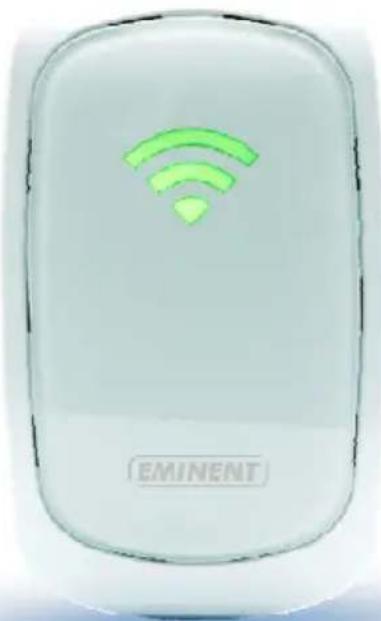
natural_image
White electronic device with green Wi-Fi symbol and 'EMINENT' label (no other text or symbols)| LABEL STATE DESCRIPTION | ||
| LED Signal strength | ||
| 3 BARS Connected | 90% and above | (Excellent) |
| 2 BARS Connected | 55-89% (Recommended) | |
| 1 BAR Connected | 10-54% (Weak) | |
Top Panel
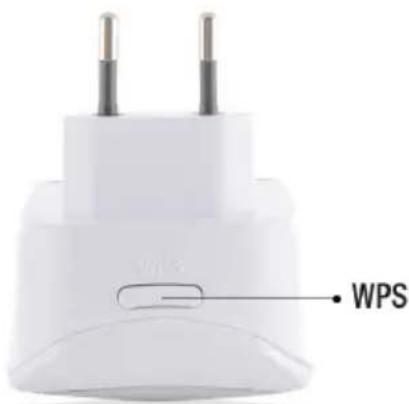
text_image
WPS| LABEL DESCRIPTION | |
| WPS Button | Connect EM4591 to any WPS capable devices (5 sec. to connect to router/AP or 2 sec. when connecting a wireless client) |

text_image
Reset 10/100 Base-T Ethernet PortLABEL DESCRIPTION
| RESET If the signal indicator is orange please wait for the indicator to turn green. Press the reset button for 5-7 seconds to restore the device to default factory settings wait approx. 1 minute for the device to reboot (Signal indicator flashes green). |
| Ethernet port Connect to computers / Ethernet devices |
2.0 Where to place the EM4591 repeater?
The best location to place the EM4591 is approximately half-way between your wireless router and your wireless computer(s) which has/have the weakest wireless reception. This way, the signal strength will be as good as possible. Refer to the following images for an example:
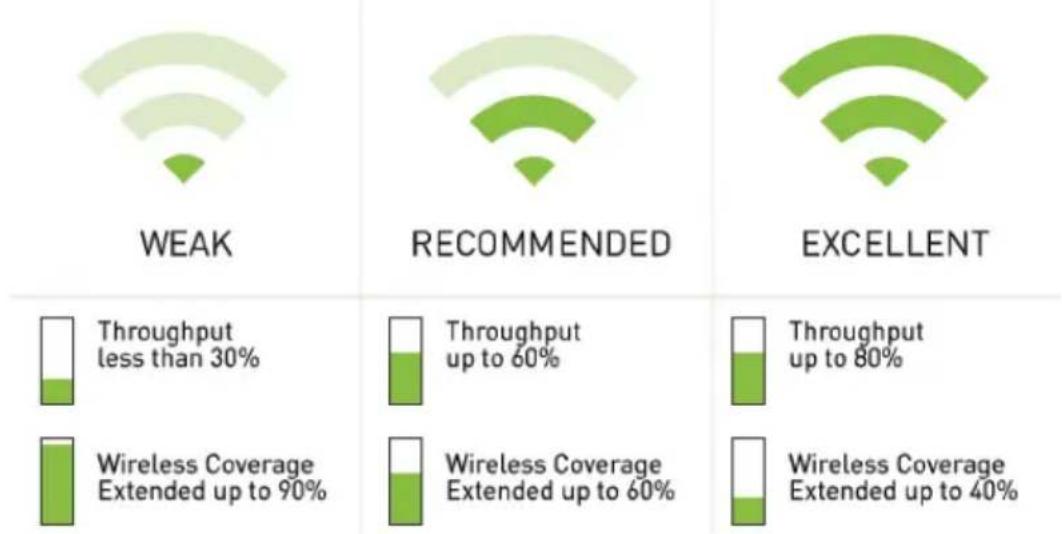
waterfall
| Category | Throughput less than 30% | Throughput up to 60% | Throughput up to 80% | Wireless Coverage Extended up to 90% | Wireless Coverage Extended up to 60% | Wireless Coverage Extended up to 40% | | -------- | ------------------------ | -------------------- | -------------------- | ------------------------------------ | ------------------------------------ | ------------------------------------- | | WEAK | - | - | - | - | - | - | | RECOMMENDED | - | - | - | - | - | - | | EXCELLENT | - | - | - | - | - | - |
flowchart
graph TD
    A["PC"] -->|Wireless Signal| B["Router"]
    C["Notebook"] -->|Wireless Signal| B
    D["Modem"] -->|Wireless Signal| B
    B --> E["WiFi Repeater"]
    style A fill:#f9f,stroke:#333
    style C fill:#f9f,stroke:#333
    style D fill:#ccf,stroke:#333
    style B fill:#cff,stroke:#333
    style E fill:#ffc,stroke:#333
Hint: Before placing the EM4591 on its destined location, the device needs to be setup. Setting up the EM4591 wireless repeater can be done best, if the EM4591 is located near your wireless router. After setting up the EM4591, you can place the EM4591 at a location defined by using the signal indicator LEDs and the recommended setup as described previously.
3.0 Configure the wireless repeater using the WPS button
- Please check if your wireless router has a WPS button. Also, check whether your wireless router has a properly configured internet connection.
- Connect the EM4591 to a wall outlet.
- Wait for the LED to turn green (flashing).
- Press the WPS button on your wireless router for approximately 3 seconds*.
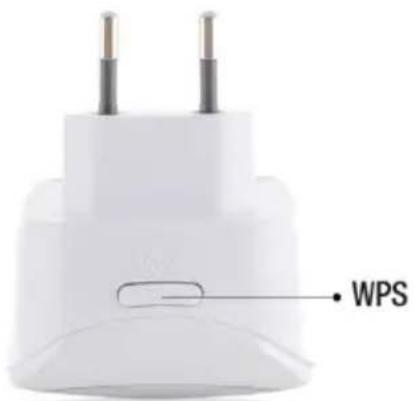
- Now press the WPS button on the EM4591 Wireless Repeater for approximately 5 seconds. Refer to the following image for the WPS button:

text_image
WPS- The connection between your wireless router and the EM4591 wireless repeater will be established automatically (this will take approx. 1 minute including reboot). The signal indicator will stop flashing and indicate the signal strength.
*Refer to the manual of your wireless router for the exact duration of pressing the WPS button. This can differ from brand or model.
Note: If the WPS button is used, the SSID and network key are the same as used on your wireless router. Some WPS routers will change their original SSID to another SSID if WPS is used. In this installation guide, the SSID of the wireless router is 'Eminent'.
4.0 Connecting a wireless WPS adapter to the EM4591
- Press the WPS button on the EM4591 for about 2-3 seconds.
- Now press the WPS button on your wireless adapter.
- If correct, the connection between the wireless WPS adapter and EM4591 will be established. Depending on the Windows version you are using, you should see a connected icon in the taskbar.
Note: Some wireless WPS adapters require the use of the supplied software to create a WPS connection. Refer to the manual of your wireless WPS adapter for more information.
5.0 Configuring the EM4591 manually
It is possible to configure the repeater manually instead of using the WPS button.
5.1 Manual configuration (PC)
- Connect the EM4591 to a wall outlet.
- Wait for the signal indicator to flash green.
- Connect to the EM4591 via WiFi SSID: Eminent_repeater or use the Ethernet cable to connect to the EM4591 directly.
- Launch the internet browser from your computer.
- You will be redirected to the EM4591 repeater's user interface. (If in any case it doesn't, type http://10.0.10.254 in your internet browser and then hit Enter.
- If you configure the device the first time you will see a pop-up screen displaying all the available WiFi networks (see picture below). If not continue to step 9
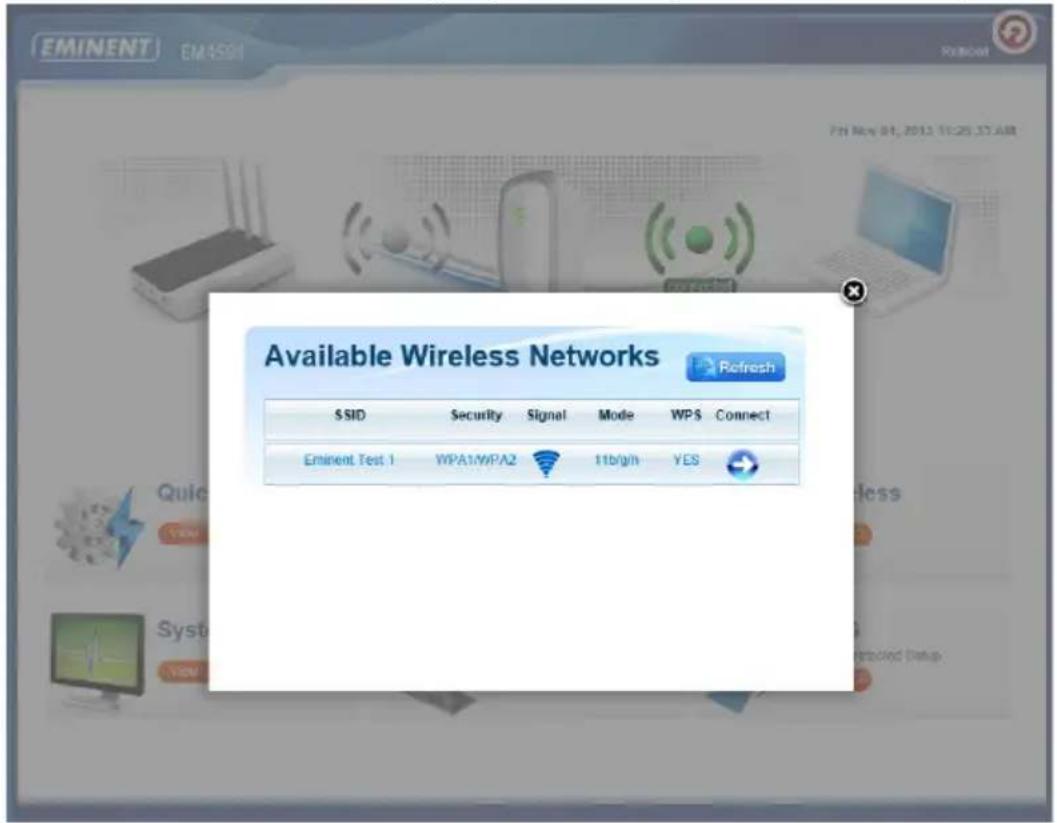
text_image
EMINENT EMASS Available Wireless Networks Refresh SSID Security Signal Mode WPS Connect Eminent Test 1 WPA1/WPA2 11b/g/n YES- Click next to the wireless network you wish to connect to.

text_image
EMINENT EM4591 Reboot Password Wireless Password: ************ Mask Apply Thei Nov 07, 2H13 10:53:07 AM Quic WBS Systo View Detected Setup- In the next step you will need to enter the WPA Passphrase of the Wi-Fi network you wish to connect to and lick "Apply". After the settings have been applied, the EM4591 will reboot and connect to your wireless router.
- The following steps will explain how to configure the EM4591 if the device does not automatically start the wizard.


text_image
Quick Connect View >
text_image
Setup View 2
text_image
Wireless VIEW
text_image
System View 3
text_image
Device Status View >
text_image
WPS Wi-Fi Protected Setup View >- Click "Quick Connect"

text_image
EMINENT EM4591 Reboot Thu Nov 07, 2013 10:54:02 AM Available Wireless Networks Channel SSID MAC Address Security Signal Mode Type WPS Connect 1 Intronics-guest 00:14:5c:8f:ba:10 WPA2 11b/g/n Infrastructure YES 1 Eminent Test 1 00:14.5c 8f.6b d0 WPA1/WPA2 11b/g/n Infrastructure YES 6 00:3a:9a:44:48 d0 WPA1 11bg Infrastructure NO 11 NIEBO 44:ad:d9:57:c2:30 WPA1 11bg Infrastructure NO- The first step of the wizard appears, where you need to select the wireless network you wish to connect to by clicking as shown in the following image:
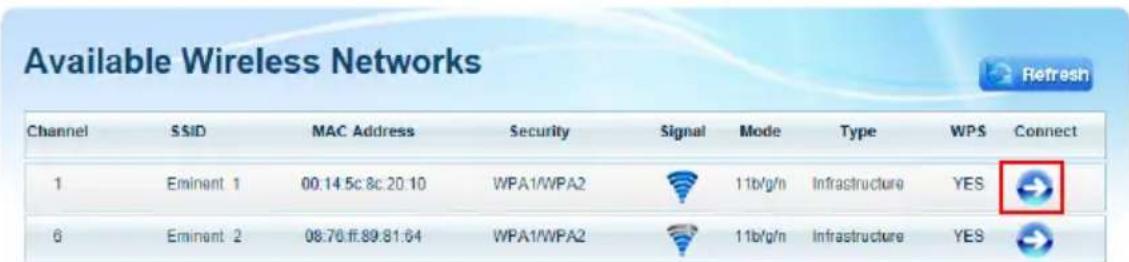
text_image
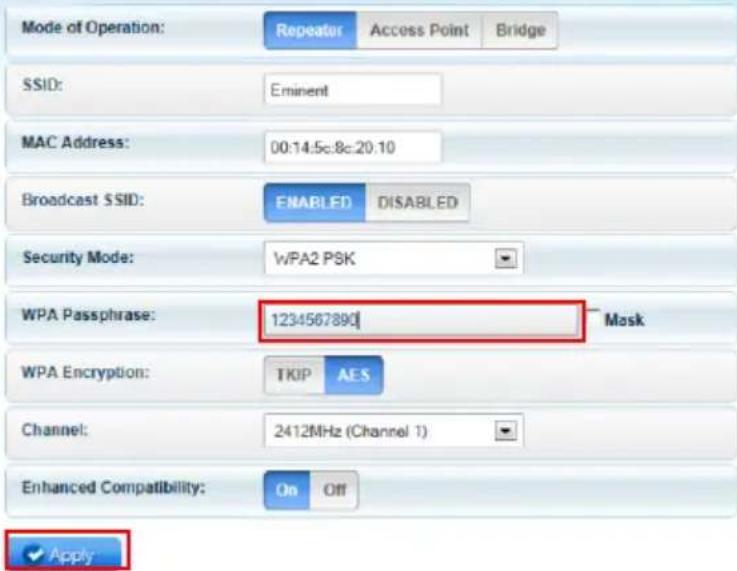
Available Wireless Networks Channel SSID MAC Address Security Signal Mode Type WPS Connect 1 Eminent 1 00.14 5c 8c 20:10 WPA1/WPA2 11b/g/n Infrastructure YES 6 Eminent 2 08.76.ff.89.81:64 WPA1/WPA2 11b/g/n Infrastructure YES- In the next step you will need to enter the WPA Passphrase of the Wi-Fi network you wish to connect to (do not change the other settings).
SETUP FOR EM4591
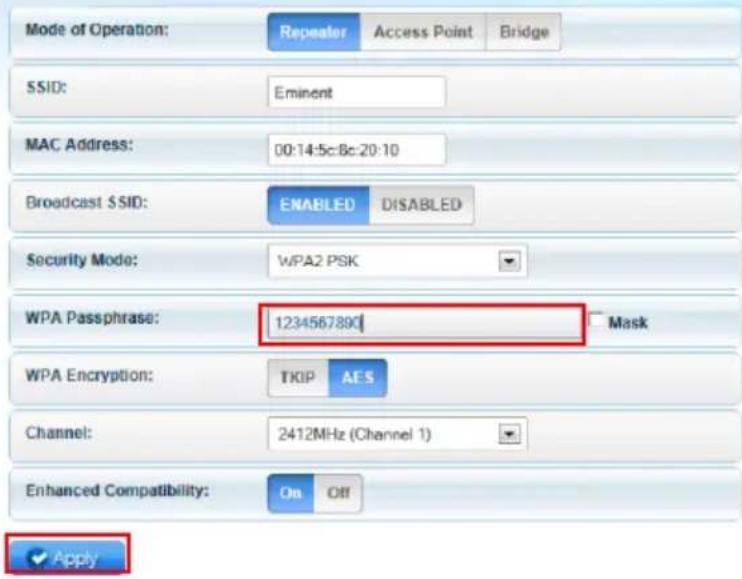
text_image
Mode of Operation: Repeater Access Point Bridge SSID: Eminent MAC Address: 00:14:5c:8c:20:10 Broadcast SSID: ENABLED DISABLED Security Mode: WPA2 PSK WPA Passphrase: 1234567890 Mask WPA Encryption: TKIP AES Channel: 2412MHz (Channel 1) Enhanced Compatibility: On Off ✓ Apply- Click 'Apply' to save and apply the configuration.
- After the settings have been applied, the EM4591 will reboot and connect to your wireless router.
Note: The EM4591 now has the same SSID (no longer “Eminent_repeater”) as the wireless network you connected to in the previous step. To make sure you are connected to the repeater and not the modem/router keep your device close to the repeater (approx. 1m). Turn of your WiFi and turn it back on again. The device will now connect to the repeater. You can only access the “User Interface” of the EM4591 if you are connected directly to the repeater.
- Check the connection status by entering the User Interface via the browser (10.0.10.254) and clicking "Device Status". Here, you can check whether a connection has been established. Refer to the following image.
System Status
AP Client Connection Status
Connection Status:
Connected
Extension Access Point:
Eminent Test 1
Client List
MAC Address
FC:25:3F:AB:AA:2F
00:13:33:93:B2:F9
70:73:CB:27:83:85
78:D6:F0:F3:31:2A
- You can now connect your wireless network adapter(s) to the EM4591 as described in chapter 'Connecting a wireless WPS adapter to the EM4591', or by connecting to the Wi-Fi connection and entering the wireless encryption key of the wireless network you previously connected.
5.2 Manual configuration (Tablet/Smartphone)
- Connect the EM4591 to a wall outlet.
- Wait for the signal indicator to flash green.
- Connect to the EM4591 via WiFi SSID: Eminent_repeater.
- The device will launch the internet browser automatically and open the EM4591 User Interface (If in any case it doesn't, open your devices browser and type http://10.0.10.254 in the address bar.
- If you configure the device the first time you will see a pop-up screen displaying all the available WiFi networks (see picture below). If not continue to step 8
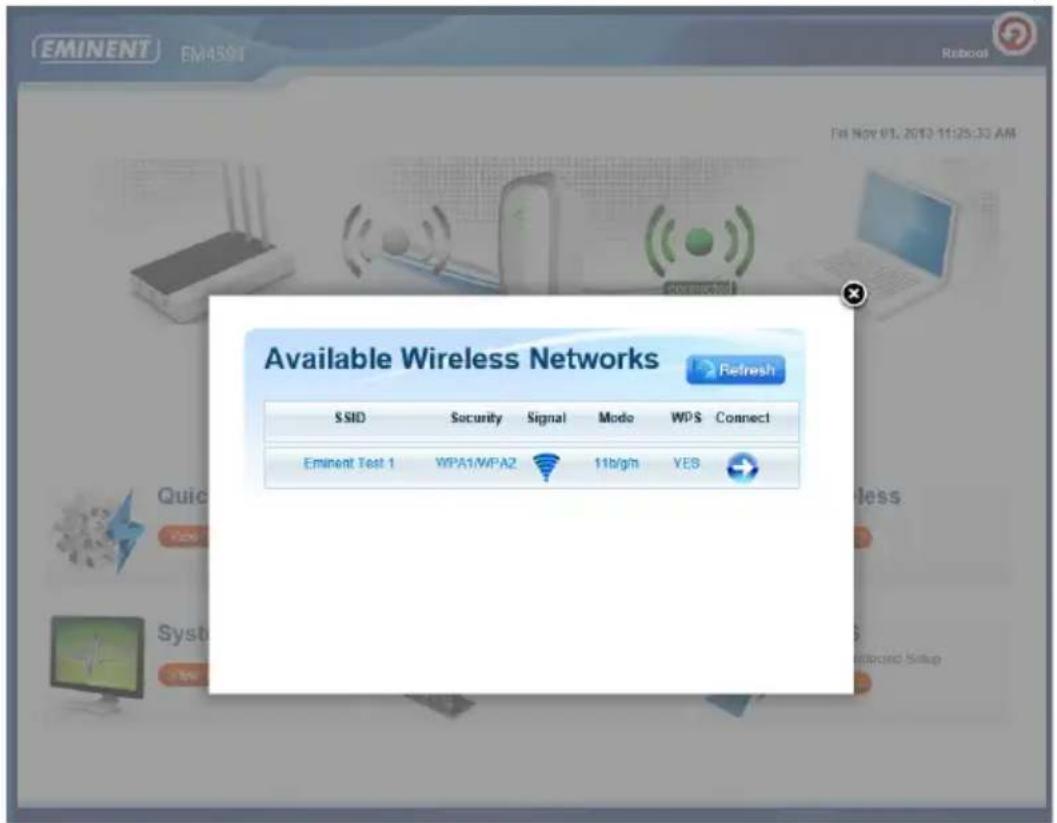
text_image
EMINENT EM4501 Reboot Available Wireless Networks Refresh SSID Security Signal Mode WPS Connect Eminent Test 1 WPA1/WPA2 11b/g/n YES- Click next to the wireless network you wish to connect to.
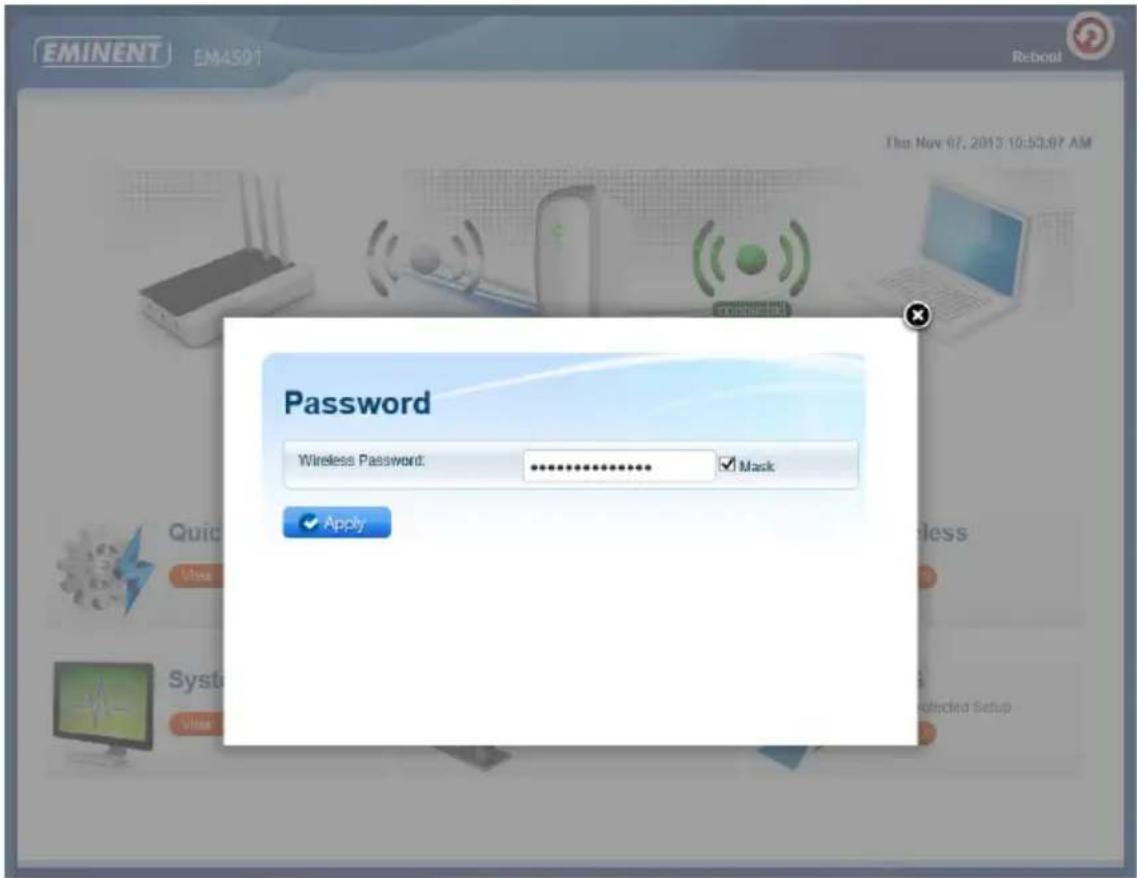
text_image
EMINENT EM4501 Reboot The Nov 07, 2015 10:53.07 AM Password Wireless Password: ************ ✓ Mask ✓ Apply Quick View Syst VCM Restricted Setup- In the next step you will need to enter the WPA Passphrase of the Wi-Fi network you wish to connect to and lick "Apply". After the settings have been applied, the EM4591 will reboot and connect to your wireless router.
- The following steps will explain how to configure the EM4591 if the device does not automatically start the wizard.


text_image
Quick Connect View >
text_image
Setup View >
text_image
Wireless View >
text_image
System View
text_image
Device Status View >
text_image
WPS Wi-Fi Protected Setup View 3- Click "Quick Connect"

text_image
EMINENT EM4591 Reboot Thu Nov 07, 2013 10:54:02 AM Available Wireless Networks Channel SSID MAC Address Security Signal Mode Type WPS Connect 1 Intronics-guest 00:14:5c:8f:ba:10 WPA2 11b/g/n Infrastructure YES 1 Eminent Test 1 00:14:5c:8f:6b:d0 WPA1/WPA2 11b/g/n Infrastructure YES 6 00:3a:9a:44:48:d0 WPA1 11big Infrastructure NO 11 NIEBO 44:ad:d9:57:c2:30 WPA1 11b/g Infrastructure NO- The first step of the wizard appears, where you need to select the wireless
network you wish to connect to by clicking

as shown in the following image:
Available Wireless Networks
| Channel | SSID | MAC Address | Security | Signal | Mode | Type | WPS | Connect |
| 1 | Eminent 1 | 00:14:5c:8c:20:10 | WPA1/WPA2 | 11b/g/n | Infrastructure | YES | ||
| 6 | Eminont 2 | 08:76:ff:89:81:64 | WPA1/WPA2 | 11b/g/n | Infrastructure | YES |
- In the next step you will need to enter the WPA Passphrase of the Wi-Fi network you wish to connect to (do not change the other settings).
SETUP FOR EM4591
text_image
Mode of Operation: Repeater Access Point Bridge SSID: Eminent MAC Address: 00:14:5c:8c:20.10 Broadcast SSID: ENABLED DISABLED Security Mode: WPA2 PSK WPA Passphrase: 1234567890 Mask WPA Encryption: TKIP AES Channel: 2412MHz (Channel 1) Enhanced Compatibility: On Off ✓ Apply- Click 'Apply' to save and apply the configuration.
- After the settings have been applied, the EM4591 will reboot and connect to your wireless router.
Note: The EM4591 now has the same SSID (no longer "Eminent_repeater") as the wireless network you connected to in the previous step. To make sure you are connected to the repeater and not the modem/router keep your device close to the repeater (approx. 1m). Turn of your WiFi and turn it back on again. The device will now connect to the SSID closest to the device. You can only access the "User Interface" of the EM4591 if you are connected directly to the repeater.
- Check the connection status by entering the User Interface via the browser (10.0.10.254) and clicking "Device Status". Here, you can check whether a connection has been established. Refer to the following image.
System Status
AP Client Connection Status
Connection Status:
Connected
Extension Access Point:
Eminent Test 1
Client List
MAC Address
FC:25:3F:AB:AA:2F
00:13:33:93:B2:F9
70:73:CB:27:83:85
78:D6:F0:F3:31:2A
- You can now connect your wireless network adapter(s) to the EM4591 as described in chapter 'Connecting a wireless WPS adapter to the EM4591', or by connecting to the Wi-Fi connection and entering the wireless encryption key of the wireless network you previously connected.
6.0 Changing the wireless network name (SSID) of the repeater.
If you wish to use a different WiFi network name SSID for the EM4591 repeater. You can change this by entering the User Interface of the EM4591.
Note: Make sure you are connected to the Repeater and not to your wireless Router/Modem. Keep your device close to the repeater (approx. 1m). Turn of your WiFi and turn it back on again.
- Open your devices browser and type http://10.0.10.254 in the address bar.
- Click Wireless.


Quick Connect
View

Setup
View

text_image
Wireless View 3
System
view

Device Status
View

WPS
Wi-Fi Protected Setup
View
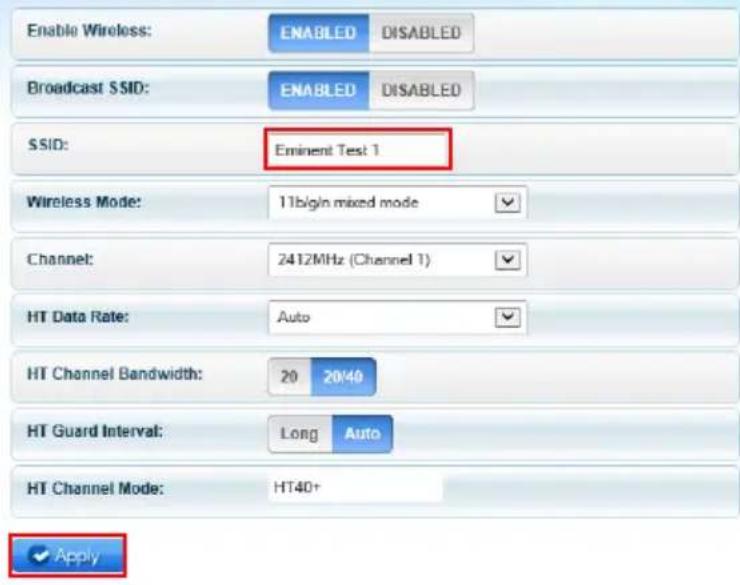
- Change the SSID name to the preferred name for the WiFi network of the Repeater and click "Apply".
Wireless Basic Settings
text_image
Enable Wireless: ENABLED DISABLED Broadcast SSID: ENABLED DISABLED SSID: Eminent Test 1 Wireless Mode: 11bigin mixed mode Channel: 2412MHz (Channel 1) HT Data Rate: Auto HT Channel Bandwidth: 20 20/40 HT Guard Interval: Long Auto HT Channel Mode: HT40+ ✓ ApplyNote: After the settings have been applied, the EM4591 will reboot. Your device will no longer be connected to the wireless network SSID of the EM4591. Reconnect your device to the Wireless network (SSID) you entered in step 3.
7.0 Frequently Asked Questions and other related information
The latest Frequently asked questions for your product can be found on the support page of your product. Eminent will update these pages frequently to assure you have the most recent information. Visit www.eminent-online.com for more information about your product.
8.0 Service and support
This users manual has been carefully written by Eminent's technical experts. If you have problems installing or using the product, please fill out the support form at the website www.eminent-online.com/support.
You can also contact us by phone. Below you will find a list with phone numbers for each supported country.
| Country | Phone number | Rate per minute* |
| Belgium (Dutch) | 070 277 286 €0.30 | |
| Belgium (French) | 070 277 286 €0.30 | |
| Denmark | +45 69918565 Local Costs | |
| Finland | +35 8942415826 Local Costs | |
| Germany | +49 (0)30 887 89 298 Local Costs | |
| Italy | +39 0240042016 Local Costs | |
| Norway | +47 21075033 Local Costs | |
| Spain | 807 080 042 €0.41 | |
| Sweden | +46 840 309985 Local Costs | |
| The Netherlands | 0900-3646368 €0.10 | |
| UK | +44 (0)203 318 9998 | Local Costs |
| Hungary | 1-4088902 (From Budapest) | Local Costs |
| Hungary | 06-1-4088902 (From the rest of Hungary) | Local Costs |
| Hungary | +36 1-4088902(International) | Local Costs |
* Rates mentioned in this table do not include cell phone charges.
9.0 Warning and points of attention

Due to laws, directives and regulations set out by the European parliament, some (wireless) devices could be subject to limitations concerning its use in certain European member states. In certain European member states the use of such devices could be prohibited. Contact your (local) government for more information about this limitations.
Always follow up the instructions in the manual*, especially where it concerns devices which need to be assembled.
Warning: In most cases this concerns an electronic device. Wrong/improper use may lead to (severe) injuries!
Repairing of the device should be done by qualified Eminent staff. The warranty immediately voids when products have undergone self repair and/or by misuse. For extended warranty conditions, please visit our website at www.eminent-online.com/warranty.
*Tip: Eminent manuals are written with great care. However, due to new technological developments it can happen that a printed manual does not longer contain the most recent information.
If you are experiencing any problems with the printed manual or you can not find what you are looking for, please always check our website www.eminent-online.com first for the newest updated manual.
Also, you will find frequently asked questions in the FAQ section. It is highly recommended to consult the FAQ section. Very often the answer to your questions will be found here.
10.0 Warranty conditions
The five-year Eminent warranty applies to all Eminent products, unless mentioned otherwise before or during the moment of purchase. After buying a second-hand Eminent product the remaining period of warranty is measured from the moment of purchase by the product's initial owner. Eminent warranty applies to all Eminent products and parts, indissolubly connected or mounted to the product it concerns. Power supply adapters, batteries, antennas and all other products not directly integrated in or connected to the main product or products of which, without reasonable doubt, can be assumed that wear and tear during use will show a different pattern than the main product, are not covered by the Eminent warranty. Products are not covered by the Eminent warranty when exposed to incorrect/improper use, external influences or when opening the service parts of the product by parties other than Eminent. Eminent may use refurbished materials for repair or replacement of your defective product. Eminent cannot be held responsible for changes in network settings by internet providers. We cannot guarantee that the Eminent networking product will keep working when settings are changed by the internet providers. Eminent cannot guarantee the working of web services, apps and other third party content that is available through Eminent products. Eminent products with an internal hard disk have a limited warranty period of two years on the hard disk. Eminent could not be held responsible for any data lost. Please make sure that if the product stores data on a hard drive or other memory source, you will make a copy before you return the product for repair.
When my product gets defective
Should you encounter a product rendered defective for reasons other than described above: Please contact your point of purchase for taking care of your defective product.
11.0 Declaration of Conformity
Application of Council Directives:
Manufacturer's Name: Eminent
Type of Equipment: WiFi Repeater
Equipment Class: Commercial, Light Industrial, Consumer
PRODUCTNUMBER: EM4591 Universal Wi-Fi-repeater with WPS
Conforms to the following standards: ETSI EN 300 328 V1.71.1 (2006-10)
ETSI EN 301 489-1 V1.9.2 (2011-09)
ETSI EN 301 489-17 V2.1.1 (2009-05)
EN62311:2008
Manufactured from: 28-06-2012
I, the undersigned, hereby declare that the equipment Conforms with the essential requirements and other relevant requirements of the R&TTE Directive (1999/5/EC) and to the above standards.
Place: Barneveld, The Netherlands
Date: 28-06-2012
Name: Marc Pannebakker
Signature:

text_image
100%
text_image
EMINENTWWW.EMINENT-ONLINE.COM
Trademarks: all brand names are trademarks and/or registered trademarks of their respective holders.
The information contained in this document has been created with the utmost care. No legal rights can be derived from these contents. Eminent cannot be held responsible, nor liable for the information contained in this document.
Eminent is a member of the Intronics Group

EMINENT
EM4591
Universal Wi-Fi repeater with WPS

Mode d'Emploi
EM4591 – Universal Wi-Fi repeater with WPS
Table des matières
1.0 Introduction ......2
natural_image
White rectangular device with a green Wi-Fi symbol on its surface, labeled 'EMINENT' at the bottom (no other text or symbols visible)text_image
EMINENT EM4501 Available Wireless Networks Refresh SSID Security Signal Mode WPS Connect Eminenl Test 1 WPA1/WPA2 11b/g/h YEStext_image
EMINENT EM4591 Reboot Password Wireless Password: ************ Mask Apply Tha Nov 07, 2013 10:52:07 AM Quick YUE Syst Protected Setuptext_image
Quick Connect View >
text_image
Setup View >
text_image
Wireless VIEW
text_image
System View >
text_image
Device Status View >
text_image
WPS Wi-Fi Protected Setup View 3text_image
EMINENT EM4591 Reboot Thu Nov 07, 2013 10:54:02 AM Available Wireless Networks Channel SSID MAC Address Security Signal Mode Type WPS Connect 1 intronics-guest 00:14:5c:8f:ba:10 WPA2 11b/g/n Infrastructure YES 1 Eminent Test 1 00:14:5c:8f:6b:d0 WPA1/WPA2 11b/g/n Infrastructure YES 6 00:3a:9a:44:48:d0 WPA1 11b/g Infrastructure NO 11 NIEBO 44 ad d9:57 c2:30 WPA1 11b/g Infrastructure NOtext_image
Available Wireless Networks Channel SSID MAC Address Security Signal Mode Type WPS Connect 1 Eminent 1 00:14.5c:8c:20:10 WPA1/WPA2 11b/g/n Infrastructure YES 6 Eminent 2 08:76.ff.89:81:64 WPA1/WPA2 11b/g/n Infrastructure YEStext_image
Mode of Operation: Repeater Access Point Bridge SSID: Eminent MAC Address: 00:14:5c:8c:20:10 Broadcast SSID: ENABLED DISABLED Security Mode: WPA2 PSK WPA Passphrase: 1234567890 Mask WPA Encryption: TKIP AES Channel: 2412MHz (Channel 1) Enhanced Compatibility: On Off
AP Client Connection Status
Connection Status:
Connected
Extension Access Point:
Eminent Test 1
Client List
MAC Address
FC:25:3F:AB:AA:2F
00:13:33:93:B2:F9
70:73:CB:27:83:85
78:D6:F0:F3:31:2A
text_image
EMINENT EM4591 Available Wireless Networks Refresh SSID Security Signal Mode WPS Connect Eminent Test 1 WPA1/WPA2 11b/g/n YEStext_image
EMINENT EM450T Reboot Password Wireless Password: ************ ✓ Mask ✓ Apply This Nov 07, 2013 10:57:07 AM Quick VIBE Syst View Untested Setuptext_image
Quick Connect View 2


System
View

Device Status
View

WPS
Wi-Fi Protected Setup
View 2
text_image
EMINENT EM4591 Reboot Thu Nov 07, 2013 10:54:02 AM Available Wireless Networks Channel SSID MAC Address Security Signal Mode Type WPS Connect 1 Intronics-guest 00:14:5c:8f:ba:10 WPA2 11b/g/n Infrastructure YES 1 Eminent Test 1 00:14:5c:8f:6b:d0 WPA1/WPA2 11b/g/n Infrastructure YES 6 00:3a:9a:44:48:d0 WPA1 11b/g Infrastructure NO 11 NIEBO 44:ad:d9:57:c2:30 WPA1 11b/g Infrastructure NOAvailable Wireless Networks

Refresh
| Channel | SSID | MAC Address | Security | Signal | Mode | Type | WPS | Connect |
| 1 | Eminent 1 | 00:14:5c:8c:20:10 | WPA1/WPA2 | 11b/g/n | Infrastructure | YES | ||
| 6 | Eminent 2 | 08:76:ff:89:81:64 | WPA1/WPA2 | 11b/g/n | Infrastructure | YES |
text_image
Mode of Operation: Repeater Access Point Bridge SSID: Eminent MAC Address: 00:14.5c:8c:20.10 Broadcast SSID: ENABLED DISABLED Security Mode: WPA2 PSK WPA Passphrase: 123456789C Mask WPA Encryption: TKIP AES Channel: 2412MHz (Channel 1) Enhanced Compatibility: On Off
AP Client Connection Status
Connection Status:
Connected
Extension Access Point:
Eminent Test 1
Client List
MAC Address
FC:25:3F:AB:AA:2F
00:13:33:93:B2:F9
70:73:CB:27:83:85
78:D6:F0:F3:31:2A
text_image
Wireless View >
View

System
View

Device Status
View

WPS
Wi-Fi Protected Setup
View
Wireless Basic Settings
Enable Wireless:
ENABLED
DISABLED
Broadcast SSID:
ENABLED
DISABLED
SSID:
Eminent Test 1

Wireless Mode:
11blgn mixed mode

Channel:
2412MHz (Channel 1)

HT Data Rate:
Auto

HT Channel Bandwidth:
20
0/48
HT Guard Interval:
Long
Auto
HT Channel Mode:
HT40+

8.0 Service et assistance
NUMÉRO PRODUIT : EM4591 Universal Wi-Fi-repeater with WPS
Conforme aux normes suivantes : ETSI EN 300 328 V1.71.1 (2006-10) ETSI EN 301 489-1 V1.9.2 (2011-09) ETSI EN 301 489-17 V2.1.1 (2009-05) EN62311:2008
Trademarks: all brand names are trademarks and/or registered trademarks of their respective holders. The information contained in this document has been created with the utmost care. No legal rights can be derived from these contents. Eminent cannot be held responsible, nor liable for the information contained in this document.
Eminent is a member of the Intronics Group

EMINENT
EM4591
Universal Wi-Fi repeater with WPS
es
Manual de usuario
EM4591 – Universal Wi-Fi repeater with WPS
Contenidos
natural_image
White rectangular device with a green Wi-Fi symbol on its surface, labeled 'EMINENT' at the bottom (no other text or symbols)text_image
EMINENT EM4591 Yin Nov 01, 2013:11:25:35 AM Available Wireless Networks Refresh SSID Security Signal Mode WPS Connect Eminent Test 1 WPA1/WPA2 11b/g/n YEStext_image
EMINENT EM4591 Reboot Password Wireless Password: ************ ✓ Mask ✓ Apply The Nov 07, 2013 10:52:07. AM Quick Systo Protected Setuptext_image
Quick Connect View >
text_image
Setup View >
text_image
Wireless View>
text_image
System View >
text_image
Device Status View >
text_image
WPS Wi-Fi Protected Setup View 3text_image
EMINENT EM4591 Reboot Thu Nov 07, 2013 10:54:02 AM Available Wireless Networks Channel SSID MAC Address Security Signal Mode Type WPS Connect 1 intronics-guest 00:14:5c.8f.ba.10 WPA2 11b/g/n Infrastructure YES 1 Eminent Test 1 00:14:5c.8f.6b.d0 WPA1/WPA2 11b/g/n Infrastructure YES 6 00:3a:9a:44:48:d0 WPA1 11big Infrastructure NO 11 NIEBO 44 ad d9:57 c2:30 WPA1 11b/g Infrastructure NOtext_image
Available Wireless Networks Channel SSID MAC Address Security Signal Mode Type WPS Connect 1 Eminent 1 00:14:5c:8c:20:10 WPA1/WPA2 11b/g/n infrastructure YES 6 Eminent 2 08:76:17:30:81:64 WPA1/WPA2 11b/g/n infrastructure YEStext_image
Mode of Operation: Repeater Access Point Bridge SSID: Eminent MAC Address: 00:14:5c:8c:20:10 Broadcast $SID: ENABLED DISABLED Security Mode: WPA2 PSK WPA Passphrase: 1234567890 Mask WPA Encryption: TKIP AES Channel: 2412MHz (Channel 1) Enhanced Compatibility: On Off
AP Client Connection Status
Connection Status:
Connected
Extension Access Point:
Eminent Test 1
Client List
MAC Address
FC:25:3F:AB:AA:2F
00:13:33:93:B2:F9
70:73:CB:27:83:85
78:D6:F0:F3:31:2A
text_image
EMINENT EMM591 Rebuild Available Wireless Networks Refresh SSID Security Signal Mode WPS Connect Eminent Test 1 WPA1/WPA2 11b/g/m YEStext_image
EMINENT EM4591 Reboot Password Wireless Password: ************ Mask Apply This Nov 07, 2013 10:53:07 AM Quic Avea System Year Connected Setup13 | ESPAÑOL
text_image
Quick Connect View >
text_image
Setup View 2
text_image
Wireless View

text_image
Device Status View >
text_image
WPS Wi-Fi Protected Setup View >text_image
EMINENT EM4591 Reboot Thu Nov 07, 2013 10:54:02 AM Available Wireless Networks Channel SSID MAC Address Security Signal Mode Type WPS Connect 1 Intronics-guest 00:14:5c:8f:ba:10 WPA2 11b/g/n Infrastructure YES 1 Eminent Test 1 00:14.5c.8f.6b.d0 WPA1/WPA2 11b/g/n Infrastructure YES 6 00:3a.9a:44:48.d0 WPA1 11b/g Infrastructure NO 11 NIEBO 44:ad:d9:57:c2:30 WPA1 11b/g Infrastructure NOAvailable Wireless Networks

Refresh
| Channel | SSID | MAC Address | Security | Signal | Mode | Type | WPS | Connect |
| 1 | Eminent 1 | 00:14:5c:8c:20:10 | WPA1/WPA2 | 11b/g/n | Infrastructure | YES | ||
| 6 | Eminent 2 | 08:76:11:39:31:64 | WPA1/WPA2 | 11b/g/n | Infrastructure | YES |
text_image
Mode of Operation: Repeater Access Point Bridge SSID: Eminent MAC Address: 00:14:5c:8c:20:10 Broadcast SSID: ENABLED DISABLED Security Mode: WPA2 PSK WPA Passphrase: 123456789Q Mask WPA Encryption: TKIP AES Channel: 2412MHz (Channel 1) Enhanced Compatibility: On Off ✓ ApplyAP Client Connection Status
Connection Status:
Connected
Extension Access Point:
Eminent Test 1
Client List
MAC Address
FC:25:3F:AB:AA:2F
00:13:33:93:B2:F9
70:73:CB:27:83:85
78:D6:F0:F3:31:2A
text_image
Wireless View >
VIEW

System
View

Device Status
View

WPS
Wi-Fi Protected Setup
View
Wireless Basic Settings
Enable Wireless:
ENABLED
DISABLED
Broadcast SSID:
ENABLED
DISABLED
SSID:
Eminent Test 1

Wireless Mode:
11blgn mixed mode

Channel:
2412MHz (Channel 1)

HT Data Rate:
Auto

HT Channel Bandwidth:
20
2010
HT Guard Interval:
Long
Auto
HT Channel Mode:
HT40+

NÚMERO DEL PRODUCTO: EM4591 Universal Wi-Fi-repeater with WPS
Trademarks: all brand names are trademarks and/or registered trademarks of their respective holders.
The information contained in this document has been created with the utmost care. No legal rights can be derived from these contents. Eminent cannot be held responsible, nor liable for the information contained in this document.
Eminent is a member of the Intronics Group

EMINENT
EM4591
Universal Wi-Fi repeater with WPS

Manual
EM4591 – Universal Wi-Fi repeater with WPS
Índice
natural_image
White rectangular device with a green Wi-Fi symbol on its surface, labeled 'EMINENT' at the bottom (no other text or symbols visible)| NOME ESTADO DESCRIÇÃO | ||
| LED de Intensidade do sinal | ||
| 3 BARRAS Ligado 90% e superior (Excelente) | ||
| 2 BARRAS Ligado 55-89% (Recomendado) | ||
| 1 BARRA Ligado 10-54% (Fraco) | ||
Painel superior
text_image
WPStext_image
EMINENT EM4501 Reboot Available Wireless Networks Refresh SSID Security Signal Mode WPS Connect Eminent Test 1 WPA1/WPA2 11b/g/n YES Quick Syst Standard Setuptext_image
EMINENT EM4591 Reboot Password Wireless Password: ************ ✓ Mask ✓ Apply This Nov 07, 2013 10:53:07. AM Quic Syst Protected Setuptext_image
Quick Connect View 2
text_image
Setup View >
text_image
Wireless VIEW

text_image
Device Status View >
text_image
WPS Wi-Fi Protected Setup View >text_image
EMINENT EM4591 Reboot Thu Nov 07, 2013 10:54:02 AM Available Wireless Networks Channel SSID MAC Address Security Signal Mode Type WPS Connect 1 intronics-guest 00:14:5c.8f.ba.10 WPA2 11b/g/n Infrastructure YES 1 Eminent Test 1 00:14:5c.8f.6b.d0 WPA1/WPA2 11b/g/n Infrastructure YES 6 00:3a:9a:44:48:d0 WPA1 11big Infrastructure NO 11 NIEBO 44 ad d9:57 c2:30 WPA1 11b/g Infrastructure NOtext_image
Available Wireless Networks Channel SSID MAC Address Security Signal Mode Type WPS Connect 1 Eminent 1 00:14:5c:8c:20:10 WPA1/WPA2 11b/g/n infrastructure YES 6 Eminent 2 08:76:17:30:31:64 WPA1/WPA2 11b/g/n infrastructure YEStext_image
Mode of Operation: Repeater Access Point Bridge SSID: Eminent MAC Address: 00:14:5c:8c:20:10 Broadcast SSID: ENABLED DISABLED Security Mode: WPA2 PSK WPA Passphrase: 1234567890 Mask WPA Encryption: TKIP AES Channel: 2412MHz (Channel 1) Enhanced Compatibility: On Off ✓ ApplyAP Client Connection Status
Connection Status:
Connected
Extension Access Point:
Eminent Test 1
Client List
MAC Address
FC:25:3F:AB:AA:2F
00:13:33:93:B2:F9
70:73:CB:27:83:85
78:D6:F0:F3:31:2A
text_image
EMINENT EM4591 Available Wireless Networks Refresh SSID Security Signal Mode WPS Connect Eminent Test 1 WPA1/WPA2 11b/g/m YEStext_image
EMINENT EM4501 Reboot Password Wireless Password: ************ Mask Apply That Nov 07, 2013 10:50:07 AM Syst My Connectedtext_image
Quick Connect View >
text_image
Setup View >
text_image
Wireless VIEW >
System
View 2

text_image
Device Status View >
text_image
EMINENT EM4591 Reboot Thu Nov 07, 2013 10:54:02 AM Available Wireless Networks Channel SSID MAC Address Security Signal Mode Type WPS Connect 1 Intronics-guest 00:14:5c:8f:ba:10 WPA2 11b/g/n Infrastructure YES 1 Eminent Test 1 00:14:5c:8f:8b:d0 WPA1/WPA2 11b/g/n Infrastructure YES 6 00:3a:9a:44:48:d0 WPA1 11b/g Infrastructure NO 11 NIEBO 44:ad:d9:57:c2:30 WPA1 11b/g Infrastructure NOAvailable Wireless Networks

Refresh
| Channel | SSID | MAC Address | Security | Signal | Mode | Type | WPS | Connect |
| 1 | Eminent 1 | 00:14:5c:8c:20:10 | WPA1/WPA2 | 11b/g/n | Infrastructure | YES | ||
| 6 | Eminent 2 | 08.76.11.89.81.64 | WPA1/WPA2 | 11b/g/n | Infrastructure | YES |
text_image
Mode of Operation: Repeater Access Point Bridge SSID: Eminent MAC Address: 00:14.5c:8c:20.10 Broadcast SSID: ENABLED DISABLED Security Mode: WPA2 PSK WPA Passphrase: 123456789Q Mask WPA Encryption: TKIP AES Channel: 2412MHz (Channel 1) Enhanced Compatibility: On Off
AP Client Connection Status
Connection Status:
Connected
Extension Access Point:
Eminent Test 1
Client List
MAC Address
FC:25:3F:AB:AA:2F
00:13:33:93:B2:F9
70:73:CB:27:83:85
78:D6:F0:F3:31:2A
text_image
Wireless View >
System
View

Device Status
View 2

WPS
Wi-Fi Protected Setup
View
Wireless Basic Settings

text_image
Enable Wireless: ENABLED DISABLED Broadcast SSID: ENABLED DISABLED SSID: Eminent Text 1 Wireless Mode: 11b/g/n mixed mode Channel: 2412MHz (Channel 1) HT Data Rate: Auto HT Channel Bandwidth: 20 20/40 HT Guard Interval: Long Auto HT Channel Mode: HT40+ ✓ ApplyTrademarks: all brand names are trademarks and/or registered trademarks of their respective holders.
The information contained in this document has been created with the utmost care. No legal rights can be derived from these contents. Eminent cannot be held responsible, nor liable for the information contained in this document.
Eminent is a member of the Intronics Group

EMINENT
EM4591
Wireless WPS Repeater

Manuale
EM4591 – Wireless WPS Repeater
Contenuti
natural_image
White rectangular device with a green Wi-Fi symbol on its surface, labeled 'EMINENT' at the bottom (no other text or symbols)text_image
EMINENT EM4591 Reboot Available Wireless Networks Refresh SSID Security Signal Mode WPS Connect Eminent Test 1 WPA1/WPA2 11Vgh YES Risected Statustext_image
EMINENT EM4591 Reboot Password Wireless Password: ************ ✓ Mask ✓ Apply This Nov 07, 2013 10:53:07. AM Quic Syst Protected Setuptext_image
Quick Connect View 2
text_image
Setup View >
text_image
Wireless VIEW
System
View

Device Status
View

WPS
Wi-Fi Protected Setup
View
text_image
EMINENT EM4591 Reboot Thu Nov 07, 2013 10:54:02 AM Available Wireless Networks Channel SSID MAC Address Security Signal Mode Type WPS Connect 1 intronics-guest 00:14:5c:8f:ba:10 WPA2 11b/g/n Infrastructure YES 1 Eminent Test 1 00:14:5c:8f:6b:d0 WPA1/WPA2 11b/g/n Infrastructure YES 6 00:3a:9a:44:48:d0 WPA1 11b/g Infrastructure NO 11 NIEBO 44 ad d9:57 c2:30 WPA1 11b/g Infrastructure NOtext_image
Mode of Operation: Repeater Access Point Bridge SSID: Eminent MAC Address: 00:14:5c:8c:20:10 Broadcast SSID: ENABLED DISABLED Security Mode: WPA2 PSK WPA Passphrase: 1234567890 Mask WPA Encryption: TKIP AES Channel: 2412MHz (Channel 1) Enhanced Compatibility: On Off ✓ ApplyAP Client Connection Status
Connection Status:
Connected
Extension Access Point:
Eminent Test 1
Client List
MAC Address
FC:25:3F:AB:AA:2F
00:13:33:93:B2:F9
70:73:CB:27:83:85
78:D6:F0:F3:31:2A
text_image
EMINENT EM4591 Available Wireless Networks Refresh SSID Security Signal Mode WPS Connect Eminent Test 1 WPA1/WPA2 11b/g/n YEStext_image
EMINENT EM4501 Reboot Password Wireless Password: ************ Mask Apply This Nov 07, 2013 10:50:07 AM Connected Quick Web Syst View Selected Setup13 | ITALIANO
text_image
Quick Connect View >
text_image
Setup View >
text_image
Wireless SHOW >
System
View 2

text_image
Device Status View >
text_image
WPS Wi-Fi Protected Setup View 3text_image
EMINENT EM4591 Reboot Thu Nov 07, 2013 10:54:02 AM Available Wireless Networks Channel SSID MAC Address Security Signal Mode Type WPS Connect 1 Intronics-guest 00:14:5c:8f:ba:10 WPA2 11b/g/n Infrastructure YES 1 Eminent Test 1 00:14:5c:8f:6b:d0 WPA1/WPA2 11b/g/n Infrastructure YES 6 00:3a:9a:44:48:d0 WPA1 11b/g Infrastructure NO 11 NIEBO 44:ad:d9:57:c2:30 WPA1 11b/g Infrastructure NOAvailable Wireless Networks

Refresh
| Channel | SSID | MAC Address | Security | Signal | Mode | Type | WPS | Connect |
| 1 | Eminent 1 | 00:14:5c:8c:20:10 | WPA1/WPA2 | 11b/g/n | Infrastructure | YES | ||
| 6 | Eminent 2 | 08.76.11.89.81.64 | WPA1/WPA2 | 11b/g/n | Infrastructure | YES |
text_image
Mode of Operation: Repeater Access Point Bridge SSID: Eminent MAC Address: 00:14:5c:8c:20:10 Broadcast SSID: ENABLED DISABLED Security Mode: WPA2 PSK WPA Passphrase: 1234567890 Mask WPA Encryption: TKIP AES Channel: 2412MHz (Channel 1) Enhanced Compatibility: On Off ✓ ApplyAP Client Connection Status
Connection Status:
Connected
Extension Access Point:
Eminent Test 1
Client List
MAC Address
FC:25:3F:AB:AA:2F
00:13:33:93:B2:F9
70:73:CB:27:83:85
78:D6:F0:F3:31:2A

WPS
Wi-Fi Protected Setup
View
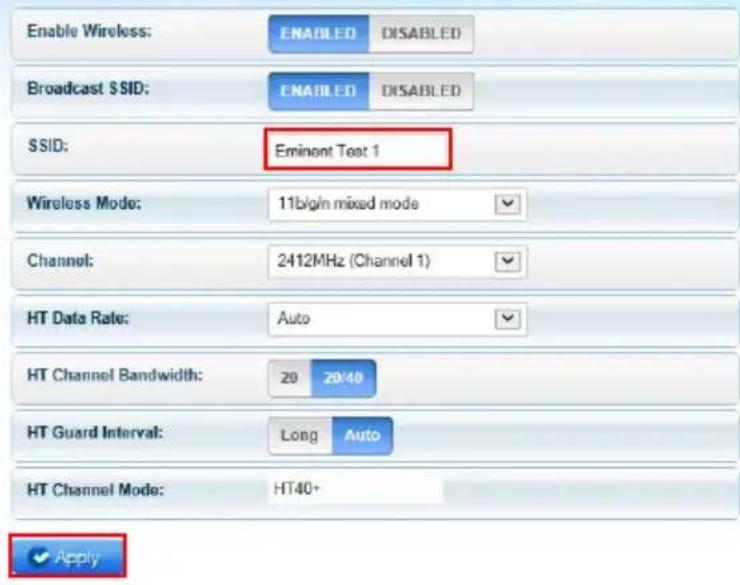
Wireless Basic Settings
text_image
Enable Wireless: ENABLED DISABLED Broadcast SSID: ENABLED DISABLED SSID: Eminent Text 1 Wireless Mode: 11b/g/n mixed mode Channel: 2412MHz (Channel 1) HT Data Rate: Auto HT Channel Bandwidth: 20 20/40 HT Guard Interval: Long Auto HT Channel Mode: HT40+ ✓ ApplyNUMERO PRODOTTO: EM4591 Universal Wi-Fi-repeater with WPS
Conforme ai seguenti standard: ETSI EN 300 328 V1.71.1 (2006-10)
ETSI EN 301 489-1 V1.9.2 (2011-09)
ETSI EN 301 489-17 V2.1.1 (2009-05)
EN62311:2008
Trademarks: all brand names are trademarks and/or registered trademarks of their respective holders.
The information contained in this document has been created with the utmost care. No legal rights can be derived from these contents. Eminent cannot be held responsible, nor liable for the information contained in this document.
Eminent is a member of the Intronics Group

EMINENT
EM4591
Universal Wi-Fi repeater with WPS
de
Benutzerhandbuch
EM4591 – Universal Wi-Fi repeater with WPS
Inhalt
natural_image
White rectangular device with a green Wi-Fi symbol on its surface, labeled 'EMINENT' below (no additional text or symbols)text_image
EMINENT EM4501 Reboot Available Wireless Networks Refresh SSID Security Signal Mode WPS Connect Eminent Test 1 WPA1/WPA2 11b/g/n YEStext_image
EMINENT EM4591 Reboot Password Wireless Password: ************ Mask Apply Tha Nov 07, 2013 10:52:07 AM Quick YUE Syst Protected Setuptext_image
Quick Connect View >
text_image
Setup View >
text_image
Wireless VIEW
System
View

Device Status
View

WPS
Wi-Fi Protected Setup
View
text_image
EMINENT EM4591 Reboot Thu Nov 07, 2013 10:54:02 AM Available Wireless Networks Channel SSID MAC Address Security Signal Mode Type WPS Connect 1 intronics-guest 00:14:5c:8f:ba:10 WPA2 11b/g/n Infrastructure YES 1 Eminent Test 1 00:14:5c:8f:6b:d0 WPA1/WPA2 11b/g/n Infrastructure YES 6 00:3a:9a:44:48:d0 WPA1 11b/g Infrastructure NO 11 NIEBO 44 ad: d9:57 c2:30 WPA1 11b/g Infrastructure NOtext_image
Available Wireless Networks Channel SSID MAC Address Security Signal Mode Type WPS Connect 1 Eminent 1 00:14.5c:8c:20:10 WPA1/WPA2 11b/g/n Infrastructure YES 6 Eminent 2 08:76.ff:89:81:64 WPA1/WPA2 11b/g/n Infrastructure YEStext_image
Mode of Operation: Repeater Access Point Bridge SSID: Eminent MAC Address: 00:14:5c:8c:20:10 Broadcast SSID: ENABLED DISABLED Security Mode: WPA2 PSK WPA Passphrase: 1234567890 Mask WPA Encryption: TKIP AES Channel: 2412MHz (Channel 1) Enhanced Compatibility: On Off ✓ ApplyAP Client Connection Status
Connection Status:
Connected
Extension Access Point:
Eminent Test 1
Client List
MAC Address
FC:25:3F:AB:AA:2F
00:13:33:93:B2:F9
70:73:CB:27:83:85
78:D6:F0:F3:31:2A
text_image
EMINENT EMM591 Rebuild Available Wireless Networks Refresh SSID Security Signal Mode WPS Connect Eminent Test 1 WPA1/WPA2 11b/g/m YEStext_image
EMINENT EM4591 Reboot Password Wireless Password: ************ Mask Apply This Nov 07, 2013 10:51:07 AM Quic AWE Syst Yee Selected Setuptext_image
Quick Connect View >
text_image
Setup View 2
text_image
Wireless View

text_image
Device Status View >
text_image
WPS Wi-Fi Protected Setup View 3text_image
EMINENT EM4591 Reboot Thu Nov 07, 2013 10:54:02 AM Available Wireless Networks Channel SSID MAC Address Security Signal Mode Type WPS Connect 1 Intronics-guest 00:14:5c:8f:ba:10 WPA2 11b/g/n Infrastructure YES 1 Eminent Test 1 00:14:5c:8f:6b:d0 WPA1/WPA2 11b/g/n Infrastructure YES 6 00:3a:9a:44:48:d0 WPA1 11b/g Infrastructure NO 11 NIEBO 44:ad:d9:57:c2:30 WPA1 11b/g Infrastructure NOAvailable Wireless Networks

Refresh
| Channel | SSID | MAC Address | Security | Signal | Mode | Type | WPS | Connect |
| 1 | Eminent 1 | 00:14:5c:8c:20:10 | WPA1/WPA2 | 11b/g/n | Infrastructure | YES | ||
| 6 | Eminent 2 | 08:76:11:39:31:64 | WPA1/WPA2 | 11b/g/n | Infrastructure | YES |
text_image
Mode of Operation: Repeater Access Point Bridge SSID: Eminent MAC Address: 00:14:5c:8c:20.10 Broadcast SSID: ENABLED DISABLED Security Mode: WPA2 PSK WPA Passphrase: 1234567890 Mask WPA Encryption: TKIP AES Channel: 2412MHz (Channel 1) Enhanced Compatibility: On Off
AP Client Connection Status
Connection Status:
Connected
Extension Access Point:
Eminent Test 1
Client List
MAC Address
FC:25:3F:AB:AA:2F
00:13:33:93:B2:F9
70:73:CB:27:83:85
78:D6:F0:F3:31:2A
text_image
Wireless View >
View

System
View

Device Status
View

WPS
Wi-Fi Protected Setup
View
Wireless Basic Settings
Enable Wireless:
ENABLED
DISABLED
Broadcast SSID:
ENABLED
DISABLED
SSID:
Eminent Test 1

Wireless Mode:
11blgn mixed mode

Channel:
2412MHz (Channel 1)

HT Data Rate:
Auto

HT Channel Bandwidth:
20
2010
HT Guard Interval:
Long
Auto
HT Channel Mode:
HT40+

PRODUKTNUMMER: EM4591 Universal Wi-Fi-repeater with WPS
Name: Marc Pannebakker
Unterschrift:

Trademarks: all brand names are trademarks and/or registered trademarks of their respective holders.
The information contained in this document has been created with the utmost care. No legal rights can be derived from these contents. Eminent cannot be held responsible, nor liable for the information contained in this document.
Eminent is a member of the Intronics Group

EMINENT
EM4591
Universal Wi-Fi repeater with WPS
hu
Használati utasítás
EM4591 – Universal Wi-Fi repeater with WPS
Tartalomjegyzék
1.0 Bevezetés 2
natural_image
Exterior view of a Wi-Fi router device with green signal icon and 'EMINENT' label (no other text or symbols)text_image
EMINENT EM4591 EBY Nov 05, 2013 11:25:30 AM Available Wireless Networks Refresh SSID Security Signal Mode WPS Connect Eminent Test 1 WPA1/WPA2 11b/g/n YEStext_image
EMINENT EM4501 Reboot Password Wireless Password: ************ ✓ Mask ✓ Apply Thu Nov 07, 2013 10:52:07 AM. Quick Yoo Syst Protected Setuptext_image
Quick Connect View >
text_image
Setup View 2
text_image
Wireless View
System
View

text_image
Device Status View >
text_image
WPS Wi-Fi Protected Setup View 3text_image
EMINENT EM4591 Reboot Thu Nov 07, 2013 10:54:02 AM Available Wireless Networks Channel SSID MAC Address Security Signal Mode Type WPS Connect 1 intronics-guest 00:14:5c:8f:ba:10 WPA2 11b/g/n Infrastructure YES 1 Eminent Test 1 00:14:5c:8f:6b:d0 WPA1/WPA2 11b/g/n Infrastructure YES 5 00:3a:9a:44:48:d0 WPA1 11b/g Infrastructure NO 11 NIEBO 44 ad d9:57:c2:30 WPA1 11b/g Infrastructure NOtext_image
Available Wireless Networks Channel SSID MAC Address Security Signal Mode Type WPS Connect 1 Eminent 1 00:14:5c:8c:20:10 WPA1/WPA2 11b/g/n Infrastructure YES 6 Eminent 2 08:76:ff:89:81:64 WPA1/WPA2 11b/g/n Infrastructure YEStext_image
Mode of Operation: Repeater Access Point Bridge SSID: Eminent MAC Address: 00:14:5c:8c:20:10 Broadcast SSID: ENABLED DISABLED Security Mode: WPA2 PSK WPA Passphrase: 1234567890 Mask WPA Encryption: TKIP AES Channel: 2412MHz (Channel 1) Enhanced Compatibility: On Off
AP Client Connection Status
Connection Status:
Connected
Extension Access Point:
Eminent Test 1
Client List
MAC Address
FC:25:3F:AB:AA:2F
00:13:33:93:B2:F9
70:73:CB:27:83:85
78:D6:F0:F3:31:2A
text_image
EMINENT EM4591 Available Wireless Networks Refresh SSID Security Signal Mode WPS Connect Eminent Test 1 WPA1/WPA2 11b/g/n YEStext_image
EMINENT EM4S9T Reboot Password Wireless Password: ************ ✓ Mask ✓ Apply Next Next Next Next Next Next Next Next Next Next Next Next Next Next Next Next Next Next Next Next Next Next Next Next Next Next Next Next Next Next Next Next Next Next Next Next Next Next Next Next Next Next Next Next Next Next Next Next Next Next Next Next Next Next Next Next Next Next Next Next Next Next Next Next Next Next Next Next Next Next Next Next Next Next Next Next Next Next Next Next Next Next Next Next Next Next Next Next Next Next Next Next Next Next Next Next Next Next Next Next Next First Quick System Unlabeled Setuptext_image
Quick Connect View >
text_image
Setup View 3
text_image
Wireless VIEW

text_image
Device Status View >
text_image
WPS Wi-Fi Protected Setup View >text_image
EMINENT EM4591 Reboot Thu Nov 07, 2013 10:54:02 AM Available Wireless Networks Channel SSIO MAC Address Security Signal Mode Type WPS Connect 1 Intronics-guest 00:14:5c:8f:ba:10 WPA2 11b/g/n Infrastructure YES 1 Eminent Test 1 00:14:5c:8f:6b:d0 WPA1/WPA2 11b/g/n Infrastructure YES 6 00:3a:9a:44:48:d0 WPA1 11b/g Infrastructure NO 11 NIEBO 44:ad:d9:57:c2:30 WPA1 11b/g Infrastructure NOAvailable Wireless Networks

Refresh
| Channel | SSID | MAC Address | Security | Signal | Mode | Type | WPS | Connect |
| 1 | Eminent 1 | 00:14:5c:8c:20:10 | WPA1/WPA2 | 11b/g/n | Infrastructure | YES | ||
| 6 | Eminent 2 | 08.76.11.89.81.64 | WPA1/WPA2 | 11b/g/n | Infrastructure | YES |
text_image
Mode of Operation: Repeater Access Point Bridge SSID: Eminent MAC Address: 00:14:5c:8c:20.10 Broadcast SSID: ENABLED DISABLED Security Mode: WPA2 PSK WPA Passphrase: 1234567890 Mask WPA Encryption: TKIP AES Channel: 2412MHz (Channel 1) Enhanced Compatibility: On OffApply
AP Client Connection Status
Connection Status:
Connected
Extension Access Point:
Eminent Test 1
Client List
MAC Address
FC:25:3F:AB:AA:2F
00:13:33:93:B2:F9
70:73:CB:27:83:85
78:D6:F0:F3:31:2A
Wi-Fi Protected Setup
View 3
Wireless Basic Settings

text_image
Enable Wireless: ENABLED DISABLED Broadcast SSID: ENABLED DISABLED SSID: Eminent Test 1 Wireless Mode: 11big/n mixed mode Channel: 2412MHz (Channel 1) HT Data Rate: Auto HT Channel Bandwidth: 20 20/40 HT Guard Interval: Long Auto HT Channel Mode: HT40+ ✓ ApplyTERMÉKSZÁM: EM4591 Universal Wi-Fi-repeater with WPS
Hely: Barneveld, The Netherlands
Dátum: 28-06-2012
Név: Marc Pannebakker
Aláírás:

text_image
EMINENTWWW.EMINENT-ONLINE.COM
Trademarks: all brand names are trademarks and/or registered trademarks of their respective holders.
The information contained in this document has been created with the utmost care. No legal rights can be derived from these contents. Eminent cannot be held responsible, nor liable for the information contained in this document.
Eminent is a member of the Intronics Group