Excellent Innergy - Bike Gazelle - Free user manual and instructions
Find the device manual for free Excellent Innergy Gazelle in PDF.


User questions about Excellent Innergy Gazelle
0 question about this device. Answer the ones you know or ask your own.
Ask a new question about this device
Download the instructions for your Bike in PDF format for free! Find your manual Excellent Innergy - Gazelle and take your electronic device back in hand. On this page are published all the documents necessary for the use of your device. Excellent Innergy by Gazelle.
USER MANUAL Excellent Innergy Gazelle
3.1 Maximum power from your 62 battery
3.2 Checking your battery status 63
3.3 Fitting and removing the 64 battery
3.4 Charging the battery 64
- The display 68
4.1 Schematic diagram of the 68 display
4.2 Attaching and removing the display 69
4.3 Operating the display 71
4.4 Error messages on your display 75
-
Replacing the rear light 76
-
Frequently asked questions 77

Disassembly of electronic parts should at all times be carried out by an authorized Gazelle dealer!
Conditional to any changes in specifications, texts and illustrations, as well as to typesetting and printing errors.
on
natural_image
Close-up of a car front bumper with red and black leather design, set against a light blue abstract background (no text or symbols visible)text_image
Step-by-step diagram showing a hand cleaning a red textured object, with numbered instructions for each step: Uit, Eco, Normal, and Boost.natural_image
Close-up of a red and black textured device being handled, showing step 8 and step 9 (no text or symbols visible)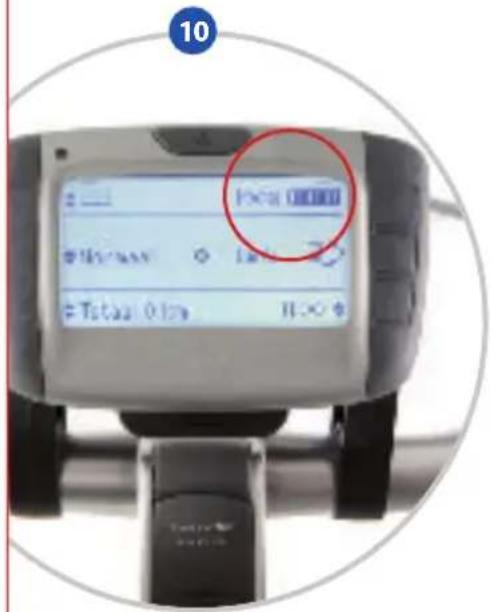
text_image
10 Local 0000 M3asy 18 Tstual Only II-∞3. De accu

natural_image
Two circular images showing a hand holding a black plastic object next to a red textured object, with no visible text or symbols.natural_image
Close-up of a red textured object with a glowing red interior, partially enclosed by a black device (no visible text or symbols)4. De display

text_image
A H 100% B C D Normaal kmAu Totaal Ø km 11:00 E F G Inatural_image
Front view of a black electronic device with multiple ports and a central display (no visible text or symbols)4. De display
natural_image
Hand holding a handheld electronic device with a screen, set against a light blue background (no visible text or symbols)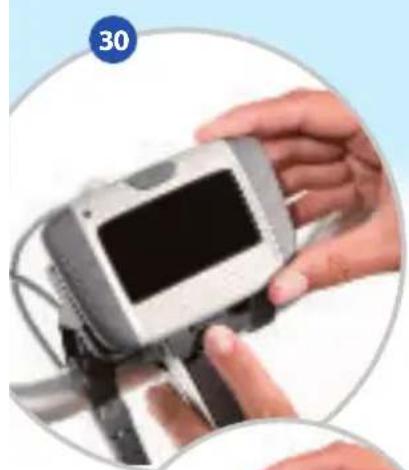
natural_image
Close-up of hands holding a digital camera module with a screen, no visible text or symbols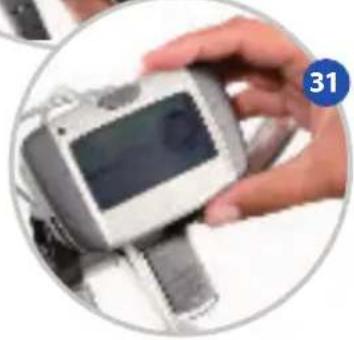
natural_image
Close-up of a hand holding a smartwatch with a display screen, no visible text or symbols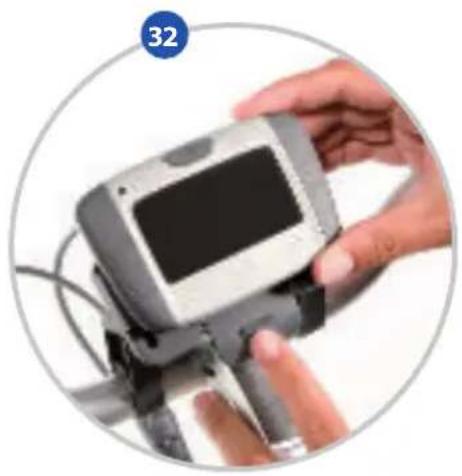
natural_image
Close-up of a hand holding a handheld electronic device with a screen and cables (no visible text or symbols)text_image
Cropped image showing a series of smartwatch control buttons with numbered labels (47–53) and a digital display showing 1:25.natural_image
Close-up of a car front bumper with red and black leather design, set against a light blue abstract background (no text or symbols visible)natural_image
Close-up of a red and black textured device with a hand pressing a button, showing two steps (8 and 9) without any visible text or symbols.
text_image
10 No Sale Sell Units 16:303. Der Akku
natural_image
Two circular images showing a hand holding a device with a red textured object, labeled 21 and 22 (no text or symbols on the devices themselves)natural_image
Close-up of a red handbag with exposed internal cavity and black plastic casing, no visible text or symbols4. Das Display
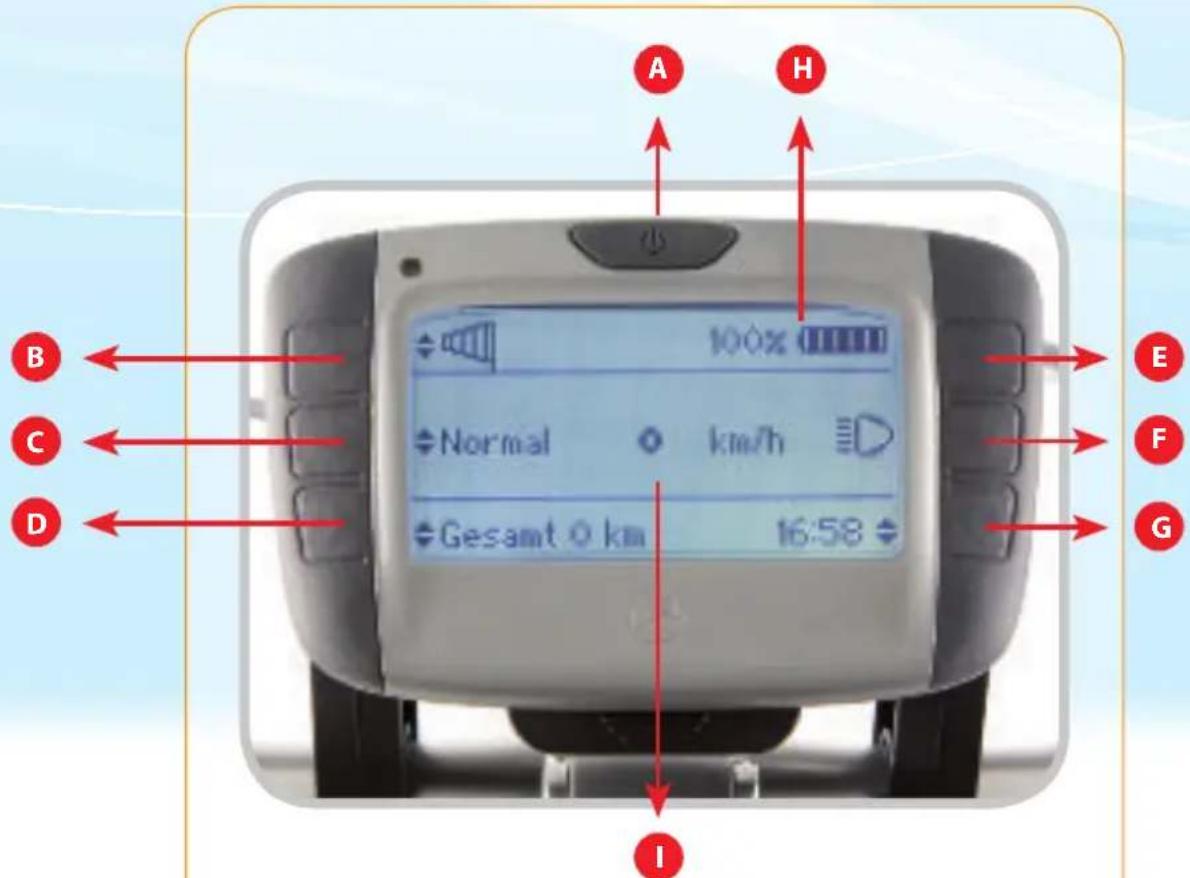
text_image
A H 100% Normal km/h Gesamt 0 km 16:58 B C D E F G Inatural_image
Front view of a black electronic device with multiple ports and a central display (no visible text or symbols)
4. Das Display

natural_image
Hand holding a handheld electronic device with a screen, set against a light blue background (no visible text or symbols)
natural_image
Close-up of hands holding a digital camera module with a screen, no visible text or symbols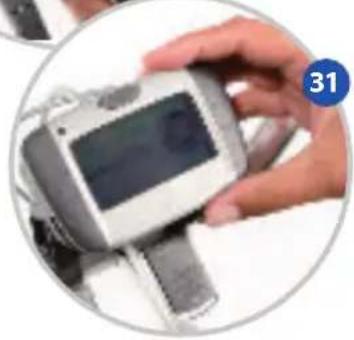
natural_image
Hand holding a smartwatch with a display screen, no visible text or symbols on the device or background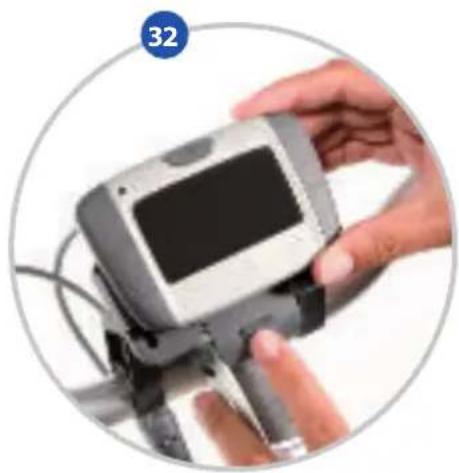
natural_image
Close-up of a hand holding a handheld electronic device with a screen, enclosed in a circular frame (no visible text or symbols)natural_image
Close-up of a car front bumper with red and black leather design, mounted on a silver platform against a light blue background (no text or symbols visible)Thank you for buying this Gazelle bike with Innergy system.
This manual is suitable for all Xtra and Excellent Innergy models. It is intended to help you use and maintain your bike and we therefore advise you to read it carefully. It is an addition to the standard Gazelle user manual with general information about your Gazelle.
This manual gives an explanation of the most important points of your Gazelle Innergy and how to use them. Please feel free to contact your Gazelle dealer if you have any questions about this user manual.
We wish you many kilometers of comfortable cycling fun!
Kind regards,
Your Gazelle specialist
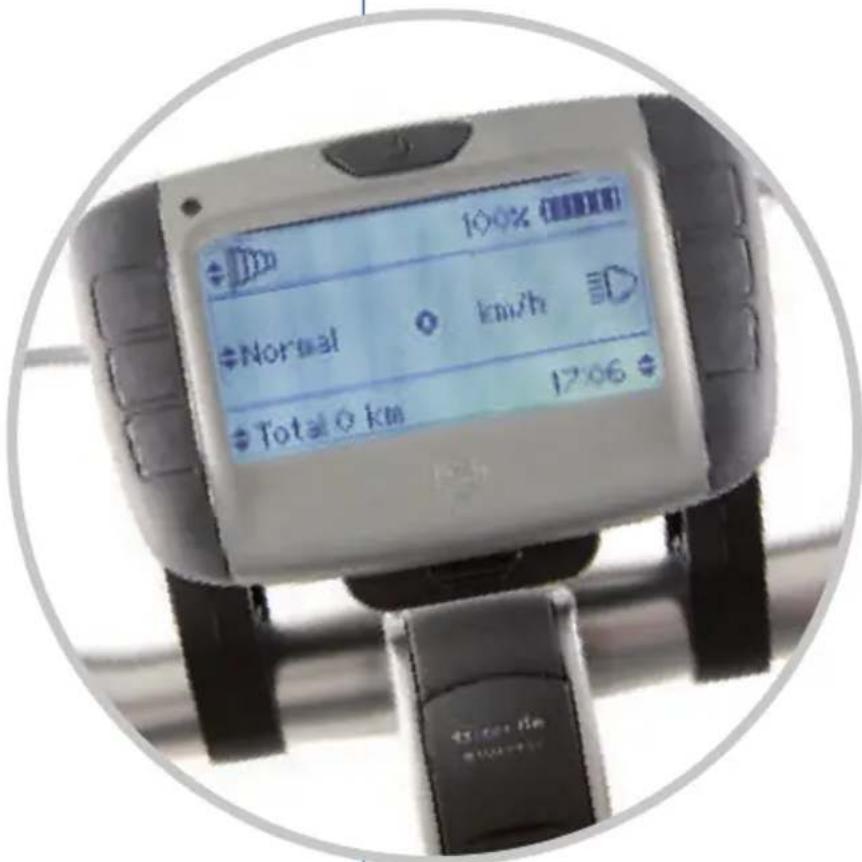
text_image
100% Normal km/h Total 0 km 17:061. Quick start
How do I start off straight away?
The description below will help you get started with your Gazelle Innergy as soon as possible.
Step 1: Check whether the battery is in place. If not, fit it in the bike as given in description 3.3.
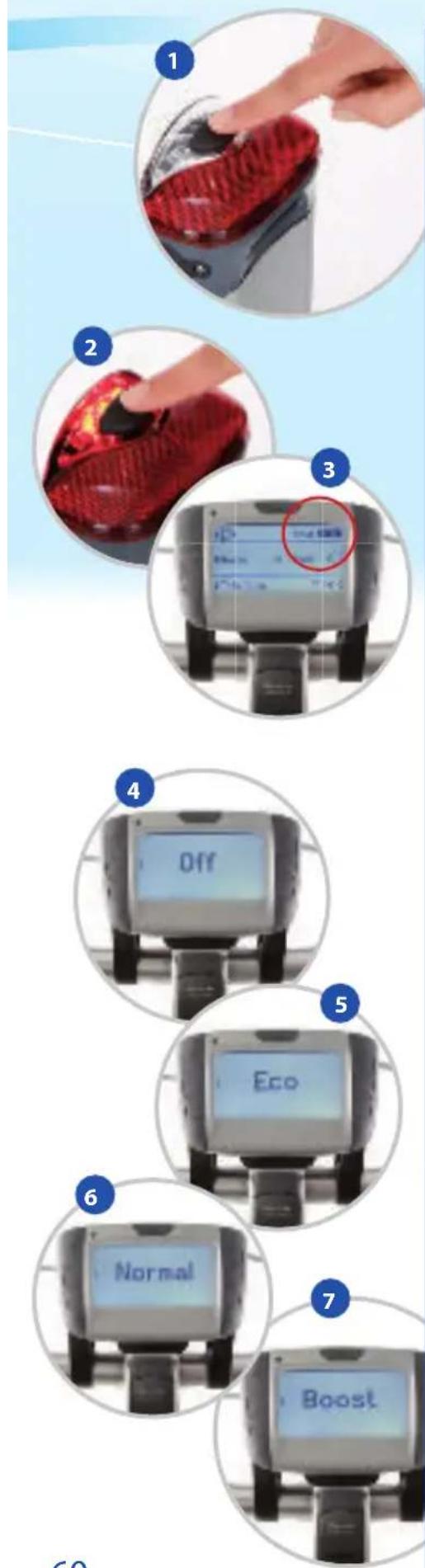
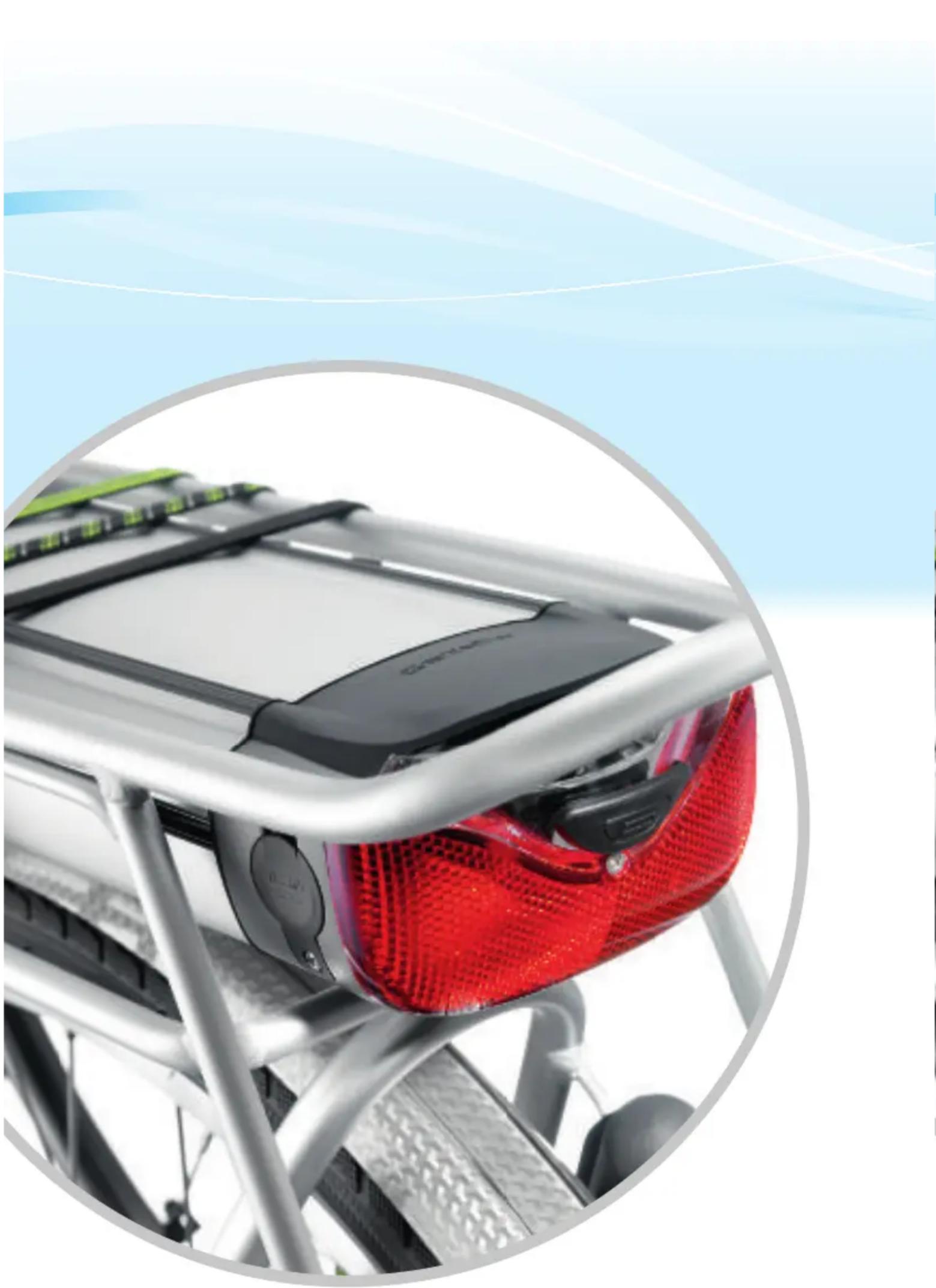
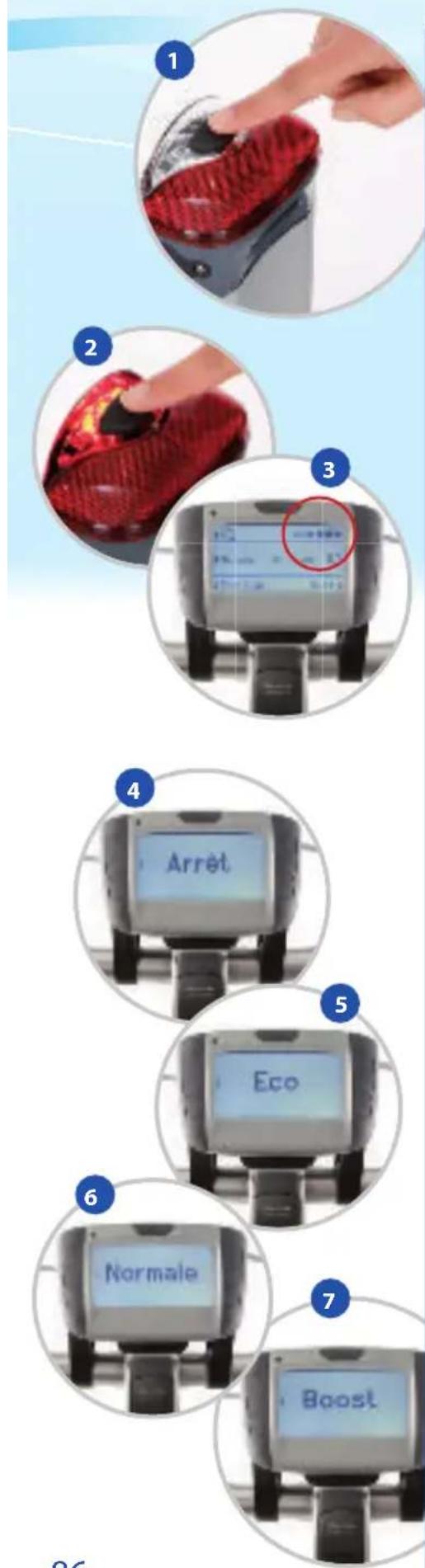
Step 2: Activate the battery by pressing the black button on the rear light (ill. 1).
Step 3: Check your battery status by looking at the LEDs on the battery itself or the battery blocks on your display. Each LED stands for approximately 20% of a full charge (ill. 2+3).
Step 4: Set the required assistance in your display, see description 4.2. You activate the various options by pressing the button to regulate the assistance a number of times.
- No assistance: choose this option when you want to cycle independently without assistance from the motor (ill. 4).
- ECO- economical assistance: this option costs you minimum battery power and can be selected for longer distances or when you require minimum assistance from your motor (ill. 5).
• NORMAL - normal assistance: select this option for average motor assistance (ill. 6).
- BOOST - boost assistance: select this option if you require maximum assistance, when cycling uphill for example. Another option is to choose the appropriate cycling program for the terrain in which you are cycling, see 4.3 Operating the display (ill. 7).
Step 5: Off you go!
NB: You can easily adjust the settings for the display yourself, for example the letter size (see description 4.3, section G on page 20).
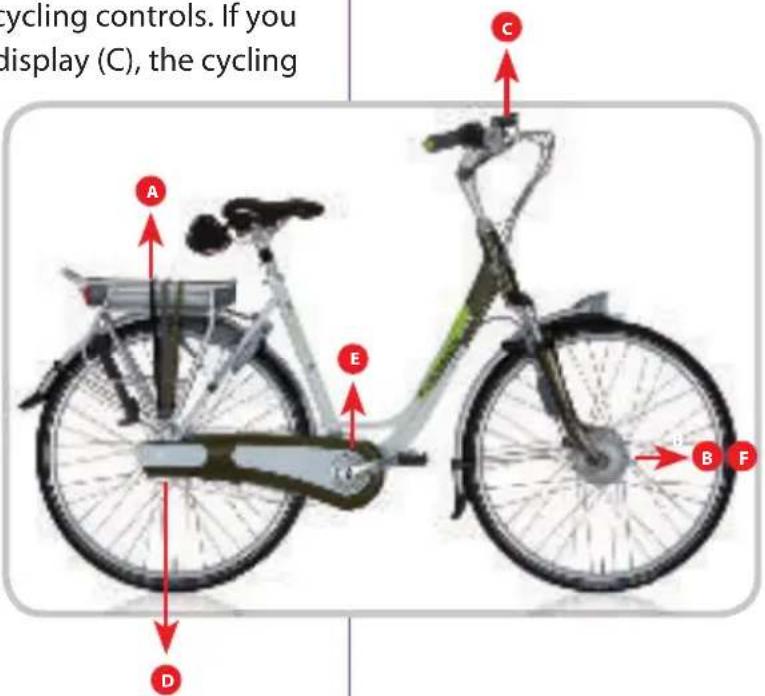
The schematic diagram below gives a summary of the various components of your Gazelle Innergy.
2.1 Components
The Innergy system has six main components:
A) The battery - integrated in the luggage carrier
B) The motor - fitted in the hub of the front wheel
C) The display - can be attached either to the left, right or middle of your handlebars
D) The pedal-force sensor - mounted to the bicycle's rear derailleur hanger. This sensor is hidden behind the chain guard or the chain shield, depending on the model.
E) The rotation sensor - this is behind the forward chain wheel and the plastic pedal axle adaptor.
F) The cycling controls - these are integrated in your bicycle's motor. The pressure exerted on the pedals is converted by the pedal-force sensor (D) to a signal to the cycling controls (F). Also, the rotations you make are converted by the rotation sensor (E) to a signal to the cycling controls. If you have switched on assistance via the display (C), the cycling
controls also receive this signal. Both signals are converted by the cycling controls into a high or low speed of the motor (B). The energy to make all this happen comes from the battery (A).
text_image
cycling controls. If you display (C), the cycling A E D B F C2.2 Parts supplied
The following parts are supplied with your Gazelle Innergy bike.
- Display
• Xtra and Excellent Innergy user manual - General user manual
- Battery charger
- Display storage bag
3. The battery
Please read the following information carefully in order to understand how your battery works and to extend the working life of your battery.
3.1 Maximum power from your battery
To get the maximum power from your battery, we advise you to follow these instructions for daily use of your bike. This will increase your operating range, in other words, you'll get more kilometers out of your battery.
- Keep your tire pressures correct; soft tires use more battery power.
- Do not start off with the bike in the 'BOOST' setting, because the bike then offers extra assistance at a low speed and uses extra battery power.
- Cycle at a constant and regular speed whenever possible; starting off and braking consumes the most battery power.
- Start off and cycle in the lowest possible gear; when you switch to a higher gear, you exert more pressure on the pedals, so that the motor gives more assistance. This is because your bike is fitted with a pedal-force sensor.
- Charge your battery at room temperature; your battery is charged up to 25% less effectively at temperatures of zero degrees.
- If you will not be using the battery for a while, we advise you to not store it fully charged. The total capacity of the battery may then be partially lost.
If you plan to cycle in a hilly area, remember that this requires extra battery power.
3.2 Checking your battery status
The battery status can be simply checked at two positions. By pressing the button on the rear light, you can simply see how much battery power your battery still has (ill. 1 + 2).
You can also check the battery status on your display, if you have fitted the battery in the bike correctly. The number of blocks on the display for the battery capacity is the same as the number of LEDs on the rear light. Therefore five battery blocks on the display is equal to five illuminated LEDs on the rear light, when the button on the rear light is pressed (ill. 3).
The LEDs indicate the power left in the battery.
- When all five LEDs are lit, this gives a battery power of approximately 100%.
- When four LEDs are lit, this gives a battery power of approximately 80%.
- When three LEDs are lit, this gives a battery power of approximately 60%.
- When two LEDs are lit, this gives a battery power of approximately 40%.
- When the last LED is lit, this gives a battery power of approximately 20%.
- When the last LED flashes, the battery capacity is less than 20%.
Once the battery is empty, the motor assistance is switched off, but you do have enough battery capacity to work your lights for quite a while. The last LED will keep flashing.
Battery standby
If you have not used your bike for an hour, the system automatically switches to 'standby', to save the battery. The system is reactivated by means of the black battery button by the rear light (ill.8).

natural_image
Close-up of a red and black textured object being handled, showing step 8 and step 9 (no text or symbols visible)
text_image
10 OK 做理器 Normal 0 0.25 40 Total OK 706 ±3. The battery

3.3 Fitting and removing the battery
Fitting the battery
• Make sure the bike is firmly on its stand.
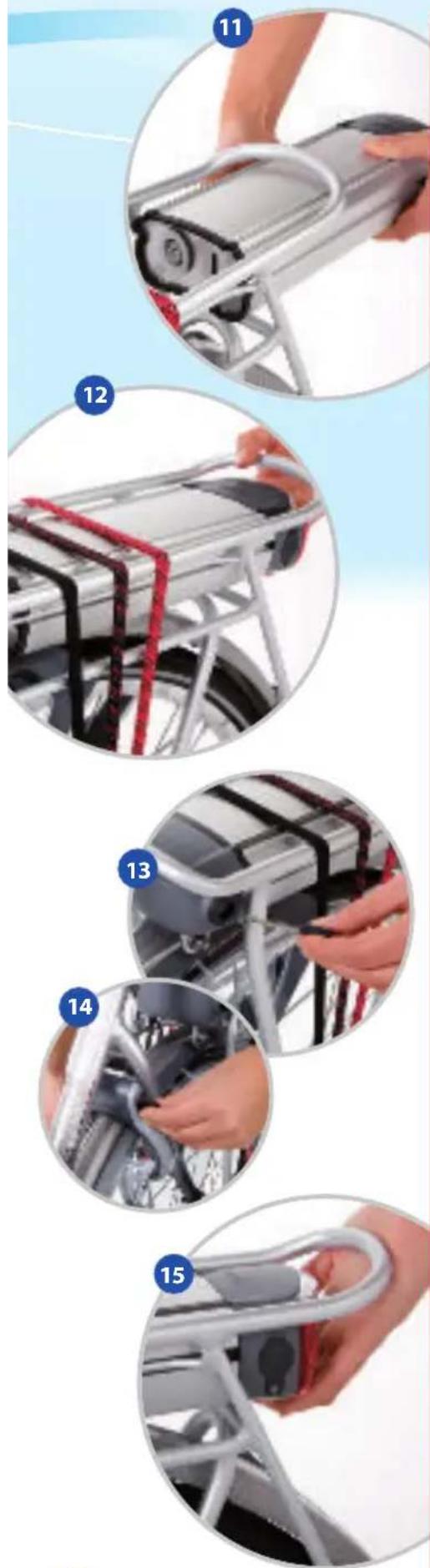
- Hold the battery with both hands; position the front of the battery so that the recesses on the side of the battery are in line with the battery guides on the luggage carrier (ill. 11).
- Ensure that the bike key is in the battery lock. Rotate it a quarter turn clockwise while pushing the battery with your free hand in a forward direction until it can't go any further. Take note: the bike key must always be in the battery lock or else you can't completely push in the battery (ill. 12).
- Remove the key from the battery lock and replace it in the bike lock, unlock the bike (ill. 13+14).
- Check whether the battery is securely held by pulling gently on it (ill. 15).
- If this is not the case, repeat the previous 3 steps. If the battery is fitted properly, your display will also be activated.
Removing the battery
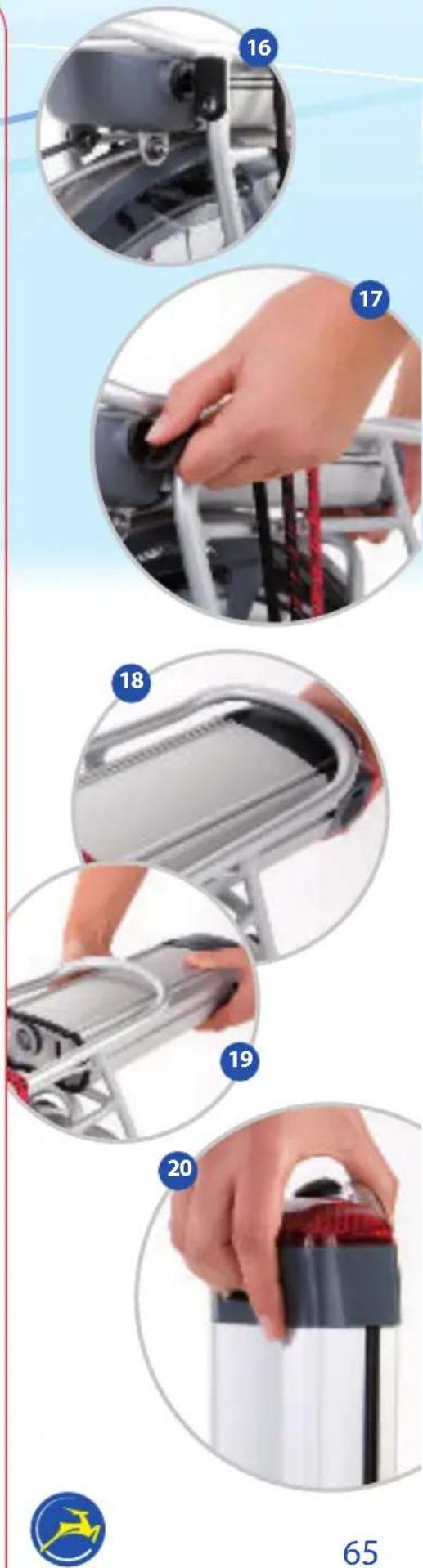
- Lock your bike (or use the spare key) and insert the bike key into the battery lock (ill. 16).
- Turn the key a quarter turn clockwise, while gently pulling the hand grip at the bottom of the battery backwards (ill. 17).
- Pull the battery backwards via the guides. We advise you to support the battery with two hands when it is nearly removed (ill. 18+19).
- The battery is ergonomically shaped and has a hand grip so that it is easy to take with you (ill. 20).
3.4 Charging the battery

Your battery can be charged either in the bike or separately using the Innergy battery charger supplied. Do NOT use any other form of charger as that can damage your battery. Gazelle cannot guarantee the consequences in that case. The total charging time for your battery depends on which battery you purchased: Bronze: 5 hours, Silver: 7 hours, Gold: 9 hours. If you have purchased a Gazelle fast-charger, these times are then <2 hours, 2 hours and 3 hours respectively.
3. The battery
Please follow the instructions below to charge the battery either in the bike or separately from the bike.

Safety instructions for charging the battery
- Only use the Gazelle Innergy battery charger supplied.
- Keep the charger and battery out of the reach of young children and pets.
- Only charge the battery indoors (i.e. where it is protected against rain and extreme temperature fluctuations). Ensure good ventilation and a dry location.
- The battery will only charge at temperatures between 0°C and 50°C.
- If you charge the battery separately from the bike, place it on a flat surface for stability. When charging the battery in the bike, make sure the bike is stable.
- Do not cover the charger. Place the charger and battery on a hard surface (so preferably not on a carpet!).
- Make sure the charger plug and charger connector are free from dirt and/or moisture.
- Do not touch the electric plug and charger plug with wet hands.
- Do not drop either the charger or the battery.
- Do not use the battery or charger if damaged. If in doubt, contact your dealer.
- Do not use the battery and/or charger for other purposes.
- Do not charge the battery in direct sunlight. (So do not place the battery on a window ledge!).
- In the winter, we do not advise you to charge the battery in an unheated shed.
• Always start by connecting the battery to the charger and then plugging it into the mains power.
3. The battery

natural_image
Two circular images showing a hand holding a black plastic object with red insulation, and a close-up of a red battery pack being connected to a cable (no text or symbols visible)Besides these safety instructions, there are some specific instructions for charging the battery in the bike and separately from the bike.
Instructions for connecting the battery in the bike
- Follow the safety instructions given earlier.
- Park the bike on its stand in the vicinity of a mains socket.
- Open the rubber cover cap of the battery charging socket (to the left of the rear light) and insert the plug from the charger (ill. 21).
- Ensure that the plug is firmly seated in the battery (ill. 22) and connect the charger to the mains socket.
- The LED in the rear light flashes when you connect the charger correctly. On the charger itself a green light will be on, indicating that the charger is in use.
Instructions for connecting the battery separately from the bike
- Follow the safety instructions given earlier.
- Remove the battery from the bike according to the instructions given earlier (3.3).
- Place the battery on a flat and hard surface in the vicinity of a mains socket.
- Open the rubber cover cap of the battery loading plug, on the left near the rear light, and plug in the charger (ill. 21).
• Make sure the plug is attached firmly to the battery (ill. 22) and plug it into the mains socket. - The LED in the rear light flashes when you connect the charger correctly. On the charger itself a green light will be on, indicating that the charger is in use.
General loading instructions
- The flashing LED displays the battery's level of charge. The LEDs start on the far right and move to the left. Each LED indicates approximately 20% of a full charge.
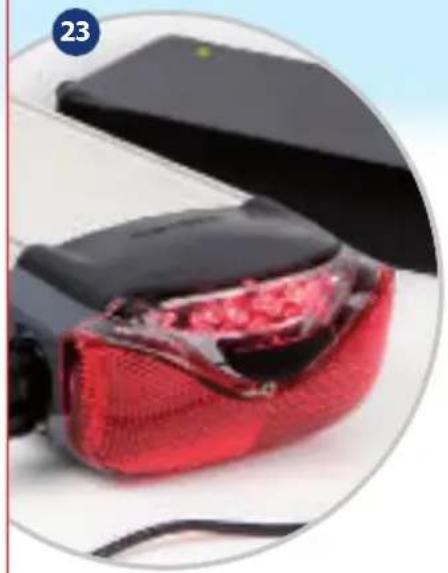
- When the battery is fully charged, there will be no LEDs lit on your rear light. The green lamp will still be lit on the charger (ill. 23).
3. The battery
- Not all batteries display flashing LEDs when charging. To check the level of charge of these batteries, briefly press the button on the rear light. The position of the flashing LED indicates how full the battery is.
- When you have finished charging, first remove the plug from the battery, replace the protective cap on the charging plug and then remove the charger plug from the mains socket.
Tip: For exact battery power indication (shown by the number of LEDs illuminated in the rear light) we advise you to fully charge your battery twice to start with and then to empty it completely, without charging it in-between.
natural_image
Close-up of a red textured object with visible internal damage, partially enclosed by a black rectangular device (no text or symbols)4. The display

text_image
A H 100% Normal km/h Total 0 km 17:06 B C D E F G IA summary of the various indications on your display is given below.
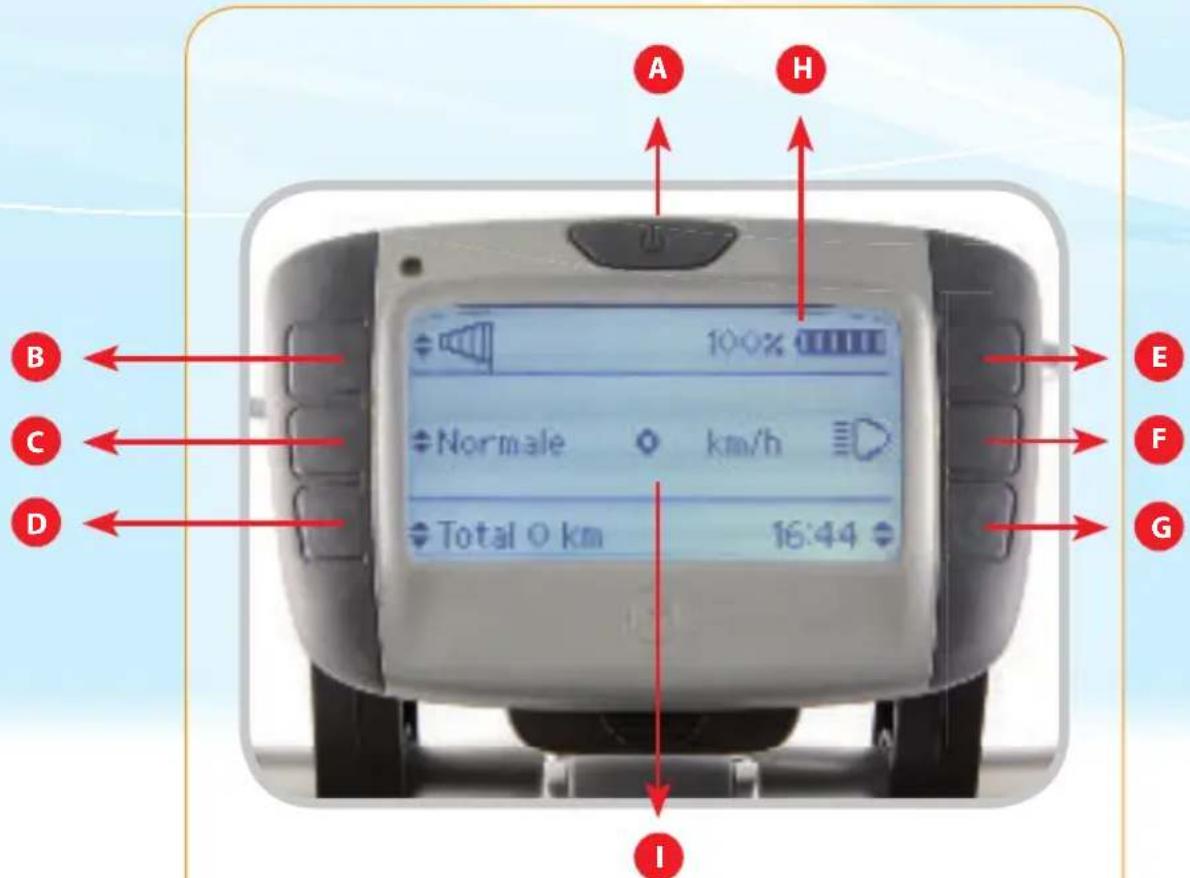
4.1 Schematic diagram of the display
Indications on your display
A. On/Off button on your display
B. Cycling settings/ minus button
C. Regulation of degree of assistance
D. Trip statistics
E. Plus button
F. Lighting on/off
G. Display settings
H. Indication of the battery capacity
I. Speed
4.2 Attaching and removing the display
The separate display supplied can be simply attached to the display holder. The display holder can be attached either left, right or in the middle of your handlebars.
Attaching and moving the display holder
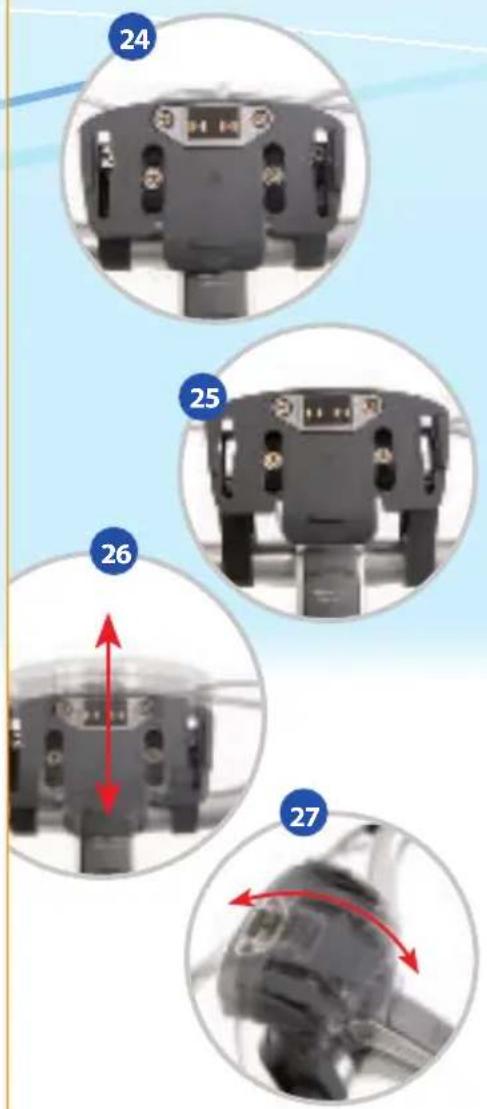
- The display holder is adjustable and can be positioned however you want it, using the four screws (ill. 24+25).
- Use the outer screws to clamp the display holder on the handlebars and change the horizontal position of the display. By loosening the outer two screws, for example, you can position the display higher or lower on the handlebars (ill. 26).
- The inner screws can be used to tilt the display to the position of your choice (ill. 27).
- Loosen all four screws to remove the display holder from the handlebars and then reattach it in the position of your choice (ill. 28).
text_image
24 25 26 27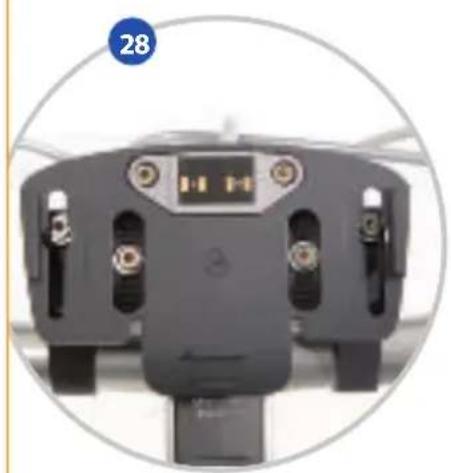
natural_image
Top-down view of a black electronic device with multiple ports and a central display (no visible text or symbols)4. The display

natural_image
Hand holding a handheld electronic device with a screen, set against a light blue background (no visible text or symbols)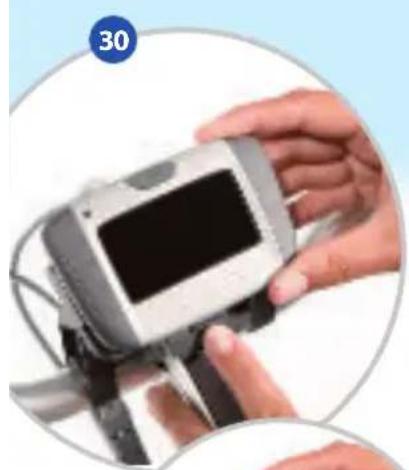
natural_image
Close-up of hands holding a digital camera module with a screen, no visible text or symbols
natural_image
Hand holding a digital payment terminal device (no visible text or symbols)
natural_image
Close-up of a hand holding a handheld electronic device with a screen, enclosed in a circular frame (no visible text or symbols)Attaching and removing the display
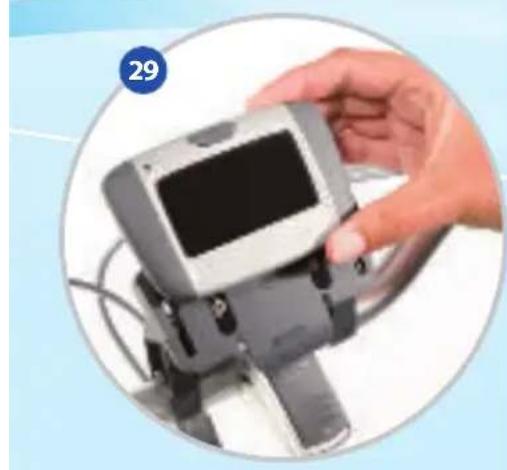
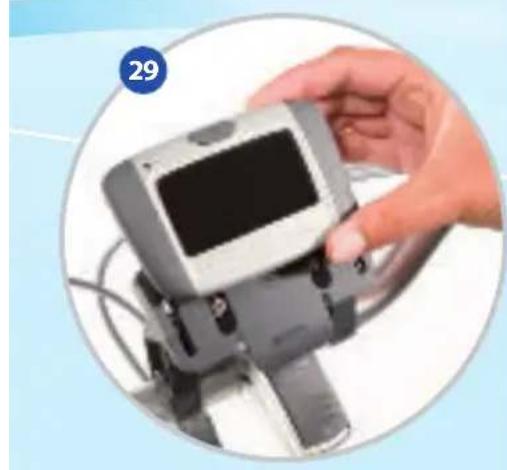
• Take hold of the display between your thumb and index finger (ill. 29).
- Attach the display by pressing the lip on the bottom down gently and sliding the display onto the holder from the front, until the lip clicks into place (ill. 30).
- If the display is attached correctly and the battery has been slid into the bike properly (don't forget to activate the battery from the standby setting by pressing the button on the rear light), the display will be switched on. For operation and functions, see 4.3 Operating the display (ill. 31).
- If this is not the case, check whether the display and/or battery is/are attached properly to the bike.
NB: The display itself does not have a battery. As soon as you remove the display from the holder, it will not display anything. We advise you to take the display with you when parking your bike, to avoid theft and/or damage.
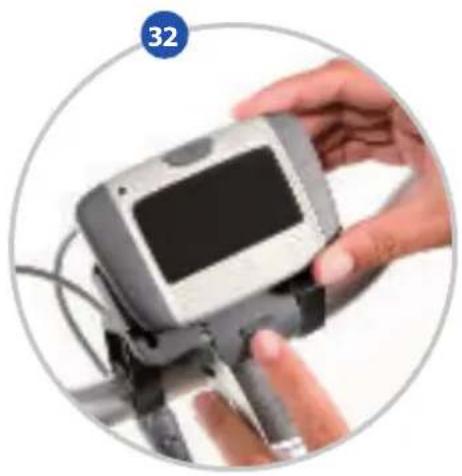
- The display can be simply removed by pressing the lip on the front of the display holder and sliding the display forward (ill. 32).
- The display can be stored safely in the bike key bag supplied with the bike.
4. The display
4.3 Operating the display
There are six buttons on the display:
A. On/Off button on your display
Use this button to switch on the display. Press the button again to switch the display back off. (ill. 33)
B. Cycling settings/ minus button
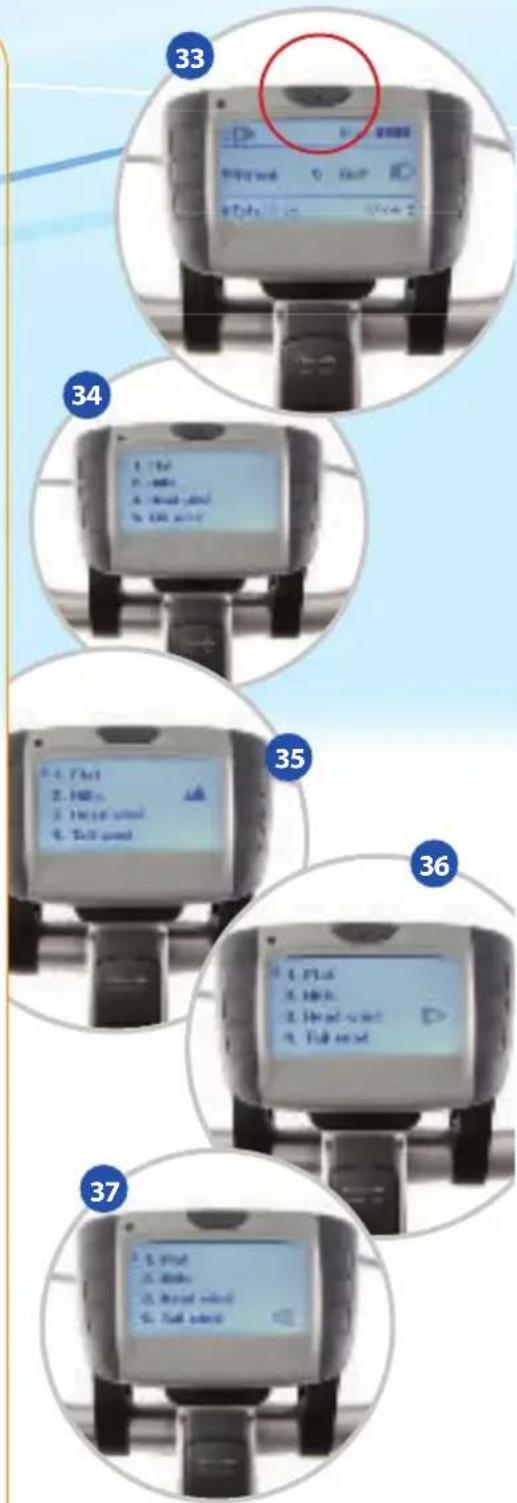
This button is used to select various cycling settings. Press this button a number of times to select the following settings:
- Flat: select this option if you will be cycling in a flat area. This is also the standard setting (ill. 34).
- Hilly: select this option if you will be cycling in a hilly area. More assistance is provided at low speeds (up to 14 km/h) (ill. 35).
- Head wind: select this option when cycling with a head wind. More assistance is provided at higher speeds. The same assistance is provided from starting off up to 10 km/h (ill. 36).
- Tail wind: select this option if you have the wind behind you. Less assistance is provided at high speeds. The same assistance is provided from starting off up to 10 km/h (ill. 37).
text_image
33 34 35 36 374. The display

text_image
38 Off 39 Eco 40 Normal 41 BoostC. Regulation of degree of assistance
Use this button to regulate the required degree of assistance.
- No assistance: choose this option when you want to cycle independently without assistance from the motor (ill. 38).
- ECO - economic assistance: this option costs you minimum battery power and can be selected for longer distances or when you require minimum assistance from your motor (ill. 39).
• NORMAL - normal assistance: select this option for average motor assistance (ill. 40). - BOOST - boost assistance: select this option if you require maximum assistance, when cycling uphill for example. Another option is to choose the appropriate cycling program for the terrain in which you are cycling, as described under B (ill. 41).
4. The display
D. Trip statistics
Use this button to show various statistics on your screen.
Press it a number of times to show the following four statistics on your screen.
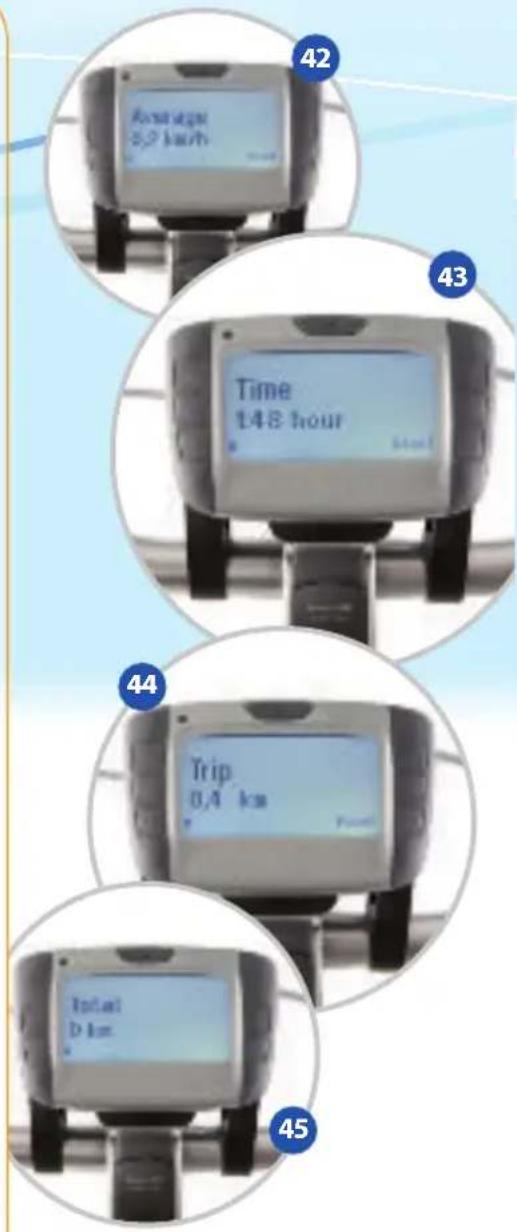
- Average: check your average speed here. Press 'reset' (button G) to reset the average speed to zero (ill. 42).
- Time: here you can see how long your trip took. Press 'reset' (button G) to reset the time to zero (ill. 43).
- Trip: here you can see how far you've cycled. Press 'reset' (button G) to reset this trip kilometer counter to zero (ill. 44).
- Total: this is your total distance cycled; this cannot be reset to zero (ill. 45).
E. Plus button
Use this button for various display settings, including the time setting. This can be set by pressing button G (see section G, time settings) (ill. 46).
text_image
42 Avonation 0,2 km/h 43 Time 148 hour 44 Trip 0,4 km 45
text_image
46 0.5 GHz-noil + 1mT 2.1/2.0 Hz C:5.04. The display
text_image
Cropped image showing a series of labeled circular images of a smartwatch with control buttons and display screens, numbered 47 to 53.F. Lighting on/off
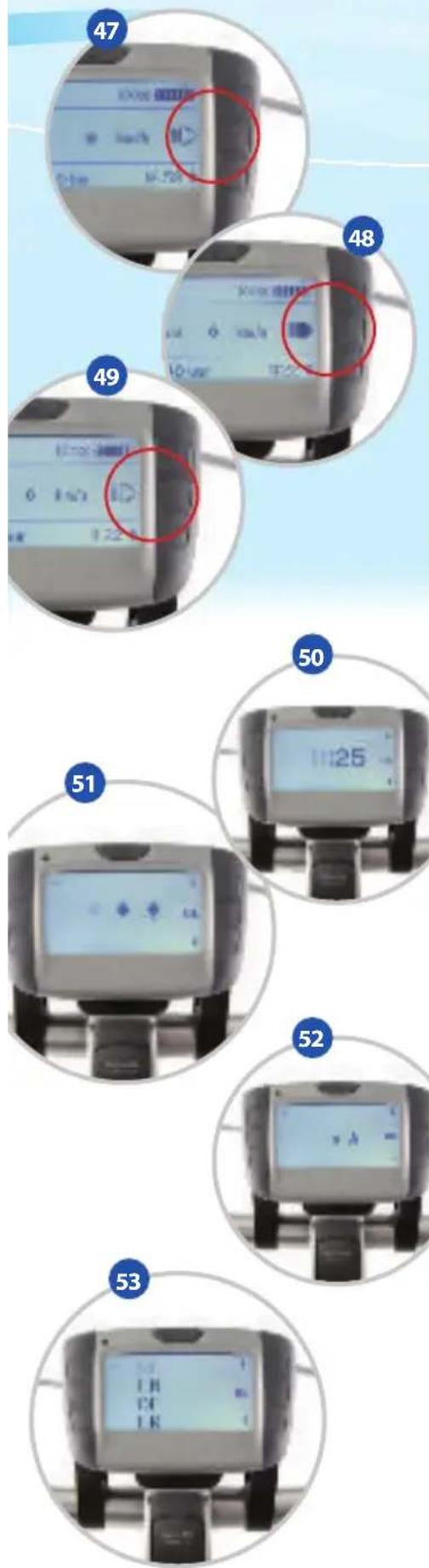
Use this button to switch on your lights. Press the button again to switch them back off. If this button is pressed three times, the automatic lighting is switched on. If it is dark and you accelerate, your lights will switch on automatically (ill. 47 t/m 49).
G. Display settings
Use this function button to change various settings in your display to your liking. Select it by pressing button G a number of times.
- Time setting: set the correct hour by using the 'plus button' (button E) and the 'minus button' (button B). Once you've selected the correct hour, press 'OK' (button F). Now set the correct minutes, once again using the 'plus button' (button E) and the 'minus button' (button B). Once again, press 'OK' (button F) (ill. 50).
- Screen brightness: select the required screen brightness by using the 'plus button' for more brightness and the 'minus button' for less brightness. Once you've selected the brightness, press 'OK' by using button F (ill. 51).
- Letter size on display: select the required letter size by using the 'plus button' (E) for larger letters and the 'minus button' (B) for smaller letters. Once you've selected your required letter size, press 'OK' by using button F (ill. 52).
- Choosing your language: You can choose between four languages, Dutch, English, German and French. Select the language of your choice using the plus and minus buttons (E and B). Once you've selected the right language, press 'OK' with button F in order to set this language (ill. 53).
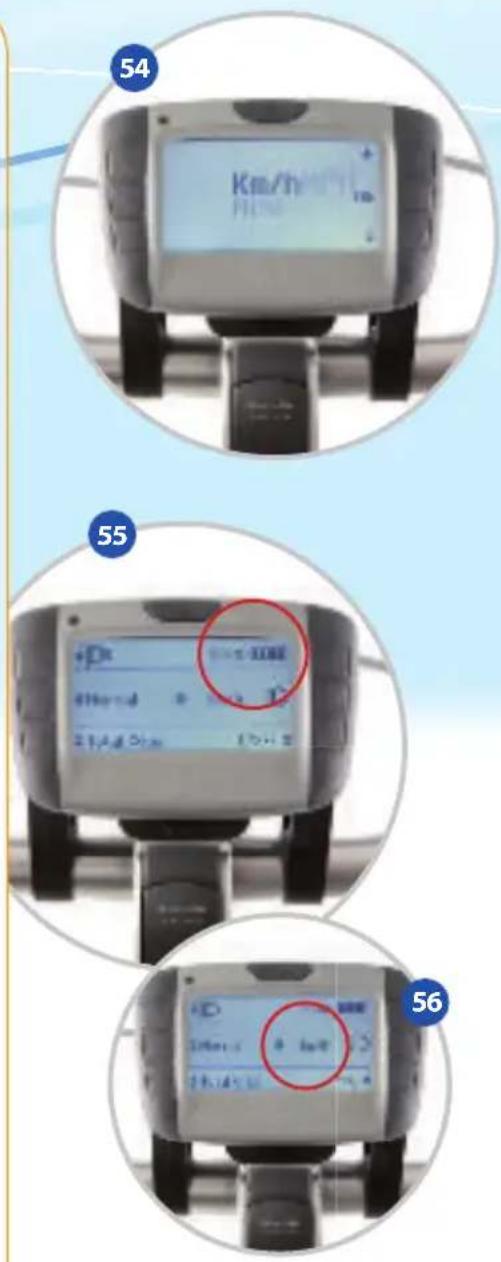
- Kilometers/Miles: you can decide whether you want the distance travelled to be shown in kilometers or miles on your screen. Select the kilometers or miles as you wish using the plus and minus buttons, B and E. Once you've made your selection, press 'OK' with button F in order to set it (ill. 54).
4. The display
H. Indication of the battery capacity
The battery capacity is shown as a percentage. 100% stands for a fully charged battery. If the battery is charged less than 17%, the battery symbol will flash. If the battery is empty, the 0 percentage will be shown and you will have no assistance (ill. 55).
I. Speed
Your cycling speed is shown here in kilometers or miles per hour, depending on your preference (ill. 56).
4.4 Error messages on your display
As soon as there is a malfunction in your Innergy system, this is shown in your display by a letter followed by a number. The letter/number combination is visible at the top left of your display, next to the cycling settings. The number is information for your dealer. The following letters give you an indication of the error.
A: shows a battery malfunction
B: shows a motor or controller malfunction
C: shows a sensor malfunction
D: shows a display malfunction
If one of the above errors appears in your display, it means that one of the above malfunctions has already occurred. Remove the battery from your bike and replace it, to check whether the error messages reappear. If malfunctions happen regularly, we advise you to contact your Gazelle dealer.
text_image
54 Km/h 55 +Dc 0.1Hz 400Hz 40Hz 400Hz 2.1A 3.1A 1.7A 2.7A 56 +D 0.1Hz 400Hz 2.1A 3.1A5. Replacing the rear light
text_image
57 58 59 60 61 625. Replacing the rear light
For more complex problems, we advise you to consult your dealer. If your rear light needs replacement, use the following guidelines. This description can be used as a supplement to your general Gazelle user manual.
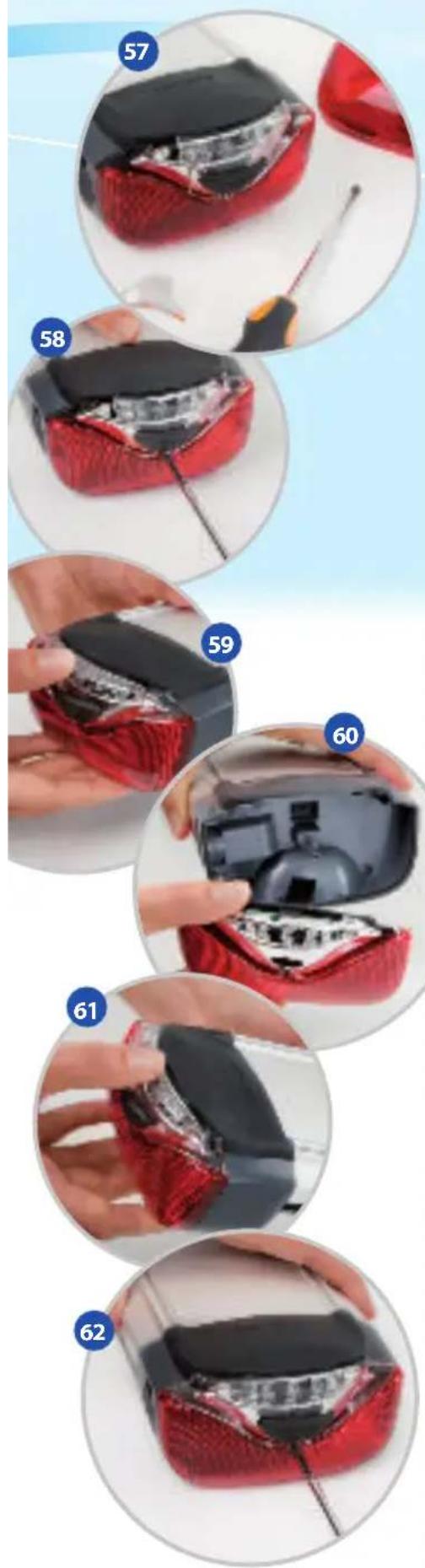
- If the rear light is damaged, it must be replaced in order to prevent moisture getting into your battery (ill. 57).
- Remove the screw of the rear light using a Phillips screwdriver (ill. 58).
- Hold the rear light with one hand and the battery with the other. Pull the rear light to detach it from the battery (ill. 59+60).
- Press the new rear light in place. Make sure that all corners and edges fit properly in place and that the rubber top flap falls over the rear light (ill. 61).
- Screw the rear light back firmly on the battery (ill. 62).
6. Frequently asked questions
Is the degree of assistance adjustable?
Yes. You can simply adjust the degree of assistance using the adjustment button on your display. Press the assistance adjustment button a number of times to activate the various settings: 'No assistance', ECO (economical), NORMAL and BOOST. You can also select your choice of cycling settings, and adjust the degree of assistance to the cycling conditions. You can choose between 'flat', 'hilly', 'head wind' and 'tail wind'.
What is the capacity of my battery?
When buying your Gazelle Innergy you can choose from three different batteries: Bronze, Silver or Gold. The Bronze battery has a capacity of 252 Wh, the Silver battery has a capacity of 324 Wh and the Gold battery has a capacity of 396 Wh.
What is the operating range for the various assistance settings?
The number of kilometers you can cycle depends on which battery you have bought. The table below gives an indication of the number of kilometers you can cycle with the various batteries.
A number of factors can result in you having a somewhat larger or smaller operating range, for example your tire pressure, but also your weight, the weather and the age of the battery.
BRONZESILVERGOLD
| number of Watt hours (Ampère x Volt): | 7 x 36 = 252 Wh | 9 x 36 = 324 Wh | 11 x 36 = 396 Wh |
| operating range in ECO: | 70 - 90 km 130 - 170 km 150 - 200 km | ||
| operating range in NORMAL: | 40 - 60 km 50 - 80 km 90 - 120 km | ||
| operating range in BOOST: | 25 - 35 km 35 - 45 km 45 - 55 km | ||
Isn't the bike heavy to pedal if you switch off the motor or if the battery is empty?
No, the bike has a brushless DC motor, so that the motor does not give any noticeable resistance when switched off. The bike also has multiple gears, so that you can choose a lighter gear to suit your needs.
6. Frequently asked questions
How fast can I go with this bike?
That's up to you. However, electric assistance is no longer provided at speeds above 25 km/h. This is a legal requirement for bikes with motor assistance.
How do I switch the bike off?
The best way to switch the bike off is using the on/off button on the display. Press this button to switch off all the bike functions. If you park your bike but don't switch it off, it will switch itself to standby after an hour. After switching it off, you may remove the battery for charging if required.
I seem to get less assistance when the battery is nearly empty, is that right?
That is correct. There is less assistance in the eco setting, if the battery has less than 40% capacity left. This has been programmed to ensure the maximum operating range. If you require more assistance, we recommend using the boost setting when there is only 20% residual capacity left (one segment/block).
Does the Innergy system make a bike very heavy?
Not very much, though of course the battery and motor do add some extra weight. The lightweight motor weighs around 3.0 kg and the removable battery 2.5 kg. In total therefore, you need to add around 5.5 kg to the weight of the “standard bike”. The bike can therefore easily be transported on a standard bike carrier on the back of your car.
NB: The Gold battery (3.4 kg) is slightly heavier than the Bronze and Silver batteries (2.5 kg)!
Can I start off just like on a normal bike?
Yes, in principle. The bike has been programmed so that the assistance at a speed of 0 - 5 km/h reacts less quickly and is less strong. Make sure you don't start off in too high a gear, to minimize the energy needed from you and your battery.
6. Frequently asked questions
Can I keep my foot on the pedal when standing still (at traffic lights, for example)?
That's no problem, because the motor provides assistance only when the pedals are turning (forwards).
Can I also use my Innergy in the rain?
Yes, the Innergy parts are all splash-proof and will always work in rainy weather. However, the system must not be submerged in any liquid or cleaned with a high pressure cleaner. So never spray your bike clean with a high pressure cleaner!
Can I park my bike without the display in the rain/snow?
Yes - since all Innergy parts are splash proof, this is not a problem.
How often does my bike need to be serviced by the Gazelle dealer?
Innergy parts need no more servicing than the other bike parts. The frequency depends on use.
How long will the battery last?
If your battery is younger than three years and has not been discharged more than 600 times, we guarantee your battery will be charged at least 80% each time.
Does my battery need to be on the charger when not in use?
No, it doesn't. The battery can be stored in a dry place or can be left in the bike.
How long does my battery take to charge?
The total charging time for your battery depends on which battery you purchased. The charging times are as follows: Bronze - 5 hours, Silver - 7 hours, Gold - 9 hours. If you have purchased a Gazelle fast-charger, these times are <2 hours, 2 hours and 3 hours respectively. Of course you can also partially charge your battery (when lunching out, for example), in order to increase the distance you can reach with assistance. Always follow the charging instructions.
6. Frequently asked questions
What should I do if I haven't used the battery for a while?
You don't need to do anything. If you have not used the battery for an hour, it switches to standby, retaining the battery's capacity and preventing it from running down. Activate the battery from standby by putting it in the bike or by pressing the button on the rear light.
Are there special external charging points?
You do not need these because the battery can be simply removed from your bike and the flat plug of the charger can be plugged into any mains socket. Furthermore, the charger is so small and light, that it easily fits in a (bike) bag. You can charge your battery with this charger in restaurants, in your hotel room or in your car (by means of a standard 12v/23v transformer which you plug into the cigarette lighter of your car).
Is the battery protected against theft?
Yes, the battery is attached to the frame with its own battery lock. This lock works with the same bike key as the ring lock on your bike.
When it's freezing outside, the battery seems to have less energy. Why is that?
Batteries work less well at temperatures of less than -5 °C. This does not give any extra problems, except that the battery can't be fully discharged.
If I don't use my bike for a few days, does the battery not give assistance anymore?
If you don't use your bike for an hour or longer, the battery switches to so-called standby. This can be cancelled by pressing the black button (at the back of the rear light) or by fitting the battery into the bike.
6. Frequently asked questions
Are extra batteries available and is it sensible to have one?
Extra batteries are available from your Gazelle dealer. If the distance you intend to ride non-stop in one journey is greater than the operating range of your battery, then an extra battery is recommended (can be purchased as an accessory from your Gazelle dealer). A second battery is also handy if you don't have a chance to recharge the battery between two long journeys. Because you can choose between three Gazelle batteries, you should choose the one that best matches your cycling needs. If you want to increase the operating range of your Innergy, choose a Silver or even a Gold battery.
Can I also use the battery from my partner's bike?
Yes, it's possible if your dealer has programmed this battery number into your bike. If this has not been done, you will see error message A.1 on your display. In that case, take both bikes and batteries to your dealer. He will then program both batteries into both bikes so that you can exchange them easily. NB: you can only connect Bronze, Silver or Gold batteries to your Innergy bike.
Will my lights work if the battery is empty?
There is always some energy left over in the battery. This is why you will see 6% battery capacity on your display. This 6% is more than enough to operate your lights for a few hours more.
NB: After purchasing your bike, you should charge the battery fully and then ride your bike until the battery is fully discharged. This should be done twice. If you fail to do this, it may be that there will be no 6% displayed in the above situation but less (or even 0%). This is not a problem as there is still sufficient charge in the battery to cycle with your lights working.
6. Frequently asked questions
Does my bike comply with European legislation on motor-assisted bicycles?
Yes, a motor-assisted bicycle may not be assisted above 25 km/h. Gazelle's Innergy bikes comply with this regulation and do not therefore require registration documents or plates. What's more, this bike is a so-called EPAC (Electrically Power Assisted Cycle) and therefore complies with European standard EN-15194.
Is it safe to cycle with a Gazelle Innergy in terms of electromagnetic radiation?
Yes, the Gazelle Innergy bikes meet the strict EMC guidelines of the EPAC norm EN-15194. EMC Stands for Electro Magnetic Compatibility and is used throughout Europe for all kinds of electrical applications. EMC standardization regulates acceptable radiation emissions from and exposure to electrical equipment. It is therefore safe for people with a pacemaker or ICD to use an Innergy bike.
Do I need liability insurance when cycling with a Gazelle Innergy?
No, it's not compulsory.
Which Service & Warranty provisions apply?
The Service & Warranty provisions referred to in the Gazelle user manual.
The following specific warranty provisions also apply. With normal treatment, use and maintenance, Gazelle provides a 2-year warranty on the motor, the display, the rotation sensor, the pedal-force sensor and the controls. The warranty does not include normal wear and tear. The battery is guaranteed for 600 full charges.
May I carry out maintenance on the bike myself?
As stated on other pages in this manual, only authorized Gazelle Innergy dealers are permitted to disassemble and open electronic parts. Disregarding this renders all guarantee and liability provisions null and void. You may of course carry out all normal mechanical maintenance activities in accordance with the instructions in Gazelle's general user manual.
natural_image
Close-up of a car front bumper with red and black leather headrest, mounted on a silver platform against a light blue background (no text or symbols visible)text_image
100% Normal km/h Total 0 km 16:441. Démarrage rapide
natural_image
Close-up of a red and black textured device being handled, showing step 8 and step 9 (no text or symbols visible)
text_image
10 OK OK Cancel Next step Next step Text at 0 time 15:4:43. La batterie

natural_image
Close-up of a hand holding a silver cylindrical device with a red clip, showing internal components (no text or symbols visible)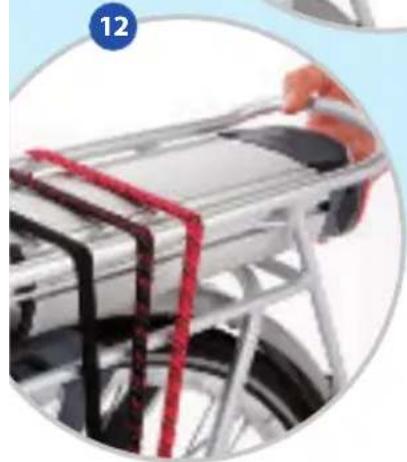
natural_image
Close-up of a bicycle rear ramp with red straps and metal frame (no visible text or symbols)
natural_image
Close-up of hands installing or adjusting a mechanical component, labeled 13 and 14 (no text or symbols on the diagram itself)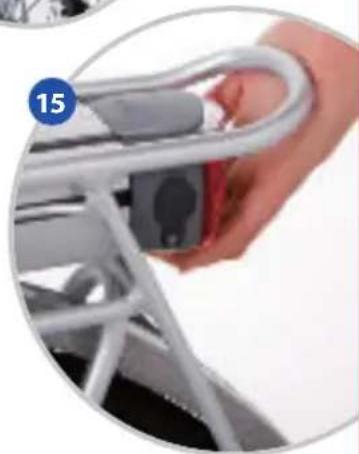
natural_image
Close-up of a hand holding a white metal car chain strap, with a blue circular badge labeled '15' in the corner (no text or symbols on the main subject)natural_image
Two circular images showing a hand holding a black plastic object next to a red, textured object on a white surface; no text or symbols visible.natural_image
Close-up of a red leather handbag with visible internal damage, placed on a white surface (no text or symbols)4. L'afficheur
text_image
A H 100% Normale km/h Total 0 km 16:44 B C D E F G Itext_image
Technical diagram showing four labeled views (24, 25, 26, 27) of a mechanical or electronic component with directional arrows indicating movement or assembly.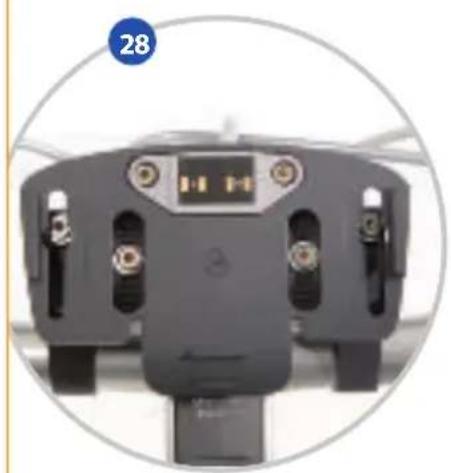
natural_image
Top-down view of a black electronic device with multiple ports and a central display (no visible text or symbols)4. L'afficheur
natural_image
Hand holding a handheld electronic device with a screen, set against a light blue background (no visible text or symbols)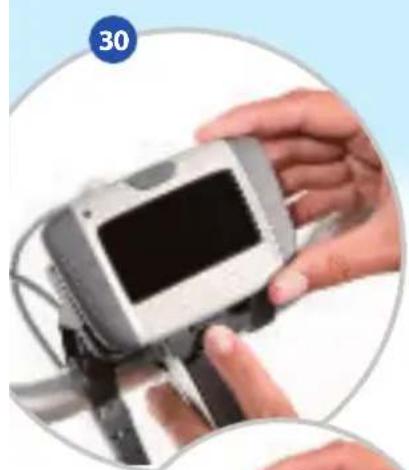
natural_image
Close-up of hands holding a digital camera module with a screen, no visible text or symbols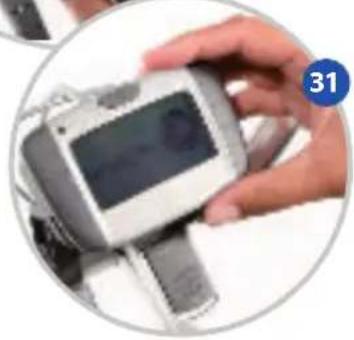
natural_image
Close-up of a hand holding a smartwatch with a display screen (no visible text or symbols)